Data Structures
(AVL Tree)
Dr.N.S.Nithya
ASP/CSE
AVL Tree
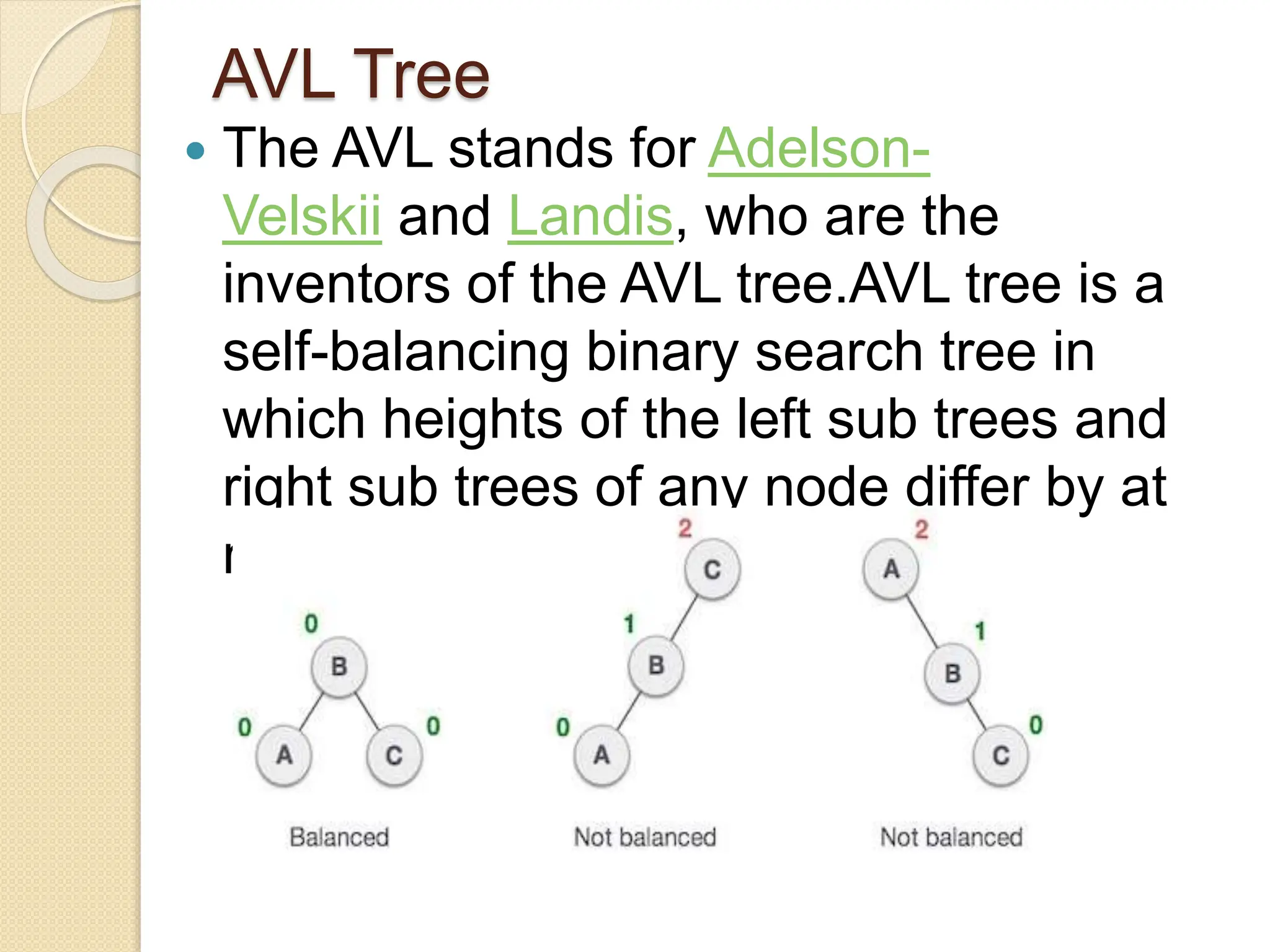
 The AVL stands for Adelson-
Velskii and Landis, who are the
inventors of the AVL tree.AVL tree is a
self-balancing binary search tree in
which heights of the left sub trees and
right sub trees of any node differ by at
most one.
Balancing Factor
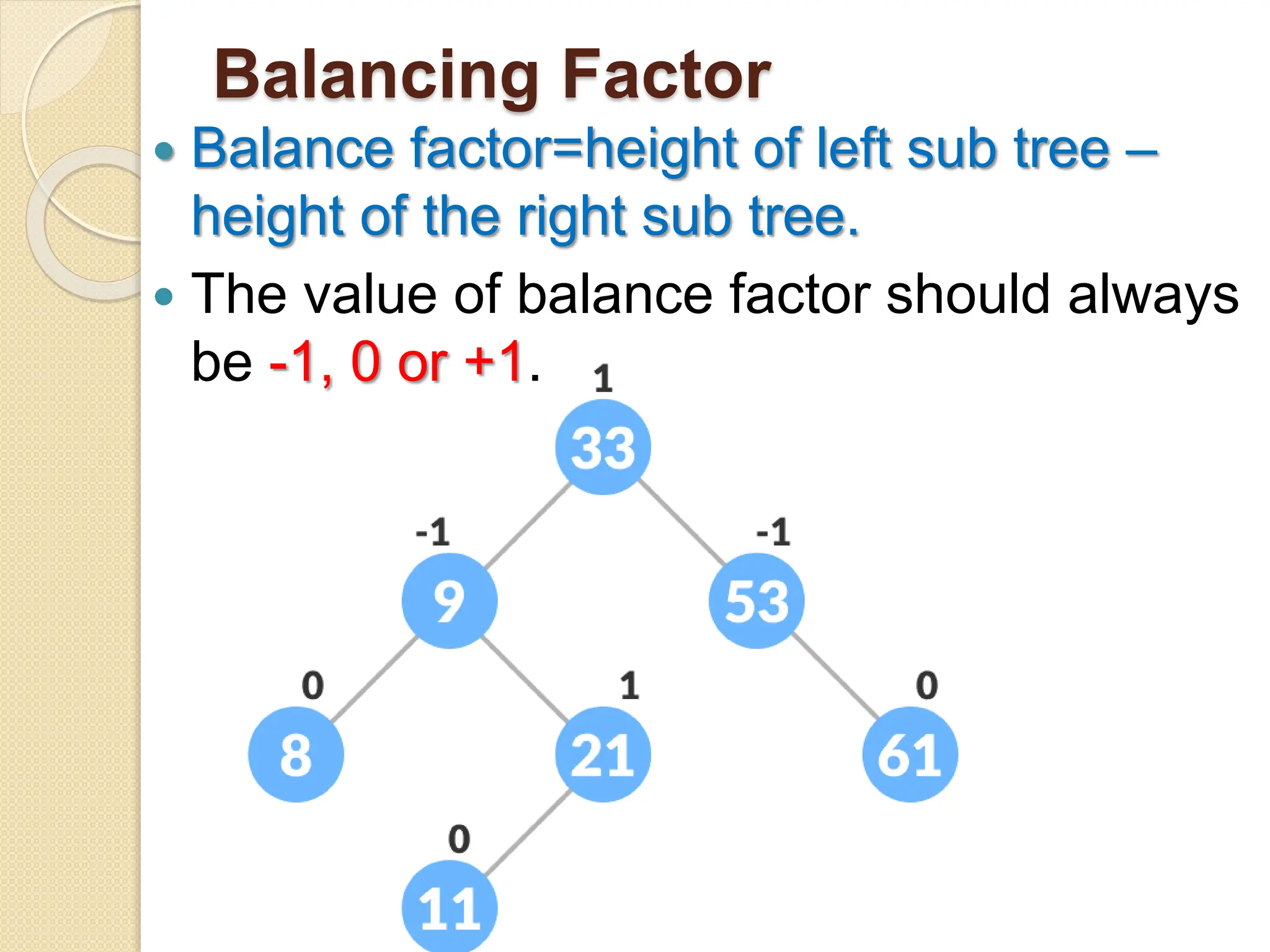
 Balance factor=height of left sub tree –
height of the right sub tree.
 The value of balance factor should always
be -1, 0 or +1.
Need for height balanced
trees
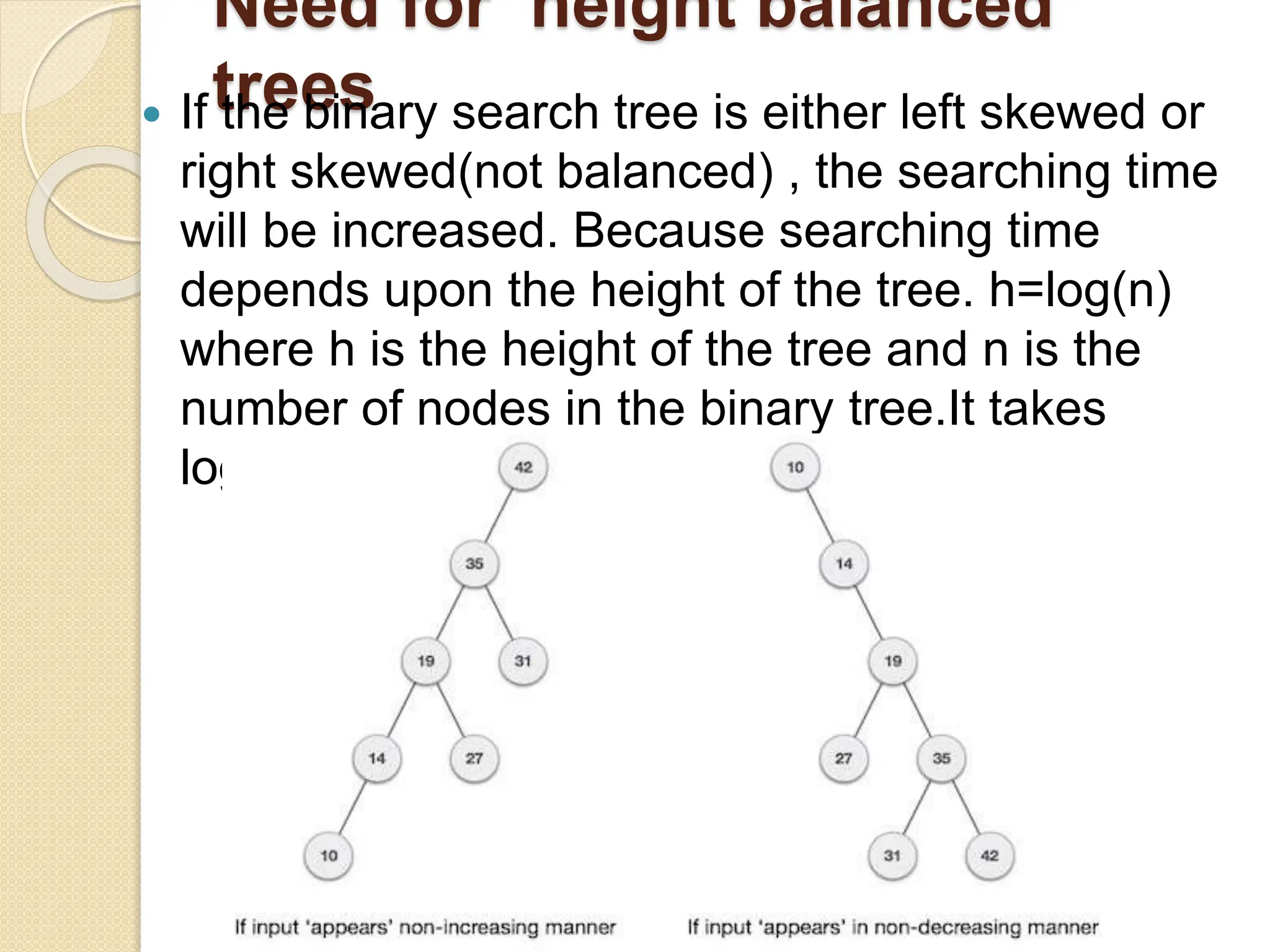
 If the binary search tree is either left skewed or
right skewed(not balanced) , the searching time
will be increased. Because searching time
depends upon the height of the tree. h=log(n)
where h is the height of the tree and n is the
number of nodes in the binary tree.It takes
log(n) for searching.
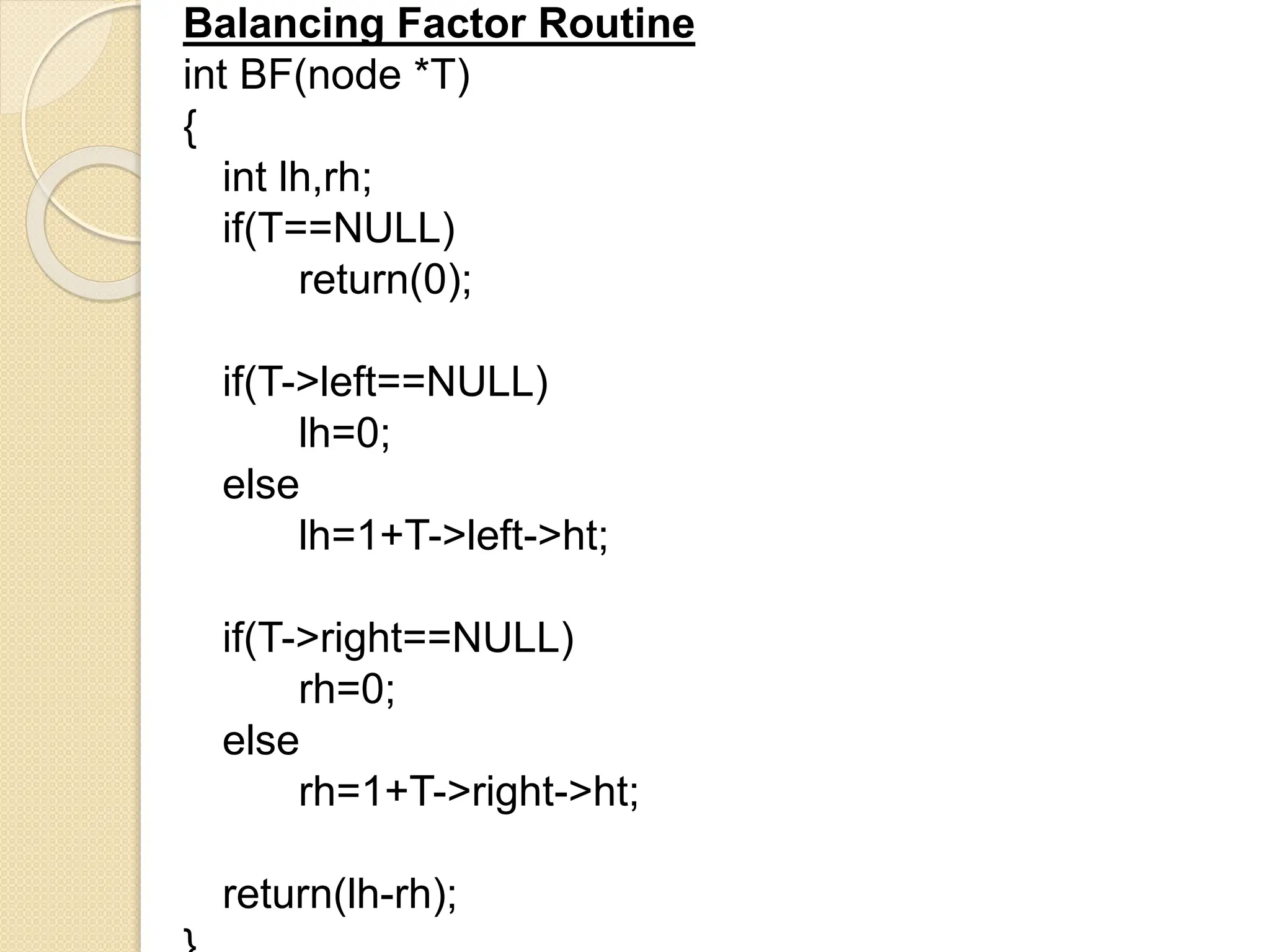
Balancing Factor Routine
int BF(node *T)
{
int lh,rh;
if(T==NULL)
return(0);
if(T->left==NULL)
lh=0;
else
lh=1+T->left->ht;
if(T->right==NULL)
rh=0;
else
rh=1+T->right->ht;
return(lh-rh);
Need for height balanced
trees
 The disadvantage of a binary search tree
is that its height can be as large as N-1
 This means that the time needed to
perform insertion and deletion and many
other operations can be O(N) in the worst
case
 We want a tree with small height
 A binary tree with N node has height at
least Q(log N)
 Thus, our goal is to keep the height of a
binary search tree O(log N)
 Such trees are called balanced binary
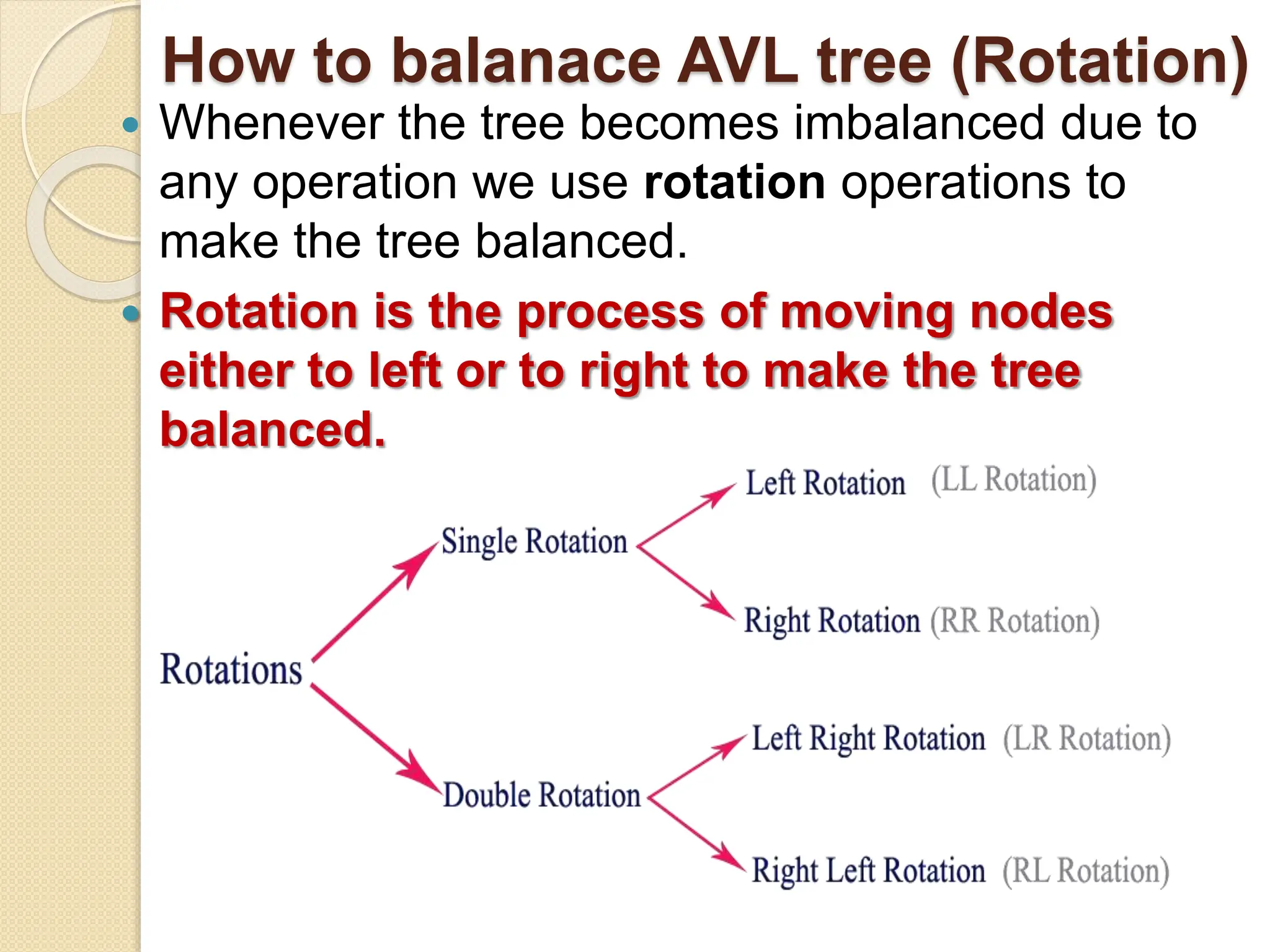
How to balanace AVL tree (Rotation)
 An insertion or deletion may cause an
imbalance in an AVL tree.
 An AVL tree causes imbalance when
any of following condition occurs:
 i. An insertion into Right child’s right
subtree.
 ii. An insertion into Left child’s left subtree.
 iii. An insertion into Right child’s left
subtree.
 iv. An insertion into Left child’s right
subtree.
How to balanace AVL tree (Rotation)
 Whenever the tree becomes imbalanced due to
any operation we use rotation operations to
make the tree balanced.
 Rotation is the process of moving nodes
either to left or to right to make the tree
balanced.
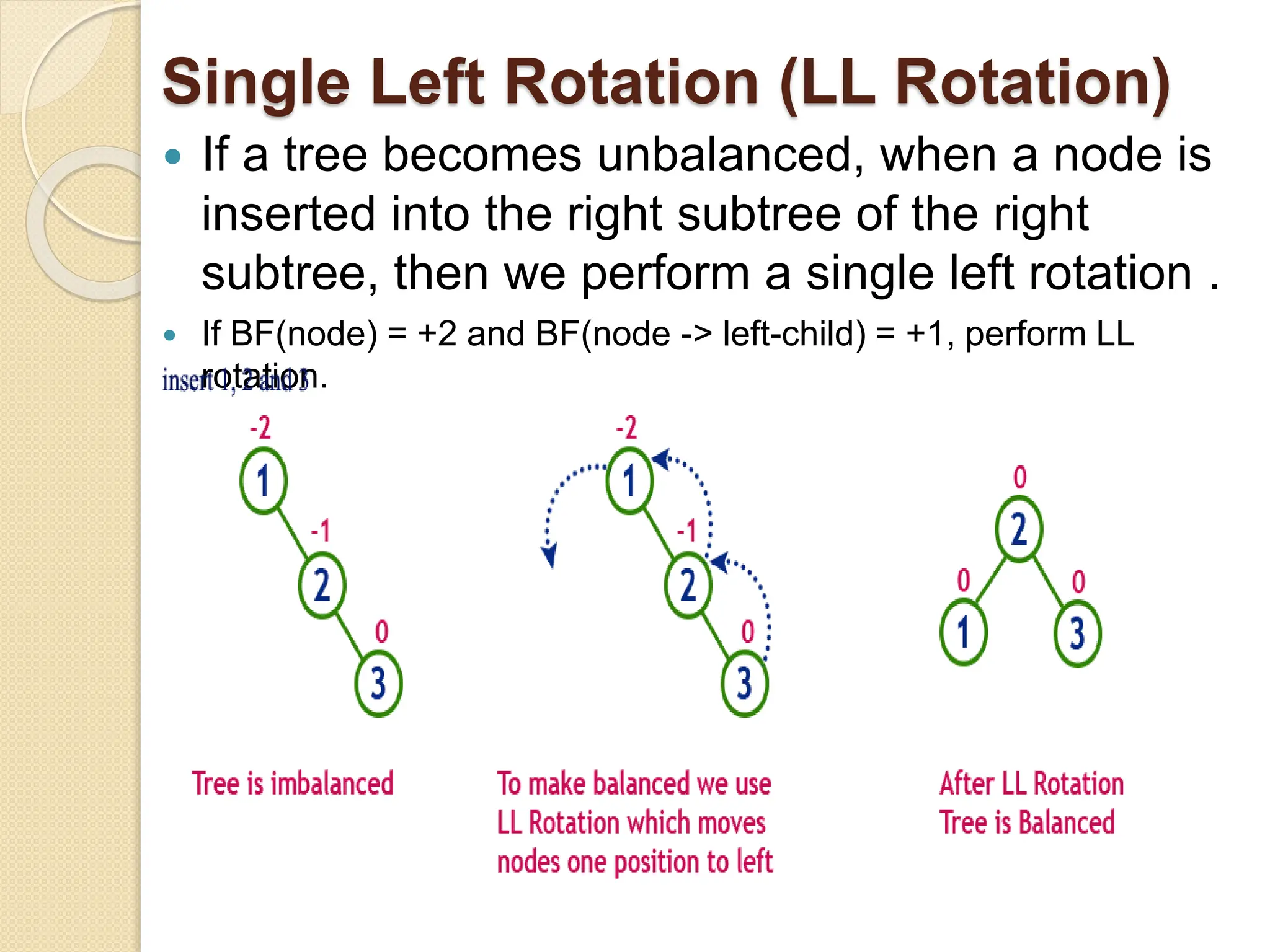
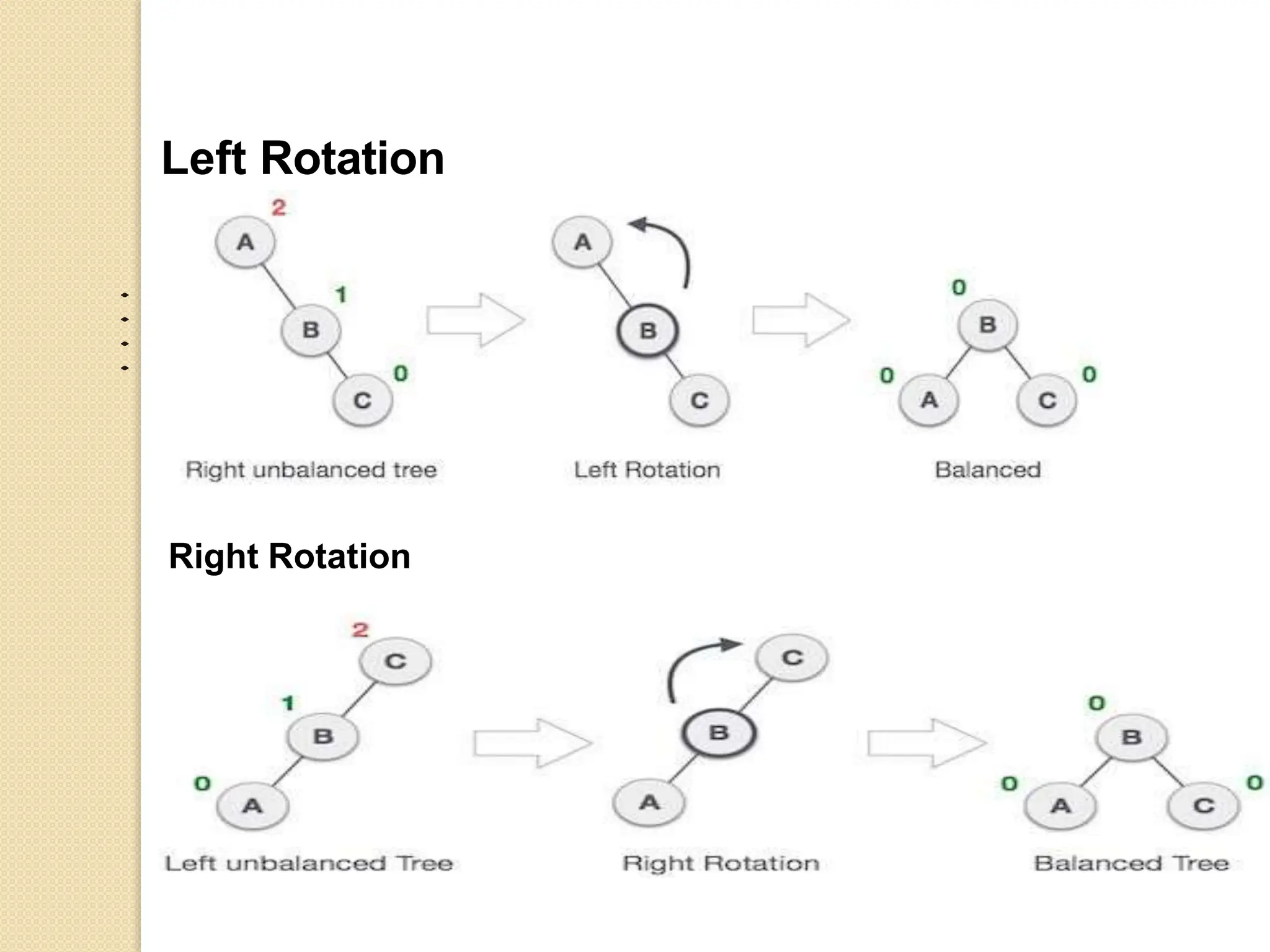
Single Left Rotation (LL Rotation)
 If a tree becomes unbalanced, when a node is
inserted into the right subtree of the right
subtree, then we perform a single left rotation .
 If BF(node) = +2 and BF(node -> left-child) = +1, perform LL
rotation.
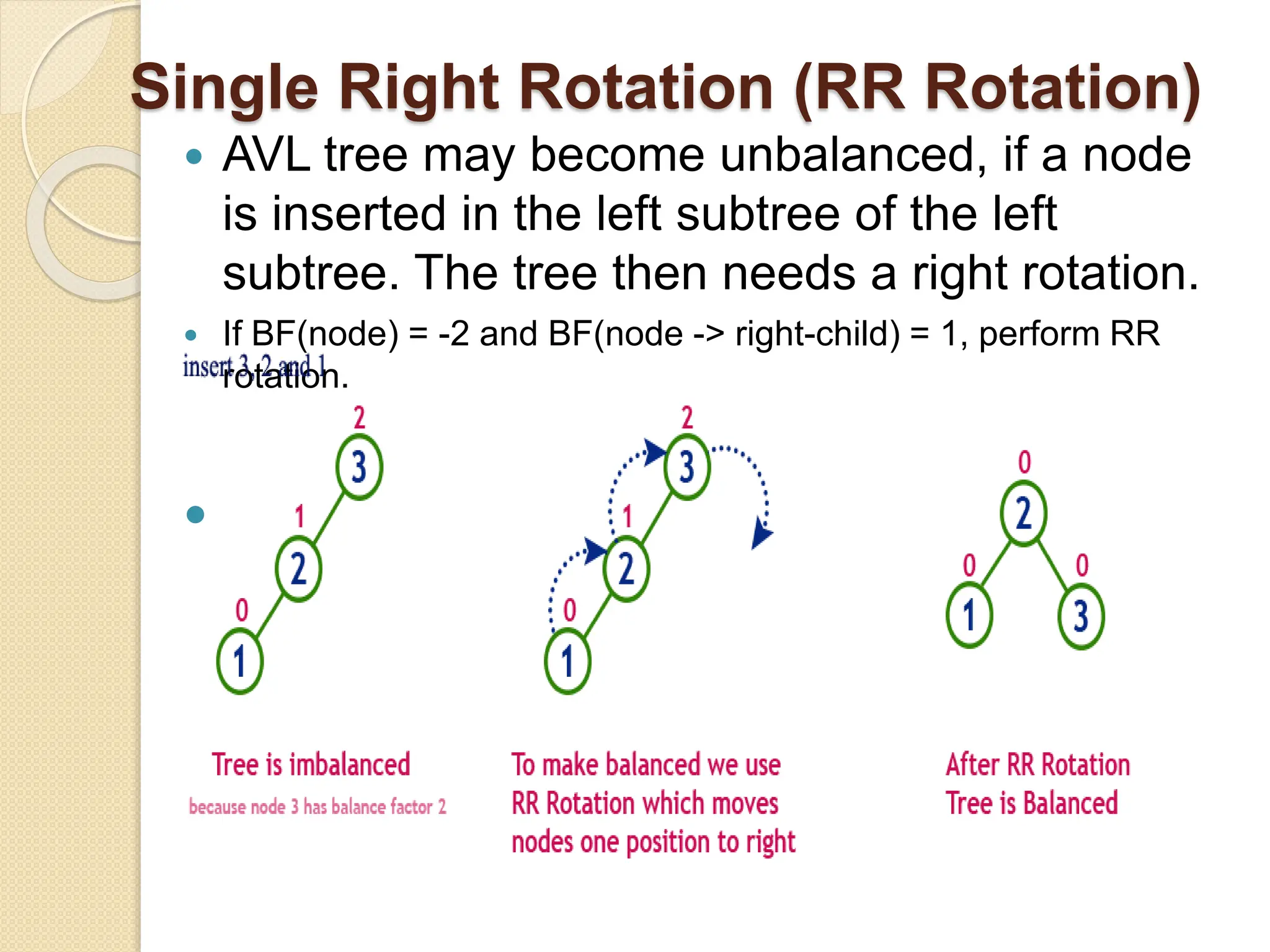
Single Right Rotation (RR Rotation)
 AVL tree may become unbalanced, if a node
is inserted in the left subtree of the left
subtree. The tree then needs a right rotation.
 If BF(node) = -2 and BF(node -> right-child) = 1, perform RR
rotation.

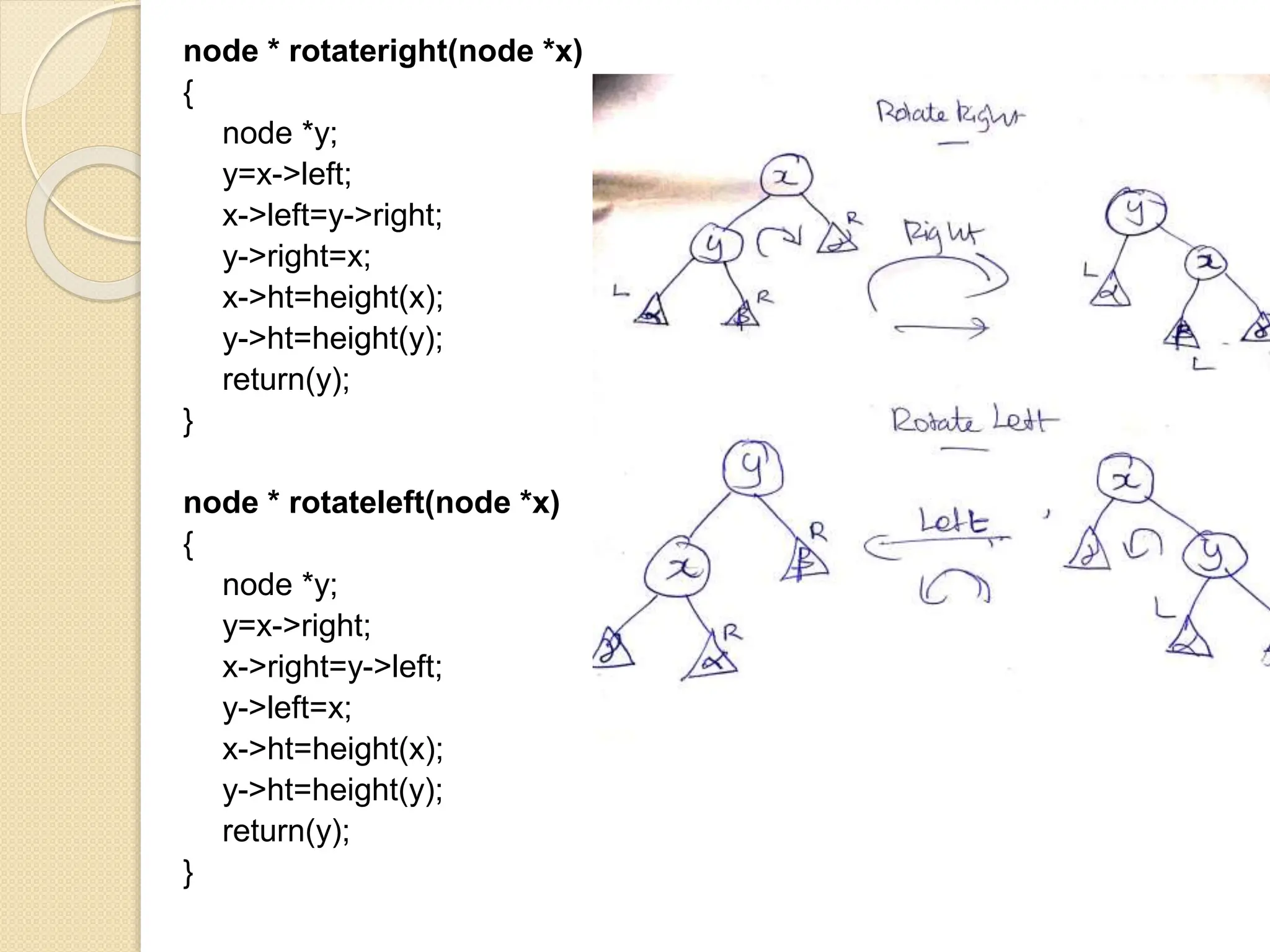
node * rotateright(node *x)
{
node *y;
y=x->left;
x->left=y->right;
y->right=x;
x->ht=height(x);
y->ht=height(y);
return(y);
}
node * rotateleft(node *x)
{
node *y;
y=x->right;
x->right=y->left;
y->left=x;
x->ht=height(x);
y->ht=height(y);
return(y);
}
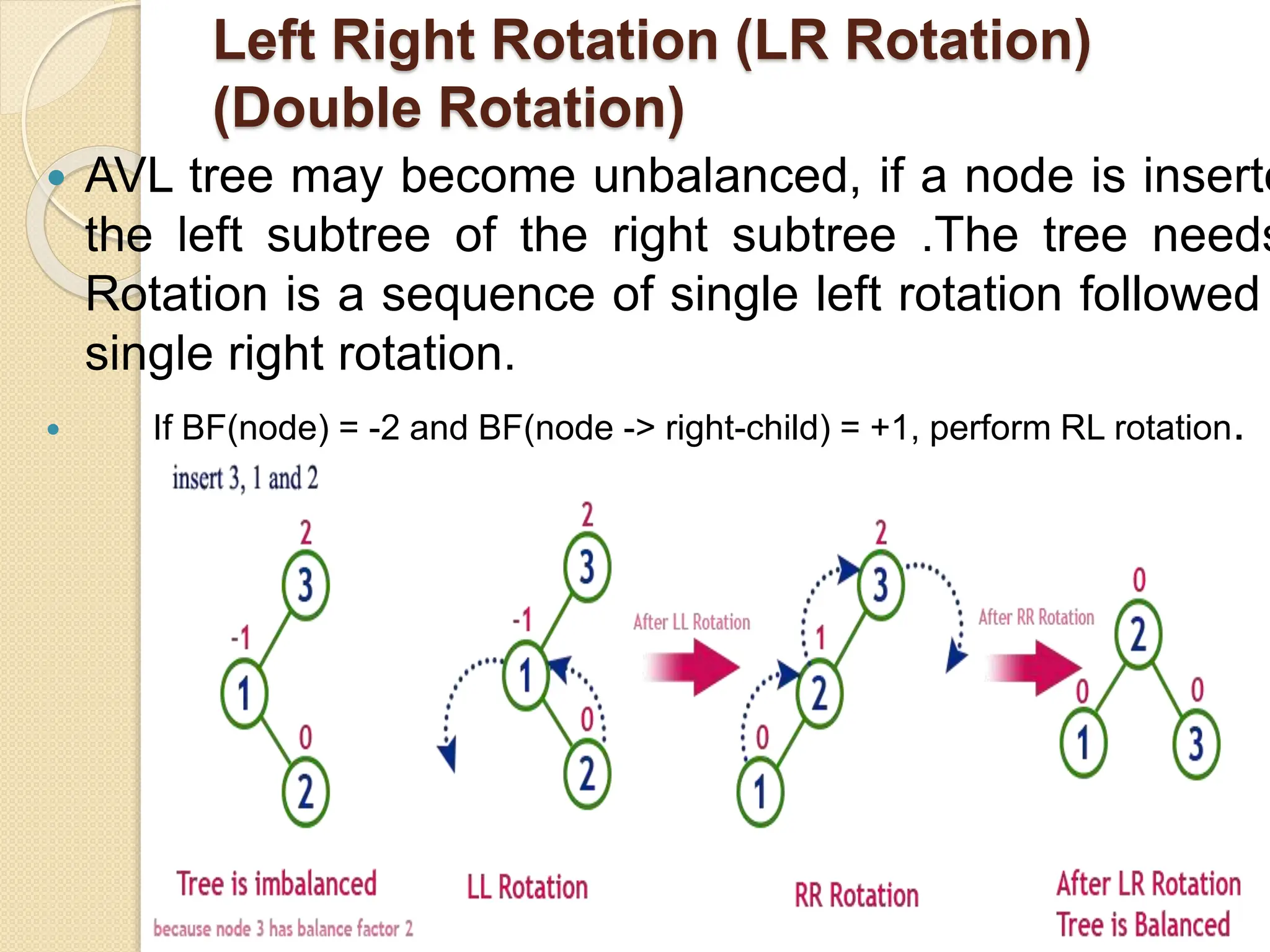
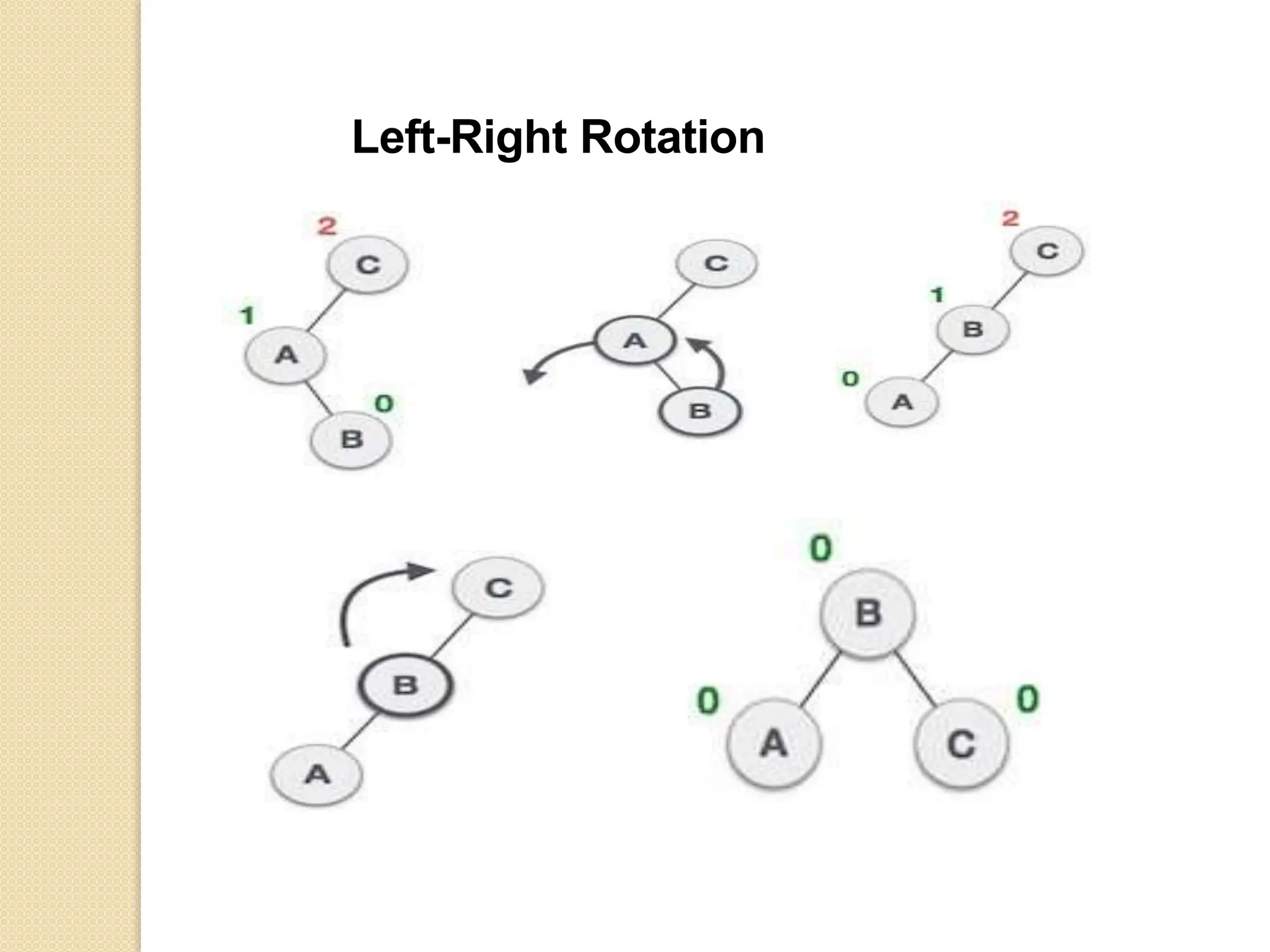
Left Right Rotation (LR Rotation)
(Double Rotation)
 AVL tree may become unbalanced, if a node is inserte
the left subtree of the right subtree .The tree needs
Rotation is a sequence of single left rotation followed
single right rotation.
 If BF(node) = -2 and BF(node -> right-child) = +1, perform RL rotation.
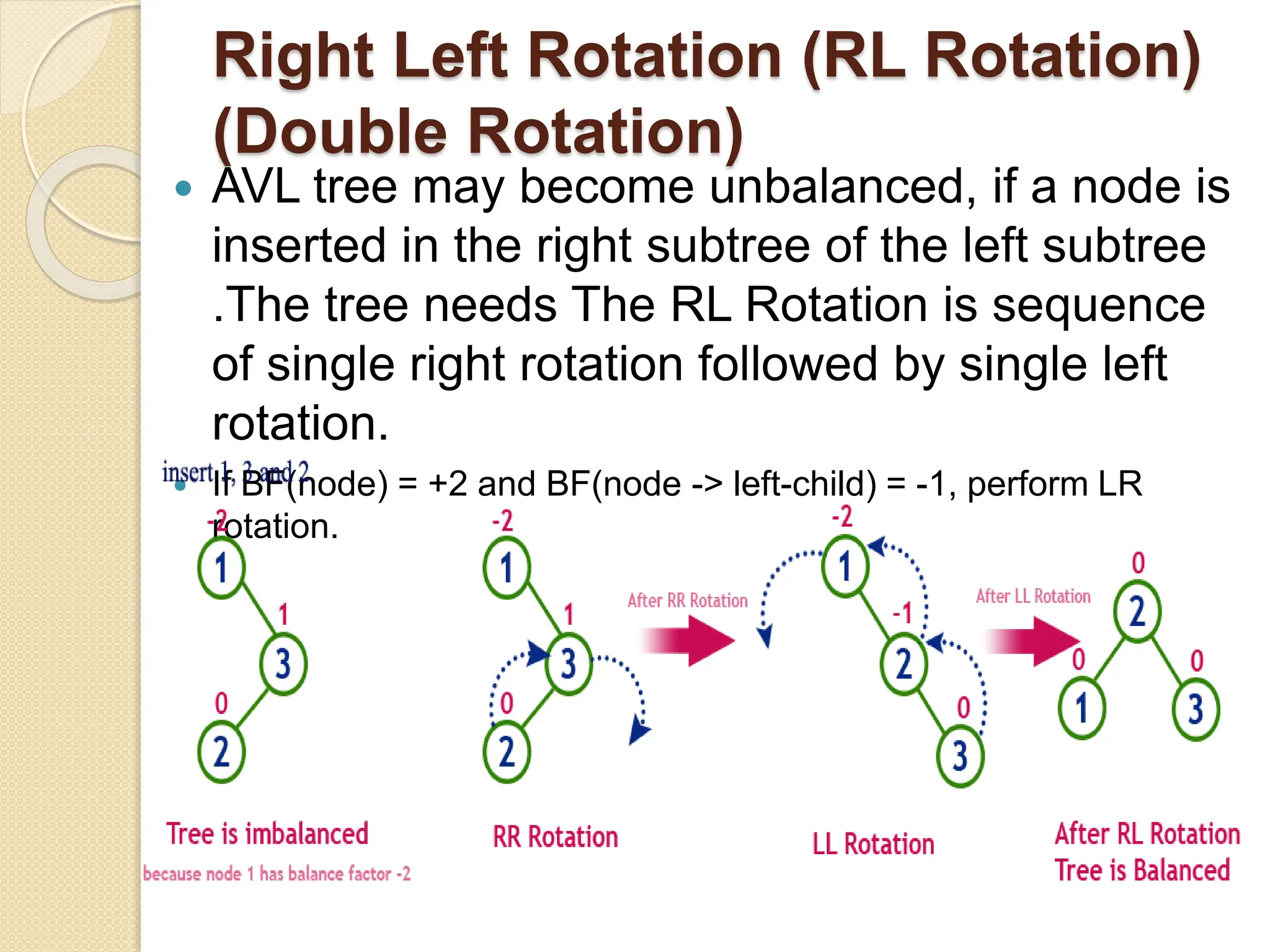
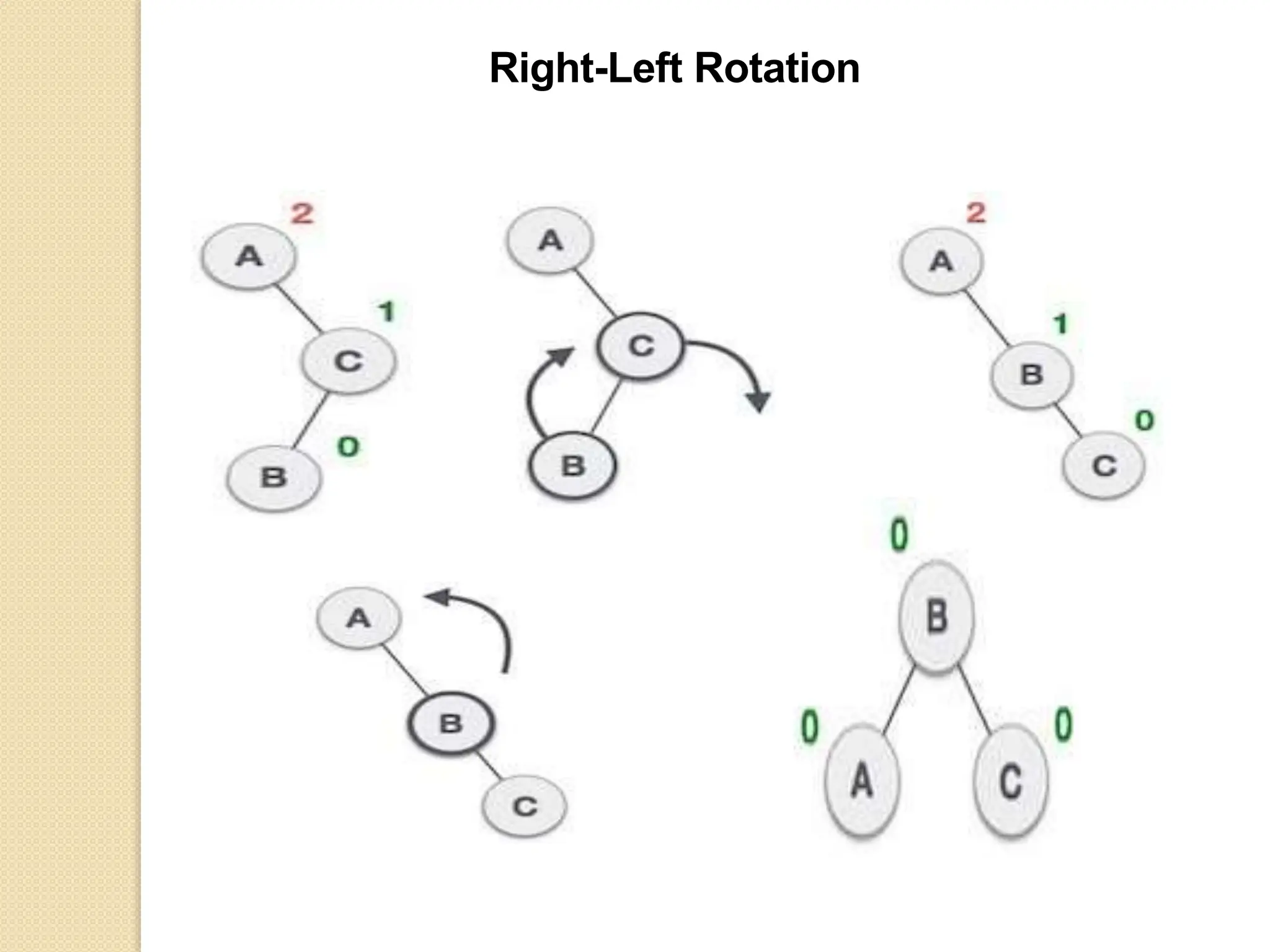
Right Left Rotation (RL Rotation)
(Double Rotation)
 AVL tree may become unbalanced, if a node is
inserted in the right subtree of the left subtree
.The tree needs The RL Rotation is sequence
of single right rotation followed by single left
rotation.
 If BF(node) = +2 and BF(node -> left-child) = -1, perform LR
rotation.
node * RR(node *T) //insert right subtree of right
{
T=rotateleft(T);
return(T);
}
node * LL(node *T) //insert left subtree of left
{
T=rotateright(T);
return(T);
}
node * LR(node *T) // insert left subtree of right
{
T->left=rotateleft(T->left);
T=rotateright(T);
return(T);
}
node * RL(node *T) //insert right subtree of left
{
T->right=rotateright(T->right);
T=rotateleft(T);
return(T);
}
Left Rotation
Right Rotation
Left-Right Rotation
Right-Left Rotation
Operations on an AVL Tree
 The following operations are performed
on AVL tree...
 Search
 Insertion
 Deletion
 search operation is similar to Binary
search tree.
Insertion Operation in AVL Tree
 Step 1 - Insert the new element into the
tree using Binary Search Tree insertion
logic.
 Step 2 - After insertion, check
the Balance Factor of every node.
 Step 3 - If the Balance Factor of every
node is 0 or 1 or -1 then go for next
operation.
 Step 4 - If the Balance Factor of any
node is other than 0 or 1 or -1 then that
tree is said to be imbalanced. In this
case, perform suitable Rotation to make
it balanced and go for next operation.
Rotating conditions
 If BF(node) = +2 and BF(node -> left-child) =
+1, perform LL rotation.
 If BF(node) = -2 and BF(node -> right-child) =
1, perform RR rotation.
 If BF(node) = -2 and BF(node -> right-child) =
+1, perform RL rotation.
 If BF(node) = +2 and BF(node -> left-child) =
1, perform LR rotation.
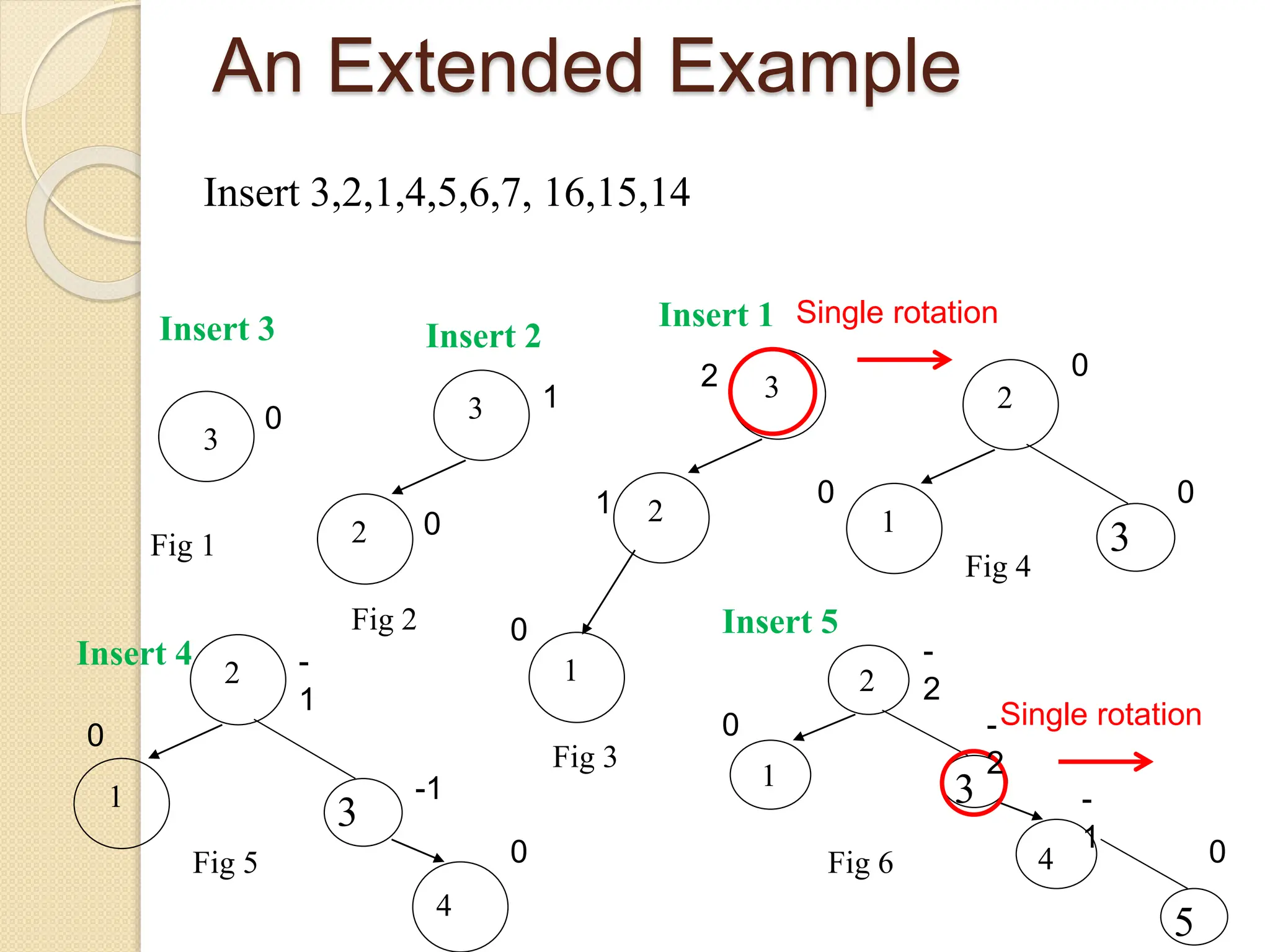
An Extended Example
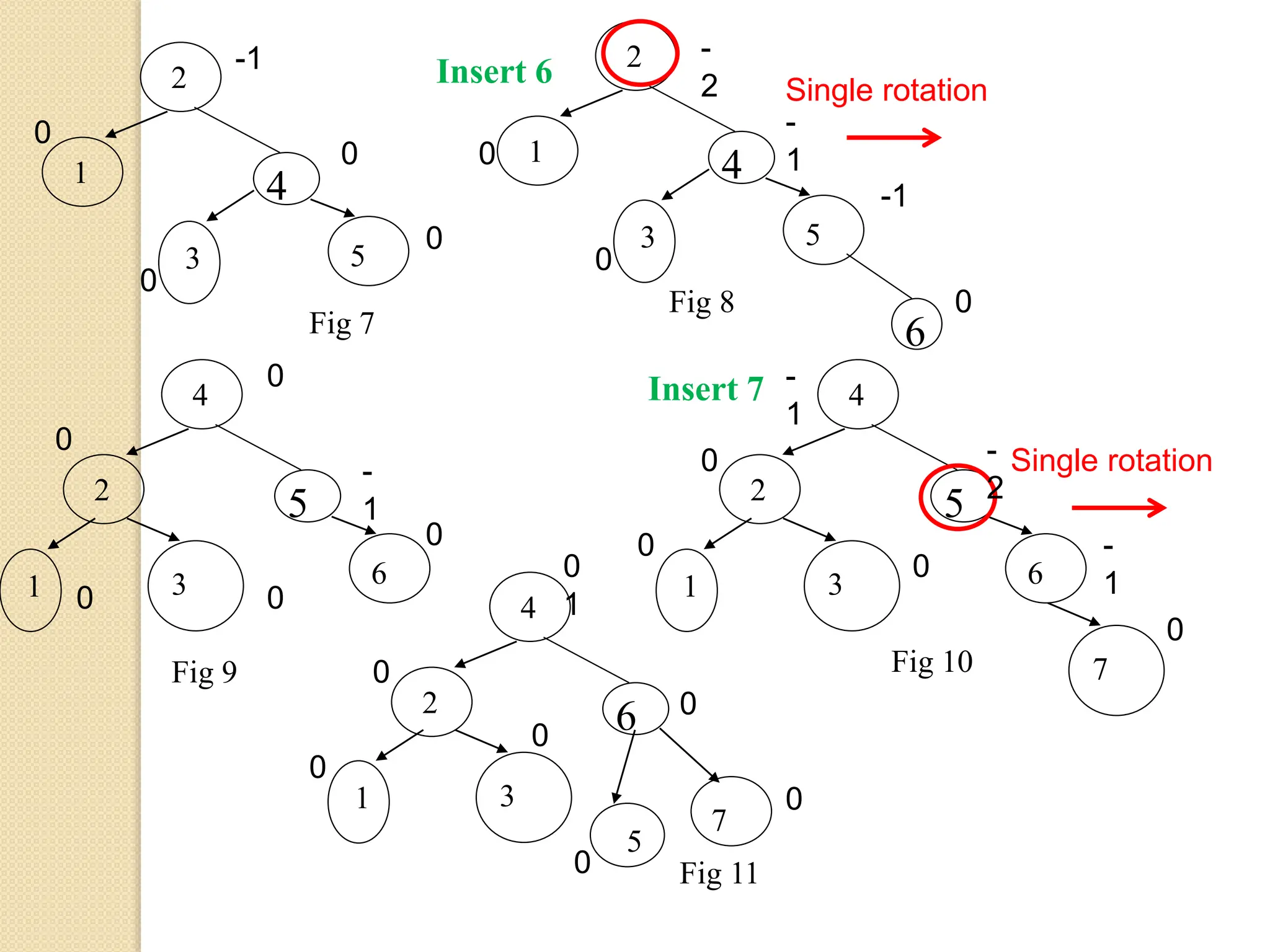
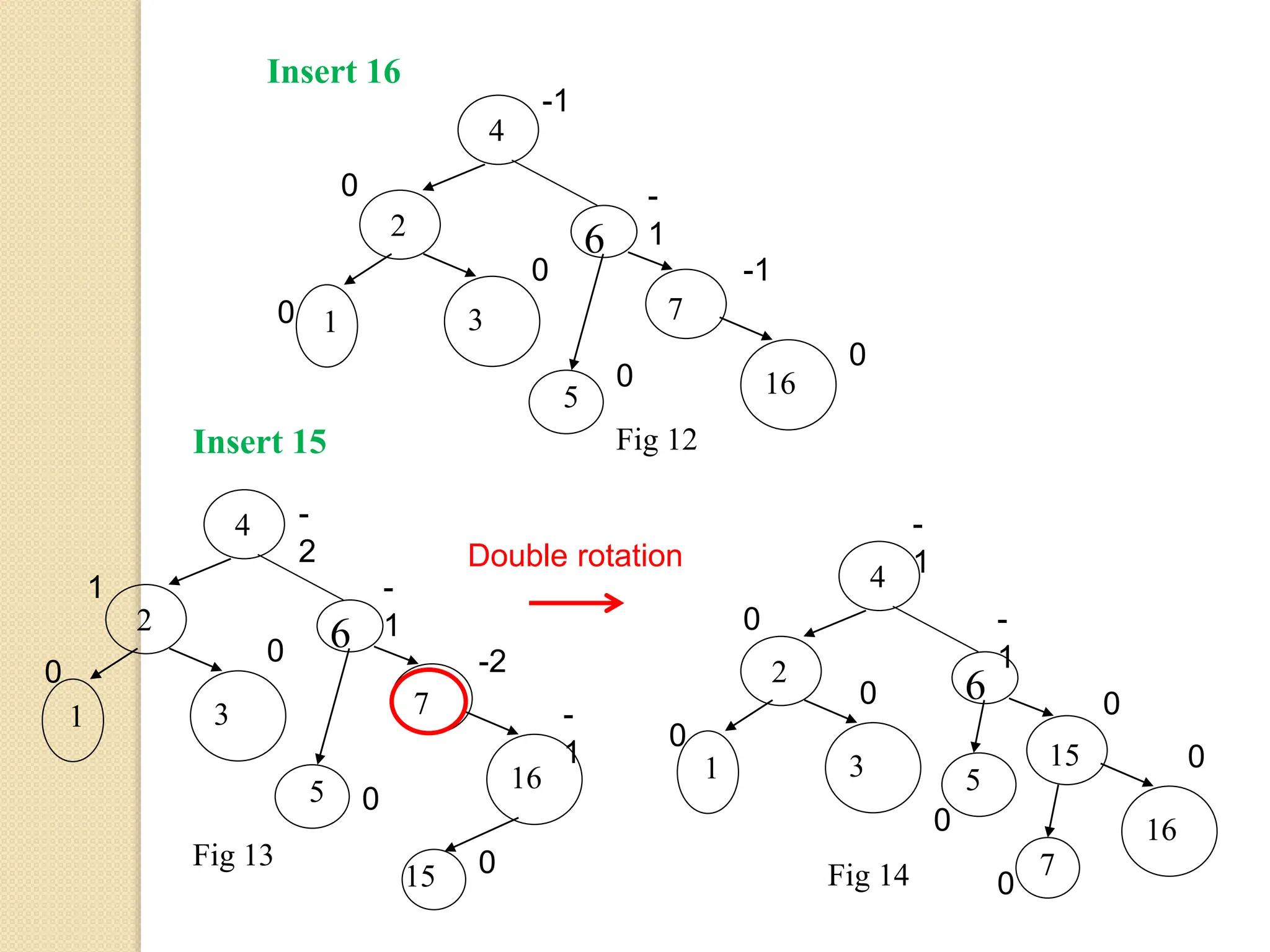
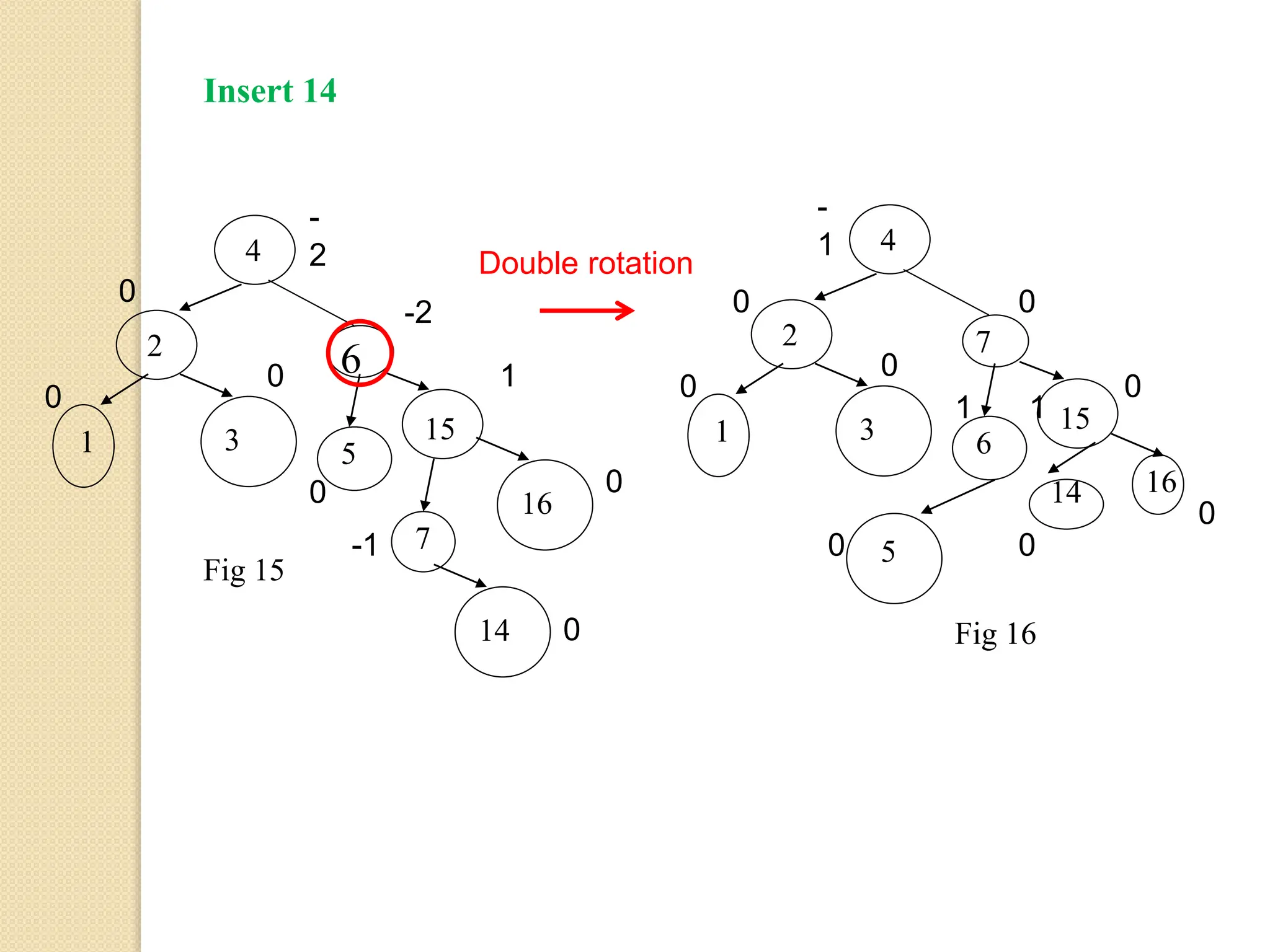
Insert 3,2,1,4,5,6,7, 16,15,14
3
Fig 1
3
2
Fig 2
3
2
1
Fig 3
2
1
3
Fig 4
2
1
3
4
Fig 5
2
1
3
4
5
Fig 6
Single rotation
Single rotation
Insert 3 Insert 2
Insert 1
Insert 4
Insert 5
0
1
0
1
0
2 0
0 0
-
1
-1
0
0
-
2
-
2
-
1 0
0
2
1
4
5
3
Fig 7 6
2
1
4
5
3
Fig 8
4
2
5
6
1 3
Fig 9
4
2
5
6
1 3
7
Fig 10
4
2
6
7
1 3
5
Fig 11
Single rotation
Single rotation
Insert 6
Insert 7
-1
0
0
0
0
0
0
0
-1
-
1
-
2
0
-
1
0
0
0
0
-
1
0
0
0
-
2
-
1
0
0
1
0
0
0
0
0
0
4
2
6
7
1 3
5 16
Fig 12
4
2
6
7
1 3
5 16
15
Fig 13
4
2
6
15
1 3 5
16
7
Fig 14
Double rotation
Insert 16
Insert 15
-1
-
1
-1
0
0
0
0
0
-
2
-
1
-2
-
1
0
1
0
0
0
-
1
0
0
0
-
1
0
0
0
0
5
4
2 7
15
1 3 6
16
14
Fig 16
4
2
6
15
1 3 5
16
7
14
Fig 15
Double rotation
Insert 14
-
2
-2
1
0
0
-1
0
0
0
0
-
1
0
0
0
0
1
0
0 0
0
1
Operations on an AVL Tree
 The following operations are performed
on AVL tree...
 Search
 Insertion
 Deletion
 search operation is similar to Binary
search tree.
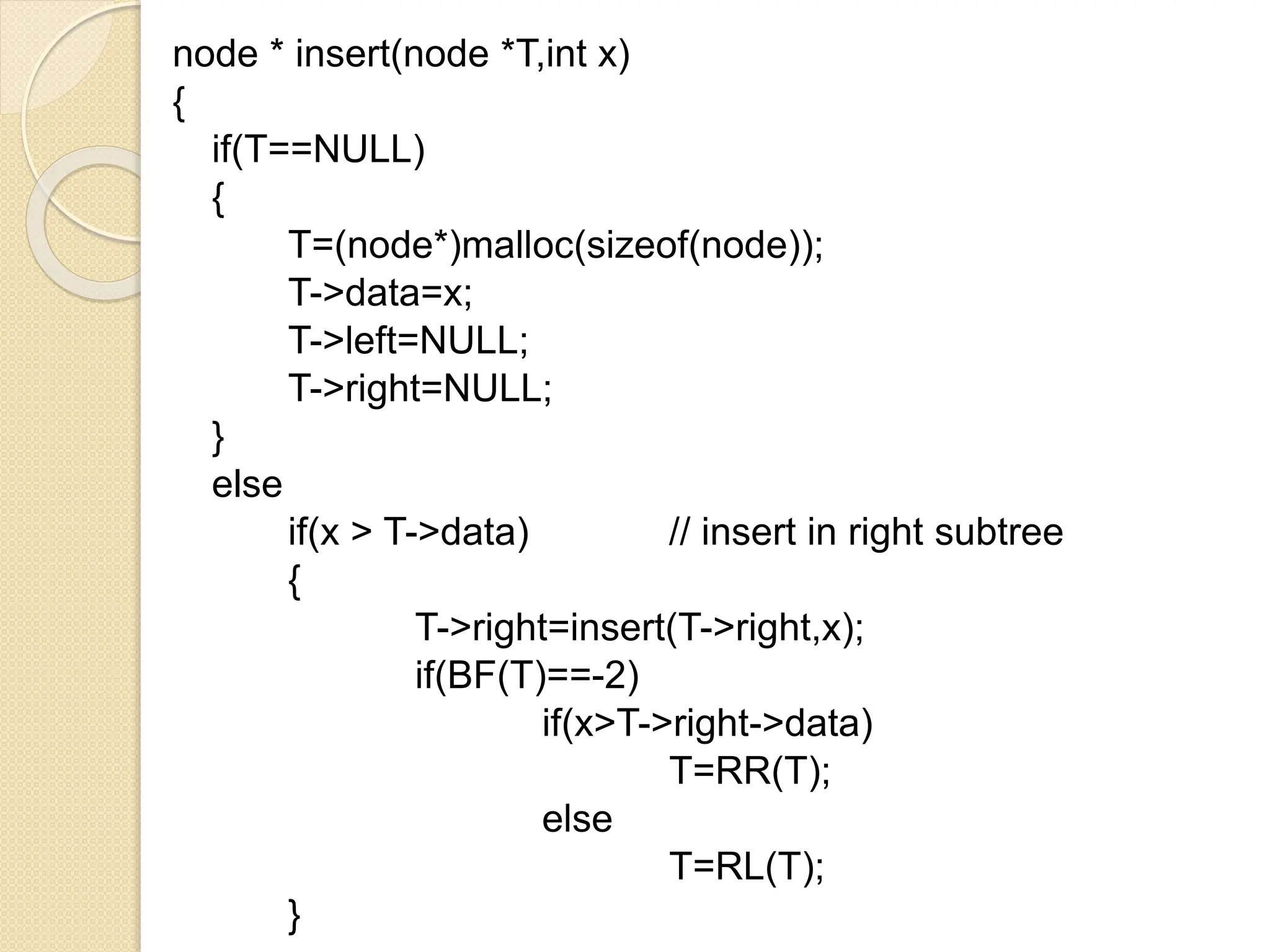
node * insert(node *T,int x)
{
if(T==NULL)
{
T=(node*)malloc(sizeof(node));
T->data=x;
T->left=NULL;
T->right=NULL;
}
else
if(x > T->data) // insert in right subtree
{
T->right=insert(T->right,x);
if(BF(T)==-2)
if(x>T->right->data)
T=RR(T);
else
T=RL(T);
}
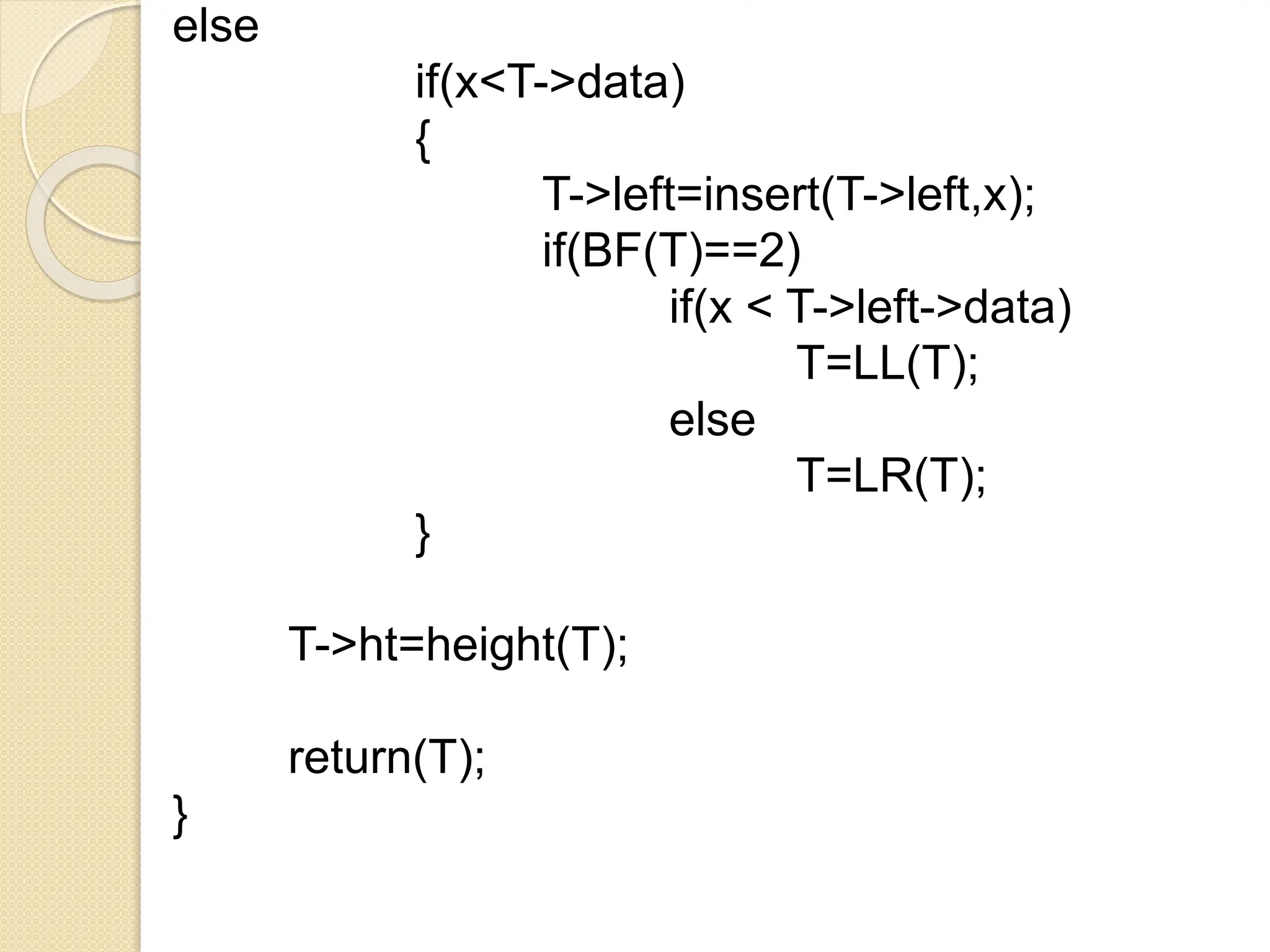
else
if(x<T->data)
{
T->left=insert(T->left,x);
if(BF(T)==2)
if(x < T->left->data)
T=LL(T);
else
T=LR(T);
}
T->ht=height(T);
return(T);
}
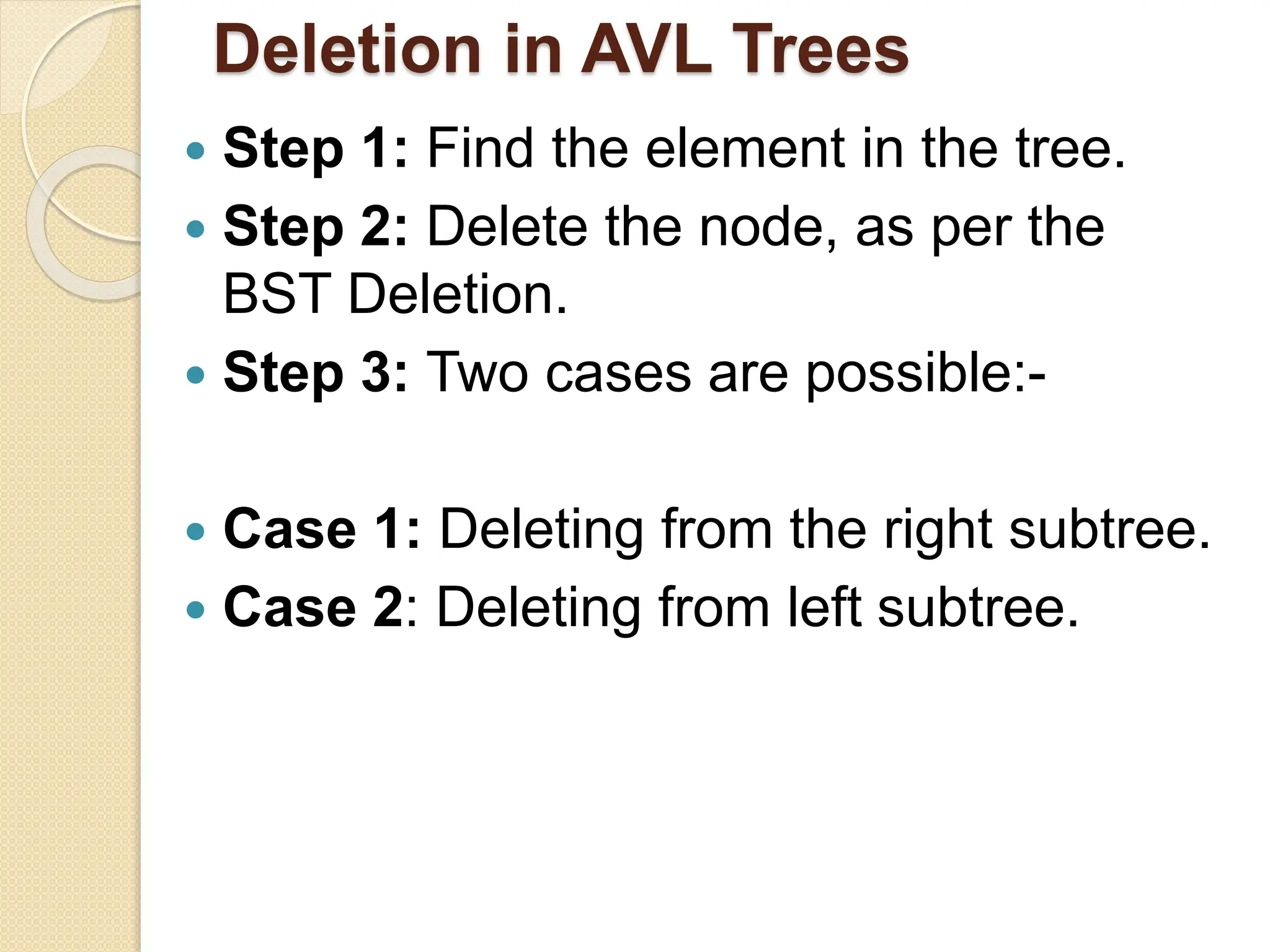
Deletion in AVL Trees
 Step 1: Find the element in the tree.
 Step 2: Delete the node, as per the
BST Deletion.
 Step 3: Two cases are possible:-
 Case 1: Deleting from the right subtree.
 Case 2: Deleting from left subtree.
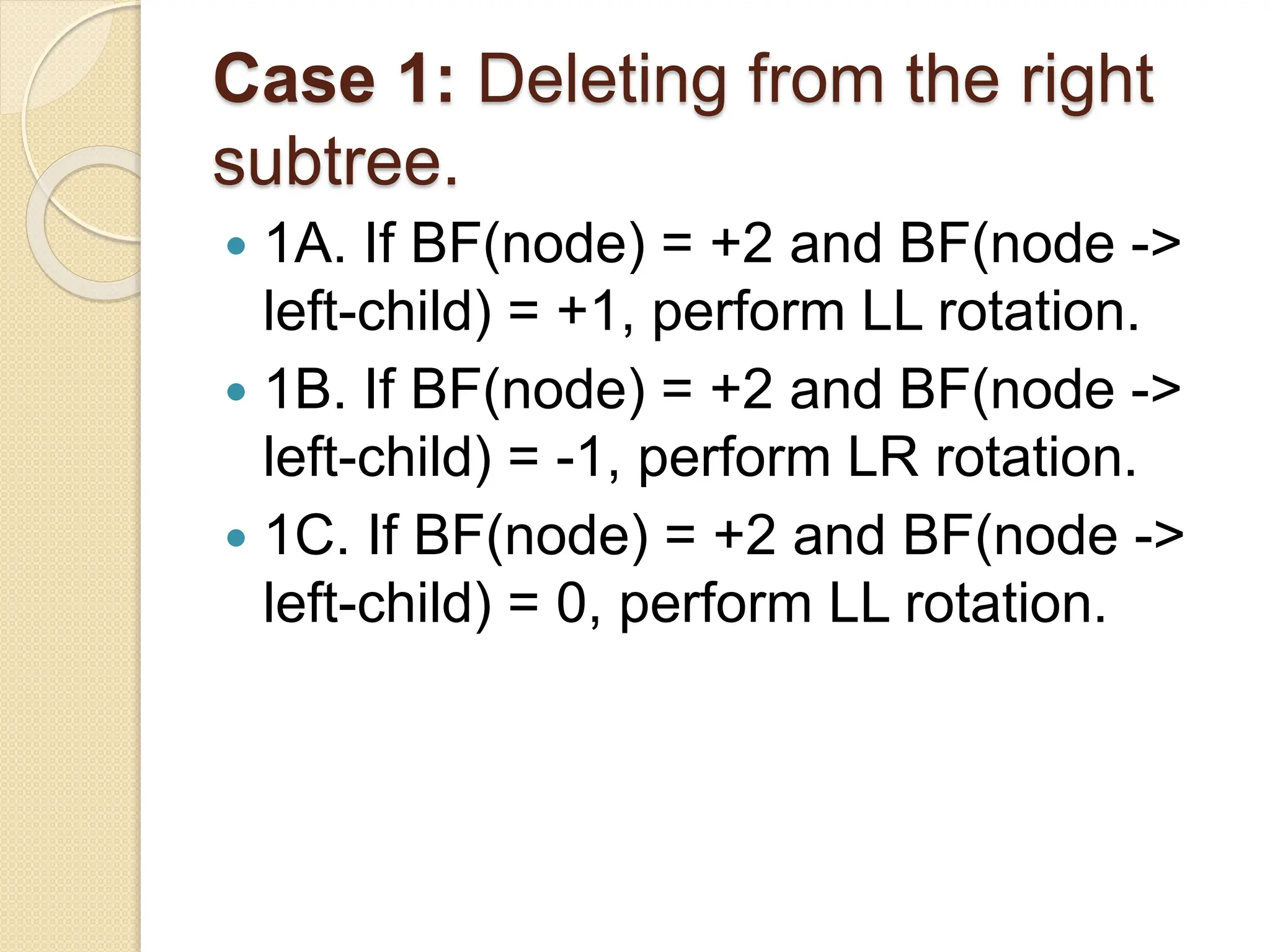
Case 1: Deleting from the right
subtree.
 1A. If BF(node) = +2 and BF(node ->
left-child) = +1, perform LL rotation.
 1B. If BF(node) = +2 and BF(node ->
left-child) = -1, perform LR rotation.
 1C. If BF(node) = +2 and BF(node ->
left-child) = 0, perform LL rotation.
Case 2: Deleting from left subtree.
 2A. If BF(node) = -2 and BF(node ->
right-child) = -1, perform RR rotation.
 2B. If BF(node) = -2 and BF(node ->
right-child) = +1, perform RL rotation.
 2C. If BF(node) = -2 and BF(node ->
right-child) = 0, perform RR rotation.
AVL Tree Example:
• Now remove 53(leaf Node)
14
17
7
4
53
11
12
8 13
AVL Tree Example:
• Now remove 53, unbalanced
14
17
7
4
11
12
8 13
AVL Tree Example:
• Balanced! Remove 11(node with two
children)
14
17
7
4
11
12
8
13
AVL Tree Example:
• Remove 11, replace it with the largest in its left
branch tree balanced
14
17
7
4
8
12
13
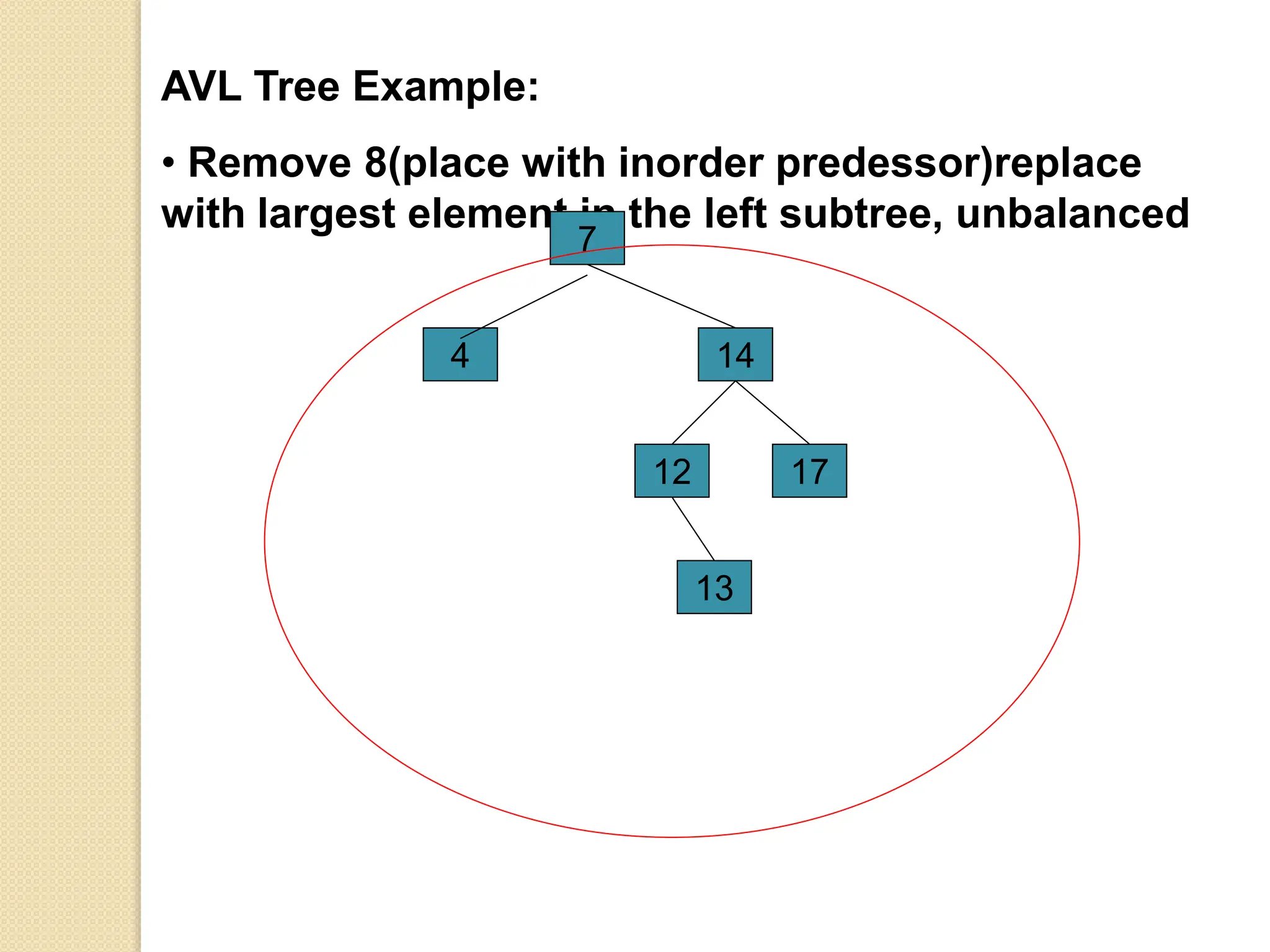
AVL Tree Example:
• Remove 8(place with inorder predessor)replace
with largest element in the left subtree, unbalanced
14
17
4
7
12
13
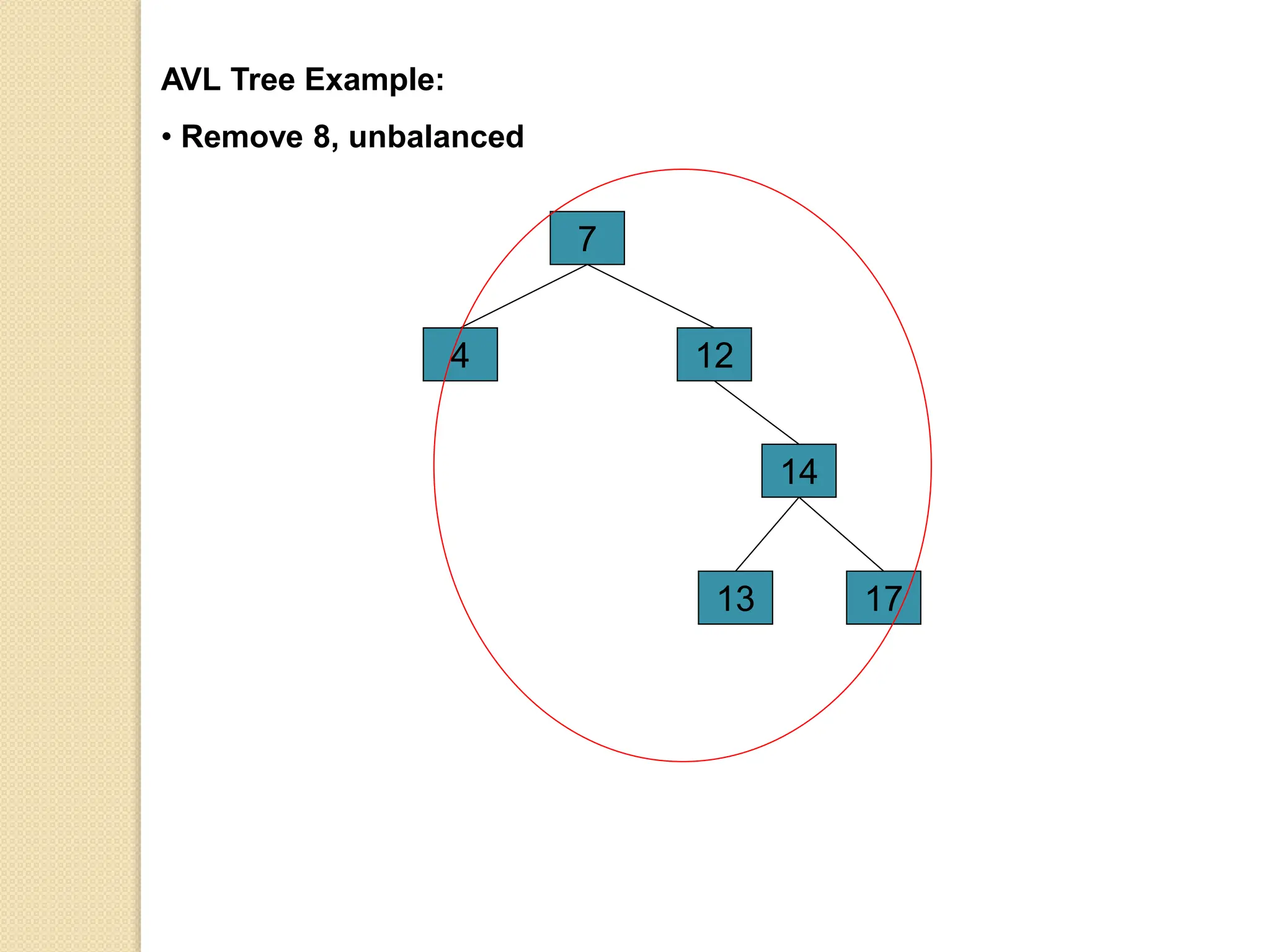
AVL Tree Example:
• Remove 8, unbalanced
14
17
4
7
12
13
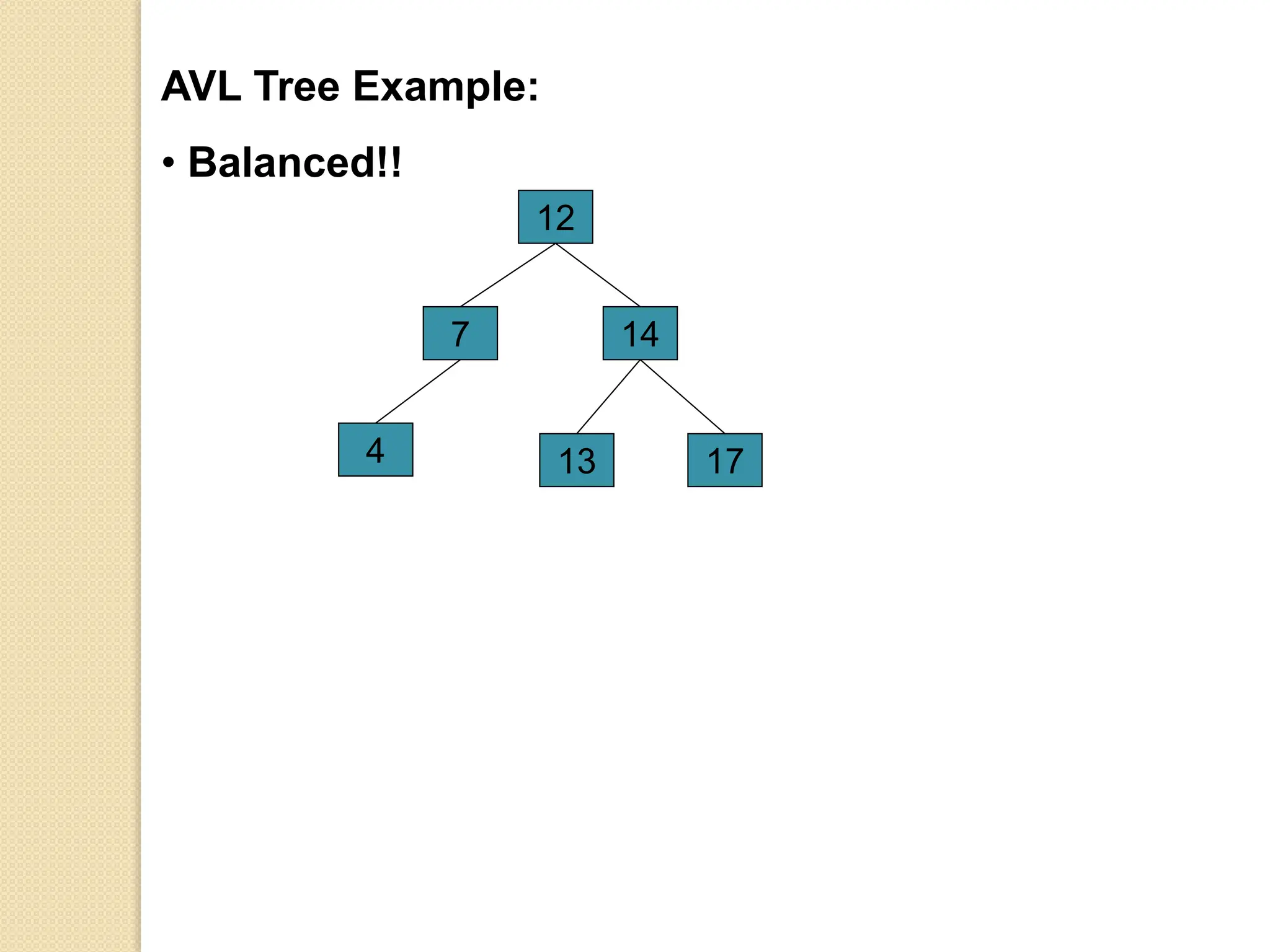
AVL Tree Example:
• Balanced!!
14
17
4
7
12
13
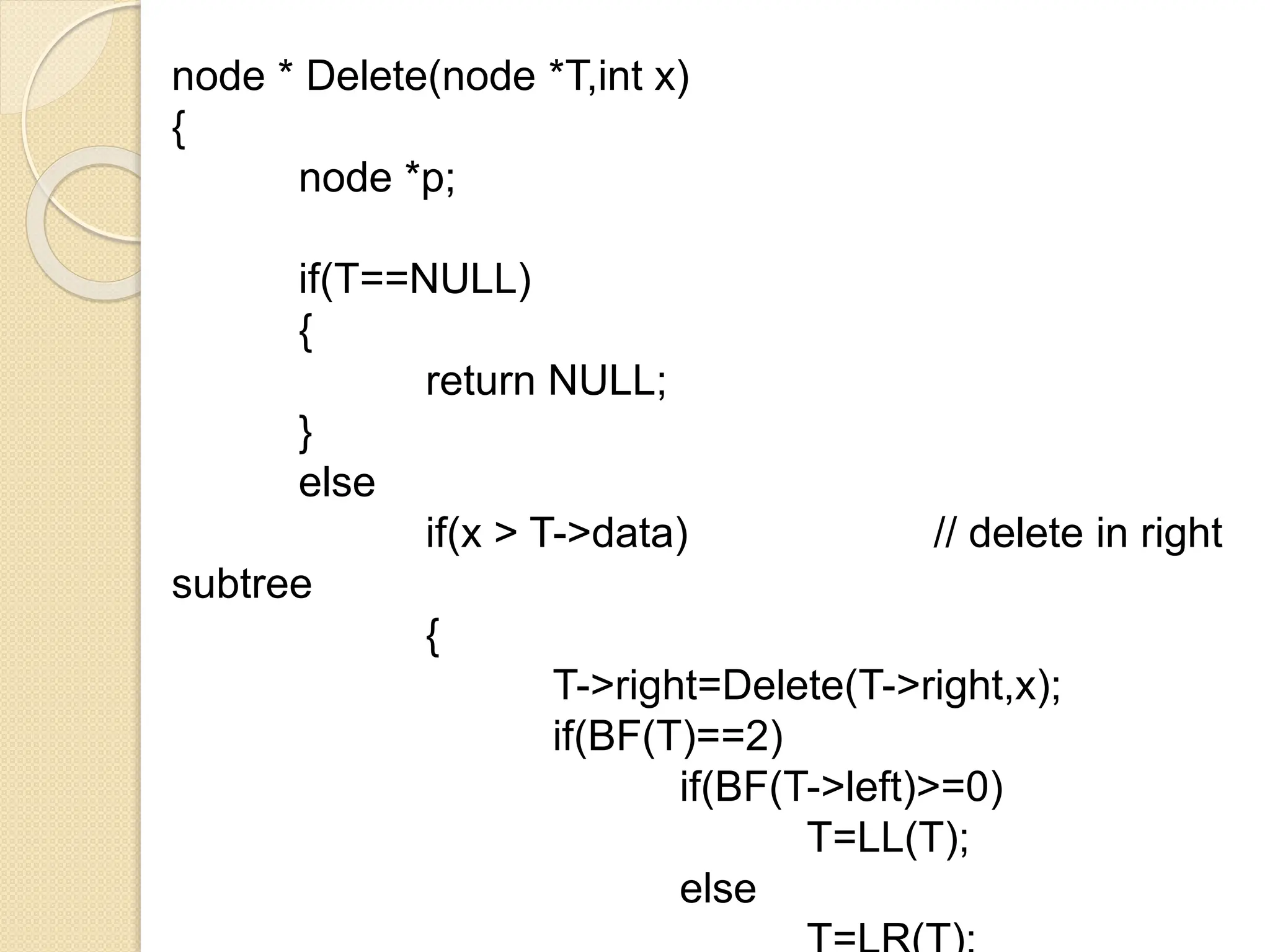
node * Delete(node *T,int x)
{
node *p;
if(T==NULL)
{
return NULL;
}
else
if(x > T->data) // delete in right
subtree
{
T->right=Delete(T->right,x);
if(BF(T)==2)
if(BF(T->left)>=0)
T=LL(T);
else
if(x<T->data)
{
T->left=Delete(T->left,x);
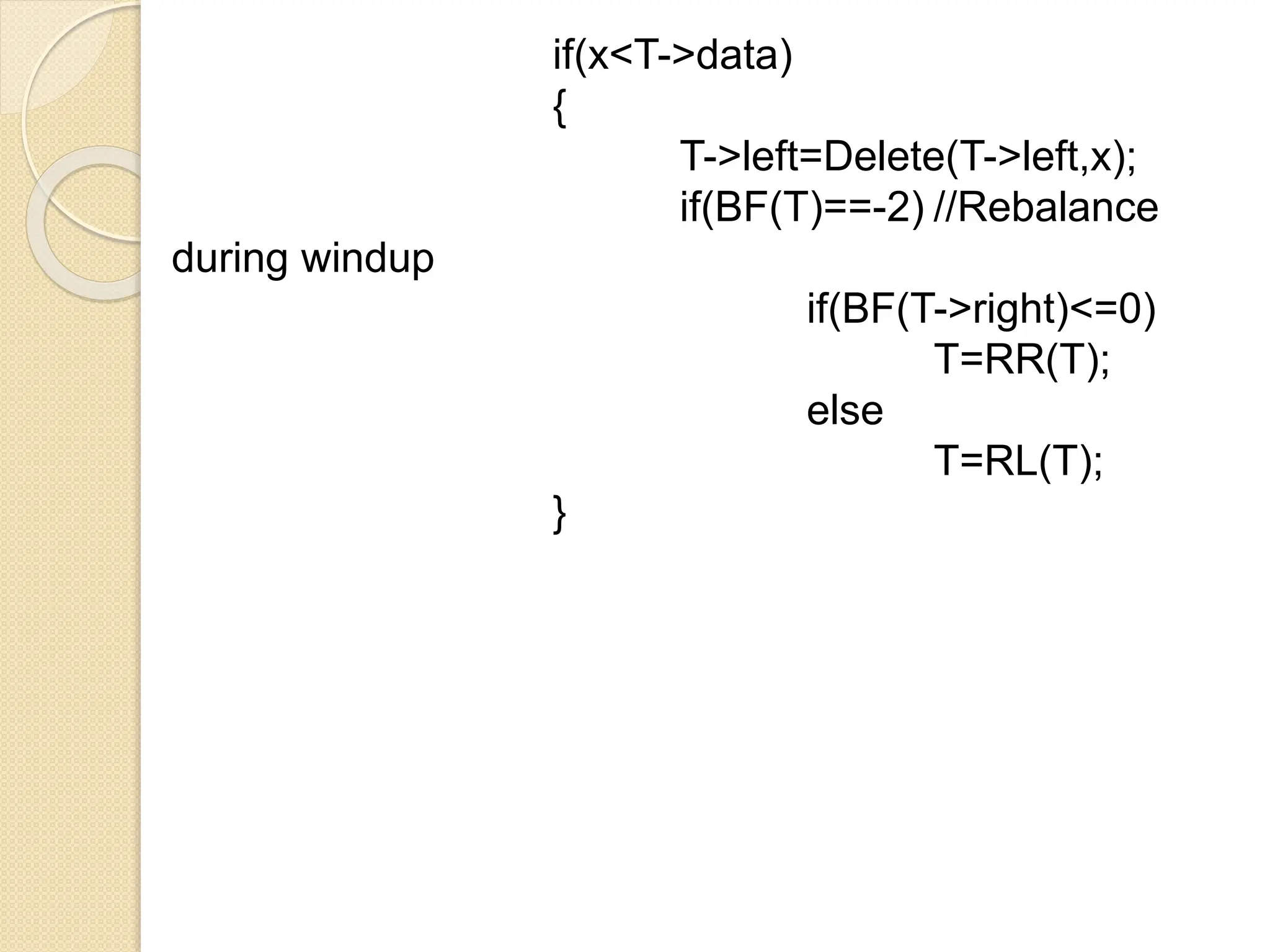
if(BF(T)==-2) //Rebalance
during windup
if(BF(T->right)<=0)
T=RR(T);
else
T=RL(T);
}
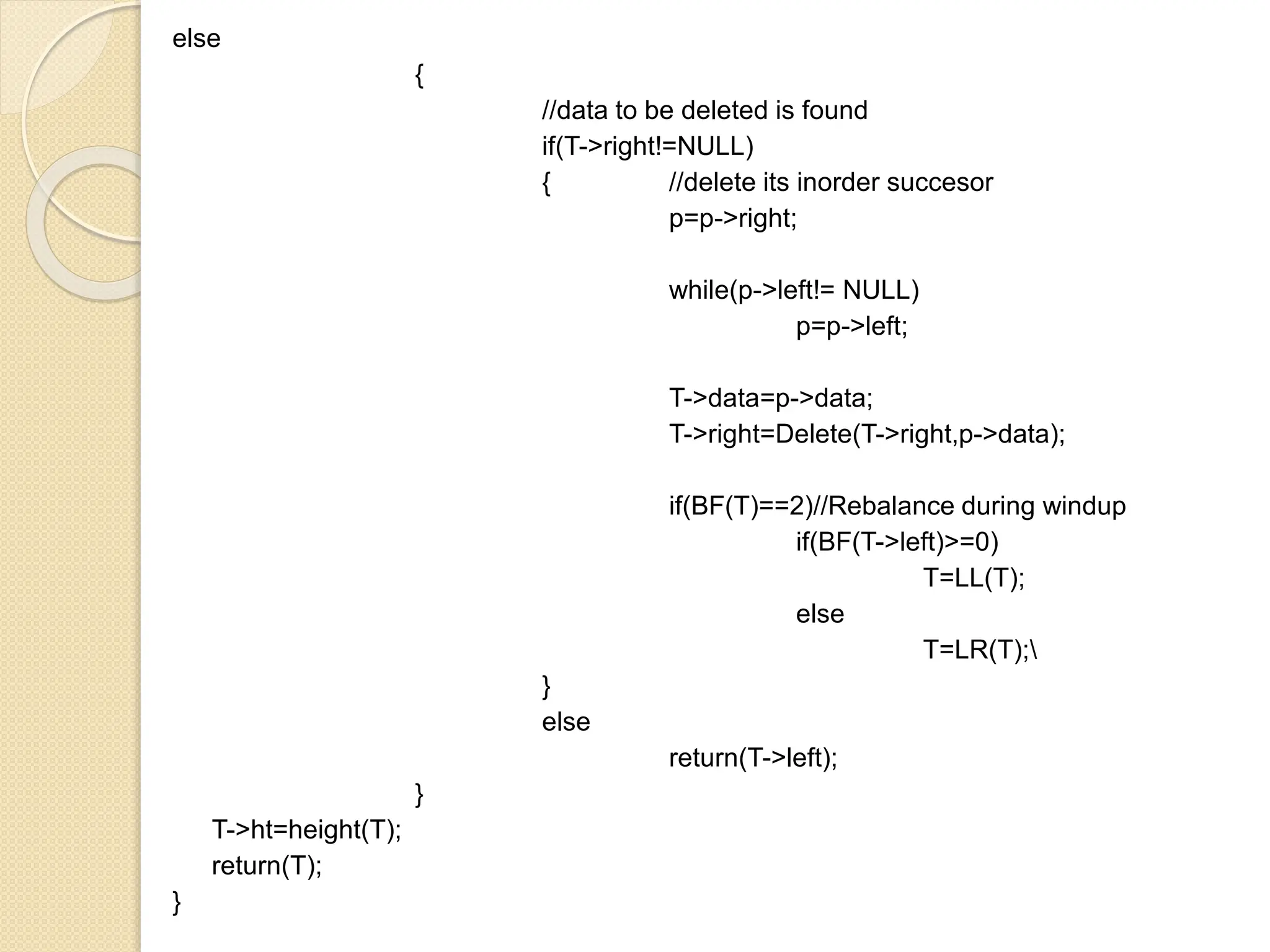
else
{
//data to be deleted is found
if(T->right!=NULL)
{ //delete its inorder succesor
p=p->right;
while(p->left!= NULL)
p=p->left;
T->data=p->data;
T->right=Delete(T->right,p->data);
if(BF(T)==2)//Rebalance during windup
if(BF(T->left)>=0)
T=LL(T);
else
T=LR(T);
}
else
return(T->left);
}
T->ht=height(T);
return(T);
}
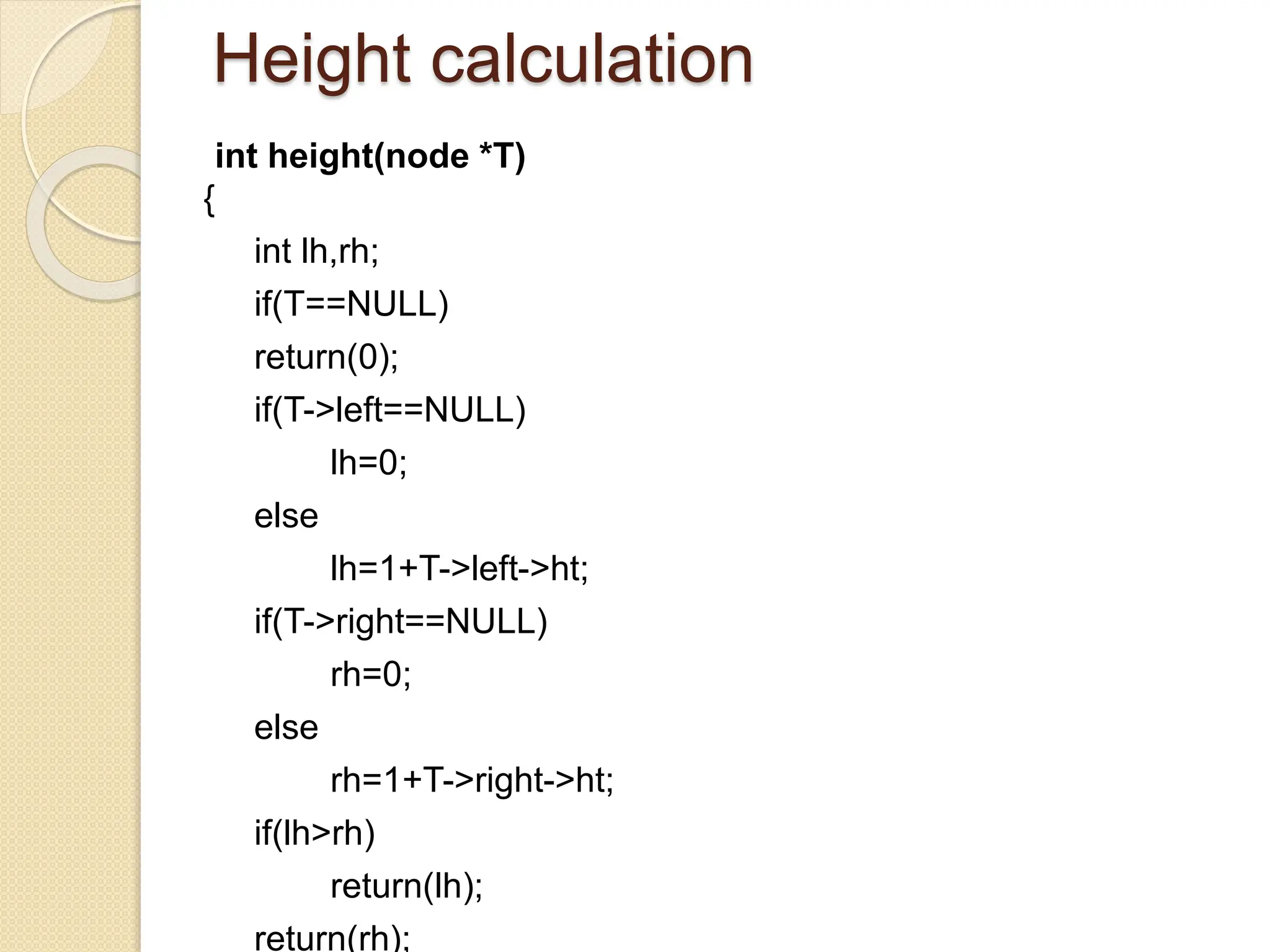
Height calculation
int height(node *T)
{
int lh,rh;
if(T==NULL)
return(0);
if(T->left==NULL)
lh=0;
else
lh=1+T->left->ht;
if(T->right==NULL)
rh=0;
else
rh=1+T->right->ht;
if(lh>rh)
return(lh);
return(rh);
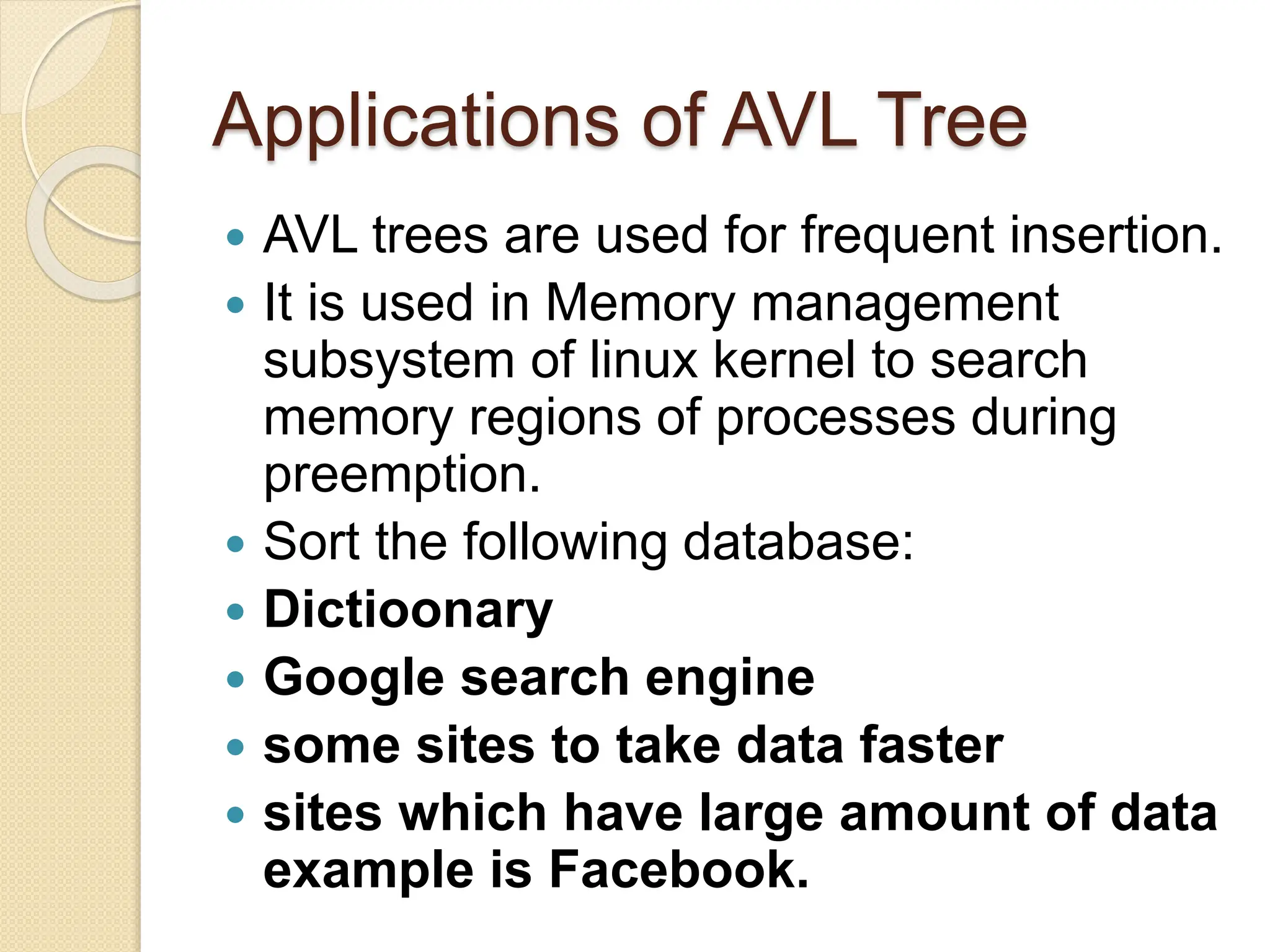
Applications of AVL Tree
 AVL trees are used for frequent insertion.
 It is used in Memory management
subsystem of linux kernel to search
memory regions of processes during
preemption.
 Sort the following database:
 Dictioonary
 Google search engine
 some sites to take data faster
 sites which have large amount of data
example is Facebook.
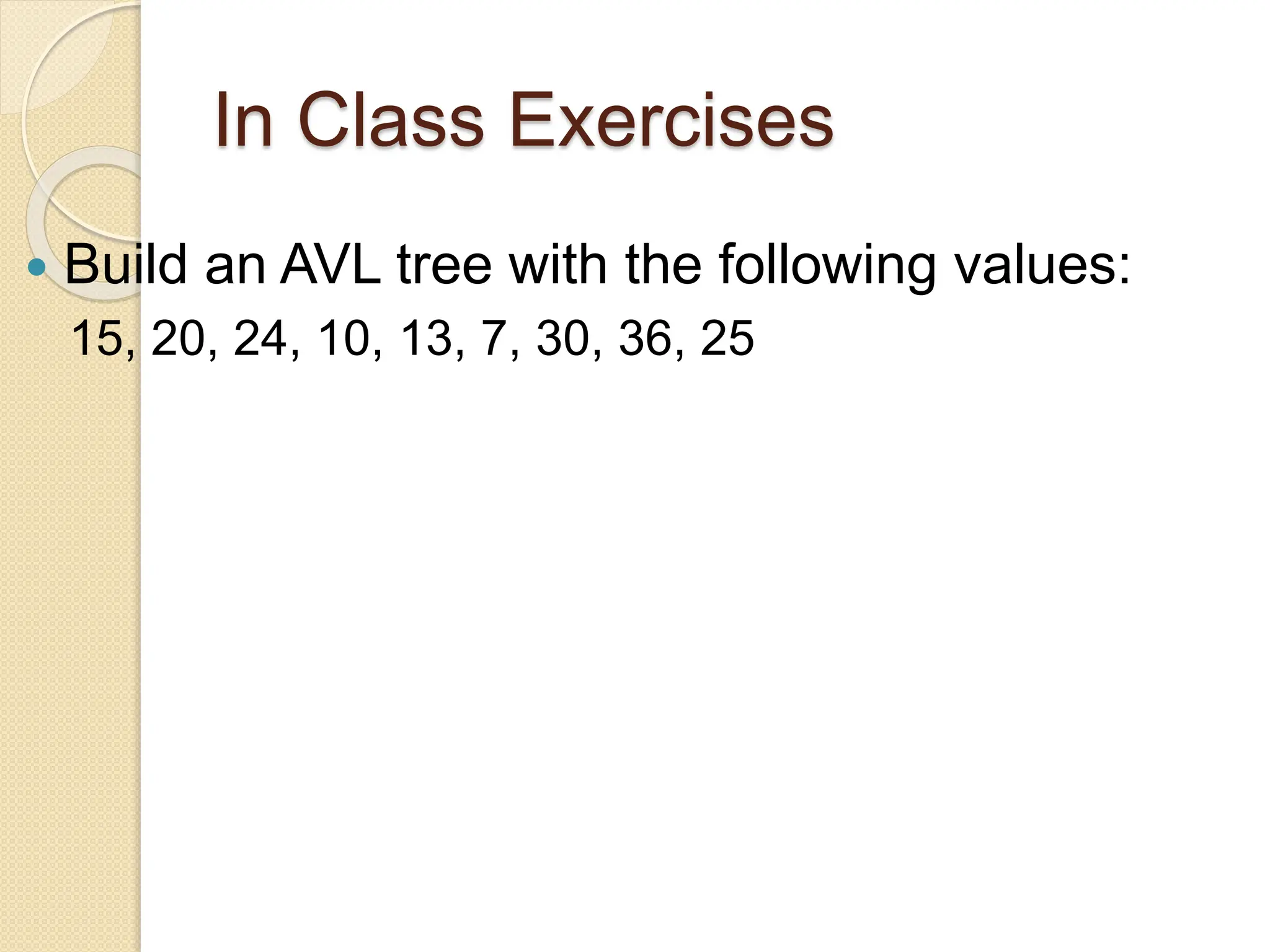
In Class Exercises
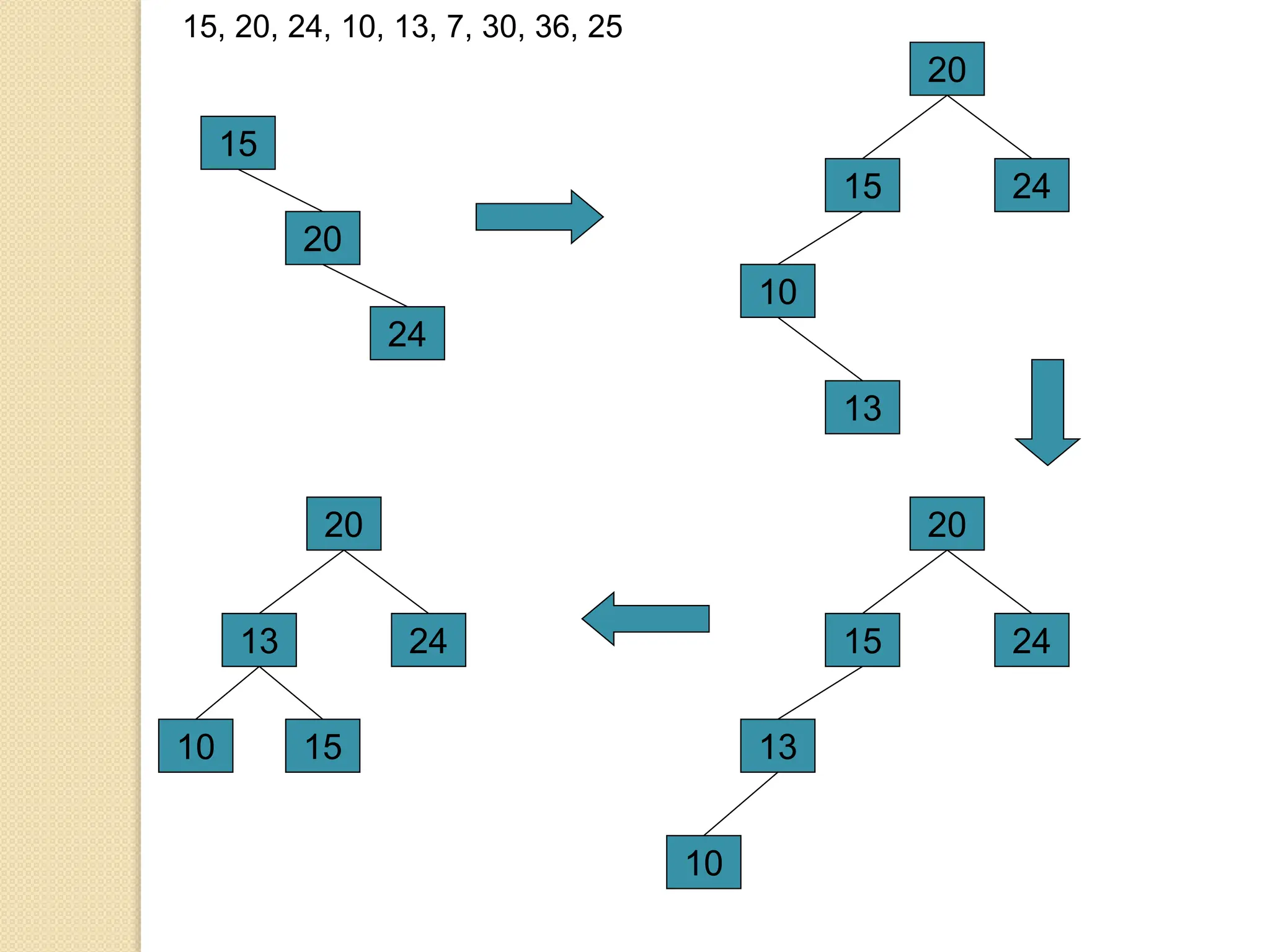
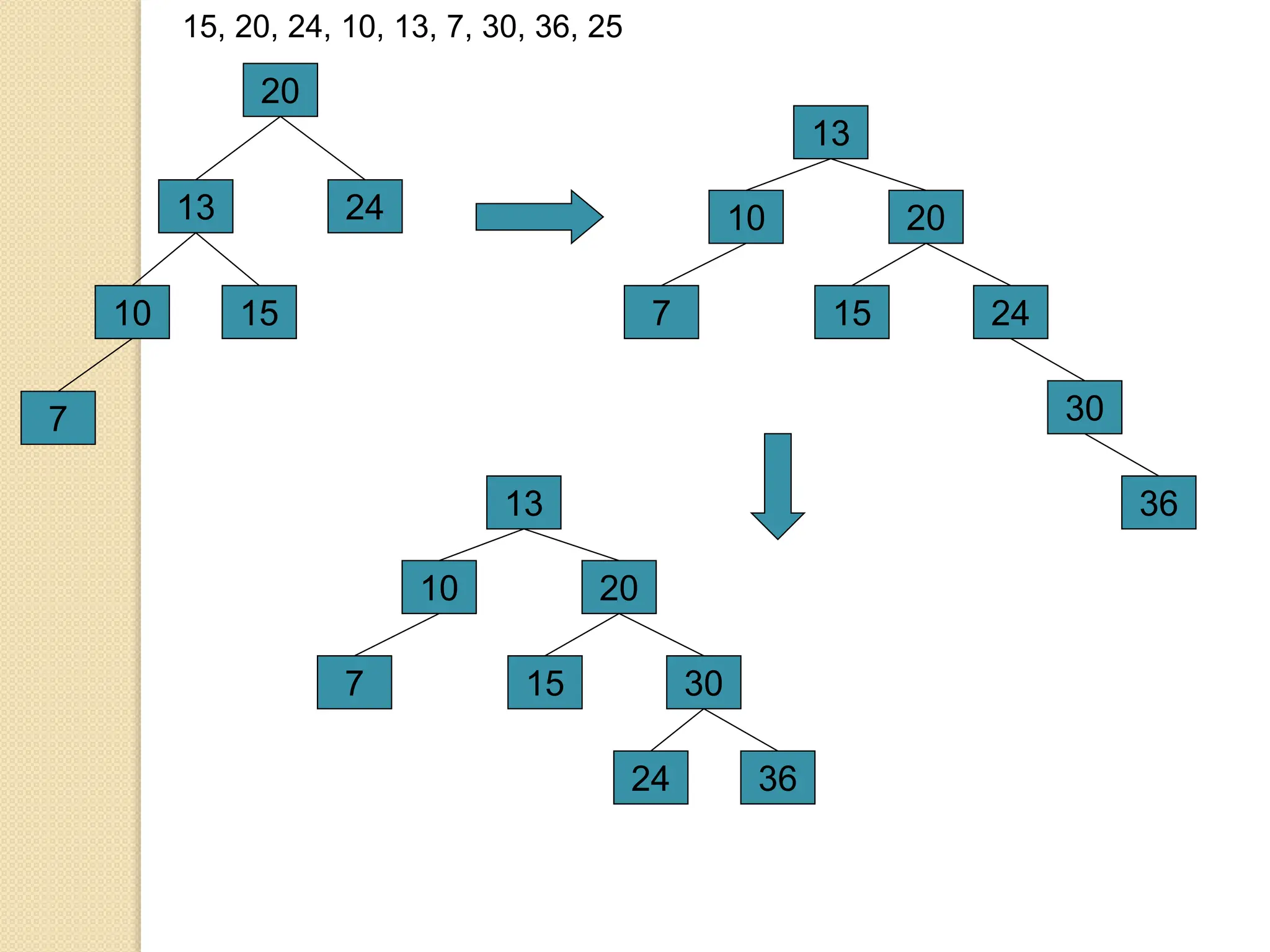
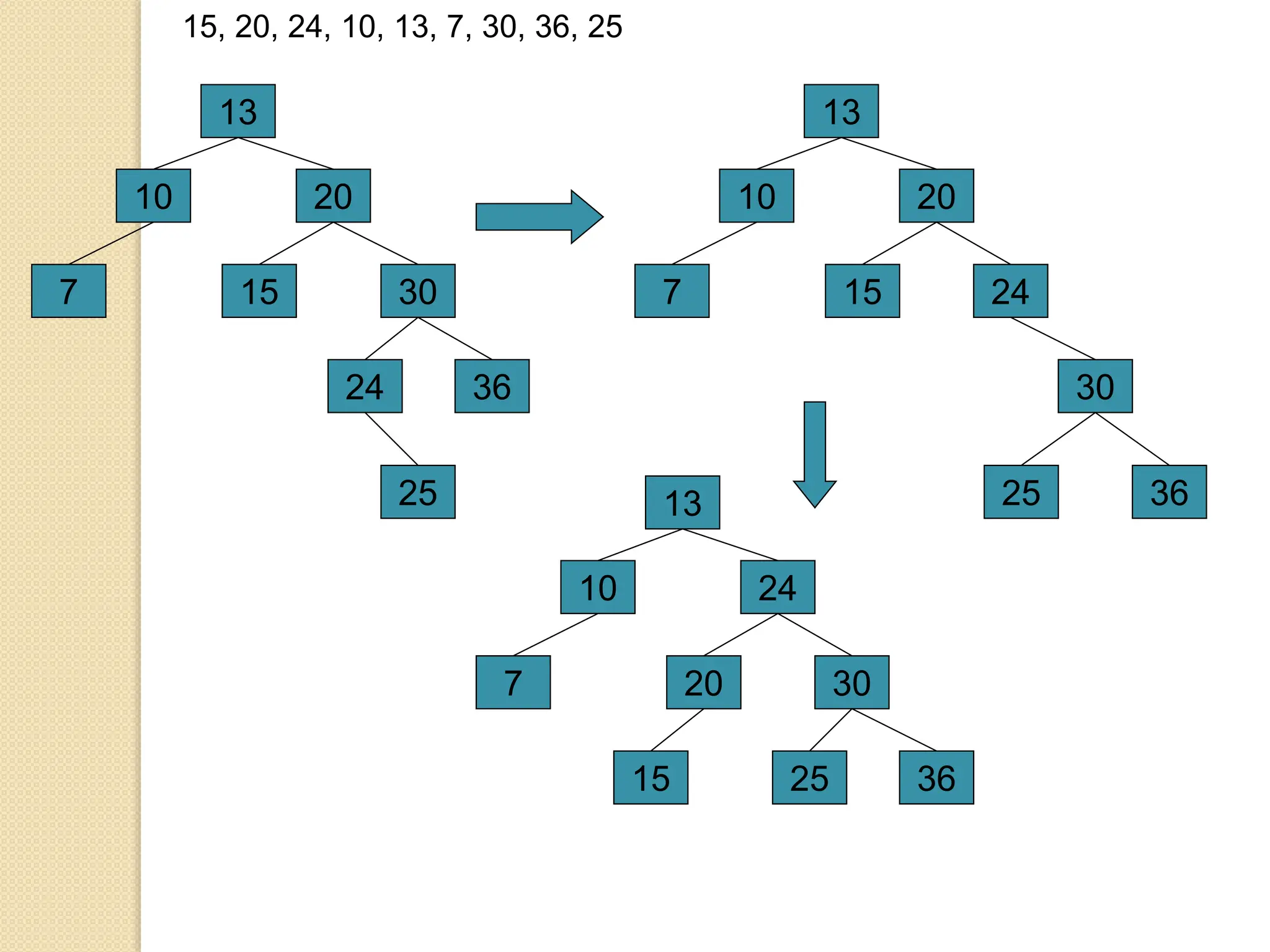
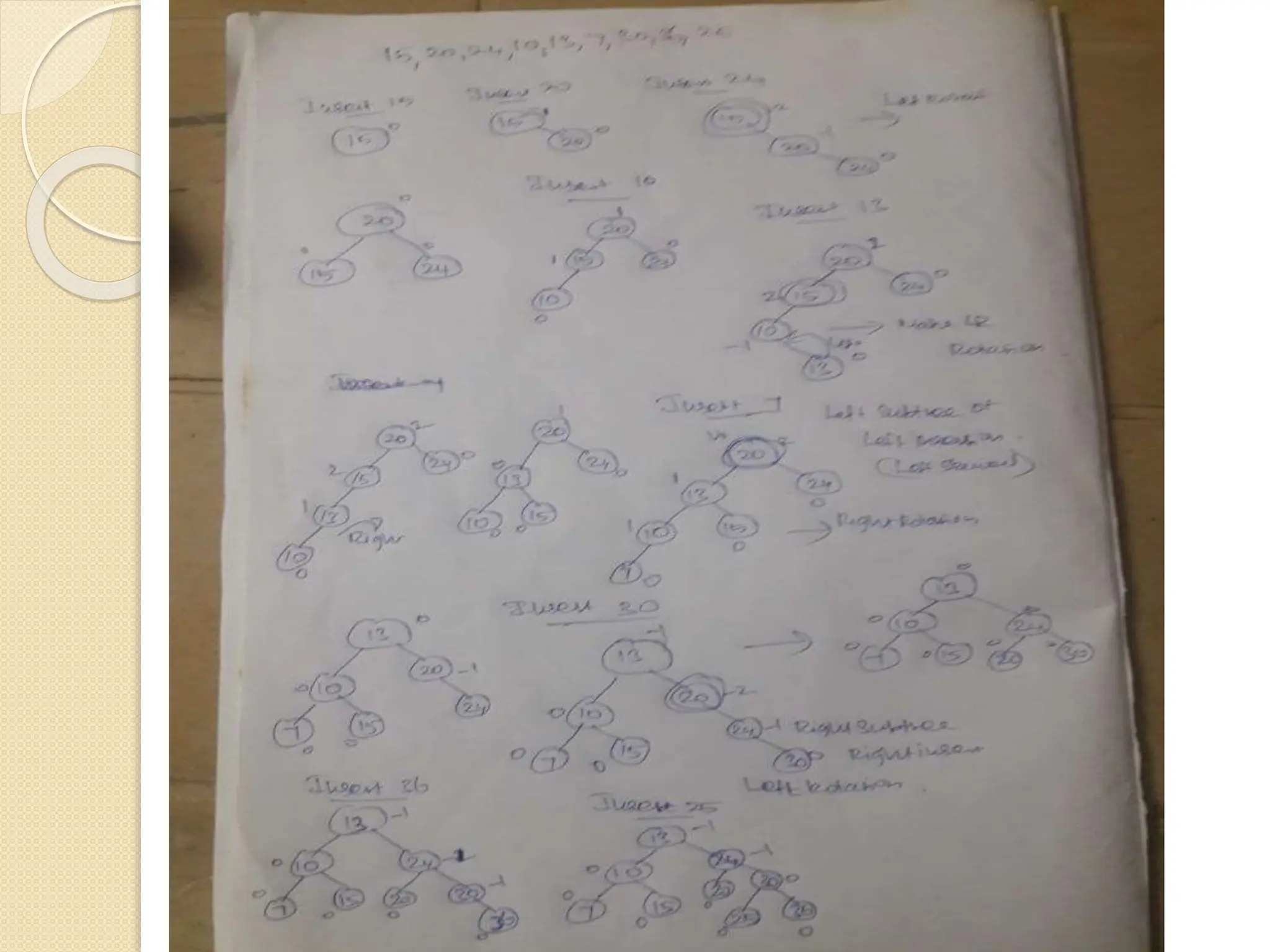
 Build an AVL tree with the following values:
15, 20, 24, 10, 13, 7, 30, 36, 25
15
15, 20, 24, 10, 13, 7, 30, 36, 25
20
24
15
20
24
10
13
15
20
24
13
10
13
20
24
15
10
13
20
24
15
10
15, 20, 24, 10, 13, 7, 30, 36, 25
7
13
20
24
15
10
7
30
36
13
20
30
15
10
7
36
24
13
20
30
15
10
7
36
24
15, 20, 24, 10, 13, 7, 30, 36, 25
25
13
20
30
15
10
7
36
24
25
13
24
36
20
10
7
25
30
15
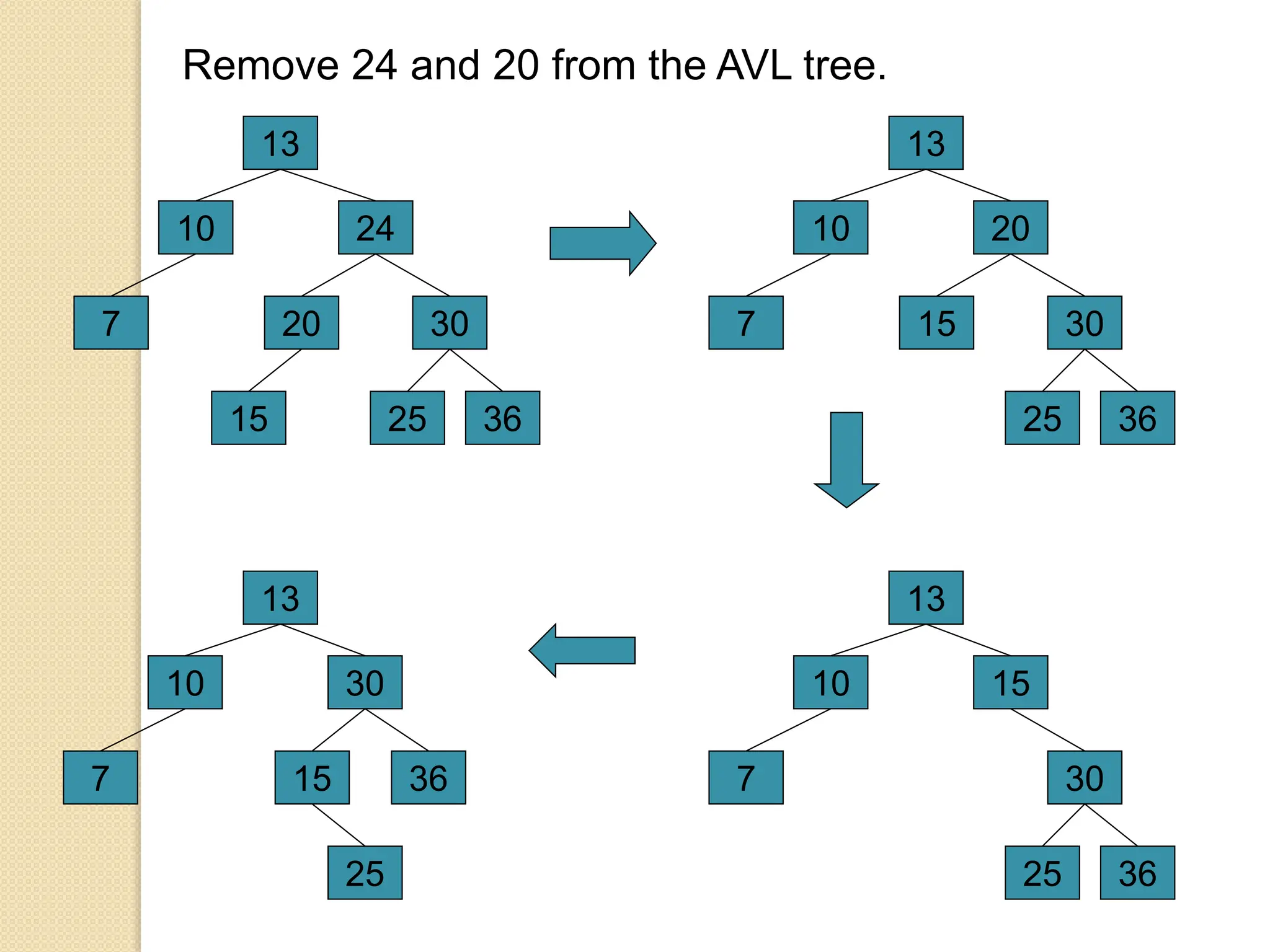
Remove 24 and 20 from the AVL tree.
13
24
36
20
10
7
25
30
15
13
20
36
15
10
7
25
30
13
15
36
10
7
25
30
13
30
36
10
7
25
15
Data structures trees and graphs - AVL  tree.pptx

Data structures trees and graphs - AVL tree.pptx

  • 1.
  • 2.
    AVL Tree  TheAVL stands for Adelson- Velskii and Landis, who are the inventors of the AVL tree.AVL tree is a self-balancing binary search tree in which heights of the left sub trees and right sub trees of any node differ by at most one.
  • 3.
    Balancing Factor  Balancefactor=height of left sub tree – height of the right sub tree.  The value of balance factor should always be -1, 0 or +1.
  • 4.
    Need for heightbalanced trees  If the binary search tree is either left skewed or right skewed(not balanced) , the searching time will be increased. Because searching time depends upon the height of the tree. h=log(n) where h is the height of the tree and n is the number of nodes in the binary tree.It takes log(n) for searching.
  • 5.
    Balancing Factor Routine intBF(node *T) { int lh,rh; if(T==NULL) return(0); if(T->left==NULL) lh=0; else lh=1+T->left->ht; if(T->right==NULL) rh=0; else rh=1+T->right->ht; return(lh-rh);
  • 6.
    Need for heightbalanced trees  The disadvantage of a binary search tree is that its height can be as large as N-1  This means that the time needed to perform insertion and deletion and many other operations can be O(N) in the worst case  We want a tree with small height  A binary tree with N node has height at least Q(log N)  Thus, our goal is to keep the height of a binary search tree O(log N)  Such trees are called balanced binary
  • 7.
    How to balanaceAVL tree (Rotation)  An insertion or deletion may cause an imbalance in an AVL tree.  An AVL tree causes imbalance when any of following condition occurs:  i. An insertion into Right child’s right subtree.  ii. An insertion into Left child’s left subtree.  iii. An insertion into Right child’s left subtree.  iv. An insertion into Left child’s right subtree.
  • 8.
    How to balanaceAVL tree (Rotation)  Whenever the tree becomes imbalanced due to any operation we use rotation operations to make the tree balanced.  Rotation is the process of moving nodes either to left or to right to make the tree balanced.
  • 9.
    Single Left Rotation(LL Rotation)  If a tree becomes unbalanced, when a node is inserted into the right subtree of the right subtree, then we perform a single left rotation .  If BF(node) = +2 and BF(node -> left-child) = +1, perform LL rotation.
  • 10.
    Single Right Rotation(RR Rotation)  AVL tree may become unbalanced, if a node is inserted in the left subtree of the left subtree. The tree then needs a right rotation.  If BF(node) = -2 and BF(node -> right-child) = 1, perform RR rotation. 
  • 11.
    node * rotateright(node*x) { node *y; y=x->left; x->left=y->right; y->right=x; x->ht=height(x); y->ht=height(y); return(y); } node * rotateleft(node *x) { node *y; y=x->right; x->right=y->left; y->left=x; x->ht=height(x); y->ht=height(y); return(y); }
  • 12.
    Left Right Rotation(LR Rotation) (Double Rotation)  AVL tree may become unbalanced, if a node is inserte the left subtree of the right subtree .The tree needs Rotation is a sequence of single left rotation followed single right rotation.  If BF(node) = -2 and BF(node -> right-child) = +1, perform RL rotation.
  • 13.
    Right Left Rotation(RL Rotation) (Double Rotation)  AVL tree may become unbalanced, if a node is inserted in the right subtree of the left subtree .The tree needs The RL Rotation is sequence of single right rotation followed by single left rotation.  If BF(node) = +2 and BF(node -> left-child) = -1, perform LR rotation.
  • 14.
    node * RR(node*T) //insert right subtree of right { T=rotateleft(T); return(T); } node * LL(node *T) //insert left subtree of left { T=rotateright(T); return(T); } node * LR(node *T) // insert left subtree of right { T->left=rotateleft(T->left); T=rotateright(T); return(T); } node * RL(node *T) //insert right subtree of left { T->right=rotateright(T->right); T=rotateleft(T); return(T); }
  • 15.
  • 16.
  • 17.
  • 18.
    Operations on anAVL Tree  The following operations are performed on AVL tree...  Search  Insertion  Deletion  search operation is similar to Binary search tree.
  • 19.
    Insertion Operation inAVL Tree  Step 1 - Insert the new element into the tree using Binary Search Tree insertion logic.  Step 2 - After insertion, check the Balance Factor of every node.  Step 3 - If the Balance Factor of every node is 0 or 1 or -1 then go for next operation.  Step 4 - If the Balance Factor of any node is other than 0 or 1 or -1 then that tree is said to be imbalanced. In this case, perform suitable Rotation to make it balanced and go for next operation.
  • 20.
    Rotating conditions  IfBF(node) = +2 and BF(node -> left-child) = +1, perform LL rotation.  If BF(node) = -2 and BF(node -> right-child) = 1, perform RR rotation.  If BF(node) = -2 and BF(node -> right-child) = +1, perform RL rotation.  If BF(node) = +2 and BF(node -> left-child) = 1, perform LR rotation.
  • 21.
    An Extended Example Insert3,2,1,4,5,6,7, 16,15,14 3 Fig 1 3 2 Fig 2 3 2 1 Fig 3 2 1 3 Fig 4 2 1 3 4 Fig 5 2 1 3 4 5 Fig 6 Single rotation Single rotation Insert 3 Insert 2 Insert 1 Insert 4 Insert 5 0 1 0 1 0 2 0 0 0 - 1 -1 0 0 - 2 - 2 - 1 0 0
  • 22.
    2 1 4 5 3 Fig 7 6 2 1 4 5 3 Fig8 4 2 5 6 1 3 Fig 9 4 2 5 6 1 3 7 Fig 10 4 2 6 7 1 3 5 Fig 11 Single rotation Single rotation Insert 6 Insert 7 -1 0 0 0 0 0 0 0 -1 - 1 - 2 0 - 1 0 0 0 0 - 1 0 0 0 - 2 - 1 0 0 1 0 0 0 0 0 0
  • 23.
    4 2 6 7 1 3 5 16 Fig12 4 2 6 7 1 3 5 16 15 Fig 13 4 2 6 15 1 3 5 16 7 Fig 14 Double rotation Insert 16 Insert 15 -1 - 1 -1 0 0 0 0 0 - 2 - 1 -2 - 1 0 1 0 0 0 - 1 0 0 0 - 1 0 0 0 0
  • 24.
    5 4 2 7 15 1 36 16 14 Fig 16 4 2 6 15 1 3 5 16 7 14 Fig 15 Double rotation Insert 14 - 2 -2 1 0 0 -1 0 0 0 0 - 1 0 0 0 0 1 0 0 0 0 1
  • 25.
    Operations on anAVL Tree  The following operations are performed on AVL tree...  Search  Insertion  Deletion  search operation is similar to Binary search tree.
  • 26.
    node * insert(node*T,int x) { if(T==NULL) { T=(node*)malloc(sizeof(node)); T->data=x; T->left=NULL; T->right=NULL; } else if(x > T->data) // insert in right subtree { T->right=insert(T->right,x); if(BF(T)==-2) if(x>T->right->data) T=RR(T); else T=RL(T); }
  • 27.
  • 28.
    Deletion in AVLTrees  Step 1: Find the element in the tree.  Step 2: Delete the node, as per the BST Deletion.  Step 3: Two cases are possible:-  Case 1: Deleting from the right subtree.  Case 2: Deleting from left subtree.
  • 29.
    Case 1: Deletingfrom the right subtree.  1A. If BF(node) = +2 and BF(node -> left-child) = +1, perform LL rotation.  1B. If BF(node) = +2 and BF(node -> left-child) = -1, perform LR rotation.  1C. If BF(node) = +2 and BF(node -> left-child) = 0, perform LL rotation.
  • 30.
    Case 2: Deletingfrom left subtree.  2A. If BF(node) = -2 and BF(node -> right-child) = -1, perform RR rotation.  2B. If BF(node) = -2 and BF(node -> right-child) = +1, perform RL rotation.  2C. If BF(node) = -2 and BF(node -> right-child) = 0, perform RR rotation.
  • 31.
    AVL Tree Example: •Now remove 53(leaf Node) 14 17 7 4 53 11 12 8 13
  • 32.
    AVL Tree Example: •Now remove 53, unbalanced 14 17 7 4 11 12 8 13
  • 33.
    AVL Tree Example: •Balanced! Remove 11(node with two children) 14 17 7 4 11 12 8 13
  • 34.
    AVL Tree Example: •Remove 11, replace it with the largest in its left branch tree balanced 14 17 7 4 8 12 13
  • 35.
    AVL Tree Example: •Remove 8(place with inorder predessor)replace with largest element in the left subtree, unbalanced 14 17 4 7 12 13
  • 36.
    AVL Tree Example: •Remove 8, unbalanced 14 17 4 7 12 13
  • 37.
    AVL Tree Example: •Balanced!! 14 17 4 7 12 13
  • 38.
    node * Delete(node*T,int x) { node *p; if(T==NULL) { return NULL; } else if(x > T->data) // delete in right subtree { T->right=Delete(T->right,x); if(BF(T)==2) if(BF(T->left)>=0) T=LL(T); else
  • 39.
  • 40.
    else { //data to bedeleted is found if(T->right!=NULL) { //delete its inorder succesor p=p->right; while(p->left!= NULL) p=p->left; T->data=p->data; T->right=Delete(T->right,p->data); if(BF(T)==2)//Rebalance during windup if(BF(T->left)>=0) T=LL(T); else T=LR(T); } else return(T->left); } T->ht=height(T); return(T); }
  • 41.
    Height calculation int height(node*T) { int lh,rh; if(T==NULL) return(0); if(T->left==NULL) lh=0; else lh=1+T->left->ht; if(T->right==NULL) rh=0; else rh=1+T->right->ht; if(lh>rh) return(lh); return(rh);
  • 42.
    Applications of AVLTree  AVL trees are used for frequent insertion.  It is used in Memory management subsystem of linux kernel to search memory regions of processes during preemption.  Sort the following database:  Dictioonary  Google search engine  some sites to take data faster  sites which have large amount of data example is Facebook.
  • 43.
    In Class Exercises Build an AVL tree with the following values: 15, 20, 24, 10, 13, 7, 30, 36, 25
  • 44.
    15 15, 20, 24,10, 13, 7, 30, 36, 25 20 24 15 20 24 10 13 15 20 24 13 10 13 20 24 15 10
  • 45.
    13 20 24 15 10 15, 20, 24,10, 13, 7, 30, 36, 25 7 13 20 24 15 10 7 30 36 13 20 30 15 10 7 36 24
  • 46.
    13 20 30 15 10 7 36 24 15, 20, 24,10, 13, 7, 30, 36, 25 25 13 20 30 15 10 7 36 24 25 13 24 36 20 10 7 25 30 15
  • 47.
    Remove 24 and20 from the AVL tree. 13 24 36 20 10 7 25 30 15 13 20 36 15 10 7 25 30 13 15 36 10 7 25 30 13 30 36 10 7 25 15