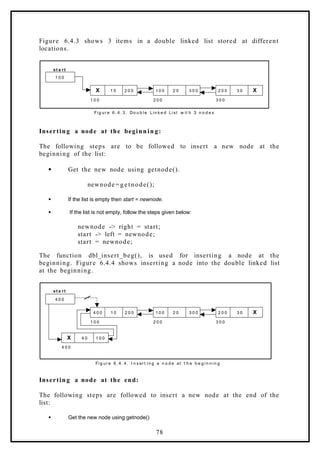
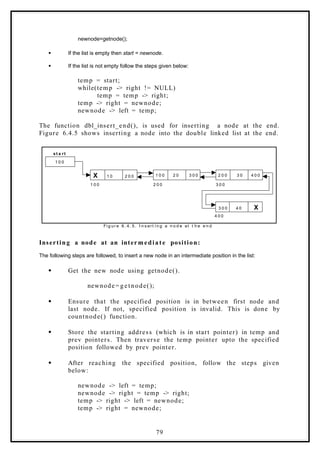
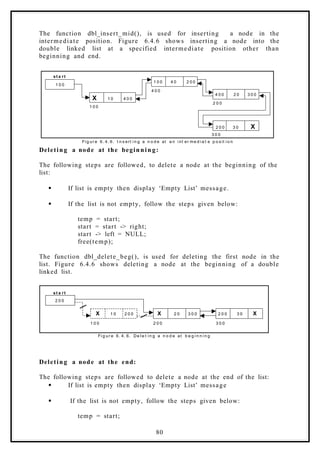
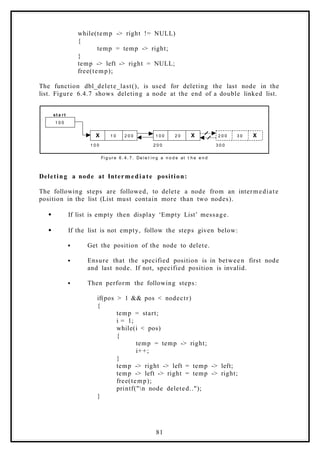
This document contains lecture notes on data structures that discuss programming performance, space complexity, time complexity, asymptotic notations, and searching and sorting algorithms. The key points covered are:
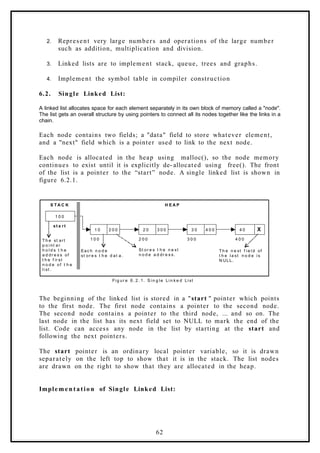
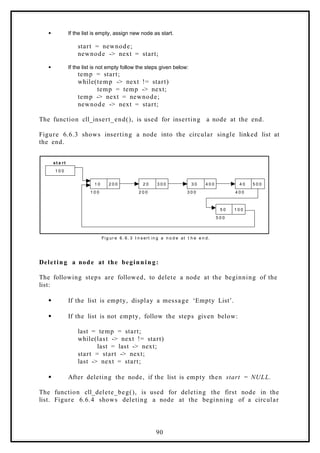
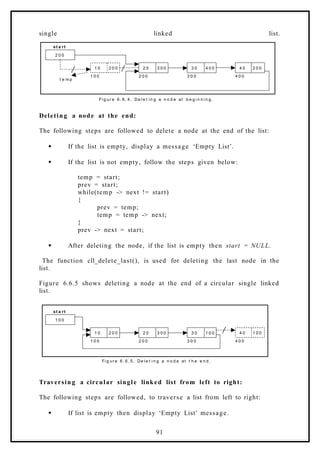
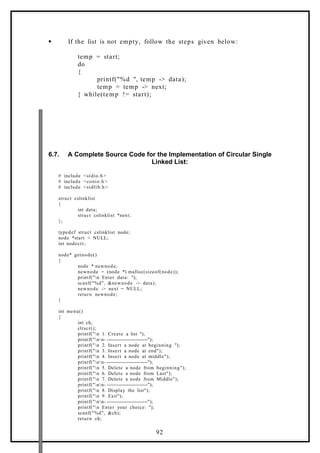
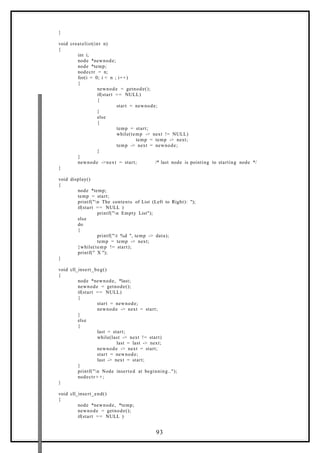
- Programming performance is measured by the memory and time needed to run a program, which can be analyzed or experimentally measured.
- Space complexity accounts for memory needed and includes instruction, data, and environment stack spaces. Time complexity accounts for time needed and includes compilation and execution times.
- Common asymptotic notations like Big-O, Omega, and Theta are used to describe time and space complexity behaviors.
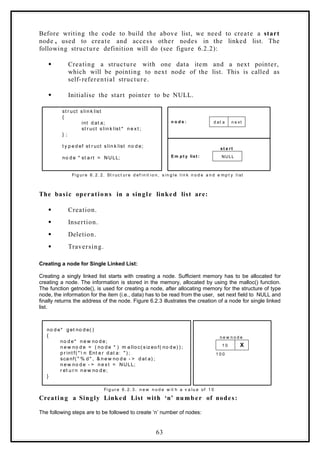
- Searching algorithms like linear and binary search are used to find elements. Sorting algorithms like bubble, quick, selection and heap sorts


![SEARCHING AND SORTING
Searching is used to find the location where an element is available. There are two types of search
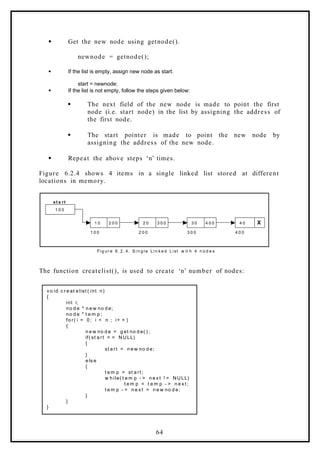
techniques. They are:
1. Linear or sequential search
2. Binary search
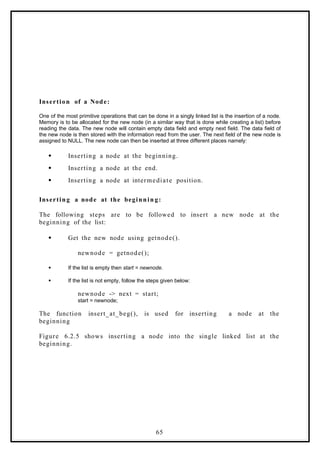
Sorting allows an efficient arrangement of elements within a given data structure. It is a way in which
the elements are organized systematically for some purpose. For example, a dictionary in which
words are arranged in alphabetical order and telephone director in which the subscriber names are
listed in alphabetical order. There are many sorting techniques out of which we study the following.
1. Bubble sort
2. Quick sort
3. Selection sort and
4. Heap sort
LINEAR SEARCH
This is the simplest of all searching techniques. In this technique, an ordered or unordered list will be
searched one by one from the beginning until the desired element is found. If the desired element is
found in the list then the search is successful otherwise unsuccessful.
Suppose there are ‘n’ elements organized sequentially on a List. The number of comparisons
required to retrieve an element from the list, purely depends on where the element is stored in the list.
If it is the first element, one comparison will do; if it is second element two comparisons are necessary
and so on. On an average you need [(n+1)/2] comparison’s to search an element. If search is not
successful, you would need ’n’ comparisons.
The time complexity of linear search is O(n).
Algorithm:
Let array a[n] stores n elements. Determine whether element ‘x’ is present or not.
linsrch(a[n], x)
{
index = 0;
flag = 0;
while (index < n) do
{
if (x == a[index])
{
flag = 1;
break;
}
index ++;
}
if(flag == 1)
printf(“Data found at %d position“, index);
else
printf(“data not found”);
}
7](https://image.slidesharecdn.com/datastructuresnotes1-221118172112-950a1a99/85/Data-Structures-Notes-7-320.jpg)
![Example 1:
Suppose we have the following unsorted list: 45, 39, 8, 54, 77, 38, 24, 16, 4, 7, 9, 20
If we are searching for: 45, we’ll look at 1 element before success
39, we’ll look at 2 elements before success
8, we’ll look at 3 elements before success
54, we’ll look at 4 elements before success
77, we’ll look at 5 elements before success
38 we’ll look at 6 elements before success
24, we’ll look at 7 elements before success
16, we’ll look at 8 elements before success
4, we’ll look at 9 elements before success
7, we’ll look at 10 elements before success
9, we’ll look at 11 elements before success
20, we’ll look at 12 elements before success
For any element not in the list, we’ll look at 12 elements before failure
Example 2:
Let us illustrate linear search on the following 9 elements:
Index 0 1 2 3 4 5 6 7 8
Elements -15 -6 0 7 9 23 54 82 101
Searching different elements is as follows:
1. Searching for x = 7 Search successful, data found at 3rd
position
2. Searching for x = 82 Search successful, data found at 7th
position
3. Searching for x = 42 Search un-successful, data not found
A non-recursive program for Linear Search:
# include <stdio.h>
# include <conio.h>
main()
{
int number[25], n, data, i, flag = 0;
clrscr();
printf("n Enter the number of elements: ");
scanf("%d", &n);
printf("n Enter the elements: ");
for(i = 0; i < n; i++)
scanf("%d", &number[i]);
printf("n Enter the element to be Searched: ");
scanf("%d", &data);
for( i = 0; i < n; i++)
{
if(number[i] == data)
{
flag = 1;
break;
}
}
if(flag == 1)
printf("n Data found at location: %d", i+1);
else
printf("n Data not found ");
8](https://image.slidesharecdn.com/datastructuresnotes1-221118172112-950a1a99/85/Data-Structures-Notes-8-320.jpg)
![}
A Recursive program for linear search:
# include <stdio.h>
# include <conio.h>
void linear_search(int a[], int data, int position, int n)
{
int mid;
if(position < n)
{
if(a[position] == data)
printf("n Data Found at %d ", position);
else
linear_search(a, data, position + 1, n);
}
else
printf("n Data not found");
}
void main()
{
int a[25], i, n, data;
clrscr();
printf("n Enter the number of elements: ");
scanf("%d", &n);
printf("n Enter the elements: ");
for(i = 0; i < n; i++)
{
scanf("%d", &a[i]);
}
printf("n Enter the element to be seached: ");
scanf("%d", &data);
linear_search(a, data, 0, n);
getch();
}
BINARY SEARCH
If we have ‘n’ records which have been ordered by keys so that x1 < x2 < … < xn . When we are given a
element ‘x’, binary search is used to find the corresponding element from the list. In case ‘x’ is
present, we have to determine a value ‘j’ such that a[j] = x (successful search). If ‘x’ is not in the list
then j is to set to zero (un successful search).
In Binary search we jump into the middle of the file, where we find key a[mid], and compare ‘x’ with
a[mid]. If x = a[mid] then the desired record has been found. If x < a[mid] then ‘x’ must be in
that portion of the file that precedes a[mid]. Similarly, if a[mid] > x, then further search is only
necessary in that part of the file which follows a[mid]. If we use recursive procedure of finding the
middle key a[mid] of the un-searched portion of a file, then every un-successful comparison of ‘x’ with
a[mid] will eliminate roughly half the un-searched portion from consideration.
Since the array size is roughly halved after each comparison between ‘x’ and a[mid], and since an
array of length ‘n’ can be halved only about log2n times before reaching a trivial length, the worst case
complexity of Binary search is about log2n
Algorithm:
9](https://image.slidesharecdn.com/datastructuresnotes1-221118172112-950a1a99/85/Data-Structures-Notes-9-320.jpg)
![Let array a[n] of elements in increasing order, n 0, determine whether ‘x’ is present, and if so, set j
such that x = a[j] else return 0.
binsrch(a[], n, x)
{
low = 1; high = n;
while (low < high) do
{
mid = (low + high)/2
if (x < a[mid])
high = mid – 1;
else if (x > a[mid])
low = mid + 1;
else return mid;
}
return 0;
}
low and high are integer variables such that each time through the loop either ‘x’ is found or low is
increased by at least one or high is decreased by at least one. Thus we have two sequences of
integers approaching each other and eventually low will become greater than high causing
termination in a finite number of steps if ‘x’ is not present.
Example 1:
Let us illustrate binary search on the following 12 elements:
Index 1 2 3 4 5 6 7 8 9 10 11 12
Elements 4 7 8 9 16 20 24 38 39 45 54 77
If we are searching for x = 4: (This needs 3 comparisons)
low = 1, high = 12, mid = 13/2 = 6, check 20
low = 1, high = 5, mid = 6/2 = 3, check 8
low = 1, high = 2, mid = 3/2 = 1, check 4, found
If we are searching for x = 7: (This needs 4 comparisons)
low = 1, high = 12, mid = 13/2 = 6, check 20
low = 1, high = 5, mid = 6/2 = 3, check 8
low = 1, high = 2, mid = 3/2 = 1, check 4
low = 2, high = 2, mid = 4/2 = 2, check 7, found
If we are searching for x = 8: (This needs 2 comparisons)
low = 1, high = 12, mid = 13/2 = 6, check 20
low = 1, high = 5, mid = 6/2 = 3, check 8, found
If we are searching for x = 9: (This needs 3 comparisons)
low = 1, high = 12, mid = 13/2 = 6, check 20
low = 1, high = 5, mid = 6/2 = 3, check 8
low = 4, high = 5, mid = 9/2 = 4, check 9, found
If we are searching for x = 16: (This needs 4 comparisons)
low = 1, high = 12, mid = 13/2 = 6, check 20
low = 1, high = 5, mid = 6/2 = 3, check 8
low = 4, high = 5, mid = 9/2 = 4, check 9
low = 5, high = 5, mid = 10/2 = 5, check 16, found
If we are searching for x = 20: (This needs 1 comparison)
low = 1, high = 12, mid = 13/2 = 6, check 20, found
If we are searching for x = 24: (This needs 4 comparisons)
low = 1, high = 12, mid = 13/2 = 6, check 20
low = 7, high = 12, mid = 19/2 = 9, check 39
low = 7, high = 10, mid = 17/2 = 8, check 38
10](https://image.slidesharecdn.com/datastructuresnotes1-221118172112-950a1a99/85/Data-Structures-Notes-10-320.jpg)
![low high mid
1 9 5
6 9 7
5 6 5
6 6 6
7 6 not found
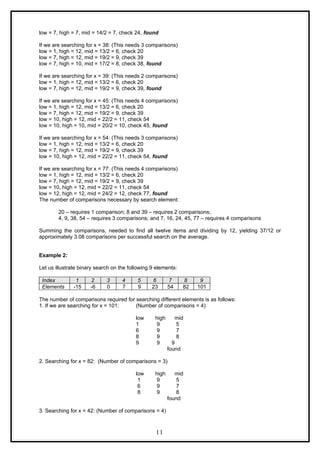
4. Searching for x = -14: (Number of comparisons = 3)
low high mid
1 9 5
4 4 2
1 1 1
2 1 not found
Continuing in this manner the number of element comparisons needed to find each of nine elements
is:
Index 1 2 3 4 5 6 7 8 9
Elements -15 -6 0 7 9 23 54 82 101
Comparisons 3 2 3 4 1 3 2 3 4
No element requires more than 4 comparisons to be found. Summing the comparisons needed to find
all nine items and dividing by 9, yielding 25/9 or approximately 2.77 comparisons per successful
search on the average.
There are ten possible ways that an un-successful search may terminate depending upon the value of
x.
If x < a(1), a(1) < x < a(2), a(2) < x < a(3), a(5) < x < a(6), a(6) < x < a(7) or a(7) < x < a(8) the
algorithm requires 3 element comparisons to determine that ‘x’ is not present. For all of the remaining
possibilities BINSRCH requires 4 element comparisons. Thus the average number of element
comparisons for an unsuccessful search is:
(3 + 3 + 3 + 4 + 4 + 3 + 3 + 3 + 4 + 4) / 10 = 34/10 = 3.4
Time Complexity:
The time complexity of binary search in a successful search is O(log n) and for an unsuccessful
search is O(log n).
A non-recursive program for binary search:
# include <stdio.h>
# include <conio.h>
main()
{
int number[25], n, data, i, flag = 0, low, high, mid;
clrscr();
printf("n Enter the number of elements: ");
scanf("%d", &n);
printf("n Enter the elements in ascending order: ");
for(i = 0; i < n; i++)
scanf("%d", &number[i]);
printf("n Enter the element to be searched: ");
scanf("%d", &data);
low = 0; high = n-1;
while(low <= high)
{
mid = (low + high)/2;
if(number[mid] == data)
12](https://image.slidesharecdn.com/datastructuresnotes1-221118172112-950a1a99/85/Data-Structures-Notes-12-320.jpg)
![{
flag = 1;
break;
}
else
{
if(data < number[mid])
high = mid - 1;
else
low = mid + 1;
}
}
if(flag == 1)
printf("n Data found at location: %d", mid + 1);
else
printf("n Data Not Found ");
}
A recursive program for binary search:
# include <stdio.h>
# include <conio.h>
void bin_search(int a[], int data, int low, int high)
{
int mid ;
if( low <= high)
{
mid = (low + high)/2;
if(a[mid] == data)
printf("n Element found at location: %d ", mid + 1);
else
{
if(data < a[mid])
bin_search(a, data, low, mid-1);
else
bin_search(a, data, mid+1, high);
}
}
else
printf("n Element not found");
}
void main()
{
int a[25], i, n, data;
clrscr();
printf("n Enter the number of elements: ");
scanf("%d", &n);
printf("n Enter the elements in ascending order: ");
for(i = 0; i < n; i++)
scanf("%d", &a[i]);
printf("n Enter the element to be searched: ");
scanf("%d", &data);
bin_search(a, data, 0, n-1);
getch();
}
Bubble Sort:
The bubble sort is easy to understand and program. The basic idea of bubble sort is to pass through
the file sequentially several times. In each pass, we compare each element in the file with its
13](https://image.slidesharecdn.com/datastructuresnotes1-221118172112-950a1a99/85/Data-Structures-Notes-13-320.jpg)
![successor i.e., X[i] with X[i+1] and interchange two element when they are not in proper order. We will
illustrate this sorting technique by taking a specific example. Bubble sort is also called as exchange
sort.
Consider the array x[n] which is stored in memory as shown below:
X[0] X[1] X[2] X[3] X[4] X[5]
33 44 22 11 66 55
Suppose we want our array to be stored in ascending order. Then we pass through the array 5 times
as described below:
Pass 1: (first element is compared with all other elements)
We compare X[i] and X[i+1] for i = 0, 1, 2, 3, and 4, and interchange X[i] and X[i+1] if X[i] > X[i+1]. The
process is shown below:
X[0] X[1] X[2] X[3] X[4] X[5] Remarks
33 44 22 11 66 55
22 44
11 44
44 66
55 66
33 22 11 44 55 66
The biggest number 66 is moved to (bubbled up) the right most position in the array.
Pass 2: (second element is compared)
We repeat the same process, but this time we don’t include X[5] into our comparisons. i.e., we
compare X[i] with X[i+1] for i=0, 1, 2, and 3 and interchange X[i] and X[i+1] if X[i] > X[i+1]. The
process is shown below:
X[0] X[1] X[2] X[3] X[4] Remarks
33 22 11 44 55
22 33
11 33
33 44
44 55
22 11 33 44 55
The second biggest number 55 is moved now to X[4].
Pass 3: (third element is compared)
We repeat the same process, but this time we leave both X[4] and X[5]. By doing this, we move the
third biggest number 44 to X[3].
X[0] X[1] X[2] X[3] Remarks
22 11 33 44
11 22
14](https://image.slidesharecdn.com/datastructuresnotes1-221118172112-950a1a99/85/Data-Structures-Notes-14-320.jpg)
![22 33
33 44
11 22 33 44
Pass 4: (fourth element is compared)
We repeat the process leaving X[3], X[4], and X[5]. By doing this, we move the fourth biggest number
33 to X[2].
X[0] X[1] X[2] Remarks
11 22 33
11 22
22 33
Pass 5: (fifth element is compared)
We repeat the process leaving X[2], X[3], X[4], and X[5]. By doing this, we move the fifth biggest
number 22 to X[1]. At this time, we will have the smallest number 11 in X[0]. Thus, we see that we
can sort the array of size 6 in 5 passes.
For an array of size n, we required (n-1) passes.
Program for Bubble Sort:
#include <stdio.h>
#include <conio.h>
void bubblesort(int x[],int n)
{
int i, j, t;
for (i = 0; i < n; i++)
{
for (j = 0; j <n-i; j++)
{
if (x[j] > x[j+1])
{
t = x[j];
x[j] = x[j+1];
x[j+1] = t;
}
}
}
}
main()
{
int i, n, x[25];
clrscr();
printf("n Enter the number of elements: ");
scanf("%d",&n);
printf("n Enter Data:");
for(i = 0; i < n ; i++)
scanf("%d", &x[i]);
bubblesort(x,n);
printf ("nArray Elements after sorting: ");
for (i = 0; i < n; i++)
15](https://image.slidesharecdn.com/datastructuresnotes1-221118172112-950a1a99/85/Data-Structures-Notes-15-320.jpg)
![printf ("%5d", x[i]);
}
Time Complexity:
The bubble sort method of sorting an array of size n requires (n-1) passes and (n-1) comparisons on
each pass. Thus the total number of comparisons is (n-1) * (n-1) = n2
– 2n + 1, which is O(n2
).
Therefore bubble sort is very inefficient when there are more elements to sorting.
Selection Sort:
Now, you will learn another sorting technique, which is more efficient than bubble sort and the
insertion sort. This sort, as you will see, will not require no more than n-1 interchanges. The sort we
are talking about is selection sort.
Suppose x is an array of size n stored in memory. The selection sort algorithm first selects the
smallest element in the array x and place it at array position 0; then it selects the next smallest
element in the array x and place it at array position 1. It simply continues this procedure until it places
the biggest element in the last position of the array. We will now present to you an algorithm for
selection sort.
The array is passed through (n-1) times and the smallest element is placed in its respective position
in the array as detailed below:
Pass 1:
Find the location j of the smallest element in the array x [0], x[1], . . . . x[n-1], and then interchange x[j]
with x[0]. Then x[0] is sorted.
Pass 2:
Leave the first element and find the location j of the smallest element in the sub-array x[1], x[2], . . . .
x[n-1], and then interchange x[1] with x[j]. Then x[0], x[1] are sorted.
Pass 3:
Leave the first two elements and find the location j of the smallest element in the sub-array x[2], x[3], .
. . . x[n-1], and then interchange x[2] with x[j]. Then x[0], x[1], x[2] are sorted.
Pass (n-1):
Find the location j of the smaller of the elements x[n-2] and x[n-1], and then interchange x[j] and x[n-
2]. Then x[0], x[1], . . . . x[n-2] are sorted. Of course, during this pass x[n-1] will be the biggest
element and so the entire array is sorted.
Time Complexity:
In general we prefer selection sort in case where the insertion sort or the bubble sort requires
exclusive swapping. In spite of superiority of the selection sort over bubble sort and the insertion sort
(there is significant decrease in run time), its efficiency is also O(n2
) for n data items.
Example:
Let us consider the following example with 9 elements to analyze selection Sort:
1 2 3 4 5 6 7 8 9 Remarks
65 70 75 80 50 60 55 85 45 find the first smallest element
i j swap a[i] & a[j]
45 70 75 80 50 60 55 85 65 find the second smallest element
i j swap a[i] and a[j]
45 50 75 80 70 60 55 85 65 Find the third smallest element
i j swap a[i] and a[j]
16](https://image.slidesharecdn.com/datastructuresnotes1-221118172112-950a1a99/85/Data-Structures-Notes-16-320.jpg)
![45 50 55 80 70 60 75 85 65 Find the fourth smallest element
i j swap a[i] and a[j]
45 50 55 60 70 80 75 85 65 Find the fifth smallest element
i j swap a[i] and a[j]
45 50 55 60 65 80 75 85 70 Find the sixth smallest element
i j swap a[i] and a[j]
45 50 55 60 65 70 75 85 80 Find the seventh smallest element
i j swap a[i] and a[j]
45 50 55 60 65 70 75 85 80 Find the eighth smallest element
i J swap a[i] and a[j]
45 50 55 60 65 70 75 80 85 The outer loop ends.
Non-recursive Program for selection sort:
# include<stdio.h>
# include<conio.h>
void selectionSort( int low, int high );
int a[25];
int main()
{
int num, i= 0;
clrscr();
printf( "Enter the number of elements: " );
scanf("%d", &num);
printf( "nEnter the elements:n" );
for(i=0; i < num; i++)
scanf( "%d", &a[i] );
selectionSort( 0, num - 1 );
printf( "nThe elements after sorting are: " );
for( i=0; i< num; i++ )
printf( "%d ", a[i] );
return 0;
}
void selectionSort( int low, int high )
{
int i=0, j=0, temp=0, minindex;
for( i=low; i <= high; i++ )
{
minindex = i;
for( j=i+1; j <= high; j++ )
if( a[j] < a[minindex] )
minindex = j;
temp = a[i];
a[i] = a[minindex];
a[minindex] = temp;
}
}
Recursive Program for selection sort:
#include <stdio.h>
17](https://image.slidesharecdn.com/datastructuresnotes1-221118172112-950a1a99/85/Data-Structures-Notes-17-320.jpg)
![#include<conio.h>
int x[6] = {77, 33, 44, 11, 66};
selectionSort(int);
main()
{
int i, n = 0;
clrscr();
printf (" Array Elements before sorting: ");
for (i=0; i<5; i++)
printf ("%d ", x[i]);
selectionSort(n); /* call selection sort */
printf ("n Array Elements after sorting: ");
for (i=0; i<5; i++)
printf ("%d ", x[i]);
}
selectionSort( int n)
{
int k, p, temp, min;
if (n== 4)
return (-1);
min = x[n];
p = n;
for (k = n+1; k<5; k++)
{
if (x[k] <min)
{
min = x[k];
p = k;
}
}
temp = x[n]; /* interchange x[n] and x[p] */
x[n] = x[p];
x[p] = temp;
n++ ;
selectionSort(n);
}
INSERTION SORT
The main idea behind the insertion sort is to insert the ith element
in its correct place in the ith pass. Suppose an array A with n elements
A[1], A[2],…A[N] is in memory. The insertion sort algorithm scans A
from A[1] to A[N], inserting each element A[K] into its proper position in
the previously sorted subarray A[1], A[2],..A[K-1].
Principle: In Insertion Sort algorithm, each element A[K] in the list is
compared with all the elements before it ( A[1] to A[K-1]). If any
element A[I] is found to be greater than A[K] then A[K] is inserted in
the place of A[I}. This process is repeated till all the elements are
sorted.
Algorith m:
18](https://image.slidesharecdn.com/datastructuresnotes1-221118172112-950a1a99/85/Data-Structures-Notes-18-320.jpg)
![Procedure INSERTIONSORT(A, N)
// A is the array containing the list of data items
// N is the number of data items in the list
Last ß N – 1
Repeat For Pass = 1 to Last Step 1
Repeat For I = 0 to Pass – 1 Step 1
If A[Pass] < A[I]
Then
Temp ß A[Pass]
Repeat For J = Pass -1 to I Step -1
A[J +1] ß A[J]
End Repeat
A[I] ß Temp
End If
End Repeat
End Repeat
End INSERTIONSORT
In Insertion Sort algorithm, Last is made to point to the last
element in the list and Pass is made to point to the second element in the
list. In every pass the Pass is incremented to point to the next element
and is continued till it reaches the last element. During each pass
A[Pass] is compared all elements before it. If A[Pass] is lesser than A[I]
in the list, then A[Pass] is inserted in position I. Finally, a sorted list is
obtained.
For performing the insertion operation, a variable temp is used to
safely store A[Pass] in it and then shift right elements starting from A[I]
to A[Pass- 1].
Example:
N = 10 à Number of elements in the list
L à Last
P à Pass
i = 0 i =1 i = 2 i = 3 i = 4 i = 5 i = 6 i = 7 i = 8 i = 9
42 23 74 11 65 58 94 36 99 87
P=1 A[P] < A[0] à Insert A[P] at 0 L=9
23 42 74 11 65 58 94 36 99 87
P=2 L=9
A[P] is greater than all elements before it. Hence No Change
19](https://image.slidesharecdn.com/datastructuresnotes1-221118172112-950a1a99/85/Data-Structures-Notes-19-320.jpg)
![23 42 74 11 65 58 94 36 99 87
P=3 A[P] < A[0] à Insert A[P] at 0 L=9
11 23 42 74 65 58 94 36 99 87
P=4 L=9
A[P] < A[3] à Insert A[P] at 3
11 23 42 65 74 58 94 36 99 87
P=5 L=9
A[P] < A[3] à Insert A[P] at 3
11 23 42 58 65 74 94 36 99 87
P=6 L=9
A[P] is greater than all elements before it. Hence No Change
11 23 42 58 65 74 94 36 99 87
P=7 L=9
A[P] < A[2] à Insert A[P] at 2
11 23 36 42 58 65 74 94 99 87
P=8 L=9
A[P] is greater than all elements before it. Hence No Change
11 23 36 42 58 65 74 94 99 87
P, L=9
A[P] < A[7] à Insert A[P] at 7
Sorted List:
11 23 36 42 58 65 74 87 94 99
Progra m:
void array::sort()
{
int temp, last=count- 1;
for (int pass=1; pass< =last;pass + + )
{
for (int i=0; i<pass; i++)
{
20](https://image.slidesharecdn.com/datastructuresnotes1-221118172112-950a1a99/85/Data-Structures-Notes-20-320.jpg)
![if (a[pass]<a[i])
{
temp=a[pass];
for (int j=pass- 1;j> =i;j- -)
a[j+1]=a[j];
a[i]=temp;
}
}
}
}
In the sort function, the integer variable last is used to point to the
last element in the list. The first pass starts with the variable pass
pointing to the second element and continues till pass reaches the last
element. In each pass, a[pass] is compared with all the elements before
it and if a[pass] is lesser than a[i], then it is inserted in position i. Before
inserting it, the elements a[i] to a[pass- 1] are shifted right using a
temporary variable.
Advanta g e s:
1. Sorts the list faster when the list has less number of elements.
2. Efficient in cases where a new element has to be inserted into a
sorted list.
Disadvan t a g e s:
1. Very slow for large values of n.
2. Poor performance if the list is in almost reverse order.
21](https://image.slidesharecdn.com/datastructuresnotes1-221118172112-950a1a99/85/Data-Structures-Notes-21-320.jpg)
![Quick Sort
The quick sort was invented by Prof. C. A. R. Hoare in the early 1960’s. It was one of the first more
efficient sorting algorithms. It is an example of a class of algorithms that work by what is usually called
“divide and conquer”.
In essence, the quick sort algorithm partitions the original array by rearranging it into two groups. The
first group contains those elements less than some arbitrary chosen value taken from the set, and the
second group contains those elements greater than or equal to the chosen value.
The chosen value is known as the pivot element. Once the array has been rearranged in this way with
respect to the pivot, the very same partitioning is recursively applied to each of the two subsets.
When all the subsets have been partitioned and rearranged, the original array is sorted.
The function partition() makes use of two pointers up and down which are moved toward each other
in the following fashion:
1. Repeatedly increase the pointer up by one position until a[up] > =pivot.
2. Repeatedly decrease the pointer down by one position until a[down] <=pivot.
3. If down > up, interchange a[down] with a[up]
4. Repeat the steps 1, 2 and 3 till the ‘up’ pointer crosses the ‘down’ pointer. If ‘up’ pointer
crosses ‘down’ pointer, the position for pivot is found and place pivot element in ‘down’
pointer position.
The program uses a recursive function quicksort(). The algorithm of quick sort function sorts all
elements in an array ‘a’ between positions ‘low’ and ‘high’.
1. It terminates when the condition low >= high is satisfied. This condition will be satisfied
only when the array is completely sorted.
2. Here we choose the first element as the ‘pivot’. So, pivot = x[low]. Now it calls the
partition function to find the proper position j of the element x[low] i.e. pivot. Then we will
have two sub-arrays x[low], x[low+1], . . . . . . . x[j-1] and x[j+1], x[j+2], . . .x[high].
3. It calls itself recursively to sort the left sub-array x[low], x[low+1], . . . . . . . x[j-1] between
positions low and j-1 (where j is returned by the partition function).
4. It calls itself recursively to sort the right sub-array x[j+1], x[j+2], . . .x[high] between
positions j+1 and high.
Algorithm
Sorts the elements a[p], . . . . . ,a[q] which reside in the global array a[n] into ascending order. The a[n
+ 1] is considered to be defined and must be greater than all elements in a[n]; a[n + 1] = +
quicksort (p, q)
{
if ( p < q ) then
{
call j = PARTITION(a, p, q+1); // j is the position of the partitioning element
call quicksort(p, j – 1);
call quicksort(j + 1 , q);
}
}
partition(a, m, p)
{
v = a[m]; up = m; down = p; // a[m] is the partition element
do
{
22](https://image.slidesharecdn.com/datastructuresnotes1-221118172112-950a1a99/85/Data-Structures-Notes-22-320.jpg)
![repeat
up = up + 1;
until (a[up] > v);
repeat
down = down – 1;
until (a[down] < v);
if (up < down) then call interchange(a, up, down);
} while (up > down);
a[m] = a[down];
a[down] = v;
return (down);
}
interchange(a, up, down)
{
p = a[up];
a[up] = a[down];
a[down] = p;
}
Time complexity:
There are several choices for choosing the ‘pivot’ element through which we can improve the
efficiency of quick sort. For example, one may choose the ‘pivot’ element as median or mean or
middle element. Also, a non-recursive method could be developed for execution efficiency. When
these improvements are made, experiments indicate the fact that the total number of comparisons for
quick sort is of O(n log n).
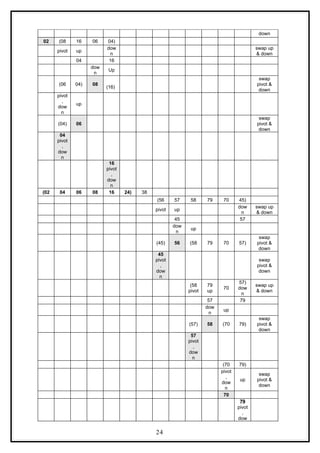
Example:
Select first element as the pivot element. Move ‘up’ pointer from left to right in search of an element
larger than pivot. Move the ‘down’ pointer from right to left in search of an element smaller than pivot.
If such elements are found, the elements are swapped. This process continues till the ‘up’ pointer
crosses the ‘down’ pointer. If ‘up’ pointer crosses ‘down’ pointer, the position for pivot is found and
interchange pivot and element at ‘down’ position.
Let us consider the following example with 13 elements to analyze quick sort:
1
2 3 4 5 6 7 8 9 10 11 12 13 Remarks
38 08 16 06 79 57 24 56 02 58 04 70 45
pivot up
dow
n
swap up
& down
04 79
up
dow
n
swap up
& down
02 57
dow
n
up
(24 08 16 06 04 02) 38 (56 57 58 79 70 45)
swap
pivot &
down
pivot
dow
n
swap
pivot &
down
(02 08 16 06 04) 24
pivot,
down
up swap
pivot &
23](https://image.slidesharecdn.com/datastructuresnotes1-221118172112-950a1a99/85/Data-Structures-Notes-23-320.jpg)
![n
(45 56 57 58 70 79)
02 04 06 08 16 24 38 45 56 57 58 70 79
Program for Quick Sort (Recursive version):
# include<stdio.h>
# include<conio.h>
void quicksort(int, int);
int partition(int, int);
void interchange(int, int);
int array[25];
int main()
{
int num, i = 0;
clrscr();
printf( "Enter the number of elements: " );
scanf( "%d", &num);
printf( "Enter the elements: " );
for(i=0; i < num; i++)
scanf( "%d", &array[i] );
quicksort(0, num -1);
printf( "nThe elements after sorting are: " );
for(i=0; i < num; i++)
printf("%d ", array[i]);
return 0;
}
void quicksort(int low, int high)
{
int pivotpos;
if( low < high )
{
pivotpos = partition(low, high + 1);
quicksort(low, pivotpos - 1);
quicksort(pivotpos + 1, high);
}
}
int partition(int low, int high)
{
int pivot = array[low];
int up = low, down = high;
do
{
do
up = up + 1;
while(array[up] < pivot );
do
down = down - 1;
while(array[down] > pivot);
if(up < down)
interchange(up, down);
}while(up < down);
25](https://image.slidesharecdn.com/datastructuresnotes1-221118172112-950a1a99/85/Data-Structures-Notes-25-320.jpg)
![array[low] = array[down];
array[down] = pivot;
return down;
}
void interchange(int i, int j)
{
int temp;
temp = array[i];
array[i] = array[j];
array[j] = temp;
}
Heap and Heap Sort
Heap is a data structure, which permits one to insert elements into a set and also to find the largest
element efficiently. A data structure, which provides these two operations, is called a priority queue.
Max and Min Heap data structures:
A max heap is an almost complete binary tree such that the value of each node is greater than or
equal to those in its children.
M a x h e a p
M i n h e a p
9 5
8 5
7 5 2 5
4 5
1 5
3 5
4 5
5 5
1 5
6 5 3 5
2 5
7 5
5 5 6 5 8 5 9 5
A min heap is an almost complete binary tree such that the value of each node is less than or equal to
those in its children.
Representation of Heap Tree:
Since heap is a complete binary tree, a heap tree can be efficiently represented using one
dimensional array. This provides a very convenient way of figuring out where children belong to.
The root of the tree is in location 1.
The left child of an element stored at location i can be found in location 2*i.
The right child of an element stored at location i can be found in location 2*i+1.
The parent of an element stored at location i can be found at location floor(i/2).
The elements of the array can be thought of as lying in a tree structure. A heap tree represented
using a single array looks as follows:
X[1] X[2] X[3] X[4] X[5] X[6] X[7] X[8]
65 45 60 40 25 50 55 30
26](https://image.slidesharecdn.com/datastructuresnotes1-221118172112-950a1a99/85/Data-Structures-Notes-26-320.jpg)
![2 5 5 5
6 0
5 0
6 5
4 5
3 0
4 0
x[ 1]
x[ 3]
x[ 7]
x[ 6]
x[ 2]
x[ 5]
x[ 4]
x[ 8] He a p T r e e
Operations on heap tree:
The major operations required to be performed on a heap tree:
1. Insertion,
2. Deletion and
3. Merging.
Insertion into a heap tree:
This operation is used to insert a node into an existing heap tree satisfying the properties of heap
tree. Using repeated insertions of data, starting from an empty heap tree, one can build up a heap
tree.
Let us consider the heap (max) tree. The principle of insertion is that, first we have to adjoin the data
in the complete binary tree. Next, we have to compare it with the data in its parent; if the value is
greater than that at parent then interchange the values. This will continue between two nodes on path
from the newly inserted node to the root node till we get a parent whose value is greater than its child
or we reached the root.
For illustration, 35 is added as the right child of 80. Its value is compared with its parent’s value, and
to be a max heap, parent’s value greater than child’s value is satisfied, hence interchange as well as
further comparisons are no more required.
As another illustration, let us consider the case of insertion 90 into the resultant heap tree. First, 90
will be added as left child of 40, when 90 is compared with 40 it requires interchange. Next, 90 is
compared with 80, another interchange takes place. Now, our process stops here, as 90 is now in
root node. The path on which these comparisons and interchanges have taken places are shown by
dashed line.
The algorithm Max_heap_insert to insert a data into a max heap tree is as follows:
Max_heap_insert (a, n)
{
//inserts the value in a[n] into the heap which is stored at a[1] to a[n-1]
integer i, n;
i = n;
item = a[n] ;
while ( (i > 1) and (a[ i/2 ] < item ) do
{
a[i] = a[ i/2 ] ; // move the parent down
i = i/2 ;
}
a[i] = item ;
return true ;
}
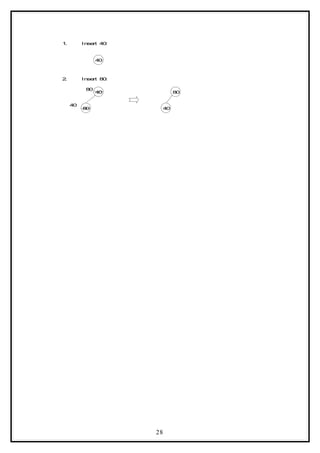
Example:
Form a heap by using the above algorithm for the given data 40, 80, 35, 90, 45, 50, 70.
27](https://image.slidesharecdn.com/datastructuresnotes1-221118172112-950a1a99/85/Data-Structures-Notes-27-320.jpg)
![9 0
8 0
4 0
5 0
9 0
3 5
9 0
9 0
8 0
4 5
4 0 3 5
5 0
8 0
3 5
4 0
8 0
4 . I n s e r t 9 0 :
3 . I n s e r t 3 5 :
5 . I n s e r t 4 5 :
6 . I n s e r t 5 0 :
4 5
4 0 4 5
9 0
7 . I n s e r t 7 0 :
9 0
4 5 3 5
7 0
4 5 3 5
3 5
8 0
4 0
4 0
8 0
5 0
7 0
5 0
5 0
3 5
7 0
5 0
8 0
4 0 3 5
4 0
9 0
8 0 3 5
4 0
9 0
9 0
8 0
adjust (a, i, n)
// The complete binary trees with roots a(2*i) and a(2*i + 1) are combined with a(i) to form a single
heap, 1 < i < n. No node has an address greater than n or less than 1. //
{
j = 2 *i ;
item = a[i] ;
while (j < n) do
29](https://image.slidesharecdn.com/datastructuresnotes1-221118172112-950a1a99/85/Data-Structures-Notes-29-320.jpg)
![{
if ((j < n) and (a (j) < a (j + 1)) then j ß j + 1;
// compare left and right child and let j be the larger child
if (item > a (j)) then break;
// a position for item is found
else a[ j / 2 ] = a[j] // move the larger child up a level
j = 2 * j;
}
a [ j / 2 ] = item;
}
Here the root node is 99. The last node is 26, it is in the level 3. So, 99 is replaced by 26 and this
node with data 26 is removed from the tree. Next 26 at root node is compared with its two child 45
and 63. As 63 is greater, they are interchanged. Now, 26 is compared with its children, namely, 57
and 42, as 57 is greater, so they are interchanged. Now, 26 appears as the leave node, hence re-
heap is completed.
9 9
4 5 6 3
3 5 5 7 4 2
2 9
2 7 1 2 2 4 2 6
6 3
4 5 5 7
3 5 2 6 4 2
2 9
2 7 1 2 2 4
2 6 6 3
2 6
5 7
2 6
De l e t i n g t h e n o d e w it h d at a 9 9 Af t er De l e t i o n of n o d e w it h d at a 9 9
HEAP SORT:
A heap sort algorithm works by first organizing the data to be sorted into a special type of binary tree
called a heap. Any kind of data can be sorted either in ascending order or in descending order using
heap tree. It does this with the following steps:
1. Build a heap tree with the given set of data.
2. a. Remove the top most item (the largest) and replace it with the last
element in the heap.
b. Re-heapify the complete binary tree.
c. Place the deleted node in the output.
3. Continue step 2 until the heap tree is empty.
Algorithm:
This algorithm sorts the elements a[n]. Heap sort rearranges them in-place in non-decreasing order.
First transform the elements into a heap.
heapsort(a, n)
{
heapify(a, n);
for i = n to 2 by – 1 do
{
temp = a[I];
a[i] = a[1];
a[1] = t;
adjust (a, 1, i – 1);
}
30](https://image.slidesharecdn.com/datastructuresnotes1-221118172112-950a1a99/85/Data-Structures-Notes-30-320.jpg)
![}
heapify (a, n)
//Readjust the elements in a[n] to form a heap.
{
for i ß n/2 to 1 by – 1 do adjust (a, i, n);
}
adjust (a, i, n)
// The complete binary trees with roots a(2*i) and a(2*i + 1) are combined with a(i) to form a single
heap, 1 < i < n. No node has an address greater than n or less than 1. //
{
j = 2 *i ;
item = a[i] ;
while (j < n) do
{
if ((j < n) and (a (j) < a (j + 1)) then j ß j + 1;
// compare left and right child and let j be the larger child
if (item > a (j)) then break;
// a position for item is found
else a[ j / 2 ] = a[j] // move the larger child up a level
j = 2 * j;
}
a [ j / 2 ] = item;
}
Time Complexity:
Each ‘n’ insertion operations takes O(log k), where ‘k’ is the number of elements in the heap at the
time.
Likewise, each of the ‘n’ remove operations also runs in time O(log k), where ‘k’ is the number of
elements in the heap at the time.
Since we always have k ≤n, each such operation runs in O(log n) time in the worst case.
Thus, for ‘n’ elements it takes O(n log n) time, so the priority queue sorting algorithm runs in O(n log
n) time when we use a heap to implement the priority queue.
Example 1:
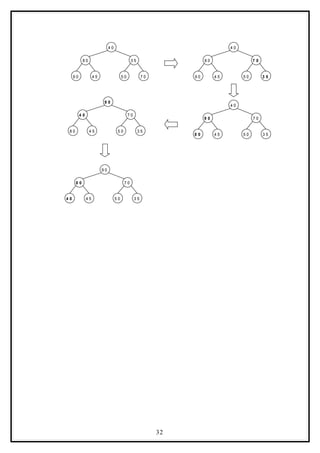
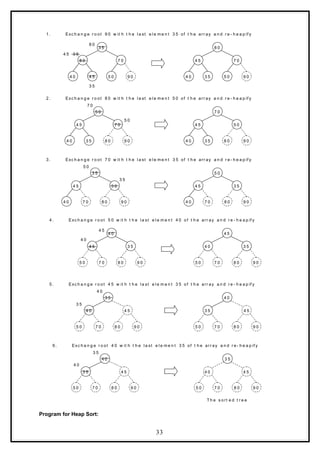
Form a heap from the set of elements (40, 80, 35, 90, 45, 50, 70) and sort the data using heap sort.
Solution:
First form a heap tree from the given set of data and then sort by repeated deletion operation:
31](https://image.slidesharecdn.com/datastructuresnotes1-221118172112-950a1a99/85/Data-Structures-Notes-31-320.jpg)
![# include <stdio.h>
# include <conio.h>
void adjust(int i, int n, int a[])
{
int j, item;
j = 2 * i;
item = a[i];
while(j <= n)
{
if((j < n) && (a[j] < a[j+1]))
j++;
if(item >= a[j])
break;
else
{
a[j/2] = a[j];
j = 2*j;
}
}
a[j/2] = item;
}
void heapify(int n, int a[])
{
int i;
for(i = n/2; i > 0; i--)
adjust(i, n, a);
}
void heapsort(int n,int a[])
{
int temp, i;
heapify(n, a);
for(i = n; i > 0; i--)
{
temp = a[i];
a[i] = a[1];
a[1] = temp;
adjust(1, i - 1, a);
}
}
void main()
{
int i, n, a[20];
clrscr();
printf("n How many element you want: ");
scanf("%d",&n);
printf("Enter %d elements: ",n);
for (i=1;i<=n;i++)
scanf("%d", &a[i]);
heapsort(n, a);
printf("n The sorted elements are: n");
for (i=1;i<=n;i++)
printf("%5d",a[i]);
getch();
}
MERGE SORT
34](https://image.slidesharecdn.com/datastructuresnotes1-221118172112-950a1a99/85/Data-Structures-Notes-34-320.jpg)
![Principle: The given list is divided into two roughly equal parts called
the left and the right subfiles. These subfiles are sorted using the
algorithm recursively and then the two subfiles are merged together to
obtain the sorted file.
Given a sequence of n elements A[1], ….A[N], the general idea is to
imagine them split into two sets A[1],…A[N/2] and A[(N/2) + 1],…A[N].
Each set is individually sorted, and the resulting sorted sequences are
merged to produce a single sorted sequence of N elements. Thus this
sorting method follows Divide and Conquer strategy.
Algorith m:
Procedure MERGE(A, low, mid, high)
// A is the array containing the list of data items
I ß low, J ß mid+1, K ß low
While I mid and J high
≤ ≤
If A[I] < A[J]
Then
Temp[K] ß A[I]
I ß I + 1
K ß K+1
Else
Temp[K] ß A[J]
J ß J + 1
K ß K + 1
End If
End While
If I > mid
Then
While J high
≤
Temp[K] ß A[J]
K ß K + 1
J ß J + 1
End While
Else
While I mid
≤
Temp[K] ß A[I]
K ß K + 1
I ß I + 1
End While
End If
Repeat for K = low to high step 1
A[K] ß Temp[K]
End Repeat
End MERGE
35](https://image.slidesharecdn.com/datastructuresnotes1-221118172112-950a1a99/85/Data-Structures-Notes-35-320.jpg)
![Procedure MERGESORT(A, low, high)
// A is the array containing the list of data items
If low < high
Then
mid ß (low + high)/2
MERGESORT(low, high)
MERGESORT(mid + 1, high)
MERGE(low, mid, high)
End If
End MERGESORT
The first algorithm MERGE can be applied on two sorted lists to
merge them. Initially, the index variable I points to low and J points to
mid + 1. A[I] is compared with A[J] and if A[I] found to be lesser than
A[J] then A[I] is stored in a temporary array and I is incremented
otherwise A[J] is stored in the temporary array and J is incremented.
This comparison is continued until either I crosses mid or J crosses high.
If I crosses the mid first then that implies that all the elements in first list
is accommodated in the temporary array and hence the remaining
elements in the second list can be put into the temporary array as it is. If
J crosses the high first then the remaining elements of first list is put as
it is in the temporary array. After this process we get a single sorted list.
Since this method merges 2 lists at a time, this is called 2-way merge
sort.
In the MERGESORT algorithm, the given unsorted list is first split
into N number of lists, each list consisting of only 1 element. Then the
MERGE algorithm is applied for first 2 lists to get a single sorted list.
Then the same thing is done on the next two lists and so on. This process
is continued till a single sorted list is obtained.
Example:
Let L à low, Mà mid, H à high
i = 0 i =1 i = 2 i = 3 i = 4 i = 5 i = 6 i = 7 i = 8 i = 9
42 23 74 11 65 58 94 36 99 87
U M H
In each pass the mid value is calculated and based on that the list is split
into two. This is done recursively and at last N number of lists each
having only one element is produced as shown.
36](https://image.slidesharecdn.com/datastructuresnotes1-221118172112-950a1a99/85/Data-Structures-Notes-36-320.jpg)
![Now merging operation is called on first two lists to produce a single
sorted list, then the same thing is done on the next two lists and so on.
Finally a single sorted list is obtained.
Progra m:
void array::sort(int low, int high)
{
int mid;
if (low<high)
{
mid=(low+high)/2;
sort(low,mid);
sort(mid+1, high);
merge(low, mid, high);
}
}
void array::merge(int low, int mid, int high)
{
int i=low, j=mid+1, k=low, temp[MAX];
while (i<=mid && j<=high)
if (a[i]<a[j])
temp[k+ +] = a[i + + ];
else
temp[k+ +] = a[j + + ];
if (i>mid)
while (j<=high)
temp[k+ +] = a[j + + ];
else
while (i<=mid)
temp[k+ +] = a[i + + ];
37](https://image.slidesharecdn.com/datastructuresnotes1-221118172112-950a1a99/85/Data-Structures-Notes-37-320.jpg)
![for (k=low; k<=high; k++)
a[k]=temp[k];
}
Advanta g e s:
1. Very useful for sorting bigger lists.
2. Applicable for external sorting also.
Disadvan t a g e s:
1. Needs a temporary array every time, for storing the new sorted
list.
shell Sort
The shell sort , sometimes called the “diminishing increment sort,”
improves on the insertion sort by breaking the original list into a number
of smaller sublists, each of which is sorted using an insertion sort. The
unique way that these sublists are chosen is the key to the shell sort.
Instead of breaking the list into sublists of contiguous items, the shell
sort uses an increment i, sometimes called the gap , to create a sublist by
choosing all items that are i items apart.
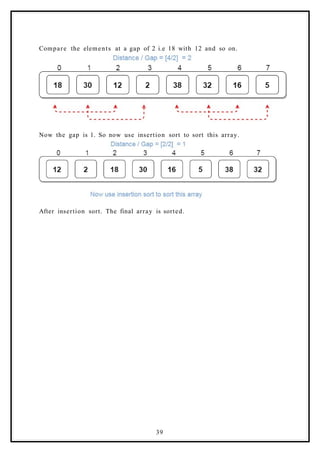
Example of shell Sort : Use Shell sort for the following array : 18, 32, 12,
5, 38, 30, 16, 2
Compare the elements at a gap of 4. i.e 18 with 38 and so on and swap if
first number is greater than second.
38](https://image.slidesharecdn.com/datastructuresnotes1-221118172112-950a1a99/85/Data-Structures-Notes-38-320.jpg)

![PUSH(x)
If top = MAX – 1
Then
Print “Stack is full”
Return
Else
Top = top + 1
A[top] = x
End if
End PUSH( )
Pop operation:
On deletion of elements the stack shrinks at the same end, as the
elements at the top get removed.
POP( )
If top = -1
Then
Print “Stack is empty”
Return
Else
Item = A[top]
A[Top] = 0
Top = top – 1
Return item
End if
End POP( )
If arrays are used for implementing the stacks, it would be very
easy to manage the stacks. However, the problem with an array is that
we are required to declare the size of the array before using it in a
program. This means the size of the stack should be fixed. We can
declare the array with a maximum size large enough to manage a stack.
As result, the stack can grow or shrink within the space reserved for it.
The following program implements the stack using array.
Progra m:
41](https://image.slidesharecdn.com/datastructuresnotes1-221118172112-950a1a99/85/Data-Structures-Notes-41-320.jpg)
![// Stack and various operations on it
#include <iostream.h >
#include <conio.h>
const int MAX=20;
class stack
{
private:
int a[MAX];
int top;
public:
stack();
void push(int x);
int pop();
void display();
};
stack::stack()
{
top=- 1;
}
void stack::push(int x)
{
if (top= = MAX- 1)
{
cout< <"nStack is full!";
return;
}
else
{
top+ +;
a[top]=x;
}
}
int stack::pop()
{
if (top= =- 1)
{
cout< <"nStack is empty!";
return NULL;
}
else
{
int item=a[top];
top- -;
return item;
42](https://image.slidesharecdn.com/datastructuresnotes1-221118172112-950a1a99/85/Data-Structures-Notes-42-320.jpg)
![}
}
void stack::display()
{
int temp=top;
while (temp!=- 1)
cout< <"n"< < a[temp- -];
}
void main()
{
clrscr();
stack s;
int n;
s.push(10);
s.push(20);
s.push(30);
s.push(40);
s.display();
n=s.pop();
cout< <"nPopped item:"< < n;
n=s.pop();
cout< <"nPopped item:"< < n;
s.display();
getch();
}
Output:
40
30
20
10
Popped item:40
Popped item:30
20
10
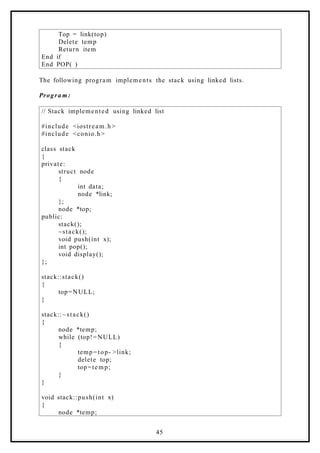
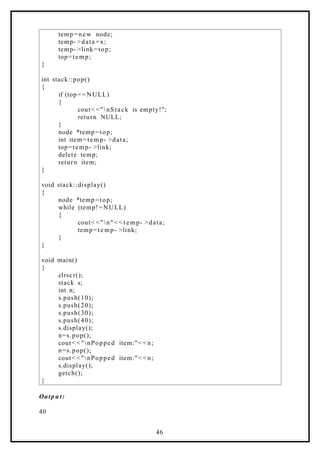
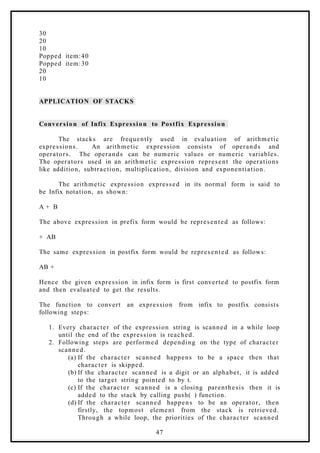
LINKED LIST IMPLEMENTATION OF STACK
Initially, when the stack is empty, top points to NULL. When an
element is added using the push operation, top is made to point to the
latest element whichever is added.
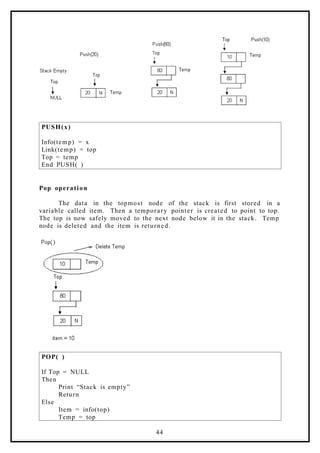
Push operation:
Create a temporary node and store the value of x in the data part
of the node. Now make link part of temp point to Top and then top point
to Temp. That will make the new node as the topmost element in the
stack.
43](https://image.slidesharecdn.com/datastructuresnotes1-221118172112-950a1a99/85/Data-Structures-Notes-43-320.jpg)
![and the character popped ‘opr’ are compared. Then
following steps are performed as per the precedence rule.
i. If ‘opr’ has higher or same priority as the character
scanned, then opr is added to the target string.
ii. If opr has lower precedence than the character
scanned, then the loop is terminated. Opr is pushed
back to the stack. Then, the character scanned is also
added to the stack.
(e) If the character scanned happens to be an opening
parenthesis, then the operators present in the stack are
retrieved through a loop. The loop continues till it does not
encounter a closing parenthesis. The operators popped, are
added to the target string pointed to by t.
2. Now the string pointed by t is the required postfix expression.
Progra m:
// Program to convert an Infix form to Postfix form
#include <iostream.h >
#include <string.h>
#include <ctype.h>
#include <conio.h>
const int MAX=50;
class infix
{
private:
char target[MAX], stack[MAX];
char *s, *t;
int top;
public:
infix();
void push(char c);
char pop();
void convert(char *str);
int priority (char c);
void show();
};
infix::infix()
{
top=- 1;
strcpy(target,"");
strcpy(stack,"");
t=target;
s="";
48](https://image.slidesharecdn.com/datastructuresnotes1-221118172112-950a1a99/85/Data-Structures-Notes-48-320.jpg)
![}
void infix::push(char c)
{
if (top= = MAX- 1)
cout< <"nStack is fulln!";
else
{
top+ +;
stack[top]=c;
}
}
char infix::pop()
{
if (top= =- 1)
{
cout< <"nStack is emptyn";
return -1;
}
else
{
char item=stack[top];
top- -;
return item;
}
}
void infix::convert(char *str)
{
s=str;
while(*s!='0')
{
if (*s==' '||*s= ='t')
{
s++;
continue;
}
if (isdigit(*s) || isalpha(*s))
{
while(isdigit(*s) || isalpha(*s))
{
*t=*s;
s++;
t++;
}
}
if (*s=='(')
{
push(*s);
s++;
49](https://image.slidesharecdn.com/datastructuresnotes1-221118172112-950a1a99/85/Data-Structures-Notes-49-320.jpg)
![else
{
if (c==' +'||c = = '- ')
return 1;
else
return 0;
}
}
void infix::show()
{
cout< < t a rget;
}
void main()
{
clrscr();
char expr[MAX], *res[MAX];
infix q;
cout< <"nEnter an expression in infix form: ";
cin> > expr;
q.convert(expr);
cout< <"nThe postfix expression is: ";
q.show();
getch();
}
Output:
Enter an expression in infix form: 5^2- 5
Stack is empty
The postfix expression is: 52^5-
Evaluation of Expression entered in postfix form
The program takes the input expression in postfix form. This
expression is scanned character by character. If the character scanned
is an operand, then first it is converted to a digit form and then it is
pushed onto the stack. If the character scanned is a blank space, then it
is skipped. If the character scanned is an operator, then the top two
elements from the stack are retrieved. An arithmetic operation is
performed between the two operands. The type of arithmetic operation
depends on the operator scanned from the string s. The result is then
pushed back onto the stack. These steps are repeated as long as the
string s is not exhausted. Finally the value in the stack is the required
result and is shown to the user.
51](https://image.slidesharecdn.com/datastructuresnotes1-221118172112-950a1a99/85/Data-Structures-Notes-51-320.jpg)
![Progra m:
// Program to evaluate an expression entered in postfix form
#include <iostream.h >
#include <stdlib.h>
#include <math.h >
#include <ctype.h>
#include <conio.h>
const int MAX=50;
class postfix
{
private:
int stack[MAX];
int top, n;
char *s;
public:
postfix();
void push(int item);
int pop();
void calculate(char *str);
void show();
};
postfix::postfix()
{
top=- 1;
}
void postfix::push(int item)
{
if (top= = MAX- 1)
cout< < e ndl < < "Stack is full";
else
{
top+ +;
stack[top]=item;
}
}
int postfix::pop()
{
if (top= =- 1)
{
cout< < e ndl < < "Stack is empty";
52](https://image.slidesharecdn.com/datastructuresnotes1-221118172112-950a1a99/85/Data-Structures-Notes-52-320.jpg)
![return NULL;
}
int data=stack[top];
top- -;
return data;
}
void postfix::calculate(char *str)
{
s=str;
int n1, n2, n3;
while (*s)
{
if (*s==' '||*s= ='t')
{
s++;
continue;
}
if (isdigit(*s))
{
n=*s- '0';
push(n);
}
else
{
n1=pop();
n2=pop();
switch(*s)
{
case '+':
n3=n2 + n 1;
break;
case '-':
n3=n2- n1;
break;
case '/':
n3=n2/n1;
break;
case '*':
n3=n2*n1;
break;
case '%':
n3=n2%n1;
break;
case '^':
n3=pow(n2, n1);
break;
default:
cout< <"Unknown operator";
exit(1);
}
push(n3);
53](https://image.slidesharecdn.com/datastructuresnotes1-221118172112-950a1a99/85/Data-Structures-Notes-53-320.jpg)
![}
s++;
}
}
void postfix::show()
{
n=pop();
cout< <"Result is: "<<n;
}
void main()
{
clrscr();
char expr[MAX];
cout << "nEnter postfix expression to be evaluated : ";
cin> > expr;
postfix q ;
q.calculate(expr);
q.show();
getch();
}
Output:
Enter postfix expression to be evaluated : 53^5-
Result is: 120
QUEUE
Queue: Queue is a linear data structure that permits insertion of new
element at one end and deletion of an element at the other end. The
end at which the deletion of an element take place is called front, and
the end at which insertion of a new element can take place is called
rear. The deletion or insertion of elements can take place only at the
front or rear end of the list respectively.
The first element that gets added into the queue is the first one to
get removed from the list. Hence, queue is also referred to as First- In-
First- Out list (FIFO). Queues can be represented using both arrays as
well as linked lists.
ARRAY IMPLEMENTATION OF QUEUE
If queue is implemented using arrays, the size of the array should
be fixed maximum allowing the queue to expand or shrink.
Operation s on a Queue
There are two common operations one in a queue. They are
addition of an element to the queue and deletion of an element from the
queue. Two variables front and rear are used to point to the ends of the
queue. The front points to the front end of the queue where deletion
takes place and rear points to the rear end of the queue, where the
54](https://image.slidesharecdn.com/datastructuresnotes1-221118172112-950a1a99/85/Data-Structures-Notes-54-320.jpg)
![addition of elements takes place. Initially, when the queue is full, the
front and rear is equal to -1.
Add(x)
An element can be added to the queue only at the rear end of the
queue. Before adding an element in the queue, it is checked whether
queue is full. If the queue is full, then addition cannot take place.
Otherwise, the element is added to the end of the list at the rear side.
ADDQ(x)
If rear = MAX – 1
Then
Print “Queue is full”
Return
Else
Rear = rear + 1
A[rear] = x
If front = -1
Then
Front = 0
End if
End if
End ADDQ( )
Del( )
The del( ) operation deletes the element from the front of the
queue. Before deleting and element, it is checked if the queue is empty.
If not the element pointed by front is deleted from the queue and front is
now made to point to the next element in the queue.
DELQ( )
If front = -1
Then
Print “Queue is Empty”
Return
55](https://image.slidesharecdn.com/datastructuresnotes1-221118172112-950a1a99/85/Data-Structures-Notes-55-320.jpg)
![Else
Item = A[front]
A[front] = 0
If front = rear
Then
Front = rear = -1
Else
Front = front + 1
End if
Return item
End if
End DELQ( )
Progra m:
// Queues and various operations on it – Using arrays
#include <iostream.h >
#include <conio.h>
const int MAX=10;
class queue
{
private:
int a[MAX], front, rear;
public:
queue();
void addq(int x);
int delq();
void display();
};
queue::queue()
{
front=rear =- 1;
}
void queue::addq(int x)
{
if (rear= = MAX- 1)
{
cout< <"Queue is full!";
return;
}
rear+ + ;
a[rear]=x;
if (front= =- 1)
front=0;
}
int queue::delq()
56](https://image.slidesharecdn.com/datastructuresnotes1-221118172112-950a1a99/85/Data-Structures-Notes-56-320.jpg)
![{
if (front= =- 1)
{
cout< <"Queue is empty!";
return NULL;
}
int item=a[front];
a[front]=0;
if (front= = r e a r)
front=rear =- 1;
else
front+ +;
return item;
}
void queue::display()
{
if (front= =- 1)
return;
for (int i=front; i<=rear; i++)
cout< < a[i]< <"t";
}
void main()
{
clrscr();
queue q;
q.addq(50);
q.addq(40);
q.addq(90);
q.display();
cout< < e ndl;
int i=q.delq();
cout< < e ndl;
cout< <i < < " deleted!";
cout< < e ndl;
q.display();
i=q.delq();
cout< < e ndl;
cout< <i < < " deleted!";
cout< < e ndl;
i=q.delq();
cout< <i < < " deleted!";
cout< < e ndl;
i=q.delq();
getch();
}
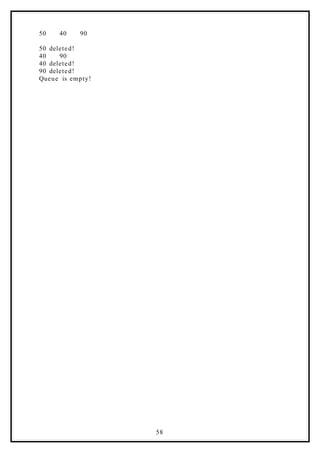
Output:
57](https://image.slidesharecdn.com/datastructuresnotes1-221118172112-950a1a99/85/Data-Structures-Notes-57-320.jpg)
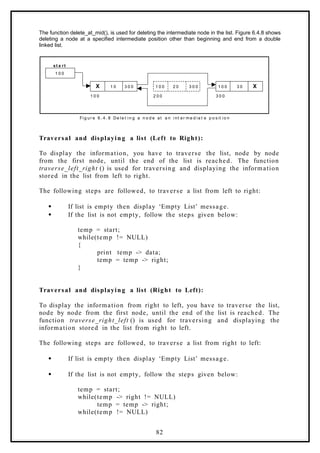
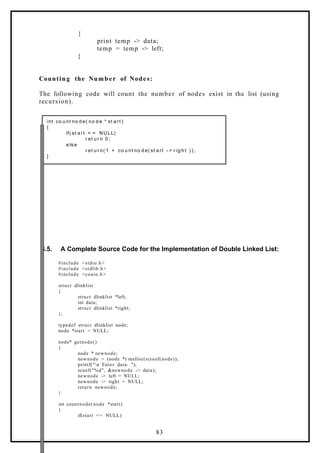
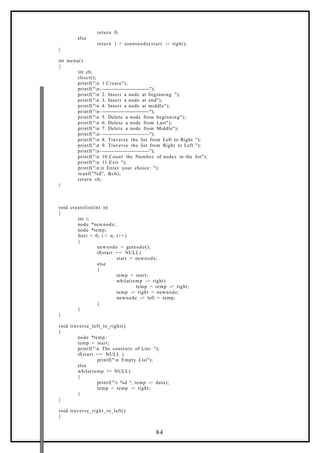
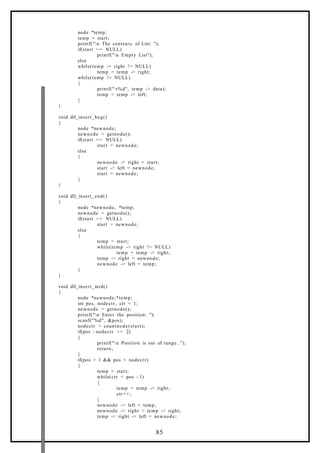
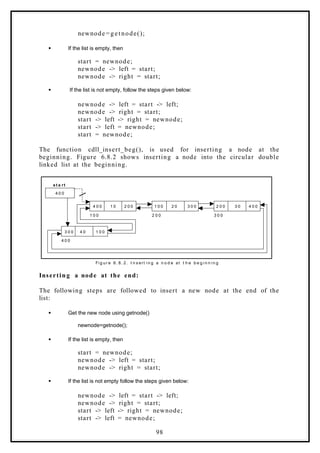
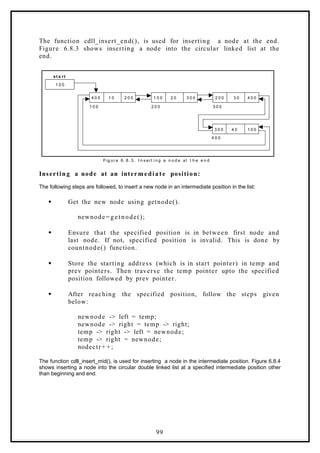
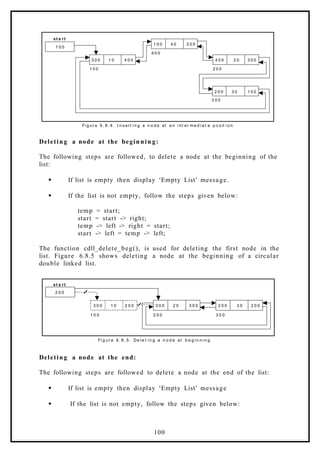
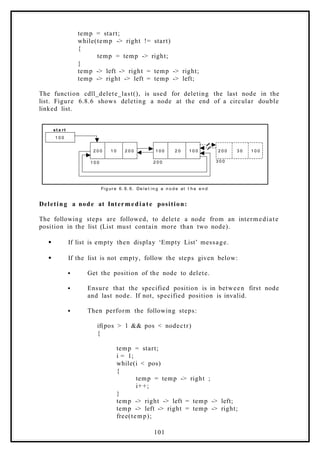
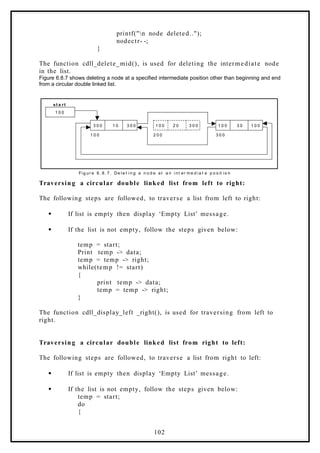
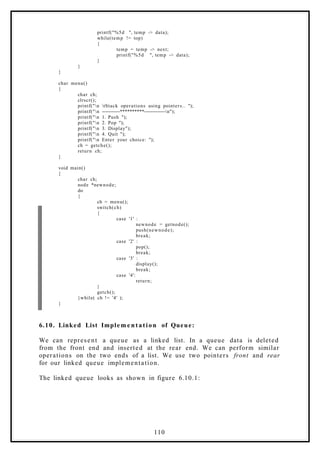
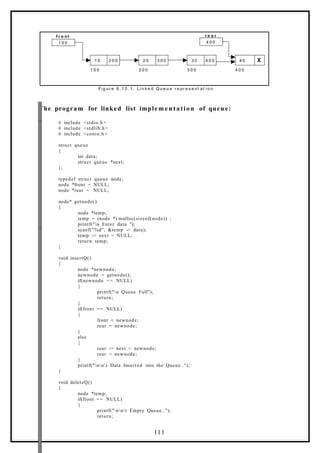
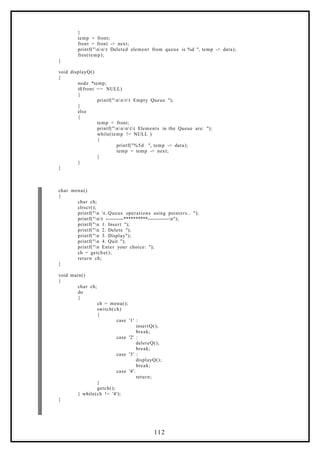

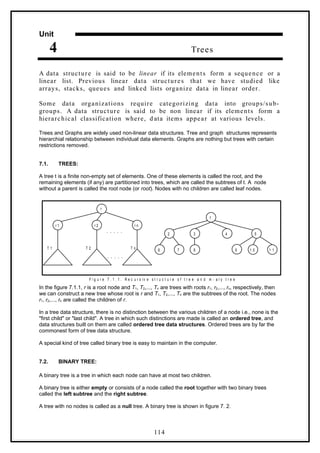
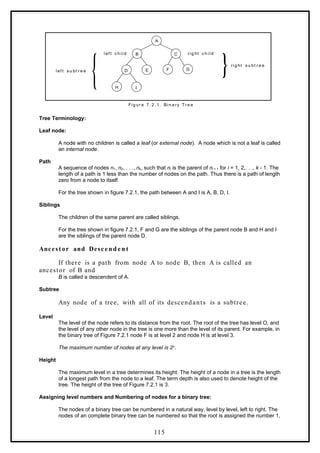
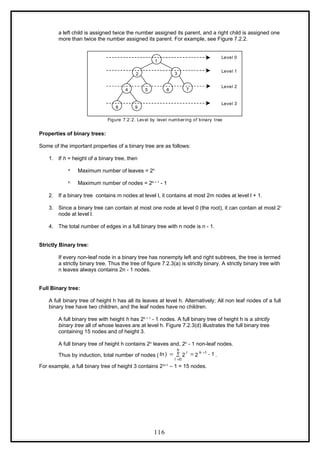
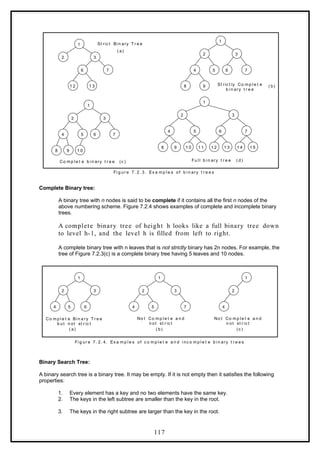
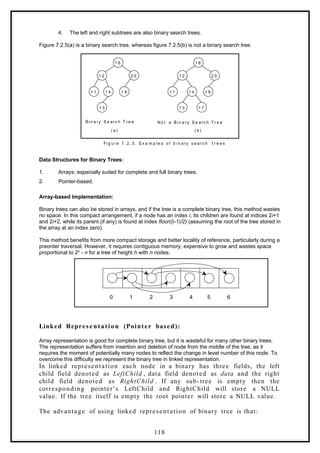
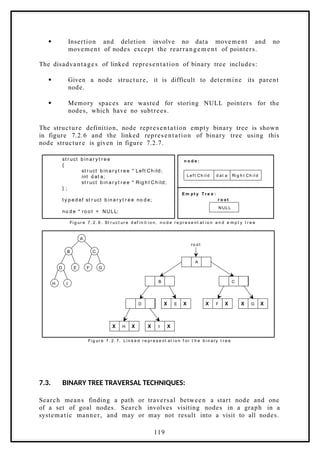
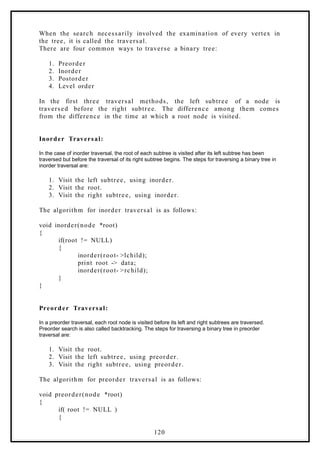
![print root -> data;
preorder (root -> lchild);
preorder (root -> rchild);
}
}
Postorder Traversal:
In a postorder traversal, each root is visited after its left and right
subtrees have been traversed. The steps for traversing a binary tree in
postorder traversal are:
1. Visit the left subtree, using postorder.
2. Visit the right subtree, using postorder
3. Visit the root.
The algorithm for postorder traversal is as follows:
void postorder(node *root)
{
if( root != NULL )
{
postorder (root -> lchild);
postorder (root -> rchild);
print (root -> data);
}
}
Level order Traversal:
In a level order traversal elements are visited by level from top to bottom. Within levels, elements are
visited from left to right. The level order traversal requires a queue data structure. So, it is not possible
to develop a recursive procedure to traverse the binary tree in level order. This is nothing but a
breadth first search technique.
The algorithm for level order traversal is as follows:
void levelorder()
{
int j;
for(j = 0; j < ctr; j++)
{
if(tree[j] != NULL)
print tree[j] -> data;
}
}
121](https://image.slidesharecdn.com/datastructuresnotes1-221118172112-950a1a99/85/Data-Structures-Notes-121-320.jpg)
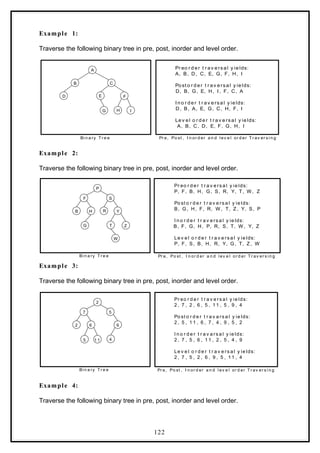
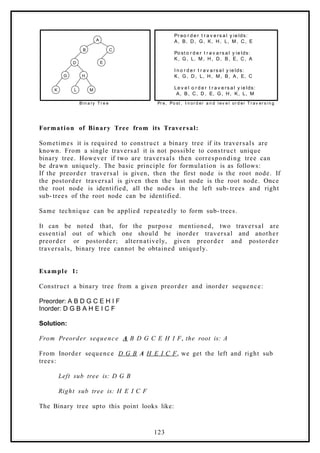
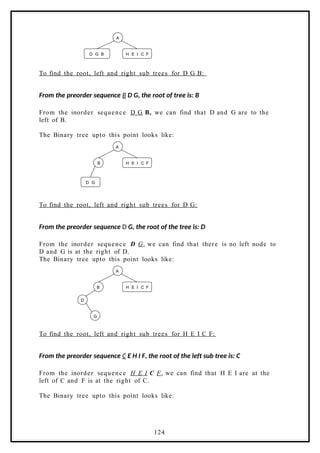
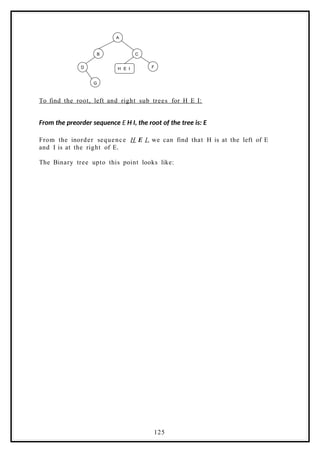
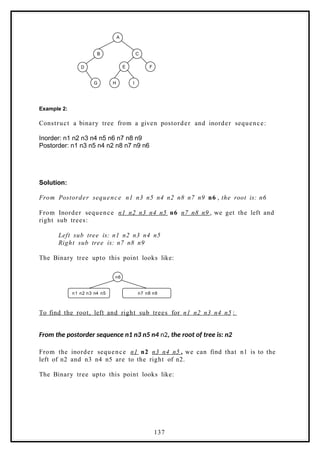
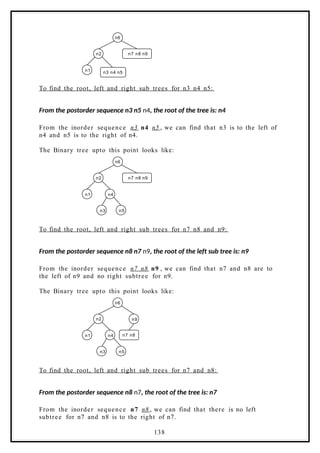
![The Binary tree upto this point looks like:
n6
n2
n1 n4
n5
n3
n9
n8
n7
Binary Tree Creation and Traversal Using Arrays:
This program performs the following operations:
1. Creates a complete Binary Tree
2. Inorder traversal
3. Preorder traversal
4. Postorder traversal
5. Level order traversal
6. Prints leaf nodes
7. Finds height of the tree created
# include <stdio.h>
# include <stdlib.h>
struct tree
{
struct tree* lchild;
char data[10];
struct tree* rchild;
};
typedef struct tree node;
int ctr;
node *tree[100];
node* getnode()
{
node *temp ;
temp = (node*) malloc(sizeof(node));
printf("n Enter Data: ");
scanf("%s",temp- >data);
temp- >lchild = NULL;
temp- >rchild = NULL;
return temp;
}
void create_fbinarytree()
{
int j, i=0;
printf("n How many nodes you want: ");
scanf("%d",&ctr);
tree[0] = getnode();
j = ctr;
j--;
do
{
if( j > 0 ) /* left child */
139](https://image.slidesharecdn.com/datastructuresnotes1-221118172112-950a1a99/85/Data-Structures-Notes-128-320.jpg)
![{
tree[ i * 2 + 1 ] = getnode();
tree[i]- >lchild = tree[i * 2 + 1];
j--;
}
if( j > 0 ) /* right child */
{
tree[i * 2 + 2] = getnode();
j--;
tree[i]- >rchild = tree[i * 2 + 2];
}
i++;
} while( j > 0);
}
void inorder(node *root)
{
if( root != NULL )
{
inorder(root- >lchild);
printf("%3s",root- >data);
inorder(root- >rchild);
}
}
void preorder(node *root)
{
if( root != NULL )
{
printf("%3s",root- >data);
preorder(root- >lchild);
preorder(root- >rchild);
}
}
void postorder(node *root)
{
if( root != NULL )
{
postorder(root- >lchild);
postorder(root- >rchild);
printf("%3s",root- >data);
}
}
void levelorder()
{
int j;
for(j = 0; j < ctr; j++)
{
if(tree[j] != NULL)
printf("%3s",tree[j]- >data);
}
}
void print_leaf(node *root)
{
if(root != NULL)
{
if(root- >lchild == NULL && root- >rchild == NULL)
printf("%3s ",root- >data);
print_leaf(root- >lchild);
print_leaf(root- >rchild);
}
}
int height(node *root)
{
if(root == NULL)
{
140](https://image.slidesharecdn.com/datastructuresnotes1-221118172112-950a1a99/85/Data-Structures-Notes-129-320.jpg)
![return 0;
}
if(root- >lchild == NULL && root- >rchild == NULL)
return 0;
else
return (1 + max(height(root- >lchild), height(root- >rchild)));
}
void main()
{
int i;
create_fbinarytree();
printf("n Inorder Traversal: ");
inorder(tree[0]);
printf("n Preorder Traversal: ");
preorder(tree[0]);
printf("n Postorder Traversal: ");
postorder(tree[0]);
printf("n Level Order Traversal: ");
levelorder();
printf("n Leaf Nodes: ");
print_leaf(tree[0]);
printf("n Height of Tree: %d ", height(tree[0]));
}
Binary Tree Creation and Traversal Using Pointers:
This program performs the following operations:
1. Creates a complete Binary Tree
2. Inorder traversal
3. Preorder traversal
4. Postorder traversal
5. Level order traversal
6. Prints leaf nodes
7. Finds height of the tree created
8. Deletes last node
9. Finds height of the tree created
# include <stdio.h>
# include <stdlib.h>
struct tree
{
struct tree* lchild;
char data[10];
struct tree* rchild;
};
typedef struct tree node;
node *Q[50];
int node_ctr;
node* getnode(void)
{
node *temp ;
temp = (node*) malloc(sizeof(node));
printf("n Enter Data: ");
fflush(stdin);
scanf("%s",temp- >data);
temp- >lchild = NULL;
temp- >rchild = NULL;
return temp;
}
void create_binarytree(node *root)
{
char option;
141](https://image.slidesharecdn.com/datastructuresnotes1-221118172112-950a1a99/85/Data-Structures-Notes-130-320.jpg)
![if( root != NULL )
{
printf("n Node %s has Left SubTree(Y/N)",root- >data);
fflush(stdin);
scanf("%c",&option);
if( option= = 'Y' || option == 'y')
{
root- >lchild = getnode();
create_binarytree(root- >lchild);
}
else
{
root- >lchild = NULL;
create_binarytree(root- >lchild);
}
printf("n Node %s has Right SubTree(Y/N) ",root- >data);
fflush(stdin);
scanf("%c",&option);
if( option= = 'Y' || option == 'y')
{
root- >rchild = getnode();
create_binarytree(root- >rchild);
}
else
{
root- >rchild = NULL;
create_binarytree(root- >rchild);
}
}
}
void make_Queue(node *root,int parent)
{
if(root != NULL)
{
node_ctr+ +;
Q[parent] = root;
make_Queue(root- >lchild,parent*2 +1);
make_Queue(root- >rchild,parent*2 +2);
}
}
delete_node(node *root, int parent)
{
int index = 0;
if(root == NULL)
printf("n Empty TREE ");
else
{
node_ctr = 0;
make_Queue(root,0);
index = node_ctr- 1;
Q[index] = NULL;
parent = (index- 1) /2;
if( 2* parent + 1 == index )
Q[parent]- >lchild = NULL;
else
Q[parent]- >rchild = NULL;
}
printf("n Node Deleted ..");
}
void inorder(node *root)
{
if(root != NULL)
{
inorder(root- >lchild);
printf("%3s",root- >data);
142](https://image.slidesharecdn.com/datastructuresnotes1-221118172112-950a1a99/85/Data-Structures-Notes-131-320.jpg)
![inorder(root- >rchild);
}
}
void preorder(node *root)
{
if( root != NULL )
{
printf("%3s",root- >data);
preorder(root- >lchild);
preorder(root- >rchild);
}
}
void postorder(node *root)
{
if( root != NULL )
{
postorder(root- >lchild);
postorder(root- >rchild);
printf("%3s", root- >data);
}
}
void print_leaf(node *root)
{
if(root != NULL)
{
if(root- >lchild == NULL && root- >rchild == NULL)
printf("%3s ",root- >data);
print_leaf(root- >lchild);
print_leaf(root- >rchild);
}
}
int height(node *root)
{
if(root == NULL)
return -1;
else
return (1 + max(height(root- >lchild), height(root- >rchild)));
}
void print_tree(node *root, int line)
{
int i;
if(root != NULL)
{
print_tree(root- >rchild,line+1);
printf("n");
for(i=0;i<line;i+ +)
printf(" ");
printf("%s", root- >data);
print_tree(root- >lchild,line+1);
}
}
void level_order(node *Q[],int ctr)
{
int i;
for( i = 0; i < ctr ; i++)
{
if( Q[i] != NULL )
printf("%5s",Q[i]- >data);
}
}
int menu()
{
int ch;
143](https://image.slidesharecdn.com/datastructuresnotes1-221118172112-950a1a99/85/Data-Structures-Notes-132-320.jpg)
![}
getch();
}while(1);
}
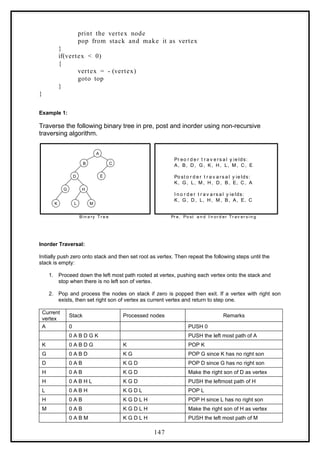
Non Recursive Binary Tree Traversal Algorithms:
We can also traverse a binary tree non recursively using stack data
structure for inorder, preorder and postorder.
Inorder Traversal:
Initially push zero onto stack and then set root as vertex. Then repeat the following steps until the
stack is empty:
1. Proceed down the left most path rooted at vertex, pushing each vertex onto the stack and
stop when there is no left son of vertex.
2. Pop and process the nodes on stack if zero is popped then exit. If a
vertex with right son exists, then set right son of vertex as current
vertex and return to step one.
Algorith m inorder()
{
stack[1] = 0
vertex = root
top: while(vertex 0)
≠
{
push the vertex into the stack
vertex = leftson(vertex)
}
pop the element from the stack and make it as vertex
while(vertex 0)
≠
{
print the vertex node
if(rightson(vertex) 0)
≠
{
vertex = rightson(vertex)
goto top
}
pop the element from the stack and made it as vertex
}
}
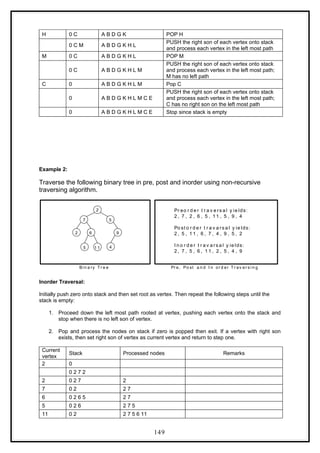
Preorder Traversal:
Initially push zero onto stack and then set root as vertex. Then repeat the following steps until the
stack is empty:
145](https://image.slidesharecdn.com/datastructuresnotes1-221118172112-950a1a99/85/Data-Structures-Notes-134-320.jpg)
![1. Proceed down the left most path by pushing the right son of vertex onto stack, if any and
process each vertex. The traversing ends after a vertex with no left child exists.
2. Pop the vertex from stack, if vertex 0 then return to step one otherwise exit.
≠
Algorith m preorder( )
{
stack[1] = 0
vertex = root.
while(vertex 0)
≠
{
print vertex node
if(rightson(vertex) 0)
≠
push the right son of vertex into the stack.
if(leftson(vertex) 0)
≠
vertex = leftson(vertex)
else
pop the element from the stack and made it as vertex
}
}
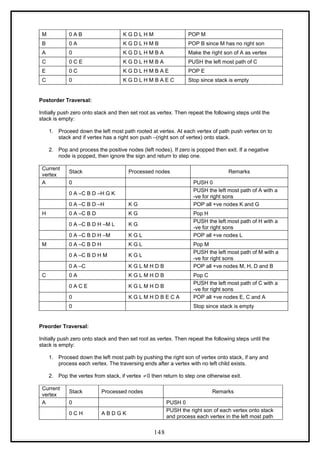
Postorder Traversal:
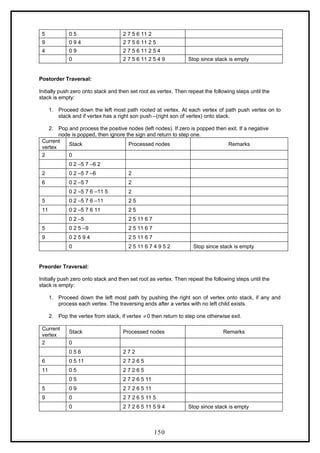
Initially push zero onto stack and then set root as vertex. Then repeat the following steps until the
stack is empty:
1. Proceed down the left most path rooted at vertex. At each vertex of path push vertex on to
stack and if vertex has a right son push –(right son of vertex) onto stack.
2. Pop and process the positive nodes (left nodes). If zero is popped then exit. If a negative
node is popped, then ignore the sign and return to step one.
Algorith m postorder( )
{
stack[1] = 0
vertex = root
top: while(vertex 0)
≠
{
push vertex onto stack
if(rightson(vertex) 0)
≠
push – (vertex) onto stack
vertex = leftson(vertex)
}
pop from stack and make it as vertex
while(vertex > 0)
{
146](https://image.slidesharecdn.com/datastructuresnotes1-221118172112-950a1a99/85/Data-Structures-Notes-135-320.jpg)
![multigraph representation, instead of entry 0 or 1, the entry will be between number of edges between
two vertices.
In case of weighted graph, the entries are weights of the edges between the vertices. The adjacency
matrix for a weighted graph is called as cost adjacency matrix. Figure 7.5.3(b) shows the cost
adjacency matrix representation of the graph G2 shown in figure 7.5.3(a).
B D
G
E
C
F
A
6
3
2
4
1
2 1
4
1
2
4
2
Fi g ur e 7. 5. 3 W e i g h t e d gr a p h a n d it s Co st a d j ac e nc y m a t r i x
( a)
Adjacency List :
In this representation, the n rows of the adjacency matrix are
represented as n linked lists. An array Adj[1, 2, . . . . . n] of pointers
where for 1 < v < n, Adj[v] points to a linked list containing the vertices
which are adjacent to v (i.e. the vertices that can be reached from v by a
single edge). If the edges have weights then these weights may also be
stored in the linked list elements. For the graph G in figure 7.5.2 (a), the
adjacency list in shown in figure 7.5.4 (b).
1
0
1 1
0 1
0 0
1
3
2
1
1
3
2
1
2
3
3
3
1 2
2
( a) A d j ac e nc y M at r i x ( b) A d j ac e nc y Li st
Fi g ur e 7. 5. 4 A d j ac e n c y m a t r i x a n d a d j ac e nc y l i st
Incidence Matrix:
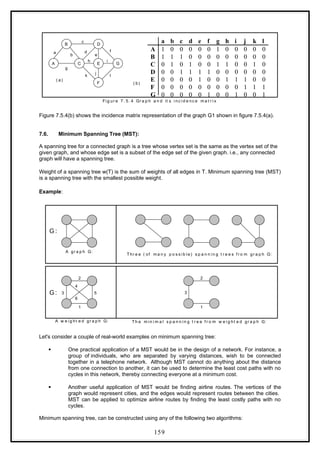
In this representation, if G is a graph with n vertices, e edges and no self loops, then incidence matrix
A is defined as an n by e matrix, say A = (ai,j), where
otherwise
v
to
incident
j
edge
an
is
there
if
a i
j
i
0
1
,
Here, n rows correspond to n vertices and e columns correspond to e edges. Such a matrix is called
as vertex-edge incidence matrix or simply incidence matrix.
A B C D E F G
A 0 3 6
B 3 0 2 4
C 6 2 0 1 4 2
D 4 1 0 2 4
E 4 2 0 2 1
F 2 2 0 1
G 4 1 1 0
G2:
(b)
158](https://image.slidesharecdn.com/datastructuresnotes1-221118172112-950a1a99/85/Data-Structures-Notes-147-320.jpg)
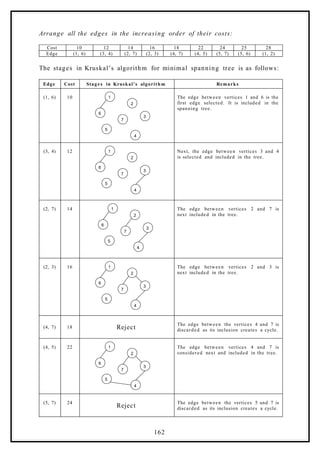
![(5, 6) 25
2
1
3
4
5
6
7
Finally, the edge between vertices 5 and 6 is
considered and included in the tree built. This
completes the tree.
The cost of the minimal spanning tree is
99 .
7.6.2. Reachability Matrix (Warshall’s Algorithm) :
Warshall’s algorithm requires to know which edges exist and which do
not. It doesn’t need to know the lengths of the edges in the given
directed graph. This information is conveniently displayed by adjacency
matrix for the graph, in which a ‘1’ indicates the existence of an edge
and ‘0’ indicates non- existence.
A d j ac e nc y M at r i x W a r s h a l l’ s A l g or it h m
A l l Pa ir s Rec h a b i l it y
M at r i x
It begins with the adjacency matrix for the given graph, which is called
A0, and then updates the matrix ‘n’ times, producing matrices called A1,
A2, . . . . . , An and then stops.
In warshall’s algorithm the matrix Ai merely contains information about
the existence of i – paths. A 1 entry in the matrix Ai will correspond to the
existence of an i – paths and O entry will correspond to non- existence.
Thus when the algorithm stops, the final matrix, the matrix An, contains
the desired connectivity information.
A 1 entry indicates a pair of vertices, which are connected, and O entry
indicates a pair, which are not. This matrix is called a reachability matrix
or path matrix for the graph. It is also called the transitive closure of the
original adjacency matrix.
The update rule for computing Ai from Ai-1 in warshall’s algorithm is:
Ai [x, y] = Ai-1 [x, y] ۷ (Ai-1 [x, i] ٨ Ai-1 [i, y]) ---- (1)
Example 1:
Use warshall’s algorithm to calculate the reachability matrix for the
graph:
163](https://image.slidesharecdn.com/datastructuresnotes1-221118172112-950a1a99/85/Data-Structures-Notes-152-320.jpg)
![3
2
1 4
1 1
4
7
7
5
1
6
We begin with the adjacency matrix of the graph ‘A0’
0
1
1
1
0
0
0
0
1
1
0
0
0
1
1
0
4
3
2
1
0
A
The first step is to compute ‘A1’ matrix. To do so we will use the updating
rule – (1).
Before doing so we notice that only 1 entry in A0 must remain 1 in A1,
since in Boolean algebra 1 + (any thing) = 1. Since these are only nine 0
entries in A0, there are only nine entries in A0 that need to be updated.
A1[1, 1] = A0[1, 1] ۷ (A0[1, 1] ٨ A0[1, 1]) = 0 ۷ (0 ٨ 0) = 0
A1[2, 1] = A0[2, 1] ۷ (A0[2, 1] ٨ A0[1, 1]) = 0 ۷ (0 ٨ 0) = 0
A1[2, 2] = A0[2, 2] ۷ (A0[2, 1] ٨ A0[1, 2]) = 0 ۷ (0 ٨ 1) = 0
A1[3, 1] = A0[3, 1] ۷ (A0[3, 1] ٨ A0[1, 1]) = 0 ۷ (0 ٨ 0) = 0
A1[3, 2] = A0[3, 2] ۷ (A0[3, 1] ٨ A0[1, 2]) = 0 ۷ (0 ٨ 1) = 0
A1[3, 3] = A0[3, 3] ۷ (A0[3, 1] ٨ A0[1, 3]) = 0 ۷ (0 ٨ 1) = 0
A1[3, 4] = A0[3, 4] ۷ (A0[3, 1] ٨ A0[1, 4]) = 0 ۷ (0 ٨ 0) = 0
A1[4, 4] = A0[4, 4] ۷ (A0[4, 1] ٨ A0[1, 4]) = 0 ۷ (1 ٨ 0) = 0
0
1
1
1
0
0
0
0
1
1
0
0
0
1
1
0
4
3
2
1
1
A
Next, A2 must be calculated from A1; but again we need to update the 0
entries,
A2[1, 1] = A1[1, 1] ۷ (A1[1, 2] ٨ A1[2, 1]) = 0 ۷ (1 ٨ 0) = 0
A2[1, 4] = A1[1, 4] ۷ (A1[1, 2] ٨ A1[2, 4]) = 0 ۷ (1 ٨ 1) = 1
A2[2, 1] = A1[2, 1] ۷ (A1[2, 2] ٨ A1[2, 1]) = 0 ۷ (0 ٨ 0) = 0
A2[2, 2] = A1[2, 2] ۷ (A1[2, 2] ٨ A1[2, 2]) = 0 ۷ (0 ٨ 0) = 0
A2[3, 1] = A1[3, 1] ۷ (A1[3, 2] ٨ A1[2, 1]) = 0 ۷ (0 ٨ 0) = 0
A2[3, 2] = A1[3, 2] ۷ (A1[3, 2] ٨ A1[2, 2]) = 0 ۷ (0 ٨ 0) = 0
164](https://image.slidesharecdn.com/datastructuresnotes1-221118172112-950a1a99/85/Data-Structures-Notes-153-320.jpg)
![A2[3, 3] = A1[3, 3] ۷ (A1[3, 2] ٨ A1[2, 3]) = 0 ۷ (0 ٨ 1) = 0
A2[3, 4] = A1[3, 4] ۷ (A1[3, 2] ٨ A1[2, 4]) = 0 ۷ (0 ٨ 1) = 0
A2[4, 4] = A1[4, 4] ۷ (A1[4, 2] ٨ A1[2, 4]) = 0 ۷ (1 ٨ 1) = 1
1
1
1
1
0
0
0
0
1
1
0
0
1
1
1
0
4
3
2
1
2
A
This matrix has only seven 0 entries, and so to compute A3, we need to do
only seven computations.
A3[1, 1] = A2[1, 1] ۷ (A2[1, 3] ٨ A2[3, 1]) = 0 ۷ (1 ٨ 0) = 0
A3[2, 1] = A2[2, 1] ۷ (A2[2, 3] ٨ A2[3, 1]) = 0 ۷ (1 ٨ 0) = 0
A3[2, 2] = A2[2, 2] ۷ (A2[2, 3] ٨ A2[3, 2]) = 0 ۷ (1 ٨ 0) = 0
A3[3, 1] = A2[3, 1] ۷ (A2[3, 3] ٨ A2[3, 1]) = 0 ۷ (0 ٨ 0) = 0
A3[3, 2] = A2[3, 2] ۷ (A2[3, 3] ٨ A2[3, 2]) = 0 ۷ (0 ٨ 0) = 0
A3[3, 3] = A2[3, 3] ۷ (A2[3, 3] ٨ A2[3, 3]) = 0 ۷ (0 ٨ 0) = 0
A3[3, 4] = A2[3, 4] ۷ (A2[3, 3] ٨ A2[3, 4]) = 0 ۷ (0 ٨ 0) = 0
1
1
1
1
0
0
0
0
1
1
0
0
1
1
1
0
4
3
2
1
3
A
Once A3 is calculated, we use the update rule to calculate A4 and stop.
This matrix is the reachability matrix for the graph.
A4[1, 1] = A3 [1, 1] ۷ (A3 [1, 4] ٨ A3 [4, 1]) = 0 ۷ (1 ٨ 1) = 0 ۷ 1 = 1
A4[2, 1] = A3 [2, 1] ۷ (A3 [2, 4] ٨ A3 [4, 1]) = 0 ۷ (1 ٨ 1) = 0 ۷ 1 = 1
A4[2, 2] = A3 [2, 2] ۷ (A3 [2, 4] ٨ A3 [4, 2]) = 0 ۷ (1 ٨ 1) = 0 ۷ 1 = 1
A4[3, 1] = A3 [3, 1] ۷ (A3 [3, 4] ٨ A3 [4, 1]) = 0 ۷ (0 ٨ 1) = 0 ۷ 0 = 0
A4[3, 2] = A3 [3, 2] ۷ (A3 [3, 4] ٨ A3 [4, 2]) = 0 ۷ (0 ٨ 1) = 0 ۷ 0 = 0
A4[3, 3] = A3 [3, 3] ۷ (A3 [3, 4] ٨ A3 [4, 3]) = 0 ۷ (0 ٨ 1) = 0 ۷ 0 = 0
A4[3, 4] = A3 [3, 4] ۷ (A3 [3, 4] ٨ A3 [4, 4]) = 0 ۷ (0 ٨ 1) = 0 ۷ 0 = 0
1
1
1
1
0
0
0
0
1
1
1
1
1
1
1
1
4
3
2
1
4
A
165](https://image.slidesharecdn.com/datastructuresnotes1-221118172112-950a1a99/85/Data-Structures-Notes-154-320.jpg)
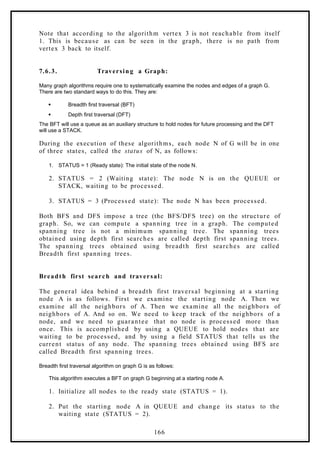
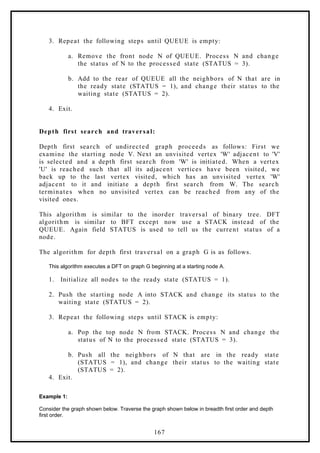
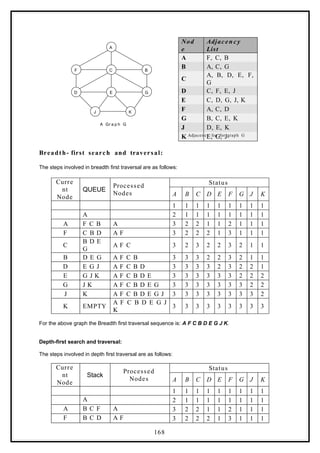
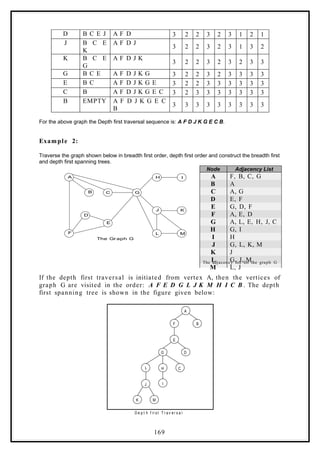
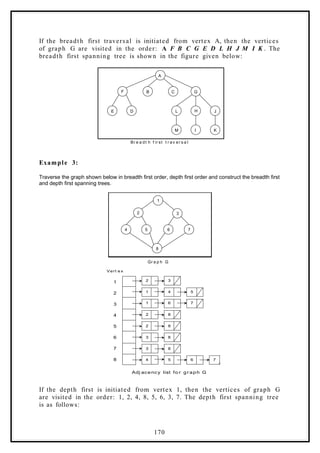
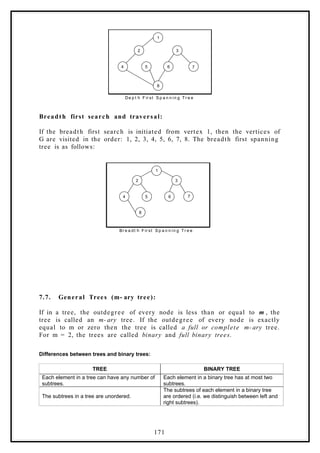
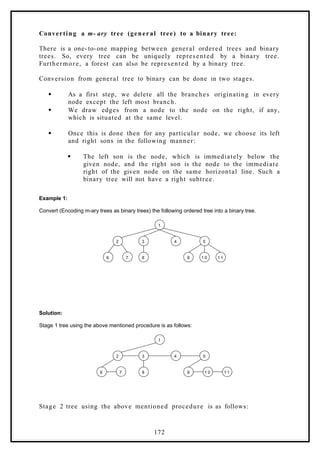
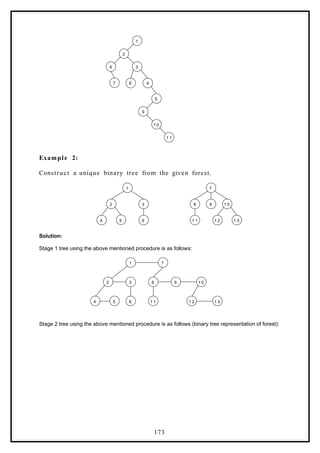
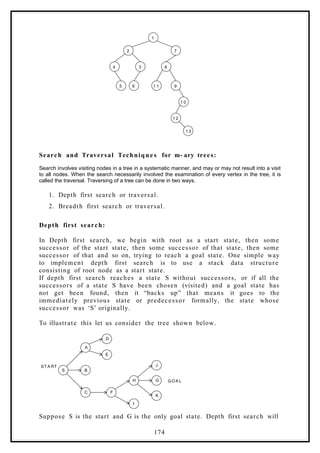
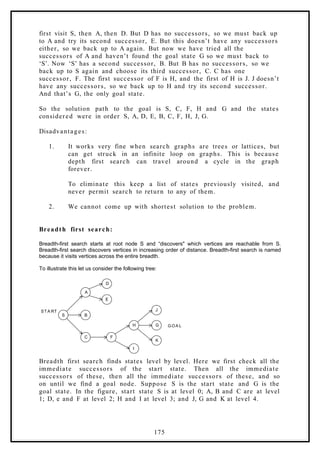
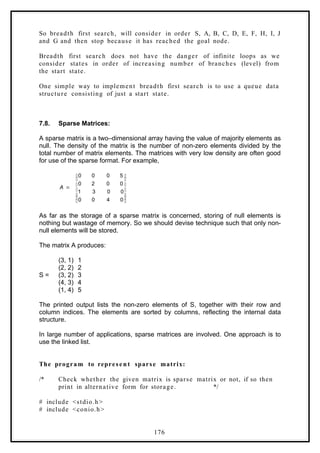
![main()
{
int matrix[20][20], m, n, total_elements, total_zeros = 0, i, j;
clrscr();
printf("n Enter Number of rows and columns: ");
scanf("%d %d",&m, &n);
total_elements = m * n;
printf("n Enter data for sparse matrix: ");
for(i = 0; i < m ; i++)
{
for( j = 0; j < n ; j++)
{
scanf("%d", &matrix[i][j]);
if( matrix[i][j] == 0)
{
total_zeros + +;
}
}
}
if(total_zeros > total_elements/2 )
{
printf("n Given Matrix is Sparse Matrix..");
printf("n The Representaion of Sparse Matrix is: n");
printf("n Row t Col t Value ");
for(i = 0; i < m ; i++)
{
for( j = 0; j < n ; j++)
{
if( matrix[i][j] != 0)
{
printf("n %d t %d t %d",i,j,matrix[i][j]);
}
}
}
}
else
printf("n Given Matrix is Not a Sparse Matrix..");
}
177](https://image.slidesharecdn.com/datastructuresnotes1-221118172112-950a1a99/85/Data-Structures-Notes-166-320.jpg)


