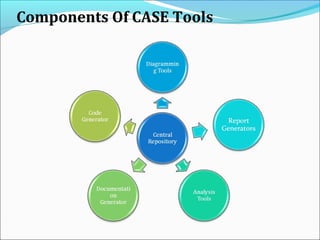
Components Of CASE Tools
Layers Of CASE Tools
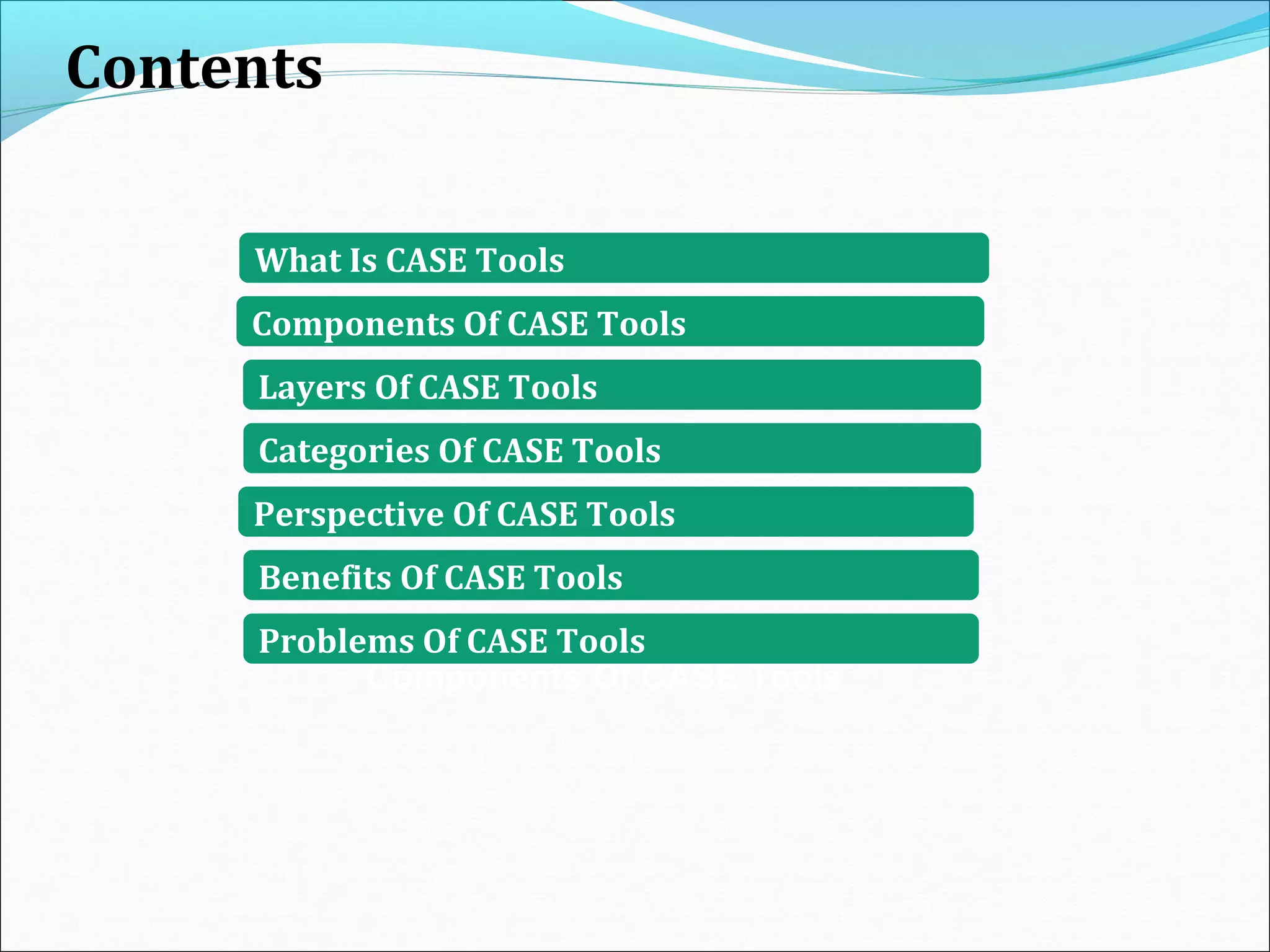
Contents
Components Of CASE Tools
What Is CASE Tools
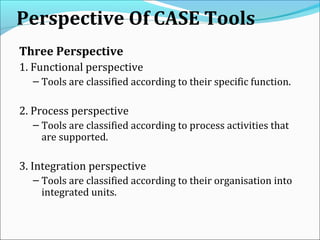
Perspective Of CASE Tools
Benefits Of CASE Tools
Problems Of CASE Tools
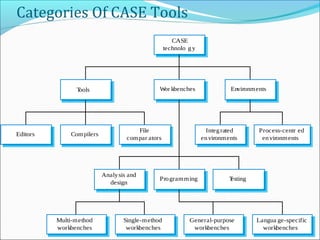
Categories Of CASE Tools
(CASE)
COMPUTER AIDED SYSTEMS ENGINEERING
CASE is a term covering a whole range of tools and methods that SUPPORT
SOFTWARE SYSTEM DEVELOPMENT.
CASE tools are programs (software) that automate or support one or more phases of
a systems development life cycle.
A collection of tools used to support the software development process.
In other words,
1. Software that is used to support software process activities .
2. Provides software process support by
•automating some process activities
•providing information about the software being developed
3. Currently used in every phase/workflow of life cycle
Two types of tools used by software engineers:
1. Analytical tools
– Stepwise refinement
– Cost-benefit analysis
– Software metrics
2. CASE tools
Components Of CASE Tools
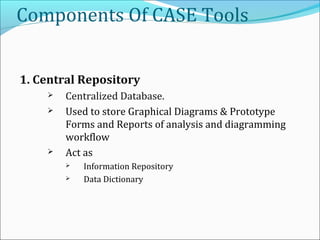
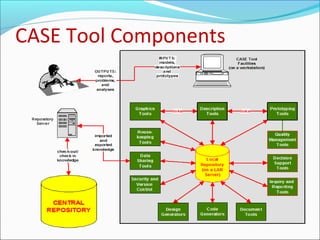
1. Central Repository
 Centralized Database.
 Used to store Graphical Diagrams & Prototype
Forms and Reports of analysis and diagramming
workflow
 Act as
 Information Repository
 Data Dictionary
Components Of CASE Tools
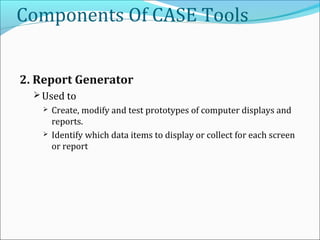
2. Report Generator
 Used to
 Create, modify and test prototypes of computer displays and
reports.
 Identify which data items to display or collect for each screen
or report
Components Of CASE Tools
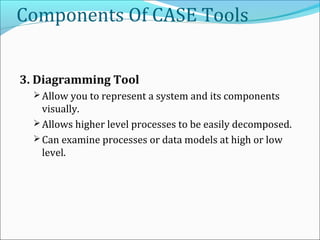
3. Diagramming Tool
 Allow you to represent a system and its components
visually.
 Allows higher level processes to be easily decomposed.
 Can examine processes or data models at high or low
level.
Components Of CASE Tools
4. Analysis tools
Generate reports that help identify possible
inconsistencies, redundancies and omissions.
Generally focus on
 diagram completeness and consistency.
 data structures and usage.
Components Of CASE Tools
5. Documentation Tool
 Create standard reports based on contents of repository.
 Need textual descriptions of needs, solutions, trade-offs,
diagrams of data and processes, prototype forms and
reports, program specifications and user documentation.
 High-quality documentation leads to 80% reduction in
system maintenance effort in comparison to average
quality documentation.
Components Of CASE Tools
6. Code Generation Tool
 Create code for the custom feature in object model.
 Code Generation Tool helps in:
 Connect to the Repository.
 Select the Object Model.
 Select the custom features to generate code for.
 Define properties for each custom feature.
 Specify the output of the project.
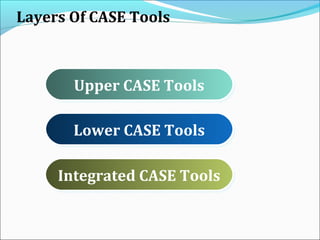
Layers Of CASE Tools
Upper CASE ToolsUpper CASE Tools
Lower CASE ToolsLower CASE Tools
Integrated CASE ToolsIntegrated CASE Tools
12
CASE Tools
The application of a set of tools and methods to a software system
with the desired end result of high-quality, defect-free, and
maintainable software products.
Purpose of CASE Tools
To make it simpler to enact a single design philosophy with the goal to
speed up the development process.
To automate mundane tasks.
To promote a central location for referencing system development
activities and documents.
To get accuracy and increase the speed of the tasks.
1. Increasing costs of software development due to
the extreme intensive labor required.
2. Avoid simple human errors in software
development.
3. CASE offers an important opportunity to alleviate
the problems of application development and
maintenance.
USES:
COMPONENTS OF CASE
TOOLS
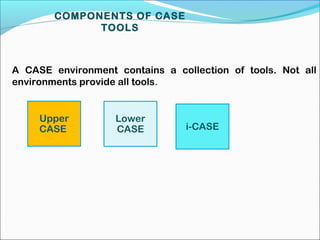
A CASE environment contains a collection of tools. Not all
environments provide all tools.
Upper
CASE
Lower
CASE i-CASE
TYPES OF CASE TOOLS
 Upper-CASE:-
 Upper CASE is focused in supporting project identification and selection,
project initiation, project planning, analysis and design. Describes tools
that automate or support the ‘upper’ or earliest phases of systems
development.
1. Supports Software Development activities implementation
2. Focuses on Analysis Phase
 Diagramming Tools
 Report Generator
 Analysis Tool
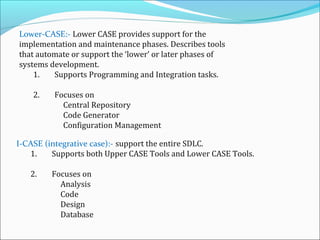
Lower-CASE:- Lower CASE provides support for the
implementation and maintenance phases. Describes tools
that automate or support the ‘lower’ or later phases of
systems development.
1. Supports Programming and Integration tasks.
2. Focuses on
Central Repository
Code Generator
Configuration Management
I-CASE (integrative case):- support the entire SDLC.
1. Supports both Upper CASE Tools and Lower CASE Tools.
2. Focuses on
Analysis
Code
Design
Database
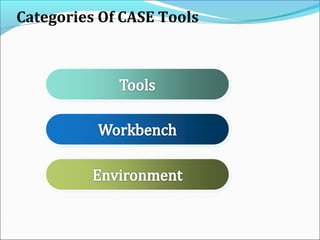
Categories Of CASE Tools
Single-method
workbenches
General-purpose
workbenches
Multi-method
workbenches
Langua ge-specific
workbenches
Programming Testing
Analysis and
design
Integrated
environments
Process-centr ed
environments
File
compar ators
CompilersEditors
EnvironmentsWor kbenchesTools
CASE
technolo gy
Perspective Of CASE Tools
Three Perspective
1. Functional perspective
– Tools are classified according to their specific function.
2. Process perspective
– Tools are classified according to process activities that
are supported.
3. Integration perspective
– Tools are classified according to their organisation into
integrated units.
Benefit Of CASE Tools
•Improve software quality
1. Enforce discipline
2. Help communication between development
team members
3. Information is illustrated through diagrams
that are typically easier to understand
4. Development information is centralized
•Reduction of time and effort
1. Tasks are much faster to complete and alter
2. Enhance reuse of models or models’
components
3. Can reduce maintenance costs
*Problems Of CASE Tools
1. Limitations in flexibility of documentation
2. Major danger: completeness and syntactic
correctness does NOT mean compliance with
requirements
3. Costs associated with the use of the tool
• Purchase price
• Training
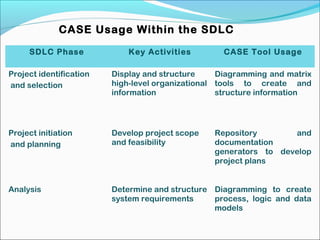
CASE Usage Within the SDLC
SDLC Phase Key Activities CASE Tool Usage
Project identification
and selection
Display and structure
high-level organizational
information
Diagramming and matrix
tools to create and
structure information
Project initiation
and planning
Develop project scope
and feasibility
Repository and
documentation
generators to develop
project plans
Analysis Determine and structure
system requirements
Diagramming to create
process, logic and data
models
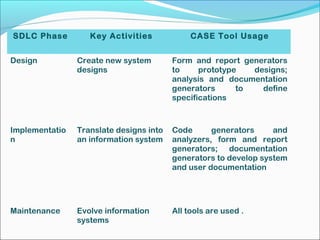
SDLC Phase Key Activities CASE Tool Usage
Design Create new system
designs
Form and report generators
to prototype designs;
analysis and documentation
generators to define
specifications
Implementatio
n
Translate designs into
an information system
Code generators and
analyzers, form and report
generators; documentation
generators to develop system
and user documentation
Maintenance Evolve information
systems
All tools are used .
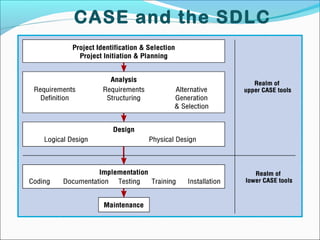
CASE and the SDLC
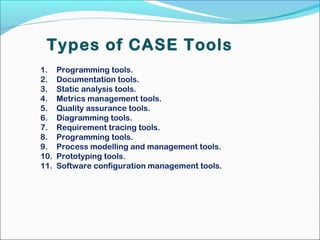
Types of CASE Tools
1. Programming tools.
2. Documentation tools.
3. Static analysis tools.
4. Metrics management tools.
5. Quality assurance tools.
6. Diagramming tools.
7. Requirement tracing tools.
8. Programming tools.
9. Process modelling and management tools.
10. Prototyping tools.
11. Software configuration management tools.
CASE Tool Components
Advantages of CASE Tools
Increased speed
Increased accuracy
Reduced lifetime maintenance
Better documentation
Programming in the hand of programmers
Intangible benefits
May be difficult to customize
Requires training of maintenance staff
May be difficult to use with existing systems
Requires more extensive and accurate definition of use
requirement.
It is costly if it is proprietary tool.
Disadvantages of CASE
Tools
The Good and Bad about CASE
 Development process
productivity and quality
increases are realizable
 Portability of new systems to
other platforms is greatly
enhanced
 Analyst skill set will improve
due to greater understanding
of the process
 Time to delivery of new
applications will decrease
 Conformity to development
standards will increase
CASE acquisition costs are
extremely high
Training of analysts and
administrators is costly
and time-consuming
Most organizations do not
have clear standards for
application development
CASE tools can be viewed
as a threat to job security
CASE tools do not have a
great reputation due to
early benefits not being
realized
Introduction
Process of creating a data model for an information
system by applying formal data modeling techniques.
Process used to define and analyze data requirements
needed to support the business processes.
Therefore, the process of data modeling involves
professional data modelers working closely with
business stakeholders, as well as potential users of the
information system.
What is Data Model
Data Model is a collection of conceptual tools for
describing data, data relationships, data semantics and
consistency constraint.
A data model is a conceptual representation of data
structures required for data base and is very powerful in
expressing and communicating the business requirements
A data model visually represents the nature of data,
business rules governing the data, and how it will be
organized in the database
A data model provides a way to describe the design of
a database at the physical, logical and view levels.
There are three different types of data models
produced while progressing from requirements to the
actual database to be used for the information system
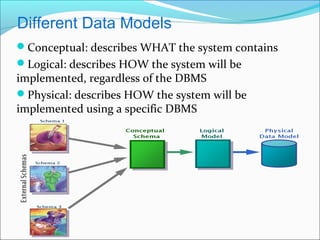
Conceptual: describes WHAT the system contains
Logical: describes HOW the system will be
implemented, regardless of the DBMS
Physical: describes HOW the system will be
implemented using a specific DBMS
Different Data Models
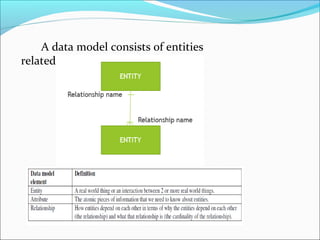
A data model consists of entities
related to each other on a diagram:
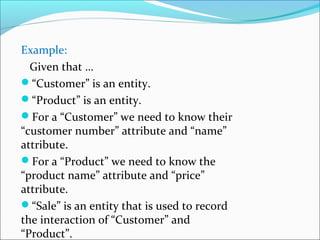
Example:
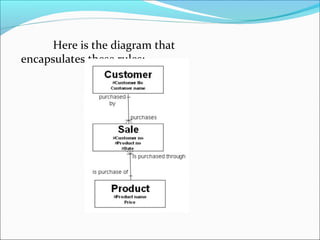
Given that …
“Customer” is an entity.
“Product” is an entity.
For a “Customer” we need to know their
“customer number” attribute and “name”
attribute.
For a “Product” we need to know the
“product name” attribute and “price”
attribute.
“Sale” is an entity that is used to record
the interaction of “Customer” and
“Product”.
Here is the diagram that
encapsulates these rules:
Notes
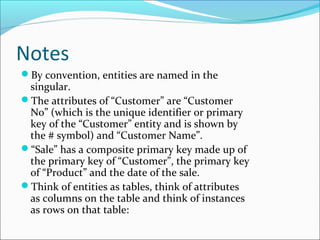
By convention, entities are named in the
singular.
The attributes of “Customer” are “Customer
No” (which is the unique identifier or primary
key of the “Customer” entity and is shown by
the # symbol) and “Customer Name”.
“Sale” has a composite primary key made up of
the primary key of “Customer”, the primary key
of “Product” and the date of the sale.
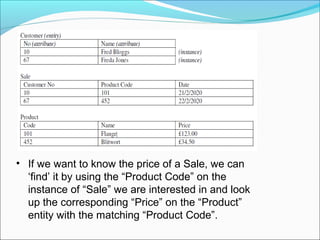
Think of entities as tables, think of attributes
as columns on the table and think of instances
as rows on that table:
• If we want to know the price of a Sale, we can
‘find’ it by using the “Product Code” on the
instance of “Sale” we are interested in and look
up the corresponding “Price” on the “Product”
entity with the matching “Product Code”.
Types of Data Models
Entity-Relationship (E-R) Models
UML (unified modeling language)
Entity-Relationship Model
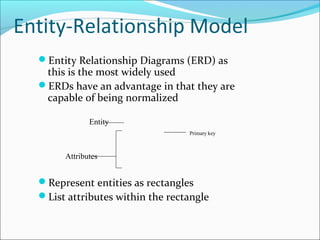
Entity Relationship Diagrams (ERD) as
this is the most widely used
ERDs have an advantage in that they are
capable of being normalized
Represent entities as rectangles
List attributes within the rectangle
Entity
Attributes
Primary key
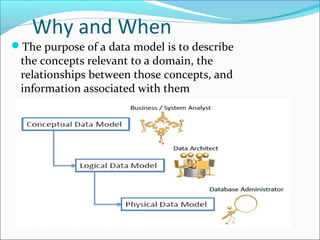
Why and When
The purpose of a data model is to describe
the concepts relevant to a domain, the
relationships between those concepts, and
information associated with them
Used to model data in a standard, consistent,
predictable manner in order to manage it as a
resource.
To have a clear picture of the base data that your
business needs
To identify missing and redundant base data
To Establish a baseline for communication across
functional boundaries within your organization
Provides a basis for defining business rules
Makes it cheaper, easier, and faster to upgrade your
IT solutions
CASE Summary
Overall use of CASE tools on a software system
improves software quality dramatically by –
Reducing errors
Improving designs throughout the development
Standardizing many tasks and development aspects
Providing many many well-tested automated
functions
Centralizing resources
CASE is so good for software development its
extremely rare to find a program that doesn’t include
some form of it within the last 2 decades

Data modelling tool in CASE

  • 1.
    Components Of CASETools Layers Of CASE Tools Contents Components Of CASE Tools What Is CASE Tools Perspective Of CASE Tools Benefits Of CASE Tools Problems Of CASE Tools Categories Of CASE Tools
  • 2.
    (CASE) COMPUTER AIDED SYSTEMSENGINEERING CASE is a term covering a whole range of tools and methods that SUPPORT SOFTWARE SYSTEM DEVELOPMENT. CASE tools are programs (software) that automate or support one or more phases of a systems development life cycle. A collection of tools used to support the software development process. In other words, 1. Software that is used to support software process activities . 2. Provides software process support by •automating some process activities •providing information about the software being developed 3. Currently used in every phase/workflow of life cycle
  • 3.
    Two types oftools used by software engineers: 1. Analytical tools – Stepwise refinement – Cost-benefit analysis – Software metrics 2. CASE tools
  • 4.
  • 5.
    Components Of CASETools 1. Central Repository  Centralized Database.  Used to store Graphical Diagrams & Prototype Forms and Reports of analysis and diagramming workflow  Act as  Information Repository  Data Dictionary
  • 6.
    Components Of CASETools 2. Report Generator  Used to  Create, modify and test prototypes of computer displays and reports.  Identify which data items to display or collect for each screen or report
  • 7.
    Components Of CASETools 3. Diagramming Tool  Allow you to represent a system and its components visually.  Allows higher level processes to be easily decomposed.  Can examine processes or data models at high or low level.
  • 8.
    Components Of CASETools 4. Analysis tools Generate reports that help identify possible inconsistencies, redundancies and omissions. Generally focus on  diagram completeness and consistency.  data structures and usage.
  • 9.
    Components Of CASETools 5. Documentation Tool  Create standard reports based on contents of repository.  Need textual descriptions of needs, solutions, trade-offs, diagrams of data and processes, prototype forms and reports, program specifications and user documentation.  High-quality documentation leads to 80% reduction in system maintenance effort in comparison to average quality documentation.
  • 10.
    Components Of CASETools 6. Code Generation Tool  Create code for the custom feature in object model.  Code Generation Tool helps in:  Connect to the Repository.  Select the Object Model.  Select the custom features to generate code for.  Define properties for each custom feature.  Specify the output of the project.
  • 11.
    Layers Of CASETools Upper CASE ToolsUpper CASE Tools Lower CASE ToolsLower CASE Tools Integrated CASE ToolsIntegrated CASE Tools
  • 12.
    12 CASE Tools The applicationof a set of tools and methods to a software system with the desired end result of high-quality, defect-free, and maintainable software products. Purpose of CASE Tools To make it simpler to enact a single design philosophy with the goal to speed up the development process. To automate mundane tasks. To promote a central location for referencing system development activities and documents. To get accuracy and increase the speed of the tasks.
  • 13.
    1. Increasing costsof software development due to the extreme intensive labor required. 2. Avoid simple human errors in software development. 3. CASE offers an important opportunity to alleviate the problems of application development and maintenance. USES:
  • 14.
    COMPONENTS OF CASE TOOLS ACASE environment contains a collection of tools. Not all environments provide all tools. Upper CASE Lower CASE i-CASE
  • 15.
    TYPES OF CASETOOLS  Upper-CASE:-  Upper CASE is focused in supporting project identification and selection, project initiation, project planning, analysis and design. Describes tools that automate or support the ‘upper’ or earliest phases of systems development. 1. Supports Software Development activities implementation 2. Focuses on Analysis Phase  Diagramming Tools  Report Generator  Analysis Tool
  • 16.
    Lower-CASE:- Lower CASEprovides support for the implementation and maintenance phases. Describes tools that automate or support the ‘lower’ or later phases of systems development. 1. Supports Programming and Integration tasks. 2. Focuses on Central Repository Code Generator Configuration Management I-CASE (integrative case):- support the entire SDLC. 1. Supports both Upper CASE Tools and Lower CASE Tools. 2. Focuses on Analysis Code Design Database
  • 17.
  • 18.
    Categories Of CASETools Single-method workbenches General-purpose workbenches Multi-method workbenches Langua ge-specific workbenches Programming Testing Analysis and design Integrated environments Process-centr ed environments File compar ators CompilersEditors EnvironmentsWor kbenchesTools CASE technolo gy
  • 19.
    Perspective Of CASETools Three Perspective 1. Functional perspective – Tools are classified according to their specific function. 2. Process perspective – Tools are classified according to process activities that are supported. 3. Integration perspective – Tools are classified according to their organisation into integrated units.
  • 20.
    Benefit Of CASETools •Improve software quality 1. Enforce discipline 2. Help communication between development team members 3. Information is illustrated through diagrams that are typically easier to understand 4. Development information is centralized
  • 21.
    •Reduction of timeand effort 1. Tasks are much faster to complete and alter 2. Enhance reuse of models or models’ components 3. Can reduce maintenance costs
  • 22.
    *Problems Of CASETools 1. Limitations in flexibility of documentation 2. Major danger: completeness and syntactic correctness does NOT mean compliance with requirements 3. Costs associated with the use of the tool • Purchase price • Training
  • 23.
    CASE Usage Withinthe SDLC SDLC Phase Key Activities CASE Tool Usage Project identification and selection Display and structure high-level organizational information Diagramming and matrix tools to create and structure information Project initiation and planning Develop project scope and feasibility Repository and documentation generators to develop project plans Analysis Determine and structure system requirements Diagramming to create process, logic and data models
  • 24.
    SDLC Phase KeyActivities CASE Tool Usage Design Create new system designs Form and report generators to prototype designs; analysis and documentation generators to define specifications Implementatio n Translate designs into an information system Code generators and analyzers, form and report generators; documentation generators to develop system and user documentation Maintenance Evolve information systems All tools are used .
  • 25.
  • 26.
    Types of CASETools 1. Programming tools. 2. Documentation tools. 3. Static analysis tools. 4. Metrics management tools. 5. Quality assurance tools. 6. Diagramming tools. 7. Requirement tracing tools. 8. Programming tools. 9. Process modelling and management tools. 10. Prototyping tools. 11. Software configuration management tools.
  • 27.
  • 28.
    Advantages of CASETools Increased speed Increased accuracy Reduced lifetime maintenance Better documentation Programming in the hand of programmers Intangible benefits
  • 29.
    May be difficultto customize Requires training of maintenance staff May be difficult to use with existing systems Requires more extensive and accurate definition of use requirement. It is costly if it is proprietary tool. Disadvantages of CASE Tools
  • 30.
    The Good andBad about CASE  Development process productivity and quality increases are realizable  Portability of new systems to other platforms is greatly enhanced  Analyst skill set will improve due to greater understanding of the process  Time to delivery of new applications will decrease  Conformity to development standards will increase CASE acquisition costs are extremely high Training of analysts and administrators is costly and time-consuming Most organizations do not have clear standards for application development CASE tools can be viewed as a threat to job security CASE tools do not have a great reputation due to early benefits not being realized
  • 32.
    Introduction Process of creatinga data model for an information system by applying formal data modeling techniques. Process used to define and analyze data requirements needed to support the business processes. Therefore, the process of data modeling involves professional data modelers working closely with business stakeholders, as well as potential users of the information system.
  • 33.
    What is DataModel Data Model is a collection of conceptual tools for describing data, data relationships, data semantics and consistency constraint. A data model is a conceptual representation of data structures required for data base and is very powerful in expressing and communicating the business requirements A data model visually represents the nature of data, business rules governing the data, and how it will be organized in the database
  • 34.
    A data modelprovides a way to describe the design of a database at the physical, logical and view levels. There are three different types of data models produced while progressing from requirements to the actual database to be used for the information system
  • 35.
    Conceptual: describes WHATthe system contains Logical: describes HOW the system will be implemented, regardless of the DBMS Physical: describes HOW the system will be implemented using a specific DBMS Different Data Models
  • 36.
    A data modelconsists of entities related to each other on a diagram:
  • 37.
    Example: Given that … “Customer”is an entity. “Product” is an entity. For a “Customer” we need to know their “customer number” attribute and “name” attribute. For a “Product” we need to know the “product name” attribute and “price” attribute. “Sale” is an entity that is used to record the interaction of “Customer” and “Product”.
  • 38.
    Here is thediagram that encapsulates these rules:
  • 39.
    Notes By convention, entitiesare named in the singular. The attributes of “Customer” are “Customer No” (which is the unique identifier or primary key of the “Customer” entity and is shown by the # symbol) and “Customer Name”. “Sale” has a composite primary key made up of the primary key of “Customer”, the primary key of “Product” and the date of the sale. Think of entities as tables, think of attributes as columns on the table and think of instances as rows on that table:
  • 40.
    • If wewant to know the price of a Sale, we can ‘find’ it by using the “Product Code” on the instance of “Sale” we are interested in and look up the corresponding “Price” on the “Product” entity with the matching “Product Code”.
  • 41.
    Types of DataModels Entity-Relationship (E-R) Models UML (unified modeling language)
  • 42.
    Entity-Relationship Model Entity RelationshipDiagrams (ERD) as this is the most widely used ERDs have an advantage in that they are capable of being normalized Represent entities as rectangles List attributes within the rectangle Entity Attributes Primary key
  • 43.
    Why and When Thepurpose of a data model is to describe the concepts relevant to a domain, the relationships between those concepts, and information associated with them
  • 44.
    Used to modeldata in a standard, consistent, predictable manner in order to manage it as a resource. To have a clear picture of the base data that your business needs To identify missing and redundant base data
  • 45.
    To Establish abaseline for communication across functional boundaries within your organization Provides a basis for defining business rules Makes it cheaper, easier, and faster to upgrade your IT solutions
  • 46.
    CASE Summary Overall useof CASE tools on a software system improves software quality dramatically by – Reducing errors Improving designs throughout the development Standardizing many tasks and development aspects Providing many many well-tested automated functions Centralizing resources CASE is so good for software development its extremely rare to find a program that doesn’t include some form of it within the last 2 decades

Editor's Notes

  • #6 CASE repository acts as: Information repository Combines information about organization’s business information and application portfolio Provides automated tools to manage and control access Data dictionary Used to manage and control access to information repository Facilities for recording, storing and processing resources Useful for cross-referencing
  • #8 Diagramming tools Allow you to draw DFDs, ERDs, use case diagrams, case diagrams Allows you to use stepwise refinement in building models (work from high level to low level)
  • #9 Analysis tools Types of analyses depend on methodology used and features of CASE environment
  • #10 Case documentation generator tools Provide a method of managing documentation Allow creation of master templates