Data Mapping:
The Foundation of Every Data Pipeline
Summary
Enterprise data is getting more dispersed and voluminous by the day, and at the same time, it has become more important
than ever for businesses to leverage data and transform it into actionable insights. However, enterprises today collect
information from an array of data points, and they may not always speak the same language.
To integrate this data and make sense of it, data mapping is used, which is the process of establishing relationships
between heterogeneous systems. As a primary step in a variety of data processes, data mapping is integral to the success
of an organization’s data initiatives.
This eBook will impart in-depth insight into the data mapping process. It will further discuss its importance in the data
integration cycle, the commonly used data mapping techniques, and how you can evaluate the best tool for your unique
data integration projects. Finally, it will illustrate how Astera Centerprise handles complex data mapping tasks to simplify
enterprise data integration projects.
Table of Contents
Data Mapping: The Foundation of Every Data Pipeline
THE BASICS .......................................................................................................................
What is Data Mapping?
THE PURPOSE ..................................................................................................................
Significance of Data Mapping
THE METHOD ..................................................................................................................
Data Mapping Techniques
Types of Data Mapping Tools
How to Evaluate and Select the Best Data Mapping Software
ASTERA CENTERPRISE ...................................................................................................
Simplify Complex Data Mappings
Visual Interface
Built-in Data Quality, Profiling, and Cleansing Capabilities
Out-of-the-Box Connectors
Auto-Mapping
Dynamic Layout
Instant Data Preview
CONCLUSION .................................................................................................................
04
05
06
07
09
10
11
11
13
14
14
15
15
15
16
16
17
Data Mapping: The Foundation of Every Data Pipeline
The Basics
Understanding Data Mapping
04Data Mapping: The Foundation of Every Data Pipeline |
What is Data Mapping?
Data mapping is the process of mapping data fields
from a source file to their related target fields.
Mapping tasks vary in complexity, depending on the hierarchy of the data being mapped, as well as the disparity
between the structure of the source and the target. Every business application, whether on-premise or cloud, uses
metadata to explain the data fields and attributes that constitute the data, as well as semantic rules that govern how
data is stored within that application or repository.
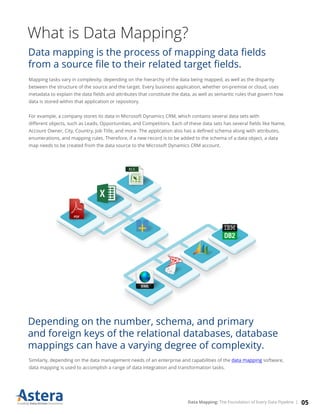
For example, a company stores its data in Microsoft Dynamics CRM, which contains several data sets with
different objects, such as Leads, Opportunities, and Competitors. Each of these data sets has several fields like Name,
Account Owner, City, Country, Job Title, and more. The application also has a defined schema along with attributes,
enumerations, and mapping rules. Therefore, if a new record is to be added to the schema of a data object, a data
map needs to be created from the data source to the Microsoft Dynamics CRM account.
Depending on the number, schema, and primary
and foreign keys of the relational databases, database
mappings can have a varying degree of complexity.
Similarly, depending on the data management needs of an enterprise and capabilities of the data mapping software,
data mapping is used to accomplish a range of data integration and transformation tasks.
05Data Mapping: The Foundation of Every Data Pipeline |
The Purpose
Why is Data Mapping Important?
06Data Mapping: The Foundation of Every Data Pipeline |
Significance of Data Mapping
To leverage data and extract business value out of it, the
information collected from various external and internal
sources must be unified and transformed into a format
suitable for the operational and analytical processes.
This is accomplished through data mapping, which is an integral step in various data
management processes, including:
07Data Mapping: The Foundation of Every Data Pipeline |
Data Integration
Data mapping is the initial step in the integration process in which data from a source is converted into a destina-
tion-compatible format and loaded into the target location. Data mapping software can reduce or eliminate the need
for manual data entry, resulting in fewer errors and more reliable data. For successful data integration, the source and
target data repositories must have the same data model. However, it is rare for any two data repositories to have the
same schema. Data mapping tools help bridge the differences in the schemas of data source and destination, allowing
businesses to consolidate information from different data points easily.
Data Migration
Data migration is the process of moving data from one database to another. While there are various steps involved in
the process, creating mappings between source and target is one of the most challenging and time-consuming tasks,
particularly when done manually. Inaccurate and invalid mappings at this stage not only impact the accuracy and
completeness of data being migrated but can even lead to the failure of the data migration project. Therefore, using a
code-free data mapping solution that can automate the process is important to migrate data to the destination
successfully.
Data Warehousing
Data mapping in a data warehouse is the process of creating a connection between the source and target tables or
attributes. Using data mapping, businesses can build a logical data model and define how data will be structured and stored
in the data warehouse. The process begins with collecting all the required information and understanding the source data.
Once that has been done and a data mapping document created, building the transformation rules and creating mappings
is a simple process with a data mapping solution.
Data Transformation
Because enterprise data resides in a variety of locations and formats, data transformation is essential to break information
silos and draw insights. Data mapping is the first step in data transformation. It is done to create a framework of what
changes will be made to data before it is loaded into the target database.
Electronic Data Interchange
Data mapping plays a significant role in EDI file conversion by converting the files into various formats, such as XML,
JSON, and Excel. An intuitive data mapping tool allows the user to extract data from different sources and utilize built-in
transformations and functions to map data to EDI formats without writing a single line of code. This helps perform
seamless B2B data exchange.
08Data Mapping: The Foundation of Every Data Pipeline |
The Method
Finding the Right Tools and Techniques
09Data Mapping: The Foundation of Every Data Pipeline |
Data Mapping Techniques
Based on the level of automation, data mapping techniques can be divided into three types:
1. Manual Data Mapping
Manual data mapping involves hand-coding the mappings between the source and target data systems. Although
hand-coded, the manual data mapping process offers unlimited flexibility for unique mapping scenarios initially.
However, it can become challenging to maintain and scale as the mapping needs of the business grow complex.
2. Semi-Automated Data Mapping
Manual data mapping involves hand-coding the mappings between the source and target data systems. Although
hand-coded, the manual data mapping process offers unlimited flexibility for unique mapping scenarios initially.
However, it can become challenging to maintain and scale as the mapping needs of the business grow complex.
Once schema mapping has been done, Java, C++, or C# code is generated to achieve the required data conversion
tasks. The programming language used may vary depending on the data mapping tool used.
3. Semi-Automated Data Mapping
Automated data mapping tools feature a complete code-free environment for data mapping tasks of any complexity.
Mappings are created between the source and target objects in a simple drag-and-drop manner. An automated data
mapping tool also has built-in transformations to convert data from XML to JSON, EDI to XML, XML to XLS, hierarchical
to flat files, or any format without writing a single line of code.
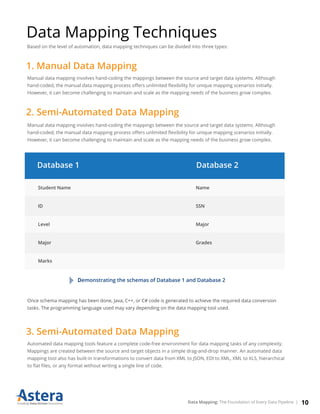
Database 1 Database 2
Student Name
ID
Level
Major
Marks
Name
SSN
Major
Grades
Demonstrating the schemas of Database 1 and Database 2
10Data Mapping: The Foundation of Every Data Pipeline |
How to Evaluate and Select the
Best Data Mapping Software
Selecting a data mapping tool that’s the best fit for the enterprise is critical to the success of any data integration
project. The process involves identifying the unique data mapping requirements of the business and
must-have features.
Online reviews on websites like Capterra, G2 Crowd, and
Software Advice can be a good starting point to shortlist
data mapping software that offers the maximum number
of features. The next step would be to classify the
features of data mapping tools into three different
categories, including must-haves, good-to-haves, and
will-not-use, depending on the unique data
management needs of the business.
Some of the key features that a data mapping
solution must have include:
Types of Data Mapping Tools
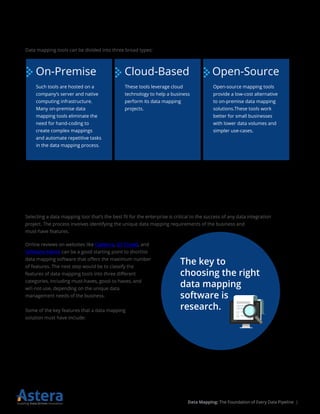
Data mapping tools can be divided into three broad types:
The key to
choosing the right
data mapping
software is
research.
On-Premise Cloud-Based Open-Source
Such tools are hosted on a
company’s server and native
computing infrastructure.
Many on-premise data
mapping tools eliminate the
need for hand-coding to
create complex mappings
and automate repetitive tasks
in the data mapping process.
These tools leverage cloud
technology to help a business
perform its data mapping
projects.
Open-source mapping tools
provide a low-cost alternative
to on-premise data mapping
solutions.These tools work
better for small businesses
with lower data volumes and
simpler use-cases.
11Data Mapping: The Foundation of Every Data Pipeline |
Support for various databases, and hierarchical and flat file formats, such as delimited, XML, JSON, EDI, Excel, and text files are
the basic staples of all data mapping tools. In addition, for businesses that need to integrate structured data with semi-struc-
tured and unstructured data sources, support for PDF, PDF forms, RTF, weblogs, etc. is also a key feature.
If your business uses a cloud-based CRM application, such as Salesforce or Microsoft Dynamics CRM, look for a data mapping
tool that offers out-of-the-box connectivity to these enterprise applications.
To break down information silos and allow both data professionals and business users access to enterprise data, it is import-
ant to select a data mapping solution that offers you a code-free way to create data maps. From built-in transformations to
join, filter, and sort data to a range of expressions and functions, user-friendly data mapping tools feature an extensive library
of transformations to fulfill the data conversion needs of an enterprise.
Since data mapping jobs, if not automated, can take up a significant amount of developer resources and time, opting for data
mapping software with process orchestration capabilities can bring cost-savings to a business. With the ability to orchestrate a
complete workflow, and time-based and event-triggered job scheduling, these solutions automate data mapping and transfor-
mation process, thereby delivering analytics-ready data faster.
Mapping data to and from formats such as JSON, XML, and EDI can be complex due to the diversity in data structures. Howev-
er, to prevent mapping errors at the design-time, an effective data mapping tool should feature a real-time testing engine that
lets the user view the processed and raw data at any step of the data integration process.
Support for a Diverse Set of Source Systems
Graphical, Drag-and-Drop, Code-Free User Interface
Ability to Schedule and Automate Mapping Jobs
Real-Time Testing and Validation of Mappings
12Data Mapping: The Foundation of Every Data Pipeline |
Astera Centerprise
Execute Data Mapping Jobs in a
Code-Free Environment
13Data Mapping: The Foundation of Every Data Pipeline |
Simplify Complex Data Mappings
with Astera Centerprise
Data from business partners and other third parties, as well as internal departments, can arrive in a myriad of formats
that needs to be mapped to a unified system.
Astera Centerprise is a powerful integration solution that
supports all types of data mappings. In addition, it also
contains built-in data quality, profiling, and automation
capabilities in a single, familiar drag-and-drop, visual
environment.
Astera Centerprise’s impressive complex data mapping capabilities make it an easy-to-use platform for overcoming the
challenges of complex hierarchical structures such as XML, electronic data interchange (EDI), web services, and more.
Here are a few other features that simplify data mapping tasks in Astera Centerprise:
Visual Interface
To carry out a successful data process, it’s essential to correctly map data from source to destination. To enable business
personnel and data professionals to use these processes easily, Astera Centerprise offers enhanced functionality to
develop, debug, and test mappings in a visual environment, without writing a single line of code.
Intuitive and code-free UI
14Data Mapping: The Foundation of Every Data Pipeline |
Built-in Data Quality, Profiling, and Cleansing Capabilities
With Astera Centerprise’s pre-built data profiling feature, you can analyze your data at any point in the dataflow, and find
out about its structure, quality, and accuracy. Furthermore, you can add data quality rules to validate records and identify
inaccuracies, and correct them through data cleanse transformation.
This ensures that accurate and high-quality data goes into your data pipeline.
A simple dataflow with built-in data profile, cleanse, and quality transformations
Out-of-the-Box Connectors
The solution has a library of built-in connectors that seamlessly connects with disparate data structures, such as XML, JSON,
EDI, etc. Whether you require connectivity to business applications (Microsoft Dynamics CRM, Salesforce, etc.), databases
(SQL Server, IBM DB2, Teradata) or file formats (Excel, PDF), Astera Centerprise can integrate these data sources through
drag-and-drop mapping.
Auto-Mapping
The challenges of handling variation in data collected from third-party applications, and ensuring consistency between
internal and external data are handled through the SmartMatch functionality in Astera Centerprise.
This feature provides an intuitive and scalable method of resolving naming conflicts and inconsistencies that arise during
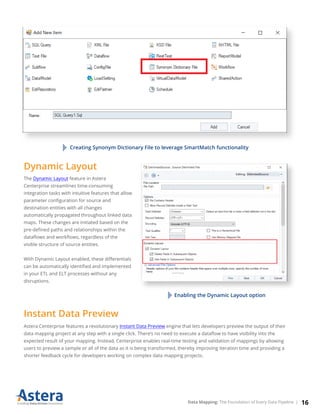
high-volume data integrations. It allows users to create a Synonym Dictionary File that contains current and alternative values
that may appear in the header field of an input table. Centerprise will then automatically match irregular headers to the
correct column at run-time and extract data from them as normal.
15Data Mapping: The Foundation of Every Data Pipeline |
Creating Synonym Dictionary File to leverage SmartMatch functionality
Astera Centerprise features a revolutionary Instant Data Preview engine that lets developers preview the output of their
data mapping project at any step with a single click. There’s no need to execute a dataflow to have visibility into the
expected result of your mapping. Instead, Centerprise enables real-time testing and validation of mappings by allowing
users to preview a sample or all of the data as it is being transformed, thereby improving iteration time and providing a
shorter feedback cycle for developers working on complex data mapping projects.
Dynamic Layout
The Dynamic Layout feature in Astera
Centerprise streamlines time-consuming
integration tasks with intuitive features that allow
parameter configuration for source and
destination entities with all changes
automatically propagated throughout linked data
maps. These changes are initiated based on the
pre-defined paths and relationships within the
dataflows and workflows, regardless of the
visible structure of source entities.
With Dynamic Layout enabled, these differentials
can be automatically identified and implemented
in your ETL and ELT processes without any
disruptions.
Instant Data Preview
Enabling the Dynamic Layout option
16Data Mapping: The Foundation of Every Data Pipeline |
Conclusion
Data mapping, transformation, and integration can be extremely tedious and demanding. Even a simple task such as
reading a CSV file into a list of class instances can require a large amount of coding because, while most tasks share
much in common, they are each just different enough to require their own data conversion methods.
Enterprise-grade tools, like Astera Centerprise, simplify complex data mapping tasks through a wide range of
user-friendly features. This results in a well-designed ETL process that is tested, validated, and optimized for
improved performance.
Astera Centerprise’s advanced data mapping functionality can ensure smooth execution of your data processes,
facilitating quick data analysis and robust decision-making for organizations.
17Data Mapping: The Foundation of Every Data Pipeline |

Data Mapping eBook

  • 1.
    Data Mapping: The Foundationof Every Data Pipeline
  • 2.
    Summary Enterprise data isgetting more dispersed and voluminous by the day, and at the same time, it has become more important than ever for businesses to leverage data and transform it into actionable insights. However, enterprises today collect information from an array of data points, and they may not always speak the same language. To integrate this data and make sense of it, data mapping is used, which is the process of establishing relationships between heterogeneous systems. As a primary step in a variety of data processes, data mapping is integral to the success of an organization’s data initiatives. This eBook will impart in-depth insight into the data mapping process. It will further discuss its importance in the data integration cycle, the commonly used data mapping techniques, and how you can evaluate the best tool for your unique data integration projects. Finally, it will illustrate how Astera Centerprise handles complex data mapping tasks to simplify enterprise data integration projects.
  • 3.
    Table of Contents DataMapping: The Foundation of Every Data Pipeline THE BASICS ....................................................................................................................... What is Data Mapping? THE PURPOSE .................................................................................................................. Significance of Data Mapping THE METHOD .................................................................................................................. Data Mapping Techniques Types of Data Mapping Tools How to Evaluate and Select the Best Data Mapping Software ASTERA CENTERPRISE ................................................................................................... Simplify Complex Data Mappings Visual Interface Built-in Data Quality, Profiling, and Cleansing Capabilities Out-of-the-Box Connectors Auto-Mapping Dynamic Layout Instant Data Preview CONCLUSION ................................................................................................................. 04 05 06 07 09 10 11 11 13 14 14 15 15 15 16 16 17 Data Mapping: The Foundation of Every Data Pipeline
  • 4.
    The Basics Understanding DataMapping 04Data Mapping: The Foundation of Every Data Pipeline |
  • 5.
    What is DataMapping? Data mapping is the process of mapping data fields from a source file to their related target fields. Mapping tasks vary in complexity, depending on the hierarchy of the data being mapped, as well as the disparity between the structure of the source and the target. Every business application, whether on-premise or cloud, uses metadata to explain the data fields and attributes that constitute the data, as well as semantic rules that govern how data is stored within that application or repository. For example, a company stores its data in Microsoft Dynamics CRM, which contains several data sets with different objects, such as Leads, Opportunities, and Competitors. Each of these data sets has several fields like Name, Account Owner, City, Country, Job Title, and more. The application also has a defined schema along with attributes, enumerations, and mapping rules. Therefore, if a new record is to be added to the schema of a data object, a data map needs to be created from the data source to the Microsoft Dynamics CRM account. Depending on the number, schema, and primary and foreign keys of the relational databases, database mappings can have a varying degree of complexity. Similarly, depending on the data management needs of an enterprise and capabilities of the data mapping software, data mapping is used to accomplish a range of data integration and transformation tasks. 05Data Mapping: The Foundation of Every Data Pipeline |
  • 6.
    The Purpose Why isData Mapping Important? 06Data Mapping: The Foundation of Every Data Pipeline |
  • 7.
    Significance of DataMapping To leverage data and extract business value out of it, the information collected from various external and internal sources must be unified and transformed into a format suitable for the operational and analytical processes. This is accomplished through data mapping, which is an integral step in various data management processes, including: 07Data Mapping: The Foundation of Every Data Pipeline |
  • 8.
    Data Integration Data mappingis the initial step in the integration process in which data from a source is converted into a destina- tion-compatible format and loaded into the target location. Data mapping software can reduce or eliminate the need for manual data entry, resulting in fewer errors and more reliable data. For successful data integration, the source and target data repositories must have the same data model. However, it is rare for any two data repositories to have the same schema. Data mapping tools help bridge the differences in the schemas of data source and destination, allowing businesses to consolidate information from different data points easily. Data Migration Data migration is the process of moving data from one database to another. While there are various steps involved in the process, creating mappings between source and target is one of the most challenging and time-consuming tasks, particularly when done manually. Inaccurate and invalid mappings at this stage not only impact the accuracy and completeness of data being migrated but can even lead to the failure of the data migration project. Therefore, using a code-free data mapping solution that can automate the process is important to migrate data to the destination successfully. Data Warehousing Data mapping in a data warehouse is the process of creating a connection between the source and target tables or attributes. Using data mapping, businesses can build a logical data model and define how data will be structured and stored in the data warehouse. The process begins with collecting all the required information and understanding the source data. Once that has been done and a data mapping document created, building the transformation rules and creating mappings is a simple process with a data mapping solution. Data Transformation Because enterprise data resides in a variety of locations and formats, data transformation is essential to break information silos and draw insights. Data mapping is the first step in data transformation. It is done to create a framework of what changes will be made to data before it is loaded into the target database. Electronic Data Interchange Data mapping plays a significant role in EDI file conversion by converting the files into various formats, such as XML, JSON, and Excel. An intuitive data mapping tool allows the user to extract data from different sources and utilize built-in transformations and functions to map data to EDI formats without writing a single line of code. This helps perform seamless B2B data exchange. 08Data Mapping: The Foundation of Every Data Pipeline |
  • 9.
    The Method Finding theRight Tools and Techniques 09Data Mapping: The Foundation of Every Data Pipeline |
  • 10.
    Data Mapping Techniques Basedon the level of automation, data mapping techniques can be divided into three types: 1. Manual Data Mapping Manual data mapping involves hand-coding the mappings between the source and target data systems. Although hand-coded, the manual data mapping process offers unlimited flexibility for unique mapping scenarios initially. However, it can become challenging to maintain and scale as the mapping needs of the business grow complex. 2. Semi-Automated Data Mapping Manual data mapping involves hand-coding the mappings between the source and target data systems. Although hand-coded, the manual data mapping process offers unlimited flexibility for unique mapping scenarios initially. However, it can become challenging to maintain and scale as the mapping needs of the business grow complex. Once schema mapping has been done, Java, C++, or C# code is generated to achieve the required data conversion tasks. The programming language used may vary depending on the data mapping tool used. 3. Semi-Automated Data Mapping Automated data mapping tools feature a complete code-free environment for data mapping tasks of any complexity. Mappings are created between the source and target objects in a simple drag-and-drop manner. An automated data mapping tool also has built-in transformations to convert data from XML to JSON, EDI to XML, XML to XLS, hierarchical to flat files, or any format without writing a single line of code. Database 1 Database 2 Student Name ID Level Major Marks Name SSN Major Grades Demonstrating the schemas of Database 1 and Database 2 10Data Mapping: The Foundation of Every Data Pipeline |
  • 11.
    How to Evaluateand Select the Best Data Mapping Software Selecting a data mapping tool that’s the best fit for the enterprise is critical to the success of any data integration project. The process involves identifying the unique data mapping requirements of the business and must-have features. Online reviews on websites like Capterra, G2 Crowd, and Software Advice can be a good starting point to shortlist data mapping software that offers the maximum number of features. The next step would be to classify the features of data mapping tools into three different categories, including must-haves, good-to-haves, and will-not-use, depending on the unique data management needs of the business. Some of the key features that a data mapping solution must have include: Types of Data Mapping Tools Data mapping tools can be divided into three broad types: The key to choosing the right data mapping software is research. On-Premise Cloud-Based Open-Source Such tools are hosted on a company’s server and native computing infrastructure. Many on-premise data mapping tools eliminate the need for hand-coding to create complex mappings and automate repetitive tasks in the data mapping process. These tools leverage cloud technology to help a business perform its data mapping projects. Open-source mapping tools provide a low-cost alternative to on-premise data mapping solutions.These tools work better for small businesses with lower data volumes and simpler use-cases. 11Data Mapping: The Foundation of Every Data Pipeline |
  • 12.
    Support for variousdatabases, and hierarchical and flat file formats, such as delimited, XML, JSON, EDI, Excel, and text files are the basic staples of all data mapping tools. In addition, for businesses that need to integrate structured data with semi-struc- tured and unstructured data sources, support for PDF, PDF forms, RTF, weblogs, etc. is also a key feature. If your business uses a cloud-based CRM application, such as Salesforce or Microsoft Dynamics CRM, look for a data mapping tool that offers out-of-the-box connectivity to these enterprise applications. To break down information silos and allow both data professionals and business users access to enterprise data, it is import- ant to select a data mapping solution that offers you a code-free way to create data maps. From built-in transformations to join, filter, and sort data to a range of expressions and functions, user-friendly data mapping tools feature an extensive library of transformations to fulfill the data conversion needs of an enterprise. Since data mapping jobs, if not automated, can take up a significant amount of developer resources and time, opting for data mapping software with process orchestration capabilities can bring cost-savings to a business. With the ability to orchestrate a complete workflow, and time-based and event-triggered job scheduling, these solutions automate data mapping and transfor- mation process, thereby delivering analytics-ready data faster. Mapping data to and from formats such as JSON, XML, and EDI can be complex due to the diversity in data structures. Howev- er, to prevent mapping errors at the design-time, an effective data mapping tool should feature a real-time testing engine that lets the user view the processed and raw data at any step of the data integration process. Support for a Diverse Set of Source Systems Graphical, Drag-and-Drop, Code-Free User Interface Ability to Schedule and Automate Mapping Jobs Real-Time Testing and Validation of Mappings 12Data Mapping: The Foundation of Every Data Pipeline |
  • 13.
    Astera Centerprise Execute DataMapping Jobs in a Code-Free Environment 13Data Mapping: The Foundation of Every Data Pipeline |
  • 14.
    Simplify Complex DataMappings with Astera Centerprise Data from business partners and other third parties, as well as internal departments, can arrive in a myriad of formats that needs to be mapped to a unified system. Astera Centerprise is a powerful integration solution that supports all types of data mappings. In addition, it also contains built-in data quality, profiling, and automation capabilities in a single, familiar drag-and-drop, visual environment. Astera Centerprise’s impressive complex data mapping capabilities make it an easy-to-use platform for overcoming the challenges of complex hierarchical structures such as XML, electronic data interchange (EDI), web services, and more. Here are a few other features that simplify data mapping tasks in Astera Centerprise: Visual Interface To carry out a successful data process, it’s essential to correctly map data from source to destination. To enable business personnel and data professionals to use these processes easily, Astera Centerprise offers enhanced functionality to develop, debug, and test mappings in a visual environment, without writing a single line of code. Intuitive and code-free UI 14Data Mapping: The Foundation of Every Data Pipeline |
  • 15.
    Built-in Data Quality,Profiling, and Cleansing Capabilities With Astera Centerprise’s pre-built data profiling feature, you can analyze your data at any point in the dataflow, and find out about its structure, quality, and accuracy. Furthermore, you can add data quality rules to validate records and identify inaccuracies, and correct them through data cleanse transformation. This ensures that accurate and high-quality data goes into your data pipeline. A simple dataflow with built-in data profile, cleanse, and quality transformations Out-of-the-Box Connectors The solution has a library of built-in connectors that seamlessly connects with disparate data structures, such as XML, JSON, EDI, etc. Whether you require connectivity to business applications (Microsoft Dynamics CRM, Salesforce, etc.), databases (SQL Server, IBM DB2, Teradata) or file formats (Excel, PDF), Astera Centerprise can integrate these data sources through drag-and-drop mapping. Auto-Mapping The challenges of handling variation in data collected from third-party applications, and ensuring consistency between internal and external data are handled through the SmartMatch functionality in Astera Centerprise. This feature provides an intuitive and scalable method of resolving naming conflicts and inconsistencies that arise during high-volume data integrations. It allows users to create a Synonym Dictionary File that contains current and alternative values that may appear in the header field of an input table. Centerprise will then automatically match irregular headers to the correct column at run-time and extract data from them as normal. 15Data Mapping: The Foundation of Every Data Pipeline |
  • 16.
    Creating Synonym DictionaryFile to leverage SmartMatch functionality Astera Centerprise features a revolutionary Instant Data Preview engine that lets developers preview the output of their data mapping project at any step with a single click. There’s no need to execute a dataflow to have visibility into the expected result of your mapping. Instead, Centerprise enables real-time testing and validation of mappings by allowing users to preview a sample or all of the data as it is being transformed, thereby improving iteration time and providing a shorter feedback cycle for developers working on complex data mapping projects. Dynamic Layout The Dynamic Layout feature in Astera Centerprise streamlines time-consuming integration tasks with intuitive features that allow parameter configuration for source and destination entities with all changes automatically propagated throughout linked data maps. These changes are initiated based on the pre-defined paths and relationships within the dataflows and workflows, regardless of the visible structure of source entities. With Dynamic Layout enabled, these differentials can be automatically identified and implemented in your ETL and ELT processes without any disruptions. Instant Data Preview Enabling the Dynamic Layout option 16Data Mapping: The Foundation of Every Data Pipeline |
  • 17.
    Conclusion Data mapping, transformation,and integration can be extremely tedious and demanding. Even a simple task such as reading a CSV file into a list of class instances can require a large amount of coding because, while most tasks share much in common, they are each just different enough to require their own data conversion methods. Enterprise-grade tools, like Astera Centerprise, simplify complex data mapping tasks through a wide range of user-friendly features. This results in a well-designed ETL process that is tested, validated, and optimized for improved performance. Astera Centerprise’s advanced data mapping functionality can ensure smooth execution of your data processes, facilitating quick data analysis and robust decision-making for organizations. 17Data Mapping: The Foundation of Every Data Pipeline |