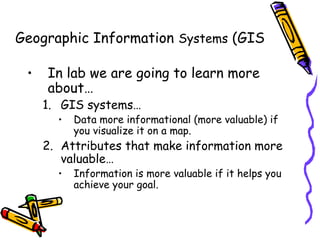
Data vs. Information
Data
• raw facts
• no context
• just numbers and
text
Information
• data with context
• processed data
• value-added to data
– summarized
– organized
– analyzed
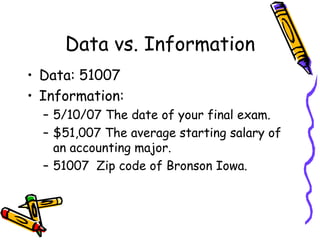
Data vs. Information
• Data: 51007
• Information:
– 5/10/07 The date of your final exam.
– $51,007 The average starting salary of
an accounting major.
– 51007 Zip code of Bronson Iowa.
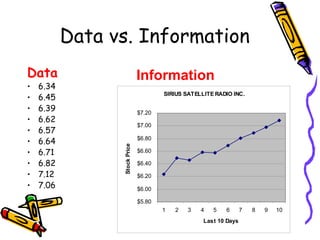
Data vs. Information
Data
• 6.34
• 6.45
• 6.39
• 6.62
• 6.57
• 6.64
• 6.71
• 6.82
• 7.12
• 7.06
SIRIUS SATELLITE RADIO INC.
$5.80
$6.00
$6.20
$6.40
$6.60
$6.80
$7.00
$7.20
1 2 3 4 5 6 7 8 9 10
Last 10 Days
Stock
Price
Information
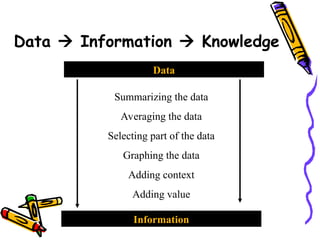
Data  Information  Knowledge
Data
Information
Summarizing the data
Averaging the data
Selecting part of the data
Graphing the data
Adding context
Adding value
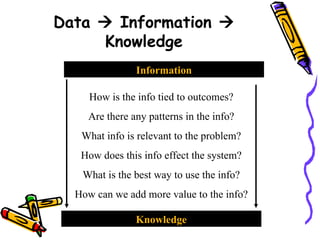
Data  Information 
Knowledge
Information
Knowledge
How is the info tied to outcomes?
Are there any patterns in the info?
What info is relevant to the problem?
How does this info effect the system?
What is the best way to use the info?
How can we add more value to the info?
Information Systems
Generic Goal:
• Transform Data into Information
– At the Core of an Information System is
a Database (raw data).
Information Systems (TSP and PCS)
• Data doesn’t just appear,
Capturing Data is really the first step
• These systems help capture data but they
also have other purposes (goals):
1. Transaction Processing Systems (TPS)
2. Process Control Systems (PCS)
Capturing Data
• What are some examples of real
TPS’s?
• What kind of data is being capture?
• How is this data transformed into
Information?
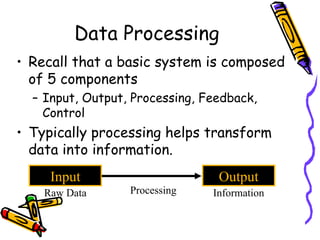
Data Processing
• Recall that a basic system is composed
of 5 components
– Input, Output, Processing, Feedback,
Control
• Typically processing helps transform
data into information.
Input Output
Processing
Raw Data Information
Processing
• Summarizing
• Computing Averages
• Graphing
• Creating Charts
• Visualizing Data
Processing: Great Example
• Navigation System
– Specialized Geographic Information System
• Input: Maps, Addresses, Points of Interest,
“Yellow Pages”
• Processing:
– Computing Shortest Paths;
– Finding the Nearest Chinese Restaurant
• Output:
– Directions (each turn + a map with arrows)
– List of nearby Chinese Restaurants (sorted by dist.)
Analysis – Navigation System
• Recall that Information Systems have
five more specific components:
• People, Data, Communication Network,
Hardware, Software.
• In a Navigation System…
– what is the Communication Network?
– what is the Hardware?
– who are the People?
Course Goal: Help you analyze systems?
• Step 1: Always ask yourself…What is
the purpose of the system?
• Step 2: Identify People, Data,
Hardware, Software, Communication
Network.
• Step 3: Identify Input, Output,
Processing, Feedback, Control.
Navigation System Feedback
• So what is the feedback in a navigation system?
• Feedback is information about how the system is
performing.
– Feedback can help you identify problems with the system…
so you can improve it.
• Feedback helps you determine if the system is
achieving its goal.
– In a heating system, the feedback was the actual
temperature.
Navigation System Control
• So what are some of the controls in a
navigation system?
• Control: Changing a variable to help
the system reach its goal or to set a
new goal.
• In a heating system, the control was
the desired temperature.
Navigation System Control
• Obviously, entering a new destination
• Not so obvious…
– zooming in
– changing the map view
– selecting an alternative route
Key Points
• A Navigation System takes raw data
(maps, locations) and displays it visually
(data  information) so that it is
easier to drive to a location. Goal
• The feedback (your current location) is
perhaps the most important feature.
• Paper maps can NOT show your location.
Geographic Information Systems (GIS
• In lab we are going to learn more
about…
1. GIS systems…
• Data more informational (more valuable) if
you visualize it on a map.
2. Attributes that make information more
valuable…
• Information is more valuable if it helps you
achieve your goal.

Data is a raw facts that when processsed

  • 1.
    Data vs. Information Data •raw facts • no context • just numbers and text Information • data with context • processed data • value-added to data – summarized – organized – analyzed
  • 2.
    Data vs. Information •Data: 51007 • Information: – 5/10/07 The date of your final exam. – $51,007 The average starting salary of an accounting major. – 51007 Zip code of Bronson Iowa.
  • 3.
    Data vs. Information Data •6.34 • 6.45 • 6.39 • 6.62 • 6.57 • 6.64 • 6.71 • 6.82 • 7.12 • 7.06 SIRIUS SATELLITE RADIO INC. $5.80 $6.00 $6.20 $6.40 $6.60 $6.80 $7.00 $7.20 1 2 3 4 5 6 7 8 9 10 Last 10 Days Stock Price Information
  • 4.
    Data  Information Knowledge Data Information Summarizing the data Averaging the data Selecting part of the data Graphing the data Adding context Adding value
  • 5.
    Data  Information Knowledge Information Knowledge How is the info tied to outcomes? Are there any patterns in the info? What info is relevant to the problem? How does this info effect the system? What is the best way to use the info? How can we add more value to the info?
  • 6.
    Information Systems Generic Goal: •Transform Data into Information – At the Core of an Information System is a Database (raw data).
  • 7.
    Information Systems (TSPand PCS) • Data doesn’t just appear, Capturing Data is really the first step • These systems help capture data but they also have other purposes (goals): 1. Transaction Processing Systems (TPS) 2. Process Control Systems (PCS)
  • 8.
    Capturing Data • Whatare some examples of real TPS’s? • What kind of data is being capture? • How is this data transformed into Information?
  • 9.
    Data Processing • Recallthat a basic system is composed of 5 components – Input, Output, Processing, Feedback, Control • Typically processing helps transform data into information. Input Output Processing Raw Data Information
  • 10.
    Processing • Summarizing • ComputingAverages • Graphing • Creating Charts • Visualizing Data
  • 11.
    Processing: Great Example •Navigation System – Specialized Geographic Information System • Input: Maps, Addresses, Points of Interest, “Yellow Pages” • Processing: – Computing Shortest Paths; – Finding the Nearest Chinese Restaurant • Output: – Directions (each turn + a map with arrows) – List of nearby Chinese Restaurants (sorted by dist.)
  • 12.
    Analysis – NavigationSystem • Recall that Information Systems have five more specific components: • People, Data, Communication Network, Hardware, Software. • In a Navigation System… – what is the Communication Network? – what is the Hardware? – who are the People?
  • 13.
    Course Goal: Helpyou analyze systems? • Step 1: Always ask yourself…What is the purpose of the system? • Step 2: Identify People, Data, Hardware, Software, Communication Network. • Step 3: Identify Input, Output, Processing, Feedback, Control.
  • 14.
    Navigation System Feedback •So what is the feedback in a navigation system? • Feedback is information about how the system is performing. – Feedback can help you identify problems with the system… so you can improve it. • Feedback helps you determine if the system is achieving its goal. – In a heating system, the feedback was the actual temperature.
  • 15.
    Navigation System Control •So what are some of the controls in a navigation system? • Control: Changing a variable to help the system reach its goal or to set a new goal. • In a heating system, the control was the desired temperature.
  • 16.
    Navigation System Control •Obviously, entering a new destination • Not so obvious… – zooming in – changing the map view – selecting an alternative route
  • 17.
    Key Points • ANavigation System takes raw data (maps, locations) and displays it visually (data  information) so that it is easier to drive to a location. Goal • The feedback (your current location) is perhaps the most important feature. • Paper maps can NOT show your location.
  • 18.
    Geographic Information Systems(GIS • In lab we are going to learn more about… 1. GIS systems… • Data more informational (more valuable) if you visualize it on a map. 2. Attributes that make information more valuable… • Information is more valuable if it helps you achieve your goal.