M C A 5 T H
S E M
System Analysis and Design
What is SAD
 System analysis and design (SAD) is a study in
which we learn how to analyze an existing and
execute a better one
 System analysis and design (SAD) is a structured
process for improving or developing systems by
analyzing existing systems, identifying areas for
improvement, and designing new systems.
System
 The word System is derived from Greek word Systema.
 The term system may be defined as an orderly arrangement
of a set of interrelated and interdependent elements that
operate collectively to accomplish some common purpose
or goal.
 System is a group of elements or components which work
together to accomplish a common task.
Example
 Human body is a system, consisting of various parts such as head, heart,
hands, legs and so on. The various body parts are related by mean of connecting
networks of blood vessels and nerves and the system has a main goal of “living”.
 Thus, a system can be described by specifying its parts, the way in which they
are related, and goals which they are expected to achieve.
 A business is also a system is also a system where economic resources such as
people, money, material, machines, etc are transformed by various
organizational processes (such as production, marketing, finance etc.) into
goods and services.
 A computer based information system is also a system which is a collection of
people, hardware, software, data and procedures that interact to provide timely
information to authorized people who need it.
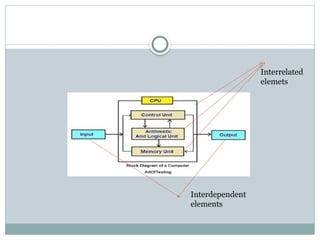
Interrelated
elemets
Interdependent
elements
Analysis
 Is a process or method of studying and observing a
system to know how it works and to identify its goal
and purpose.
 System analysis is conducted for the purpose of
studying a system or its parts in order to identify its
objectives.
 It ensures that all the components of the system
work efficiently to accomplish their purpose.
 Analysis specifies what the system should do.
System Design
 It is a process of planning a new system or replacing
an existing system.
 It is done by defining its components or modules to
satisfy the specific requirements.
 System Design focuses on how to accomplish the
objective of the system.
Elements /Components of system
 Input: Data or information that enters into the system
for processing.
 Output: Output is the outcome of processing or
information received from system.
 Processor: The processor is the element of a system that
involves the actual transformation of input into output.
 It is the operational component of a system.
 Control: The control element guides the system.
 The behavior of a computer System is controlled by the
Operating System and software.
Elements /Components of system
 Feedback: In this component system feedback is taken
to determine whether system is performing according to
customer requirement or not.
 Positive feedback is routine in nature that encourages
the performance of the system.
 Negative feedback is informational in nature that
provides the controller with information for action.
 Boundaries: A system should be defined by its
boundaries. Boundaries are the limits that identify its
components, processes, and interrelationship when it
interfaces with another system.
Elements /Components of system
 Environment: Things outside the boundary of the
system.
 The environment is the “supersystem” within which
an organization operates.
 It is the source of external elements that strike on the
system.
 Interface: Point of contact where system meets its
environment
Properties/ concepts/ characteristics of a System
 Organization: It implies structure and order.
 It is the arrangement of components that are well organized and
helps to achieve predetermined objectives.
e.g Input device ,output device and CPU of a computer system
are organized to process the data and produce information.
 Interaction :Process in which the components of the
system function or operate with each other.
 Interdependence :Interdependence means how the
components of a system depend on one another.
 They should coordinate and are linked together according to a
specified plan. The output of one subsystem may be input to
other subsystem.
Properties/ concepts/ characteristics of a System
 Integration: It implies how components of the
system are connected together.
 It means that the parts of the system work together
within the system even if each part performs a
unique function.
 Central Objective: The objective of system must
be central.
 The users must know in advance what is the main
objective of the system.
Physical Systems Abstract Systems
 Physical systems are real entities.
 We can touch and feel them.
 Physical System may be static or
dynamic in nature.
 For example, desks and chairs are
the physical parts of computer
center which are static.
 A programmed computer is a
dynamic system in which
programs, data, and applications
can change according to the user's
needs.
 Abstract systems are non-
physical entities or conceptual
that may be representation or
model of a real system.
 e.g , Model of earth,map of
earth,traffic
system,mathematical
equations.
Types of System
Open Systems Closed Systems
 System that freely interacts
with its environment.
 It receives inputs and
delivers outputs to the
outside of the system.
 It must adapt the changing
demands of the user.
 E.g
Business ,library ,colleges etc
 A closed system does not
interact with its environment.
 It is isolated from
environmental influences.
 A completely closed system is
rare in reality.
 E.g computer program
without input and output.
Types of System
Man–Made Information Systems
 it is an interconnected set of information resources to manage data for particular
organization, under Direct Management Control (DMC).
 This system includes hardware, software, communication, data, and application
for producing information according to the need of an organization.
 Man-made information systems are divided into three types −
 Formal Information System − It is based on the flow of information in the
form of memos, instructions, etc., from top level to lower levels of management.
 Informal Information System − This is employee based system which solves
the day to day work related problems.
 Computer Based System − This system is directly dependent on the computer
for managing business applications. For example, automatic library system,
railway reservation system, banking system, etc.
Information and its categories
Data: Data refers to raw facts and figures that represent measurements,
observations, or descriptions.
 It serves as the foundational element for information and knowledge.
 Types of Data:
 Quantitative Data: Numerical values that can be measured and analyzed
statistically (e.g., height, sales figures).
 Qualitative Data: Descriptive information that captures qualities or
characteristics (e.g., colors, opinions).
 Formats:
 Structured Data: Organized into a predefined format, often found in
databases (e.g., tables).
 Unstructured Data: Lacks a specific format, including text documents,
images, and videos.
 Sources:
 Primary Data: Collected directly from sources (e.g.,
surveys, experiments).
 Secondary Data: Existing data that has been collected
and analyzed by others (e.g., research papers, reports).
 Importance of Data
 Data is crucial for analysis, decision-making, and
understanding trends in various fields like business,
science, and healthcare. When processed and analyzed,
data can provide valuable insights, inform strategies, and
support evidence-based conclusions.
 Information: Information is data that has been processed
or organized in a way that makes it meaningful and useful.
 Categories of Information
 Quantitative vs. Qualitative
 Quantitative Information: Numerical data that can be measured and
analyzed statistically (e.g., sales figures, temperature).
 Qualitative Information: Descriptive data that provides insights into
qualities or characteristics (e.g., customer feedback, interview transcripts).
 Primary vs. Secondary
 Primary Information: Original data collected firsthand (e.g., surveys,
experiments).
 Secondary Information: Information that has been collected, processed,
or interpreted from primary sources (e.g., research papers, reviews).
 Structured vs. Unstructured
 Structured Information: Organized data, often in databases, that follows a predefined format (e.g.,
spreadsheets).
 Unstructured Information: Data that does not have a specific format, making it harder to analyze (e.g.,
emails, social media posts).
 Static vs. Dynamic
 Static Information: Information that does not change frequently (e.g., historical records).
 Dynamic Information: Information that is continually updated or changes over time (e.g., real-time
stock prices).
 Formal vs. Informal
 Formal Information: Official communications or data, often adhering to specific formats (e.g., legal
documents, official reports).
 Informal Information: Casual or unofficial data shared in everyday communication (e.g., gossip,
informal chats).
 Importance of Information
 Information is crucial for decision-making, problem-solving, and understanding complex
systems. In various fields, the way information is categorized can help in organizing
knowledge, improving communication, and enhancing analysis and interpretation.
Types of Information
 Factual Information: Factual information is information that can be
proven to be true.

 It can be verified by looking at evidence or using a scientific method. Facts are
also referred to as “verifiable facts” or “data.”
 Examples of factual information:
 The number of products a company produces.
 The number of employees a company has.
 The locations of a company’s offices or factories.
 The names of a company’s products.
 The dates when a company was founded or when products were launched.
 Conceptual information: Conceptual information refers
to abstract ideas, theories, and frameworks that help in
understanding complex topics or phenomena. It focuses on the
underlying principles and concepts rather than specific data or
facts.
 Examples of conceptual information:
 The mission, vision, and values of the organization
 The organizational structure
 The strategies and goals of the organization
 The culture of the organization
 The history of the organization
 Procedural information: Procedural information is a type of
information that provides a step-by-step guide on how to do
something.
 It can be presented in a number of different formats, including
written instructions, diagrams, and videos.
 Examples of procedural information:
 The name, address, and telephone number of the organization
 The hours of operation of the organization
 The process for applying for services from the organization
 The geographical areas served by the organization
 The languages spoken by staff at the organization
 The payment methods accepted by the organization
 Policy information: Refers to data, guidelines, or principles that
govern decision-making and actions within organizations,
governments, or institutions.
 E.g : human resources policies, climate change policies, safety
protocols, ethics etc.
 Directive Information: Directive information provides specific
instructions or guidelines that tell individuals or groups what actions
to take or how to behave in certain situations.
 Examples:
 Policies and Procedures: Employee handbooks outlining
workplace rules.
 Regulations: Government mandates on safety practices.
 Instructions: Step-by-step guides for completing tasks.
 Stimulatory Information: refers to data or messages designed to motivate,
encourage, or engage individuals or groups.
 It aims to inspire action, change attitudes, or increase participation in various
contexts.
 Examples of Stimulatory Information:
 Marketing Campaigns: Advertisements that promote products or services,
aiming to excite consumers and drive sales.
 Public Health Campaigns: Initiatives that encourage healthy behaviors, like
anti-smoking campaigns or vaccination drives.
 Employee Engagement Initiatives: Programs or messages designed to
boost morale and encourage teamwork, such as recognition awards or team-
building activities.
 Social Media Content: Posts that inspire or challenge followers to participate
in causes or movements.
Information System
 An Information System (IS) is a structured system designed to collect,
store, manage, and disseminate information.
 It combines technology (hardware and software), people, and processes to
facilitate the processing of data into meaningful information that supports
decision-making and organizational goals.
 Key Components of Information Systems
 Hardware: Physical devices like computers, servers, and networking equipment.
 Software: Applications and programs that process and analyze data (e.g.,
databases, enterprise software).
 Data: Raw facts and figures that are processed to generate meaningful
information.
 Procedures: Policies and processes that govern how data is collected, processed,
and disseminated.
 People: Users and IT professionals who interact with the system, including
managers, analysts, and end-users.
Types of Information Systems
Transaction Processing Systems (TPS):
 A Transaction Processing System (TPS) is a type of information system
that collects, stores, modifies, and retrieves the data generated from day-to-day
business transactions. TPS is essential for managing routine operations in
organizations by handling a large volume of transactions efficiently and
accurately.
 Key Features of TPS
 Real-Time Processing: TPS processes transactions immediately as they
occur, ensuring that data is updated in real-time.
 Data Integrity: It maintains the accuracy and consistency of data through
validation checks and error detection mechanisms.
 High Volume: TPS can handle a large number of transactions simultaneously,
making it suitable for businesses with high transaction volumes.
 User Interfaces: Typically includes user-friendly interfaces that allow
employees to enter and manage transaction data easily.
 Automated Reports: Generates reports on transaction
activities, which can be used for analysis and decision-making.
 Examples of TPS
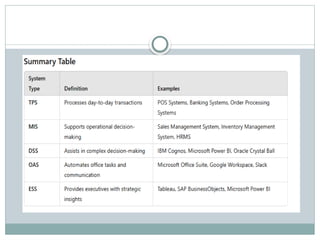
 Point of Sale (POS) Systems: Used in retail to process sales
transactions, manage inventory, and generate sales reports.
 Banking Systems: Processes customer transactions such as
deposits, withdrawals, and transfers.
 Order Processing Systems: Manages customer orders from
initiation to fulfillment, tracking inventory and shipping status.
 Reservation Systems: Used in airlines and hotels to manage
bookings and customer information.
 Importance of TPS
 Efficiency: Streamlines transaction processes, reducing
manual effort and processing time.
 Accuracy: Minimizes errors in data entry and
transaction processing, ensuring reliable data.
 Data Management: Provides a centralized repository
for transaction data, making it easier to analyze and
retrieve information.
 Support for Other Systems: Serves as a foundation
for higher-level systems like Management Information
Systems (MIS) and Decision Support Systems (DSS).
 Office Automation System (OAS):An Office Automation System is designed to
improve office productivity by automating routine tasks and facilitating
communication.
 Key Features:
 Document management
 Communication tools
 Scheduling and calendar management
 Workflow management
 Example:
 Microsoft Office Suite: Includes applications like Word, Excel, and Outlook that
help create documents, manage spreadsheets, and facilitate communication through
email.
 Google Workspace: Offers tools like Docs, Sheets, and Drive for collaboration and
document management.
 Slack: A communication platform that facilitates team collaboration and information
sharing.
 Management Information System (MIS):
 A Management Information System provides structured reports and summaries
to assist middle management in decision-making.
 Key Features:
 Data collection and processing
 Reporting tools
 Performance monitoring
 Example:
 Sales Management System: A system that compiles sales data from various
sources, generates weekly or monthly sales reports, and tracks sales performance
against targets.
 Inventory Management System: Monitors stock levels and generates
inventory reports.
 Human Resource Management System (HRMS): Manages employee data,
payroll, and performance evaluations.
 Decision Support System (DSS):
 A Decision Support System helps in making informed decisions by analyzing
data and providing insights.
 Key Features:
 Data analysis and modeling
 Scenario simulation
 User-friendly interfaces for interaction
 Example:
 IBM Cognos: A business intelligence tool that enables users to create reports,
dashboards, and perform data analysis to support complex business decisions.
 Microsoft Power BI: Provides interactive data visualization and business
analytics.
 Oracle Crystal Ball: A forecasting and risk analysis tool that helps evaluate
various business scenarios.
 Executive Support System (ESS): An Executive Support System
provides senior executives with easy access to critical information for
strategic decision-making.
 Key Features:
 Dashboards displaying key performance indicators (KPIs)
 Integration of data from various sources
 High-level reporting tailored for executives
 Example:
 Tableau: A data visualization tool that helps executives create interactive
dashboards to monitor organizational performance and analyze key metrics.
 SAP BusinessObjects: Provides comprehensive reporting and analytics for
executives.
 Microsoft Power BI: Also serves as an ESS by providing high-level insights
through visual reports and dashboards.
System Analyst in Information Systems
 A System Analyst is a professional responsible for analyzing, designing, and
implementing information systems to meet specific business needs. They serve as a
bridge between stakeholders (like management and end-users) and the technical teams.
 Key Responsibilities of a System Analyst
 Requirements Gathering: Working with stakeholders to understand their needs and
requirements for the information system.
 System Design: Developing specifications for the system, including workflows, data
structures, and interfaces.
 Feasibility Analysis: Assessing the practicality and viability of proposed systems,
including cost-benefit analysis.
 Documentation: Creating detailed documentation for system requirements, design
specifications, and user manuals.
 Testing and Implementation: Overseeing the testing of systems and ensuring they
are implemented successfully within the organization.
 User Training: Training users on how to effectively use the new system.
 Importance of System Analysts
 Problem Solving: They identify and address
organizational challenges through effective use of
technology.
 Efficiency: Help streamline processes and improve
operational efficiency.
 Strategic Alignment: Ensure that the information
systems align with the organization's goals and
objectives.
System analyst as an agent of change
 A system analyst plays a crucial role as an agent of change within organizations, particularly in
the context of implementing new information systems or improving existing processes.
 Here are some key aspects of this role:
 1. Identifying Needs and Opportunities
 Requirements Gathering: System analysts engage with stakeholders to understand their needs,
challenges, and aspirations, identifying areas where change can improve efficiency and effectiveness.
 Gap Analysis: They assess the current systems and processes, identifying gaps between the existing
state and desired outcomes.
 2. Designing Solutions
 System Design: Based on the identified needs, system analysts develop specifications for new
systems or enhancements to existing ones, ensuring they align with organizational goals.
 Process Improvement: They propose workflow modifications and process improvements that can
lead to better performance and productivity.
 3. Facilitating Implementation
 Project Management: System analysts often take on project management roles during system
implementations, coordinating tasks, timelines, and resources.
 Change Management: They help manage the human aspect of change, addressing resistance, and
ensuring that users are prepared for new systems or processes.
 4. Training and Support
 User Training: Providing training to end-users is essential for successful adoption. System
analysts create training materials and conduct sessions to help users understand new
systems.
 Ongoing Support: After implementation, they offer support and troubleshoot issues,
ensuring smooth operation and user satisfaction.
 5. Monitoring and Evaluation
 Performance Metrics: System analysts establish metrics to evaluate the effectiveness of
the new systems or processes, providing data-driven insights into their impact.
 Continuous Improvement: They advocate for continuous assessment and refinement of
systems to adapt to changing needs and technologies.
 6. Stakeholder Engagement
 Collaboration: System analysts work closely with various stakeholders—management, IT
teams, and end-users—to ensure that changes are well-communicated and that everyone is
aligned.
 Facilitating Communication: They serve as a bridge between technical teams and non-
technical users, translating complex technical language into understandable terms.
Importance of System Analysts as Change Agents
 Driving Innovation: By identifying opportunities
for improvement, system analysts foster innovation
within organizations.
 Enhancing Efficiency: Their work leads to more
efficient processes and systems, ultimately
contributing to better organizational performance.
 Fostering Adaptability: By facilitating change,
system analysts help organizations adapt to evolving
market conditions and technological advancements.
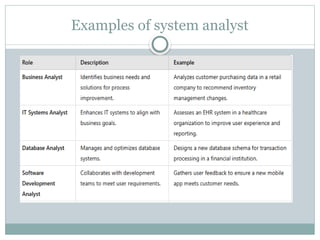
Examples of system analyst

System Analysis and Design.pptx DFD'S data flow

  • 1.
    M C A5 T H S E M System Analysis and Design
  • 2.
    What is SAD System analysis and design (SAD) is a study in which we learn how to analyze an existing and execute a better one  System analysis and design (SAD) is a structured process for improving or developing systems by analyzing existing systems, identifying areas for improvement, and designing new systems.
  • 3.
    System  The wordSystem is derived from Greek word Systema.  The term system may be defined as an orderly arrangement of a set of interrelated and interdependent elements that operate collectively to accomplish some common purpose or goal.  System is a group of elements or components which work together to accomplish a common task.
  • 4.
    Example  Human bodyis a system, consisting of various parts such as head, heart, hands, legs and so on. The various body parts are related by mean of connecting networks of blood vessels and nerves and the system has a main goal of “living”.  Thus, a system can be described by specifying its parts, the way in which they are related, and goals which they are expected to achieve.  A business is also a system is also a system where economic resources such as people, money, material, machines, etc are transformed by various organizational processes (such as production, marketing, finance etc.) into goods and services.  A computer based information system is also a system which is a collection of people, hardware, software, data and procedures that interact to provide timely information to authorized people who need it.
  • 5.
  • 6.
    Analysis  Is aprocess or method of studying and observing a system to know how it works and to identify its goal and purpose.  System analysis is conducted for the purpose of studying a system or its parts in order to identify its objectives.  It ensures that all the components of the system work efficiently to accomplish their purpose.  Analysis specifies what the system should do.
  • 7.
    System Design  Itis a process of planning a new system or replacing an existing system.  It is done by defining its components or modules to satisfy the specific requirements.  System Design focuses on how to accomplish the objective of the system.
  • 8.
  • 9.
    Elements /Components ofsystem  Input: Data or information that enters into the system for processing.  Output: Output is the outcome of processing or information received from system.  Processor: The processor is the element of a system that involves the actual transformation of input into output.  It is the operational component of a system.  Control: The control element guides the system.  The behavior of a computer System is controlled by the Operating System and software.
  • 10.
    Elements /Components ofsystem  Feedback: In this component system feedback is taken to determine whether system is performing according to customer requirement or not.  Positive feedback is routine in nature that encourages the performance of the system.  Negative feedback is informational in nature that provides the controller with information for action.  Boundaries: A system should be defined by its boundaries. Boundaries are the limits that identify its components, processes, and interrelationship when it interfaces with another system.
  • 11.
    Elements /Components ofsystem  Environment: Things outside the boundary of the system.  The environment is the “supersystem” within which an organization operates.  It is the source of external elements that strike on the system.  Interface: Point of contact where system meets its environment
  • 12.
    Properties/ concepts/ characteristicsof a System  Organization: It implies structure and order.  It is the arrangement of components that are well organized and helps to achieve predetermined objectives. e.g Input device ,output device and CPU of a computer system are organized to process the data and produce information.  Interaction :Process in which the components of the system function or operate with each other.  Interdependence :Interdependence means how the components of a system depend on one another.  They should coordinate and are linked together according to a specified plan. The output of one subsystem may be input to other subsystem.
  • 13.
    Properties/ concepts/ characteristicsof a System  Integration: It implies how components of the system are connected together.  It means that the parts of the system work together within the system even if each part performs a unique function.  Central Objective: The objective of system must be central.  The users must know in advance what is the main objective of the system.
  • 14.
    Physical Systems AbstractSystems  Physical systems are real entities.  We can touch and feel them.  Physical System may be static or dynamic in nature.  For example, desks and chairs are the physical parts of computer center which are static.  A programmed computer is a dynamic system in which programs, data, and applications can change according to the user's needs.  Abstract systems are non- physical entities or conceptual that may be representation or model of a real system.  e.g , Model of earth,map of earth,traffic system,mathematical equations. Types of System
  • 15.
    Open Systems ClosedSystems  System that freely interacts with its environment.  It receives inputs and delivers outputs to the outside of the system.  It must adapt the changing demands of the user.  E.g Business ,library ,colleges etc  A closed system does not interact with its environment.  It is isolated from environmental influences.  A completely closed system is rare in reality.  E.g computer program without input and output. Types of System
  • 16.
    Man–Made Information Systems it is an interconnected set of information resources to manage data for particular organization, under Direct Management Control (DMC).  This system includes hardware, software, communication, data, and application for producing information according to the need of an organization.  Man-made information systems are divided into three types −  Formal Information System − It is based on the flow of information in the form of memos, instructions, etc., from top level to lower levels of management.  Informal Information System − This is employee based system which solves the day to day work related problems.  Computer Based System − This system is directly dependent on the computer for managing business applications. For example, automatic library system, railway reservation system, banking system, etc.
  • 17.
    Information and itscategories Data: Data refers to raw facts and figures that represent measurements, observations, or descriptions.  It serves as the foundational element for information and knowledge.  Types of Data:  Quantitative Data: Numerical values that can be measured and analyzed statistically (e.g., height, sales figures).  Qualitative Data: Descriptive information that captures qualities or characteristics (e.g., colors, opinions).  Formats:  Structured Data: Organized into a predefined format, often found in databases (e.g., tables).  Unstructured Data: Lacks a specific format, including text documents, images, and videos.
  • 18.
     Sources:  PrimaryData: Collected directly from sources (e.g., surveys, experiments).  Secondary Data: Existing data that has been collected and analyzed by others (e.g., research papers, reports).  Importance of Data  Data is crucial for analysis, decision-making, and understanding trends in various fields like business, science, and healthcare. When processed and analyzed, data can provide valuable insights, inform strategies, and support evidence-based conclusions.
  • 19.
     Information: Informationis data that has been processed or organized in a way that makes it meaningful and useful.  Categories of Information  Quantitative vs. Qualitative  Quantitative Information: Numerical data that can be measured and analyzed statistically (e.g., sales figures, temperature).  Qualitative Information: Descriptive data that provides insights into qualities or characteristics (e.g., customer feedback, interview transcripts).  Primary vs. Secondary  Primary Information: Original data collected firsthand (e.g., surveys, experiments).  Secondary Information: Information that has been collected, processed, or interpreted from primary sources (e.g., research papers, reviews).
  • 20.
     Structured vs.Unstructured  Structured Information: Organized data, often in databases, that follows a predefined format (e.g., spreadsheets).  Unstructured Information: Data that does not have a specific format, making it harder to analyze (e.g., emails, social media posts).  Static vs. Dynamic  Static Information: Information that does not change frequently (e.g., historical records).  Dynamic Information: Information that is continually updated or changes over time (e.g., real-time stock prices).  Formal vs. Informal  Formal Information: Official communications or data, often adhering to specific formats (e.g., legal documents, official reports).  Informal Information: Casual or unofficial data shared in everyday communication (e.g., gossip, informal chats).  Importance of Information  Information is crucial for decision-making, problem-solving, and understanding complex systems. In various fields, the way information is categorized can help in organizing knowledge, improving communication, and enhancing analysis and interpretation.
  • 21.
    Types of Information Factual Information: Factual information is information that can be proven to be true.   It can be verified by looking at evidence or using a scientific method. Facts are also referred to as “verifiable facts” or “data.”  Examples of factual information:  The number of products a company produces.  The number of employees a company has.  The locations of a company’s offices or factories.  The names of a company’s products.  The dates when a company was founded or when products were launched.
  • 22.
     Conceptual information:Conceptual information refers to abstract ideas, theories, and frameworks that help in understanding complex topics or phenomena. It focuses on the underlying principles and concepts rather than specific data or facts.  Examples of conceptual information:  The mission, vision, and values of the organization  The organizational structure  The strategies and goals of the organization  The culture of the organization  The history of the organization
  • 23.
     Procedural information:Procedural information is a type of information that provides a step-by-step guide on how to do something.  It can be presented in a number of different formats, including written instructions, diagrams, and videos.  Examples of procedural information:  The name, address, and telephone number of the organization  The hours of operation of the organization  The process for applying for services from the organization  The geographical areas served by the organization  The languages spoken by staff at the organization  The payment methods accepted by the organization
  • 24.
     Policy information:Refers to data, guidelines, or principles that govern decision-making and actions within organizations, governments, or institutions.  E.g : human resources policies, climate change policies, safety protocols, ethics etc.  Directive Information: Directive information provides specific instructions or guidelines that tell individuals or groups what actions to take or how to behave in certain situations.  Examples:  Policies and Procedures: Employee handbooks outlining workplace rules.  Regulations: Government mandates on safety practices.  Instructions: Step-by-step guides for completing tasks.
  • 25.
     Stimulatory Information:refers to data or messages designed to motivate, encourage, or engage individuals or groups.  It aims to inspire action, change attitudes, or increase participation in various contexts.  Examples of Stimulatory Information:  Marketing Campaigns: Advertisements that promote products or services, aiming to excite consumers and drive sales.  Public Health Campaigns: Initiatives that encourage healthy behaviors, like anti-smoking campaigns or vaccination drives.  Employee Engagement Initiatives: Programs or messages designed to boost morale and encourage teamwork, such as recognition awards or team- building activities.  Social Media Content: Posts that inspire or challenge followers to participate in causes or movements.
  • 26.
    Information System  AnInformation System (IS) is a structured system designed to collect, store, manage, and disseminate information.  It combines technology (hardware and software), people, and processes to facilitate the processing of data into meaningful information that supports decision-making and organizational goals.  Key Components of Information Systems  Hardware: Physical devices like computers, servers, and networking equipment.  Software: Applications and programs that process and analyze data (e.g., databases, enterprise software).  Data: Raw facts and figures that are processed to generate meaningful information.  Procedures: Policies and processes that govern how data is collected, processed, and disseminated.  People: Users and IT professionals who interact with the system, including managers, analysts, and end-users.
  • 27.
    Types of InformationSystems Transaction Processing Systems (TPS):  A Transaction Processing System (TPS) is a type of information system that collects, stores, modifies, and retrieves the data generated from day-to-day business transactions. TPS is essential for managing routine operations in organizations by handling a large volume of transactions efficiently and accurately.  Key Features of TPS  Real-Time Processing: TPS processes transactions immediately as they occur, ensuring that data is updated in real-time.  Data Integrity: It maintains the accuracy and consistency of data through validation checks and error detection mechanisms.  High Volume: TPS can handle a large number of transactions simultaneously, making it suitable for businesses with high transaction volumes.  User Interfaces: Typically includes user-friendly interfaces that allow employees to enter and manage transaction data easily.
  • 28.
     Automated Reports:Generates reports on transaction activities, which can be used for analysis and decision-making.  Examples of TPS  Point of Sale (POS) Systems: Used in retail to process sales transactions, manage inventory, and generate sales reports.  Banking Systems: Processes customer transactions such as deposits, withdrawals, and transfers.  Order Processing Systems: Manages customer orders from initiation to fulfillment, tracking inventory and shipping status.  Reservation Systems: Used in airlines and hotels to manage bookings and customer information.
  • 29.
     Importance ofTPS  Efficiency: Streamlines transaction processes, reducing manual effort and processing time.  Accuracy: Minimizes errors in data entry and transaction processing, ensuring reliable data.  Data Management: Provides a centralized repository for transaction data, making it easier to analyze and retrieve information.  Support for Other Systems: Serves as a foundation for higher-level systems like Management Information Systems (MIS) and Decision Support Systems (DSS).
  • 30.
     Office AutomationSystem (OAS):An Office Automation System is designed to improve office productivity by automating routine tasks and facilitating communication.  Key Features:  Document management  Communication tools  Scheduling and calendar management  Workflow management  Example:  Microsoft Office Suite: Includes applications like Word, Excel, and Outlook that help create documents, manage spreadsheets, and facilitate communication through email.  Google Workspace: Offers tools like Docs, Sheets, and Drive for collaboration and document management.  Slack: A communication platform that facilitates team collaboration and information sharing.
  • 31.
     Management InformationSystem (MIS):  A Management Information System provides structured reports and summaries to assist middle management in decision-making.  Key Features:  Data collection and processing  Reporting tools  Performance monitoring  Example:  Sales Management System: A system that compiles sales data from various sources, generates weekly or monthly sales reports, and tracks sales performance against targets.  Inventory Management System: Monitors stock levels and generates inventory reports.  Human Resource Management System (HRMS): Manages employee data, payroll, and performance evaluations.
  • 32.
     Decision SupportSystem (DSS):  A Decision Support System helps in making informed decisions by analyzing data and providing insights.  Key Features:  Data analysis and modeling  Scenario simulation  User-friendly interfaces for interaction  Example:  IBM Cognos: A business intelligence tool that enables users to create reports, dashboards, and perform data analysis to support complex business decisions.  Microsoft Power BI: Provides interactive data visualization and business analytics.  Oracle Crystal Ball: A forecasting and risk analysis tool that helps evaluate various business scenarios.
  • 33.
     Executive SupportSystem (ESS): An Executive Support System provides senior executives with easy access to critical information for strategic decision-making.  Key Features:  Dashboards displaying key performance indicators (KPIs)  Integration of data from various sources  High-level reporting tailored for executives  Example:  Tableau: A data visualization tool that helps executives create interactive dashboards to monitor organizational performance and analyze key metrics.  SAP BusinessObjects: Provides comprehensive reporting and analytics for executives.  Microsoft Power BI: Also serves as an ESS by providing high-level insights through visual reports and dashboards.
  • 35.
    System Analyst inInformation Systems  A System Analyst is a professional responsible for analyzing, designing, and implementing information systems to meet specific business needs. They serve as a bridge between stakeholders (like management and end-users) and the technical teams.  Key Responsibilities of a System Analyst  Requirements Gathering: Working with stakeholders to understand their needs and requirements for the information system.  System Design: Developing specifications for the system, including workflows, data structures, and interfaces.  Feasibility Analysis: Assessing the practicality and viability of proposed systems, including cost-benefit analysis.  Documentation: Creating detailed documentation for system requirements, design specifications, and user manuals.  Testing and Implementation: Overseeing the testing of systems and ensuring they are implemented successfully within the organization.  User Training: Training users on how to effectively use the new system.
  • 36.
     Importance ofSystem Analysts  Problem Solving: They identify and address organizational challenges through effective use of technology.  Efficiency: Help streamline processes and improve operational efficiency.  Strategic Alignment: Ensure that the information systems align with the organization's goals and objectives.
  • 37.
    System analyst asan agent of change  A system analyst plays a crucial role as an agent of change within organizations, particularly in the context of implementing new information systems or improving existing processes.  Here are some key aspects of this role:  1. Identifying Needs and Opportunities  Requirements Gathering: System analysts engage with stakeholders to understand their needs, challenges, and aspirations, identifying areas where change can improve efficiency and effectiveness.  Gap Analysis: They assess the current systems and processes, identifying gaps between the existing state and desired outcomes.  2. Designing Solutions  System Design: Based on the identified needs, system analysts develop specifications for new systems or enhancements to existing ones, ensuring they align with organizational goals.  Process Improvement: They propose workflow modifications and process improvements that can lead to better performance and productivity.  3. Facilitating Implementation  Project Management: System analysts often take on project management roles during system implementations, coordinating tasks, timelines, and resources.  Change Management: They help manage the human aspect of change, addressing resistance, and ensuring that users are prepared for new systems or processes.
  • 38.
     4. Trainingand Support  User Training: Providing training to end-users is essential for successful adoption. System analysts create training materials and conduct sessions to help users understand new systems.  Ongoing Support: After implementation, they offer support and troubleshoot issues, ensuring smooth operation and user satisfaction.  5. Monitoring and Evaluation  Performance Metrics: System analysts establish metrics to evaluate the effectiveness of the new systems or processes, providing data-driven insights into their impact.  Continuous Improvement: They advocate for continuous assessment and refinement of systems to adapt to changing needs and technologies.  6. Stakeholder Engagement  Collaboration: System analysts work closely with various stakeholders—management, IT teams, and end-users—to ensure that changes are well-communicated and that everyone is aligned.  Facilitating Communication: They serve as a bridge between technical teams and non- technical users, translating complex technical language into understandable terms.
  • 39.
    Importance of SystemAnalysts as Change Agents  Driving Innovation: By identifying opportunities for improvement, system analysts foster innovation within organizations.  Enhancing Efficiency: Their work leads to more efficient processes and systems, ultimately contributing to better organizational performance.  Fostering Adaptability: By facilitating change, system analysts help organizations adapt to evolving market conditions and technological advancements.
  • 40.