
Data Analytics using Power
BI
Ming Man
MVP Visual Studio Technology
Objectives
• Data Analysis vs Data Analytic
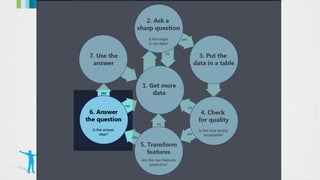
• Date Science Process
• Machine Learning
• Power BI
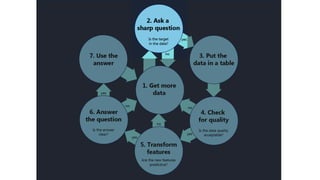
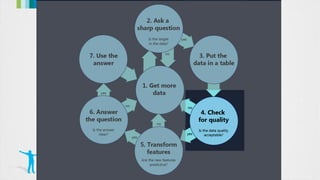
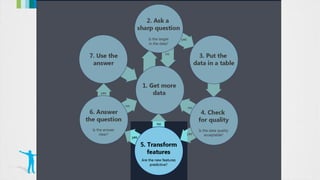
Microsoft Data Science Process
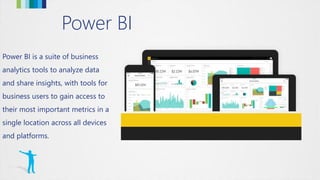
Power BI
Power BI is a suite of business
analytics tools to analyze data
and share insights, with tools for
business users to gain access to
their most important metrics in a
single location across all devices
and platforms.
Building Block Associations
DATA
SOURCES
REPORTS VISUALIZATIONS
DEVICES
DASHBOARDS
Demo
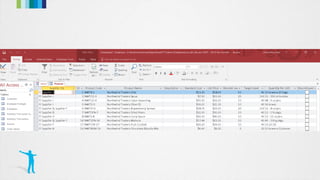
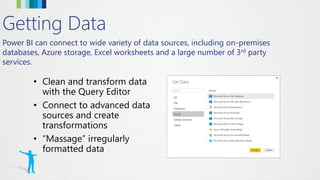
Power BI can connect to wide variety of data sources, including on-premises
databases, Azure storage, Excel worksheets and a large number of 3rd party
services.
Getting Data
• Clean and transform data
with the Query Editor
• Connect to advanced data
sources and create
transformations
• “Massage” irregularly
formatted data
Demo
1. How much / how many?
2. Which category?
3. Which groups?
4. Is it weird?
5. Which action?
[algorithm]
How much / how many?
What will the temperature
be next Tuesday?
What will my fourth
quarter sales in Portugal
be?
How many new followers
will I get next week?
Which category?
Is this an image of a cat or
a dog?
Which aircraft is causing
this radar signature?
What is the topic of this
news article?
[classification]
Which groups?
Which shoppers have similar
tastes in produce?
Which viewers like the same
kind of movies?
What is a natural way to break
these documents into five
topic groups?
Is this weird?
Is this pressure reading unusual?
Is this internet message typical?
Is this combination of purchases
very different from what this
customer has made in the past?
Which action?
Should I raise or lower the
temperature?
Should I vacuum the living
room again or stay plugged
in to my charging station?
Should I brake or accelerate
in response to that yellow
light?
Visualizations
Line, bar, pie, stacked
Matrix/pivots
Key performance
Tree maps
Geo and filled maps
Slicers/filters
Custom visualizations
A visualization is a visual representation of data, such as a chart,
graph, map, or other “visual” representations of data.
Demo
Diamonds
Diamonds
Diamonds
Diamonds
Diamonds
Diamonds
Diamonds
Diamonds
Diamonds
Diamonds
Diamonds
[prediction]
Diamonds
Diamonds
Demo
Notenoughdata
Barelyenoughdata
Enoughdata
Demo
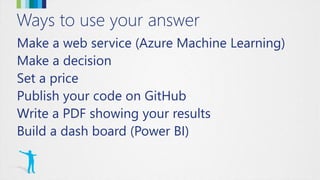
Ways to use your answer
Make a web service (Azure Machine Learning)
Make a decision
Set a price
Publish your code on GitHub
Write a PDF showing your results
Build a dash board (Power BI)
Thank You
www.expertslive.asia
#expertsliveasia

Data analytics using Power BI

Editor's Notes

  • #6 Power BI can unify all of your organization’s data, whether in the cloud or on-premises. Using the Power BI gateways, you can connect SQL Server databases, Analysis Services models, and many other data sources to your same dashboards in Power BI. If you already have reporting portals or applications, you can embed Power BI reports and dashboards into web and app scenarios for a unified experience across any device or platform.
  • #10 The basic building block for all Business Intelligence elements in Power BI begins with the data itself. Data from various sources is filtered, cleaned, and combined into Reports via Visualizations, and optionally published to Dashboards. Dashboard data is surfaced to users on any device, based on permissions and organization needs.
  • #18 A primary goal of Microsoft Power BI is to enable report creators, managers, and stakeholders to connect to any data source necessary to create a unified experience that makes sense to audiences and viewers of the content. Along with full support for more typical, legacy systems such as an Excel spreadsheet or SQL Server database, Power BI can authenticate and access data across a wide variety of data sources via “Connectors”, including Azure, Oracle, or even external services such as Facebook, Salesforce, or MailChimp,
  • #24 cluster
  • #25 Reinforcement learning
  • #27 Visualizations or “Visuals” are the end-result of any Business Intelligence effort. Ultimately, the aim is to access data, any data that makes sense in our organization, and present it to users in a meaningful, compelling, interactive, and insightful way. Power BI exposes a large number of out-of-the-box visualizations found in common Business Intelligence tools, such as numerous graphs, charts, maps, and filters, while also enabling visualization “extensibility” for creating organization-specific or scenario-specific custom visuals to be created by developers and power users.
  • #53 Built into the Power BI experience is the ability for users to glean additional information “on-the-fly” via a natural language question and answer paradigm, as well as providing quick “insights” into a dashboard, report, or the associated data based on intelligent analysis of current datasets. Power BI makes it easy to access these features by keeping the front and center during the user experience.