Republic of the Philippines
Department of Education
Region IV-B MIMAROPA
Division of Romblon
CAJIDIOCAN NATIONAL HIGH SCHOOL
Cajidiocan, Romblon
School Cajidiocan NHS Grade Level 7
Teacher Glaire R. Rollo Learning Area TLE
Teaching Date/s and Time
Grade 7-SSC Platinum B
March 22, 2024
9:45-10:30 A.M.
Quarter
THIRD
OBJECTIVES
A. Content
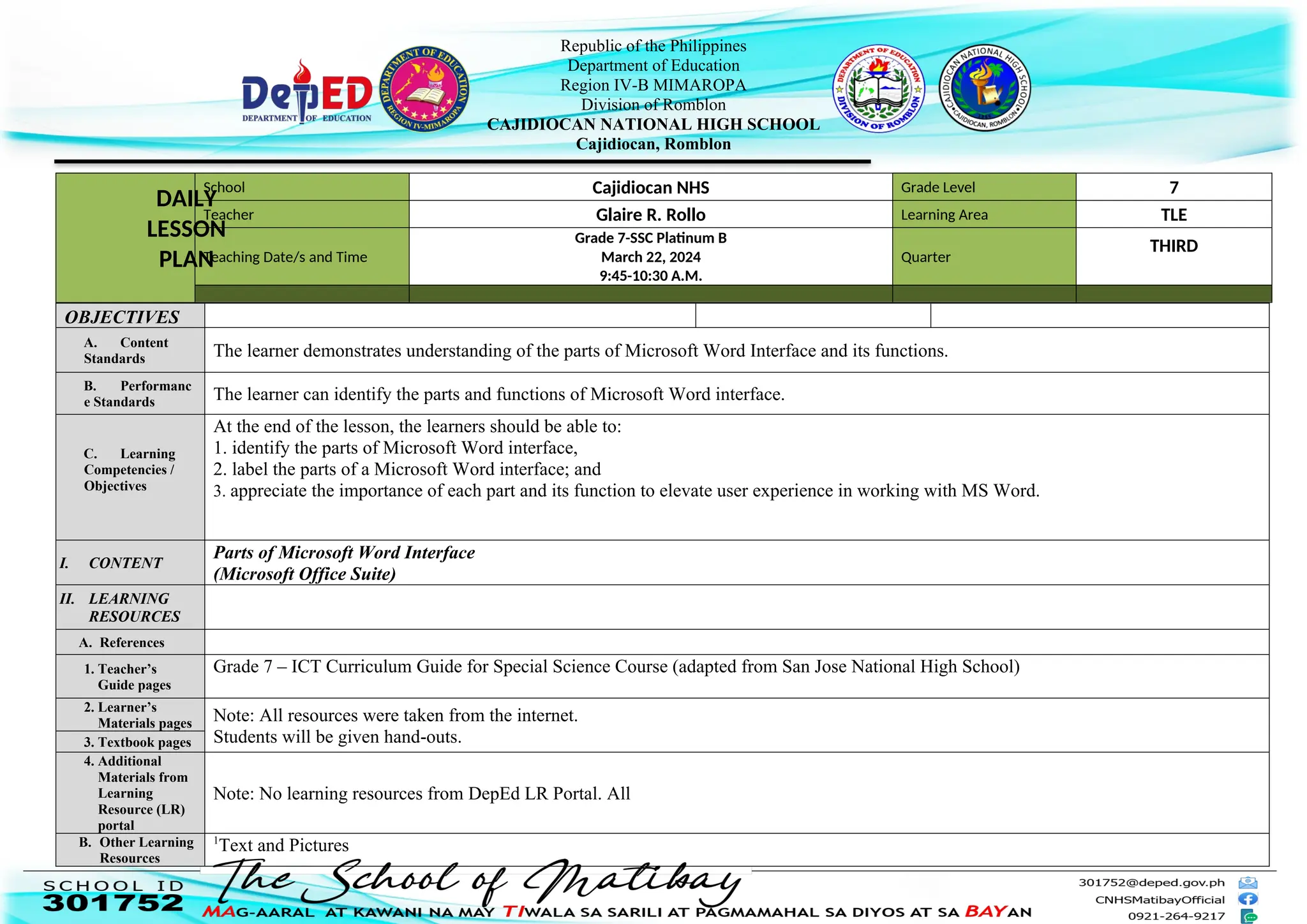
Standards The learner demonstrates understanding of the parts of Microsoft Word Interface and its functions.
B. Performanc
e Standards The learner can identify the parts and functions of Microsoft Word interface.
C. Learning
Competencies /
Objectives
At the end of the lesson, the learners should be able to:
1. identify the parts of Microsoft Word interface,
2. label the parts of a Microsoft Word interface; and
3. appreciate the importance of each part and its function to elevate user experience in working with MS Word.
I. CONTENT
Parts of Microsoft Word Interface
(Microsoft Office Suite)
II. LEARNING
RESOURCES
A. References
1. Teacher’s
Guide pages
Grade 7 – ICT Curriculum Guide for Special Science Course (adapted from San Jose National High School)
2. Learner’s
Materials pages Note: All resources were taken from the internet.
Students will be given hand-outs.
3. Textbook pages
4. Additional
Materials from
Learning
Resource (LR)
portal
Note: No learning resources from DepEd LR Portal. All
B. Other Learning
Resources
1
Text and Pictures
DAILY
LESSON
PLAN
Republic of the Philippines
Department of Education
Region IV-B MIMAROPA
Division of Romblon
CAJIDIOCAN NATIONAL HIGH SCHOOL
Cajidiocan, Romblon
https://www.scribd.com/document/601184422/PARTS-OF-MS-WORD-WINDOW/
https://www.techopedia.com
https://www.google.com
2
PowerPoint Presentation, Markers, Manila Paper and Coupon Bond, Projector and White Screen, Laptop
III. PROCEDURES Teacher’s Activity Student’s Activity Remarks/Annotation/Reflection
*Prayer
*Greetings
*Checking of Attendance
- Check attendance and give reminders on the importance of
attending classes.
*Class Norms
 Put your mobiles phone in silent mode and keep it.
 Avoid unnecessary talking and movement.
 Raise your hand if you want to say something.
*Checking of Assignment
KRA 2: Learning Environment and
Diversity of Learners
Objective 5. Established safe and secure
learning environments to enhance learning
through the consistent implementation of
policies, guidelines, and procedures.
Annotation: Using simple gesture to get
learners’ attention is a positive and non-
violent way of managing learner’s
behavior. Also, constantly reminding
them on class norms or rules will result
to a learning-focused environment.
A. Reviewing
yesterday’s
lesson or
Presenting the
new lesson
Activity 1
Word Puzzle
Mechanics:
 The students will be required to dance to the tune of a
song.
 When the music stops, the students will stop dancing.
 Anyone who will be caught moving, will go to the board
and will cross out one word/acronym that is related to
the previous lesson.
 This will be repeated until all the five words are found.
(Please find attached Activity Sheet sample.)
Expected Answer:
1. Microsoft
2. Bill Gates
3. WYSIWYG
4. Steve Jobs
5. Processor
B. Establishing the
purpose of the
lesson
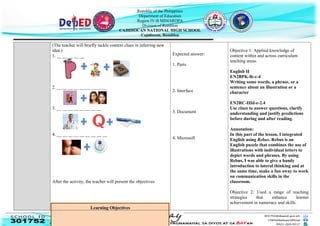
Activity 2: What Am I?
Directions: Guess the word using the pictures as clues.
KRA 1: Content Knowledge and
Pedagogy
Republic of the Philippines
Department of Education
Region IV-B MIMAROPA
Division of Romblon
CAJIDIOCAN NATIONAL HIGH SCHOOL
Cajidiocan, Romblon
(The teacher will briefly tackle context clues in inferring new
idea.)
1. __ __ __ __ __
2. __ __ __ __ __ __ __ __ __
3. __ __ __ __ __ __ __ __
4. __ __ __ __ __ __ __ __ __
After the activity, the teacher will present the objectives.
Learning Objectives
Expected answer:
1. Parts
2. Interface
3. Document
4. Microsoft
Objective 1: Applied knowledge of
content within and across curriculum
teaching areas.
English II
EN2BPK-lb-c-4
Writing some words, a phrase, or a
sentence about an illustration or a
character
EN2RC-IIId-e-2.4
Use clues to answer questions, clarify
understanding and justify predictions
before during and after reading.
Annotation:
In this part of the lesson, I integrated
English using Rebus. Rebus is an
English puzzle that combines the use of
illustrations with individual letters to
depict words and phrases. By using
Rebus, I was able to give a handy
introduction to lateral thinking and at
the same time, make a fun away to work
on communication skills in the
classroom.
Objective 2: Used a range of teaching
strategies that enhance learner
achievement in numeracy and skills.
Republic of the Philippines
Department of Education
Region IV-B MIMAROPA
Division of Romblon
CAJIDIOCAN NATIONAL HIGH SCHOOL
Cajidiocan, Romblon
1. identify the parts of Microsoft Word interface,
2. label the parts of a Microsoft Word interface; and
3. appreciate the importance of each part and its functions to
elevate user experience.
Annotation: The students will be able to
enhance their skills in literacy for they
will be able to formulate a term out of
the pictures presented before them. This
kind of activity will also draw students’
interest and entice participation.
C. Presenting
examples/instan
ces of the lesson
Guide Questions:
1. Have you tried using Microsoft Word?
2. Have you experienced getting into trouble while using MS
word in typing and you don’t know what tabs or buttons are
you going to press to fix it? - like accidentally deleting long
paragraphs of your document or the active window suddenly
disappear?
3. Were you nervous? Why?
(Students’ answer may
vary.)
KRA 1: Content Knowledge and
Pedagogy
Objective 3: Applied a range of teaching
strategies to develop critical and creative
thinking, as well as other higher order
thinking skills.
Annotation: In this portion, I used
Socratic method to solicit ideas from
students and to allow students to recall
and share their experiences.
D. Discussing new
concepts and
practicing new
skills #1 (Leads
to Formative
Assessment)
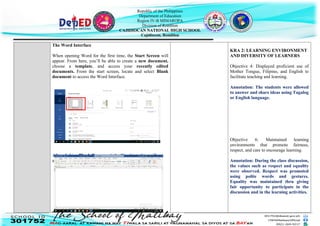
Microsoft Word is a component of the Microsoft Office Suite
of productivity software.
Microsoft Word is a word processing software that
enable users to create, edit, save, and print
professional-looking documents such as letters,
resumes, brochures, and other various types of
documents.
KRA 1: CONTENT KNOWLEDGE
AND PEDAGOGY
Objective 3: Applied a range of teaching
strategies to develop critical thinking, as
well as other higher order thinking skills.
Annotation: In this part of the lesson, I
employed screenshots of labeled parts of
the interface to emphasize its location
and function.
Republic of the Philippines
Department of Education
Region IV-B MIMAROPA
Division of Romblon
CAJIDIOCAN NATIONAL HIGH SCHOOL
Cajidiocan, Romblon
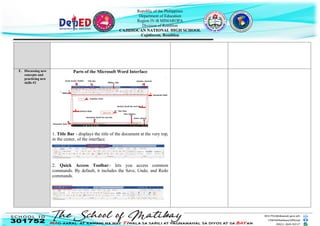
The Word Interface
When opening Word for the first time, the Start Screen will
appear. From here, you’ll be able to create a new document,
choose a template, and access your recently edited
documents. From the start screen, locate and select Blank
document to access the Word Interface.
After clicking Blank Document, the Word interface will
appear as follows.
KRA 2: LEARNING ENVIRONMENT
AND DIVERSITY OF LEARNERS
Objective 4: Displayed proficient use of
Mother Tongue, Filipino, and English to
facilitate teaching and learning.
Annotation: The students were allowed
to answer and share ideas using Tagalog
or English language.
Objective 6: Maintained learning
environments that promote fairness,
respect, and care to encourage learning.
Annotation: During the class discussion,
the values such as respect and equality
were observed. Respect was promoted
using polite words and gestures.
Equality was maintained thru giving
fair opportunity to participate in the
discussion and in the learning activities.
Republic of the Philippines
Department of Education
Region IV-B MIMAROPA
Division of Romblon
CAJIDIOCAN NATIONAL HIGH SCHOOL
Cajidiocan, Romblon
E. Discussing new
concepts and
practicing new
skills #2
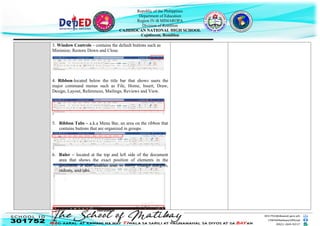
Parts of the Microsoft Word Interface
1. Title Bar - displays the title of the document at the very top,
in the center, of the interface.
2. Quick Access Toolbar– lets you access common
commands. By default, it includes the Save, Undo, and Redo
commands.
Republic of the Philippines
Department of Education
Region IV-B MIMAROPA
Division of Romblon
CAJIDIOCAN NATIONAL HIGH SCHOOL
Cajidiocan, Romblon
3. Window Controls – contains the default buttons such as
Minimize, Restore Down and Close.
4. Ribbon-located below the title bar that shows users the
major command menus such as File, Home, Insert, Draw,
Design, Layout, References, Mailings, Reviews and View.
5. Ribbon Tabs – a.k.a Menu Bar, an area on the ribbon that
contains buttons that are organized in groups.
6. Ruler – located at the top and left side of the document
area that shows the exact position of elements in the
document. It also enables user to easily change margins,
indents, and tabs.
Horizontal
Republic of the Philippines
Department of Education
Region IV-B MIMAROPA
Division of Romblon
CAJIDIOCAN NATIONAL HIGH SCHOOL
Cajidiocan, Romblon
7. Scroll bar and box– located at the bottom and right side of
the text area. It enables you to move up and down, and left
and right, through the pages of your document.
8. Insertion Point – the blinking line in the text area that
marks the beginning of text.
9. Text Area-occupies the lion’s share of your screen. This is
the white area where your text is displayed.
Vertical
Horizontal
Vertical
Republic of the Philippines
Department of Education
Region IV-B MIMAROPA
Division of Romblon
CAJIDIOCAN NATIONAL HIGH SCHOOL
Cajidiocan, Romblon
10. Document Information-located at the very bottom of the
interface that displays the page number, the number of
words in the document, language used, and others.
11. View Buttons – contains options such as Read Mode, Print
Layout and Web Layout.
Text Area
Insertion Point
(White Area)
Republic of the Philippines
Department of Education
Region IV-B MIMAROPA
Division of Romblon
CAJIDIOCAN NATIONAL HIGH SCHOOL
Cajidiocan, Romblon
12. Zoom control – is used to zoom in and zoom out your
document. You can zoom in to get a close-up view of your
file or zoom out to see more of the page at a reduced size.
F. Developing
Mastery (Leads
to Format)
Activity 3: Fit or Flop
 The teacher will divide the class into two groups.
 Members of the group will sit together.
KRA 2: Learning Environment and
Diversity of Learners
Republic of the Philippines
Department of Education
Region IV-B MIMAROPA
Division of Romblon
CAJIDIOCAN NATIONAL HIGH SCHOOL
Cajidiocan, Romblon
Directions: Raise the placard that says “Fit” if the
statement in Column A describes the function of the part in
Column B and “Flop” if it doesn’t.
Note: Each number will be displayed separately in the
PowerPoint presentation.
Objective 6: Use differentiated,
developmentally appropriate learning
experiences to address learner’s gender,
needs, strengths, interests, and
experiences.
Annotation: To join the vibe of my
young learners while encouraging
participation and sharing of learning, I
employed an activity that fits to them
while ensuring mastery of the lesson
presented.
G. Finding
practical
applications of
concept and
skills
Individual Activity
Directions: Label each part of the MS Word Interface by writing the letter that
corresponds to its name. Select your answer from the given choices. Expected Answer:
1. I 11. D
2. K 12. H
3. C 13. N
4. E 14. G
5. M
6. A
7. L
8. B
9. F
10. J
KRA 1: CONTENT KNOWLEDGE
AND PEDAGOGY
Objective 4: Managed classroom
structures to engage learners, individually
or in groups, in meaningful exploration,
discovery and hands-on activities within a
range of physical environment.
Annotation: I gave an activity to allow
students to explore the interface and
experience the actual labeling of parts
and be familiar with it and its location
in the interface.
H. Making Analogy of a Part to a Whole: A Piece to a Puzzle KRA 1: CONTENT KNOWLEDGE
Republic of the Philippines
Department of Education
Region IV-B MIMAROPA
Division of Romblon
CAJIDIOCAN NATIONAL HIGH SCHOOL
Cajidiocan, Romblon
generalizations
and
abstractions
about the lesson
Remember:
Remember:
“Each part has its specific function that could make a
significant contribution to the ease and peace while working
with MS Word.”
Students’ answer may vary.
AND PEDAGOGY
Objective 1: Applied knowledge of
content within and across curriculum
teaching areas.
ENGLISH 7 (No code in MELCS)
Use analogy to describe or make a
point.
Objective 3: Applied a range of teaching
strategies to develop critical and creative
thinking, as well as other higher thinking
skills.
Annotation: To sum up the lesson, I
used the analogy of a part to a whole to
point out to my learners the importance
of each single part of MS Word
Interface to elevate user experiences in
working with the whole system.
I. Evaluating
Learning
Directions: Read carefully and write the letter of your
answer in the space provided before each number.
(Remembering)
__1. It displays the title of the document.
a. Document Information
b. Ribbon
c. Title Bar
d. Ribbon Tabs
(Remembering)
__2. It shows the number of pages and number of words.
Expected Answer:
1. c
2. a
3. d
4. a
5. b
KRA 3: CURRICULUM AND
PLANNING AND ASSESSMENT AND
REPORTING
Objective 9: Used strategies for providing
timely, accurate and constructive feedback
to improve learner performance.
Annotation: Assessing learning is one of
the most vital part of the teaching
learning process. To evaluate learning
among students, I gave a paper-pencil
type of test to assess students’ learning
Republic of the Philippines
Department of Education
Region IV-B MIMAROPA
Division of Romblon
CAJIDIOCAN NATIONAL HIGH SCHOOL
Cajidiocan, Romblon
a. Document Information
b. Ribbon
c. Title Bar
d. Ribbon Tabs
(Understanding)
__3. If you are going to describe the function of the Insertion
Point, how would you rephrase it?
a. The insertion point displays the title of the document.
b. The insertion point blinks once.
c. The insertion point is a horizontal line.
d. The insertion point signals where the text will begin.
(Analyzing)
__4. How is the vertical ruler related to the horizontal ruler?
a. Both shows the exact location of the elements in the
document.
b. Both are used to zoom in and out of the document.
c. Option A only
d. Option B only
(Evaluating)
__5. What details would you use to support the view the
statement below?
“Text area occupies the lion’s view of the screen.”
a. Text area is the black area in the interface.
b. Text area occupies the widest area of the interface.
c. Text area is where the text appear.
d. Text area display what the user enters using a keyboard.
of the lesson presented and to check if
they really understood the lesson or if I
need to reteach it.
J. Additional Individual Activity
Republic of the Philippines
Department of Education
Region IV-B MIMAROPA
Division of Romblon
CAJIDIOCAN NATIONAL HIGH SCHOOL
Cajidiocan, Romblon
Activities for
application and
remediation
Directions: Identify the parts of the MS Word interface
that is needed to do the following tasks.
1. Minimize an active window.
2. Locate the exact position of elements in the document.
3. Get a close-up view of your document.
4. Move up and down thru the pages of your document.
5. Find out the number of words used in your document.
Expected Answer:
1. Window Controls
2. Ruler
3. Zoom Control
4. Vertical Scroll bar and
box
5. Document Information
REFLECTION
A. No. of learners who
earned 80% on the
formative assessment
B. No. of learners who
require additional
activities for remediation.
C. Did the remedial
lessons work? No. of
learners who have caught
up with the lesson.
D. No. of learners who
continue to require
remediation
E. Which of my teaching
strategies worked well?
Why did these work?
F. What difficulties did I
encounter which my
principal or supervisor
can help me solve?
G. What innovation or
localized materials did I
use/discover which I wish
to share with other
teachers?
H. No. of learners who
earned 80% on the
formative assessment
Republic of the Philippines
Department of Education
Region IV-B MIMAROPA
Division of Romblon
CAJIDIOCAN NATIONAL HIGH SCHOOL
Cajidiocan, Romblon
Prepared By: Checked By:
GLAIRE R. ROLLO ALMA M. AGUADO
Teacher-I Master Teacher I
Noted By: Approved By:
EMELINDA C. FADRI ROSELITA F. REPIZO
HT-V /TLE Department Principal II

Daily Lesson Plan in MS Word Interface for Classroom Observation

  • 1.
    Republic of thePhilippines Department of Education Region IV-B MIMAROPA Division of Romblon CAJIDIOCAN NATIONAL HIGH SCHOOL Cajidiocan, Romblon School Cajidiocan NHS Grade Level 7 Teacher Glaire R. Rollo Learning Area TLE Teaching Date/s and Time Grade 7-SSC Platinum B March 22, 2024 9:45-10:30 A.M. Quarter THIRD OBJECTIVES A. Content Standards The learner demonstrates understanding of the parts of Microsoft Word Interface and its functions. B. Performanc e Standards The learner can identify the parts and functions of Microsoft Word interface. C. Learning Competencies / Objectives At the end of the lesson, the learners should be able to: 1. identify the parts of Microsoft Word interface, 2. label the parts of a Microsoft Word interface; and 3. appreciate the importance of each part and its function to elevate user experience in working with MS Word. I. CONTENT Parts of Microsoft Word Interface (Microsoft Office Suite) II. LEARNING RESOURCES A. References 1. Teacher’s Guide pages Grade 7 – ICT Curriculum Guide for Special Science Course (adapted from San Jose National High School) 2. Learner’s Materials pages Note: All resources were taken from the internet. Students will be given hand-outs. 3. Textbook pages 4. Additional Materials from Learning Resource (LR) portal Note: No learning resources from DepEd LR Portal. All B. Other Learning Resources 1 Text and Pictures DAILY LESSON PLAN
  • 2.
    Republic of thePhilippines Department of Education Region IV-B MIMAROPA Division of Romblon CAJIDIOCAN NATIONAL HIGH SCHOOL Cajidiocan, Romblon https://www.scribd.com/document/601184422/PARTS-OF-MS-WORD-WINDOW/ https://www.techopedia.com https://www.google.com 2 PowerPoint Presentation, Markers, Manila Paper and Coupon Bond, Projector and White Screen, Laptop III. PROCEDURES Teacher’s Activity Student’s Activity Remarks/Annotation/Reflection *Prayer *Greetings *Checking of Attendance - Check attendance and give reminders on the importance of attending classes. *Class Norms  Put your mobiles phone in silent mode and keep it.  Avoid unnecessary talking and movement.  Raise your hand if you want to say something. *Checking of Assignment KRA 2: Learning Environment and Diversity of Learners Objective 5. Established safe and secure learning environments to enhance learning through the consistent implementation of policies, guidelines, and procedures. Annotation: Using simple gesture to get learners’ attention is a positive and non- violent way of managing learner’s behavior. Also, constantly reminding them on class norms or rules will result to a learning-focused environment. A. Reviewing yesterday’s lesson or Presenting the new lesson Activity 1 Word Puzzle Mechanics:  The students will be required to dance to the tune of a song.  When the music stops, the students will stop dancing.  Anyone who will be caught moving, will go to the board and will cross out one word/acronym that is related to the previous lesson.  This will be repeated until all the five words are found. (Please find attached Activity Sheet sample.) Expected Answer: 1. Microsoft 2. Bill Gates 3. WYSIWYG 4. Steve Jobs 5. Processor B. Establishing the purpose of the lesson Activity 2: What Am I? Directions: Guess the word using the pictures as clues. KRA 1: Content Knowledge and Pedagogy
  • 3.
    Republic of thePhilippines Department of Education Region IV-B MIMAROPA Division of Romblon CAJIDIOCAN NATIONAL HIGH SCHOOL Cajidiocan, Romblon (The teacher will briefly tackle context clues in inferring new idea.) 1. __ __ __ __ __ 2. __ __ __ __ __ __ __ __ __ 3. __ __ __ __ __ __ __ __ 4. __ __ __ __ __ __ __ __ __ After the activity, the teacher will present the objectives. Learning Objectives Expected answer: 1. Parts 2. Interface 3. Document 4. Microsoft Objective 1: Applied knowledge of content within and across curriculum teaching areas. English II EN2BPK-lb-c-4 Writing some words, a phrase, or a sentence about an illustration or a character EN2RC-IIId-e-2.4 Use clues to answer questions, clarify understanding and justify predictions before during and after reading. Annotation: In this part of the lesson, I integrated English using Rebus. Rebus is an English puzzle that combines the use of illustrations with individual letters to depict words and phrases. By using Rebus, I was able to give a handy introduction to lateral thinking and at the same time, make a fun away to work on communication skills in the classroom. Objective 2: Used a range of teaching strategies that enhance learner achievement in numeracy and skills.
  • 4.
    Republic of thePhilippines Department of Education Region IV-B MIMAROPA Division of Romblon CAJIDIOCAN NATIONAL HIGH SCHOOL Cajidiocan, Romblon 1. identify the parts of Microsoft Word interface, 2. label the parts of a Microsoft Word interface; and 3. appreciate the importance of each part and its functions to elevate user experience. Annotation: The students will be able to enhance their skills in literacy for they will be able to formulate a term out of the pictures presented before them. This kind of activity will also draw students’ interest and entice participation. C. Presenting examples/instan ces of the lesson Guide Questions: 1. Have you tried using Microsoft Word? 2. Have you experienced getting into trouble while using MS word in typing and you don’t know what tabs or buttons are you going to press to fix it? - like accidentally deleting long paragraphs of your document or the active window suddenly disappear? 3. Were you nervous? Why? (Students’ answer may vary.) KRA 1: Content Knowledge and Pedagogy Objective 3: Applied a range of teaching strategies to develop critical and creative thinking, as well as other higher order thinking skills. Annotation: In this portion, I used Socratic method to solicit ideas from students and to allow students to recall and share their experiences. D. Discussing new concepts and practicing new skills #1 (Leads to Formative Assessment) Microsoft Word is a component of the Microsoft Office Suite of productivity software. Microsoft Word is a word processing software that enable users to create, edit, save, and print professional-looking documents such as letters, resumes, brochures, and other various types of documents. KRA 1: CONTENT KNOWLEDGE AND PEDAGOGY Objective 3: Applied a range of teaching strategies to develop critical thinking, as well as other higher order thinking skills. Annotation: In this part of the lesson, I employed screenshots of labeled parts of the interface to emphasize its location and function.
  • 5.
    Republic of thePhilippines Department of Education Region IV-B MIMAROPA Division of Romblon CAJIDIOCAN NATIONAL HIGH SCHOOL Cajidiocan, Romblon The Word Interface When opening Word for the first time, the Start Screen will appear. From here, you’ll be able to create a new document, choose a template, and access your recently edited documents. From the start screen, locate and select Blank document to access the Word Interface. After clicking Blank Document, the Word interface will appear as follows. KRA 2: LEARNING ENVIRONMENT AND DIVERSITY OF LEARNERS Objective 4: Displayed proficient use of Mother Tongue, Filipino, and English to facilitate teaching and learning. Annotation: The students were allowed to answer and share ideas using Tagalog or English language. Objective 6: Maintained learning environments that promote fairness, respect, and care to encourage learning. Annotation: During the class discussion, the values such as respect and equality were observed. Respect was promoted using polite words and gestures. Equality was maintained thru giving fair opportunity to participate in the discussion and in the learning activities.
  • 6.
    Republic of thePhilippines Department of Education Region IV-B MIMAROPA Division of Romblon CAJIDIOCAN NATIONAL HIGH SCHOOL Cajidiocan, Romblon E. Discussing new concepts and practicing new skills #2 Parts of the Microsoft Word Interface 1. Title Bar - displays the title of the document at the very top, in the center, of the interface. 2. Quick Access Toolbar– lets you access common commands. By default, it includes the Save, Undo, and Redo commands.
  • 7.
    Republic of thePhilippines Department of Education Region IV-B MIMAROPA Division of Romblon CAJIDIOCAN NATIONAL HIGH SCHOOL Cajidiocan, Romblon 3. Window Controls – contains the default buttons such as Minimize, Restore Down and Close. 4. Ribbon-located below the title bar that shows users the major command menus such as File, Home, Insert, Draw, Design, Layout, References, Mailings, Reviews and View. 5. Ribbon Tabs – a.k.a Menu Bar, an area on the ribbon that contains buttons that are organized in groups. 6. Ruler – located at the top and left side of the document area that shows the exact position of elements in the document. It also enables user to easily change margins, indents, and tabs. Horizontal
  • 8.
    Republic of thePhilippines Department of Education Region IV-B MIMAROPA Division of Romblon CAJIDIOCAN NATIONAL HIGH SCHOOL Cajidiocan, Romblon 7. Scroll bar and box– located at the bottom and right side of the text area. It enables you to move up and down, and left and right, through the pages of your document. 8. Insertion Point – the blinking line in the text area that marks the beginning of text. 9. Text Area-occupies the lion’s share of your screen. This is the white area where your text is displayed. Vertical Horizontal Vertical
  • 9.
    Republic of thePhilippines Department of Education Region IV-B MIMAROPA Division of Romblon CAJIDIOCAN NATIONAL HIGH SCHOOL Cajidiocan, Romblon 10. Document Information-located at the very bottom of the interface that displays the page number, the number of words in the document, language used, and others. 11. View Buttons – contains options such as Read Mode, Print Layout and Web Layout. Text Area Insertion Point (White Area)
  • 10.
    Republic of thePhilippines Department of Education Region IV-B MIMAROPA Division of Romblon CAJIDIOCAN NATIONAL HIGH SCHOOL Cajidiocan, Romblon 12. Zoom control – is used to zoom in and zoom out your document. You can zoom in to get a close-up view of your file or zoom out to see more of the page at a reduced size. F. Developing Mastery (Leads to Format) Activity 3: Fit or Flop  The teacher will divide the class into two groups.  Members of the group will sit together. KRA 2: Learning Environment and Diversity of Learners
  • 11.
    Republic of thePhilippines Department of Education Region IV-B MIMAROPA Division of Romblon CAJIDIOCAN NATIONAL HIGH SCHOOL Cajidiocan, Romblon Directions: Raise the placard that says “Fit” if the statement in Column A describes the function of the part in Column B and “Flop” if it doesn’t. Note: Each number will be displayed separately in the PowerPoint presentation. Objective 6: Use differentiated, developmentally appropriate learning experiences to address learner’s gender, needs, strengths, interests, and experiences. Annotation: To join the vibe of my young learners while encouraging participation and sharing of learning, I employed an activity that fits to them while ensuring mastery of the lesson presented. G. Finding practical applications of concept and skills Individual Activity Directions: Label each part of the MS Word Interface by writing the letter that corresponds to its name. Select your answer from the given choices. Expected Answer: 1. I 11. D 2. K 12. H 3. C 13. N 4. E 14. G 5. M 6. A 7. L 8. B 9. F 10. J KRA 1: CONTENT KNOWLEDGE AND PEDAGOGY Objective 4: Managed classroom structures to engage learners, individually or in groups, in meaningful exploration, discovery and hands-on activities within a range of physical environment. Annotation: I gave an activity to allow students to explore the interface and experience the actual labeling of parts and be familiar with it and its location in the interface. H. Making Analogy of a Part to a Whole: A Piece to a Puzzle KRA 1: CONTENT KNOWLEDGE
  • 12.
    Republic of thePhilippines Department of Education Region IV-B MIMAROPA Division of Romblon CAJIDIOCAN NATIONAL HIGH SCHOOL Cajidiocan, Romblon generalizations and abstractions about the lesson Remember: Remember: “Each part has its specific function that could make a significant contribution to the ease and peace while working with MS Word.” Students’ answer may vary. AND PEDAGOGY Objective 1: Applied knowledge of content within and across curriculum teaching areas. ENGLISH 7 (No code in MELCS) Use analogy to describe or make a point. Objective 3: Applied a range of teaching strategies to develop critical and creative thinking, as well as other higher thinking skills. Annotation: To sum up the lesson, I used the analogy of a part to a whole to point out to my learners the importance of each single part of MS Word Interface to elevate user experiences in working with the whole system. I. Evaluating Learning Directions: Read carefully and write the letter of your answer in the space provided before each number. (Remembering) __1. It displays the title of the document. a. Document Information b. Ribbon c. Title Bar d. Ribbon Tabs (Remembering) __2. It shows the number of pages and number of words. Expected Answer: 1. c 2. a 3. d 4. a 5. b KRA 3: CURRICULUM AND PLANNING AND ASSESSMENT AND REPORTING Objective 9: Used strategies for providing timely, accurate and constructive feedback to improve learner performance. Annotation: Assessing learning is one of the most vital part of the teaching learning process. To evaluate learning among students, I gave a paper-pencil type of test to assess students’ learning
  • 13.
    Republic of thePhilippines Department of Education Region IV-B MIMAROPA Division of Romblon CAJIDIOCAN NATIONAL HIGH SCHOOL Cajidiocan, Romblon a. Document Information b. Ribbon c. Title Bar d. Ribbon Tabs (Understanding) __3. If you are going to describe the function of the Insertion Point, how would you rephrase it? a. The insertion point displays the title of the document. b. The insertion point blinks once. c. The insertion point is a horizontal line. d. The insertion point signals where the text will begin. (Analyzing) __4. How is the vertical ruler related to the horizontal ruler? a. Both shows the exact location of the elements in the document. b. Both are used to zoom in and out of the document. c. Option A only d. Option B only (Evaluating) __5. What details would you use to support the view the statement below? “Text area occupies the lion’s view of the screen.” a. Text area is the black area in the interface. b. Text area occupies the widest area of the interface. c. Text area is where the text appear. d. Text area display what the user enters using a keyboard. of the lesson presented and to check if they really understood the lesson or if I need to reteach it. J. Additional Individual Activity
  • 14.
    Republic of thePhilippines Department of Education Region IV-B MIMAROPA Division of Romblon CAJIDIOCAN NATIONAL HIGH SCHOOL Cajidiocan, Romblon Activities for application and remediation Directions: Identify the parts of the MS Word interface that is needed to do the following tasks. 1. Minimize an active window. 2. Locate the exact position of elements in the document. 3. Get a close-up view of your document. 4. Move up and down thru the pages of your document. 5. Find out the number of words used in your document. Expected Answer: 1. Window Controls 2. Ruler 3. Zoom Control 4. Vertical Scroll bar and box 5. Document Information REFLECTION A. No. of learners who earned 80% on the formative assessment B. No. of learners who require additional activities for remediation. C. Did the remedial lessons work? No. of learners who have caught up with the lesson. D. No. of learners who continue to require remediation E. Which of my teaching strategies worked well? Why did these work? F. What difficulties did I encounter which my principal or supervisor can help me solve? G. What innovation or localized materials did I use/discover which I wish to share with other teachers? H. No. of learners who earned 80% on the formative assessment
  • 15.
    Republic of thePhilippines Department of Education Region IV-B MIMAROPA Division of Romblon CAJIDIOCAN NATIONAL HIGH SCHOOL Cajidiocan, Romblon Prepared By: Checked By: GLAIRE R. ROLLO ALMA M. AGUADO Teacher-I Master Teacher I Noted By: Approved By: EMELINDA C. FADRI ROSELITA F. REPIZO HT-V /TLE Department Principal II