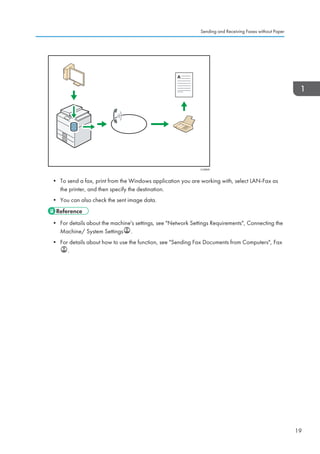
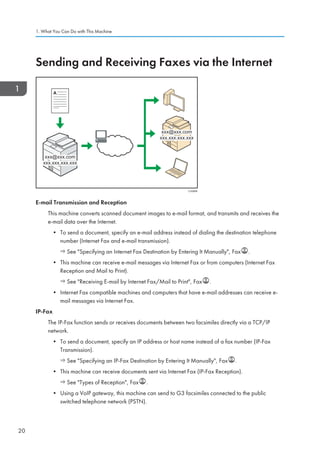
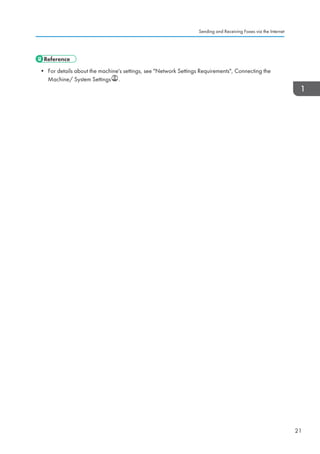
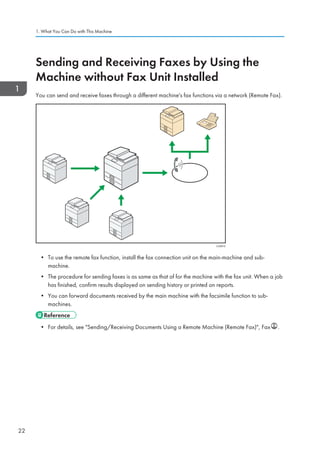
This document provides instructions for basic copying and faxing functions on the machine's control panel:
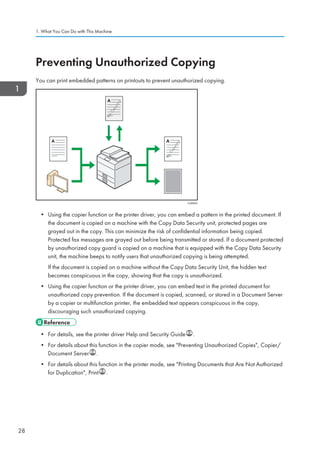
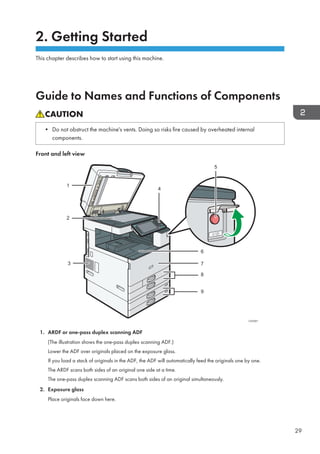
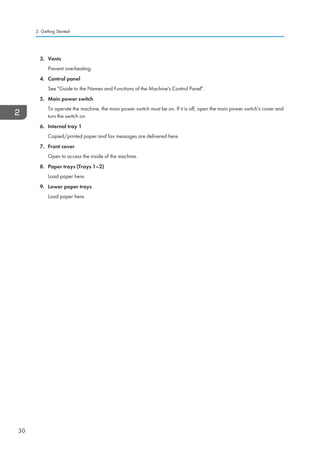
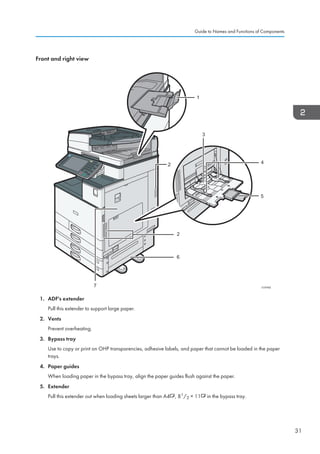
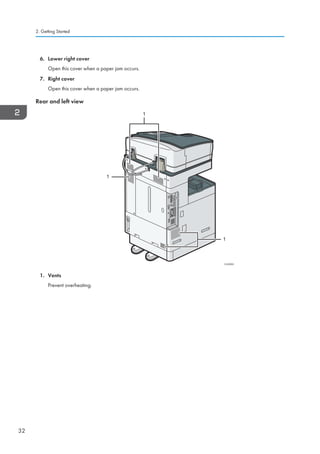
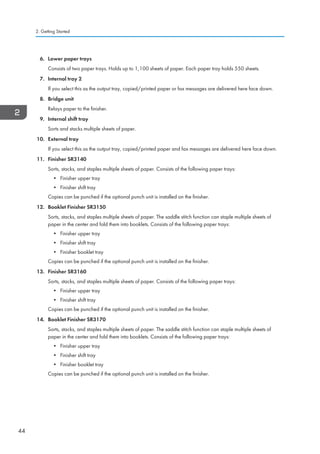
1. The control panel overview explains the main buttons and indicators including the Home, Reset, and Energy Saver keys for navigating menus and modes.
2. Basic copying instructions cover placing originals, setting paper size and quantity, and using features like auto density and duplex copying.
3. The document server function allows storing scanned files to print on demand rather than copying immediately.
4. Sending a fax involves setting transmission mode, scanning originals, and specifying recipients. Storing documents to the document server for later faxing is also described.
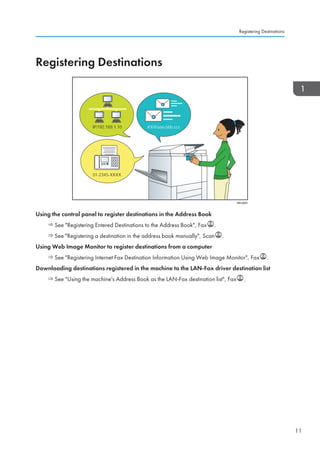
5. Instructions for addressing book

![Guide to the Names and Functions
of the Machine's Control Panel
[Home] key111
Press to display the [Home] screen. For details,
see "How to Use the [Home] Screen".
Function keys222
No functions are registered to the function keys
as a factory default. You can register often used
functions, programs, and Web pages. For details,
see "Configuring function keys", Getting Started
.
Display panel333
Displays keys for each function, operation status,
or messages. See "How to Use the Screens on
the Control Panel", Getting Started .
[Reset] key444
Press to clear the current settings.
[Program] key (copier, Document Server,555
facsimile, and scanner mode)
Press to register frequently used settings, or••
to recall registered settings. See "Registering
Frequently Used Functions", Convenient
Functions .
Press to program defaults for the initial••
display when modes are cleared or reset,
or immediately after the main power switch
is turned on.
See "Changing the Default Functions of the
Initial Screen", Convenient Functions .
[Interrupt] key666
Press to make interrupt copies. See "Interrupt
Copy", Copy/ Document Server .
Main power indicator777
The main power indicator goes on when you turn
on the main power switch.
[Energy Saver] key888
Press to switch to and from Low Power mode or Sleep
mode. See "Saving Energy", Getting Started .
When the machine is in Low Power mode, the
[Energy Saver] key is lit. In Sleep mode, the
[Energy Saver] key flashes slowly.
[Login/Logout] key999
Press to log in or log out.
[User Tools/Counter] key1111
User Tools••
Press to change the default settings to meet
your requirements. See "Accessing User
Tools", Connecting the Machine/ System
Settings .
Counter••
Press to check or print the counter
value. See "Counter", Maintenance and
Specifications .
You can find out where to order expendable
supplies and where to call when a malfunction
occurs. You can also print these details. See
"Checking Inquiry Using the User Tools",
Maintenance and Specifications .
1 4 5 6 732
8
9
10
11
1213141516171819
20
21
22
This illustration shows the control panel of the machine with options fully installed.](https://image.slidesharecdn.com/d1467503-191008171028/85/D1467503-2-320.jpg)
![Simple Screen
When you press the {Simple Screen} key, the screen changes
to the simplified display. Letters and keys are displayed at a
larger size, making operations easier.
Certain keys do not appear on the simplified display.
[Simple Screen] key1111
Press to switch to the simple screen. See
"Switching Screen Patterns", Getting Started .
[ # ] key (Enter key)1111
Press to confirm values entered or items specified.
[Start] key1111
Press to start copying, printing, scanning, or
sending.
[Sample Copy] key1111
Press to make a single set of copies or prints to
check print quality before making multiple sets.
See "Sample Copy", Copy/ Document Server
.
[Stop] key1111
Press to stop a job in progress, such as copying,
scanning, faxing, or printing.
[Clear] key1111
Press to delete a number entered.
Number keys1111
Use to enter the numbers for copies, fax numbers
and data for the selected function.
[Check Status] key1111
Press to check the machine's system status,
operational status of each function, and current
jobs. You can also display the job history and the
machine's maintenance information.
Data In indicator (facsimile and printer1111
mode)
Flashes when the machine is receiving print jobs
or LAN-Fax documents from a computer. See Fax
and Print .
Communicating indicator, Fax Received2222
indicator, Confidential File indicator
Communicating indicator••
Lights continuously during data transmission
and reception.
Fax Received indicator••
Lights continuously while data other than
personal box or Memory Lock file is being
received and stored in the fax memory.
See "Substitute Reception", Fax .
Confidential File indicator••
Lights continuously while personal box data
is being received. Blinks while Memory
Lock file is being received. See "Personal
Boxes" and "Printing a File Received with
Memory Lock", Fax .
Media access lamp2222
Lights up when a removable memory device is
inserted in the media slot.
Media slots2222
Use to insert an SD card or a USB flash memory
device.](https://image.slidesharecdn.com/d1467503-191008171028/85/D1467503-3-320.jpg)
![A Press the {Home} key on the top left of
the control panel, and press the [Copier]
icon on the [Home] screen.
B Press the {Reset} key.
C Place the originals.
• Exposure Glass
(Face down)
• Auto Document Feeder (Face up)
ARDF•
One-pass duplex•
scanning ADF
D Make desired settings.
E Enter the number of copies.
F Press the {Start} key.
Paper Size
You can check the paper
size using the scale on the exposure glass.
Auto Image Density
Dark texture originals will be copied so that
background will not be reproduced.
Auto Paper Select
Selects a suitable size of paper automatically.
Paper Size
Tips
Auto Reduce/Enlarge
A Press [Auto Reduce /
Enlarge].
B Select the paper size.
C Place the originals, and then press the {Start} key.
Preset Reduce/Enlarge
A Press [Reduce / Enlarge].
B Select a ratio, and then
press [OK].
C Place the originals, and then press the {Start}
key. (Paper size is selected automatically.)
How to Reduce/Enlarge... (Basic Copying)
A See if original is 1-sided or
2-sided (duplex).
B Press [Dup./Combine/Series].
C Select the original and copy types and/or
the orientation.
D Place the originals, and then press the {Start} key.
Duplex
1-Sided → 2-Sided
Copies two 1-sided pages
on one 2-sided page.
2-Sided → 2-Sided
Copies one 2-sided page on
one 2-sided page.
Combine
1-sided Combine
Copies multiple 1-sided or 2-sided
originals on one side of copy paper.
2-sided Combine
Copies multiple 1-sided originals
on two sides of copy paper.
Copies multiple 2-sided originals
on two sides of copy paper.
For more functions on Combine, see Basic
Copying, Copy/ Document Server .
(Basic Copying)How to save paper...
A Select a color mode.
How to select a color mode... (Color Copying)
Quick Reference Copy Guide
How to make Copies...
(Placing Originals, Paper Specifications and Adding Paper , Basic Copying)](https://image.slidesharecdn.com/d1467503-191008171028/85/D1467503-4-320.jpg)
![Reduce/Enlarge
Zoom:You can specify the reproduction•
ratio in increments of 1%.
Magnification:You can specify the horizontal•
and vertical reproduction ratios, individually.
Series Copies
Separately copies the front and back of a•
2-sided original onto two sheets.
Booklet/Magazine
Copies two or more originals in page order.•
Edit/Stamp
Image Repeat/Double Copies: The original•
image is copied repeatedly.
Centering: Moves image to center.•
Erase: Erases the center and/or all four•
sides of the original image.
Stamps: Copies with the date, page numbers, etc.•
Cover/Slip Sheet
Front Cover / Front/Back Cover: Create cover•
sheets.
Designate: Copies certain pages of the•
original onto designation sheets.
Advanced features
(Basic Copying)How to finish your document...
Staple
A Press [Finishing].
B Select one of the stapling positions
(Copies will be sorted automatically).
C Press [OK].
D Enter the number of copies.
E Place the originals, and then
press the {Start} key.
Punch
A Press [Finishing].
B Select one of the punch hole positions
(Copies will be hole punched).
C Press [OK].
D Enter the number of copies.
E Place the originals, and then press the
{Start} key.
Staple and Punch can be done at the
same time.
Availability of finishing depends on your
configuration.
Why use it...
• To store often used documents centrally
and print on demand.
• To reduce network load.
How to use in copy mode...
A Press [Store File].
B Enter a file name,
user name, or
password if necessary.
C Specify a folder in which to store the
document if necessary.
D Press [OK].
E Place the originals.
F Make the scanning settings for the original.
G Press the {Start} key.
The machine stores scanned originals in
memory and makes one set of copies.
To find your document, press the {Home}
key on the top left of the control panel, and
press the [Document Server] icon on the
[Home] screen.
For more functions on Document Server,
see Document Server, Copy/ Document
Server .
(Basic Copying)Document Server
Chapter references in this guide refer to the bundled OI CD; Copy/ Document Server .
(Basic Copying, Advanced Copying)](https://image.slidesharecdn.com/d1467503-191008171028/85/D1467503-5-320.jpg)
![A Specify a transmission mode:
• Memory Transmission, or
• Immediate Transmission (selected by
pressing [Immed. TX])
B Place the original.
• Exposure glass
(Face down)
• Auto Document Feeder (Face up)
ARDF•
One-pass duplex•
scanning ADF
C Make the scan settings you require.
D Specify a destination.
E Press the {Start} key.
If you choose Memory Transmission, you can
send to more destinations at once. To do this,
after step 4, specify destinations and press
the {Start} key.
To send to an Internet
Fax, e-mail, or folder
destination, press
[Internet Fax], [E-mail],
or [Folder] to switch
the transmission type.
How to send a fax... (Transmission)
A Press [Store File].
B Select [Send Store].
C Set the user name, file name, and
password as necessary, and then press
[OK].
D Specify a destination, and then press the
{Start} key.
To send a fax from Document Server:
A Press [Select Stored File].
B Select the documents to be sent, and
then press [OK].
C Specify a destination, and then press the
{Start} key.
A Press the {User Tools/Counter} key.
B Press [Address Book Mangmnt].
C Check that [Program / Change] is
selected.
D Press [New Program].
E Press [Change] and set user’s
information, press [OK].
F Press [Fax Dest.].
G Press [Change] under Fax Destination,
enter the fax number using the number
keys and press [OK].
H Press [OK].
I Press [Exit].
J Press the {User Tools/Counter} key.
How to fax to Document Server...
(Storing a Document)
Quick Reference Fax Guide
How to program a Destination key...
(Registering Addresses and Users, Connecting the
Machine/ System Settings )](https://image.slidesharecdn.com/d1467503-191008171028/85/D1467503-6-320.jpg)
![See Fax Operating Instructions:
- SUB/SEP Codes (Other Transmission
Features)
Privacy can be protected when faxing with
a SUB/SEP Code, since only people who
know the SUB/SEP Code can receive or
print the fax document.
- Printed reports (Changing/Confirming
Communication Information) Inform you if
a fax has been saved, sent, or failed to be
transmitted.
- LAN-Fax features - Sending a fax from a
computer
(Fax via Computer)
Advanced Fax Features
Memory + Immediate
Before the original is scanned = before
pressing the {Start} key:
A Press the {Reset} key.
While the original is being scanned
A Press the {Stop} key.
B Press [Cancel Scanning] or [Cancel TX].
Memory
After the original is scanned
A Press the {Stop} key.
B Press [Standby File List].
C Select the file you want to cancel.
D Press [Stop Transmission], and then press [OK].
E Press [Exit].
How to cancel a transmission... (Transmission)
Using this function, you can instruct the
machine to send the fax at a later time via
Memory Transmission.
Advantage: you can take advantage of off-
peak telephone charges, without being at
the machine.
A Place the original, and then select the
scan settings you require.
B Press [TX Mode].
C Press [Send Later].
D Enter the time using the number keys,
and then press [#].
E Press [OK] twice.
The Journal is printed automatically
after every 50 communications.You can
also request a Journal at any time, by
following the procedure below.
A Press [TX/RX Status / Print].
B Select [Print Journal].
C Select the printing method:
- [All]
- [Print per File No.]
- [Print per User]
D Press the {Start} key.
E Press [Exit] twice.
(Other Transmission Features)
(Changing/Confirming Communication Information)
Chapter references in this guide refer to the bundled OI CD; Fax and Connecting the Machine/
System Settings .
How to send at a specific time (Send Later)
How to print the Journal...](https://image.slidesharecdn.com/d1467503-191008171028/85/D1467503-7-320.jpg)
![To use the scanner functions, several
settings must be made beforehand.
For details about these settings,
see Accessing UserTools, Connecting
the Machine/ System Settings and
Scan on the supplied CD-ROM.
How to scan...
A Press the {Home} key on the top left
of the control panel, and press the
[Scanner] icon on the [Home] screen.
B Make sure that no previous settings
remain. If a previous setting remains,
press the {Reset} key.
C Press the [E-mail] or [Folder] tab.
D Place originals.
E If necessary, specify the scan settings
according to the original to be scanned.
F If necessary, press [Send File Type /
Name] to specify settings such as file
name and file format.
How to use Scan to E-mail/Scan to Folder...
(Basic Procedure for Sending Scan Files by Email.
Basic Procedure When Using Scan to Folder)
G Specify the destination(s).You can specify
multiple destinations.
For scan to e-mail:
Before you select destination(s), make
sure you have selected [To]. If necessary,
press [Cc] or [Bcc], and then select
destination(s).
H For scan to e-mail only
Specify the e-mail sender.
Depending on the security settings,
the logged-in user may be specified as
[Sender Name]
• To specify the e-mail sender, press
[Sender Name].
• Select a sender.
• Press [OK].
• For reception
confirmation e-mail,
press [Recept. Notice].
I For scan to e-mail only
Enter a subject line if necessary.
• Press [Subject].
• Enter the subject.
• Press [OK].
J Press the {Start} key.
Available scan functions:
A Scan to E-mail
B Scan to Folder (SMB/FTP/NCP)
C Scan Using WSD (Web Services on
Devices)
D Store to Hard Disk
E Save to Memory Storage Device
F Scan to Delivery Server
G Scan via TWAIN Driver
For details about C, E, F, and G, see Scan
on the supplied CD-ROM.
Quick Reference Scanner Guide](https://image.slidesharecdn.com/d1467503-191008171028/85/D1467503-8-320.jpg)
![A Press the {User Tools/Counter} key.
B Press [Address Book Mangmnt].
C Check that [Program / Change] is
selected.
D Select the name whose e-mail address
you want to register. Press the name key,
or enter the registered number using the
number keys.
E Press [E-mail].
F Press [Change], under E-mail Address.
G Enter the e-mail address.
H Press [OK].
For details about registering folders, see
Registering Addresses and Users,
Connecting the Machine/ System Settings
.
Registering an E-mail destination...
(Registering Addresses and Users, Connecting the
Machine/ System Settings )
How to save to the machine’s hard
disk...(Storing and Saving the Scanned Documents)
A Press the {Home} key on the top left of
the control panel, and press the [Scanner]
icon on the [Home] screen.
B Make sure that no previous settings
remain. If a previous setting remains,
press the {Reset} key.
C Place originals.
D Press [Store File].
E Press [Store to HDD].
F If necessary, specify file information,
such as [User Name], [File Name], and
[Password].
G Press [OK].
H If necessary, press [Scan Settings]
to specify scanner settings such as
resolution and scan size.
I Press the {Start} key.
For details about saving to memory
storage device, see Storing the Scanned
Documents to a USB Flash Memory
Device or SD Card, Scan on the
supplied CD-ROM.
Why use it?
To store scanned files in the hard disk of
the machine for later (shared) use. (See
Scan .)
Displayingalistoffilesstoredonthemachine’sharddisk
(Storing and Saving the Scanned Documents)
A Press the {Home} key on the top left of
the control panel, and press the [Scanner]
icon on the [Home] screen.
B Press [Select Stored File]. The list of
stored files is displayed.
Chapter references in this guide refer to the bundled OI CD; Scan and Connecting the Machine/ System Settings .
How to save to the machine’s hard disk...](https://image.slidesharecdn.com/d1467503-191008171028/85/D1467503-9-320.jpg)

![TABLE OF CONTENTS
How to Read the Manuals.................................................................................................................................6
Symbols Used in the Manuals.......................................................................................................................6
Model-Specific Information...............................................................................................................................7
Names of Major Features..................................................................................................................................8
1. What You Can Do with This Machine
Reducing my Costs............................................................................................................................................. 9
Converting Documents to Electronic Formats Easily......................................................................................10
Registering Destinations...................................................................................................................................11
Operating the Machine More Effectively...................................................................................................... 12
Customizing the [Home] Screen..................................................................................................................... 13
Making Copies Using Various Functions........................................................................................................14
Printing Data Using Various Functions............................................................................................................16
Utilizing Stored Document...............................................................................................................................17
Sending and Receiving Faxes without Paper.................................................................................................18
Sending and Receiving Faxes via the Internet............................................................................................... 20
Sending and Receiving Faxes by Using the Machine without Fax Unit Installed....................................... 22
Using the Facsimile and the Scanner in a Network Environment.................................................................23
Embedding Text Information in Scanned Files...............................................................................................24
Preventing Information Leakage (Security Functions)....................................................................................25
Centrally Controlling Scan Conditions and Distribution............................................................................... 26
Monitoring and Setting the Machine Using a Computer..............................................................................27
Preventing Unauthorized Copying................................................................................................................. 28
2. Getting Started
Guide to Names and Functions of Components............................................................................................29
Guide to Functions of the Machine's Options................................................................................................33
Guide to Functions of the Machine's External Options.............................................................................33
Changing the Display Language.................................................................................................................... 45
How to Use the [Home] Screen...................................................................................................................... 46
Adding Icons to the [Home] Screen...........................................................................................................47
Registering Functions in a Program.................................................................................................................51
Example of Programs...................................................................................................................................53
Turning On/Off the Power..............................................................................................................................57
Turning On the Main Power........................................................................................................................57
1](https://image.slidesharecdn.com/d1467503-191008171028/85/D1467503-11-320.jpg)
![Checking a Stored File Selected from the List......................................................................................... 120
Specifying the File Type................................................................................................................................ 121
Specifying Scan Settings...............................................................................................................................122
7. Document Server
Storing Data...................................................................................................................................................123
Printing Stored Documents............................................................................................................................125
8. Web Image Monitor
Displaying Top Page..................................................................................................................................... 127
9. Adding Paper and Toner
Precautions for Loading Paper......................................................................................................................129
Loading Paper into Paper Trays................................................................................................................... 130
Loading Paper into the Bypass Tray.............................................................................................................132
Printing from the Bypass Tray Using the Printer Function........................................................................133
Loading Paper into Tray 3 (LCT)...................................................................................................................138
Loading Paper into the Large Capacity Tray (LCT).....................................................................................140
Loading Orientation-fixed Paper or Two-sided Paper............................................................................... 141
Recommended Paper Sizes and Types........................................................................................................144
Thick Paper.................................................................................................................................................154
Envelopes...................................................................................................................................................155
Adding Toner................................................................................................................................................. 159
Sending Faxes or Scanned Documents When Toner Has Run Out...................................................... 161
Disposing of Used Toner...........................................................................................................................161
10. Troubleshooting
When a Status Icon Is Displayed..................................................................................................................163
When the Indicator Lamp for the [Check Status] Key Is Lit or Flashing.....................................................165
When the Machine Makes a Beeping Sound.............................................................................................167
When You Have Problems Operating the Machine...................................................................................168
When Multiple Functions Cannot Be Executed Simultaneously............................................................ 173
Messages Displayed When Using the Copy/Document Server Function................................................174
Messages Displayed When Using the Facsimile Function.........................................................................178
When There Is a Problem Specifying the Network Settings.................................................................. 179
When the Remote Fax Function Cannot Be Used...................................................................................185
Messages Displayed When Using the Printer Function..............................................................................188
4](https://image.slidesharecdn.com/d1467503-191008171028/85/D1467503-14-320.jpg)
![How to Read the Manuals
Symbols Used in the Manuals
This manual uses the following symbols:
Indicates points to pay attention to when using the machine, and explanations of likely causes of paper
misfeeds, damage to originals, or loss of data. Be sure to read these explanations.
Indicates supplementary explanations of the machine's functions, and instructions on resolving user
errors.
This symbol is located at the end of sections. It indicates where you can find further relevant information.
[ ]
Indicates the names of keys on the machine's display or control panels.
Indicates instructions stored in a file on a provided CD-ROM.
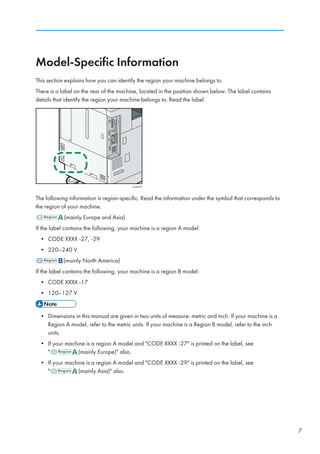
(mainly Europe and Asia), (mainly Europe) or (mainly Asia)
(mainly North America)
Differences in the functions of Region A and Region B models are indicated by two symbols. Read the
information indicated by the symbol that corresponds to the region of the model you are using. For
details about which symbol corresponds to the model you are using, see page 7 Model-Specific
Information.
6](https://image.slidesharecdn.com/d1467503-191008171028/85/D1467503-16-320.jpg)
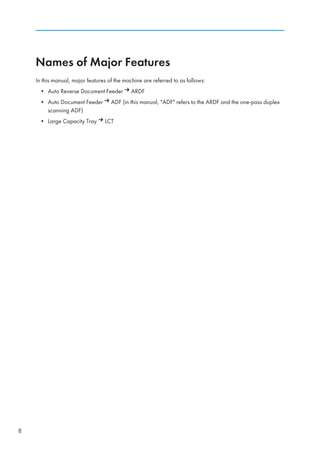
![1. What You Can Do with This Machine
You can search for a description by what you want to do.
Reducing my Costs
BRL059S
Printing multi-page documents on both sides of sheets (Duplex Copy)
See Duplex Copying, Copy/ Document Server .
Printing multi-page documents and received faxes on a single sheet (Combine (Copier/Fax))
See Combined Copying, Copy/ Document Server .
See Combine Two Originals, Fax .
Printing received faxes on both sides of sheets (2 Sided Print)
See Two-Sided Printing, Fax .
Converting received faxes to electronic formats (Paperless Fax)
See Confirming/Printing/Deleting Received and Stored Documents, Fax .
Sending files from the computer without printing them (LAN-Fax)
See Sending Fax Documents from Computers, Fax .
Checking how much paper is saved ([Information] screen)
See How to Use the [Information] Screen, Getting Started .
Reducing electricity consumption
See Saving Energy, Getting Started .
See Timer Settings, Connecting the Machine/ System Settings .
9](https://image.slidesharecdn.com/d1467503-191008171028/85/D1467503-19-320.jpg)
![Operating the Machine More Effectively
BQX139S
Registering and using frequently-used settings (Program)
See Registering Functions in a Program, Convenient Functions .
Registering frequently-used settings as initial settings (Program as Defaults (Copier/Document
Server/Fax/Scanner))
See Changing the Default Functions of the Initial Screen, Convenient Functions .
Registering frequently-used printing settings to the printer driver
See Using One Click Presets, Print .
Changing the initial settings of the printer driver to frequently-used printing settings
See Displaying the Printing Preferences Dialog Box, Print .
Adding shortcuts to frequently used programs or Web pages
See Adding Icons to the [Home] Screen, Convenient Functions .
Changing the order of the function and shortcut icons
See Changing the Order of Icons on the [Home] Screen, Convenient Functions .
1. What You Can Do with This Machine
12](https://image.slidesharecdn.com/d1467503-191008171028/85/D1467503-22-320.jpg)
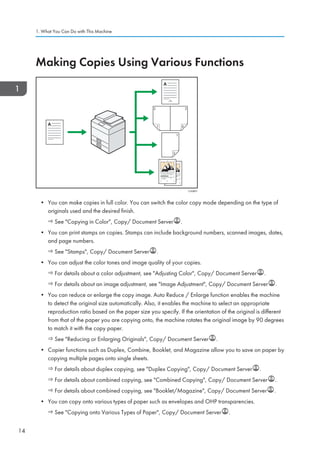
![Customizing the [Home] Screen
The icons of each function are displayed on the [Home] screen.
CUM001
• You can add shortcuts to often used programs or Web pages to the [Home] screen. The programs
or Web pages can be recalled easily by pressing the shortcut icons.
• You can display only the icons of functions and shortcuts that you use.
• You can change the order of the function and shortcut icons.
• For details about the features on the [Home] screen, see How to Use the [Home] Screen, Getting
Started .
• For details about how to customize the [Home] screen, see Types of [Home] Screens and How to
Customize Them, Convenient Functions .
Customizing the [Home] Screen
13](https://image.slidesharecdn.com/d1467503-191008171028/85/D1467503-23-320.jpg)
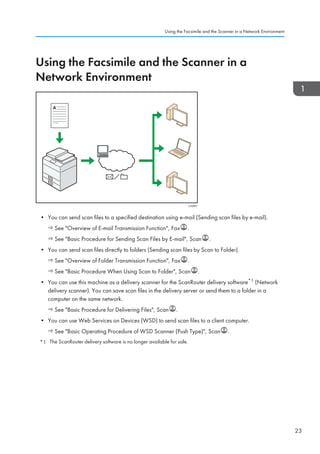
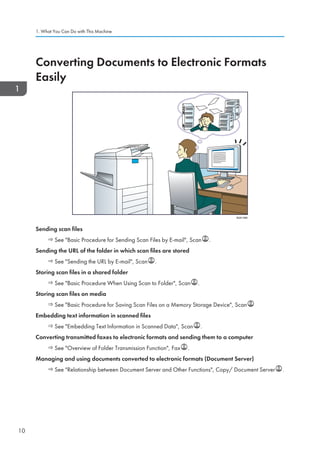
![Embedding Text Information in Scanned Files
You can extract text information from a scanned document and embed it in the file without using a
computer.
If you scan a document using this function, embedded text can be searched by using the text search
function or copied to another document.
CUL003
• To use this function, the optional OCR unit is required.
• You can select a file type from [PDF], [High Compression PDF], or [PDF/A].
• This function can optically recognize characters in various languages and up to approximately
40,000 characters a page.
• See Embedding Text Information in Scanned Data, Scan .
1. What You Can Do with This Machine
24](https://image.slidesharecdn.com/d1467503-191008171028/85/D1467503-34-320.jpg)
![Changing the Display Language
You can change the language used on the display. English is set as default.
1. Press the [User Tools/Counter] key.
CUP009
2. Press language key until the language you want to display appears.
3. Press the [User Tools/Counter] key.
Changing the Display Language
45](https://image.slidesharecdn.com/d1467503-191008171028/85/D1467503-55-320.jpg)
![How to Use the [Home] Screen
The icons of each function are displayed on the [Home] screen.
You can add shortcuts to frequently used programs or Web pages to the [Home] screen. The icons of
added shortcuts appear on the [Home] screen. The programs or Web pages can be recalled easily by
pressing the shortcut icons.
To display the [Home] screen, press the [Home] key.
CUV215
1 2 3 4
8 7910
5
6
1. [Copier]
Press to make copies.
For details about how to use the copy function, see Copy/ Document Server .
2. [Facsimile]
Press to send or receive faxes.
For details about how to use the fax function, see Fax .
3. [Scanner]
Press to scan originals and save images as files.
For details about how to use the scanner function, see Scan .
4. [Printer]
Press to make settings for using the machine as a printer.
For details about how to make settings for the printer function, see Print .
5. Home screen image
You can display an image on the [Home] screen, such as a corporate logo. To change the image, see
Displaying the Image on the [Home] Screen, Convenient Functions .
6. /
Press to switch pages when the icons are not displayed on one page.
2. Getting Started
46](https://image.slidesharecdn.com/d1467503-191008171028/85/D1467503-56-320.jpg)
![7. Shortcut icon
You can add shortcuts to programs or Web pages to the [Home] screen. For details about how to register
shortcuts, see page 47 Adding Icons to the [Home] Screen. The program number appears on the bottom
of the shortcut icon.
8. [Address Book Management]
Press to display the Address Book.
For details about how to use the Address Book, see Address Book, Connecting the Machine/ System
Settings .
9. [Browser]
Press to display Web pages.
For details about how to use the browser function, see Convenient Functions .
10. [Document Server]
Press to store or print documents on the machine's hard disk.
For details about how to use the Document Server function, see Copy/ Document Server .
Adding Icons to the [Home] Screen
You can add shortcuts to programs stored in copier, facsimile, or scanner mode, or Web pages
registered in Favorites using the browser function.
You can also review icons of functions and embedded software applications that you deleted from the
[Home] screen.
• Shortcuts to programs stored in Document Server mode cannot be registered to the [Home] screen.
• Shortcut names of up to 32 characters can be displayed in a standard screen. If the name of the
shortcut is longer than 32 characters, the 32nd character is replaced with .... Only 30 characters
can be displayed in a simple screen. If the name of the shortcut is longer than 30 characters, the
30th character is replaced with ....
• For details about how to make a program, see page 51 Registering Functions in a Program.
• For details about the procedure for registering Web pages to Favorites, see Specifying the
Settings for Favorites, Convenient Functions .
• Shortcuts to Web pages that are registered to Common Favorites can be registered to the [Home]
screen. When user authentication is enabled, shortcuts to Web pages that are registered to
Favorites by User can also be registered to a user's [Home] screen.
• For details about the procedure for registering a shortcut using the [Program] screen, see
Registering a Shortcut to a Program to the [Home] Screen, Convenient Functions .
• You can register up to 72 function and shortcut icons. Delete unused icons if the limit is reached. For
details see Deleting an Icon on the [Home] Screen, Convenient Functions .
How to Use the [Home] Screen
47](https://image.slidesharecdn.com/d1467503-191008171028/85/D1467503-57-320.jpg)
![• You can change the position of icons. For details, see Changing the Order of Icons on the [Home]
Screen, Convenient Functions .
Adding icons to the [Home] screen using Web Image Monitor
1. Start Web Image Monitor.
For details, see Using Web Image Monitor, Connecting the Machine/ System Settings .
2. Log in to Web Image Monitor as an administrator.
For details, see Security Guide .
3. Point to [Device Management], and then click [Device Home Management].
4. Click [Edit Icons].
5. Point to [ Icon can be added.] of the position that you want to add, and then click [
Add].
6. Select the function or shortcut icon you want to add.
7. Click [OK] four times.
Adding icons to the [Home] screen using the User Tools
In the following procedure, a shortcut to a copier program is registered to the [Home] screen.
1. Register a program.
2. Press the [User Tools/Counter] key.
CUP009
2. Getting Started
48](https://image.slidesharecdn.com/d1467503-191008171028/85/D1467503-58-320.jpg)
![3. Press [Edit Home].
4. Press [Add Icon].
5. Press the [Program] tab.
How to Use the [Home] Screen
49](https://image.slidesharecdn.com/d1467503-191008171028/85/D1467503-59-320.jpg)
![6. Make sure that [Copier Program] is selected.
7. Select the program you want to add.
8. Specify the position where [Blank] is displayed.
9. Press [OK].
10. Press the [User Tools/Counter] key.
• Press [ ] on the upper-right corner of the screen to check the position on the simple screen.
2. Getting Started
50](https://image.slidesharecdn.com/d1467503-191008171028/85/D1467503-60-320.jpg)
![Registering Functions in a Program
Depending on the functions, the number of programs that can be registered is different.
• Copier: 25 programs
• Document Server: 25 programs
• Facsimile: 100 programs
• Scanner: 25 programs
The following settings can be registered to programs:
Copier:
Color mode, original type, density, Special Original, paper tray, Store File (except for User Name,
File Name, and Password), Auto Reduce / Enlarge, Create Margin, Finishing, Cover/Slip Sheet,
Edit / Color, Dup./Combine/Series, Reduce / Enlarge, number of copies
Document Server (on the initial document print screen):
2 Sided Copy Top to Top, 2 Sided Copy Top to Bottom, Booklet, Magazine, Finishing, Cover/Slip
Sheet (except for Main Sheet Tray in Designate / Chapter), Edit / Stamp, number of prints
Facsimile:
Scan Settings, density, Original Feed Type, File Type, Store File (except for User Name, File
Name, and Password), Preview, transmission type, destinations (except for folder destinations),
Select Line, Adv.Features, memory transmission/immediate transmission, Communi. Result Rep., TX
Mode (except for Subject)
Scanner:
Scan Settings, density, Original Feed Type, Send File Type / Name (except for Security Settings
and Start No.), Store File (except for User Name, File Name, and Password), Preview,
Destinations selected from the Address Book, Text, Subject, Security, Recept. Notice
This section explains how to register functions in a program using copier function as an example.
1. Press the [Home] key on the top left of the control panel, and press the [Copier] icon on
the [Home] screen.
CJS113
Registering Functions in a Program
51](https://image.slidesharecdn.com/d1467503-191008171028/85/D1467503-61-320.jpg)
![2. Edit the copy settings so all functions you want to store in a program are selected.
3. Press the [Program] key.
CUP008
4. Press [Program].
5. Press the program number you want to register.
6. Enter the program name.
7. Press [OK].
8. Press [Exit].
• The number of characters you can enter for a program name varies depending on the functions as
follows:
• Copier: 34 characters
• Document Server: 34 characters
• Facsimile: 20 characters
• Scanner: 34 characters
• When a specified program is registered as the default, its values become the default settings, which
are displayed without pressing the [Program] key, when modes are cleared or reset, and after the
machine is turned on. See Changing the Default Functions of the Initial Screen, Convenient
Functions .
2. Getting Started
52](https://image.slidesharecdn.com/d1467503-191008171028/85/D1467503-62-320.jpg)
![• When the paper tray you specified in a program is empty and if there is more than one paper tray
with the same size paper in it, the paper tray prioritized under [Paper Tray Priority: Copier] or
[Paper Tray Priority: Facsimile] in the [Tray Paper Settings] tab will be selected first. For details, see
System Settings, Connecting the Machine/ System Settings .
• Destinations that are registered in the machine's Address Book can be registered to a program of
the scanner mode.
• Destinations can be registered to a program of the scanner mode only when [Include Destinations]
is selected for [Program Setting for Destinations] in [Scanner Features]. For details about the setting,
see General Settings, Scan .
• Folder destinations that have protection codes cannot be registered to a program of the scanner
mode.
• Programs are not deleted by turning the power off or by pressing the [Reset] key unless the
program is deleted or overwritten.
• Program numbers with next to them already have settings made for them.
• Programs can be registered to the [Home] screen, and can be recalled easily. For details, see
Registering a Shortcut to a Program to the [Home] Screen, Convenient Functions and page 47
Adding Icons to the [Home] Screen. Shortcuts to programs stored in Document Server mode
cannot be registered to the [Home] screen.
Example of Programs
Copier mode
Program name Program description Effect
Eco copy Specify [Combine 2 Sides] in
[Dup./Combine/Series].
You can save paper and toner.
Dated confidential
copy
In [Edit / Color], specify
[CONFIDENTIAL] under [Preset
Stamp], and [Date Stamp].
You can increase security
awareness by printing
CONFIDENTIAL and the date on
copies.
Conference
material copy
Specify [Combine 2 Sides] in
[Dup./Combine/Series] and
[Staple] in [Finishing].
You can copy conference materials
efficiently.
Registering Functions in a Program
53](https://image.slidesharecdn.com/d1467503-191008171028/85/D1467503-63-320.jpg)
![Program name Program description Effect
Magazine copy Specify [Magazine] in [Dup./
Combine/Series] and [Staple:
Center] in [Finishing].
You can save paper. Also, you can
perform printing jobs such as
producing leaflets in-house instead
of having them printed by an
outside printing company.
Unified-size copy Specify [Mixed Sizes] in [Special
Original] and [Auto Reduce /
Enlarge] in the initial display.
You can print various size copies
onto one size of paper, so they are
easier to manage.
Stamping
corporate name
copy
Specify [User Stamp] in [Edit /
Color].
You can stamp the name of your
company on copies of working or
architectural drawings. Your
company name needs to be pre-
registered in the machine.
Thumbnail copy Specify [Combine 1 Side] in [Dup./
Combine/Series].
You can copy up to eight pages
onto one side of a sheet, so that you
can save paper.
Storage copy:
XXXX
(replace XXXX by a
folder name)
Specify a folder in [Target Folder to
Store] in [Store File].
You can use folders to organize
stored files by user name or
intended use.
Scanner mode
Program name Program description Effect
Easy PDF scan Select [Full Color: Text / Photo] in
[Scan Settings]. In [Send File Type /
Name], select [PDF] under [File
Type] and enter the business details
such as London branch: daily
report under [File Name].
You can scan documents efficiently.
High compression
PDF scan
Select [Full Color: Text / Photo] in
[Scan Settings] and [High
Compression PDF] in [Send File
Type / Name].
You can compress the data size of
scanned documents, so that you can
send and store them.
2. Getting Started
54](https://image.slidesharecdn.com/d1467503-191008171028/85/D1467503-64-320.jpg)
![Program name Program description Effect
Long-term storage
scan
Select [PDF/A] in [Send File Type /
Name].
You can easily digitize documents
to PDF/A file format, which is
suitable for long-term storage.
Unified-size scan In [Scan Settings], select [Mixed
Original Sizes] in [Scan Size] and
specify the finished size of scanned
data in [Reduce / Enlarge] under
[Edit].
You can skip this procedure to unify
the size when reprinting scanned
data.
Digital signature
scan
In [Send File Type / Name], specify
[PDF] in [File Type], and also
specify [Digital Signature].
You can add a digital signature to
an important document such as a
contract, so that any data tampering
can be detected.
Dividing file scan Specify [Divide] in [Original Feed
Type].
You can scan a multiple page
original as one file by splitting it into
groups of a specified number of
pages.
High resolution
scan
Specify settings to save scanned
data in TIFF format. Also, specify a
higher resolution in [Scan Settings].
Scanned documents maintain much
of the detail of the originals, but the
size of the data may be quite large.
Batch document
scan
Select [Batch] in [Original Feed
Type].
You can apply multiple scans to a
large volume of originals and send
the scanned originals as a single
job.
Scan to XXXX
(replace XXXX by a
destination name)
Select e-mail or folder destinations
from the list that is registered in the
machine's Address Book, and then
specify the scan settings.
If you register destinations and scan
settings that you use often, you can
skip the procedures to specify them
when sending a scanned file.
Storage scan:
XXXX
(replace XXXX by a
folder name)
Specify a folder in [Target Folder to
Store] in [Store File].
You can use folders to organize
stored files by user name or
intended use.
Registering Functions in a Program
55](https://image.slidesharecdn.com/d1467503-191008171028/85/D1467503-65-320.jpg)
![Facsimile mode
Program name Program description Effect
Transmission result
notification fax
Select [Preview] in the initial display
and specify [E-mail TX Results] in [TX
Mode].
You can check whether the
transmission settings are correct
before and after transmission.
Specified time fax
transmission
Specify [Send Later] in [TX Mode]. You can send a fax at a specified
time.
Departmental fax
transmission
Specify [Fax Header Print] in [TX
Mode].
This setting can be used if the
receiver specifies forwarding
destinations by senders.
• Depending on the options installed, some functions cannot be registered. For details, see Functions
Requiring Optional Configurations, Getting Started .
• The names of programs given above are just examples. You can assign any name to a program
according to your objectives.
• Depending on your business details or the type of documents to be scanned, registering a program
cannot be recommended.
2. Getting Started
56](https://image.slidesharecdn.com/d1467503-191008171028/85/D1467503-66-320.jpg)
![When the Authentication Screen Is Displayed
If Basic Authentication, Windows Authentication, LDAP Authentication, or Integration Server
Authentication is active, the authentication screen appears on the display. The machine only becomes
operable after entering your own Login User Name and Login Password. If User Code Authentication is
active, you cannot use the machine until you enter the User Code.
If you can use the machine, you can say that you are logged in. When you go out of the operable state,
you can say that you are logged out. After logging in the machine, be sure to log out of it to prevent
unauthorized usage.
• Ask the user administrator for the Login User Name, Login Password, and User Code. For details
about user authentication, see Security Guide .
• User Code to enter on User Code Authentication is the numerical value registered in the Address
Book as User Code.
User Code Authentication Using the Control Panel
This section explains the procedure for logging in to the machine using the control panel while User
Code Authentication is active.
If User Code Authentication is active, a screen prompting you to enter a User Code appears.
1. Enter a User Code (up to eight digits), and then press [OK].
Logging In Using the Control Panel
This section explains the procedure for logging in to the machine when Basic Authentication, Windows
Authentication, LDAP Authentication, or Integration Server Authentication is set.
2. Getting Started
58](https://image.slidesharecdn.com/d1467503-191008171028/85/D1467503-68-320.jpg)
![1. Press [Login].
2. Enter a Login User Name, and then press [OK].
3. Enter a Login Password, and then press [OK].
When the user is authenticated, the screen for the function you are using appears.
Logging Out Using the Control Panel
This section explains the procedure for logging out the machine when Basic Authentication, Windows
Authentication, LDAP Authentication, or Integration Server Authentication is set.
• To prevent use of the machine by unauthorized persons, always log out when you have finished
using the machine.
1. Press the [Login/Logout] key.
CJS040
2. Press [Yes].
When the Authentication Screen Is Displayed
59](https://image.slidesharecdn.com/d1467503-191008171028/85/D1467503-69-320.jpg)
![3. Copy
This chapter describes frequently used copier functions and operations. For the information not included
in this chapter, see Copy/ Document Server on the supplied CD-ROM.
Basic Procedure
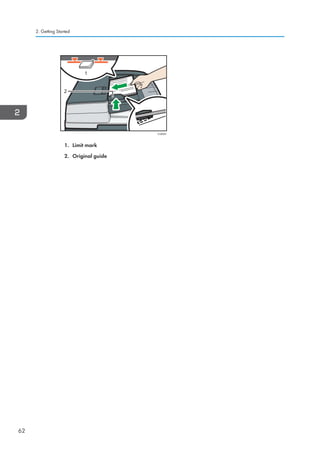
To make copies of originals, place them on the exposure glass or in the ADF.
When placing the original on the exposure glass, start with the first page to be copied. When placing
the original in the ADF, place them so that the first page is on the top.
For details about how to place the original on the exposure glass, see page 60 Placing Originals on
the Exposure Glass.
For details about how to place the original in the ADF, see page 60 Placing Originals in the Auto
Document Feeder.
To copy onto paper other than plain paper, specify the paper type in User Tools according to the weight
of the paper you are using. For details, see Tray Paper Settings, Connecting the Machine/ System
Settings .
1. Press the [Home] key on the top left of the control panel, and press the [Copier] icon on
the [Home] screen.
CJS113
2. Make sure that no previous settings remain.
When there are previous settings remaining, press the [Reset] key.
3. Place the originals.
4. Make desired settings.
5. Enter the number of copies with the number keys.
The maximum copy quantity that can be entered is 999.
63](https://image.slidesharecdn.com/d1467503-191008171028/85/D1467503-73-320.jpg)
![6. Press the [Start] key.
When placing the original on the exposure glass, press the [ ] key after all originals are scanned.
Some functions such as Batch mode may require that you press the [ ] key when placing originals
in the ADF. Follow the messages that appear on screen.
7. When the copy job is finished, press the [Reset] key to clear the settings.
3. Copy
64](https://image.slidesharecdn.com/d1467503-191008171028/85/D1467503-74-320.jpg)
![Auto Reduce / Enlarge
The machine automatically detects the original size and then selects an appropriate reproduction ratio
based on the paper size you select.
CKN008
• If you select a reproduction ratio after pressing [Auto Reduce / Enlarge], [Auto Reduce / Enlarge]
is canceled and the image cannot be rotated automatically.
This is useful to copy different size originals to the same size paper.
If the orientation in which your original is placed is different from that of the paper you are copying onto,
the machine rotates the original image by 90 degrees and fits it on the copy paper (Rotate Copy). For
example, to reduce A3 (11 × 17) originals to fit onto A4 (81/2 × 11) paper, select a paper tray
containing A4 (81/2 × 11) paper, and then press [Auto Reduce / Enlarge]. The image is
automatically rotated. For details about Rotate Copy, see Rotate Copy, Copy/ Document Server .
The original sizes and orientations you can use with this function are as follows:
(mainly Europe and Asia)
Original location Original size and orientation
Exposure glass A3 , B4 JIS , A4 , B5 JIS , A5 , 81/2 × 13
ADF A3 , B4 JIS , A4 , B5 JIS , A5 , B6 JIS , 11
× 17 , 81/2 × 11 , 81/2 × 13
(mainly North America)
Original location Original size and orientation
Exposure glass 11 × 17 , 81/2 × 14 , 81/2 × 11 , 51/2 × 81/2
ADF 11 × 17 , 81/2 × 14 , 81/2 × 11 , 51/2 × 81/2
, 10 × 14 , 71/4 × 101/2 , A3 , A4
Auto Reduce / Enlarge
65](https://image.slidesharecdn.com/d1467503-191008171028/85/D1467503-75-320.jpg)
![1. Press [Auto Reduce / Enlarge].
2. Select the paper size.
3. Place the originals, and then press the [Start] key.
3. Copy
66](https://image.slidesharecdn.com/d1467503-191008171028/85/D1467503-76-320.jpg)
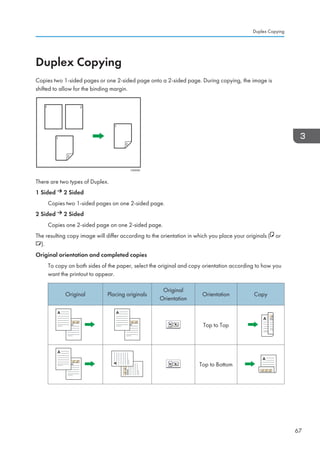
![Original Placing originals
Original
Orientation
Orientation Copy
Top to Top
Top to Bottom
1. Press [Dup./Combine/Series].
2. Make sure that [Duplex] is selected. If [Duplex] is not selected, press [Duplex].
3. Select [1 Sided 2 Sided] or [2 Sided 2 Sided] according to how you want the
document to be output.
To change the original or copy orientation, press [Orientation].
4. Press [OK].
5. Place the originals.
6. Press [Special Original].
3. Copy
68](https://image.slidesharecdn.com/d1467503-191008171028/85/D1467503-78-320.jpg)
![7. Select the original orientation, and then press [OK].
8. Press the [Start] key.
Specifying the Original and Copy Orientation
Select the orientation of the originals and copies if the original is two-sided or if you want to copy onto
both sides of the paper.
• Top to Top
CKN011
• Top to Bottom
CKN012
1. Press [Orientation].
Duplex Copying
69](https://image.slidesharecdn.com/d1467503-191008171028/85/D1467503-79-320.jpg)
![2. Select [Top to Top] or [Top to Bottom] for [Original:] if the original is two-sided.
3. Select [Top to Top] or [Top to Bottom] for [Copy:].
4. Press [OK].
3. Copy
70](https://image.slidesharecdn.com/d1467503-191008171028/85/D1467503-80-320.jpg)
![Combined Copying
This mode can be used to select a reproduction ratio automatically and copy the originals onto a single
sheet of copy paper.
The machine selects a reproduction ratio between 25 and 400%. If the orientation of the original is
different from that of the copy paper, the machine will automatically rotate the image by 90 degrees to
make copies properly.
Orientation of the original and image position of Combine
The image position of Combine differs according to original orientation and the number of originals
to be combined.
• Portrait ( ) originals
CKN015
• Landscape ( ) originals
CKN016
Placing originals (originals placed in the ADF)
The default value for the copy order in the Combine function is [From Left to Right]. To copy
originals from right to left in the ADF, place them upside down.
• Originals read from left to right
Combined Copying
71](https://image.slidesharecdn.com/d1467503-191008171028/85/D1467503-81-320.jpg)
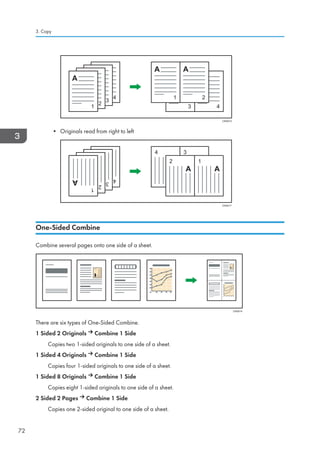
![2 Sided 4 Pages Combine 1 Side
Copies two 2-sided originals to one side of a sheet.
2 Sided 8 Pages Combine 1 Side
Copies four 2-sided originals to one side of a sheet.
1. Press [Dup./Combine/Series].
2. Press [Combine].
3. Select [1 Sided] or [2 Sided] for [Original:].
If you selected [2 Sided], you can change the orientation.
4. Press [Combine 1 Side].
5. Select the number of originals to combine.
6. Press [OK].
7. Select the paper size.
8. Place the originals, and then press the [Start] key.
Two-Sided Combine
Combines various pages of originals onto two sides of one sheet.
Combined Copying
73](https://image.slidesharecdn.com/d1467503-191008171028/85/D1467503-83-320.jpg)
![CKN074
There are six types of Two-Sided Combine.
1 Sided 4 Originals Combine 2 Sides
Copies four 1-sided originals to one sheet with two pages per side.
1 Sided 8 Originals Combine 2 Sides
Copies eight 1-sided originals to one sheet with four pages per side.
1 Sided 16 Originals Combine 2 Sides
Copies 16 1-sided originals to one sheet with eight pages per side.
2 Sided 4 Pages Combine 2 Sides
Copies two 2-sided originals to one sheet with two pages per side.
2 Sided 8 Pages Combine 2 Sides
Copies four 2-sided originals to one sheet with four pages per side.
2 Sided 16 Pages Combine 2 Sides
Copies eight 2-sided originals to one sheet with eight pages per side.
1. Press [Dup./Combine/Series].
2. Press [Combine].
3. Copy
74](https://image.slidesharecdn.com/d1467503-191008171028/85/D1467503-84-320.jpg)
![3. Select [1 Sided] or [2 Sided] for [Original:].
4. Press [Combine 2 Sides].
5. Press [Orientation].
6. Select [Top to Top] or [Top to Bottom] for [Original:] and/or [Copy:], and then press
[OK].
7. Select the number of originals to combine.
8. Press [OK].
9. Select the paper size.
10. Place the originals, and then press the [Start] key.
Combined Copying
75](https://image.slidesharecdn.com/d1467503-191008171028/85/D1467503-85-320.jpg)
![Copying onto Custom Size Paper from the
Bypass Tray
Paper that has a horizontal length of 148.0–457.2 mm (5.83–18.00 inches) and a vertical length of
90.0–320.0 mm (3.55–12.59 inches) can be fed in from the bypass tray.
1. Load the paper face down in the bypass tray.
The bypass tray ( ) is automatically selected.
2. Press the [ ] key.
3. Press [Paper Size].
4. Press [Custom Size].
5. Enter the horizontal size with the number keys, and then press [ ].
6. Enter the vertical size with the number keys, and then press [ ].
7. Press [OK] twice.
8. Place the originals, and then press the [Start] key.
3. Copy
76](https://image.slidesharecdn.com/d1467503-191008171028/85/D1467503-86-320.jpg)
![Copying onto Envelopes
This section describes how to copy onto regular size and custom size envelopes. Place the original on
the exposure glass and place the envelope in the bypass tray or paper tray.
Specify the thickness of the paper according to the weight of the envelopes you are printing on. For
details about the relationship between paper weight and paper thickness and the sizes of envelopes that
can be used, see page 144 Recommended Paper Sizes and Types.
For details about how to handle envelopes, supported envelope types, and how to load envelopes, see
page 155 Envelopes.
• The Duplex function cannot be used with envelopes. If the Duplex function is specified, press [1
sided 2 sided:TtoT] to cancel the setting.
To copy onto custom size envelopes, you must specify the envelope's dimensions. Specify the horizontal
and vertical length of the envelope.
CJF005
: Horizontal
: Vertical
Be sure to include the fully open flap in the horizontal dimension.
Copying onto Envelopes from the Bypass Tray
Before using this function, select [Envelope] for the paper type under [Tray Paper Settings] in User Tools.
For details, see Tray Paper Settings, Connecting the Machine/ System Settings .
Copying onto Envelopes
77](https://image.slidesharecdn.com/d1467503-191008171028/85/D1467503-87-320.jpg)
![1. Load the envelopes face down in the bypass tray.
The bypass tray ( ) is automatically selected.
2. Press the [ ] key.
3. Press [Paper Size].
4. Specify the envelope size, and then press [OK] twice.
5. Place the originals, and then press the [Start] key.
Copying onto Envelopes from the Paper Tray
Before using this function, specify the paper size and type under [Tray Paper Settings] in User Tools. For
the paper type, select [Envelope]. For details, see Tray Paper Settings, Connecting the Machine/
System Settings .
1. Select the paper tray where the envelopes are loaded.
2. Place the originals, and then press the [Start] key.
3. Copy
78](https://image.slidesharecdn.com/d1467503-191008171028/85/D1467503-88-320.jpg)
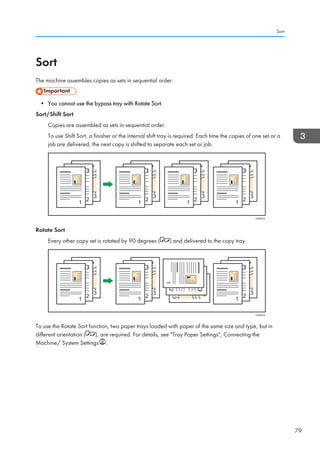
![1. Press [Finishing].
2. Select [Sort] or [Rotate Sort], and then press [OK].
3. Enter the number of copy sets using the number keys.
4. Place the originals.
To confirm the type of finishing, press the [Sample Copy] key.
5. Press the [Start] key.
• Depending on your model and which options are installed on it, some of these functions might not
be available. For details, see Functions Requiring Optional Configurations, Getting Started .
Changing the Number of Sets
You can change the number of copy sets during copying.
• This function can be used only when the Sort function is selected.
1. While Copying... is displayed, press the [Stop] key.
3. Copy
80](https://image.slidesharecdn.com/d1467503-191008171028/85/D1467503-90-320.jpg)
![2. Enter the number of copy sets with the number keys.
3. Press [Continue].
Copying starts again.
Sort
81](https://image.slidesharecdn.com/d1467503-191008171028/85/D1467503-91-320.jpg)
![Storing Data in the Document Server
The Document Server enables you to store documents being read with the copy feature on the hard disk
of this machine. Thus you can print them later applying necessary conditions.
You can check the stored documents on the Document Server screen. For details about the Document
Server, see page 123 Storing Data.
1. Press [Store File].
2. Enter a file name, user name, or password if necessary.
3. Specify a folder in which to store the document if necessary.
4. Press [OK].
5. Place the originals.
6. Make the scanning settings for the original.
7. Press the [Start] key.
Stores scanned originals in memory and makes one set of copies. If you want to store another
document, do so after copying is complete.
3. Copy
82](https://image.slidesharecdn.com/d1467503-191008171028/85/D1467503-92-320.jpg)
![4. Fax
This chapter describes frequently used facsimile functions and operations. For the information not
included in this chapter, see Fax on the supplied CD-ROM.
Basic Procedure for Transmissions (Memory
Transmission)
This section describes the basic procedure for transmitting documents using Memory Transmission.
You can specify the fax, IP-Fax, Internet Fax, e-mail, or folder destinations. Multiple types of destination
can be specified simultaneously.
• It is recommended that you call the receivers and confirm with them when sending important
documents.
• If there is a power failure (the main power switch is turned off) or the machine is unplugged for
about one hour, all the documents stored in memory are deleted. As soon as the main power
switch is turned on, the Power Failure Report is printed to help you check the list of deleted files. See
When an Error Is Notified via a Report or E-mail, Troubleshooting .
1. Press the [Home] key on the top left of the control panel, and press the [Facsimile] icon on
the [Home] screen.
CJS113
2. Make sure Ready appears on the screen.
83](https://image.slidesharecdn.com/d1467503-191008171028/85/D1467503-93-320.jpg)
![3. Make sure [Immed. TX] is not highlighted.
4. Place the original into the ADF.
5. Make the scan settings such as scan size and resolution.
6. Configure the transmission settings such as [TX Mode] as necessary.
7. Specify a destination.
You can enter the destination's number or address directly or select from the Address Book by
pressing the destination key.
If you make a mistake, press the [Clear] key, and then enter again.
8. When sending the same original to several destinations (broadcasting), specify the next
destination.
4. Fax
84](https://image.slidesharecdn.com/d1467503-191008171028/85/D1467503-94-320.jpg)
![9. If you send documents to Internet Fax or e-mail destinations or enable the E-mail TX
Results function, specify a sender.
10. Press the [Start] key.
Sending Originals Using the Exposure Glass (Memory Transmission)
1. Make sure [Immed. TX] is not highlighted.
2. Place the first page of the original face down on the exposure glass.
3. Specify a destination.
4. Make the scan settings you require.
5. Press the [Start] key.
6. Place the next original on the exposure glass within 60 seconds when you send multiple
originals, and then repeat steps 4 and 5.
Repeat this step for each page.
7. Press the [ ] key.
The machine dials the destination and starts transmission.
Basic Procedure for Transmissions (Memory Transmission)
85](https://image.slidesharecdn.com/d1467503-191008171028/85/D1467503-95-320.jpg)
![Registering a Fax Destination
1. Press the [User Tools/Counter] key.
2. Press [Address Book Mangmnt].
3. Check that [Program / Change] is selected.
4. Press [New Program].
5. Press [Change] under Name.
The name entry display appears.
6. Enter the name, and then press [OK].
7. Press [ Next].
8. Press the key for the classification you want to use under Select Title.
The keys you can select are as follows:
• [Frequent]: Added to the page that is displayed first.
• [AB], [CD], [EF], [GH], [IJK], [LMN], [OPQ], [RST], [UVW], [XYZ], [1] to [10]: Added to the
list of items in the selected title.
You can select [Frequent] and one more key for each title.
9. Press [Fax Dest.].
10. Press [Change] under Fax Destination.
4. Fax
86](https://image.slidesharecdn.com/d1467503-191008171028/85/D1467503-96-320.jpg)
![11. Enter the fax number using the number keys, and then press [OK].
12. Specify optional settings such as SUB Code, SEP Code, and International TX Mode.
13. Press [OK].
14. Press [Exit].
15. Press the [User Tools/Counter] key.
Deleting a Fax Destination
• If you delete a destination that is a specified delivery destination, messages to its registered
Personal Box, for example, cannot be delivered. Be sure to check the settings in the fax function
before deleting any destinations.
1. Press the [User Tools/Counter] key.
2. Press [Address Book Mangmnt].
3. Check that [Program / Change] is selected.
4. Select the name whose fax destination you want to delete.
Press the name key, or enter the registered number using the number keys.
You can search by the registered name, user code, fax number, folder name, e-mail address, or IP-
Fax destination.
5. Press [Fax Dest.].
6. Press [Change] under Fax Destination.
Basic Procedure for Transmissions (Memory Transmission)
87](https://image.slidesharecdn.com/d1467503-191008171028/85/D1467503-97-320.jpg)
![7. Press [Delete All], and then press [OK] under Fax Destination.
8. Press [OK].
9. Press [Exit].
10. Press the [User Tools/Counter] key.
4. Fax
88](https://image.slidesharecdn.com/d1467503-191008171028/85/D1467503-98-320.jpg)
![Transmitting while Checking Connection to
Destination (Immediate Transmission)
Using Immediate Transmission, you can send documents while checking the connection to the
destination.
You can specify fax or IP-Fax destinations.
If you specify Internet Fax, e-mail, folder destinations, and group or multiple destinations, the
transmission mode is automatically switched to Memory Transmission.
• It is recommended that you call the receivers and confirm with them when sending important
documents.
1. Press the [Home] key on the top left of the control panel, and press the [Facsimile] icon on
the [Home] screen.
CJS113
2. Make sure Ready appears on the screen.
3. Press [Immed. TX].
4. Place the original into the ADF.
5. Select the scan settings you require.
Transmitting while Checking Connection to Destination (Immediate Transmission)
89](https://image.slidesharecdn.com/d1467503-191008171028/85/D1467503-99-320.jpg)
![6. Specify a destination.
If you make a mistake, press the [Clear] key, and then enter again.
7. Press the [Start] key.
Sending Originals Using the Exposure Glass (Immediate Transmission)
1. Press [Immed. TX].
2. Place the first page face down on the exposure glass.
3. Specify a destination.
4. Make the scan settings you require.
5. Press the [Start] key.
6. Place the next original on the exposure glass within 10 seconds when you send multiple
originals, and then repeat steps 4 and 5.
Repeat this step for each page.
7. Press the [ ] key.
4. Fax
90](https://image.slidesharecdn.com/d1467503-191008171028/85/D1467503-100-320.jpg)
![Canceling a Transmission
This section explains how to cancel a fax transmission.
Canceling a Transmission Before the Original Is Scanned
Use this procedure to cancel a transmission before pressing the [Start] key.
1. Press the [Reset] key.
CUH002
Canceling a Transmission While the Original Is Being Scanned
Use this procedure to cancel scanning or transmitting of the original while it is being scanned.
If you cancel a transmission using the standard memory transmission function, you need to follow a
different procedure to cancel the transmission. See page 92 Canceling a Transmission After the
Original Is Scanned.
1. Press the [Stop] key.
CJN024
Canceling a Transmission
91](https://image.slidesharecdn.com/d1467503-191008171028/85/D1467503-101-320.jpg)
![2. Press [Cancel Scanning] or [Cancel TX].
Depending on the transmission mode and function you use, either [Cancel Scanning] or [Cancel
TX] is displayed.
Canceling a Transmission After the Original Is Scanned
Use this procedure to cancel a transmission after the original is scanned.
You can cancel transmission of a file while the file is being sent, stored in memory, or if it fails to transmit.
All the scanned data is deleted from memory.
1. Press the [Stop] key.
CJN024
You can also press [TX/RX Status / Print], and then [Check / Stop Transmission File].
2. Press [Standby File List].
To cancel transmission of a file stored in the memory, press the [File List] tab.
3. Select the file you want to cancel.
If the desired file is not shown, press [ ] or [ ] to find it.
4. Press [Stop Transmission].
5. Press [OK].
To cancel another file, repeat steps 3 through 5.
6. Press [Exit].
After pressing [Check / Stop Transmission File] under [TX/RX Status / Print] in step 1, press [Exit]
twice.
4. Fax
92](https://image.slidesharecdn.com/d1467503-191008171028/85/D1467503-102-320.jpg)
![Storing a Document
You can store and send a document at the same time. You can also just store a document.
The following information can be set for the stored documents as necessary:
User Name
You can set this function if necessary to know who and what departments stored documents in the
machine. A user name can be selected from the Address Book or entered manually.
File Name
You can specify a name for a stored document. If you do not specify a name, scanned documents
will be automatically assigned names such as FAX0001 or FAX0002.
Password
You can set this function so as not to send to unspecified people. A four to eight digit number can
be specified as a password.
You can also change the file information after storing files.
1. Place the original, and then specify the scan settings you require.
Specify the [Original Orientation] setting correctly. If you do not, the top/bottom orientation of the
original will not be displayed correctly in the preview.
2. Press [Store File].
3. Select [Send Store] or [Store Only].
Select [Send Store] to send documents after they are stored.
Select [Store Only] to store documents.
Storing a Document
93](https://image.slidesharecdn.com/d1467503-191008171028/85/D1467503-103-320.jpg)
![4. Set the user name, file name, and password as necessary.
• User Name
Press [User Name], and then select a user name. To specify an unregistered user name, press
[Manual Entry], and then enter the name. After specifying a user name, press [OK].
• File Name
Press [File Name], enter a file name, and then press [OK].
• Password
Press [Password], enter a password using the number keys, and then press [OK]. Re-enter the
password for confirmation, and then press [OK].
5. Press [OK].
6. If you have selected [Send Store], specify the receiver.
7. Press the [Start] key.
Sending Stored Documents
The machine sends documents stored with the facsimile function in the Document Server.
The documents stored in the Document Server can be sent again and again until they are deleted.
The stored documents are sent with the scan settings made when they were stored.
You cannot use the following transmission methods:
• Immediate Transmission
• Parallel Memory Transmission
• On Hook Dial
• Manual Dial
4. Fax
94](https://image.slidesharecdn.com/d1467503-191008171028/85/D1467503-104-320.jpg)
![1. Press [Select Stored File].
2. Select the documents to be sent.
When multiple documents are selected, they are sent in the order of selection.
• Press [User Name] to place the documents in order by programmed user name.
• Press [File Name] to place the documents in alphabetical order.
• Press [Date] to place the documents in order of programmed date.
• Press [Queue] to arrange the order of the documents to be sent.
To view details about stored documents, press [Details].
Press the Thumbnails key to switch the screen to thumbnail display.
3. If you select a document with a password, enter the password using the number keys,
and then press [OK].
4. When you want to add your originals to stored documents and send them all at once,
press [Original Stored File] or [Stored file Original].
When [Original Stored File] is pressed, the machine sends the originals, and then stored files.
When [Stored file Original] is pressed, the machine sends the stored files, and then originals.
5. Press [OK].
6. To add an original to stored documents, place the original, and then select any scan
settings you require.
7. Specify the destination, and then press the [Start] key.
Storing a Document
95](https://image.slidesharecdn.com/d1467503-191008171028/85/D1467503-105-320.jpg)
![Printing the Journal Manually
To print the Journal manually, select the printing method: [All], [Print per File No.], or [Print per User].
All
Prints the results of communications in the order made.
Print per File No.
Prints only the results of communications specified by file number.
Print per User
Prints the results of communications by individual senders.
1. Press [TX/RX Status / Print].
2. Press [Print Journal].
3. Select the printing method.
4. If you selected [Print per File No.] in step 3, enter a 4-digit file number using the number
keys.
5. If you selected [Print per User] in step 3, select a user from the list, and then press [OK].
6. Press the [Start] key.
7. Press [Exit] twice.
4. Fax
96](https://image.slidesharecdn.com/d1467503-191008171028/85/D1467503-106-320.jpg)
![5. Print
This chapter describes frequently used printer functions and operations. For the information not included
in this chapter, see Print on the supplied CD-ROM.
Quick Install
You can install the printer drivers easily from the CD-ROM provided with this machine.
Using Quick Install, the PCL 6 printer driver is installed under network environment, and the Standard
TCP/IP port will be set.
• Manage Printers permission is required to install the drivers. Log on as an Administrators group
member.
1. Quit all applications. (Do not close this manual.)
2. Insert the provided CD-ROM into the computer's CD-ROM drive.
If the [AutoPlay] dialog box appears, click [Run AUTORUN.EXE].
If you are using a computer that is running Windows 8 or Windows Server 2012, click the drive
and CD-ROM names when these appear in the upper right corner of the screen, and then click
[Run SETUP.EXE].
3. Select an interface language, and then click [OK].
4. Click [Quick Install].
5. The software license agreement appears in the [License Agreement] dialog box. After
reading the agreement, click [I accept the agreement.], and then click [Next].
6. Click [Next].
7. Select the machine model you want to use in the [Select Printer] dialog box.
8. Click [Install].
9. Configure the user code, default printer, and shared printer as necessary.
10. Click [Continue].
The installation starts.
If the [User Account Control] dialog box appears, and then click [Yes] or [Continue].
11. Click [Finish].
When you are prompted to restart your computer, restart it by following the instructions that
appear.
12. Click [Exit] in the first window of the installer, and then take out the CD-ROM.
97](https://image.slidesharecdn.com/d1467503-191008171028/85/D1467503-107-320.jpg)
![Displaying the Printer Driver Properties
This section explains how to open the printer driver properties from [Devices and Printers].
• Manage Printers permission is required to change the printer settings. Log on as an Administrators
group member.
• You cannot change the machine default settings for individual users. Settings made in the printer
properties dialog box are applied to all users.
1. On the [Start] menu, click [Devices and Printers].
2. Right-click the icon of the printer you want to use.
3. Click [Printer properties].
5. Print
98](https://image.slidesharecdn.com/d1467503-191008171028/85/D1467503-108-320.jpg)
![Standard Printing
• The default setting is 2 sided printing. If you want to print on only one side, select [Off] for the 2
sided printing setting.
• If you send a print job via USB 2.0 while the machine is in Low Power mode or Sleep mode, an
error message might appear when the print job is complete. In this case, check if the document was
printed.
When Using the PCL 6 Printer Driver
1. Click the WordPad menu button in the upper left corner of the window, and then click
[Print].
2. In the [Select Printer] list, select the printer you want to use.
3. Click [Preferences].
4. In the Job Type: list, select [Normal Print].
5. In the Document Size: list, select the size of the original to be printed.
6. In the Orientation: list, select [Portrait] or [Landscape] as the orientation of the original.
7. In the Input Tray: list, select the paper tray that contains the paper you want to print
onto.
If you select [Auto Tray Select] in the Input Tray: list, the source tray is automatically selected
according to the paper size and type specified.
8. In the Paper Type: list, select the type of paper that is loaded in the paper tray.
9. Select [Color] or [Black and White] in the Color/ Black and White: list.
10. If you want to print multiple copies, specify a number of sets in the Copies: box.
11. Click [OK].
12. Start printing from the application's [Print] dialog box.
Standard Printing
99](https://image.slidesharecdn.com/d1467503-191008171028/85/D1467503-109-320.jpg)
![Printing on Both Sides of Sheets
This section explains how to print on both sides of each page using the printer driver.
• The types of paper that can be printed on both sides are as follows:
• Plain (60 to 81 g/m2), Recycled, Special 1, Special 2, Special 3, Middle Thick (82 to 105
g/m2), Thick 1(106 to 169 g/m2), Thick 2(170 to 220 g/m2), Thick 3(221 to 256 g/m2),
Thin (52 to 59 g/m2), Color, Letterhead, Preprinted, Bond, Cardstock
When Using the PCL 6 Printer Driver
1. Click the WordPad menu button in the upper left corner of the window, and then click
[Print].
2. In the [Select Printer] list, select the printer you want to use.
3. Click [Preferences].
4. Click the [Detailed Settings] tab.
5. In the Menu: box, click the [Edit] icon.
6. Select the method for binding the output pages in the 2 sided: list.
7. Change any other print settings if necessary.
8. Click [OK].
9. Start printing from the application's [Print] dialog box.
Types of 2 Sided Printing
You can select which way the bound pages open by specifying which edge to bind.
Orientation Open to Left Open to Top
Portrait
Landscape
5. Print
100](https://image.slidesharecdn.com/d1467503-191008171028/85/D1467503-110-320.jpg)
![Combining Multiple Pages into Single Page
This section explains how to print multiple pages onto a single sheet. The combine printing function
allows you to economize on paper by printing multiple sheets at reduced size onto a single sheet.
When Using the PCL 6 Printer Driver
1. Click the WordPad menu button in the upper left corner of the window, and then click
[Print].
2. In the [Select Printer] list, select the printer you want to use.
3. Click [Preferences].
4. Click the [Detailed Settings] tab.
5. In the Menu: box, click the [Edit] icon.
6. Select the combination pattern in the Layout: list, and then specify the method for
combining pages in the Page Order: list.
To draw a border line around each page, select [Draw Frame Border].
7. Change any other print settings if necessary.
8. Click [OK].
9. Start printing from the application's [Print] dialog box.
Types of Combine Printing
This function allows you to print 2, 4, 6, 9, or 16 pages at reduced size onto a single sheet and to
specify a page ordering pattern for the combination. When combining 4 or more pages onto a single
sheet of paper, four patterns are available.
The following illustrations show example page ordering patterns for 2- and 4-page combinations.
2 Pages per Sheet
Orientation
From Left to Right/Top to
Bottom
From Right to Left/Top to
Bottom
Portrait
Landscape
Combining Multiple Pages into Single Page
101](https://image.slidesharecdn.com/d1467503-191008171028/85/D1467503-111-320.jpg)
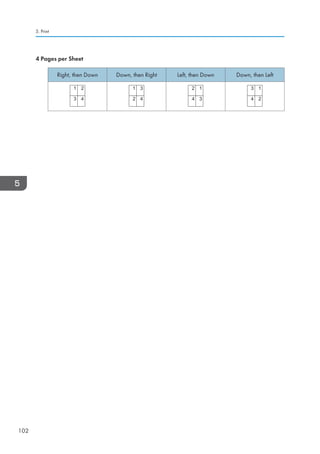
![Printing on Envelopes
Configure the paper settings appropriately using both the printer driver and the control panel.
Configuring Envelope Settings Using the Control Panel
1. Load envelopes in the paper tray.
2. Press the [User Tools/Counter] key.
CJS039
3. Press [Tray Paper Settings].
4. Select the paper size setting of the paper tray in which the envelopes are loaded.
5. Select the envelope size, and then press [OK].
6. Press [ Next].
7. Select the paper type setting of the paper tray in which the envelopes are loaded.
8. Press [Envelope] in the Paper Type area, and then select the appropriate item in the
Paper Thickness area.
9. Press [OK].
10. Press the [User Tools/Counter] key.
Printing on Envelopes Using the Printer Driver
When using the PCL 6 printer driver
1. Click the WordPad menu button in the upper left corner of the window, and then click
[Print].
2. In the [Select Printer] list, select the printer you want to use.
3. Click [Preferences].
Printing on Envelopes
103](https://image.slidesharecdn.com/d1467503-191008171028/85/D1467503-113-320.jpg)
![4. In the Document Size: list, select the envelope size.
5. In the Input Tray: list, select the paper tray where the envelopes are loaded.
6. In the Paper Type: list, select [Envelope].
7. Change any other print settings if necessary.
8. Click [OK].
9. Start printing from the application's [Print] dialog box.
5. Print
104](https://image.slidesharecdn.com/d1467503-191008171028/85/D1467503-114-320.jpg)
![Saving and Printing Using the Document
Server
The Document Server enables you to store documents on the machine's hard disk, and allows you to edit
and print them as necessary.
• Applications with their own drivers, such as PageMaker, do not support this function.
• Do not cancel the file transfer process while the data is being sent to the Document Server. The
process may not be canceled properly. If you accidentally cancel a print job, use the control panel
of the machine to delete the transferred data. For details about how to delete documents that are
stored in the Document Server, see Deleting a Stored Document, Copy/ Document Server , or
Web Image Monitor Help.
• Up to 3,000 files can be stored in the Document Server. New files cannot be stored when 3,000
files have already been stored. Even if less than 3,000 files are stored, new files cannot be stored
when
• The number of pages in a document exceeds 2,000.
• The total number of stored pages in the machine and the sent data has reached 9,000 (It may
be fewer depending on the print data).
• The hard disk is full.
You can send data created on a client computer to the Document Server.
Storing Documents in Document Server
• If the machine's hard disk is used for purposes other than the Document Server, the maximum
number of the documents that can be stored in the server may be less than the number described in
the specification.
1. Click the WordPad menu button in the upper left corner of the window, and then click
[Print].
2. In the Select Printer list, select the printer you want to use.
3. Click [Preferences].
4. In the Job Type: list, click [Document Server].
5. Click [Details...].
6. Enter a user ID, file name, password, and user name as required.
Saving and Printing Using the Document Server
105](https://image.slidesharecdn.com/d1467503-191008171028/85/D1467503-115-320.jpg)
![7. Specify the folder number to store the document in the Folder Number box.
When 0 is specified in the Folder Number: box, documents will be saved in the Shared folder.
8. If the folder is protected by a password, enter the password in the Folder Password:
box.
9. Click [OK].
10. Change any other print settings if necessary.
11. Click [OK].
12. Start printing from the application's [Print] dialog box.
• You can print the documents stored in the Document Server using the control panel.
Managing Documents Stored in Document Server
When this machine is configured as a network printer using TCP/IP, you can view or delete the
documents stored in the machine's Document Server using DeskTopBinder or Web Image Monitor from
a client computer connected to the network. You can print and operate this machine remotely without
operating the control panel.
5. Print
106](https://image.slidesharecdn.com/d1467503-191008171028/85/D1467503-116-320.jpg)
![6. Scan
This chapter describes frequently used scanner functions and operations. For the information not
included in this chapter, see Scan on the supplied CD-ROM.
Basic Procedure When Using Scan to Folder
• Before performing this procedure, refer to Preparation for Sending by Scan to Folder, Scan
and confirm the details of the destination computer. Also refer to Registering Folders, Connecting
the Machine/ System Settings, and register the address of the destination computer to the address
book.
1. Press the [Home] key on the top left of the control panel, and press the [Scanner] icon on
the [Home] screen.
CJS113
2. Make sure that no previous settings remain.
If a previous setting remains, press the [Reset] key.
3. Press the [Folder] tab.
4. Place originals.
107](https://image.slidesharecdn.com/d1467503-191008171028/85/D1467503-117-320.jpg)
![5. If necessary, specify the scan settings according to the original to be scanned.
Example: Scanning the document in color/duplex mode, and saving as a PDF file.
• Press [Scan Settings], and then press [Full Color: Text / Photo] in the [Original Type] tab.
• Press [Original Feed Type], and then press [2 Sided Original].
• Press [PDF] under [Send File Type / Name].
6. Specify the destination.
You can specify multiple destinations.
7. Press the [Start] key.
Creating a Shared Folder on a Computer Running Windows/Confirming a
Computer's Information
The following procedures explain how to create a shared folder on a computer running Windows, and
how to confirm the computer's information. In these examples, Windows 7 Ultimate is the operating
system, and the computer is a member in a network domain. Write down the confirmed information.
Step 1: Confirming the user name and computer name
Confirm the user name and the name of the computer you will send scanned documents to.
1. On the [Start] menu, point to [All Programs], then [Accessories], and then click on
[Command Prompt].
2. Enter the command ipconfig/all, and then press the [Enter] key.
3. Confirm the name of the computer.
The computer's name is displayed under [Host Name].
You can also confirm the IPv4 address. The address displayed under [IPv4 Address] is the IPv4
address of the computer.
4. Next, enter the command set user, and then press the [Enter] key. (Be sure to put a
space between set and user.)
6. Scan
108](https://image.slidesharecdn.com/d1467503-191008171028/85/D1467503-118-320.jpg)
![5. Confirm the user name.
The user name is displayed under [USERNAME].
Step 2: Creating a shared folder on a computer running Microsoft Windows
Create a shared destination folder in Windows and enable sharing. In the following procedure, a
computer which is running under Windows 7 Ultimate and participating in a domain is used as an
example.
• You must log in as an Administrators group member to create a shared folder.
• If Everyone is left selected in step 6, the created shared folder will be accessible by all users. This
is a security risk, so we recommend that you give access rights only to specific users. Use the
following procedure to remove Everyone and specify user access rights.
1. Create a folder, just as you would create a normal folder, in a location of your choice on
the computer.
2. Right-click the folder, and then click [Properties].
When using Windows XP, right-click the folder, and then click [Sharing and Security].
3. On the [Sharing] tab, select [Advanced Sharing...].
When using Windows XP, on the [Sharing] tab, select [Share this folder].
Proceed to step 5.
4. Select the [Share this folder] check box.
5. Click [Permissions].
6. In the [Group or user names:] list, select Everyone, and then click [Remove].
7. Click [Add...].
8. In the [Select Users or Groups] window, click [Advanced...].
9. Specify one or more object types, select a location, and then click [Find Now].
10. From the list of results, select the groups and users you want to grant access to, and then
click [OK].
11. In the [Select Users or Groups] window, click [OK].
12. In the [Groups or user names:] list, select a group or user, and then, in the [Allow] column
of the permissions list, select either the [Full Control] or [Change] check box.
Configure the access permissions for each group and user.
13. Click [OK].
Basic Procedure When Using Scan to Folder
109](https://image.slidesharecdn.com/d1467503-191008171028/85/D1467503-119-320.jpg)
![Step 3: Specifying access privileges for the created shared folder
If you want to specify access privileges for the created folder to allow other users or groups to access
the folder, configure the folder as follows:
1. Right-click the folder created in step 2, and then click [Properties].
2. On the [Security] tab, click [Edit...].
3. Click [Add...].
4. In the [Select Users or Groups] window, click [Advanced...].
5. Specify one or more object types, select a location, and then click [Find Now].
6. From the list of results, select the groups and users you want to grant access to, and then
click [OK].
7. In the [Select Users or Groups] window, click [OK].
8. In the [Groups or user names:] list, select a group or user, and then, in the [Allow] column
of the permissions list, select either the [Full Control] or [Change] check box.
9. Press [OK] twice.
Registering an SMB Folder
1. Press the [User Tools/Counter] key.
2. Press [Address Book Mangmnt].
3. Check that [Program / Change] is selected.
4. Press [New Program].
5. Press [Change] under Name.
The name entry display appears.
6. Enter the name, and then press [OK].
7. Press [ Next].
8. Press the key for the classification you want to use under Select Title.
6. Scan
110](https://image.slidesharecdn.com/d1467503-191008171028/85/D1467503-120-320.jpg)
![The keys you can select are as follows:
• [Frequent]: Added to the page that is displayed first.
• [AB], [CD], [EF], [GH], [IJK], [LMN], [OPQ], [RST], [UVW], [XYZ], [1] to [10]: Added to the
list of items in the selected title.
You can select [Frequent] and one more key for each title.
9. Press [Auth. Info], and then press [ Next].
10. Press [Specify Other Auth. Info] on the right side of Folder Authentication.
When [Do not Specify] is selected, the SMB User Name and SMB Password that you have
specified in Default User Name / Password (Send) of File Transfer settings are applied.
11. Press [Change] under Login User Name.
12. Enter the login user name of the destination computer, and then press [OK].
13. Press [Change] under Login Password.
14. Enter the password of the destination computer, and then press [OK].
15. Enter the password again to confirm, and then press [OK].
16. Press [Folder].
17. Check that [SMB] is selected.
18. Press [Change] or [Browse Network], and then specify the folder.
To specify a folder, you can either enter the path manually or locate the folder by browsing the
network.
Basic Procedure When Using Scan to Folder
111](https://image.slidesharecdn.com/d1467503-191008171028/85/D1467503-121-320.jpg)
![19. Press [Connection Test] to check the path is set correctly.
20. Press [Exit].
If the connection test fails, check the settings, and then try again.
21. Press [OK].
22. Press [Exit].
23. Press the [User Tools/Counter] key.
Locating the SMB folder manually
1. Press [Change] under Path.
2. Enter the path where the folder is located.
For example: if the name of the destination computer is User, and the folder name is Share, the
path will be UserShare.
If the network does not allow automatic obtaining of IP addresses, include the destination
computer's IP address in the path. For example: if the IP address of the destination computer is
192.168.0.191, and the folder name is Share, the path will be 192.168.0.191Share.
3. Press [OK].
If the format of the entered path is not correct, a message appears. Press [Exit], and then enter the
path again.
Locating the SMB folder using Browse Network
1. Press [Browse Network].
The client computers sharing the same network as the machine appear.
Network display only lists client computers you are authorized to access.
2. Select the group that contains the destination computer.
6. Scan
112](https://image.slidesharecdn.com/d1467503-191008171028/85/D1467503-122-320.jpg)
![3. Select the computer name of the destination computer.
Shared folders under it appear.
You can press [Up One Level] to switch between levels.
4. Select the folder you want to register.
5. Press [OK].
Deleting an SMB Registered Folder
1. Press the [User Tools/Counter] key.
2. Press [Address Book Mangmnt].
3. Check that [Program / Change] is selected.
4. Select the name whose folder you want to delete.
Press the name key, or enter the registered number using the number keys.
You can search by the registered name, user code, fax number, folder name, e-mail address, or IP-
Fax destination.
5. Press [Folder].
6. Press the protocol which is not currently selected.
A confirmation message appears.
7. Press [Yes].
8. Press [OK].
9. Press [Exit].
10. Press the [User Tools/Counter] key.
Basic Procedure When Using Scan to Folder
113](https://image.slidesharecdn.com/d1467503-191008171028/85/D1467503-123-320.jpg)
![Entering the Path to the Destination Manually
1. Press [Manual Entry].
2. Press [SMB].
3. Press [Manual Entry] on the right side of the path field.
4. Enter the path for the folder.
In the following example path, the shared folder name is user and the computer name is
desk01:
desk01user
5. Press [OK].
6. Depending on the destination setting, enter the user name for logging in to the computer.
Press [Manual Entry] to the right of the user name field to display the soft keyboard.
7. Depending on the destination setting, enter the password for logging in to the computer.
Press [Manual Entry] for the password to display the soft keyboard.
8. Press [Connection Test].
A connection test is performed to check whether the specified shared folder exists.
9. Check the connection test result, and then press [Exit].
10. Press [OK].
6. Scan
114](https://image.slidesharecdn.com/d1467503-191008171028/85/D1467503-124-320.jpg)
![Basic Procedure for Sending Scan Files by E-
mail
1. Press the [Home] key on the top left of the control panel, and press the [Scanner] icon on
the [Home] screen.
CJS113
2. Make sure that no previous settings remain.
If a previous setting remains, press the [Reset] key.
3. Press the [E-mail] tab.
4. Place originals.
5. If necessary, specify the scan settings according to the original to be scanned.
Basic Procedure for Sending Scan Files by E-mail
115](https://image.slidesharecdn.com/d1467503-191008171028/85/D1467503-125-320.jpg)
![Example: Scanning the document in color/duplex mode, and saving as a PDF file.
• Press [Scan Settings], and then press [Full Color: Text / Photo] in the [Original Type] tab.
• Press [Original Feed Type], and then press [2 Sided Original].
• Press [PDF] under [Send File Type / Name].
6. Specify the destination.
You can specify multiple destinations.
7. To specify the e-mail sender, press [Sender Name], and then press [OK].
8. To use Message Disposition Notification, press [Recept. Notice].
If you select [Recept. Notice], the selected e-mail sender will receive e-mail notification when the e-
mail recipient has opened the e-mail.
9. Press the [Start] key.
Registering an E-mail Destination
1. Press the [User Tools/Counter] key.
2. Press [Address Book Mangmnt].
3. Check that [Program / Change] is selected.
4. Press [New Program].
5. Press [Change] under Name.
The name entry display appears.
6. Enter the name, and then press [OK].
7. Press [ Next].
8. Press the key for the classification you want to use under Select Title.
The keys you can select are as follows:
• [Frequent]: Added to the page that is displayed first.
6. Scan
116](https://image.slidesharecdn.com/d1467503-191008171028/85/D1467503-126-320.jpg)
![• [AB], [CD], [EF], [GH], [IJK], [LMN], [OPQ], [RST], [UVW], [XYZ], [1] to [10]: Added to the
list of items in the selected title.
You can select [Frequent] and one more key for each title.
9. Press [E-mail].
10. Press [Change] under E-mail Address.
11. Enter the e-mail address.
12. Press [OK].
13. Select [E-mail / Internet Fax Destination] or [Internet Fax Destination Only].
If [E-mail / Internet Fax Destination] is specified, registered e-mail addresses appear in both
Internet fax address display and E-mail address display on the fax function screen, and in the
address display on the scanner function screen.
If [Internet Fax Destination Only] is specified, registered e-mail addresses only appear in Internet
fax display on the fax function screen.
14. If you want to use Internet fax, specify whether or not to use Send via SMTP Server.
15. Press [OK].
16. Press [Exit].
17. Press the [User Tools/Counter] key.
Basic Procedure for Sending Scan Files by E-mail
117](https://image.slidesharecdn.com/d1467503-191008171028/85/D1467503-127-320.jpg)
![Deleting an E-mail Destination
1. Press the [User Tools/Counter] key.
2. Press [Address Book Mangmnt].
3. Check that [Program / Change] is selected.
4. Select the name whose e-mail address you want to delete.
Press the name key, or enter the registered number using the number keys. You can search by the
registered name, user code, fax number, folder name, e-mail address, or IP-Fax destination.
5. Press [E-mail].
6. Press [Change] under E-mail Address.
7. Press [Delete All], and then press [OK].
8. Press [OK].
9. Press [Exit].
10. Press the [User Tools/Counter] key.
Entering an E-mail Address Manually
1. Press [Manual Entry].
2. Enter the e-mail address.
3. Press [OK].
6. Scan
118](https://image.slidesharecdn.com/d1467503-191008171028/85/D1467503-128-320.jpg)
![Basic Procedure for Storing Scan Files
• You can specify a password for each stored file. Files that are not password-protected can be
accessed by other users on the same local area network using DeskTopBinder. We recommend
that you protect stored files from unauthorized access by specifying passwords.
• Scan file stored in the machine may be lost if some kind of failure occurs. We advise against using
the hard disk to store important files. The supplier shall not be responsible for any damage that may
result from the loss of files.
1. Press the [Home] key on the top left of the control panel, and press the [Scanner] icon on
the [Home] screen.
CJS113
2. Make sure that no previous settings remain.
If a previous setting remains, press the [Reset] key.
3. Place originals.
4. Press [Store File].
5. Press [Store to HDD].
6. If necessary, specify the stored file's information, such as [User Name], [File Name],
[Password], and [Select Folder].
• User Name
Basic Procedure for Storing Scan Files
119](https://image.slidesharecdn.com/d1467503-191008171028/85/D1467503-129-320.jpg)
![Press [User Name], and then select a user name. To specify an unregistered user name, press
[Manual Entry], and then enter the name. After specifying a user name, press [OK].
• File Name
Press [File Name], enter a file name, and then press [OK].
• Password
Press [Password], enter a password, and then press [OK]. Re-enter the password for
confirmation, and then press [OK].
• Select Folder
Specify the folder to save the stored files.
7. Press [OK].
8. If necessary, press [Scan Settings] to specify scanner settings such as resolution and scan
size.
9. Press the [Start] key.
Checking a Stored File Selected from the List
This section explains how to preview a file selected from the list of stored files.
1. Press [Select Stored File].
2. Specify the folder in which the stored files are saved.
3. From the list of stored files, select the file you want to check.
You can select more than one file.
4. Press [Preview].
6. Scan
120](https://image.slidesharecdn.com/d1467503-191008171028/85/D1467503-130-320.jpg)
![Specifying the File Type
This section explains the procedure for specifying the file type of a file you want to send.
File types can be specified when sending files by e-mail or Scan to Folder, sending stored files by e-mail
or Scan to Folder, and saving files on a memory storage device.
You can select one of the following file types:
• Single Page: [TIFF / JPEG], [PDF]
If you select a single-page file type when scanning multiple originals, one file is created for each
single page and the number of files sent is the same as the number of pages scanned.
• Multi-page: [TIFF], [PDF]
If you select a multi-page file type when scan multiple originals, scanned pages are combined and
sent as a single file.
Selectable file types differ depending on the scan settings and other conditions. For details about
file types, see Notes About and Limitations of File Types, Scan .
1. Press [Send File Type / Name].
2. Select a file type.
If necessary, configure [PDF File Setting].
3. Press [OK].
Specifying the File Type
121](https://image.slidesharecdn.com/d1467503-191008171028/85/D1467503-131-320.jpg)
![Specifying Scan Settings
1. Press [Scan Settings].
2. Specify resolution, scan size, and other settings, as required.
3. Press [OK].
6. Scan
122](https://image.slidesharecdn.com/d1467503-191008171028/85/D1467503-132-320.jpg)
![7. Document Server
This chapter describes frequently used Document Server functions and operations. For the information
not included in this chapter, see Copy/ Document Server on the supplied CD-ROM.
Storing Data
This section describes the procedure for storing documents on the Document Server.
• A document accessed with a correct password remains selected even after operations are
complete, and it can be accessed by other users. After the operation, be sure to press the [Reset]
key to cancel the document selection.
• The user name registered to a stored document in the Document Server is to identify the document
creator and type. It is not to protect confidential documents from others.
• When turning on the fax transmission or scanning by the scanner, make sure that all other
operations are ended.
File Name
A file name such as COPY0001 and COPY0002 is automatically attached to the scanned
document. You can change the file name.
User Name
You can register a user name to identify the user or user group that stored the documents. To assign
it, select the user name registered in the Address Book, or enter the name directly. Depending on
the security setting, [Access Privileges] may appear instead of [User Name].
For details about the Address Book, see Registering Addresses and Users, Connecting the
Machine/ System Settings .
Password
To prevent unauthorized printing, you can specify a password for any stored document. A
protected document can only be accessed if its password is entered. If a password is specified for
the documents, the lock icon appears on the left side of the file name.
123](https://image.slidesharecdn.com/d1467503-191008171028/85/D1467503-133-320.jpg)
![1. Press the [Home] key on the top left of the control panel, and press the [Document Server]
icon on the [Home] screen.
CJS113
2. Press [To Scanning Screen].
3. Press [Target Fldr. to Store].
4. Specify a folder in which to store the document, and then press [OK].
5. Press [User Name].
6. Specify a user name, and then press [OK].
The user names shown are names that were registered in the Address Book. To specify a name not
shown in the screen, press [Manual Entry], and then enter a user name.
7. Press [File Name].
8. Enter a file name, and then press [OK].
9. Press [Password].
10. Enter a password with the number keys, and then press [OK].
You can use four to eight digits for the password.
11. For double-check, enter the password again, and then press [OK].
12. Place the original.
13. Specify the original scanning conditions.
14. Press the [Start] key.
The original is scanned. The document is saved in the Document Server.
After scanning, a list of folders will be displayed. If the list does not appear, press [Finish Scanning].
7. Document Server
124](https://image.slidesharecdn.com/d1467503-191008171028/85/D1467503-134-320.jpg)
![Printing Stored Documents
Prints stored documents on the Document Server.
The items you can specify on the printing screen are as follows:
• Paper tray
• The number of prints
• [Finishing] ([Sort], [Rotate Sort], [Stack], [Staple], [Punch], [Half Fold])
• [Cover/Slip Sheet] ([Front Cover], [Front/Back Cover], [Designate/Chapter], [Slip Sheet])
• [Edit / Stamp] ([Margin Adj.], [Stamp])
• [2 Sided Copy Top to Top], [2 Sided Copy Top to Bottom], [Booklet], [Magazine]
For details about each function, see Copy/ Document Server .
1. Select a folder.
2. Select a document to be printed.
3. When printing two or more documents at a time, repeat step 2.
Up to 30 documents can be printed.
4. When specifying printing conditions, press [To Printing Screen], and then configure print
settings.
5. Enter the number of print copies with the number keys.
The maximum quantity that can be entered is 999.
6. Press the [Start] key.
Printing Stored Documents
125](https://image.slidesharecdn.com/d1467503-191008171028/85/D1467503-135-320.jpg)
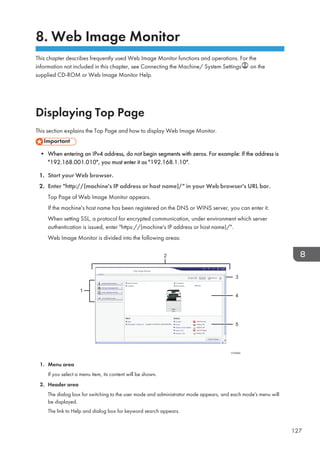
![3. Refresh/Help
(Refresh): Click at the upper right in the work area to update the machine information. Click the Web
browser's [Refresh] button to refresh the entire browser screen.
(Help): Use Help to view or download Help file contents.
4. Basic Information area
Displays the basic information of the machine.
5. Work area
Displays the contents of the item selected in the menu area.
8. Web Image Monitor
128](https://image.slidesharecdn.com/d1467503-191008171028/85/D1467503-138-320.jpg)
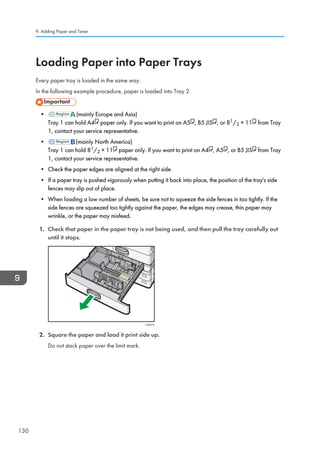
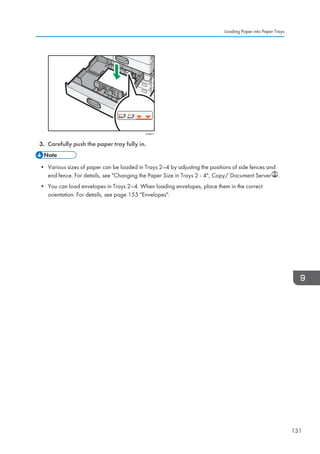
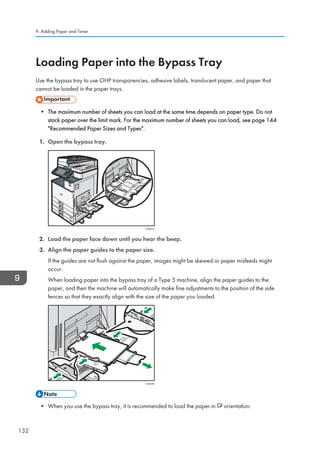
![• Certain types of paper might not be detected properly when placed on the bypass tray. If this
happens, remove the paper and place it on the bypass tray again.
• Pull the extender out when loading sheets larger than A4 , 81/2 × 11 in the bypass tray.
• When loading thick paper, thin paper, or OHP transparencies, specify the paper size and the
paper type.
• Letterhead paper must be loaded in a specific orientation. For details, see page 141 Loading
Orientation-fixed Paper or Two-sided Paper.
• You can load envelopes into the bypass tray. Envelopes must be loaded in a specific orientation.
For details, see page 155 Envelopes.
• Specify the sizes of paper that are not automatically detected. For details about the sizes that can
be detected automatically, see page 144 Recommended Paper Sizes and Types. For details
about how to specify sizes, see page 133 Printing from the Bypass Tray Using the Printer
Function or Copying from the Bypass Tray, Copy/ Document Server .
• When copying from the bypass tray, see Copying from the Bypass Tray, Copy/ Document
Server . When printing from a computer, see page 133 Printing from the Bypass Tray Using the
Printer Function.
• When the [Panel Key Sound] is turned off, it does not sound if you load paper into the bypass tray.
For details about [Panel Key Sound], see General Features, Connecting the Machine/ System
Settings .
Printing from the Bypass Tray Using the Printer Function
• If you select [Machine Setting(s)] in [Bypass Tray] under [Tray Setting Priority] in [System] of the
Printer Features menu, the settings made using the control panel have priority over the printer driver
settings. For details, see System, Print .
• The default of [Bypass Tray] is [Machine Setting(s): Any Type].
• Settings remain valid until they are changed.
• For details about setting printer drivers, see Printing Documents, Print .
• The default of [Printer Bypass Paper Size] is [Auto Detect].
Loading Paper into the Bypass Tray
133](https://image.slidesharecdn.com/d1467503-191008171028/85/D1467503-143-320.jpg)
![Specifying regular sizes using the control panel
1. Press the [User Tools/Counter] key.
CUP009
2. Press [Tray Paper Settings].
3. Press [Printer Bypass Paper Size].
4. Select the paper size.
5. Press [OK].
6. Press the [User Tools/Counter] key.
9. Adding Paper and Toner
134](https://image.slidesharecdn.com/d1467503-191008171028/85/D1467503-144-320.jpg)
![Specifying a custom size paper using the control panel
1. Press the [User Tools/Counter] key.
CUP009
2. Press [Tray Paper Settings].
3. Press [Printer Bypass Paper Size].
4. Press [Custom Size].
If a custom size is already specified, press [Change Size].
5. Press [Vertical].
6. Enter the vertical size using the number keys, and then press [ ].
7. Press [Horizontal].
8. Enter the horizontal size using the number keys, and then press [ ].
9. Press [OK] twice.
10. Press the [User Tools/Counter] key.
Specifying thick paper, thin paper, or OHP transparencies for paper type using the
control panel
• Use A4 or 81/2 × 11 size OHP transparencies, and specify their size.
Loading Paper into the Bypass Tray
135](https://image.slidesharecdn.com/d1467503-191008171028/85/D1467503-145-320.jpg)
![• Usually only one side of OHP transparencies can be used for printing. Be sure to load them with the
print side down.
• When printing onto OHP transparencies, remove printed sheets one by one.
1. Press the [User Tools/Counter] key.
CUP009
2. Press [Tray Paper Settings].
3. Press [Printer Bypass Paper Size], and then specify the paper size.
4. Press [OK].
5. Press [ Next].
6. Press [Paper Type: Bypass Tray].
7. Select the proper items, according to the paper type you want to specify.
• Press [OHP (Transparency)] on the [Paper Type] area when loading OHP transparencies.
• To load thin or thick paper, press [Do not Display] on the [Paper Type] area, and then select
the appropriate paper thickness in the [Paper Thickness] area.
8. Press [OK].
9. Press the [User Tools/Counter] key.
• We recommend that you use specified OHP transparencies.
9. Adding Paper and Toner
136](https://image.slidesharecdn.com/d1467503-191008171028/85/D1467503-146-320.jpg)
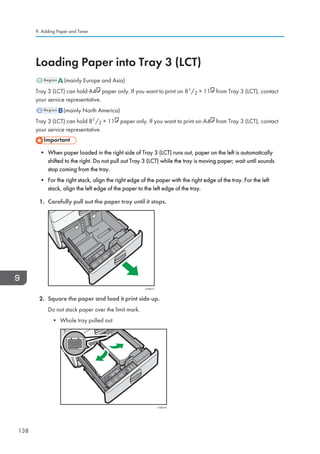
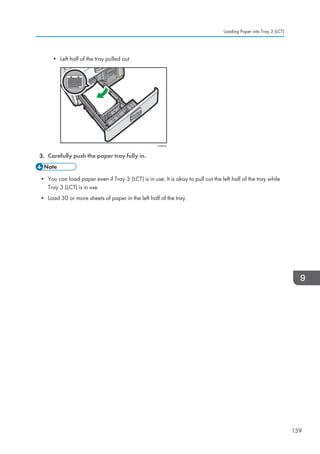
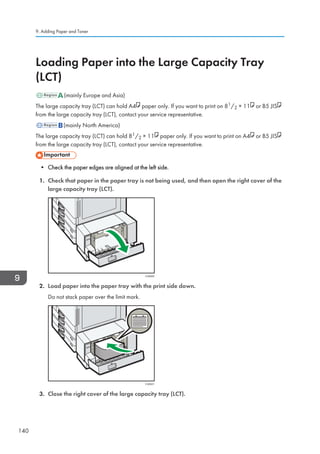
![Loading Orientation-fixed Paper or Two-sided
Paper
Orientation-fixed (top to bottom) or two-sided paper (for example, letterhead paper, punched paper, or
copied paper) might not be printed correctly, depending on how the originals and paper are placed.
Settings for the User Tools
• Copier mode
Specify [Yes] for [Letterhead Setting] in [Input / Output] under the Copier / Document Server
Features menu, and then place the original and paper as shown below.
• Printer mode
Specify [Auto Detect] or [On (Always)] for [Letterhead Setting] in [System] under the Printer
Features menu, and then place the paper as shown below.
For details about the letterhead settings, see Input / Output, Copy/ Document Server , or
System, Print .
Original orientation and paper orientation
The meanings of the icons are as follows:
Icon Meaning
Place or load paper scanned or printed side face up.
Place or load paper scanned or printed side face down.
• Original orientation
Original orientation Exposure glass ADF
Readable orientation
Loading Orientation-fixed Paper or Two-sided Paper
141](https://image.slidesharecdn.com/d1467503-191008171028/85/D1467503-151-320.jpg)
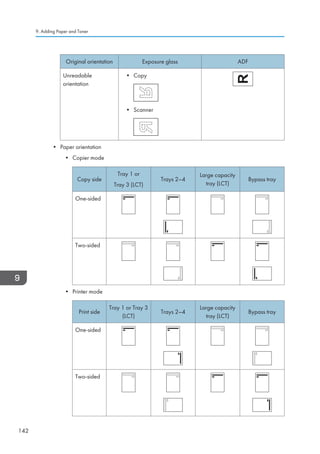
![• In copier mode:
• For details about how to make two-sided copies, see page 67 Duplex Copying.
• In printer mode:
• To print on letterhead paper when [Auto Detect] is specified for [Letterhead Setting], you must
specify [Letterhead] as the paper type in the printer driver's settings.
• If a print job is changed partway through printing from one-sided to two-sided printing, one-
sided output after the first copy may be printed facing a different direction. To ensure all
paper is output facing the same direction, specify different input trays for one-sided and two-
sided printing. Note also that two-sided printing must be disabled for the tray specified for
one-sided printing.
• For details about how to make two-sided prints, see page 100 Printing on Both Sides of
Sheets.
Loading Orientation-fixed Paper or Two-sided Paper
143](https://image.slidesharecdn.com/d1467503-191008171028/85/D1467503-153-320.jpg)
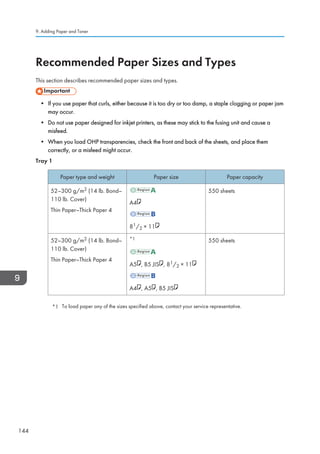
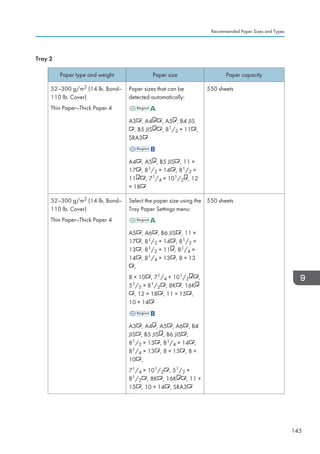
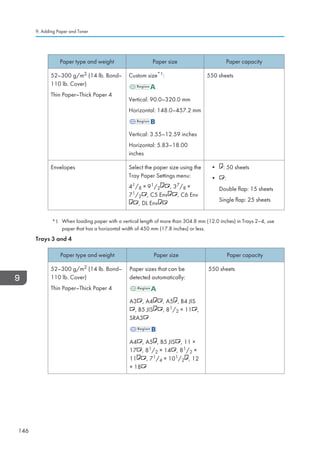
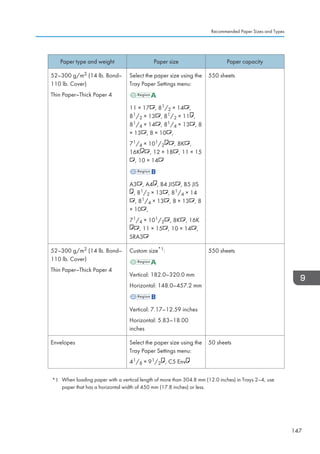
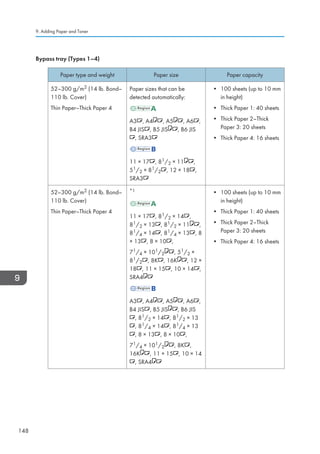
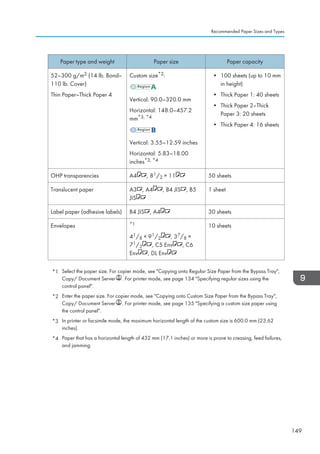
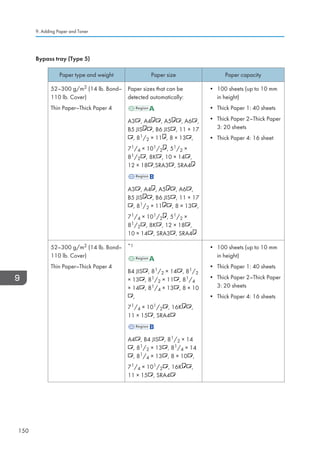
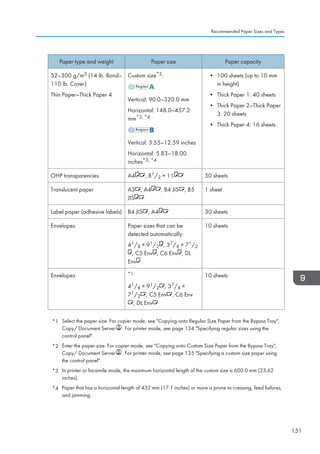
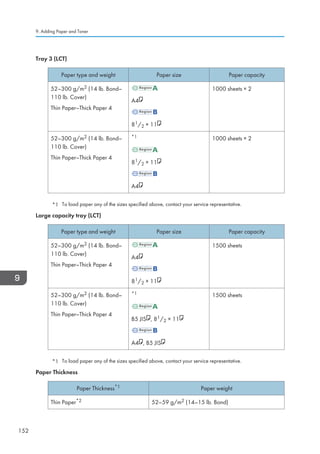
![Paper Thickness*1 Paper weight
Plain Paper 1 60–74 g/m2 (16–20 lb. Bond)
Plain Paper 2 75–81 g/m2 (20 lb. Bond)
Middle Thick 82–105 g/m2 (20–28 lb. Bond)
Thick Paper 1 106–169 g/m2 (28 lb. Bond–90 lb. Index)
Thick Paper 2 170–220 g/m2 (65–80 lb. Cover)
Thick Paper 3 221–256 g/m2 (80 lb. Cover–140 lb. Index)
Thick Paper 4 257–300 g/m2 (140 lb. Index–110 lb. Cover)
*1 Print quality will decrease if the paper you are using is close to the minimum or maximum weight.
Change the paper weight setting to thinner or thicker.
*2 Depending on the type of thin paper, the edges may crease or the paper may be misfed.
• Certain types of paper, such as translucent paper or OHP transparencies, may produce noise
when delivered. This noise does not indicate a problem and print quality is unaffected.
• The paper capacity described in the tables above is an example. Actual paper capacity might be
lower, depending on the paper type.
• When loading paper, make sure the stack height does not exceed the limit mark of the paper tray.
• If multiple sheet feeding occurs, fan sheets thoroughly or load sheets one by one from the bypass
tray.
• Flatten out curled sheets before loading them.
• Depending on the paper sizes and types, the copy/print speed may be slower than usual.
• When loading thick paper of 106–300 g/m2 (28 lb. Bond–110 lb. Cover), see page 154 Thick
Paper.
• When loading envelopes, see page 155 Envelopes.
• When copying or printing onto letterhead paper, the paper placing orientation is different
depending on which function you are using. For details, see page 141 Loading Orientation-fixed
Paper or Two-sided Paper.
• If you load paper of the same size and same type in two or more trays, the machine automatically
feeds from one of the trays in which [Yes] is selected for [Apply Auto Paper Select] when the first
tray in use runs out of paper. This function is called Auto Tray Switching. This saves interrupting a
copy run to replenish paper when making a large number of copies. You can specify the paper
type of the paper trays under [Paper Type]. For details, see Tray Paper Settings, Connecting the
Recommended Paper Sizes and Types
153](https://image.slidesharecdn.com/d1467503-191008171028/85/D1467503-163-320.jpg)
![Machine/ System Settings . For the setting procedure of the Auto Tray Switching function, see
General Features, Copy/ Document Server .
• When loading label paper:
• We recommend that you use specified label paper.
• It is recommended to place one sheet at a time.
• Press [Bypass], and then select the appropriate paper thickness for [Paper Type].
• When loading OHP transparencies:
• It is recommended to place one sheet at a time.
• When copying onto OHP transparencies, see Copying onto OHP Transparencies, Copy/
Document Server .
• When printing on OHP transparencies from the computer, see page 135 Specifying thick
paper, thin paper, or OHP transparencies for paper type using the control panel.
• Fan OHP transparencies thoroughly whenever you use them. This prevents OHP
transparencies from sticking together, and from feeding incorrectly.
• Remove copied or printed sheets one by one.
• When loading translucent paper:
• When loading translucent paper, always use long grain paper, and set the paper direction
according to the grain.
• Translucent paper easily absorbs humidity and becomes curled. Remove curl in the translucent
paper before loading.
• Remove copied or printed sheets one by one.
• When loading coated paper:
• To print on coated paper: press the [User Tools/Counter] key, press [Tray Paper Settings],
and then, for each tray's [Paper Type] be sure to specify [Paper Type] to [Coated Paper], and
[Paper Thickness] to the appropriate paper thickness.
• To print on high-gloss coated paper: press the [User Tools/Counter] key, press [Tray Paper
Settings], and then, for each tray's [Paper Type], be sure to set [Paper Type] to [Coated
Paper: Gloss].
• When loading coated paper or glossy paper, always fan the paper before using it.
• If a paper jam occurs or if the machine makes a strange noise when feeding stacks of coated
paper, feed the coated paper from the bypass tray one sheet at a time.
Thick Paper
This section gives you various details about and recommendations concerning thick paper.
9. Adding Paper and Toner
154](https://image.slidesharecdn.com/d1467503-191008171028/85/D1467503-164-320.jpg)
![When loading thick paper of 106–300 g/m2 (28 lb. Bond–110 lb. Cover), follow the
recommendations below to prevent misfeeds and loss of image quality.
• Store all your paper in the same environment - a room where the temperature is 20–25°C (68–
77°F) and the humidity is 30–65%.
• When loading paper in Trays 1–4, be sure to load at least 20 sheets. Also, be sure to position the
side fences flush against the paper stack.
• Jams and misfeeds can occur when printing on thick smooth paper. To prevent such problems, be
sure to fan smooth paper thoroughly before loading them. If paper continues to become jammed or
feed in together even after they are fanned, load them one by one from the bypass tray.
• When loading thick paper, set the paper direction according to its grain, as shown in the following
diagram:
Direction of
paper grain
Tray 1 or Tray 3
(LCT)
Trays 2–4
Large capacity
tray (LCT)
Bypass tray
Not
recommended
Not
recommended
• Select [Thick Paper 1], [Thick Paper 2], [Thick Paper 3], or [Thick Paper 4] as the paper thickness in
[Tray Paper Settings].
• Even if thick paper is loaded as described above, normal operations and print quality might still not
be possible, depending on the paper type.
• Prints might have prominent vertical creases.
• Prints might be noticeably curled. Flatten out prints if they are creased or curled.
Envelopes
This section gives you various details about and recommendations concerning envelopes.
• Do not use window envelopes.
• Misfeeds might occur depending on the length and shape of the flaps.
• Only envelopes that are at least 148 mm (5.9 inches) wide and whose flaps are open can be
loaded in the orientation.
Recommended Paper Sizes and Types
155](https://image.slidesharecdn.com/d1467503-191008171028/85/D1467503-165-320.jpg)
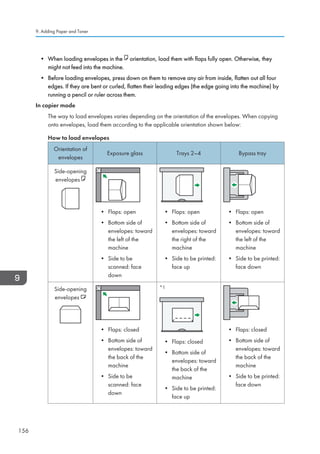
![*1 You cannot load side-opening envelopes in the orientation in Trays 3 and 4.
When loading envelopes, specify the envelope size and thickness. For details, see page 77
Copying onto Envelopes.
In printer mode
The way to load envelopes varies depending on the orientation of the envelopes. When printing
onto envelopes, load them according to the applicable orientation shown below:
How to load envelopes
Types of envelopes Trays 2–4 Bypass tray
Side-opening
envelopes
• Flaps: open
• Bottom side of envelopes:
toward the right of the
machine
• Side to be printed: face up
• Flaps: open
• Bottom side of envelopes:
toward the left of the machine
• Side to be printed: face down
Side-opening
envelopes
*1
• Flaps: closed
• Bottom side of envelopes:
toward the back of the
machine
• Side to be printed: face up
• Flaps: closed
• Bottom side of envelopes:
toward the back of the
machine
• Side to be printed: face down
*1 You cannot load side-opening envelopes in the orientation in Trays 3 and 4.
When loading envelopes, select Envelope as the paper types using both [Tray Paper Settings]
and printer driver and specify the thickness of envelopes. For details, see page 103 Printing on
Envelopes.
To print on envelopes that are loaded with their short edges against the machine body, rotate the
print image by 180 degrees using the printer driver.
Recommended Paper Sizes and Types
157](https://image.slidesharecdn.com/d1467503-191008171028/85/D1467503-167-320.jpg)
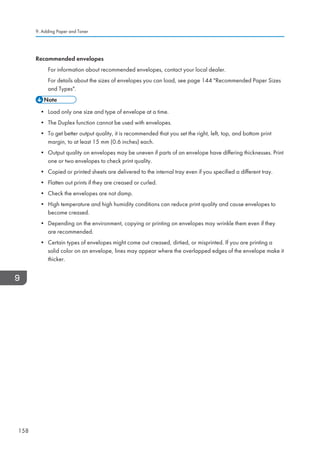
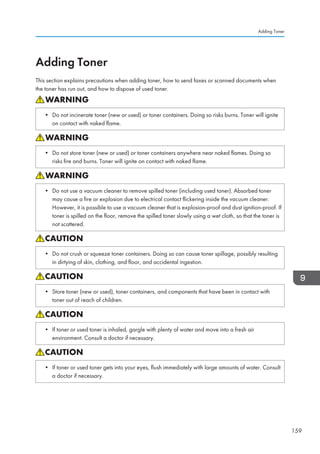
![• If toner or used toner is swallowed, dilute by drinking a large amount of water. Consult a doctor
if necessary.
• When removing jammed paper or replacing toner, avoid getting toner (new or used) on your
clothing. If toner comes into contact with your clothing, wash the stained area with cold water.
Hot water will set the toner into the fabric and make removing the stain impossible.
• When removing jammed paper or replacing toner, avoid getting toner (new or used) on your
skin. If toner comes into contact with your skin, wash the affected area thoroughly with soap and
water.
• When replacing a toner or waste toner container or consumables with toner, make sure that the
toner does not splatter. Put the waste consumables in a bag after they are removed. For
consumables with a lid, make sure that the lid is shut.
• Always replace the toner cartridge when a notification appears on the machine.
• Fault may occur if you use toner other than the recommended type.
• When adding toner, do not turn off the main power. If you do, settings will be lost.
• Store toner where it will not be exposed to direct sunlight, temperatures above 35°C (95°F), or
high humidity.
• Store toner horizontally.
• Do not shake the toner cartridge with its mouth down after removing it. Residual toner may scatter.
• Do not repeatedly install and remove toner cartridges. This will result in toner leakage.
Follow the instruction on the screen regarding how to replace a toner cartridge.
• If Toner Cartridge is almost empty. appears, the toner has almost run out. Have a replacement
toner cartridge at hand.
• If appears when there is a lot of toner, follow the toner replacement instructions that appear on
the screen. Pull out the cartridge, and then reinstall it.
• You can check the name of the required toner and the replacement procedure using the [ Add
Toner] screen.
9. Adding Paper and Toner
160](https://image.slidesharecdn.com/d1467503-191008171028/85/D1467503-170-320.jpg)
![• For details about how to check contact number where you can order supplies, see Inquiry,
Maintenance and Specifications .
Sending Faxes or Scanned Documents When Toner Has Run Out
When the machine has run out of toner, the indicator on the display lights. Note that even if there is no
toner left, you can still send faxes or scanned documents.
• If number of communications executed after the toner has run out and not listed in the automatically
output Journal exceeds 200, communication is not possible.
1. Press the [Home] key on the top left of the control panel, and press the [Facsimile] icon or
the [Scanner] icon on the [Home] screen.
CJS113
2. Press [Exit], and then perform transmission operation.
The error message disappears.
• Any reports are not printed.
Disposing of Used Toner
This section describes what to do with used toner.
Toner cannot be re-used.
Pack used toner containers in the container's box or a bag to prevent the toner from leaking out of the
container when you dispose of it.
(mainly Europe and Asia)
If you want to discard your used toner container, please contact your local sales office. If you discard it
by yourself, treat it as general plastic waste material.
(mainly North America)
Adding Toner
161](https://image.slidesharecdn.com/d1467503-191008171028/85/D1467503-171-320.jpg)
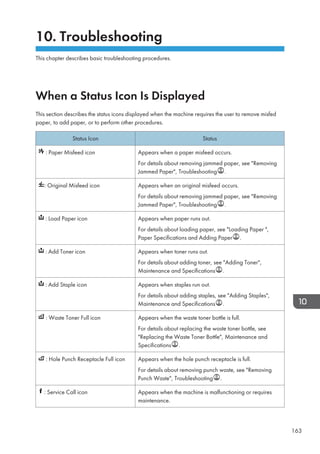
![When the Indicator Lamp for the [Check Status]
Key Is Lit or Flashing
If the indicator lamp for the [Check Status] key lights up or flashes, press the [Check Status] key to
display the [Check Status] screen. Check the status of each function in the [Check Status] screen.
[Check Status] screen
CUR012
1
4 3
2
1. [Mach./Applic. Stat] tab
Indicates the status of the machine and each function.
2. [Check]
If an error occurs in the machine or a function, press [Check] to view details.
Pressing [Check] displays an error message or the corresponding function screen. Check the error message
displayed on the function screen and take the appropriate action. For details about how to resolve the
problems described in error messages, see When Messages Appear, Troubleshooting .
3. Messages
Displays a message that indicates the status of the machine and each function.
4. Status icons
The status icons that can be displayed are described below:
: The function is performing a job.
: An error has occurred on the machine.
: The function cannot be used because an error has occurred in the function or machine. This icon may also
appear if the toner is running low.
The following table explains problems that cause the indicator lamp for the [Check Status] key to light or
flash.
When the Indicator Lamp for the [Check Status] Key Is Lit or Flashing
165](https://image.slidesharecdn.com/d1467503-191008171028/85/D1467503-175-320.jpg)
![Problem Causes Solutions
Documents and reports do
not print out.
The paper output tray is full. Remove the prints from the tray.
Documents and reports do
not print out.
There is no paper left. Load paper. For details about loading
paper, see Loading Paper, Paper
Specifications and Adding Paper .
An error has occurred. A function which has the
status Error Occurred in
the [Check Status] screen is
defective.
Press [Check] in the function which the
error has occurred. Then check the
displayed message, and take
appropriate action. For details about
error messages and their solutions, see
When Messages Appear,
Troubleshooting .
You can use other functions normally.
The machine is unable to
connect to the network.
A network error has
occurred.
• Check that the machine is
correctly connected to the
network, and that the machine is
correctly set. For details about
how to connect the network, see
Interface Settings, Connecting
the Machine/ System Settings .
• For details about connecting to
the network, contact your
administrator.
• If the indicator lamp is still lit even
after trying to solve the problem
as described here, contact your
service representative.
10. Troubleshooting
166](https://image.slidesharecdn.com/d1467503-191008171028/85/D1467503-176-320.jpg)
![When You Have Problems Operating the
Machine
Problem Causes Solutions
When the machine is turned
on, the only icon that
appears on the home screen
is the [Copier] icon.
Functions other than the
copier function are not yet
ready.
Wait a little longer.
The machine has just been
turned on and the User Tools
screen is displayed, but the
User Tools menu has items
missing.
Functions other than the
copier function are not yet
ready. Time required varies
by function. Functions
appear in the User Tools
menu when they become
ready for use.
Wait a little longer.
The indicator lamp remains
lit and the machine does not
enter Sleep mode even
though the [Energy Saver]
key was pressed.
This occurs in the following
cases:
• The ADF is open.
• The machine is
communicating with
external equipment.
• The hard disk is active.
• Close the ADF.
• Check if the machine is
communicating with external
equipment.
• Wait a little longer.
The display is off.
(Type 3, 4, and 5 models
only)
The machine is in Low Power
mode.
Touch the display panel or press one
of the keys on the control panel to
cancel Low Power mode.
The display is off. The machine is in Sleep
mode.
Press the [Energy Saver] key or the
[Check Status] key to cancel Sleep
mode.
Nothing happens when the
[Check Status] key or the
[Energy Saver] key is
pressed.
The power is turned off. Make sure the main power indicator is
off, and then turn on the power.
10. Troubleshooting
168](https://image.slidesharecdn.com/d1467503-191008171028/85/D1467503-178-320.jpg)
![Problem Causes Solutions
The power turns off
automatically.
The Weekly Timer setting is
set to [Main Power Off].
Change the Weekly Timer setting. For
details about the Weekly Timer setting,
see Timer Settings, Connecting the
Machine/ System Settings .
The user code entry screen is
displayed.
Users are restricted by User
Code Authentication.
For details about how to log in when
User Code Authentication is enabled,
see When the Authentication Screen is
Displayed, Getting Started .
The Authentication screen
appears.
Basic Authentication,
Windows Authentication,
LDAP Authentication or
Integration Server
Authentication is set.
Enter your login user name and user
password. For details about the
Authentication screen, see When the
Authentication Screen is Displayed,
Getting Started .
An error message remains,
even if misfed paper is
removed.
• When a misfeed
message appears, it
remains until you open
and close the cover as
required.
• Paper is still jammed in
the tray.
After removing misfed paper, fully
open the front cover, and then close it.
For details about removing jammed
paper, see Removing Jammed Paper,
Troubleshooting .
An error message remains
displayed even if the
indicated cover is closed.
One or more covers that are
not indicated are still open.
Close all the covers of the machine.
Original images are printed
on the reverse side of the
paper.
You may have loaded the
paper incorrectly.
Load paper into the paper tray or tray
3 (LCT) with the print side up. Load
paper into the Large Capacity Tray
(LCT), or the bypass tray with the print
side down.
When You Have Problems Operating the Machine
169](https://image.slidesharecdn.com/d1467503-191008171028/85/D1467503-179-320.jpg)
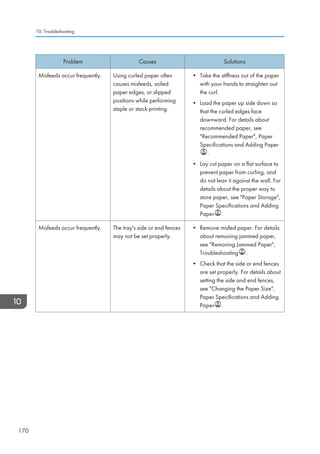
![Problem Causes Solutions
Misfeeds occur frequently. Paper of undetectable size
has been loaded.
• Remove misfed paper. For details
about removing jammed paper,
see Removing Jammed Paper,
Troubleshooting .
• If you load a paper size that is not
selected automatically, you need
to specify the paper size with the
control panel. For details about
specifying paper size with the
control panel, see Changing to a
Size That Is Not Automatically
Detected, Paper Specifications
and Adding Paper .
Misfeeds occur frequently. There is a foreign object on
the finisher tray.
• Remove misfed paper. For details
about removing jammed paper,
see Removing Jammed Paper,
Troubleshooting .
• Do not place anything on the
finisher tray.
Cannot print in duplex
mode.
You have selected a paper
tray that is not set for duplex
printing.
Change the setting for Apply Duplex
in [System Settings] to enable duplex
printing for the paper tray. For details
about setting Apply Duplex, see
Tray Paper Settings, Connecting the
Machine/ System Settings .
Cannot print in duplex
mode.
You have selected a paper
type that cannot be used for
duplex printing.
In [System Settings], select a paper
type that can be used for duplex
printing. For details about setting
Paper Type, see Tray Paper
Settings, Connecting the Machine/
System Settings .
An error has occurred when
the Address Book is
changed from the display
panel or Web Image
Monitor.
The Address Book cannot be
changed while deleting the
multiple stored documents.
Wait a while, and then retry the
operation.
When You Have Problems Operating the Machine
171](https://image.slidesharecdn.com/d1467503-191008171028/85/D1467503-181-320.jpg)
![Problem Causes Solutions
The Address Book cannot be
changed from the display
panel.
The Address Book cannot be
changed while it is being
backed up from Web Image
Monitor or other tools
running on the computer.
• Wait until the Address Book
backup is complete, and then try
to change the Address Book
again.
• If an SC997 error occurs, press
[Exit].
Cannot use Web Image
Monitor to print documents
stored in Document Server.
When print volume limits are
specified, users cannot print
beyond their print volume
limit. Print jobs selected by
users who have reached
their print volume limits will
be canceled.
• For details about specifying print
volume limits, see Security Guide
.
• To view the status of a print job,
see [Print Job History]. In Web
Image Monitor, click [Job] on the
[Status/Information] menu. And
then click [Print Job History] in
Document Server.
The function does not run or
cannot be used.
If you are not able to carry
out your job, it may be that
the machine is being used
by another function.
Wait until the current job is completed
before trying again.
For details about Function
Compatibility, see When Multiple
Functions Cannot Be Executed
Simultaneously, Troubleshooting .
The function does not run or
cannot be used.
The function cannot be
performed while the Address
Book is being backed up
from Web Image Monitor or
other tools running on the
computer.
Wait a while. When the Address Book
backup is complete, the function will
be performed.
Paper is bent. Paper may be bent when it is
ejected from the finisher
upper tray.
Change the output tray to the finisher
shift tray.
• If you cannot make copies as you want because of paper type, paper size, or paper capacity
problems, use the recommended paper. For details about recommended paper, see page 144
Recommended Paper Sizes and Types.
10. Troubleshooting
172](https://image.slidesharecdn.com/d1467503-191008171028/85/D1467503-182-320.jpg)
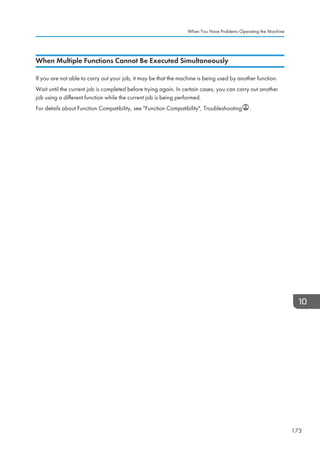
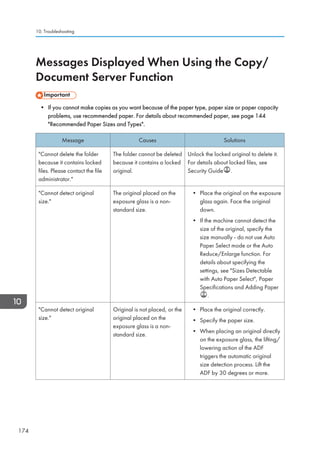
![Message Causes Solutions
Cannot display preview of
this page.
The image data may have
been corrupted.
Press [Exit] to display the preview
screen without a thumbnail.
If the selected document contains
several pages, press [Switch] on the
Display Page area to change the
page, and then a preview of the next
page will appear.
Cannot punch this paper
size.
The Punch function cannot
be used with paper size
selected.
For details about paper, see
Specifications for Punch Unit (Internal
Finisher SR3130), Specifications for
Punch Unit (Finisher SR3140, Booklet
Finisher SR3150), or Specifications
for Punch Unit (Finisher SR3160,
Booklet Finisher SR3170),
Maintenance and Specifications .
Cannot staple paper of this
size.
The Staple function cannot
be used with paper size
selected.
Select a proper paper size. For details
about paper, see Specifications for
Internal Finisher SR3130,
Specifications for Finisher SR3140,
Specifications for Booklet Finisher
SR3150, Specifications for Finisher
SR3160, or Specifications for
Booklet Finisher SR3170,
Maintenance and Specifications .
Check paper size. An irregular paper size is
set.
If you press the [Start] key, the copy
will start using the selected paper.
Duplex is not available with
this paper size.
A paper size not available in
Duplex mode has been
selected.
Select a proper paper size. For details
about paper, see Specifications for
the Main Unit, Maintenance and
Specifications .
Exceeded the maximum
number of sheets that can be
used. Copying will be
stopped.
The number of pages the
user is permitted to copy has
been exceeded.
For details about how to check the
number of copies available per user,
see Security Guide .
Messages Displayed When Using the Copy/Document Server Function
175](https://image.slidesharecdn.com/d1467503-191008171028/85/D1467503-185-320.jpg)
![Message Causes Solutions
File being stored exceeded
max. number of pages per
file. Copying will be
stopped.
The scanned originals have
too many pages to store as
one document.
Press [Exit], and then store again with
an appropriate number of pages.
Magazine or Booklet mode
is not available due to mixed
image mode.
You selected the
Magazine or Booklet
function for originals
scanned using different
functions, such as copy and
printer.
Make sure originals for the
Magazine or Booklet function are
scanned using the same function.
Maximum number of sets is
n.
(A figure is placed at n.)
The number of copies
exceeds the maximum copy
quantity.
You can change the maximum copy
quantity from [Max. Copy Quantity] in
[General Features] under [Copier /
Document Server Features]. For details
about Max. Copy Quantity, see
General Features, Copy/ Document
Server .
Memory is full. nn originals
have been scanned. Press
[Print] to copy scanned
originals. Do not remove
remaining originals.
(n in the message
represents a changeable
number.)
The scanned originals
exceed the number of pages
that can be stored in
memory.
Press [Print] to copy scanned originals
and cancel the scanning data. Press
[Clear Memory] to cancel the scanning
data and not copy.
Press [Continue] to scan
and copy remaining
originals.
The machine checked if the
remaining originals should
be copied, after the scanned
originals were printed.
Remove all copies, and then press
[Continue] to continue copying. Press
[Stop] to stop copying.
Rotate Sort is not available
with this paper size.
A size of paper for which
Rotate Sort is not available is
selected.
Select a proper paper size. For details
about paper, see Sort, Copy/
Document Server .
10. Troubleshooting
176](https://image.slidesharecdn.com/d1467503-191008171028/85/D1467503-186-320.jpg)
![Message Causes Solutions
Stapling capacity
exceeded.
The number of sheets per set
is over the staple capacity.
Check the stapler capacity. For details
about the stapler capacity, see
Specifications for Internal Finisher
SR3130, Specifications for Finisher
SR3140, Specifications for Booklet
Finisher SR3150, Specifications for
Finisher SR3160, or Specifications
for Booklet Finisher SR3170,
Maintenance and Specifications .
The selected folder is
locked. Please contact the
file administrator.
An attempt was made to edit
or use a locked folder.
For details about locked folders, see
Security Guide .
• If you set [Memory Full Auto Scan Restart] in [Input / Output] of User Tools to [On], even if the
memory becomes full, the memory overflow message will not be displayed. The machine will make
copies of the scanned originals first, and then automatically proceed to scan and to copy the
remaining originals. In this case, the resulting sorted pages will not be sequential. For details about
Memory Full Auto Scan Restart, see Input / Output, Copy/ Document Server .
Messages Displayed When Using the Copy/Document Server Function
177](https://image.slidesharecdn.com/d1467503-191008171028/85/D1467503-187-320.jpg)
![Messages Displayed When Using the Facsimile
Function
Message Causes Solutions
Cannot find the specified
path. Please check the
settings.
The name of the computer or
folder entered as the
destination is wrong.
Check that the computer name and the
folder name for the destination are
correct.
Error occurred, and
transmission was
cancelled.
• Original jammed during
Immediate Transmission.
• A problem occurred in
the machine, or noise
occurred on the
telephone line.
Press [Exit], and then send the
documents again.
Functional problem
occurred. Stopped
processing.
The power was turned off
while the machine was
receiving a document by
Internet Fax.
Even if you turn on the power
immediately, depending on the mail
server, the machine might not be able
to resume reception of the Internet Fax
if the timeout period has not expired.
Wait until the mail server's timeout
period has expired, and then resume
reception of the Internet Fax. For
details about reception of the Internet
Fax, contact your administrator.
Functional problems with
facsimile. Data will be
initialized.
There is a problem with the
fax.
Record the code number shown on the
screen, and then contact your service
representative. Other functions can be
used.
Memory is full. Cannot
scan more. Transmission will
be stopped.
The memory is full. If you press [Exit], the machine returns
to standby mode and starts transmitting
the stored pages.
Check the pages that have not been
sent using the Communication Result
Report, and then resend those pages.
Put original back, check it
and press the Start key.
Original jammed during
Memory Transmission.
Press [Exit], and then send the
documents again.
10. Troubleshooting
178](https://image.slidesharecdn.com/d1467503-191008171028/85/D1467503-188-320.jpg)
![Message Causes Solutions
Some page(s) are near
blank.
The first page of the
document is almost blank.
The original's blank side might have
been scanned. Be sure to place your
originals correctly. For details about
determining the cause of blank pages,
see Detecting Blank Pages, Fax .
• Settings that can be confirmed in System Settings or Facsimile Features on the control panel can
also be confirmed from Web Image Monitor. For details about how to confirm the settings from
Web Image Monitor, see Web Image Monitor Help.
• If the paper tray runs out of paper, There is no paper. Load paper. appears on the screen, asking
you to add paper. If there is paper left in the other trays, you can receive documents as usual, even
if the message appears on the screen. You can turn this function on or off with Parameter Settings.
For details about how to do this, see Parameter Settings, Fax .
When There Is a Problem Specifying the Network Settings
Message Causes Solutions
Check whether there are
any network problems.
[13-10]
The alias telephone number
you entered is already
registered on the gatekeeper
by another device.
• Check that the correct alias phone
number is listed in [H.323
Settings] of [Facsimile Features].
For details about H.323 Settings,
see Initial Settings, Fax .
• For details about network
problems, contact your
administrator.
Check whether there are
any network problems.
[13-11]
Cannot access gatekeeper. • Check that the correct gate
keeper address is listed in [H.323
Settings] of [Facsimile Features].
For details about H.323 Settings,
see Initial Settings, Fax .
• For details about network
problems, contact your
administrator.
Messages Displayed When Using the Facsimile Function
179](https://image.slidesharecdn.com/d1467503-191008171028/85/D1467503-189-320.jpg)
![Message Causes Solutions
Check whether there are
any network problems.
[13-17]
Registering of user name is
rejected by SIP server.
• Correct that the correct SIP Server
IP Address and SIP User Name
are listed in [SIP Settings] of
[Facsimile Features]. For details
about SIP Settings, see Initial
Settings, Fax .
• For details about network
problems, contact your
administrator.
Check whether there are
any network problems.
[13-18]
Cannot access SIP server. • Check that the correct SIP Server
IP Address is listed in [SIP
Settings] of [Facsimile Features].
For details about SIP Settings, see
Initial Settings, Fax .
• For details about network
problems, contact your
administrator.
Check whether there are
any network problems.
[13-24]
The password registered for
the SIP server is not the same
as the password registered
for this machine.
For details about network problems,
contact your administrator.
Check whether there are
any network problems.
[13-25]
In [Effective Protocol], the IP
address is not enabled, or an
incorrect IP address has been
registered.
• Check that IPv4 in [Effective
Protocol] is set to Active in
[System Settings]. For details
about effective protocol, see
Interface Settings, Connecting
the Machine/ System Settings .
• Check that the correct IPv4
address is specified for the
machine in [System Settings]. For
details about IPv4 address, see
Interface Settings, Connecting
the Machine/ System Settings .
• For details about network
problems, contact your
administrator.
10. Troubleshooting
180](https://image.slidesharecdn.com/d1467503-191008171028/85/D1467503-190-320.jpg)
![Message Causes Solutions
Check whether there are
any network problems.
[13-26]
The Effective Protocol and
SIP Server IP Address
settings are different, or an
incorrect IP address has been
registered.
• Check that the correct IP address
is specified for the machine in
[System Settings]. For details
about IP address, see Interface
Settings, Connecting the
Machine/ System Settings .
• For details about network
problems, contact your
administrator.
Check whether there are
any network problems.
[14-01]
The DNS server, SMTP
server, or folder specified for
transfer to was not found, or
the destination for Internet
Fax around (not through) the
SMTP server could not be
found.
• Check that the following settings
in [System Settings] are listed
correctly.
• DNS server
• Server name and IP address
for the SMTP Server
For details about these settings,
see Interface Settings or File
Transfer, Connecting the
Machine/ System Settings .
• Check that the folder for transfer is
correctly specified.
• Check that the computer in which
the folder for transfer is specified
is correctly operated.
• Check that the LAN cable is
correctly connected to the
machine.
• For details about network
problems, contact the
administrator of the destinations.
• For details about network
problems, contact your
administrator.
Messages Displayed When Using the Facsimile Function
181](https://image.slidesharecdn.com/d1467503-191008171028/85/D1467503-191-320.jpg)
![Message Causes Solutions
Check whether there are
any network problems.
[14-09]
E-mail transmission was
refused by SMTP
authentication, POP before
SMTP authentication, or login
authentication of the
computer in which the folder
for transfer is specified.
• Check that User Name and
Password for the following
settings in [System Settings] are
listed correctly.
• SMTP Authentication
• POP before SMTP
• Fax E-mail Account
For details about these settings,
see File Transfer, Connecting the
Machine/ System Settings .
• Check that the user ID and
password for the computer with
the folder for forwarding are
correctly specified.
• Check that the folder for
forwarding is correctly specified.
• Confirm that the computer with the
folder for forwarding is properly
working.
• For details about network
problems, contact your
administrator.
Check whether there are
any network problems.
[14-33]
E-mail addresses for the
machine and the
administrator are not
registered.
• Check that the correct E-mail
Address is listed in [Fax E-mail
Account] of [System Settings]. For
details about Fax E-mail Account,
see File Transfer, Connecting the
Machine/ System Settings .
• For details about network
problems, contact your
administrator.
10. Troubleshooting
182](https://image.slidesharecdn.com/d1467503-191008171028/85/D1467503-192-320.jpg)
![Message Causes Solutions
Check whether there are
any network problems.
[15-01]
No POP3/IMAP4 server
address is registered.
• Check that the correct Server
Name or Server Address is listed
in [POP3 / IMAP4 Settings] of
[System Settings]. For details
about POP3 / IMAP4 Settings,
see File Transfer, Connecting the
Machine/ System Settings .
• For details about network
problems, contact your
administrator.
Check whether there are
any network problems.
[15-02]
Cannot log in to the POP3/
IMAP4 server.
• Check that the correct User Name
and Password are listed in [Fax E-
mail Account] of [System
Settings]. For details about Fax E-
mail Account, see File Transfer,
Connecting the Machine/ System
Settings .
• For details about network
problems, contact your
administrator.
Check whether there are
any network problems.
[15-03]
No machine e-mail address
is programmed.
• Check that the correct machine e-
mail address is specified in
[System Settings]. For details
about settings of e-mail address,
see File Transfer, Connecting the
Machine/ System Settings .
• For details about network
problems, contact your
administrator.
Messages Displayed When Using the Facsimile Function
183](https://image.slidesharecdn.com/d1467503-191008171028/85/D1467503-193-320.jpg)
![Message Causes Solutions
Check whether there are
any network problems.
[15-11]
Cannot find the DNS server
or POP3/IMAP4 server.
• Check that the following settings
in [System Settings] are listed
correctly.
• IP address of the DNS
Server
• the server name or IP
address of the POP3/
IMAP4 server
• the port number of the
POP3/IMAP4 server
• Reception Protocol
For details about these settings,
see Interface Settings or File
Transfer, Connecting the
Machine/ System Settings .
• Check that the LAN cable is
correctly connected to the
machine.
• For details about network
problems, contact your
administrator.
Check whether there are
any network problems.
[15-12]
Cannot log in to the POP3/
IMAP4 server.
• Check that the following settings
in [System Settings] are listed
correctly.
• the user name and password
for [Fax E-mail Account]
• the user name and password
for POP before SMTP
authentication
For details about these settings,
see File Transfer, Connecting the
Machine/ System Settings .
• For details about network
problems, contact your
administrator.
10. Troubleshooting
184](https://image.slidesharecdn.com/d1467503-191008171028/85/D1467503-194-320.jpg)
![• Settings that can be confirmed in System Settings or Facsimile Features on the control panel can
also be confirmed from Web Image Monitor. For details about how to confirm the settings from
Web Image Monitor, see Web Image Monitor Help.
• If the paper tray runs out of paper, There is no paper. Load paper. appears on the screen, asking
you to add paper. If there is paper left in the other trays, you can receive documents as usual, even
if the message appears on the screen. You can turn this function on or off with Parameter Settings.
For details about how to do this, see Parameter Settings, Fax .
• If Check whether there are any network problems. appears, the machine is not correctly
connected to the network or the settings of the machine are not correct. If you do not need to
connect to a network, you can specify the setting so this message is not displayed, and then the
[Check Status] key no longer lights. For details about how to do this, see Parameter Settings, Fax
. If you reconnect the machine to the network, be sure to set Display by configuring the
appropriate User Parameter.
When the Remote Fax Function Cannot Be Used
Message Causes Solutions
Authentication with remote
machine failed. Check
remote machine's auth.
settings.
User authentication on the
main machine has failed.
For details about user authentication,
see Security Guide .
Authentication with remote
machine failed. Check
remote machine's auth.
settings.
User Code Authentication is
set on the device connected
via the remote fax function.
The remote fax function does not
support User Code Authentication.
Disable the User Code Authentication
on the main machine.
Authentication with remote
machine failed. Check
remote machine's auth.
settings.
The user does not have
permission to use the function
on the main machine.
For details about how to set
permissions, see Security Guide .
Messages Displayed When Using the Facsimile Function
185](https://image.slidesharecdn.com/d1467503-191008171028/85/D1467503-195-320.jpg)
![Message Causes Solutions
Check whether there are
any network problems.
[16-00]
• An IP address has not
been registered for the
main machine.
• A network is not
connected properly.
• Check that the correct IP address
is specified for the machine in
[System Settings]. For details
about the IP address of the main
machine, contact your
administrator.
• For details about network
problems, contact your
administrator.
Connection with the remote
machine has failed. Check
the remote machine status.
A network error occurred
while using the remote fax
function.
• Check that the main machine
supports the remote fax function.
• Check that the main machine is
working normally.
• Check that the correct IP address
or host name is set for the main
machine in [System Settings]. For
details about these settings,
contact your administrator.
• Check that the LAN cable is
correctly connected to the
machine.
• For details about network
problems, contact your
administrator.
Connection with the remote
machine has failed. Check
the remote machine status.
The main machine's power is
off.
Turn on the main machine's power.
Connection with the remote
machine has failed. Check
the remote machine status.
A timeout error occurred
while an attempt was made
to connect the device via
remote fax function.
• Check that the LAN cable is
correctly connected to the
machine.
• Check that the main machine is
working correctly.
• For details about connection with
main machine, see Sending/
Receiving Documents Using a
Remote Machine (Remote Fax),
Fax .
10. Troubleshooting
186](https://image.slidesharecdn.com/d1467503-191008171028/85/D1467503-196-320.jpg)
![Message Causes Solutions
Connection with the remote
machine has failed. There is
a problem with the remote
machine structure. Contact
the administrator.
The settings or machine
configuration for using the
remote fax function to
connect to the main machine
are incorrect.
For details about the settings and
machine configuration for using the
remote fax function to connect to a
main machine, contact your
administrator.
Transfer error has occured.
Check the status of the
remote machine.
A network error occurred
during transfer.
• Check that the correct IP address
or host name is set for the main
machine in [System Settings]. For
details about these settings,
contact your administrator.
• Check that the main machine is
working correctly.
• Check that the LAN cable is
correctly connected to the
machine.
• For details about transmission,
contact your administrator.
The HDD of the remote
machine is full.
The hard disk became full
after using the remote fax
function to scan an original.
Delete unnecessary files.
Messages Displayed When Using the Facsimile Function
187](https://image.slidesharecdn.com/d1467503-191008171028/85/D1467503-197-320.jpg)
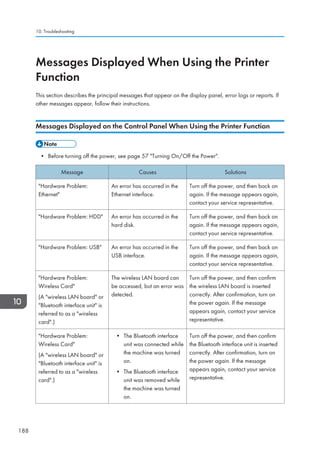
![Message Causes Solutions
Load following paper in n.
To cancel job, press [Job
Reset].
(A figure is placed at n.)
The printer driver settings are
incorrect or the tray does not
contain paper of the size
selected in the printer driver.
Check that the printer driver settings
are correct, and then load paper of
the size selected in the printer driver
into the input tray. For details about
how to change the paper size, see
Changing the Paper Size, Paper
Specifications and Adding Paper .
Paper in staple tray. Open
cover and remove paper.
If printing is stopped before it
is finished, paper may remain
in the finisher.
Remove the paper remaining in the
finisher.
Paper size and type are
mismatched. Select another
tray from the following and
press [Continue]. To cancel
job, press [Job Reset].
Paper size and type can
also be changed in User
Tools.
The printer driver settings are
incorrect or the tray does not
contain paper of the size or
type selected in the printer
driver.
• Check that the printer driver
settings are correct, and then
load paper of the size selected in
the printer driver into the input
tray. For details about how to
change the paper size, see
Changing the Paper Size,
Paper Specifications and Adding
Paper .
• Select the tray manually to
continue printing, or cancel a
print job. For details about how
to select the tray manually, or
cancel a print job, see If an
Error Occurs with the Specified
Paper Size and Type, Print .
Paper size of n is
mismatched. Select another
tray from the following and
press [Continue]. Paper
type can also be changed
in User Tools.
(A tray name is placed at
n.)
The size of the paper in the
tray does not match the paper
size specified in the printer
driver.
Select a tray containing paper that is
the same size as the specified paper
size.
Parallel I/F board has a
problem.
An error has occurred in the
IEEE 1284 interface board.
Turn off the power, and then back on
again. If the message appears again,
contact your service representative.
Messages Displayed When Using the Printer Function
189](https://image.slidesharecdn.com/d1467503-191008171028/85/D1467503-199-320.jpg)
![Message Causes Solutions
Printer font error. An error has occurred in the
font settings.
Contact your service representative.
Problems with the wireless
card. Please call service.
(A wireless LAN board or
Bluetooth unit is referred
to as a wireless card.)
The machine has detected a
Bluetooth failure, or it could
not detect a Bluetooth unit. It
may be incorrectly installed.
Check that the Bluetooth unit is
installed properly, or contact your
service representative.
Cannot print because both
the main and designation
(chapter) sheets are set to
the same paper tray. Press
[Job Reset] to cancel the
job. To print the job again
specify different trays.
The tray selected for other
pages is the same as the one
for slip sheets.
Reset the job. Be sure the tray you
select for slip sheets is not providing
paper for other pages.
When using direct print from a memory storage device
Message Causes Solutions
Exceeded the limit value for
total data size of the
selected files. Cannot select
more files.
• The size of the selected
file exceeds 1 GB.
• The total size of the
selected files exceeds 1
GB.
Files or groups of files larger than 1 GB
cannot be printed.
• When the total size of the multiple
files that are selected exceeds 1
GB, select files separately.
• When the size of the selected file
exceeds 1 GB, print from a
memory storage device using a
function other than the Direct
printing function.
You cannot select files of different
formats at the same time.
10. Troubleshooting
190](https://image.slidesharecdn.com/d1467503-191008171028/85/D1467503-200-320.jpg)
![Message Causes Solutions
Unable to access the
specified memory storage
device.
• An error occurred
when the machine
accessed the memory
storage device or a file
stored on the memory
storage device.
• An error occurred
when the user used the
Direct printing function
to print from a memory
storage device.
Save the file to a different memory
storage device, and then try to print
again.
Messages Printed on the Error Logs or Reports When Using the Printer Function
This section describes likely causes of and possible solutions for the error messages that are printed on
the error logs or reports.
When print jobs are canceled
Message Causes Solutions
91: Error Printing was canceled by the
auto job cancel function due
to a command error.
Check that the data is valid.
An error occurred while
processing an Unauthorized
Copy Prevention job. The
job was cancelled.
You tried to store a file in the
Document Server when the
[Unauthorized Copy
Prevention] was specified.
On the printer driver, select a job type
other than [Document Server] in Job
Type: or deselect [Unauthorized Copy
Prevention].
An error occurred while
processing an Unauthorized
Copy Prevention job. The
job was cancelled.
The [Enter User Text:] field
on the [Unauthorized Copy
Prevention for Pattern
Details] screen is blank.
On the printer driver's [Detailed
Settings] tab, click [Effects] in Menu:.
Select [Unauthorized Copy
Prevention], and then click [Details] to
display [Unauthorized Copy
Prevention for Pattern Details]. Enter
text in [Enter User Text:].
Messages Displayed When Using the Printer Function
191](https://image.slidesharecdn.com/d1467503-191008171028/85/D1467503-201-320.jpg)
![Message Causes Solutions
An error occurred while
processing an Unauthorized
Copy Prevention job. The
job was cancelled.
The resolution is set to a
value less than 600 dpi
when [Unauthorized Copy
Prevention] is specified.
On the printer driver, set the resolution
to 600 dpi or higher, or deselect
[Unauthorized Copy Prevention].
Collate has been
cancelled.
Collate was canceled. Turn off the power, and then back on
again. If the message appears again,
contact your service representative.
Exceeded the maximum unit
count for Print Volume Use.
The job has been
cancelled.
The number of pages the
user is permitted to print has
been exceeded.
For details about print volume use
limitation, see Security Guide .
Receiving data failed. Data reception was aborted. Resend the data.
Sending data failed. The machine received a
command to stop
transmission from the printer
driver.
Check if the computer is working
correctly.
The selected paper size is
not supported. This job has
been cancelled.
Job reset is automatically
performed if the specified
paper size is incorrect.
Specify the correct paper size, and
then print the file again.
The selected paper type is
not supported. This job has
been cancelled.
Job reset is automatically
performed if the specified
paper type is incorrect.
Specify the correct paper type, and
then print the file again.
When there is a problem with the print settings
Message Causes Solutions
Booklet/Half Fold Error The job was canceled
because you specified
invalid settings for saddle
stitching or half fold.
Check the settings for saddle stitching or
half fold.
Classification Code is
incorrect.
The classification code has
not been entered, or the
classification code has
been entered incorrectly.
Enter the correct classification code.
10. Troubleshooting
192](https://image.slidesharecdn.com/d1467503-191008171028/85/D1467503-202-320.jpg)
![Message Causes Solutions
Classification Code is
incorrect.
The classification code is
not supported with the
printer driver.
Select [Optional] for classification code.
For details about how to specify
classification code settings, see
Configuring Classification Codes, Print
.
Duplex has been
cancelled.
Duplex printing was
canceled.
• Select the proper paper size for the
duplex function. For details about
paper, see Specifications for the
Main Unit, Maintenance and
Specifications .
• Change the setting for Apply
Duplex in [System Settings] to
enable duplex printing for the paper
tray. For details about setting Apply
Duplex, see Tray Paper Settings,
Connecting the Machine/ System
Settings .
Exceeded max. pages.
Collate is incomplete.
The number of pages
exceeds the maximum
number of sheets that you
can use Collate with.
Reduce the number of pages to print.
Exceeded the maximum
number of multi-sheet fold
(Half Fold).
The maximum number of
multi-sheet folds (Half Fold)
was exceeded.
For details about the maximum number of
multi-sheet folds (Half Fold), see Fold,
Print .
Output tray has been
changed.
The output tray was
changed because the
paper size of the specified
output tray is limited.
Specify the proper output tray.
Messages Displayed When Using the Printer Function
193](https://image.slidesharecdn.com/d1467503-191008171028/85/D1467503-203-320.jpg)
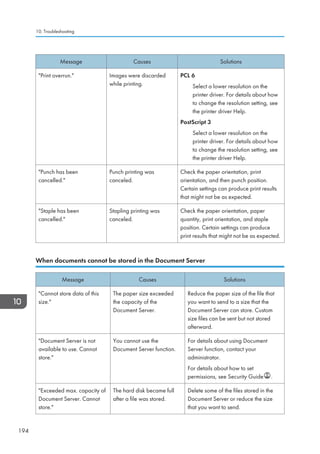
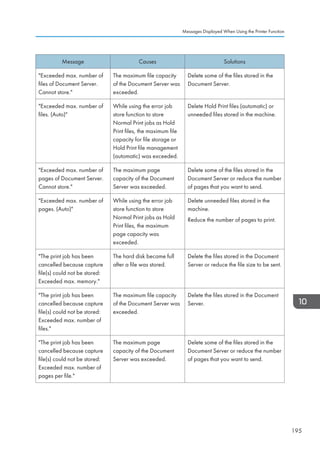
![Message Causes Solutions
The specified folder in
Document Server is locked.
Cannot store.
The specified folder is
locked.
Unlock the folder or specify another
folder number that can be used. For
details about locked folders, see
Security Guide .
When there is not enough free hard disk space
Message Causes Solutions
HDD is full. When printing with the
PostScript 3 printer driver,
the hard disk capacity for
fonts and forms has been
exceeded.
Delete unneeded forms or fonts
registered in the machine.
HDD is full. The hard disk became full
while printing a Sample
Print, Locked Print, Hold
Print, or Stored Print file.
Delete unneeded files stored in the
machine.
Alternatively, reduce the data size of
the Sample Print, Locked Print, Hold
Print, or Stored Print file.
HDD is full. (Auto) The hard disk became full
while using the error job
store function to store
Normal Print jobs as Hold
Print files.
Delete unneeded files stored in the
machine.
Alternatively, reduce the data size of
the Temporary Print file and/or the
Stored Print file.
When there is not enough memory
Message Causes Solutions
84: Error There is no work area
available for image
processing.
Decrease the number of files sent to the
machine.
92: Error Printing was canceled
because [Job Reset] or the
[Stop] key was selected on
the machine's control panel.
Perform the print operation again if
necessary.
10. Troubleshooting
196](https://image.slidesharecdn.com/d1467503-191008171028/85/D1467503-206-320.jpg)
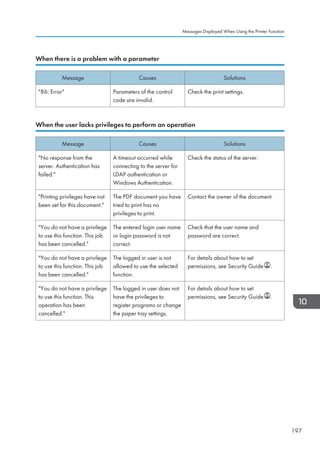
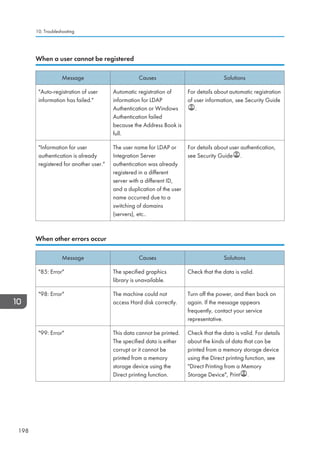
![Message Causes Solutions
Failed to obtain file system. PDF direct printing could not
be performed because the
file system could not be
obtained.
Turn off the power, and then back on
again. If the message appears again,
contact your service representative.
File system is full. PDF file does not print out
because the capacity of the
file system is full.
Delete all unnecessary files from the
hard disk, or decrease the file size sent
to the machine.
I/O buffer overflow. An input buffer overflow
occurred.
• In [Printer Features], under [Host
Interface], select [I/O Buffer],
and then set the maximum buffer
size to a larger value.
• Reduce the number of files being
sent to the machine.
Insufficient Memory A memory allocation error
occurred.
PCL 6
On the printer driver's [Detailed
Settings] tab, click [Print Quality]
in Menu:, and then select
[Raster] in the Vector/Raster:
list. In some cases, it will take a
long time to complete a print job.
Memory Retrieval Error A memory allocation error
occurred.
Turn off the power, and then back on
again. If the message appears again,
replace the RAM. For details about
replacing the RAM, contact your
service representative.
If printing does not start, contact your service representative.
• The contents of errors may be printed on the Configuration Page. Check the Configuration Page in
conjunction with the error log. For details about how to print the Configuration Page, see List / Test
Print, Print .
10. Troubleshooting
200](https://image.slidesharecdn.com/d1467503-191008171028/85/D1467503-210-320.jpg)
![Message Causes Solutions
Exceeded max. number of
alphanumeric characters.
The maximum enterable
number of alphanumeric
characters has been
exceeded.
Check the maximum number of
characters which can be entered, and
then enter it again. For details about
the maximum enterable number of
characters, see Values of Various Set
Items for Transmission/Storage /
Delivery Function, Scan .
Programmed. Cannot
program the destination(s)
that is not programmed in
the address book.
The destinations selected
while registering to the
program contain a folder
destination for which one of
the following destinations is
set:
manually entered
destination, delivery server
destination, WSD
destination, or DSM
destination
WSD destinations and DSM
destinations cannot be registered to the
program because they cannot be
registered in the address book. For
manually entered and delivery server
destinations, register the destinations in
the address book, and then try to
register them to the program again.
Scanner journal is full.
Please check Scanner
Features.
Print Delete Scanner
Journal in [Scanner
Features] is set to [Do not
Print: Disable Send], and
Scanner Journal is full.
Print or delete Scanner Journal. For
details about Scanner Features, see
General Settings, Scan .
The entered file name
contains invalid character(s).
Enter the file name again
using any of the following 1
byte characters. 0 to 9 ,
A to Z , a to z , . - _
The file name contains a
character that cannot be
used.
Check the file name set at the time of
scanning. For details about characters
that can be used in file names, see
Specifying the File Name, Scan .
The entered file name
contains invalid character(s).
Enter the file name again
using any of the following 1
byte characters. 0 to 9 ,
A to Z , a to z , . - _
The file name contains a
character that cannot be
used.
Check the file name specified at the
time of scanning. The file name
specified in the Sending Scan Files to
Folders function cannot contain the
following characters:
/ : * ? |
The file name cannot start or end with a
period ..
10. Troubleshooting
202](https://image.slidesharecdn.com/d1467503-191008171028/85/D1467503-212-320.jpg)
![Message Causes Solutions
The program is recalled.
Cannot recall the
destination(s) for which
access privileges are
required.
The program contains a
destination for which the
currently logged-in user
does not have permission to
view.
For details about how to set
permissions, see Security Guide .
The program is recalled.
Cannot recall the
destination(s) that is deleted
from the address book.
The destination stored in the
program could not be called
because it was deleted from
the address book.
Enter the destination directly to send
data separately.
The program is recalled.
Cannot recall the folder
destination(s) with protection
code(s).
Destinations registered in the
program contain a folder
destination for which the
protection code is set.
A destination for which the protection
code is set cannot be called by the
program. Cancel the protection code
setting or send scanned files to the
destination separately.
When documents cannot be scanned properly
Message Causes Solutions
All the pages are detected
as blank. No file was
created.
No PDF file was created
because all the pages of the
scanned original were
detected as blank when
[On] is specified for [Delete
Blank Page] in [OCR
Settings].
Check whether the original is set
upside down.
Change [OCR Scanned PDF: Blank
Page Sensitivity] in [Scanner Features]
to Sensitivity Level 1.
Check original's
orientation.
Documents may sometimes
not be scanned depending
on a combination of items
such as the specified scaling
factor and document size.
Change the orientation of the original,
and then try to scan the original again.
Messages Displayed When Using the Scanner Function
203](https://image.slidesharecdn.com/d1467503-191008171028/85/D1467503-213-320.jpg)
![Message Causes Solutions
Exceeded max. data
capacity.
Check scanning resolution,
then press Start key again.
The scanned data exceeded
maximum data capacity.
Specify the scan size and resolution
again. Note that it may not be possible
to scan very large originals at a high
resolution. For details about the settings
for scan function, see Relationship
between Resolution and Scan Size,
Scan .
Exceeded max. data
capacity.
Check the scanning
resolution, then reset n
original(s).
(n in the message
represents a changeable
number.)
The scanned original
exceeded maximum data
capacity.
Specify the scan size and resolution
again. Note that it may not be possible
to scan very large originals at a high
resolution. For details about the settings
for scan function, see Relationship
between Resolution and Scan Size,
Scan .
Exceeded max. data
capacity.
Check the resolution and
the ratio and then press the
Start key again.
The data being scanned is
too large for the scale ratio
specified in [Specify Size].
Reduce the resolution or [Specify Size]
value, and then try to scan the original
again.
Exceeded max. number of
files which can be used in
Document Server at the
same time.
The maximum number of
files that can be stored in the
Document Server has been
exceeded.
Check the files stored by the other
functions, and then delete unneeded
files. For details about how to delete
files, see Deleting Stored Documents,
Copy/ Document Server .
Not all of the image will be
scanned.
If the scaling factor specified
in [Specify Reproduction
Ratio] is too large, part of
the image may be lost.
Reduce the scaling factor in [Specify
Reproduction Ratio], and then try to
scan the original again.
If displaying the entire image is not
necessary, press the [Start] key to start
scanning with the current scaling
factor.
10. Troubleshooting
204](https://image.slidesharecdn.com/d1467503-191008171028/85/D1467503-214-320.jpg)
![Message Causes Solutions
Not all of the image will be
scanned.
Using [Specify Reproduction
Ratio] to scale down a large
document may cause part of
the image to be lost.
Specify a large size in [Specify Size],
and then try to scan the original again.
If displaying the entire image is not
necessary, press the [Start] key to start
scanning with the current scaling
factor.
The size of the scanned
data is too small.
Check the resolution and
the ratio and then press the
Start key again.
The data being scanned is
too small for the scale ratio
specified in [Specify Size].
Specify a higher resolution or a large
size in [Specify Size], and then try to
scan the original again.
When documents cannot be scanned because the memory is full
Message Causes Solutions
Memory is full. Cannot
scan. The scanned data will
be deleted.
Because of insufficient hard
disk space, the first page
could not be scanned.
Try one of the following measures:
• Wait for a while, and then retry
the scan operation.
• Reduce the scan area or scanning
resolution. For details about
changing scan area and scanning
resolution, see Scan Settings of
Various Scan Settings, Scan .
• Delete unneeded stored files. For
details about how to delete stored
files, see Deleting a Stored File,
Scan .
Memory is full. Do you
want to store scanned file?
Because there is not enough
free hard disk space in the
machine for storing in the
Document Server, only some
of the pages could be
scanned.
Specify whether to use the data or not.
Messages Displayed When Using the Scanner Function
205](https://image.slidesharecdn.com/d1467503-191008171028/85/D1467503-215-320.jpg)
![Message Causes Solutions
Memory is full. Scanning
has been cancelled. Press
[Send] to send the scanned
data, or press [Cancel] to
delete.
Because there is not enough
free hard disk space in the
machine for delivering or
sending by e-mail while
storing in the Document
Server, only some of the
pages could be scanned.
Specify whether to use the data or not.
When data transmission fails
Message Causes Solutions
Authentication with the
destination has failed. Check
settings. To check the current
status, press [Scanned Files
Status].
The entered user name or
password was invalid.
• Check that the user name and
password are correct.
• Check that the ID and password
for the destination folder are
correct.
• A password of 128 or more
characters may not be
recognized.
Exceeded max. E-mail size.
Sending E-mail has been
cancelled. Check [Max. E-
mail Size] in Scanner
Features.
The file size per page has
reached the maximum e-
mail size specified in
[Scanner Features].
Change the scanner features settings
as follows:
• Increase the e-mail size limit in
[Max. E-mail Size].
• Change the [Divide Send E-
mail] setting to [Yes (per Page)] or
[Yes (per Max. Size)]. For details
about these settings, see Send
Settings, Scan .
Sending the data has
failed. The data will be
resent later.
A network error has
occurred and a file was not
sent correctly.
Wait until sending is retried
automatically after the preset interval. If
sending fails again, contact your
administrator.
10. Troubleshooting
206](https://image.slidesharecdn.com/d1467503-191008171028/85/D1467503-216-320.jpg)
![Message Causes Solutions
Transmission has failed.
Insufficient memory in the
destination hard disk. To
check the current status,
press [Scanned Files
Status].
Transmission has failed.
There was not enough free
space on the hard disk of the
SMTP server, FTP server, or
client computer at the
destination.
Allocate sufficient space.
Transmission has failed. To
check the current status,
press [Scanned Files
Status].
While a file was being sent,
a network error occurred
and the file could not be sent
correctly.
If the same message appears again
after scanning again, the cause could
be a mixed network, or else network
settings were changed during WSD
scanner transmission. For details about
network error, contact your
administrator.
When data cannot be sent because a currently used file is selected
Message Causes Solutions
Selected file is currently in
use. File name cannot be
changed.
You cannot change the
name of a file whose status
is Waiting... or that is
being edited with
DeskTopBinder.
Cancel transmission (Waiting... status
cleared) or the DeskTopBinder setting,
and then change the file name.
Selected file is currently in
use. Password cannot be
changed.
You cannot change the
password of a file whose
status is Waiting... or that is
being edited with
DeskTopBinder.
Cancel transmission (Waiting... status
cleared) or the DeskTopBinder setting,
and then change the password.
Selected file is currently in
use. User name cannot be
changed.
You cannot change the
sender's name whose status
is Waiting... or that is
being edited with
DeskTopBinder.
Cancel transmission (Waiting... status
cleared) or the DeskTopBinder setting,
and then change the user name.
Messages Displayed When Using the Scanner Function
207](https://image.slidesharecdn.com/d1467503-191008171028/85/D1467503-217-320.jpg)
![Message Causes Solutions
Some of selected files are
currently in use. They could
not be deleted.
You cannot delete a file
which is waiting to be
transmitted (Waiting...
status displayed) or whose
information is being
changed with
DeskTopBinder.
Cancel transmission (Waiting... status
cleared) or the DeskTopBinder setting,
and then delete the file.
When data cannot be sent because there are too many documents or pages
Message Causes Solutions
Exceeded max. number of
pages per file. Do you want
to store the scanned pages
as 1 file?
The file being stored has
exceeded the maximum
number of pages for one file.
Specify whether to store the data or
not. Scan the pages that were not
scanned, and then store them as a new
file. For details about storing files, see
Storing and Saving the Scanned
Documents, Scan .
Exceeded max. number of
stored files. Cannot send the
scanned data as capturing
files is unavailable.
Too many files are waiting to
be delivered.
Try again after they have been
delivered.
Exceeded max. page
capacity per file. Press
[Send] to send the scanned
data, or press [Cancel] to
delete.
The number of scanned
pages exceeded the
maximum page capacity.
Select whether to send the data that
has already been scanned.
Exceeded maximum
number of file to store.
Delete all unnecessary files.
Too many files are waiting to
be delivered.
Try again after they have been
delivered.
10. Troubleshooting
208](https://image.slidesharecdn.com/d1467503-191008171028/85/D1467503-218-320.jpg)
![When the WSD scanner function cannot be used
Message Causes Solutions
Cannot communicate with
PC. Contact the
administrator.
WSD (Device) protocol or
WSD (Scanner) protocol is
disabled.
For details about how to enable or
disable the WSD protocol, see Security
Guide .
Cannot start scanning
because communication was
failed.
Scan Profile is not set on the
client computer.
Set Scan Profile. For details about how
to do this, see Creating a New Scan
Profile, Scan .
Cannot start scanning
because communication was
failed.
The [Take no action] setting
has been selected on the
client computer, forcing the
client computer to remain
inactive when it receives
scan data.
Open scanner properties, click the
[Events] tab, and then select [Start this
program] as the computer's response
on receipt of scan data. For details, see
your operating system's Help.
Cannot start scanning.
Check the setting(s) on the
PC.
The Scan Profile might be
incorrectly configured.
Check the Scan Profile configuration.
Could not send the data
because the PC timed out
before it was sent.
A time out occurred when
using WSD Scanner. Time
outs occur when too much
time passes between
scanning an original and
sending its data. The
followings are likely causes
of time outs:
• Too many originals per
set.
• Misfed originals.
• Transmission of other
jobs.
• Reduce the number of originals,
and then scan again.
• Remove any misfed original, and
then scan again.
• Use Scanner Journal to check
there are no jobs awaiting
transmission, and then scan
again.
Messages Displayed When Using the Scanner Function
209](https://image.slidesharecdn.com/d1467503-191008171028/85/D1467503-219-320.jpg)
![When documents cannot be stored on a memory storage device
Message Causes Solutions
Cannot write on the
memory storage device
because remaining free
space is insufficient.
The memory storage device
is full and scan data cannot
be saved. Even if the
memory storage device
appears to have sufficient
free space, data might not
be saved if the maximum
number of files that can be
saved is exceeded.
• Replace the memory storage
device.
• If the document is scanned as
single-page or divided multiple
pages, data already written to the
memory storage device is saved
as is. Replace the memory storage
device, and then press [Retry] to
save the remaining data, or press
[Cancel] to redo the scan.
Cannot write on the
memory storage device
because the device is write-
protected.
The memory storage device
is write-protected.
Unlock the write-protection on the
memory storage device.
Cannot write on the
memory storage device.
Check the memory storage
device and machine
settings.
The memory storage device
is faulty, or the file name
contains a character that
cannot be used.
• Check to see if the memory
storage device is defective.
• Check the memory storage
device. It might be unformatted,
or its format might be
incompatible with this machine.
• Check the file name set at the time
of scanning. For details about the
characters that can be used in file
names, see Specifying the File
Name, Scan .
Exceeded max. page
capacity per file. Press
[Write] to write the scanned
data to the memory storage
device, or press [Cancel] to
delete.
The scan could not be
completed because the
maximum number of pages
that can be scanned by this
machine was exceeded
during writing to the memory
storage device.
Reduce the number of documents to be
written to the memory storage device,
and then try again.
10. Troubleshooting
210](https://image.slidesharecdn.com/d1467503-191008171028/85/D1467503-220-320.jpg)
![Message Causes Solutions
Memory is full. Press [Write]
to write the current scanned
data to the memory storage
device, or press [Cancel] to
delete.
The scan could not be
completed because there
was insufficient hard disk
memory at the time of saving
to the memory storage
device.
Select whether or not to save the
scanned document to the memory
storage device.
Messages Displayed on the Client Computer
This section describes likely causes of and possible solutions for the main error messages displayed on
the client computer when using the TWAIN driver. If a message not described here appears, act
according to the message.
Message Causes Solutions
Any of Login User Name,
Login Password or Driver
Encryption Key is incorrect.
The entered login user
name, password, or driver
encryption key was invalid.
Check your login user name, login
password, or driver encryption key,
and then enter them correctly. For
details about login user name, login
password, and driver encryption key,
see Security Guide .
Authentication succeeded.
However, the access
privileges for scanner
function has been denied.
The logged in user name
does not have permission for
scanner function.
For details about how to set
permissions, see Security Guide .
Cannot add any more
scanning mode.
The maximum number of
registerable scan modes has
been exceeded.
The maximum number of modes that
can be stored is 100. Delete unneeded
modes.
Cannot detect the paper
size of the original. Specify
the scanning size.
The set original was
misaligned.
• Place the original correctly.
• Specify the scan size.
• When placing an original directly
on the exposure glass, the lifting/
lowering action of the ADF
triggers the automatic original
size detection process. Lift the
ADF by 30 degrees or more.
Messages Displayed When Using the Scanner Function
211](https://image.slidesharecdn.com/d1467503-191008171028/85/D1467503-221-320.jpg)
![Message Causes Solutions
Scanner is in use for other
function. Please wait.
A function of the machine
other than the Scanner
function is being used such
as the Copier function.
• Wait for a while, and then
reconnect.
• Cancel the job that is being
processed. Press the [Stop] key.
Follow the instructions in the
message that appears and exit
the function that is running.
Scanner is not available on
the specified device.
The TWAIN scanner function
cannot be used on this
machine.
Contact your service representative.
Scanner is not ready.
Check the scanner and the
options.
The ADF cover is open. Check whether the ADF cover is
closed.
The name is already in use.
Check the registered
names.
You tried to register a name
that is already in use.
Use another name.
When there is a problem connecting to the scanner
Message Causes Solutions
Cannot connect to the
scanner. Check the network
Access Mask settings in User
Tools.
An access mask is set. For details about an access mask,
contact your administrator.
Cannot find XXX scanner
used for the previous scan.
YYY will be used instead.
(XXX and YYY indicate
scanner names.)
The main power of the
previously used scanner is
not set to On.
Check whether the main power of the
scanner used for the previous scan has
been turned on.
10. Troubleshooting
214](https://image.slidesharecdn.com/d1467503-191008171028/85/D1467503-224-320.jpg)
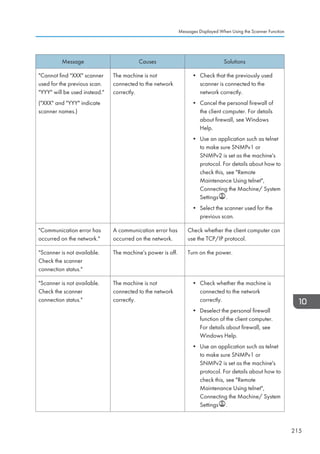
![Message Causes Solutions
Scanner is not available.
Check the scanner
connection status.
Network communication is
not available because the
machine's IP address could
not be obtained from the
host name. If only IPv6 is
set to [Active], the IPv6
address might not be
obtained.
• Check whether the machine's host
name is specified in the Network
Connection Tool. For the WIA
driver, check the [Network
Connection] tab in the properties.
• Use Web Image Monitor to set
LLMNR of IPv6 to [Active].
• In Windows XP, IPv6 address
cannot be obtained from the host
name. Specify the machine's IPv6
address in the Network
Connection Tool.
10. Troubleshooting
216](https://image.slidesharecdn.com/d1467503-191008171028/85/D1467503-226-320.jpg)
![When Other Messages Appear
Message Causes Solutions
Cannot connect with the
wireless card. Turn the main
power switch off, then check
the card.
(A wireless LAN board or
Bluetooth interface unit is
referred to as a wireless
card.)
• The wireless LAN
board was not inserted
when the machine was
turned on.
• The wireless LAN
board was pulled out
after the machine was
turned on.
• The settings are not
updated although the
unit is detected.
Turn off the power, and then confirm
the wireless LAN board is inserted
correctly. After confirmation, turn on
the power again. If the message
appears again, contact your service
representative.
Cannot connect with the
Bluetooth interface. Check
the Bluetooth interface.
• The Bluetooth interface
unit was installed while
the machine was turned
on.
• The Bluetooth interface
unit was removed while
the machine was turned
on.
Turn off the power, and then confirm
that the Bluetooth interface unit was
installed correctly. After confirmation,
turn on the power again. If the
message appears again, contact your
service representative.
Clean the scanning glass.
(Located next to the
exposure glass.)
The scanning glass or guide
plate of the ADF is dirty.
Clean them. See Maintaining Your
Machine, Maintenance and
Specifications .
Following output tray is full.
Remove paper.
The output tray is full. Remove paper from the output tray to
resume printing. If paper is destined for
the finisher shift tray, to prevent paper
from falling off the tray press the [Stop]
key to suspend printing, and then
remove the paper. Press [Continue] on
the display panel to resume printing.
When Other Messages Appear
217](https://image.slidesharecdn.com/d1467503-191008171028/85/D1467503-227-320.jpg)
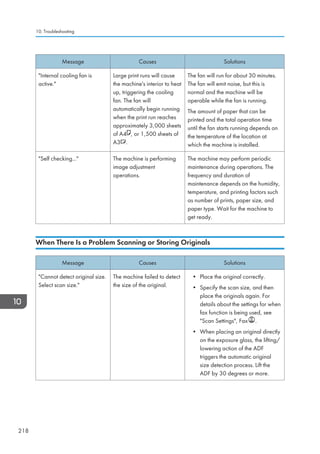
![Message Causes Solutions
Captured file exceeded
max. number of pages per
file. Cannot send the
scanned data.
The maximum number of
pages per file has been
exceeded.
Reduce the number of pages in the
transmitted file, and then resend the
file. For details about the maximum
number of pages per file, see Storage
Function, Scan .
Original(s) is being
scanned for a different
function.
Another function of the
machine is being used.
Cancel the job in progress. Press [Exit],
and then press the [Stop] key. Follow
the instructions in the message that
appears and exit the function that is
running.
When the Home Screen Cannot Be Edited
Message Causes Solutions
The image data size is not
valid. See the manual for
required data.
The image data size is not
valid.
For details about file size for shortcut
image, see Displaying the Image on
the [Home] Screen, Convenient
Functions .
The format of the image
data is not valid. See the
manual for required data.
The file format of the shortcut
image to be added is not
supported.
The file format of shortcut images to be
added must be PNG. Specify the
image again.
When Other Messages Appear
219](https://image.slidesharecdn.com/d1467503-191008171028/85/D1467503-229-320.jpg)
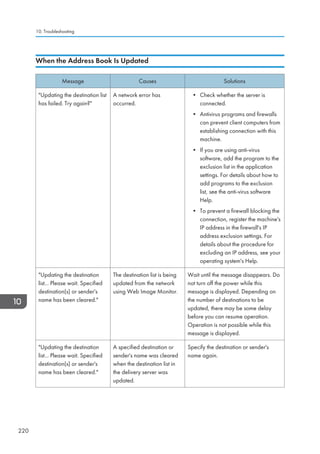
![When Data Cannot Be Sent Due to a Problem with the Destination
Message Causes Solutions
Some invalid destination(s)
contained. Do you want to
select only valid
destination(s)?
The specified group contains
fax destinations, e-mail
destinations, and/or folder
destinations, either of which
are incompatible with the
specified transmission
method.
In the message that appears at each
transmission, press [Select].
SMTP authentication E-mail
address and Administrator
E-mail address mismatch.
The SMTP authentication e-
mail address and the
administrator's e-mail
address do not match.
For details about how to set SMTP
authentication, see File Transfer,
Connecting the Machine/ System
Settings .
When the Machine Cannot Be Operated Due to a Problem with the User
Certificate
Message Causes Solutions
The destination cannot be
selected because its
encryption certificate is not
currently valid.
The user certificate
(destination certificate) has
expired.
A new user certificate must be installed.
For details about the user certificate
(destination certificate), see Security
Guide .
The group destination
cannot be selected because
it contains a destination with
a encryption certificate that
is not currently valid.
The user certificate
(destination certificate) has
expired.
A new user certificate must be installed.
For details about the user certificate
(destination certificate), see Security
Guide .
Transmission cannot be
performed because the
encryption certificate is not
currently valid.
The user certificate
(destination certificate) has
expired.
A new user certificate must be installed.
For details about the user certificate
(destination certificate), see Security
Guide .
When Other Messages Appear
221](https://image.slidesharecdn.com/d1467503-191008171028/85/D1467503-231-320.jpg)
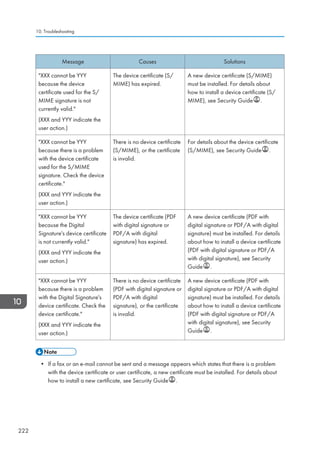
![When Problems Occur While Logging In
Message Causes Solutions
Authentication has failed. The entered login user name
or login password is not
correct.
For details about the correct login user
name and login password, see
Security Guide .
Authentication has failed. The machine cannot perform
authentication.
For details about authentication, see
Security Guide .
When the User Lacks Privileges to Perform an Operation
Message Causes Solutions
You do not have the
privileges to use this
function.
The logged in user name
does not have permission for
the selected function.
For details about how to set
permissions, see Security Guide .
The selected file(s)
contained file(s) without
access privileges. Only
file(s) with access privileges
will be deleted.
You have tried to delete files
without the authority to do
so.
To check your access permission for
stored documents, or to delete a
document you do not have permission
to delete, see Security Guide .
When the LDAP Server Cannot Be Used
Message Causes Solutions
Connection with LDAP
server has failed. Check the
server status.
A network error has
occurred and connection
has failed.
Try the operation again. If the message
is still shown, the network may be busy.
Check the settings for LDAP server in
[System Settings]. For details about
settings for LDAP server, see
Programming the LDAP server,
Connecting the Machine/ System
Settings .
When Other Messages Appear
223](https://image.slidesharecdn.com/d1467503-191008171028/85/D1467503-233-320.jpg)
![Message Causes Solutions
Exceeded time limit for
LDAP server search. Check
the server status.
A network error has
occurred and connection
has failed.
• Try the operation again. If the
message is still shown, the
network may be busy.
• Check that the correct settings for
LDAP server are listed in
[Administrator Tools] of [System
Settings]. For details about LDAP
server, see Programming the
LDAP server, Connecting the
Machine/ System Settings .
LDAP server authentication
has failed. Check the
settings.
A network error has
occurred and connection
has failed.
Make settings correctly for the user
name and the password for LDAP
server authentication.
10. Troubleshooting
224](https://image.slidesharecdn.com/d1467503-191008171028/85/D1467503-234-320.jpg)