Vishwash Gaur

                  © 2012 Vishwash Gaur. All rights reserved.
All registered trademarks, logos, products and service names belong to their
                              respective owners.
       Image Credit: http://ayadipro.com/blog/high-tech-education/25-improvements-in-joomla-2-5/
Disclaimer: Images used on this slide are for representative purposes only and belong to their respective owners.
   Basic knowledge of HTML, PHP and MySQL
   Interest in MVC and CMS frameworks to reduce development
    time
   A web server with PHP/MySQL installed on it
   Joomla! 2.5 package downloaded and installed
    ◦ it can be downloaded from http://www.joomla.org/download.html


   NOTE: This presentation is focused for the beginners in Joomla! and would
    cover only a basic overview due to limited time. Further details can be
    discussed separately later.
Hands on workshop to install
modules and components to
extend website functionality in
Joomla!
   Login to Joomla Admin panel at
    http://yoursite.com/administrator
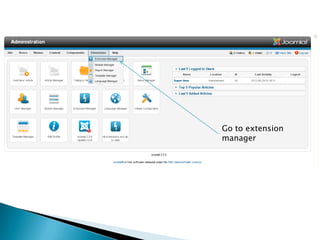
   Go to Top menu>Extensions>Extension
    Manager
Go to extension
manager
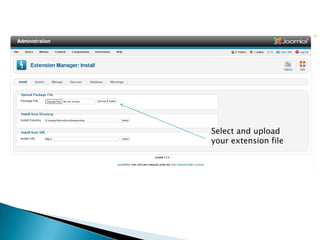
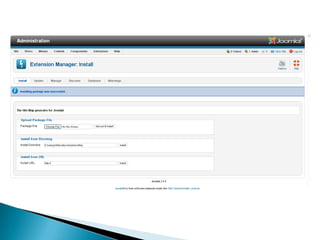
Select and upload
your extension file
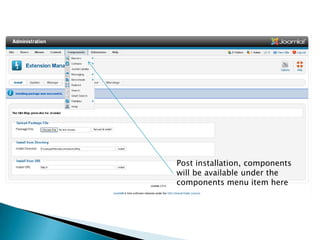
Post installation, components
will be available under the
components menu item here
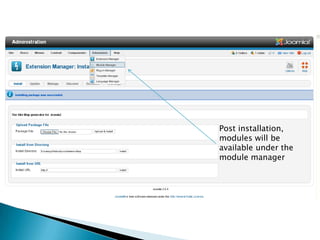
Post installation,
modules will be
available under the
module manager
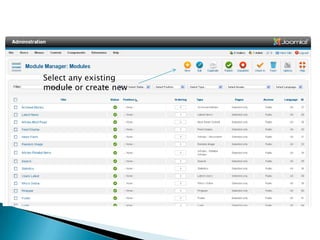
Select any existing
module or create new
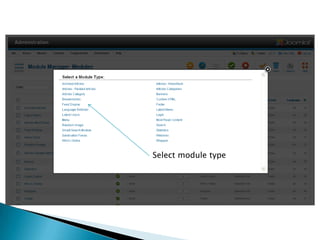
Select module type
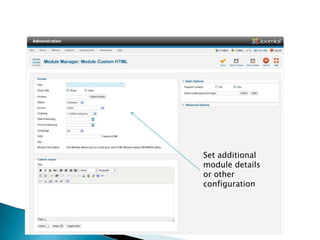
Set additional
module details
or other
configuration
   I look forward to learn and share more with you in
    future too.

   I can be reached easily at my blog
    www.vishwashgaur.com and/or using twitter
    @vishwashgaur
   XAMP: http://www.apachefriends.org/en/xampp.html
   Joomla!: http://www.joomla.org/
   JED: http://extensions.joomla.org/
   Joomla! Forum: http://forum.joomla.org/
   Joomla! Magazine: http://magazine.joomla.org/authors/itemlist/user/65-Nicholas-G-Antimisiaris
   Joomla documentation: http://docs.joomla.org/
   Joomla 2.5 essential training: http://www.lynda.com/Joomla-tutorials/Joomla-Essential-Training/95699-2.html
   Joomla! For beginners guide 2012: http://www.danconia.com/joomla-for-beginners-guide-2012.html
   Joomla! Developers guide: http://cocoate.com/sites/cocoate.com/files/private/jdev.pdf

Installing Extensions in Joomla! 2.5

  • 1.
    Vishwash Gaur © 2012 Vishwash Gaur. All rights reserved. All registered trademarks, logos, products and service names belong to their respective owners. Image Credit: http://ayadipro.com/blog/high-tech-education/25-improvements-in-joomla-2-5/ Disclaimer: Images used on this slide are for representative purposes only and belong to their respective owners.
  • 2.
    Basic knowledge of HTML, PHP and MySQL  Interest in MVC and CMS frameworks to reduce development time  A web server with PHP/MySQL installed on it  Joomla! 2.5 package downloaded and installed ◦ it can be downloaded from http://www.joomla.org/download.html  NOTE: This presentation is focused for the beginners in Joomla! and would cover only a basic overview due to limited time. Further details can be discussed separately later.
  • 3.
    Hands on workshopto install modules and components to extend website functionality in Joomla!
  • 4.
    Login to Joomla Admin panel at http://yoursite.com/administrator  Go to Top menu>Extensions>Extension Manager
  • 5.
  • 6.
    Select and upload yourextension file
  • 8.
    Post installation, components willbe available under the components menu item here
  • 9.
    Post installation, modules willbe available under the module manager
  • 10.
  • 11.
  • 12.
  • 13.
    I look forward to learn and share more with you in future too.  I can be reached easily at my blog www.vishwashgaur.com and/or using twitter @vishwashgaur
  • 14.
    XAMP: http://www.apachefriends.org/en/xampp.html  Joomla!: http://www.joomla.org/  JED: http://extensions.joomla.org/  Joomla! Forum: http://forum.joomla.org/  Joomla! Magazine: http://magazine.joomla.org/authors/itemlist/user/65-Nicholas-G-Antimisiaris  Joomla documentation: http://docs.joomla.org/  Joomla 2.5 essential training: http://www.lynda.com/Joomla-tutorials/Joomla-Essential-Training/95699-2.html  Joomla! For beginners guide 2012: http://www.danconia.com/joomla-for-beginners-guide-2012.html  Joomla! Developers guide: http://cocoate.com/sites/cocoate.com/files/private/jdev.pdf

Editor's Notes

  • #2 Hi, I am Vishwash Gaur. Today, I am going to present a beginner series webinar on the topic of Component and Module development in Joomla 2.5
  • #3 There would be an added benefit if you have downloaded, installed and used Joomla! a little bit in prior.In reducing the procedural code issues i.e. lack of code reusability, higher debugging time and more