Develop Basic Joomla! MVC Component for
version 3.x
Gunjan Patel
Sr. PHP Developer
Joomla! Bug Squad Member
Joomla! SQL Optimisation team coordinator
Google Summer Of Code 2014 Mentor
Joomla! User Network Ahmedabad
My Joomla! Family
gunjan.ce2009@gmail.com @ergunjanpatel
Joomla! User Network Ahmedabad Gunjan Patel @ergunjanpatel
Important Tools
• WebServer, PHP, MySQL - XAMP or WAMP server
• Text Editor or IDE - PhpStorm or SublimeText3
• Web Browser - Firebug and WebDeveloper addons
• Joomla! Coding Standard
• Php Code Sniffer - PHPCS
• jQuery
• BootStrap
• Xdebug
All above are good to know and it
will be a plus point.
Joomla! User Network Ahmedabad Gunjan Patel @ergunjanpatel
Required Skills
Must Know Good to know
• PHP – Minimum 5.3.10 +
• Object Oriented Concepts
• MVC Structure
• HTML
• CSS – Basic
• JavaScript – Entry Level
Joomla! License
• The Joomla software and
default templates are
copyright 2005-2013 Open
Source Matters, Inc.
• You can use, copy, modify
or distribute Joomla!
Under GNU General Public
License.
Joomla! User Network Ahmedabad Gunjan Patel @ergunjanpatel
Security
• Never Trust your User
• Always, sanitize user input
• Use native joomla!
functions to get user
inputs.
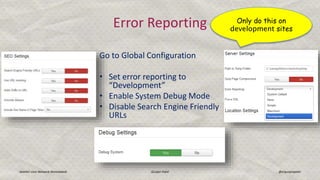
Go to Global Configuration
• Set error reporting to
“Development”
• Enable System Debug Mode
• Disable Search Engine Friendly
URLs
Joomla! User Network Ahmedabad Gunjan Patel @ergunjanpatel
Error Reporting Only do this on
development sites
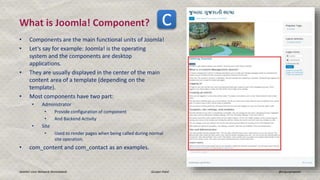
What is Joomla! Component?
• Components are the main functional units of Joomla!
• Let’s say for example: Joomla! is the operating
system and the components are desktop
applications.
• They are usually displayed in the center of the main
content area of a template (depending on the
template).
• Most components have two part:
• Administrator
• Provide configuration of component
• And Backend Activity
• Site
• Used to render pages when being called during normal
site operation.
• com_content and com_contact as an examples.
Joomla! User Network Ahmedabad Gunjan Patel @ergunjanpatel
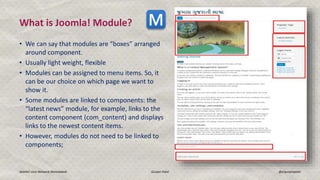
What is Joomla! Module?
• We can say that modules are “boxes” arranged
around component.
• Usually light weight, flexible
• Modules can be assigned to menu items. So, it
can be our choice on which page we want to
show it.
• Some modules are linked to components: the
“latest news” module, for example, links to the
content component (com_content) and displays
links to the newest content items.
• However, modules do not need to be linked to
components;
Joomla! User Network Ahmedabad Gunjan Patel @ergunjanpatel
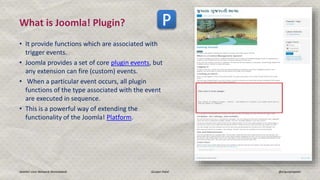
What is Joomla! Plugin?
• It provide functions which are associated with
trigger events.
• Joomla provides a set of core plugin events, but
any extension can fire (custom) events.
• When a particular event occurs, all plugin
functions of the type associated with the event
are executed in sequence.
• This is a powerful way of extending the
functionality of the Joomla! Platform.
Joomla! User Network Ahmedabad Gunjan Patel @ergunjanpatel
Joomla! Installation
• Search in Google “developing MVC component in joomla
3” go with the first link.
• In http://docs.joomla.org it is explained really good.
• I will use the same document and will explain you in deep.
• Joomla! Component starts with “com_” prefix in name.
• In URL you can access it using,
http://gunjanpat.el/workshop/administrator/index.php?option=com_helloworld
Joomla! User Network Ahmedabad Gunjan Patel @ergunjanpatel
Let’s start with com_helloworld
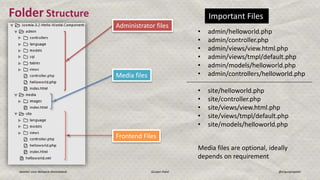
Folder Structure
Joomla! User Network Ahmedabad Gunjan Patel @ergunjanpatel
Administrator files
Media files
Frontend Files
Important Files
• admin/helloworld.php
• admin/controller.php
• admin/views/view.html.php
• admin/views/tmpl/default.php
• admin/models/helloworld.php
• admin/controllers/helloworld.php
• site/helloworld.php
• site/controller.php
• site/views/view.html.php
• site/views/tmpl/default.php
• site/models/helloworld.php
Media files are optional, ideally
depends on requirement
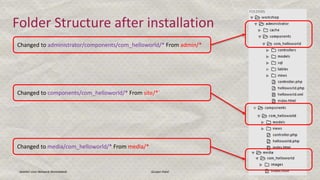
Folder Structure after installation
Joomla! User Network Ahmedabad Gunjan Patel 14
Changed to administrator/components/com_helloworld/* From admin/*
Changed to components/com_helloworld/* From site/*`
Changed to media/com_helloworld/* From media/*
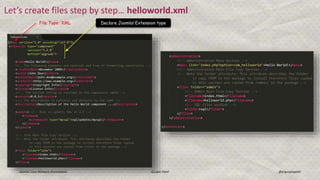
Let’s create files step by step… helloworld.xml
Joomla! User Network Ahmedabad Gunjan Patel @ergunjanpatel
File Type: XML Declare Joomla! Extension type
Joomla! User Network Ahmedabad Gunjan Patel @ergunjanpatel
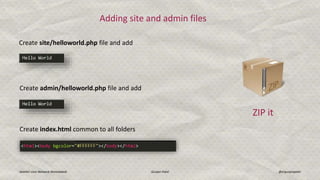
Adding site and admin files
Create site/helloworld.php file and add
Create admin/helloworld.php file and add
Create index.html common to all folders
ZIP it
Adding a view to the site part
Joomla! User Network Ahmedabad Gunjan Patel @ergunjanpatel
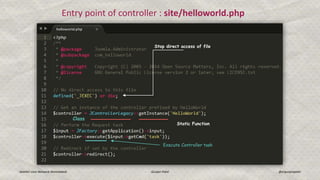
Entry point of controller : site/helloworld.php
Stop direct access of file
Static Function
Execute Controller task
Class
Joomla! User Network Ahmedabad Gunjan Patel @ergunjanpatel
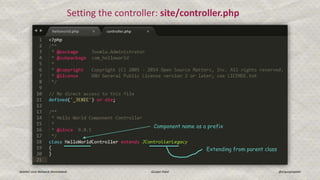
Setting the controller: site/controller.php
Component name as a prefix
Extending from parent class
Setting the view
Joomla! User Network Ahmedabad Gunjan Patel @ergunjanpatel
1. Create folder at <yoursite-url>/components/com_[component_name]/views/[name of view]/
2. For helloworld it will look like, yoursite/components/com_helloworld/views/helloworld/
3. Create file at view.[view_mode].php
• view_mode = HTML, XML, CSV, PDF etc…
4. Create folder named tmpl and add default.php file. So, path will be look like,
yoursite/components/com_helloworld/views/helloworld/tmpl/default.php
Joomla! User Network Ahmedabad Gunjan Patel @ergunjanpatel
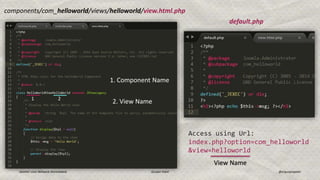
components/com_helloworld/views/helloworld/view.html.php
default.php
1 2
1. Component Name
2. View Name
Access using Url:
index.php?option=com_helloworld
&view=helloworld
View Name
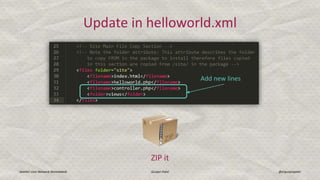
Update in helloworld.xml
Joomla! User Network Ahmedabad Gunjan Patel @ergunjanpatel
Add new lines
ZIP it
Adding a menu type to the site part
Joomla! User Network Ahmedabad Gunjan Patel @ergunjanpatel
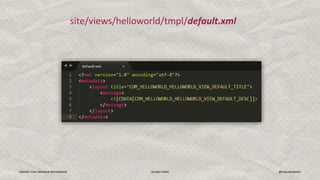
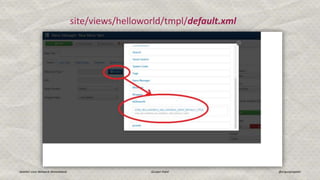
site/views/helloworld/tmpl/default.xml
Joomla! User Network Ahmedabad Gunjan Patel @ergunjanpatel
site/views/helloworld/tmpl/default.xml
Adding a model to the site part
Joomla! User Network Ahmedabad Gunjan Patel @ergunjanpatel
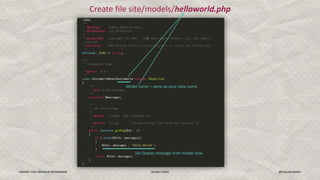
Create file site/models/helloworld.php
Joomla! User Network Ahmedabad Gunjan Patel @ergunjanpatel
Model name – same as your view name
Set Display message from model now.
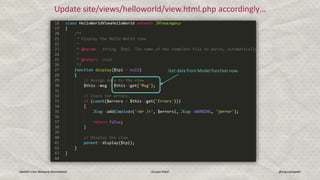
Update site/views/helloworld/view.html.php accordingly…
Joomla! User Network Ahmedabad Gunjan Patel @ergunjanpatel
Get data from Model function now.
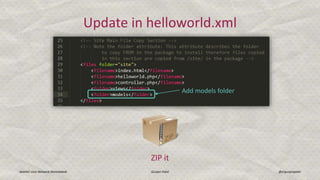
Update in helloworld.xml
Joomla! User Network Ahmedabad Gunjan Patel @ergunjanpatel
ZIP it
Add models folder
Adding a variable request in the menu type
Joomla! User Network Ahmedabad Gunjan Patel @ergunjanpatel
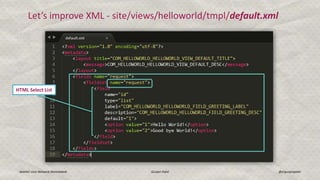
Let’s improve XML - site/views/helloworld/tmpl/default.xml
HTML Select List
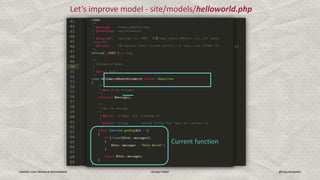
Let’s improve model - site/models/helloworld.php
Joomla! User Network Ahmedabad Gunjan Patel @ergunjanpatel
Current function
No need to update helloworld.xml
Joomla! User Network Ahmedabad Gunjan Patel @ergunjanpatel
JUST ZIP it
Joomla! User Network Ahmedabad Gunjan Patel @ergunjanpatel
Any Questions so far?

Develop Basic joomla! MVC component for version 3

  • 1.
    Develop Basic Joomla!MVC Component for version 3.x Gunjan Patel Sr. PHP Developer Joomla! Bug Squad Member Joomla! SQL Optimisation team coordinator Google Summer Of Code 2014 Mentor Joomla! User Network Ahmedabad
  • 2.
  • 3.
    Joomla! User NetworkAhmedabad Gunjan Patel @ergunjanpatel Important Tools • WebServer, PHP, MySQL - XAMP or WAMP server • Text Editor or IDE - PhpStorm or SublimeText3 • Web Browser - Firebug and WebDeveloper addons • Joomla! Coding Standard • Php Code Sniffer - PHPCS
  • 4.
    • jQuery • BootStrap •Xdebug All above are good to know and it will be a plus point. Joomla! User Network Ahmedabad Gunjan Patel @ergunjanpatel Required Skills Must Know Good to know • PHP – Minimum 5.3.10 + • Object Oriented Concepts • MVC Structure • HTML • CSS – Basic • JavaScript – Entry Level
  • 5.
    Joomla! License • TheJoomla software and default templates are copyright 2005-2013 Open Source Matters, Inc. • You can use, copy, modify or distribute Joomla! Under GNU General Public License. Joomla! User Network Ahmedabad Gunjan Patel @ergunjanpatel
  • 6.
    Joomla! User NetworkAhmedabad Gunjan Patel @ergunjanpatel Security • Never Trust your User • Always, sanitize user input • Use native joomla! functions to get user inputs.
  • 7.
    Go to GlobalConfiguration • Set error reporting to “Development” • Enable System Debug Mode • Disable Search Engine Friendly URLs Joomla! User Network Ahmedabad Gunjan Patel @ergunjanpatel Error Reporting Only do this on development sites
  • 8.
    What is Joomla!Component? • Components are the main functional units of Joomla! • Let’s say for example: Joomla! is the operating system and the components are desktop applications. • They are usually displayed in the center of the main content area of a template (depending on the template). • Most components have two part: • Administrator • Provide configuration of component • And Backend Activity • Site • Used to render pages when being called during normal site operation. • com_content and com_contact as an examples. Joomla! User Network Ahmedabad Gunjan Patel @ergunjanpatel
  • 9.
    What is Joomla!Module? • We can say that modules are “boxes” arranged around component. • Usually light weight, flexible • Modules can be assigned to menu items. So, it can be our choice on which page we want to show it. • Some modules are linked to components: the “latest news” module, for example, links to the content component (com_content) and displays links to the newest content items. • However, modules do not need to be linked to components; Joomla! User Network Ahmedabad Gunjan Patel @ergunjanpatel
  • 10.
    What is Joomla!Plugin? • It provide functions which are associated with trigger events. • Joomla provides a set of core plugin events, but any extension can fire (custom) events. • When a particular event occurs, all plugin functions of the type associated with the event are executed in sequence. • This is a powerful way of extending the functionality of the Joomla! Platform. Joomla! User Network Ahmedabad Gunjan Patel @ergunjanpatel
  • 11.
    Joomla! User NetworkAhmedabad Gunjan Patel @ergunjanpatel Joomla! Installation
  • 12.
    • Search inGoogle “developing MVC component in joomla 3” go with the first link. • In http://docs.joomla.org it is explained really good. • I will use the same document and will explain you in deep. • Joomla! Component starts with “com_” prefix in name. • In URL you can access it using, http://gunjanpat.el/workshop/administrator/index.php?option=com_helloworld Joomla! User Network Ahmedabad Gunjan Patel @ergunjanpatel Let’s start with com_helloworld
  • 13.
    Folder Structure Joomla! UserNetwork Ahmedabad Gunjan Patel @ergunjanpatel Administrator files Media files Frontend Files Important Files • admin/helloworld.php • admin/controller.php • admin/views/view.html.php • admin/views/tmpl/default.php • admin/models/helloworld.php • admin/controllers/helloworld.php • site/helloworld.php • site/controller.php • site/views/view.html.php • site/views/tmpl/default.php • site/models/helloworld.php Media files are optional, ideally depends on requirement
  • 14.
    Folder Structure afterinstallation Joomla! User Network Ahmedabad Gunjan Patel 14 Changed to administrator/components/com_helloworld/* From admin/* Changed to components/com_helloworld/* From site/*` Changed to media/com_helloworld/* From media/*
  • 15.
    Let’s create filesstep by step… helloworld.xml Joomla! User Network Ahmedabad Gunjan Patel @ergunjanpatel File Type: XML Declare Joomla! Extension type
  • 16.
    Joomla! User NetworkAhmedabad Gunjan Patel @ergunjanpatel Adding site and admin files Create site/helloworld.php file and add Create admin/helloworld.php file and add Create index.html common to all folders ZIP it
  • 17.
    Adding a viewto the site part Joomla! User Network Ahmedabad Gunjan Patel @ergunjanpatel
  • 18.
    Joomla! User NetworkAhmedabad Gunjan Patel @ergunjanpatel Entry point of controller : site/helloworld.php Stop direct access of file Static Function Execute Controller task Class
  • 19.
    Joomla! User NetworkAhmedabad Gunjan Patel @ergunjanpatel Setting the controller: site/controller.php Component name as a prefix Extending from parent class
  • 20.
    Setting the view Joomla!User Network Ahmedabad Gunjan Patel @ergunjanpatel 1. Create folder at <yoursite-url>/components/com_[component_name]/views/[name of view]/ 2. For helloworld it will look like, yoursite/components/com_helloworld/views/helloworld/ 3. Create file at view.[view_mode].php • view_mode = HTML, XML, CSV, PDF etc… 4. Create folder named tmpl and add default.php file. So, path will be look like, yoursite/components/com_helloworld/views/helloworld/tmpl/default.php
  • 21.
    Joomla! User NetworkAhmedabad Gunjan Patel @ergunjanpatel components/com_helloworld/views/helloworld/view.html.php default.php 1 2 1. Component Name 2. View Name Access using Url: index.php?option=com_helloworld &view=helloworld View Name
  • 22.
    Update in helloworld.xml Joomla!User Network Ahmedabad Gunjan Patel @ergunjanpatel Add new lines ZIP it
  • 23.
    Adding a menutype to the site part Joomla! User Network Ahmedabad Gunjan Patel @ergunjanpatel
  • 24.
    Joomla! User NetworkAhmedabad Gunjan Patel @ergunjanpatel site/views/helloworld/tmpl/default.xml
  • 25.
    Joomla! User NetworkAhmedabad Gunjan Patel @ergunjanpatel site/views/helloworld/tmpl/default.xml
  • 26.
    Adding a modelto the site part Joomla! User Network Ahmedabad Gunjan Patel @ergunjanpatel
  • 27.
    Create file site/models/helloworld.php Joomla!User Network Ahmedabad Gunjan Patel @ergunjanpatel Model name – same as your view name Set Display message from model now.
  • 28.
    Update site/views/helloworld/view.html.php accordingly… Joomla!User Network Ahmedabad Gunjan Patel @ergunjanpatel Get data from Model function now.
  • 29.
    Update in helloworld.xml Joomla!User Network Ahmedabad Gunjan Patel @ergunjanpatel ZIP it Add models folder
  • 30.
    Adding a variablerequest in the menu type Joomla! User Network Ahmedabad Gunjan Patel @ergunjanpatel
  • 31.
    Joomla! User NetworkAhmedabad Gunjan Patel @ergunjanpatel Let’s improve XML - site/views/helloworld/tmpl/default.xml HTML Select List
  • 32.
    Let’s improve model- site/models/helloworld.php Joomla! User Network Ahmedabad Gunjan Patel @ergunjanpatel Current function
  • 33.
    No need toupdate helloworld.xml Joomla! User Network Ahmedabad Gunjan Patel @ergunjanpatel JUST ZIP it
  • 34.
    Joomla! User NetworkAhmedabad Gunjan Patel @ergunjanpatel Any Questions so far?