Tech Mahindra Limited confidential
© Tech Mahindra Limited 2007
Cursors
CONFIDENTIAL© Copyright 2007 Tech Mahindra Limited 2
Objectives
 At the end of this session, you will be able to:
 Understand the concept of Cursors and its types
 Understand the use of Implicit Cursor and its attributes
 Understand the use of Explicit Cursor and its attributes
 Declare and process Explicit Cursors
 Understand and use Cursors LOOPS
 Implement Parameterized Cursors
 Learn the use of Advanced Cursors
 Understand the concept of REF Cursors and use REF Cursors in
PL/SQL blocks
CONFIDENTIAL© Copyright 2007 Tech Mahindra Limited 3
Agenda
 Cursors and its types
 Implicit Cursors
 Explicit Cursors
 Parameterized Cursors
 Advanced Cursors
 Cursor Variables
CONFIDENTIAL© Copyright 2007 Tech Mahindra Limited 4
Cursors
 What is a Cursor?
 To process any DML or SELECT queries, Oracle allocates
an area of memory on the database server, known as
context area
 Cursor is a pointer to the context area
 Context area contains information about the SQL
statement and the set of data returned or affected by
that statement
 Cursor is a mechanism by which one can name that work
area and manipulate the information within it
CONFIDENTIAL© Copyright 2007 Tech Mahindra Limited 5
Cursor Types
 Two Types
 Static
Implicit Cursors
Explicit Cursors
 Dynamic
REF Cursors
CONFIDENTIAL© Copyright 2007 Tech Mahindra Limited 6
Implicit Cursors
 PL/SQL implicitly declares a cursor for all SQL data
manipulation statements on a set of rows, including queries
that return only one row
 For queries that return more than one row, you can explicitly
declare a cursor to process the rows individually
 We can refer to the most recent implicit cursor by the name
SQL
CONFIDENTIAL© Copyright 2007 Tech Mahindra Limited 7
Implicit Cursors - Attributes
 %FOUND Attribute: used to check whether a DML Statement
has affected one or many rows
 Until the DML or SELECT statement is executed, it yields NULL
 Yields TRUE if the DML affects one or more rows, or a SELECT
INTO statement returns one or more rows.
 Otherwise yields FALSE.
 %ISOPEN Attribute: always FALSE for Implicit Cursors
 Yields TRUE if the cursor is open else returns FALSE.
 Oracle closes the SQL cursor automatically after executing its
associated SQL statement. As a result, %ISOPEN always yields
FALSE.
CONFIDENTIAL© Copyright 2007 Tech Mahindra Limited 8
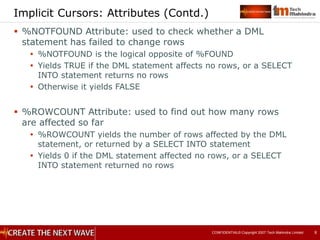
Implicit Cursors: Attributes (Contd.)
 %NOTFOUND Attribute: used to check whether a DML
statement has failed to change rows
 %NOTFOUND is the logical opposite of %FOUND
 Yields TRUE if the DML statement affects no rows, or a SELECT
INTO statement returns no rows
 Otherwise it yields FALSE
 %ROWCOUNT Attribute: used to find out how many rows
are affected so far
 %ROWCOUNT yields the number of rows affected by the DML
statement, or returned by a SELECT INTO statement
 Yields 0 if the DML statement affected no rows, or a SELECT
INTO statement returned no rows
CONFIDENTIAL© Copyright 2007 Tech Mahindra Limited 9
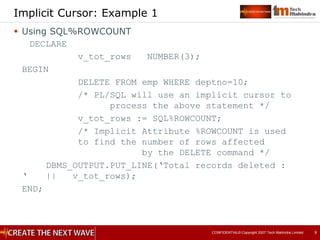
Implicit Cursor: Example 1
 Using SQL%ROWCOUNT
DECLARE
v_tot_rows NUMBER(3);
BEGIN
DELETE FROM emp WHERE deptno=10;
/* PL/SQL will use an implicit cursor to
process the above statement */
v_tot_rows := SQL%ROWCOUNT;
/* Implicit Attribute %ROWCOUNT is used
to find the number of rows affected
by the DELETE command */
DBMS_OUTPUT.PUT_LINE(‘Total records deleted :
‘ || v_tot_rows);
END;
CONFIDENTIAL© Copyright 2007 Tech Mahindra Limited 10
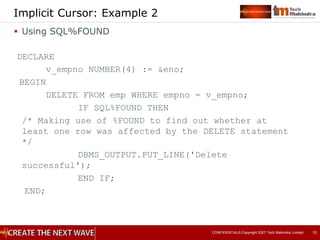
Implicit Cursor: Example 2
 Using SQL%FOUND
DECLARE
v_empno NUMBER(4) := &eno;
BEGIN
DELETE FROM emp WHERE empno = v_empno;
IF SQL%FOUND THEN
/* Making use of %FOUND to find out whether at
least one row was affected by the DELETE statement
*/
DBMS_OUTPUT.PUT_LINE('Delete
successful');
END IF;
END;
CONFIDENTIAL© Copyright 2007 Tech Mahindra Limited 11
Need for Explicit Cursors
 Implicit cursors are declared and managed automatically by
PL/SQL. We do not have any control over the processing of
implicit cursors.
 Explicit cursors give us the complete control over opening,
closing and fetching from an explicit cursor, including the
number of rows fetched.
 We can declare explicit cursors only for SELECT queries.
Generally explicit cursors are used when the SELECT query
is returning multiple rows and we want to process one row
at a time.
 Explicit cursors can take parameters. So the cursor can be
opened for a different result set in each execution by
passing on different values for the parameters.
CONFIDENTIAL© Copyright 2007 Tech Mahindra Limited 12
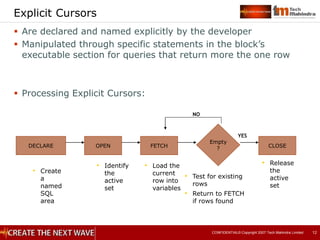
Explicit Cursors
 Are declared and named explicitly by the developer
 Manipulated through specific statements in the block’s
executable section for queries that return more the one row
 Processing Explicit Cursors:
DECLARE OPEN FETCH
Empty
? CLOSE
NO
• Create
a
named
SQL
area
• Identify
the
active
set
• Load the
current
row into
variables
• Test for existing
rows
• Return to FETCH
if rows found
• Release
the
active
set
YES
CONFIDENTIAL© Copyright 2007 Tech Mahindra Limited 13
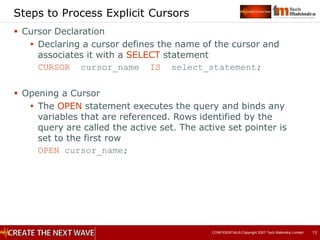
Steps to Process Explicit Cursors
 Cursor Declaration
 Declaring a cursor defines the name of the cursor and
associates it with a SELECT statement
CURSOR cursor_name IS select_statement;
 Opening a Cursor
 The OPEN statement executes the query and binds any
variables that are referenced. Rows identified by the
query are called the active set. The active set pointer is
set to the first row
OPEN cursor_name;
CONFIDENTIAL© Copyright 2007 Tech Mahindra Limited 14
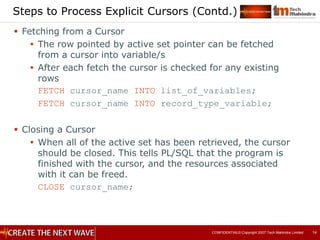
Steps to Process Explicit Cursors (Contd.)
 Fetching from a Cursor
 The row pointed by active set pointer can be fetched
from a cursor into variable/s
 After each fetch the cursor is checked for any existing
rows
FETCH cursor_name INTO list_of_variables;
FETCH cursor_name INTO record_type_variable;
 Closing a Cursor
 When all of the active set has been retrieved, the cursor
should be closed. This tells PL/SQL that the program is
finished with the cursor, and the resources associated
with it can be freed.
CLOSE cursor_name;
CONFIDENTIAL© Copyright 2007 Tech Mahindra Limited 15
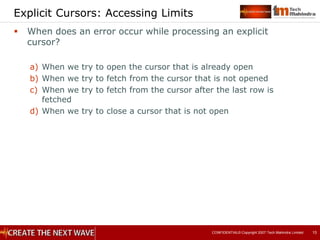
Explicit Cursors: Accessing Limits
 When does an error occur while processing an explicit
cursor?
a) When we try to open the cursor that is already open
b) When we try to fetch from the cursor that is not opened
c) When we try to fetch from the cursor after the last row is
fetched
d) When we try to close a cursor that is not open
CONFIDENTIAL© Copyright 2007 Tech Mahindra Limited 16
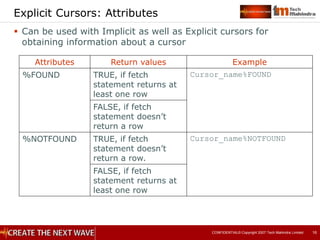
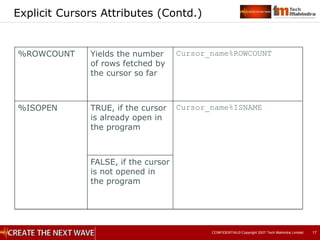
Explicit Cursors: Attributes
 Can be used with Implicit as well as Explicit cursors for
obtaining information about a cursor
Attributes Return values Example
%FOUND TRUE, if fetch
statement returns at
least one row
Cursor_name%FOUND
FALSE, if fetch
statement doesn’t
return a row
%NOTFOUND TRUE, if fetch
statement doesn’t
return a row.
Cursor_name%NOTFOUND
FALSE, if fetch
statement returns at
least one row
CONFIDENTIAL© Copyright 2007 Tech Mahindra Limited 17
Explicit Cursors Attributes (Contd.)
%ROWCOUNT Yields the number
of rows fetched by
the cursor so far
Cursor_name%ROWCOUNT
%ISOPEN TRUE, if the cursor
is already open in
the program
Cursor_name%ISNAME
FALSE, if the cursor
is not opened in
the program
CONFIDENTIAL© Copyright 2007 Tech Mahindra Limited 18
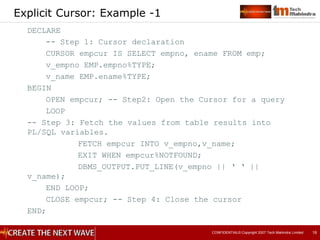
Explicit Cursor: Example -1
DECLARE
-- Step 1: Cursor declaration
CURSOR empcur IS SELECT empno, ename FROM emp;
v_empno EMP.empno%TYPE;
v_name EMP.ename%TYPE;
BEGIN
OPEN empcur; -- Step2: Open the Cursor for a query
LOOP
-- Step 3: Fetch the values from table results into
PL/SQL variables.
FETCH empcur INTO v_empno,v_name;
EXIT WHEN empcur%NOTFOUND;
DBMS_OUTPUT.PUT_LINE(v_empno || ‘ ‘ ||
v_name);
END LOOP;
CLOSE empcur; -- Step 4: Close the cursor
END;
CONFIDENTIAL© Copyright 2007 Tech Mahindra Limited 19
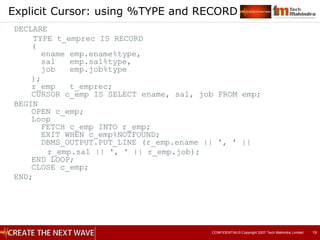
Explicit Cursor: using %TYPE and RECORD
DECLARE
TYPE t_emprec IS RECORD
(
ename emp.ename%type,
sal emp.sal%type,
job emp.job%type
);
r_emp t_emprec;
CURSOR c_emp IS SELECT ename, sal, job FROM emp;
BEGIN
OPEN c_emp;
Loop
FETCH c_emp INTO r_emp;
EXIT WHEN c_emp%NOTFOUND;
DBMS_OUTPUT.PUT_LINE (r_emp.ename || ', ' ||
r_emp.sal || ', ' || r_emp.job);
END LOOP;
CLOSE c_emp;
END;
CONFIDENTIAL© Copyright 2007 Tech Mahindra Limited 20
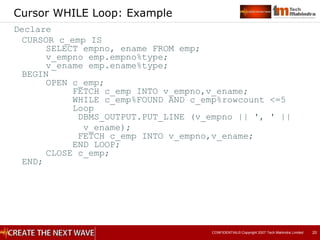
Cursor WHILE Loop: Example
Declare
CURSOR c_emp IS
SELECT empno, ename FROM emp;
v_empno emp.empno%type;
v_ename emp.ename%type;
BEGIN
OPEN c_emp;
FETCH c_emp INTO v_empno,v_ename;
WHILE c_emp%FOUND AND c_emp%rowcount <=5
Loop
DBMS_OUTPUT.PUT_LINE (v_empno || ', ' ||
v_ename);
FETCH c_emp INTO v_empno,v_ename;
END LOOP;
CLOSE c_emp;
END;
CONFIDENTIAL© Copyright 2007 Tech Mahindra Limited 21
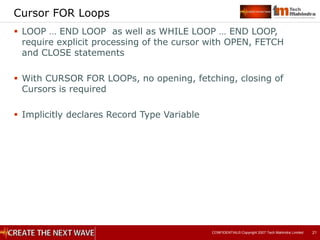
Cursor FOR Loops
 LOOP … END LOOP as well as WHILE LOOP … END LOOP,
require explicit processing of the cursor with OPEN, FETCH
and CLOSE statements
 With CURSOR FOR LOOPs, no opening, fetching, closing of
Cursors is required
 Implicitly declares Record Type Variable
CONFIDENTIAL© Copyright 2007 Tech Mahindra Limited 22
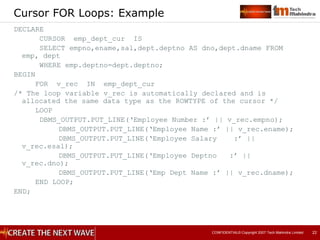
Cursor FOR Loops: Example
DECLARE
CURSOR emp_dept_cur IS
SELECT empno,ename,sal,dept.deptno AS dno,dept.dname FROM
emp, dept
WHERE emp.deptno=dept.deptno;
BEGIN
FOR v_rec IN emp_dept_cur
/* The loop variable v_rec is automatically declared and is
allocated the same data type as the ROWTYPE of the cursor */
LOOP
DBMS_OUTPUT.PUT_LINE(‘Employee Number :’ || v_rec.empno);
DBMS_OUTPUT.PUT_LINE(‘Employee Name :’ || v_rec.ename);
DBMS_OUTPUT.PUT_LINE(‘Employee Salary :’ ||
v_rec.esal);
DBMS_OUTPUT.PUT_LINE(‘Employee Deptno :’ ||
v_rec.dno);
DBMS_OUTPUT.PUT_LINE(‘Emp Dept Name :’ || v_rec.dname);
END LOOP;
END;
CONFIDENTIAL© Copyright 2007 Tech Mahindra Limited 23
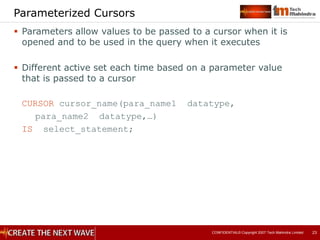
Parameterized Cursors
 Parameters allow values to be passed to a cursor when it is
opened and to be used in the query when it executes
 Different active set each time based on a parameter value
that is passed to a cursor
CURSOR cursor_name(para_name1 datatype,
para_name2 datatype,…)
IS select_statement;
CONFIDENTIAL© Copyright 2007 Tech Mahindra Limited 24
Parameterized Cursors: Example
DECLARE
CURSOR par_cur(p_deptno NUMBER, p_job VARCHAR2) IS
SELECT empno,ename FROM emp
WHERE deptno=p_deptno and upper(job)=upper(p_job);
v_deptno emp.deptno%TYPE := &dno;
v_job emp.job%TYPE := ‘&job’;
BEGIN
FOR emp_record IN par_cur(v_deptno,v_job)
LOOP
DBMS_OUTPUT.PUT_LINE(‘Empno :’ ||
emp_record.empno);
DBMS_OUTPUT.PUT_LINE(‘Ename :’ ||
emp_record.ename);
END LOOP;
END;
CONFIDENTIAL© Copyright 2007 Tech Mahindra Limited 25
Advanced Cursors
 SELECT FOR UPDATE CURSOR
 If FOR UPDATE clause is present, exclusive row locks are
taken on the rows in the active set before the OPEN
returns
 Locks prevent other sessions from changing the rows in
the active set until the transaction is committed
 CURSOR cursor_name IS SELECT……FROM….FOR UPDATE
[OF column_reference] [NOWAIT|WAIT n]
 Example:
CURSOR emp_cursor IS
SELECT empno,ename,sal FROM emp
WHERE deptno=30
FOR UPDATE OF sal NOWAIT;
 NOWAIT: OPEN will return immediately with Oracle error
if rows are locked by another session
 WAIT n: If rows are locked by another session and are
not released in “n” seconds then OPEN will return with
Oracle error
CONFIDENTIAL© Copyright 2007 Tech Mahindra Limited 26
Advanced Cursors
 WHERE CURRENT OF Clause
 Used for referencing the current row from an explicit
cursor
 Used along with UPDATE & DELETE Statements for
Current Row
 Must include FOR UPDATE clause while declaring a cursor
CONFIDENTIAL© Copyright 2007 Tech Mahindra Limited 27
WHERE CURRENT OF Clause
 UPDATE and DELETE statements can use a WHERE CURRENT
OF clause if they reference a cursor declared with FOR
UPDATE clause.
 It indicates that the UPDATE or DELETE should modify the
current row identified by the FOR UPDATE cursor.
 Syntax:
[UPDATE | DELETE ] ... WHERE CURRENT OF
cursor_name;
 By using WHERE CURRENT OF, you do not have to repeat
the WHERE clause in the UPDATE/DELETE statement.
CONFIDENTIAL© Copyright 2007 Tech Mahindra Limited 28
WHERE CURRENT OF Clause: Example
CREATE TABLE emp_history(
myEno NUMBER(4),
myHireDt DATE);
DECLARE
CURSOR emp_cur IS
SELECT empno, hiredate FROM emp
WHERE hiredate < SYSDATE -7 FOR UPDATE;
BEGIN
FOR emp_rec IN emp_cur
LOOP
INSERT INTO emp_history VALUES
(emp_rec.empno, emp_rec.hiredate);
DELETE FROM emp WHERE CURRENT OF emp_cur; END
LOOP;
END;
CONFIDENTIAL© Copyright 2007 Tech Mahindra Limited 29
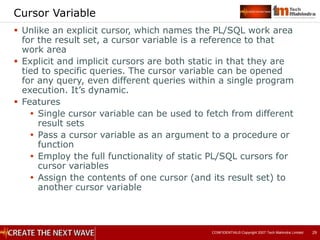
Cursor Variable
 Unlike an explicit cursor, which names the PL/SQL work area
for the result set, a cursor variable is a reference to that
work area
 Explicit and implicit cursors are both static in that they are
tied to specific queries. The cursor variable can be opened
for any query, even different queries within a single program
execution. It’s dynamic.
 Features
 Single cursor variable can be used to fetch from different
result sets
 Pass a cursor variable as an argument to a procedure or
function
 Employ the full functionality of static PL/SQL cursors for
cursor variables
 Assign the contents of one cursor (and its result set) to
another cursor variable
CONFIDENTIAL© Copyright 2007 Tech Mahindra Limited 30
REF CURSOR: Types
 REF CURSOR types can be strong or weak
 A strong REF CURSOR type definition specifies a return type,
but a weak definition does not
 Strong REF CURSOR types are less error-prone because
PL/SQL lets you associate a strongly typed cursor variable
only with type-compatible queries
 Weak REF CURSOR types are more flexible because you can
associate a weakly typed cursor variable with any query
CONFIDENTIAL© Copyright 2007 Tech Mahindra Limited 31
Declaring REF CURSOR Types and Cursor Variables
Two distinct declaration steps to create a cursor variable
1. Create a REF CURSOR type
2. Declare a cursor variable based on REF CURSOR type
1. Creating a REF CURSOR type:
TYPE cur_type_name IS REF CURSOR [ RETURN
return_type ];
return-type is the RETURN data specification
for the cursor type. In short, what kind of
data will be returned by a cursor
Strong cursor type: cursor type with a RETURN clause;
associated with a specific data structure
TYPE emp_type REF CURSOR RETURN emp%ROWTYPE;
CONFIDENTIAL© Copyright 2007 Tech Mahindra Limited 32
Declaring REF CURSOR Types and Cursor
Variables (Contd.)
Weak cursor type: cursor type without a RETURN clause;
not associated with a specific data structure
TYPE emp_type REF CURSOR;
2. Declaring a Cursor variable
cursor_variable_name cursor_type_name;
e.g. v_empno emp_type;
 Opening a Cursor variable
OPEN cursor_variable_name FOR select_statement;
 Fetching from a Cursor
FETCH cursor_variable_name INTO
record_variable;
FETCH cursor_variable_name INTO variable1,
variable2, …;
CONFIDENTIAL© Copyright 2007 Tech Mahindra Limited 33
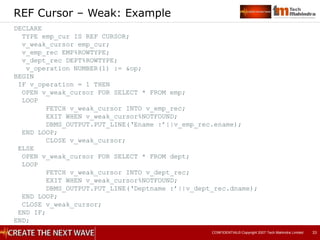
REF Cursor – Weak: Example
DECLARE
TYPE emp_cur IS REF CURSOR;
v_weak_cursor emp_cur;
v_emp_rec EMP%ROWTYPE;
v_dept_rec DEPT%ROWTYPE;
v_operation NUMBER(1) := &op;
BEGIN
IF v_operation = 1 THEN
OPEN v_weak_cursor FOR SELECT * FROM emp;
LOOP
FETCH v_weak_cursor INTO v_emp_rec;
EXIT WHEN v_weak_cursor%NOTFOUND;
DBMS_OUTPUT.PUT_LINE(‘Ename :’||v_emp_rec.ename);
END LOOP;
CLOSE v_weak_cursor;
ELSE
OPEN v_weak_cursor FOR SELECT * FROM dept;
LOOP
FETCH v_weak_cursor INTO v_dept_rec;
EXIT WHEN v_weak_cursor%NOTFOUND;
DBMS_OUTPUT.PUT_LINE(‘Deptname :’||v_dept_rec.dname);
END LOOP;
CLOSE v_weak_cursor;
END IF;
END;
CONFIDENTIAL© Copyright 2007 Tech Mahindra Limited 34
REF Cursor – Strong: Example
DECLARE
TYPE curType IS REF CURSOR RETURN emp%ROWTYPE;
refCur curType;
emprec EMP%ROWTYPE;
BEGIN
DBMS_OUTPUT.PUT_LINE('Dept 10 employees are ');
OPEN refCur FOR SELECT * FROM emp WHERE deptno=10;
LOOP
FETCH refCur INTO emprec;
EXIT WHEN refCur%NOTFOUND;
DBMS_OUTPUT.PUT_LINE('Ename :'||emprec.ename);
END LOOP;
CLOSE refCur;
DBMS_OUTPUT.PUT_LINE('Dept 20 employees are ');
OPEN refCur FOR SELECT * FROM emp WHERE deptno =20 ;
LOOP
FETCH refCur INTO emprec;
EXIT WHEN refCur%NOTFOUND;
DBMS_OUTPUT.PUT_LINE('Ename :'||emprec.ename);
END LOOP;
CLOSE refCur;
END;
/
CONFIDENTIAL© Copyright 2007 Tech Mahindra Limited 35
Limitations of Cursor
 Comparison operators cannot be used to test cursor
variables for equality, inequality, null, or not null
 Null cannot be assigned to a cursor variable
 The value of a cursor variable cannot be stored in a
database column
 Static cursors and cursor variables are not interchangeable;
For example, a static cursor cannot be used in an OPEN FOR
statement
CONFIDENTIAL© Copyright 2007 Tech Mahindra Limited 36
Summary
In this session, we have covered:
 Implicit Cursors
 Explicit Cursors
 Cursors FOR LOOPS
 Parameterized Cursors
 Advanced Cursors
 Cursor Variables
Tech Mahindra Limited confidential
© Tech Mahindra Limited 2007
Thank You

Cursors.ppt

  • 1.
    Tech Mahindra Limitedconfidential © Tech Mahindra Limited 2007 Cursors
  • 2.
    CONFIDENTIAL© Copyright 2007Tech Mahindra Limited 2 Objectives  At the end of this session, you will be able to:  Understand the concept of Cursors and its types  Understand the use of Implicit Cursor and its attributes  Understand the use of Explicit Cursor and its attributes  Declare and process Explicit Cursors  Understand and use Cursors LOOPS  Implement Parameterized Cursors  Learn the use of Advanced Cursors  Understand the concept of REF Cursors and use REF Cursors in PL/SQL blocks
  • 3.
    CONFIDENTIAL© Copyright 2007Tech Mahindra Limited 3 Agenda  Cursors and its types  Implicit Cursors  Explicit Cursors  Parameterized Cursors  Advanced Cursors  Cursor Variables
  • 4.
    CONFIDENTIAL© Copyright 2007Tech Mahindra Limited 4 Cursors  What is a Cursor?  To process any DML or SELECT queries, Oracle allocates an area of memory on the database server, known as context area  Cursor is a pointer to the context area  Context area contains information about the SQL statement and the set of data returned or affected by that statement  Cursor is a mechanism by which one can name that work area and manipulate the information within it
  • 5.
    CONFIDENTIAL© Copyright 2007Tech Mahindra Limited 5 Cursor Types  Two Types  Static Implicit Cursors Explicit Cursors  Dynamic REF Cursors
  • 6.
    CONFIDENTIAL© Copyright 2007Tech Mahindra Limited 6 Implicit Cursors  PL/SQL implicitly declares a cursor for all SQL data manipulation statements on a set of rows, including queries that return only one row  For queries that return more than one row, you can explicitly declare a cursor to process the rows individually  We can refer to the most recent implicit cursor by the name SQL
  • 7.
    CONFIDENTIAL© Copyright 2007Tech Mahindra Limited 7 Implicit Cursors - Attributes  %FOUND Attribute: used to check whether a DML Statement has affected one or many rows  Until the DML or SELECT statement is executed, it yields NULL  Yields TRUE if the DML affects one or more rows, or a SELECT INTO statement returns one or more rows.  Otherwise yields FALSE.  %ISOPEN Attribute: always FALSE for Implicit Cursors  Yields TRUE if the cursor is open else returns FALSE.  Oracle closes the SQL cursor automatically after executing its associated SQL statement. As a result, %ISOPEN always yields FALSE.
  • 8.
    CONFIDENTIAL© Copyright 2007Tech Mahindra Limited 8 Implicit Cursors: Attributes (Contd.)  %NOTFOUND Attribute: used to check whether a DML statement has failed to change rows  %NOTFOUND is the logical opposite of %FOUND  Yields TRUE if the DML statement affects no rows, or a SELECT INTO statement returns no rows  Otherwise it yields FALSE  %ROWCOUNT Attribute: used to find out how many rows are affected so far  %ROWCOUNT yields the number of rows affected by the DML statement, or returned by a SELECT INTO statement  Yields 0 if the DML statement affected no rows, or a SELECT INTO statement returned no rows
  • 9.
    CONFIDENTIAL© Copyright 2007Tech Mahindra Limited 9 Implicit Cursor: Example 1  Using SQL%ROWCOUNT DECLARE v_tot_rows NUMBER(3); BEGIN DELETE FROM emp WHERE deptno=10; /* PL/SQL will use an implicit cursor to process the above statement */ v_tot_rows := SQL%ROWCOUNT; /* Implicit Attribute %ROWCOUNT is used to find the number of rows affected by the DELETE command */ DBMS_OUTPUT.PUT_LINE(‘Total records deleted : ‘ || v_tot_rows); END;
  • 10.
    CONFIDENTIAL© Copyright 2007Tech Mahindra Limited 10 Implicit Cursor: Example 2  Using SQL%FOUND DECLARE v_empno NUMBER(4) := &eno; BEGIN DELETE FROM emp WHERE empno = v_empno; IF SQL%FOUND THEN /* Making use of %FOUND to find out whether at least one row was affected by the DELETE statement */ DBMS_OUTPUT.PUT_LINE('Delete successful'); END IF; END;
  • 11.
    CONFIDENTIAL© Copyright 2007Tech Mahindra Limited 11 Need for Explicit Cursors  Implicit cursors are declared and managed automatically by PL/SQL. We do not have any control over the processing of implicit cursors.  Explicit cursors give us the complete control over opening, closing and fetching from an explicit cursor, including the number of rows fetched.  We can declare explicit cursors only for SELECT queries. Generally explicit cursors are used when the SELECT query is returning multiple rows and we want to process one row at a time.  Explicit cursors can take parameters. So the cursor can be opened for a different result set in each execution by passing on different values for the parameters.
  • 12.
    CONFIDENTIAL© Copyright 2007Tech Mahindra Limited 12 Explicit Cursors  Are declared and named explicitly by the developer  Manipulated through specific statements in the block’s executable section for queries that return more the one row  Processing Explicit Cursors: DECLARE OPEN FETCH Empty ? CLOSE NO • Create a named SQL area • Identify the active set • Load the current row into variables • Test for existing rows • Return to FETCH if rows found • Release the active set YES
  • 13.
    CONFIDENTIAL© Copyright 2007Tech Mahindra Limited 13 Steps to Process Explicit Cursors  Cursor Declaration  Declaring a cursor defines the name of the cursor and associates it with a SELECT statement CURSOR cursor_name IS select_statement;  Opening a Cursor  The OPEN statement executes the query and binds any variables that are referenced. Rows identified by the query are called the active set. The active set pointer is set to the first row OPEN cursor_name;
  • 14.
    CONFIDENTIAL© Copyright 2007Tech Mahindra Limited 14 Steps to Process Explicit Cursors (Contd.)  Fetching from a Cursor  The row pointed by active set pointer can be fetched from a cursor into variable/s  After each fetch the cursor is checked for any existing rows FETCH cursor_name INTO list_of_variables; FETCH cursor_name INTO record_type_variable;  Closing a Cursor  When all of the active set has been retrieved, the cursor should be closed. This tells PL/SQL that the program is finished with the cursor, and the resources associated with it can be freed. CLOSE cursor_name;
  • 15.
    CONFIDENTIAL© Copyright 2007Tech Mahindra Limited 15 Explicit Cursors: Accessing Limits  When does an error occur while processing an explicit cursor? a) When we try to open the cursor that is already open b) When we try to fetch from the cursor that is not opened c) When we try to fetch from the cursor after the last row is fetched d) When we try to close a cursor that is not open
  • 16.
    CONFIDENTIAL© Copyright 2007Tech Mahindra Limited 16 Explicit Cursors: Attributes  Can be used with Implicit as well as Explicit cursors for obtaining information about a cursor Attributes Return values Example %FOUND TRUE, if fetch statement returns at least one row Cursor_name%FOUND FALSE, if fetch statement doesn’t return a row %NOTFOUND TRUE, if fetch statement doesn’t return a row. Cursor_name%NOTFOUND FALSE, if fetch statement returns at least one row
  • 17.
    CONFIDENTIAL© Copyright 2007Tech Mahindra Limited 17 Explicit Cursors Attributes (Contd.) %ROWCOUNT Yields the number of rows fetched by the cursor so far Cursor_name%ROWCOUNT %ISOPEN TRUE, if the cursor is already open in the program Cursor_name%ISNAME FALSE, if the cursor is not opened in the program
  • 18.
    CONFIDENTIAL© Copyright 2007Tech Mahindra Limited 18 Explicit Cursor: Example -1 DECLARE -- Step 1: Cursor declaration CURSOR empcur IS SELECT empno, ename FROM emp; v_empno EMP.empno%TYPE; v_name EMP.ename%TYPE; BEGIN OPEN empcur; -- Step2: Open the Cursor for a query LOOP -- Step 3: Fetch the values from table results into PL/SQL variables. FETCH empcur INTO v_empno,v_name; EXIT WHEN empcur%NOTFOUND; DBMS_OUTPUT.PUT_LINE(v_empno || ‘ ‘ || v_name); END LOOP; CLOSE empcur; -- Step 4: Close the cursor END;
  • 19.
    CONFIDENTIAL© Copyright 2007Tech Mahindra Limited 19 Explicit Cursor: using %TYPE and RECORD DECLARE TYPE t_emprec IS RECORD ( ename emp.ename%type, sal emp.sal%type, job emp.job%type ); r_emp t_emprec; CURSOR c_emp IS SELECT ename, sal, job FROM emp; BEGIN OPEN c_emp; Loop FETCH c_emp INTO r_emp; EXIT WHEN c_emp%NOTFOUND; DBMS_OUTPUT.PUT_LINE (r_emp.ename || ', ' || r_emp.sal || ', ' || r_emp.job); END LOOP; CLOSE c_emp; END;
  • 20.
    CONFIDENTIAL© Copyright 2007Tech Mahindra Limited 20 Cursor WHILE Loop: Example Declare CURSOR c_emp IS SELECT empno, ename FROM emp; v_empno emp.empno%type; v_ename emp.ename%type; BEGIN OPEN c_emp; FETCH c_emp INTO v_empno,v_ename; WHILE c_emp%FOUND AND c_emp%rowcount <=5 Loop DBMS_OUTPUT.PUT_LINE (v_empno || ', ' || v_ename); FETCH c_emp INTO v_empno,v_ename; END LOOP; CLOSE c_emp; END;
  • 21.
    CONFIDENTIAL© Copyright 2007Tech Mahindra Limited 21 Cursor FOR Loops  LOOP … END LOOP as well as WHILE LOOP … END LOOP, require explicit processing of the cursor with OPEN, FETCH and CLOSE statements  With CURSOR FOR LOOPs, no opening, fetching, closing of Cursors is required  Implicitly declares Record Type Variable
  • 22.
    CONFIDENTIAL© Copyright 2007Tech Mahindra Limited 22 Cursor FOR Loops: Example DECLARE CURSOR emp_dept_cur IS SELECT empno,ename,sal,dept.deptno AS dno,dept.dname FROM emp, dept WHERE emp.deptno=dept.deptno; BEGIN FOR v_rec IN emp_dept_cur /* The loop variable v_rec is automatically declared and is allocated the same data type as the ROWTYPE of the cursor */ LOOP DBMS_OUTPUT.PUT_LINE(‘Employee Number :’ || v_rec.empno); DBMS_OUTPUT.PUT_LINE(‘Employee Name :’ || v_rec.ename); DBMS_OUTPUT.PUT_LINE(‘Employee Salary :’ || v_rec.esal); DBMS_OUTPUT.PUT_LINE(‘Employee Deptno :’ || v_rec.dno); DBMS_OUTPUT.PUT_LINE(‘Emp Dept Name :’ || v_rec.dname); END LOOP; END;
  • 23.
    CONFIDENTIAL© Copyright 2007Tech Mahindra Limited 23 Parameterized Cursors  Parameters allow values to be passed to a cursor when it is opened and to be used in the query when it executes  Different active set each time based on a parameter value that is passed to a cursor CURSOR cursor_name(para_name1 datatype, para_name2 datatype,…) IS select_statement;
  • 24.
    CONFIDENTIAL© Copyright 2007Tech Mahindra Limited 24 Parameterized Cursors: Example DECLARE CURSOR par_cur(p_deptno NUMBER, p_job VARCHAR2) IS SELECT empno,ename FROM emp WHERE deptno=p_deptno and upper(job)=upper(p_job); v_deptno emp.deptno%TYPE := &dno; v_job emp.job%TYPE := ‘&job’; BEGIN FOR emp_record IN par_cur(v_deptno,v_job) LOOP DBMS_OUTPUT.PUT_LINE(‘Empno :’ || emp_record.empno); DBMS_OUTPUT.PUT_LINE(‘Ename :’ || emp_record.ename); END LOOP; END;
  • 25.
    CONFIDENTIAL© Copyright 2007Tech Mahindra Limited 25 Advanced Cursors  SELECT FOR UPDATE CURSOR  If FOR UPDATE clause is present, exclusive row locks are taken on the rows in the active set before the OPEN returns  Locks prevent other sessions from changing the rows in the active set until the transaction is committed  CURSOR cursor_name IS SELECT……FROM….FOR UPDATE [OF column_reference] [NOWAIT|WAIT n]  Example: CURSOR emp_cursor IS SELECT empno,ename,sal FROM emp WHERE deptno=30 FOR UPDATE OF sal NOWAIT;  NOWAIT: OPEN will return immediately with Oracle error if rows are locked by another session  WAIT n: If rows are locked by another session and are not released in “n” seconds then OPEN will return with Oracle error
  • 26.
    CONFIDENTIAL© Copyright 2007Tech Mahindra Limited 26 Advanced Cursors  WHERE CURRENT OF Clause  Used for referencing the current row from an explicit cursor  Used along with UPDATE & DELETE Statements for Current Row  Must include FOR UPDATE clause while declaring a cursor
  • 27.
    CONFIDENTIAL© Copyright 2007Tech Mahindra Limited 27 WHERE CURRENT OF Clause  UPDATE and DELETE statements can use a WHERE CURRENT OF clause if they reference a cursor declared with FOR UPDATE clause.  It indicates that the UPDATE or DELETE should modify the current row identified by the FOR UPDATE cursor.  Syntax: [UPDATE | DELETE ] ... WHERE CURRENT OF cursor_name;  By using WHERE CURRENT OF, you do not have to repeat the WHERE clause in the UPDATE/DELETE statement.
  • 28.
    CONFIDENTIAL© Copyright 2007Tech Mahindra Limited 28 WHERE CURRENT OF Clause: Example CREATE TABLE emp_history( myEno NUMBER(4), myHireDt DATE); DECLARE CURSOR emp_cur IS SELECT empno, hiredate FROM emp WHERE hiredate < SYSDATE -7 FOR UPDATE; BEGIN FOR emp_rec IN emp_cur LOOP INSERT INTO emp_history VALUES (emp_rec.empno, emp_rec.hiredate); DELETE FROM emp WHERE CURRENT OF emp_cur; END LOOP; END;
  • 29.
    CONFIDENTIAL© Copyright 2007Tech Mahindra Limited 29 Cursor Variable  Unlike an explicit cursor, which names the PL/SQL work area for the result set, a cursor variable is a reference to that work area  Explicit and implicit cursors are both static in that they are tied to specific queries. The cursor variable can be opened for any query, even different queries within a single program execution. It’s dynamic.  Features  Single cursor variable can be used to fetch from different result sets  Pass a cursor variable as an argument to a procedure or function  Employ the full functionality of static PL/SQL cursors for cursor variables  Assign the contents of one cursor (and its result set) to another cursor variable
  • 30.
    CONFIDENTIAL© Copyright 2007Tech Mahindra Limited 30 REF CURSOR: Types  REF CURSOR types can be strong or weak  A strong REF CURSOR type definition specifies a return type, but a weak definition does not  Strong REF CURSOR types are less error-prone because PL/SQL lets you associate a strongly typed cursor variable only with type-compatible queries  Weak REF CURSOR types are more flexible because you can associate a weakly typed cursor variable with any query
  • 31.
    CONFIDENTIAL© Copyright 2007Tech Mahindra Limited 31 Declaring REF CURSOR Types and Cursor Variables Two distinct declaration steps to create a cursor variable 1. Create a REF CURSOR type 2. Declare a cursor variable based on REF CURSOR type 1. Creating a REF CURSOR type: TYPE cur_type_name IS REF CURSOR [ RETURN return_type ]; return-type is the RETURN data specification for the cursor type. In short, what kind of data will be returned by a cursor Strong cursor type: cursor type with a RETURN clause; associated with a specific data structure TYPE emp_type REF CURSOR RETURN emp%ROWTYPE;
  • 32.
    CONFIDENTIAL© Copyright 2007Tech Mahindra Limited 32 Declaring REF CURSOR Types and Cursor Variables (Contd.) Weak cursor type: cursor type without a RETURN clause; not associated with a specific data structure TYPE emp_type REF CURSOR; 2. Declaring a Cursor variable cursor_variable_name cursor_type_name; e.g. v_empno emp_type;  Opening a Cursor variable OPEN cursor_variable_name FOR select_statement;  Fetching from a Cursor FETCH cursor_variable_name INTO record_variable; FETCH cursor_variable_name INTO variable1, variable2, …;
  • 33.
    CONFIDENTIAL© Copyright 2007Tech Mahindra Limited 33 REF Cursor – Weak: Example DECLARE TYPE emp_cur IS REF CURSOR; v_weak_cursor emp_cur; v_emp_rec EMP%ROWTYPE; v_dept_rec DEPT%ROWTYPE; v_operation NUMBER(1) := &op; BEGIN IF v_operation = 1 THEN OPEN v_weak_cursor FOR SELECT * FROM emp; LOOP FETCH v_weak_cursor INTO v_emp_rec; EXIT WHEN v_weak_cursor%NOTFOUND; DBMS_OUTPUT.PUT_LINE(‘Ename :’||v_emp_rec.ename); END LOOP; CLOSE v_weak_cursor; ELSE OPEN v_weak_cursor FOR SELECT * FROM dept; LOOP FETCH v_weak_cursor INTO v_dept_rec; EXIT WHEN v_weak_cursor%NOTFOUND; DBMS_OUTPUT.PUT_LINE(‘Deptname :’||v_dept_rec.dname); END LOOP; CLOSE v_weak_cursor; END IF; END;
  • 34.
    CONFIDENTIAL© Copyright 2007Tech Mahindra Limited 34 REF Cursor – Strong: Example DECLARE TYPE curType IS REF CURSOR RETURN emp%ROWTYPE; refCur curType; emprec EMP%ROWTYPE; BEGIN DBMS_OUTPUT.PUT_LINE('Dept 10 employees are '); OPEN refCur FOR SELECT * FROM emp WHERE deptno=10; LOOP FETCH refCur INTO emprec; EXIT WHEN refCur%NOTFOUND; DBMS_OUTPUT.PUT_LINE('Ename :'||emprec.ename); END LOOP; CLOSE refCur; DBMS_OUTPUT.PUT_LINE('Dept 20 employees are '); OPEN refCur FOR SELECT * FROM emp WHERE deptno =20 ; LOOP FETCH refCur INTO emprec; EXIT WHEN refCur%NOTFOUND; DBMS_OUTPUT.PUT_LINE('Ename :'||emprec.ename); END LOOP; CLOSE refCur; END; /
  • 35.
    CONFIDENTIAL© Copyright 2007Tech Mahindra Limited 35 Limitations of Cursor  Comparison operators cannot be used to test cursor variables for equality, inequality, null, or not null  Null cannot be assigned to a cursor variable  The value of a cursor variable cannot be stored in a database column  Static cursors and cursor variables are not interchangeable; For example, a static cursor cannot be used in an OPEN FOR statement
  • 36.
    CONFIDENTIAL© Copyright 2007Tech Mahindra Limited 36 Summary In this session, we have covered:  Implicit Cursors  Explicit Cursors  Cursors FOR LOOPS  Parameterized Cursors  Advanced Cursors  Cursor Variables
  • 37.
    Tech Mahindra Limitedconfidential © Tech Mahindra Limited 2007 Thank You