Vishwanath KC
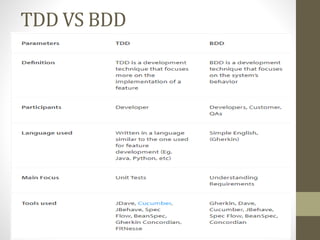
TDD VS BDD
TDD
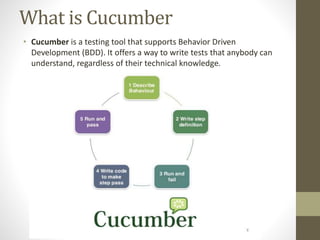
What is Cucumber
• Cucumber is a testing tool that supports Behavior Driven
Development (BDD). It offers a way to write tests that anybody can
understand, regardless of their technical knowledge.
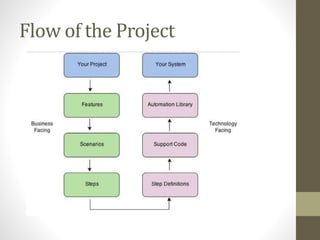
Flow of the Project
Prerequisite for Cucumber
with Selenium
• Java (JDK, JRE)
• Install IDE – Eclipse
• Selenium jar files
• Selenium-server-standalone
• Jar files For Cucumber
• Cucumber-core
• Cucumber-html
• cobertura code coverage
• Cucumber-java
• Cucumber-junit
• Cucumber-jvm-deps
• Cucumber-reporting
• Hemcrest-core
• Gherkin
• Junit
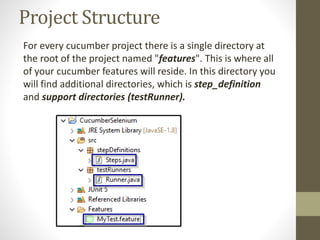
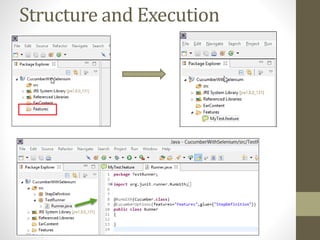
Project Structure
For every cucumber project there is a single directory at
the root of the project named "features". This is where all
of your cucumber features will reside. In this directory you
will find additional directories, which is step_definition
and support directories (testRunner).
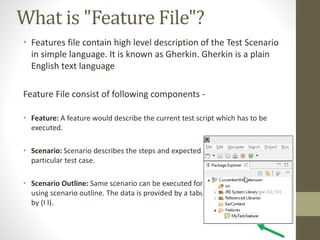
What is "Feature File"?
• Features file contain high level description of the Test Scenario
in simple language. It is known as Gherkin. Gherkin is a plain
English text language
Feature File consist of following components -
• Feature: A feature would describe the current test script which has to be
executed.
• Scenario: Scenario describes the steps and expected outcome for a
particular test case.
• Scenario Outline: Same scenario can be executed for multiple sets of data
using scenario outline. The data is provided by a tabular structure separated
by (I I).
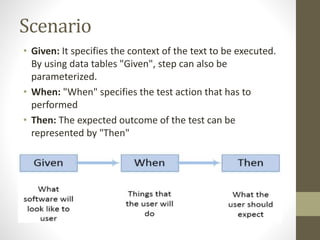
Scenario
• Given: It specifies the context of the text to be executed.
By using data tables "Given", step can also be
parameterized.
• When: "When" specifies the test action that has to
performed
• Then: The expected outcome of the test can be
represented by "Then"
Gherkin Syntax
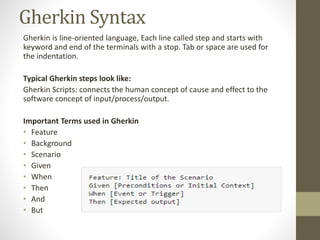
Gherkin is line-oriented language, Each line called step and starts with
keyword and end of the terminals with a stop. Tab or space are used for
the indentation.
Typical Gherkin steps look like:
Gherkin Scripts: connects the human concept of cause and effect to the
software concept of input/process/output.
Important Terms used in Gherkin
• Feature
• Background
• Scenario
• Given
• When
• Then
• And
• But
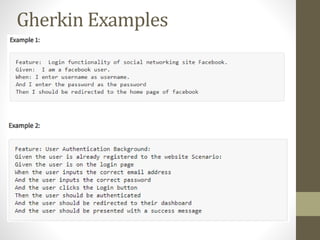
Gherkin Examples
Scenario Outline
Best practices
• Each scenario should execute separately
• Every feature should able to be executed along
• Steps information should be shown independently
• Connect your Scenario's with your requirements
• Keep a complete track of what scenarios should be included in a
requirement document
• Create modular and easy to understand steps
• Try to combine all your common scenarios
Advantages of Gherkin
• Gherkin is simple enough for non-programmers to understand and It
makes User Stories easier to digest
• Gherkin script can easily understand by business executives and
developers and they can use it to start their tests
• A significant proportion of the functional specifications is written as
user stories
• You don't need to be expert to understand the small Gherkin
command set
• Gherkin Test cases link acceptance tests directly to automated tests
• Style of writing tests cases are easier to reuse code in other tests
• It requires a high level of business engagement and collaborations
• May not work well in all scenarios
• Poorly written tests can easily increase test-maintenance cost
Dis-Advantages of Gherkin
Exercise
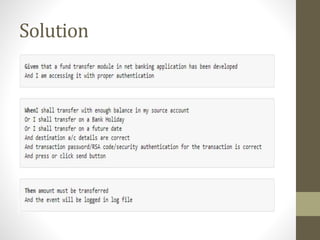
• Fund Transfer should take place if there is enough balance in
source account
• Fund Transfer should take place if the destination a/c details
are correct
• Fund Transfer should take place if transaction password / rsa
code / security authentication for the transaction entered by
user is correct
• Fund Transfer should take place even if it's a Bank Holiday
• Fund Transfer should take place on a future date as set by the
account holder
Solution
Structure and Execution
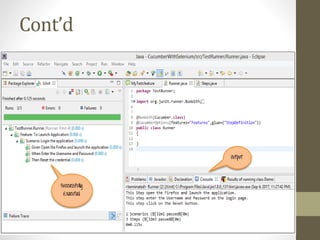
Cont’d
Cont’d
Cucumber With Selenium

Cucumber With Selenium

  • 1.
  • 2.
  • 3.
  • 4.
    What is Cucumber •Cucumber is a testing tool that supports Behavior Driven Development (BDD). It offers a way to write tests that anybody can understand, regardless of their technical knowledge.
  • 5.
    Flow of theProject
  • 6.
    Prerequisite for Cucumber withSelenium • Java (JDK, JRE) • Install IDE – Eclipse • Selenium jar files • Selenium-server-standalone • Jar files For Cucumber • Cucumber-core • Cucumber-html • cobertura code coverage • Cucumber-java • Cucumber-junit • Cucumber-jvm-deps • Cucumber-reporting • Hemcrest-core • Gherkin • Junit
  • 7.
    Project Structure For everycucumber project there is a single directory at the root of the project named "features". This is where all of your cucumber features will reside. In this directory you will find additional directories, which is step_definition and support directories (testRunner).
  • 8.
    What is "FeatureFile"? • Features file contain high level description of the Test Scenario in simple language. It is known as Gherkin. Gherkin is a plain English text language Feature File consist of following components - • Feature: A feature would describe the current test script which has to be executed. • Scenario: Scenario describes the steps and expected outcome for a particular test case. • Scenario Outline: Same scenario can be executed for multiple sets of data using scenario outline. The data is provided by a tabular structure separated by (I I).
  • 9.
    Scenario • Given: Itspecifies the context of the text to be executed. By using data tables "Given", step can also be parameterized. • When: "When" specifies the test action that has to performed • Then: The expected outcome of the test can be represented by "Then"
  • 10.
    Gherkin Syntax Gherkin isline-oriented language, Each line called step and starts with keyword and end of the terminals with a stop. Tab or space are used for the indentation. Typical Gherkin steps look like: Gherkin Scripts: connects the human concept of cause and effect to the software concept of input/process/output. Important Terms used in Gherkin • Feature • Background • Scenario • Given • When • Then • And • But
  • 12.
  • 13.
  • 14.
    Best practices • Eachscenario should execute separately • Every feature should able to be executed along • Steps information should be shown independently • Connect your Scenario's with your requirements • Keep a complete track of what scenarios should be included in a requirement document • Create modular and easy to understand steps • Try to combine all your common scenarios
  • 15.
    Advantages of Gherkin •Gherkin is simple enough for non-programmers to understand and It makes User Stories easier to digest • Gherkin script can easily understand by business executives and developers and they can use it to start their tests • A significant proportion of the functional specifications is written as user stories • You don't need to be expert to understand the small Gherkin command set • Gherkin Test cases link acceptance tests directly to automated tests • Style of writing tests cases are easier to reuse code in other tests • It requires a high level of business engagement and collaborations • May not work well in all scenarios • Poorly written tests can easily increase test-maintenance cost Dis-Advantages of Gherkin
  • 17.
    Exercise • Fund Transfershould take place if there is enough balance in source account • Fund Transfer should take place if the destination a/c details are correct • Fund Transfer should take place if transaction password / rsa code / security authentication for the transaction entered by user is correct • Fund Transfer should take place even if it's a Bank Holiday • Fund Transfer should take place on a future date as set by the account holder
  • 18.
  • 19.
  • 20.
  • 21.