Presented By:
Gargi Sanadhya
Software Consultant - Test Automation
Introducing BDD and
TDD with Cucumber
Lack of etiquette and manners is a huge turn off.
KnolX Etiquettes
Punctuality
Join the session 5 minutes prior to
the session start time. We start on
time and conclude on time!
Feedback
Make sure to submit a constructive
feedback for all sessions as it is
very helpful for the presenter.
Silent Mode
Keep your mobile devices in silent
mode, feel free to move out of
session in case you need to attend
an urgent call.
Avoid Disturbance
Avoid unwanted chit chat during
the session.
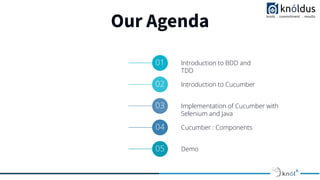
Our Agenda
01 Introduction to BDD and
TDD
02 Introduction to Cucumber
03 Implementation of Cucumber with
Selenium and Java
04 Cucumber : Components
05 Demo
Introduction to TDD
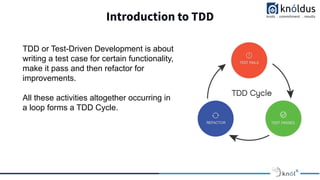
TDD or Test-Driven Development is about
writing a test case for certain functionality,
make it pass and then refactor for
improvements.
All these activities altogether occurring in
a loop forms a TDD Cycle.
Introduction to TDD
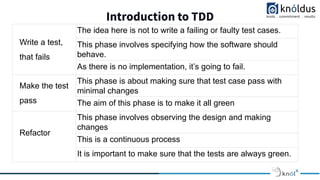
Write a test,
that fails
The idea here is not to write a failing or faulty test cases.
This phase involves specifying how the software should
behave.
As there is no implementation, it’s going to fail.
Make the test
pass
This phase is about making sure that test case pass with
minimal changes
The aim of this phase is to make it all green
Refactor
This phase involves observing the design and making
changes
This is a continuous process
It is important to make sure that the tests are always green.
Introduction to BDD
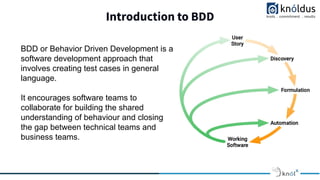
BDD or Behavior Driven Development is a
software development approach that
involves creating test cases in general
language.
It encourages software teams to
collaborate for building the shared
understanding of behaviour and closing
the gap between technical teams and
business teams.
Introduction to BDD
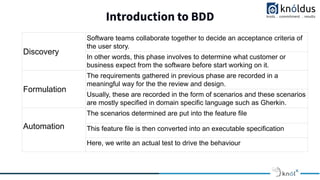
Discovery
Software teams collaborate together to decide an acceptance criteria of
the user story.
In other words, this phase involves to determine what customer or
business expect from the software before start working on it.
Formulation
The requirements gathered in previous phase are recorded in a
meaningful way for the the review and design.
Usually, these are recorded in the form of scenarios and these scenarios
are mostly specified in domain specific language such as Gherkin.
Automation
The scenarios determined are put into the feature file
This feature file is then converted into an executable specification
Here, we write an actual test to drive the behaviour
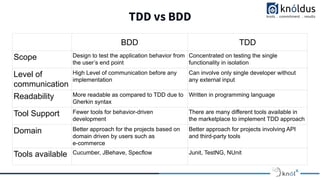
TDD vs BDD
BDD TDD
Scope Design to test the application behavior from
the user’s end point
Concentrated on testing the single
functionality in isolation
Level of
communication
High Level of communication before any
implementation
Can involve only single developer without
any external input
Readability More readable as compared to TDD due to
Gherkin syntax
Written in programming language
Tool Support Fewer tools for behavior-driven
development
There are many different tools available in
the marketplace to implement TDD approach
Domain Better approach for the projects based on
domain driven by users such as
e-commerce
Better approach for projects involving API
and third-party tools
Tools available Cucumber, JBehave, Specflow Junit, TestNG, NUnit
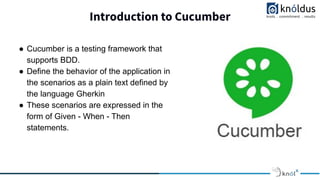
Introduction to Cucumber
● Cucumber is a testing framework that
supports BDD.
● Define the behavior of the application in
the scenarios as a plain text defined by
the language Gherkin
● These scenarios are expressed in the
form of Given - When - Then
statements.
Implementing BDD using Cucumber : Scenario
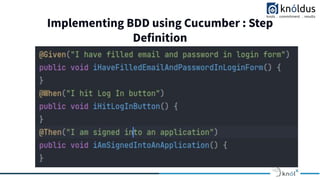
Implementing BDD using Cucumber : Step
Definition
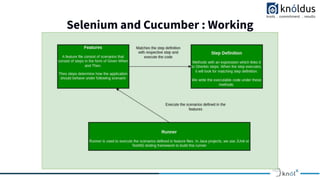
Implementing BDD with Selenium and Cucumber
Selenium and Cucumber : Working
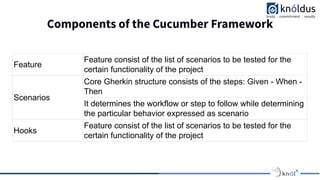
Components of the Cucumber Framework
Feature
Feature consist of the list of scenarios to be tested for the
certain functionality of the project
Scenarios
Core Gherkin structure consists of the steps: Given - When -
Then
It determines the workflow or step to follow while determining
the particular behavior expressed as scenario
Hooks
Feature consist of the list of scenarios to be tested for the
certain functionality of the project
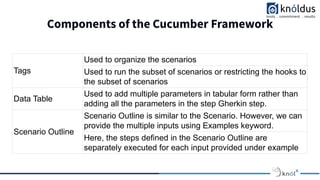
Components of the Cucumber Framework
Tags
Used to organize the scenarios
Used to run the subset of scenarios or restricting the hooks to
the subset of scenarios
Data Table
Used to add multiple parameters in tabular form rather than
adding all the parameters in the step Gherkin step.
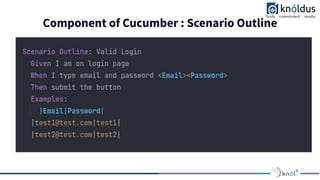
Scenario Outline
Scenario Outline is similar to the Scenario. However, we can
provide the multiple inputs using Examples keyword.
Here, the steps defined in the Scenario Outline are
separately executed for each input provided under example
Component of Cucumber : Scenario Outline
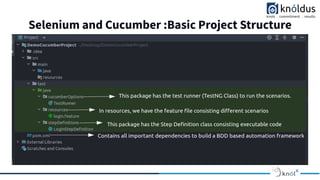
Selenium and Cucumber :Basic Project Structure
Demo
QA
Thank You !
Get in touch with us:
Lorem Studio, Lord Building
D4456, LA, USA

Introducing BDD and TDD with Cucumber

  • 1.
    Presented By: Gargi Sanadhya SoftwareConsultant - Test Automation Introducing BDD and TDD with Cucumber
  • 2.
    Lack of etiquetteand manners is a huge turn off. KnolX Etiquettes Punctuality Join the session 5 minutes prior to the session start time. We start on time and conclude on time! Feedback Make sure to submit a constructive feedback for all sessions as it is very helpful for the presenter. Silent Mode Keep your mobile devices in silent mode, feel free to move out of session in case you need to attend an urgent call. Avoid Disturbance Avoid unwanted chit chat during the session.
  • 3.
    Our Agenda 01 Introductionto BDD and TDD 02 Introduction to Cucumber 03 Implementation of Cucumber with Selenium and Java 04 Cucumber : Components 05 Demo
  • 4.
    Introduction to TDD TDDor Test-Driven Development is about writing a test case for certain functionality, make it pass and then refactor for improvements. All these activities altogether occurring in a loop forms a TDD Cycle.
  • 5.
    Introduction to TDD Writea test, that fails The idea here is not to write a failing or faulty test cases. This phase involves specifying how the software should behave. As there is no implementation, it’s going to fail. Make the test pass This phase is about making sure that test case pass with minimal changes The aim of this phase is to make it all green Refactor This phase involves observing the design and making changes This is a continuous process It is important to make sure that the tests are always green.
  • 6.
    Introduction to BDD BDDor Behavior Driven Development is a software development approach that involves creating test cases in general language. It encourages software teams to collaborate for building the shared understanding of behaviour and closing the gap between technical teams and business teams.
  • 7.
    Introduction to BDD Discovery Softwareteams collaborate together to decide an acceptance criteria of the user story. In other words, this phase involves to determine what customer or business expect from the software before start working on it. Formulation The requirements gathered in previous phase are recorded in a meaningful way for the the review and design. Usually, these are recorded in the form of scenarios and these scenarios are mostly specified in domain specific language such as Gherkin. Automation The scenarios determined are put into the feature file This feature file is then converted into an executable specification Here, we write an actual test to drive the behaviour
  • 8.
    TDD vs BDD BDDTDD Scope Design to test the application behavior from the user’s end point Concentrated on testing the single functionality in isolation Level of communication High Level of communication before any implementation Can involve only single developer without any external input Readability More readable as compared to TDD due to Gherkin syntax Written in programming language Tool Support Fewer tools for behavior-driven development There are many different tools available in the marketplace to implement TDD approach Domain Better approach for the projects based on domain driven by users such as e-commerce Better approach for projects involving API and third-party tools Tools available Cucumber, JBehave, Specflow Junit, TestNG, NUnit
  • 9.
    Introduction to Cucumber ●Cucumber is a testing framework that supports BDD. ● Define the behavior of the application in the scenarios as a plain text defined by the language Gherkin ● These scenarios are expressed in the form of Given - When - Then statements.
  • 10.
    Implementing BDD usingCucumber : Scenario
  • 11.
    Implementing BDD usingCucumber : Step Definition
  • 12.
    Implementing BDD withSelenium and Cucumber
  • 13.
  • 14.
    Components of theCucumber Framework Feature Feature consist of the list of scenarios to be tested for the certain functionality of the project Scenarios Core Gherkin structure consists of the steps: Given - When - Then It determines the workflow or step to follow while determining the particular behavior expressed as scenario Hooks Feature consist of the list of scenarios to be tested for the certain functionality of the project
  • 15.
    Components of theCucumber Framework Tags Used to organize the scenarios Used to run the subset of scenarios or restricting the hooks to the subset of scenarios Data Table Used to add multiple parameters in tabular form rather than adding all the parameters in the step Gherkin step. Scenario Outline Scenario Outline is similar to the Scenario. However, we can provide the multiple inputs using Examples keyword. Here, the steps defined in the Scenario Outline are separately executed for each input provided under example
  • 16.
    Component of Cucumber: Scenario Outline
  • 17.
    Selenium and Cucumber:Basic Project Structure
  • 18.
  • 19.
  • 20.
    Thank You ! Getin touch with us: Lorem Studio, Lord Building D4456, LA, USA