1
 Why do we need Automation testing
 Manual to Automation benifits
 Testing Framework and Types
Linear
Modular
Data Driven
Keyword Driven
Page Object
Hybrid
2Company Confidential. For Internal use only.
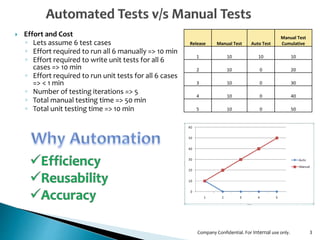
 Effort and Cost
◦ Lets assume 6 test cases
◦ Effort required to run all 6 manually => 10 min
◦ Effort required to write unit tests for all 6
cases => 10 min
◦ Effort required to run unit tests for all 6 cases
=> < 1 min
◦ Number of testing iterations => 5
◦ Total manual testing time => 50 min
◦ Total unit testing time => 10 min
3
Release Manual Test Auto Test
Manual Test
Cumulative
1 10 10 10
2 10 0 20
3 10 0 30
4 10 0 40
5 10 0 50
Company Confidential. For Internal use only.
4
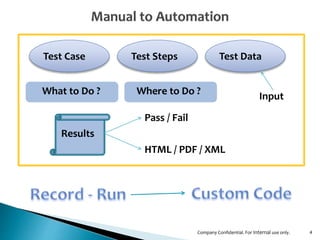
Test Case Test Steps Test Data
Results
What to Do ? Input
Pass / Fail
HTML / PDF / XML
Where to Do ?
Company Confidential. For Internal use only.
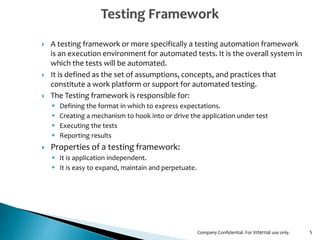
 A testing framework or more specifically a testing automation framework
is an execution environment for automated tests. It is the overall system in
which the tests will be automated.
 It is defined as the set of assumptions, concepts, and practices that
constitute a work platform or support for automated testing.
 The Testing framework is responsible for:
 Defining the format in which to express expectations.
 Creating a mechanism to hook into or drive the application under test
 Executing the tests
 Reporting results
 Properties of a testing framework:
 It is application independent.
 It is easy to expand, maintain and perpetuate.
5Company Confidential. For Internal use only.
6
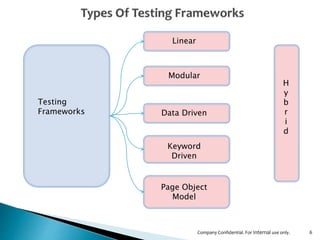
Testing
Frameworks
Linear
Modular
Data Driven
Keyword
Driven
Page Object
Model
H
y
b
r
i
d
Company Confidential. For Internal use only.
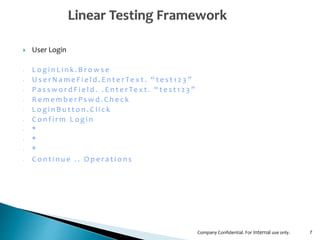
 User Login
‐ L o g i n L i n k . B r o w s e
‐ U s e r N a m e F i e l d . E n t e r Te x t . “ t e s t 1 2 3 ”
‐ P a s s w o r d F i e l d . . E n t e r Te x t . “ t e s t 1 2 3 ”
‐ R e m e m b e r P s w d . C h e c k
‐ L o g i n B u t t o n . C l i c k
‐ C o n f i r m L o g i n
‐ *
‐ *
‐ *
‐ C o n t i n u e . . O p e r a t i o n s
7Company Confidential. For Internal use only.
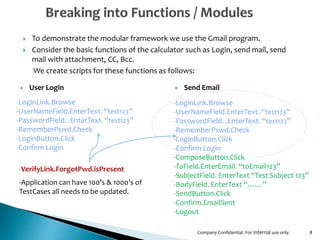
 To demonstrate the modular framework we use the Gmail program.
 Consider the basic functions of the calculator such as Login, send mail, send
mail with attachment, CC, Bcc.
We create scripts for these functions as follows:
8
‐LoginLink.Browse
‐UserNameField.EnterText. “test123”
‐PasswordField. .EnterText. “test123”
‐RememberPswd.Check
‐LoginButton.Click
‐Confirm Login
‐LoginLink.Browse
‐UserNameField.EnterText. “test123”
‐PasswordField. .EnterText. “test123”
‐RememberPswd.Check
‐LoginButton.Click
‐Confirm Login
‐ComposeButton.Click
‐ToField.EnterEmail. “toEmail123”
‐SubjectField. EnterText “Test Subject 123”
‐BodyField. EnterText “……”
‐SendButton.Click
‐Confirm.EmailSent
‐Logout
 User Login  Send Email
‐VerifyLink.ForgotPwd.isPresent
‐Application can have 100’s & 1000’s of
TestCases all needs to be updated.
Company Confidential. For Internal use only.
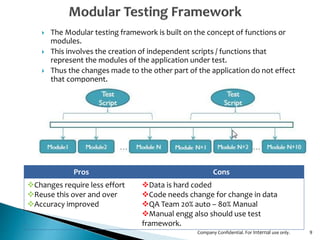
 The Modular testing framework is built on the concept of functions or
modules.
 This involves the creation of independent scripts / functions that
represent the modules of the application under test.
 Thus the changes made to the other part of the application do not effect
that component.
9
Pros Cons
Changes require less effort
Reuse this over and over
Accuracy improved
Data is hard coded
Code needs change for change in data
QA Team 20% auto – 80% Manual
Manual engg also should use test
framework.
Company Confidential. For Internal use only.
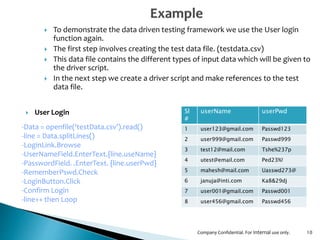
 To demonstrate the data driven testing framework we use the User login
function again.
 The first step involves creating the test data file. (testdata.csv)
 This data file contains the different types of input data which will be given to
the driver script.
 In the next step we create a driver script and make references to the test
data file.
10
‐Data = openfile(‘testData.csv’).read()
‐line = Data.splitLines()
‐LoginLink.Browse
‐UserNameField.EnterText.{line.useName}
‐PasswordField. .EnterText. {line.userPwd}
‐RememberPswd.Check
‐LoginButton.Click
‐Confirm Login
‐line++ then Loop
 User Login Sl
#
userName userPwd
1 user123@gmail.com Passwd123
2 user999@gmail.com Passwd999
3 test12@mail.com Tshe%237p
4 utest@email.com Ped23%!
5 mahesh@mail.com Uasswd273@
6 januja@inti.com Ka8&29dj
7 user001@gmail.com Passwd001
8 user456@gmail.com Passwd456
Company Confidential. For Internal use only.
11
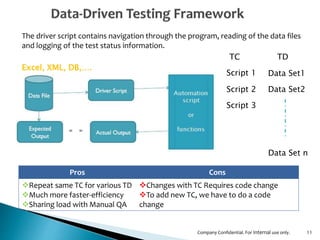
The driver script contains navigation through the program, reading of the data files
and logging of the test status information.
TC
Script 1
Script 2
Script 3
TD
Data Set1
Data Set2
Data Set n
Excel, XML, DB,….
Pros Cons
Repeat same TC for various TD
Much more faster-efficiency
Sharing load with Manual QA
Changes with TC Requires code change
To add new TC, we have to do a code
change
Company Confidential. For Internal use only.
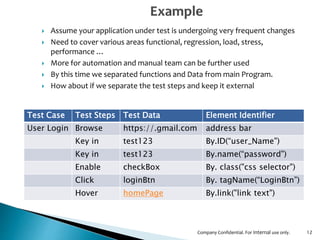
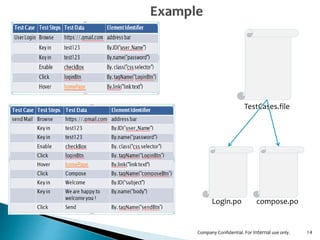
 Assume your application under test is undergoing very frequent changes
 Need to cover various areas functional, regression, load, stress,
performance …
 More for automation and manual team can be further used
 By this time we separated functions and Data from main Program.
 How about if we separate the test steps and keep it external
12
Test Case Test Steps Test Data Element Identifier
User Login Browse https://.gmail.com address bar
Key in test123 By.ID(“user_Name")
Key in test123 By.name(“password")
Enable checkBox By. class("css selector")
Click loginBtn By. tagName(“LoginBtn”)
Hover homePage By.link("link text")
Company Confidential. For Internal use only.
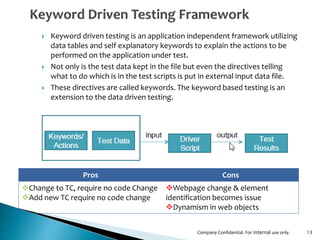
 Keyword driven testing is an application independent framework utilizing
data tables and self explanatory keywords to explain the actions to be
performed on the application under test.
 Not only is the test data kept in the file but even the directives telling
what to do which is in the test scripts is put in external input data file.
 These directives are called keywords. The keyword based testing is an
extension to the data driven testing.
13
Pros Cons
Change to TC, require no code Change
Add new TC require no code change
Webpage change & element
identification becomes issue
Dynamism in web objects
Company Confidential. For Internal use only.
14
Login.po compose.po
TestCases.file
Company Confidential. For Internal use only.
15
TestCases.file
Login.po
Login.csv Compose.csv
Compose.po
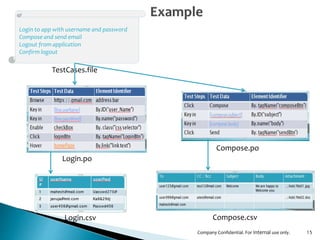
Login to app with username and password
Compose and send email
Logout from application
Confirm logout
Company Confidential. For Internal use only.
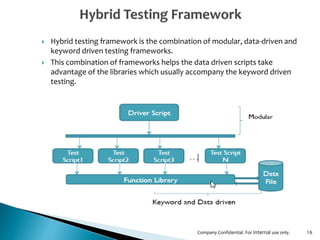
 Hybrid testing framework is the combination of modular, data-driven and
keyword driven testing frameworks.
 This combination of frameworks helps the data driven scripts take
advantage of the libraries which usually accompany the keyword driven
testing.
16Company Confidential. For Internal use only.
17Company Confidential. For Internal use only.
18

Automation frameworks

  • 1.
  • 2.
     Why dowe need Automation testing  Manual to Automation benifits  Testing Framework and Types Linear Modular Data Driven Keyword Driven Page Object Hybrid 2Company Confidential. For Internal use only.
  • 3.
     Effort andCost ◦ Lets assume 6 test cases ◦ Effort required to run all 6 manually => 10 min ◦ Effort required to write unit tests for all 6 cases => 10 min ◦ Effort required to run unit tests for all 6 cases => < 1 min ◦ Number of testing iterations => 5 ◦ Total manual testing time => 50 min ◦ Total unit testing time => 10 min 3 Release Manual Test Auto Test Manual Test Cumulative 1 10 10 10 2 10 0 20 3 10 0 30 4 10 0 40 5 10 0 50 Company Confidential. For Internal use only.
  • 4.
    4 Test Case TestSteps Test Data Results What to Do ? Input Pass / Fail HTML / PDF / XML Where to Do ? Company Confidential. For Internal use only.
  • 5.
     A testingframework or more specifically a testing automation framework is an execution environment for automated tests. It is the overall system in which the tests will be automated.  It is defined as the set of assumptions, concepts, and practices that constitute a work platform or support for automated testing.  The Testing framework is responsible for:  Defining the format in which to express expectations.  Creating a mechanism to hook into or drive the application under test  Executing the tests  Reporting results  Properties of a testing framework:  It is application independent.  It is easy to expand, maintain and perpetuate. 5Company Confidential. For Internal use only.
  • 6.
  • 7.
     User Login ‐L o g i n L i n k . B r o w s e ‐ U s e r N a m e F i e l d . E n t e r Te x t . “ t e s t 1 2 3 ” ‐ P a s s w o r d F i e l d . . E n t e r Te x t . “ t e s t 1 2 3 ” ‐ R e m e m b e r P s w d . C h e c k ‐ L o g i n B u t t o n . C l i c k ‐ C o n f i r m L o g i n ‐ * ‐ * ‐ * ‐ C o n t i n u e . . O p e r a t i o n s 7Company Confidential. For Internal use only.
  • 8.
     To demonstratethe modular framework we use the Gmail program.  Consider the basic functions of the calculator such as Login, send mail, send mail with attachment, CC, Bcc. We create scripts for these functions as follows: 8 ‐LoginLink.Browse ‐UserNameField.EnterText. “test123” ‐PasswordField. .EnterText. “test123” ‐RememberPswd.Check ‐LoginButton.Click ‐Confirm Login ‐LoginLink.Browse ‐UserNameField.EnterText. “test123” ‐PasswordField. .EnterText. “test123” ‐RememberPswd.Check ‐LoginButton.Click ‐Confirm Login ‐ComposeButton.Click ‐ToField.EnterEmail. “toEmail123” ‐SubjectField. EnterText “Test Subject 123” ‐BodyField. EnterText “……” ‐SendButton.Click ‐Confirm.EmailSent ‐Logout  User Login  Send Email ‐VerifyLink.ForgotPwd.isPresent ‐Application can have 100’s & 1000’s of TestCases all needs to be updated. Company Confidential. For Internal use only.
  • 9.
     The Modulartesting framework is built on the concept of functions or modules.  This involves the creation of independent scripts / functions that represent the modules of the application under test.  Thus the changes made to the other part of the application do not effect that component. 9 Pros Cons Changes require less effort Reuse this over and over Accuracy improved Data is hard coded Code needs change for change in data QA Team 20% auto – 80% Manual Manual engg also should use test framework. Company Confidential. For Internal use only.
  • 10.
     To demonstratethe data driven testing framework we use the User login function again.  The first step involves creating the test data file. (testdata.csv)  This data file contains the different types of input data which will be given to the driver script.  In the next step we create a driver script and make references to the test data file. 10 ‐Data = openfile(‘testData.csv’).read() ‐line = Data.splitLines() ‐LoginLink.Browse ‐UserNameField.EnterText.{line.useName} ‐PasswordField. .EnterText. {line.userPwd} ‐RememberPswd.Check ‐LoginButton.Click ‐Confirm Login ‐line++ then Loop  User Login Sl # userName userPwd 1 user123@gmail.com Passwd123 2 user999@gmail.com Passwd999 3 test12@mail.com Tshe%237p 4 utest@email.com Ped23%! 5 mahesh@mail.com Uasswd273@ 6 januja@inti.com Ka8&29dj 7 user001@gmail.com Passwd001 8 user456@gmail.com Passwd456 Company Confidential. For Internal use only.
  • 11.
    11 The driver scriptcontains navigation through the program, reading of the data files and logging of the test status information. TC Script 1 Script 2 Script 3 TD Data Set1 Data Set2 Data Set n Excel, XML, DB,…. Pros Cons Repeat same TC for various TD Much more faster-efficiency Sharing load with Manual QA Changes with TC Requires code change To add new TC, we have to do a code change Company Confidential. For Internal use only.
  • 12.
     Assume yourapplication under test is undergoing very frequent changes  Need to cover various areas functional, regression, load, stress, performance …  More for automation and manual team can be further used  By this time we separated functions and Data from main Program.  How about if we separate the test steps and keep it external 12 Test Case Test Steps Test Data Element Identifier User Login Browse https://.gmail.com address bar Key in test123 By.ID(“user_Name") Key in test123 By.name(“password") Enable checkBox By. class("css selector") Click loginBtn By. tagName(“LoginBtn”) Hover homePage By.link("link text") Company Confidential. For Internal use only.
  • 13.
     Keyword driventesting is an application independent framework utilizing data tables and self explanatory keywords to explain the actions to be performed on the application under test.  Not only is the test data kept in the file but even the directives telling what to do which is in the test scripts is put in external input data file.  These directives are called keywords. The keyword based testing is an extension to the data driven testing. 13 Pros Cons Change to TC, require no code Change Add new TC require no code change Webpage change & element identification becomes issue Dynamism in web objects Company Confidential. For Internal use only.
  • 14.
  • 15.
    15 TestCases.file Login.po Login.csv Compose.csv Compose.po Login toapp with username and password Compose and send email Logout from application Confirm logout Company Confidential. For Internal use only.
  • 16.
     Hybrid testingframework is the combination of modular, data-driven and keyword driven testing frameworks.  This combination of frameworks helps the data driven scripts take advantage of the libraries which usually accompany the keyword driven testing. 16Company Confidential. For Internal use only.
  • 17.
    17Company Confidential. ForInternal use only.
  • 18.