(MuhammadSHarif)
04-FEB-19
1
Css for webapp in one hours .
Complete C.S.S Introduction to Advance Course
It is written by Muhammad Sharif Software
Engineer Governement College University
Faisalabad.
Type equation here.
What is CSS
CSS stands for Cascading Style Sheets. It is a
style sheet language which is used to describe
the look and formatting of a document written
in markup language. It provides an additional
feature to HTML.
(MuhammadSHarif)
04-FEB-19
2
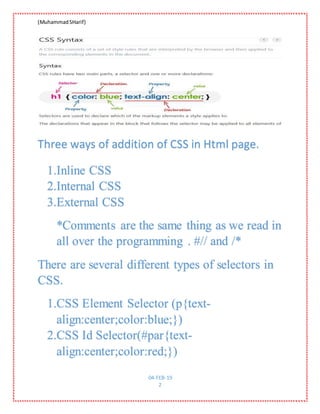
Three ways of addition of CSS in Html page.
1.Inline CSS
2.Internal CSS
3.External CSS
*Comments are the same thing as we read in
all over the programming . #// and /*
There are several different types of selectors in
CSS.
1.CSS Element Selector (p{text-
align:center;color:blue;})
2.CSS Id Selector(#par{text-
align:center;color:red;})
(MuhammadSHarif)
04-FEB-19
3
3.CSS Class Selector(.par{text-
align:center;color:red;})
4.CSS Universal Selector(*{text-
align:center;border:1px;margin:2;})
5.CSS Group Selector(h1,h2,h3,p{text-
align:center;})
6.CSS Particular class element(p.class name
{panding:12;} in many same classes name
exist)
7.Descendant Selectors (ul.menu li
a{color:red;} <ul class="menu"><li><a
href="#">Home</a></li>)
8.Child Selector is represent (ul > li ol{list-
style:square;})
9.Adjacent Sibling selectors(p+h1{color:blue;
or ul.par+h2{ color:#f0f;this colred only h1
and h2 due to adjacent of p and ul.par.}})
10. General sibling selector (It work similar
to adjacent sibling but It color allheading of
ul)
(MuhammadSHarif)
04-FEB-19
4
Back Ground Image and
colors
Body {
Background-image:url(“gradient.png”);
Background-repeat:no-repeat-x;”bg:fixed;”
overflow:scroll; background-position: 100%
top; margin-left:100px;}
<h1 style="background-color:hsla(9, 100%,
64%, 0.5); rgb(255, 255, 0)">..in line
style..</h1>
(MuhammadSHarif)
04-FEB-19
5
hsla(hue, saturation, lightness, alpha) hsla(9,
100%, 64%, 0.2)
Font Style
 p.one {
 font-style: normal;
 font-size: 24px, 62.5%;;
 }
 p.two {
 font-style: italic;
 }
 {
 font-family: "Times New Roman", Sans-
serif, Times, serif, monospace;
 }
 p.three {
font-style: oblique;
 font-weight: bold;}
 p.small {
(MuhammadSHarif)
04-FEB-19
6
 font-variant: small-caps;
 }
 <p style="font:italic small-
caps bold 15px georgia;">}

 <p style="width:400px;
max-height:10px; border:1px
solid red; padding:5px;
margin:10px;">

Border
 <p class="none">No border.</p>
 <p class="dotted">A dotted border.</p>
 <p class="dashed">A dashed border.</p>
 <p class="solid">A solid border.</p>
p.inset {outline-style: inset;}
p.outset {outline-style: outset;}
(MuhammadSHarif)
04-FEB-19
7
outline-style: solid;
outline-color: invert;
text-decoration: overline;
p.solid{
border: 5px solid red;}, border-radius,
border-right-width
 <p class="double">A double border.</p>
 <p class="groove">A groove border.</p>
 <p class="ridge">A ridge border.</p>
 <p class="inset">An inset border.</p>
 <p class="outset">Anoutset border.</p>
p.hidden {border-style: hidden;}
 <p class="hidden">A hidden border.</p>
Transform
(MuhammadSHarif)
04-FEB-19
8
 p.up {
 text-transform:
uppercase;
 }
 p.cap {
 text-transform:
capitalize;
 }
 p.low {
 text-transform:
lowercase;
 word-spacing: 20px; text-
align: justify; line-height:
1.2;}
p {
display: inline; <p> java</p><p>html</p> and
display :block; will show each <p> seperated
}
(MuhammadSHarif)
04-FEB-19
9
div { heignt:200px; width:50% ; min-
width:200px; max-height:300px;
border: 1px solid red;
margin-left: 100px;
background-color: powderblue;
padding: 25px 50px 75px 100px;
}
p.ex1 {
(MuhammadSHarif)
04-FEB-19
10
margin-left: inherit;
}
<div><p class=”ex1”>My name is sharif son of
Abdullah</p> </div>
Image in css
<img style="border:1px solid red; width:100%;"
src="logo.png" />
‫کو‬ ‫تصویر‬ ‫یہ‬‫پن‬ ‫ھندلا‬ُ‫د‬‫ھے‬ ‫دیتی‬ ‫کر‬ The -moz-
opacity Property
<img style="border:1px solid
red;-moz-
opacity:0.4;filter:alpha(opacity
=40);"
src="/css/images/logo.png" />
(MuhammadSHarif)
04-FEB-19
11
<style>
img.trans {
opacity: 0.4;
filter: alpha(opacity=40); /* For IE8 and
earlier */ }
</style>
<body>
<p>Transparent Image</p>
<img class="trans"
src="/csspages/images/rose.jpg"
alt="transparent rose">
(MuhammadSHarif)
04-FEB-19
12
List Style Type
 ul li {
 list-style-image:
url("arrow.png");
 <ul style="list-style-
type:circle,decimal; list-
style-position:inside">
 <ol style="list-style:
outside upper-alpha;">

(MuhammadSHarif)
04-FEB-19
13
 <li style="list-style-image:
url(/images/bullet.gif);">Mat
hs</li> }
Behavior of cursor when cursor
goes on the text;
<p>Move the mouse over the words
to see the cursor change:</p>
(MuhammadSHarif)
04-FEB-19
14
<div
style="cursor:auto">Auto</div>
<div
style="cursor:crosshair">Crossha
ir</div>
<div
style="cursor:default">Default</
div>
<div
style="cursor:pointer">Pointer</
div>
<div
style="cursor:move">Move</div>
<div style="cursor:e-
resize">e-resize</div>
<div style="cursor:ne-
resize">ne-resize</div>
<div style="cursor:nw-
resize">nw-resize</div>
<div style="cursor:n-
resize">n-resize</div>
(MuhammadSHarif)
04-FEB-19
15
<div style="cursor:se-
resize">se-resize</div>
<div style="cursor:sw-
resize">sw-resize</div>
<div style="cursor:s-
resize">s-resize</div>
<div style="cursor:w-
resize">w-resize</div>
<div
style="cursor:text">text</div>
<div
style="cursor:wait">wait</div>
<div
style="cursor:help">help</div>
url()
a:hover{cursor:url("custo
m.cur"), default;}
progre
ss
a:hover{cursor:progress;}
a {
(MuhammadSHarif)
04-FEB-19
16
cursor:
url("/examples/images/custom.gif
"),
url("/examples/images/custom.cur
"), default;
Units in css
 h1 { margin: 0.5in;
} /* inches */
 h2 { line-height: 3cm;
} /* centimeters */
 h3 { word-spacing: 4mm;
} /* millimeters */
(MuhammadSHarif)
04-FEB-19
17
 h4 { font-size: 12pt;
} /* points */
 h5 { font-size: 1pc;
} /* picas */
 h6 { font-size: 12px;
} /* picas */
 font-size: 3em;
 float: left;
 bottom: 0; Top:0;
 h1.visible {
 visibility: visible
 }
 h1.hidden {
 visibility: hidden}
input[type="submit"] {
border: 1px solid #006633;
background-color: #009966;
(MuhammadSHarif)
04-FEB-19
18
color: #FFFFFF;
border-radius: 5px;
padding: 5px;
margin-top: 10px;}
input[type="submit"]:hover {
border: 6px solid red;
background-color: #00CC33;
color: #ccc;
cursor: wait;}
tr.head th {
color: #fff;
background-color: #90b4d6;
border-bottom: 2px solid #547ca0;
border-right: 1px solid #749abe;
(MuhammadSHarif)
04-FEB-19
19
border-top: 1px solid #90b4d6;
text-align: center;
text-shadow: -1px -1px 1px #666;
letter-spacing: 0.15em;}
Css opacity
img.trans{
opacity: 0.5;
filter: alpha(opacity=10);
width:100px;
height:100px;
};
img{
width:100px;
(MuhammadSHarif)
04-FEB-19
20
height:100px;
}
</style>
<head>
<body>
<img src="Logo1.jpg" alt="transparent rose">
<img class="trans" src="Logo01.jpg">
</body>
CSS Position
The CSS position property is used to set position for an element. it is also used to place an
element behind another
element'scomputedpositionpropertyisrelative,absolute,fixedorsticky. Static itsi defaltpositionof
an element
(MuhammadSHarif)
04-FEB-19
21
Fixed position
<p class="pos_fixed">This is the fix position
ed text.</p>
 p.pos_fixed {
 position:fixed;
 top:50px;
 right:5px;
 color:blue;
}
z-index It is used to set stack order of an element. number, auto, inherit
It is also a postion propertie
Layout in Css
 <style>
 .header{margin:-8px -8px 0px;background-image:linear-
gradient(145deg,#7379ff,#b524ef);color:white;text-align:center;padding:10px;}
 .container{width:100%}
 .left{width:15%;float:left;}
 .body{width:65%;float:left;background-color:pink;padding:5px;}
 .right{width:15%;float:left;}
 .footer{margin:-8px;clear:both;background-image:linear-
gradient(145deg,#7379ff,#b524ef);color:white;text-align:center;padding:10px;}
 <body>
 <div class="header"><h2>JavaTpoint</h2></div>

 <div class="container">
(MuhammadSHarif)
04-FEB-19
22
 <div class="left">
 <p>Left Page</p>
 </div>
 <div class="body">
 <h1>Body Page</h1>

<p>Page Content goes here</p><p>Page Content goes here</p><p>Page Content goes here</p>

<p>Page Content goes here</p><p>Page Content goes here</p><p>Page Content goes here</p>

<p>Page Content goes here</p><p>Page Content goes here</p><p>Page Content goes here</p>

<p>Page Content goes here</p><p>Page Content goes here</p><p>Page Content goes here</p>
 <p>Page Content goes here</p>
 </div>
 <div class="right">
 <p>Right Page</p>
 </div>
 </div>

 <div class="footer">
 <p>Footer</p>
 </div>

 </body>
 </style>
ANIMATION IN CSS
<style>
img.trans{
(MuhammadSHarif)
04-FEB-19
23
opacity: 0.5;
filter: alpha(opacity=10);
width:100px;
height:100px;
};
img{
width:100px;
height:100px;
}
</style>
<style>
div {
(MuhammadSHarif)
04-FEB-19
24
z-index:100px;
width: 100px;
height: 100px;
background: red;
position: fixed;
-webkit-animation: myfirst 5s; /* Chrome,
Safari, Opera */
animation: myfirst 10s;
}
/* Chrome, Safari, Opera */
@-webkit-keyframes myfirst {
0% {background:red; left:0px; top:0px;}
(MuhammadSHarif)
04-FEB-19
25
25% {background:yellow; left:300px;
top:0px;}
50% {background:blue; left:200px;
top:300px;}
75% {background:green; left:0px;
top:200px;}
100% {background:red; left:0px; top:0px;}
}
/* Standard syntax */
@keyframes myfirst {
0% {background:red; left:0px; top:0px;}
25% {background:yellow; left:300px;
top:0px;}
(MuhammadSHarif)
04-FEB-19
26
50% {background:blue; left:300px;
top:200px;}
75% {background:green; left:0px;
top:200px;}
100% {background:orange; left:0px; top:0px;}
 @-webkit-keyframes myfirst {
 from {background: red;}
 to {background: green;}
 }
 /* Standard syntax */
 @keyframes myfirst {
 from {background: red;}
 to {background: green;}
}
</style>
table {
border-collapse:collapse;
width: 100%;
}
(MuhammadSHarif)
04-FEB-19
27
th, td {
color:yellow;
text-align: left;
padding:8px;
}
tr:nth-child(even){background-color: #f2f2f2}Hexadecimal Colors
rgb(0,255,255)
tr:nth-child(even){background-color:#ccc}
tr:nth-child(odd){background-color:red}
tr:hover{background-color:green}
</style>
<ul style="list-style-type:number">
<li>Coffee</li>
<li>Tea</li>
<li>Milk</li>
(MuhammadSHarif)
04-FEB-19
28
</ul>
<ol type="I">
Tag Description
<div> Definesasectionina document(block-level)
<span>
Definesasectionina document(inline)
1. <script>
2. var emp=["Sonoo","Vimal","Ratan"];
3. for (i=0;i<emp.length;i++){
4. document.write(emp[i] + "<br/>");
5. }
6. </script>

Css web side