CSS – CASCADING STYLE SHEET
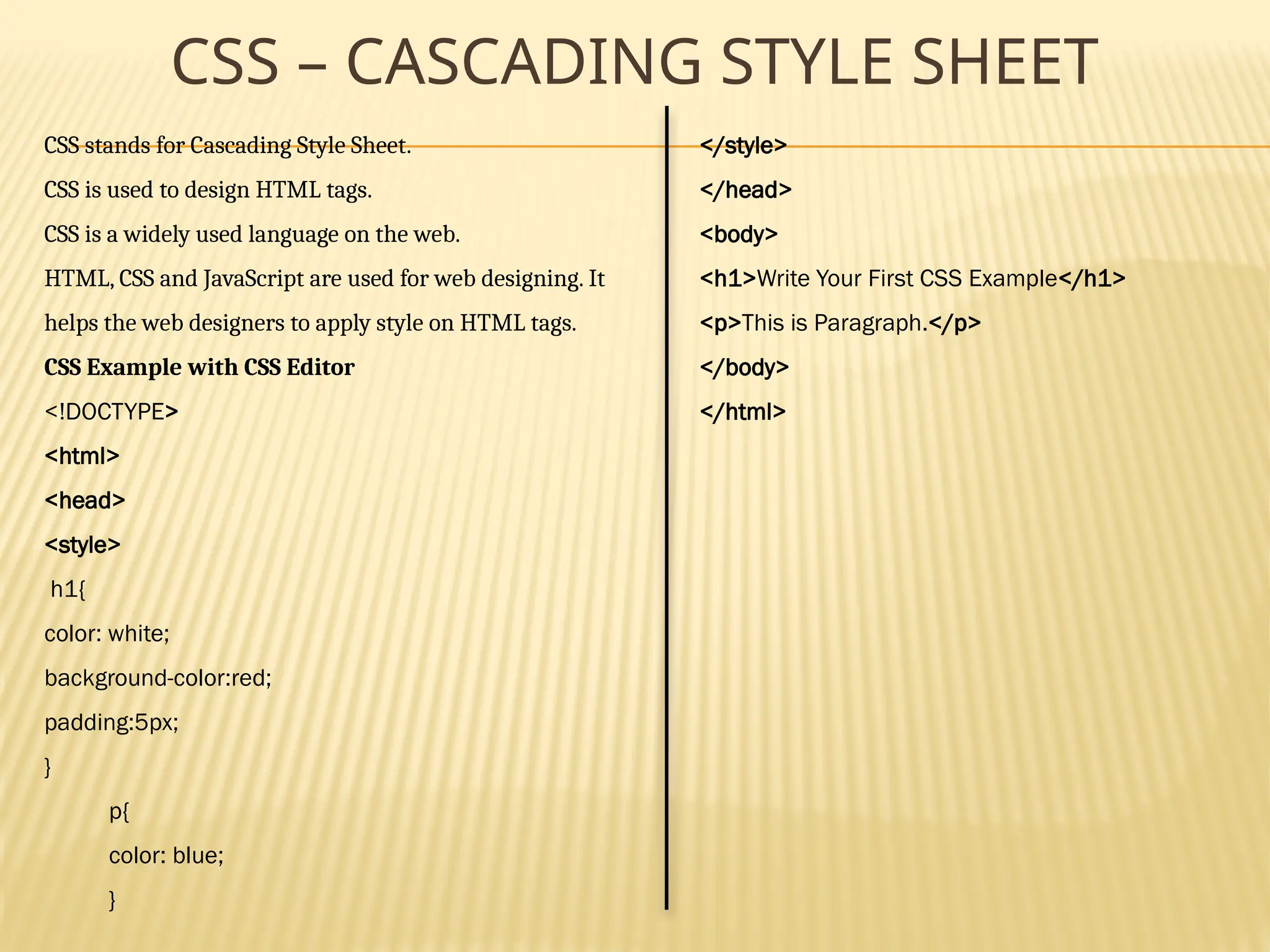
CSS stands for Cascading Style Sheet.
CSS is used to design HTML tags.
CSS is a widely used language on the web.
HTML, CSS and JavaScript are used for web designing. It
helps the web designers to apply style on HTML tags.
CSS Example with CSS Editor
<!DOCTYPE>
<html>
<head>
<style>
h1{
color: white;
background-color:red;
padding:5px;
}
p{
color: blue;
}
</style>
</head>
<body>
<h1>Write Your First CSS Example</h1>
<p>This is Paragraph.</p>
</body>
</html>
TYPES OF CSS
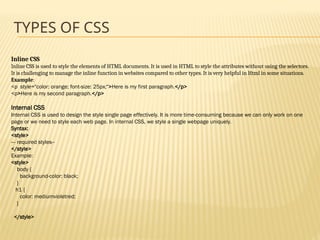
Inline CSS
Inline CSS is used to style the elements of HTML documents. It is used in HTML to style the attributes without using the selectors.
It is challenging to manage the inline function in websites compared to other types. It is very helpful in Html in some situations.
Example:
<p style="color: orange; font-size: 25px;">Here is my first paragraph.</p>
<p>Here is my second paragraph.</p>
Internal CSS
Internal CSS is used to design the style single page effectively. It is more time-consuming because we can only work on one
page or we need to style each web page. In internal CSS, we style a single webpage uniquely.
Syntax:
<style>
--- required styles--
</style>
Example:
<style>
body {
background-color: black;
}
h1 {
color: mediumvioletred;
}
</style>
TYPES OF CSS CONTINUES
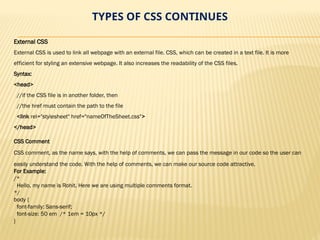
External CSS
External CSS is used to link all webpage with an external file. CSS, which can be created in a text file. It is more
efficient for styling an extensive webpage. It also increases the readability of the CSS files.
Syntax:
<head>
//if the CSS file is in another folder, then
//the href must contain the path to the file
<link rel="stylesheet" href="nameOfTheSheet.css">
</head>
CSS Comment
CSS comment, as the name says, with the help of comments, we can pass the message in our code so the user can
easily understand the code. With the help of comments, we can make our source code attractive.
For Example:
/*
Hello, my name is Rohit. Here we are using multiple comments format.
*/
body {
font-family: Sans-serif;
font-size: 50 em /* 1em = 10px */
}
CSS – SELECTOR TYPES
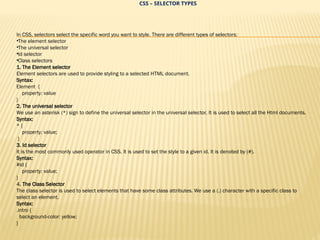
In CSS, selectors select the specific word you want to style. There are different types of selectors:
•The element selector
•The universal selector
•Id selector
•Class selectors
1. The Element selector
Element selectors are used to provide styling to a selected HTML document.
Syntax:
Element {
property: value
}
2. The universal selector
We use an asterisk (*) sign to define the universal selector in the universal selector. It is used to select all the Html documents.
Syntax:
* {
property: value;
}
3. Id selector
It is the most commonly used operator in CSS. It is used to set the style to a given id. It is denoted by (#).
Syntax:
#id {
property: value;
}
4. The Class Selector
The class selector is used to select elements that have some class attributes. We use a (.) character with a specific class to
select an element.
Syntax:
.intro {
background-color: yellow;
}
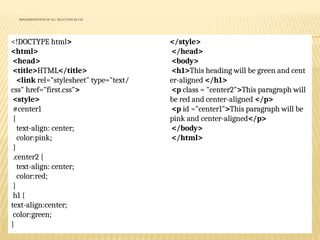
IMPLEMENTATION OF ALL SELECTORS IN CSS
<!DOCTYPE html>
<html>
<head>
<title>HTML</title>
<link rel="stylesheet" type="text/
css" href="first.css">
<style>
#center1
{
text-align: center;
color:pink;
}
.center2 {
text-align: center;
color:red;
}
h1 {
text-align:center;
color:green;
}
</style>
</head>
<body>
<h1>This heading will be green and cent
er-aligned </h1>
<p class = "center2">This paragraph will
be red and center-aligned </p>
<p id ="center1">This paragraph will be
pink and center-aligned</p>
</body>
</html>
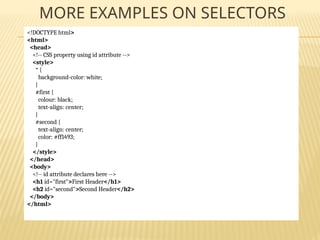
MORE EXAMPLES ON SELECTORS
<!DOCTYPE html>
<html>
<head>
<!-- CSS property using id attribute -->
<style>
* {
background-color: white;
}
#first {
colour: black;
text-align: center;
}
#second {
text-align: center;
color: #ff1493;
}
</style>
</head>
<body>
<!-- id attribute declares here -->
<h1 id="first">First Header</h1>
<h2 id="second">Second Header</h2>
</body>
</html>
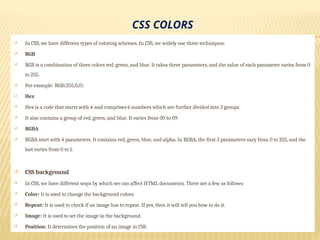
CSS COLORS
 In CSS, we have different types of coloring schemes. In CSS, we widely use three techniques:
 RGB
 RGB is a combination of three colors red, green, and blue. It takes three parameters, and the value of each parameter varies from 0
to 255.
 For example: RGB(255,0,0)
 Hex
 Hex is a code that starts with # and comprises 6 numbers which are further divided into 3 groups.
 It also contains a group of red, green, and blue. It varies from 00 to 09.
 RGBA
 RGBA start with 4 parameters. It contains red, green, blue, and alpha. In RGBA, the first 3 parameters vary from 0 to 255, and the
last varies from 0 to 1.
 CSS background
 In CSS, we have different ways by which we can affect HTML documents. There are a few as follows:
 Color: It is used to change the background colors.
 Repeat: It is used to check if an image has to repeat. If yes, then it will tell you how to do it.
 Image: It is used to set the image in the background.
 Position: It determines the position of an image in CSS.
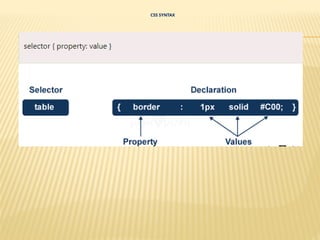
CSS SYNTAX
EXAMPLE OF CSS PROPERTY
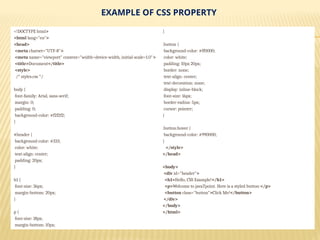
<!DOCTYPE html>
<html lang="en">
<head>
<meta charset="UTF-8">
<meta name="viewport" content="width=device-width, initial-scale=1.0">
<title>Document</title>
<style>
/* styles.css */
body {
font-family: Arial, sans-serif;
margin: 0;
padding: 0;
background-color: #f2f2f2;
}
#header {
background-color: #333;
color: white;
text-align: center;
padding: 20px;
}
h1 {
font-size: 36px;
margin-bottom: 20px;
}
p {
font-size: 18px;
margin-bottom: 10px;
}
.button {
background-color: #ff0000;
color: white;
padding: 10px 20px;
border: none;
text-align: center;
text-decoration: none;
display: inline-block;
font-size: 16px;
border-radius: 5px;
cursor: pointer;
}
.button:hover {
background-color: #990000;
}
</style>
</head>
<body>
<div id="header">
<h1>Hello, CSS Example!</h1>
<p>Welcome to javaTpoint. Here is a styled button:</p>
<button class="button">Click Me!</button>
</div>
</body>
</html>
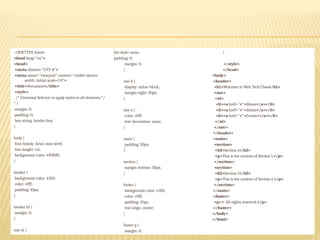
<!DOCTYPE html>
<html lang="en">
<head>
<meta charset="UTF-8">
<meta name="viewport" content="width=device-
width, initial-scale=1.0">
<title>Document</title>
<style>
/* Universal Selector to apply styles to all elements */
* {
margin: 0;
padding: 0;
box-sizing: border-box;
}
body {
font-family: Arial, sans-serif;
line-height: 1.6;
background-color: #f0f0f0;
}
header {
background-color: #333;
color: #fff;
padding: 10px;
}
header h1 {
margin: 0;
}
nav ul {
list-style: none;
padding: 0;
margin: 0;
}
nav li {
display: inline-block;
margin-right: 20px;
}
nav a {
color: #fff;
text-decoration: none;
}
main {
padding: 20px;
}
section {
margin-bottom: 30px;
}
footer {
background-color: #333;
color: #fff;
padding: 10px;
text-align: center;
}
footer p {
margin: 0;
}
</style>
</head>
<body>
<header>
<h1>Welcome to Web Tech Class</h1>
<nav>
<ul>
<li><a href="#">Home</a></li>
<li><a href="#">About</a></li>
<li><a href="#">Contact</a></li>
</ul>
</nav>
</header>
<main>
<section>
<h2>Section 1</h2>
<p>This is the content of Section 1.</p>
</section>
<section>
<h2>Section 2</h2>
<p>This is the content of Section 2.</p>
</section>
</main>
<footer>
<p>© All rights reserved.</p>
</footer>
</body>
</html>
CSS PROPERTIES
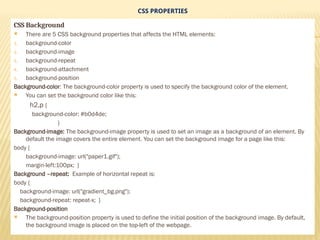
CSS Background
 There are 5 CSS background properties that affects the HTML elements:
1. background-color
2. background-image
3. background-repeat
4. background-attachment
5. background-position
Background-color: The background-color property is used to specify the background color of the element.
 You can set the background color like this:
h2,p {
background-color: #b0d4de;
}
Background-image: The background-image property is used to set an image as a background of an element. By
default the image covers the entire element. You can set the background image for a page like this:
body {
background-image: url("paper1.gif");
margin-left:100px; }
Background –repeat: Example of horizontal repeat is:
body {
background-image: url("gradient_bg.png");
background-repeat: repeat-x; }
Background-position
 The background-position property is used to define the initial position of the background image. By default,
the background image is placed on the top-left of the webpage.
CSS BORDER
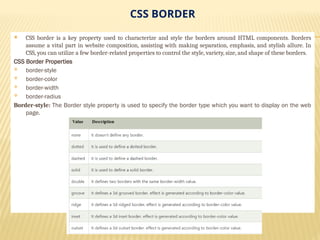
 CSS border is a key property used to characterize and style the borders around HTML components. Borders
assume a vital part in website composition, assisting with making separation, emphasis, and stylish allure. In
CSS, you can utilize a few border-related properties to control the style, variety, size, and shape of these borders.
CSS Border Properties
 border-style
 border-color
 border-width
 border-radius
Border-style: The Border style property is used to specify the border type which you want to display on the web
page.
CSS – CASCADING STYLE SHEET - MY_PPT.pptx

CSS – CASCADING STYLE SHEET - MY_PPT.pptx

  • 1.
    CSS – CASCADINGSTYLE SHEET CSS stands for Cascading Style Sheet. CSS is used to design HTML tags. CSS is a widely used language on the web. HTML, CSS and JavaScript are used for web designing. It helps the web designers to apply style on HTML tags. CSS Example with CSS Editor <!DOCTYPE> <html> <head> <style> h1{ color: white; background-color:red; padding:5px; } p{ color: blue; } </style> </head> <body> <h1>Write Your First CSS Example</h1> <p>This is Paragraph.</p> </body> </html>
  • 3.
    TYPES OF CSS InlineCSS Inline CSS is used to style the elements of HTML documents. It is used in HTML to style the attributes without using the selectors. It is challenging to manage the inline function in websites compared to other types. It is very helpful in Html in some situations. Example: <p style="color: orange; font-size: 25px;">Here is my first paragraph.</p> <p>Here is my second paragraph.</p> Internal CSS Internal CSS is used to design the style single page effectively. It is more time-consuming because we can only work on one page or we need to style each web page. In internal CSS, we style a single webpage uniquely. Syntax: <style> --- required styles-- </style> Example: <style> body { background-color: black; } h1 { color: mediumvioletred; } </style>
  • 4.
    TYPES OF CSSCONTINUES External CSS External CSS is used to link all webpage with an external file. CSS, which can be created in a text file. It is more efficient for styling an extensive webpage. It also increases the readability of the CSS files. Syntax: <head> //if the CSS file is in another folder, then //the href must contain the path to the file <link rel="stylesheet" href="nameOfTheSheet.css"> </head> CSS Comment CSS comment, as the name says, with the help of comments, we can pass the message in our code so the user can easily understand the code. With the help of comments, we can make our source code attractive. For Example: /* Hello, my name is Rohit. Here we are using multiple comments format. */ body { font-family: Sans-serif; font-size: 50 em /* 1em = 10px */ }
  • 5.
    CSS – SELECTORTYPES In CSS, selectors select the specific word you want to style. There are different types of selectors: •The element selector •The universal selector •Id selector •Class selectors 1. The Element selector Element selectors are used to provide styling to a selected HTML document. Syntax: Element { property: value } 2. The universal selector We use an asterisk (*) sign to define the universal selector in the universal selector. It is used to select all the Html documents. Syntax: * { property: value; } 3. Id selector It is the most commonly used operator in CSS. It is used to set the style to a given id. It is denoted by (#). Syntax: #id { property: value; } 4. The Class Selector The class selector is used to select elements that have some class attributes. We use a (.) character with a specific class to select an element. Syntax: .intro { background-color: yellow; }
  • 6.
    IMPLEMENTATION OF ALLSELECTORS IN CSS <!DOCTYPE html> <html> <head> <title>HTML</title> <link rel="stylesheet" type="text/ css" href="first.css"> <style> #center1 { text-align: center; color:pink; } .center2 { text-align: center; color:red; } h1 { text-align:center; color:green; } </style> </head> <body> <h1>This heading will be green and cent er-aligned </h1> <p class = "center2">This paragraph will be red and center-aligned </p> <p id ="center1">This paragraph will be pink and center-aligned</p> </body> </html>
  • 7.
    MORE EXAMPLES ONSELECTORS <!DOCTYPE html> <html> <head> <!-- CSS property using id attribute --> <style> * { background-color: white; } #first { colour: black; text-align: center; } #second { text-align: center; color: #ff1493; } </style> </head> <body> <!-- id attribute declares here --> <h1 id="first">First Header</h1> <h2 id="second">Second Header</h2> </body> </html>
  • 8.
    CSS COLORS  InCSS, we have different types of coloring schemes. In CSS, we widely use three techniques:  RGB  RGB is a combination of three colors red, green, and blue. It takes three parameters, and the value of each parameter varies from 0 to 255.  For example: RGB(255,0,0)  Hex  Hex is a code that starts with # and comprises 6 numbers which are further divided into 3 groups.  It also contains a group of red, green, and blue. It varies from 00 to 09.  RGBA  RGBA start with 4 parameters. It contains red, green, blue, and alpha. In RGBA, the first 3 parameters vary from 0 to 255, and the last varies from 0 to 1.  CSS background  In CSS, we have different ways by which we can affect HTML documents. There are a few as follows:  Color: It is used to change the background colors.  Repeat: It is used to check if an image has to repeat. If yes, then it will tell you how to do it.  Image: It is used to set the image in the background.  Position: It determines the position of an image in CSS.
  • 9.
  • 10.
    EXAMPLE OF CSSPROPERTY <!DOCTYPE html> <html lang="en"> <head> <meta charset="UTF-8"> <meta name="viewport" content="width=device-width, initial-scale=1.0"> <title>Document</title> <style> /* styles.css */ body { font-family: Arial, sans-serif; margin: 0; padding: 0; background-color: #f2f2f2; } #header { background-color: #333; color: white; text-align: center; padding: 20px; } h1 { font-size: 36px; margin-bottom: 20px; } p { font-size: 18px; margin-bottom: 10px; } .button { background-color: #ff0000; color: white; padding: 10px 20px; border: none; text-align: center; text-decoration: none; display: inline-block; font-size: 16px; border-radius: 5px; cursor: pointer; } .button:hover { background-color: #990000; } </style> </head> <body> <div id="header"> <h1>Hello, CSS Example!</h1> <p>Welcome to javaTpoint. Here is a styled button:</p> <button class="button">Click Me!</button> </div> </body> </html>
  • 11.
    <!DOCTYPE html> <html lang="en"> <head> <metacharset="UTF-8"> <meta name="viewport" content="width=device- width, initial-scale=1.0"> <title>Document</title> <style> /* Universal Selector to apply styles to all elements */ * { margin: 0; padding: 0; box-sizing: border-box; } body { font-family: Arial, sans-serif; line-height: 1.6; background-color: #f0f0f0; } header { background-color: #333; color: #fff; padding: 10px; } header h1 { margin: 0; } nav ul { list-style: none; padding: 0; margin: 0; } nav li { display: inline-block; margin-right: 20px; } nav a { color: #fff; text-decoration: none; } main { padding: 20px; } section { margin-bottom: 30px; } footer { background-color: #333; color: #fff; padding: 10px; text-align: center; } footer p { margin: 0; } </style> </head> <body> <header> <h1>Welcome to Web Tech Class</h1> <nav> <ul> <li><a href="#">Home</a></li> <li><a href="#">About</a></li> <li><a href="#">Contact</a></li> </ul> </nav> </header> <main> <section> <h2>Section 1</h2> <p>This is the content of Section 1.</p> </section> <section> <h2>Section 2</h2> <p>This is the content of Section 2.</p> </section> </main> <footer> <p>© All rights reserved.</p> </footer> </body> </html>
  • 12.
    CSS PROPERTIES CSS Background There are 5 CSS background properties that affects the HTML elements: 1. background-color 2. background-image 3. background-repeat 4. background-attachment 5. background-position Background-color: The background-color property is used to specify the background color of the element.  You can set the background color like this: h2,p { background-color: #b0d4de; } Background-image: The background-image property is used to set an image as a background of an element. By default the image covers the entire element. You can set the background image for a page like this: body { background-image: url("paper1.gif"); margin-left:100px; } Background –repeat: Example of horizontal repeat is: body { background-image: url("gradient_bg.png"); background-repeat: repeat-x; } Background-position  The background-position property is used to define the initial position of the background image. By default, the background image is placed on the top-left of the webpage.
  • 13.
    CSS BORDER  CSSborder is a key property used to characterize and style the borders around HTML components. Borders assume a vital part in website composition, assisting with making separation, emphasis, and stylish allure. In CSS, you can utilize a few border-related properties to control the style, variety, size, and shape of these borders. CSS Border Properties  border-style  border-color  border-width  border-radius Border-style: The Border style property is used to specify the border type which you want to display on the web page.