CSS
DAY1
LESSON OBJECTIVES:
• identify different types of hand tools used in computer assembly
and repair tasks, as well as understand their functions and
significance.
• demonstrate proper handling and usage of hand tools by actively
participating in hands-on practice sessions under supervision.
• appreciate the importance of hand tools in technology and
livelihood education, recognizing their role in ensuring efficiency,
safety, and quality in computer-related tasks, and reflecting on
how these skills can be applied in real-life situations.
Identifying and Selecting Different Types of
Hand Tools
•Hand tools are useful for day-to-day activities.
There are various types of tools that can be used
to perform different types of task. Most devices
are flexible and some have specific functions.
Preparing Hand Tools
• Before you do some repair work on your PC — in fact,
before you even think about taking off the cover of
your computer, we suggest that you provide yourself
with a computer tool kit. The use of proper hand tools
and equipment is very important in computer
applications. A successful trouble-shooter must have
knowledge of tools and equipment.
Preparing Hand Tools
•A hand tool is a device for performing work on a
material or a physical system using only hands.
•The hands tools can be manually used employing
force, or electrically powered, using electrical
current.
Hand Tools
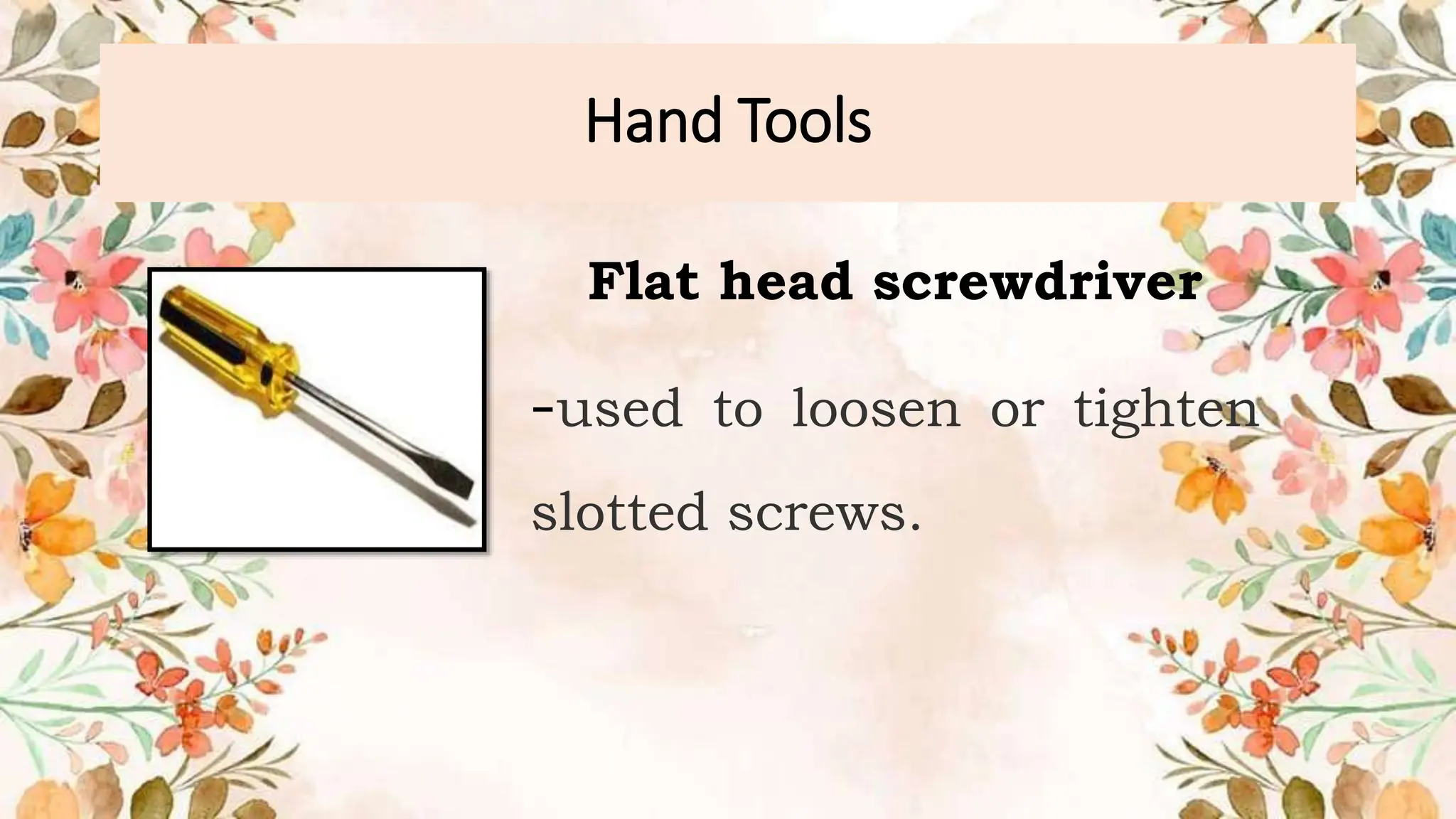
Flat head screwdriver
-used to loosen or tighten
slotted screws.
Hand Tools
Phillips head screwdriver
- used to loosen or tighten
cross-head screws
Hand Tools
Torx screwdriver used to
loosen or tighten screws that
have a star-like depression on
top, a feature that is mainly
found on laptop.
Hand Tools
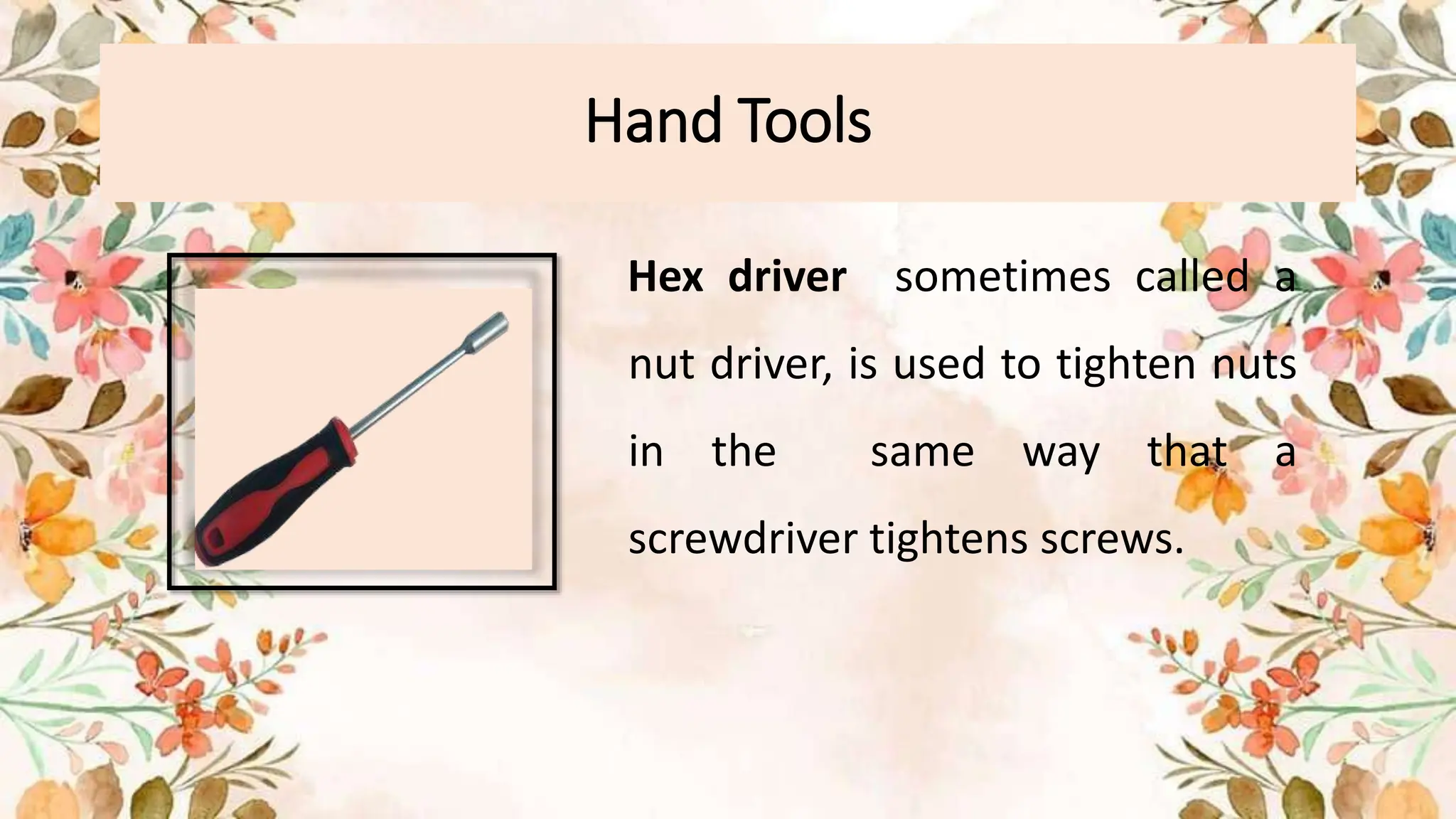
Hex driver sometimes called a
nut driver, is used to tighten nuts
in the same way that a
screwdriver tightens screws.
Hand Tools
Needle Noise Plier – used to hold
small parts
Hand Tools
Wire cutter – use to strip and cut
wires.
Hand Tools
Tweezers – used to manipulate
small parts.
Hand Tools
Part retriever – used to retrieve
small parts that are too small for
your hands to fit.
Faulty or Unsafe Hand Tools
Hand tools include a wide variety of non-
powered devices, such as wrenches, pliers,
hammers and screwdrivers. Such devices may
seem harmless, but they cause a lot of injuries.
The following are hand tools related to safety
procedures.
General hazards:
• The two most common hazards associated with the use of hand
tools include misuse and improper maintenance.
• Misuse occurs when a hand tool is being used for something
other than its intended purpose. An example of misuse is when
we use a screwdriver as a chisel, which could cause the tip to
break and strike someone.
• Improper maintenance causes hand tools to deteriorate
in an unsafe condition. A good example is when include broken
wooden handles that cause the head of the tool to fly off or
mushroomed heads that can break upon impact.
General hazards:
• Place hazardous devices in a safe environment. For
example, use non-sparkling devices in the
presence of flammable vapors and dust. Insulated
equipment with appropriate ratings must be used
for electrical work.
Personal Protective Equipment:
• The type of Personal Protective Equipment required
for the use of tools depends on the nature of the
task. At a minimum, eye protection should always
be worn.
• The use of hand gloves protection can also be
necessary to provide protection against wounds,
abrasion, and repetitive impacts.
Do’s and Don’ts in Using Hand Tools
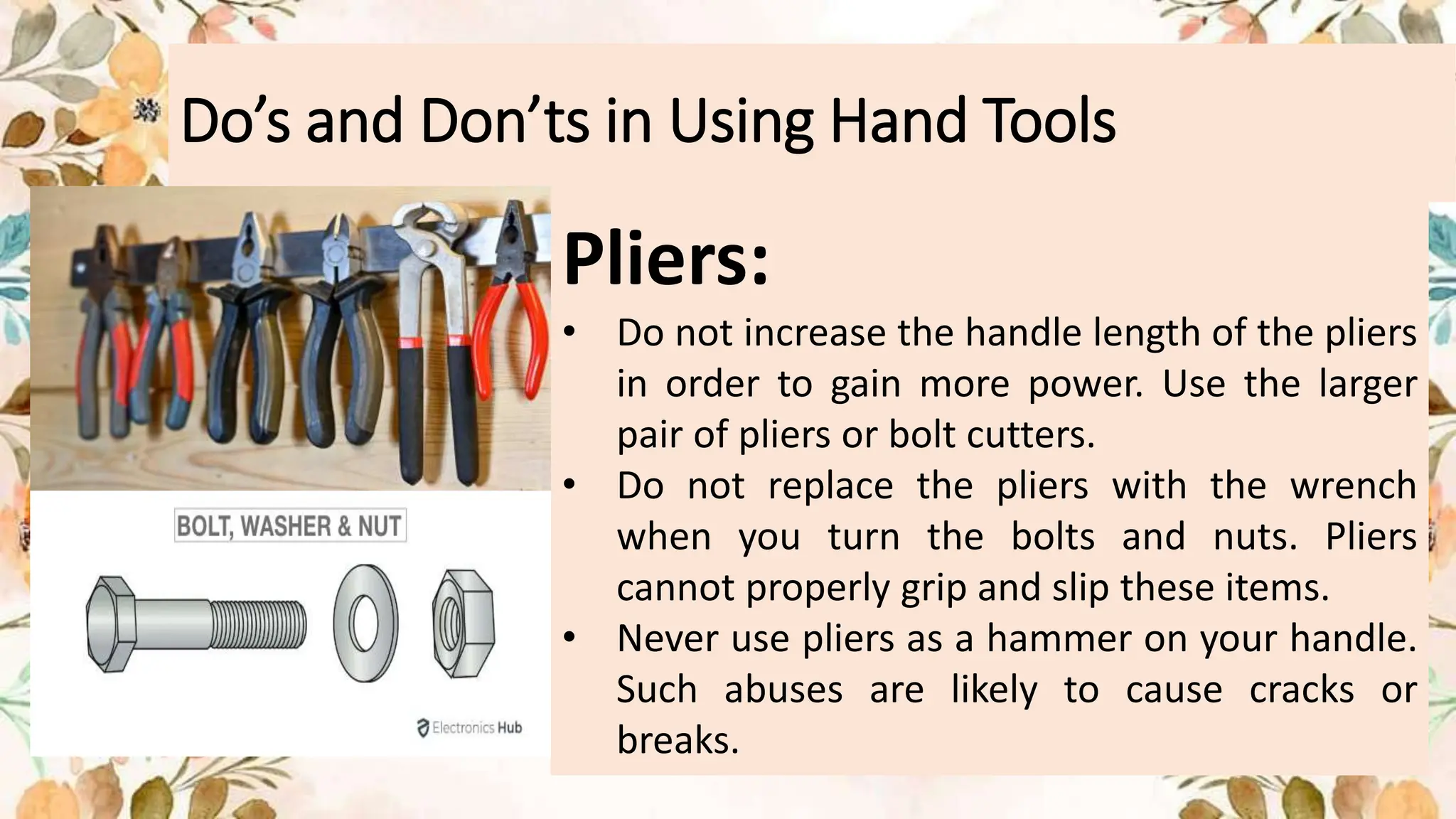
Pliers:
• Do not increase the handle length of the pliers
in order to gain more power. Use the larger
pair of pliers or bolt cutters.
• Do not replace the pliers with the wrench
when you turn the bolts and nuts. Pliers
cannot properly grip and slip these items.
• Never use pliers as a hammer on your handle.
Such abuses are likely to cause cracks or
breaks.
Do’s and Don’ts in Using Hand Tools
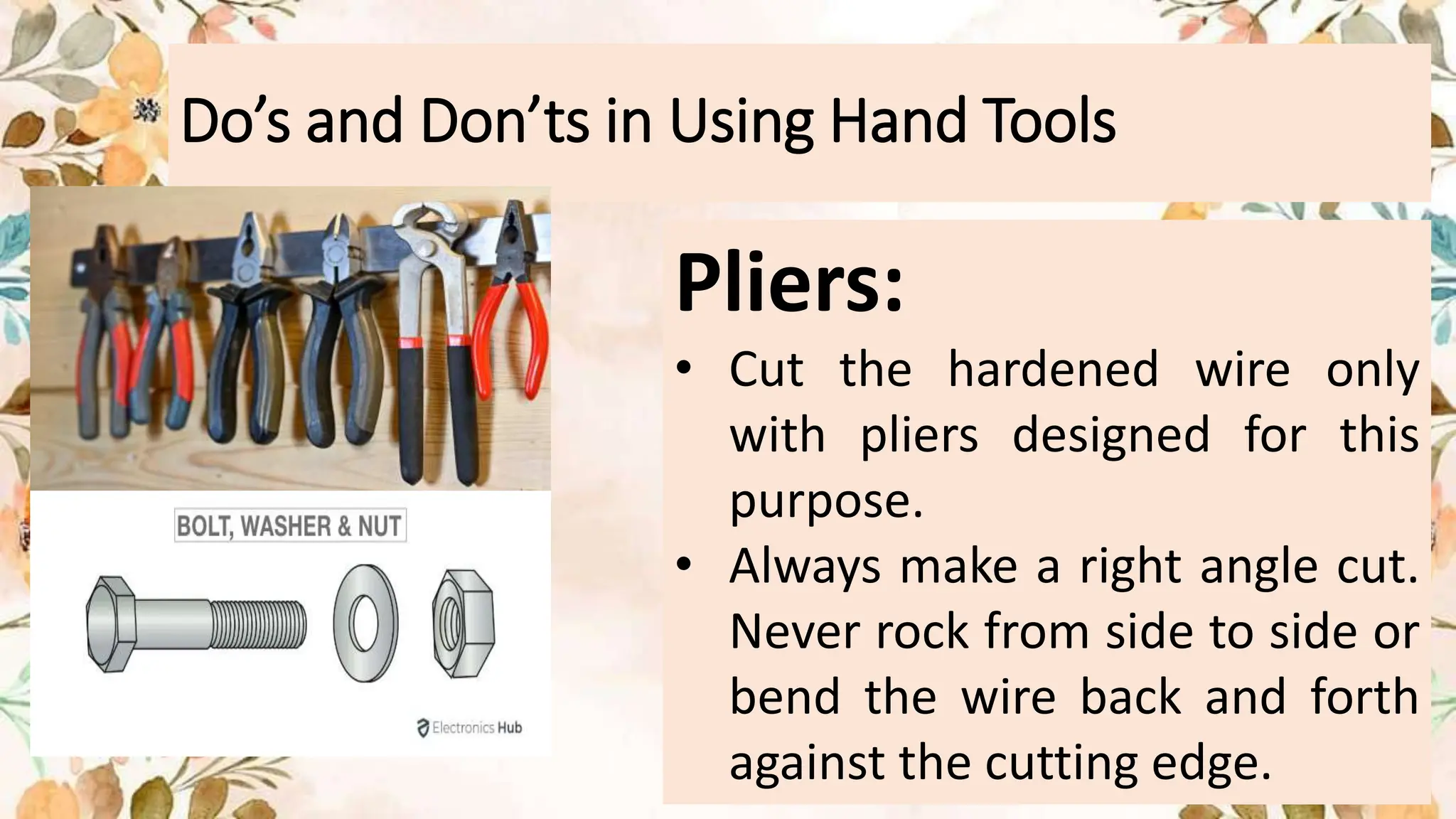
Pliers:
• Cut the hardened wire only
with pliers designed for this
purpose.
• Always make a right angle cut.
Never rock from side to side or
bend the wire back and forth
against the cutting edge.
Do’s and Don’ts in Using Hand Tools
Screwdrivers:
• Never use a screwdriver as a
pry bar, a chisel, a punch stirrer
or a scraper.
Pry bar
chisel
scraper
Do’s and Don’ts in Using Hand Tools
Screwdrivers:
• Always use a
screwdriver tip that
best fits the screw
slot properly.
• Throw the
screwdrivers away
with damaged or
rusty handles.
Do’s and Don’ts in Using Hand Tools
Screwdrivers:
• Never use pliers on the
screwdriver for additional
leverage. Only use specially
designed wrench or
screwdrivers to accept
them.
Do’s and Don’ts in Using Hand Tools
Utility Knives/ Blades:
• Always use a sharp blade. Dull blades require more
force, so they are more likely to slip. Replace the blade
when the blade starts to "tear" instead of cutting.
• Never leave the knife unattended with the blade
exposed. Consider using a self-retracted knife with a
spring-loaded black knife. (The blade will retract when
the pressure is removed.
• Keep your free hand away from the cutting line.
• Do not bend or apply side loads to blades by using
them to open cans or pay loose objects. Blades are
brittle and can break easily.
Proper Use of Tools
Proper use of tools helps prevent accidents and harm
to the equipment and people. There is a right tool for
every job. As a future computer technician, you must
have the proper knowledge of the correct usage of
each tool and the proper tools used for the current
tasks.
Skilful use of tools and software’s makes the job easier
and less difficult. It will ensure that tasks are carried
out correctly and safely.
Hardware Tools
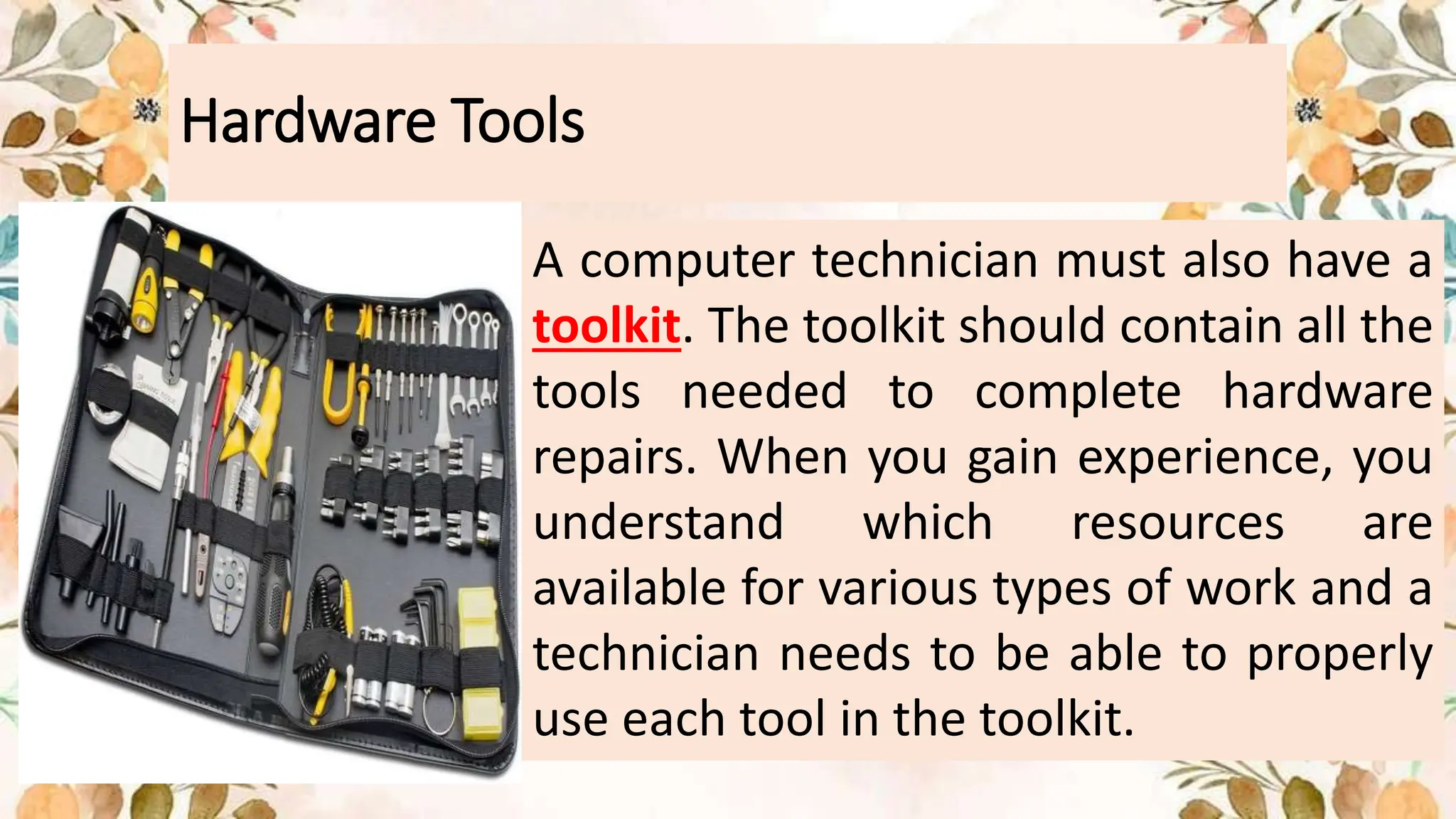
A computer technician must also have a
toolkit. The toolkit should contain all the
tools needed to complete hardware
repairs. When you gain experience, you
understand which resources are
available for various types of work and a
technician needs to be able to properly
use each tool in the toolkit.
Hand Tools
The majority of tools used in the computer
assembly process are small hand tools. They
can be used individually or as part of a
computer repair toolkit. Toolkits are widely
available in size, quality, and price.
Screws
• Match each screw to the proper screwdriver.
• Place the tip of the screwdriver on the screw
head.
• Turn the screwdriver clockwise to tighten the
screw and release the screw in the counter
clockwise direction.
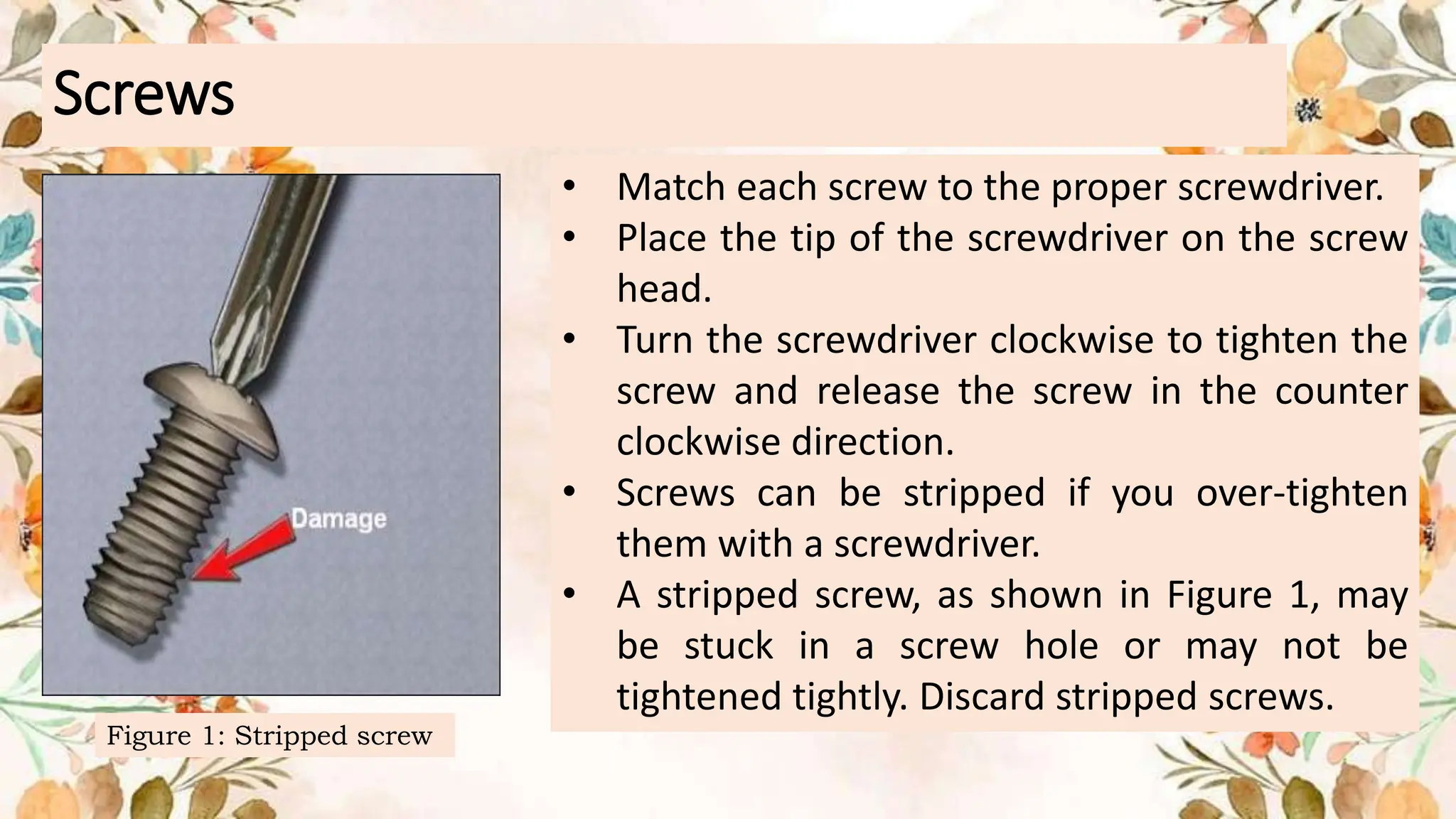
• Screws can be stripped if you over-tighten
them with a screwdriver.
• A stripped screw, as shown in Figure 1, may
be stuck in a screw hole or may not be
tightened tightly. Discard stripped screws.
Figure 1: Stripped screw
Screws
Flat-Head Screwdriver
• Use a flat-head screwdriver while
working with a slotted screw.
• Don't use a flat-head screwdriver to
remove a Phillips-head screw.
• Never use a screwdriver as a pry
bar. If the component cannot be
removed, check to see if there is a
clip or lock that secures the
component in place.
Screws
CAUTION
If excessive force is required to
remove or add a part, something
may be wrong. Take a second look
to make sure you haven't lost a
screw or a lock clip that keeps the
part in place.
Screws Phillips-Head Screwdriver
Use a Phillips-head screwdriver with
crosshead screws. Do not use this type
of screwdriver to puncture anything.
This will damage the head of the
screwdriver.
How to use Screwdrivers
Start with creating a pilot hole
When you screw into wood, it's a
good idea to make a pilot hole
first. This means that the screw
goes straight. Screws appear to
fit the grain of the wood, resulting
in skew screws. An extra
advantage is that the pilot holes
keep the wood from splitting
when you push the screw in.
How to use Screwdrivers
Start the screw
Place the screw on the tip of the
screwdriver and hold the fingers of
one hand tightly. Apply a little
gentle pressure on the screwdriver
while turning clockwise until the
screw starts to move into the wood.
How to use Screwdrivers
Keep driving
When the thread of the screws comes
into contact with the wood, you can
release your fingers that held it in place.
Keep hold of the tip of the screwdriver
as a guide. Keep pressing and turning
clockwise, until the screw is firmly in
place.
How to use Screwdrivers
Hex Driver
• A hex screwdriver is a type of
screwdriver that has a hexagonal tip
for driving certain nuts, bolts and
screws. Hex screwdrivers, like all
types of screwdrivers, are available
in a wide variety of regular and
metric sizes.
How to use Screwdrivers
Hex Driver
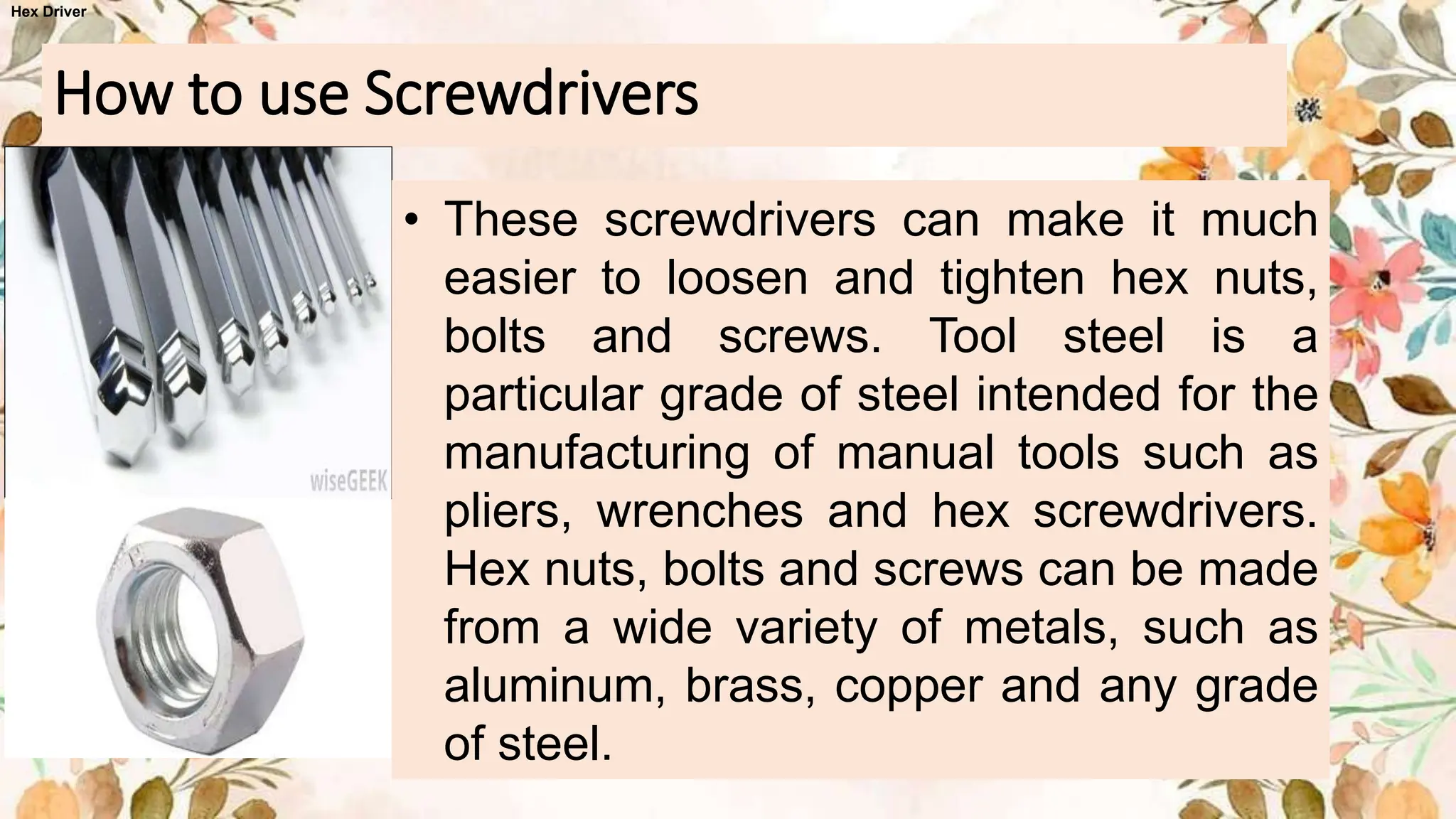
• These screwdrivers can make it much
easier to loosen and tighten hex nuts,
bolts and screws. Tool steel is a
particular grade of steel intended for the
manufacturing of manual tools such as
pliers, wrenches and hex screwdrivers.
Hex nuts, bolts and screws can be made
from a wide variety of metals, such as
aluminum, brass, copper and any grade
of steel.
How to use Screwdrivers
Hex Driver
• However, most types of
screwdrivers are almost entirely
made of steel materials. Tool
steel is a very hard, robust
grade of steel that holds well to
daily wear and is very solid at
high temperatures.
How to use Screwdrivers
Hex Driver
Use the hex driver shown in Figure
2 to loosen and tighten the bolts
with a hexagonal (six-sided) head.
Hex bolts should not be over-
tightened because the threads of the
bolts can be stripped. Don't use a
hex driver that's too large for the
bolt you 're using.
Figure 2: Hex driver
How to use Screwdrivers
Hex Driver
CAUTION
Some of the tools are magnetized. When
operating with electronic devices, be sure
that the tools you use have not been
magnetized. Magnetic fields may be harmful
to data stored in magnetic media. Check the
tool by touching the tool with a screw. If the
screw is attracted to the tool, do not use the
tool.
Figure 2: Hex driver
How to use Screwdrivers
Hex Driver
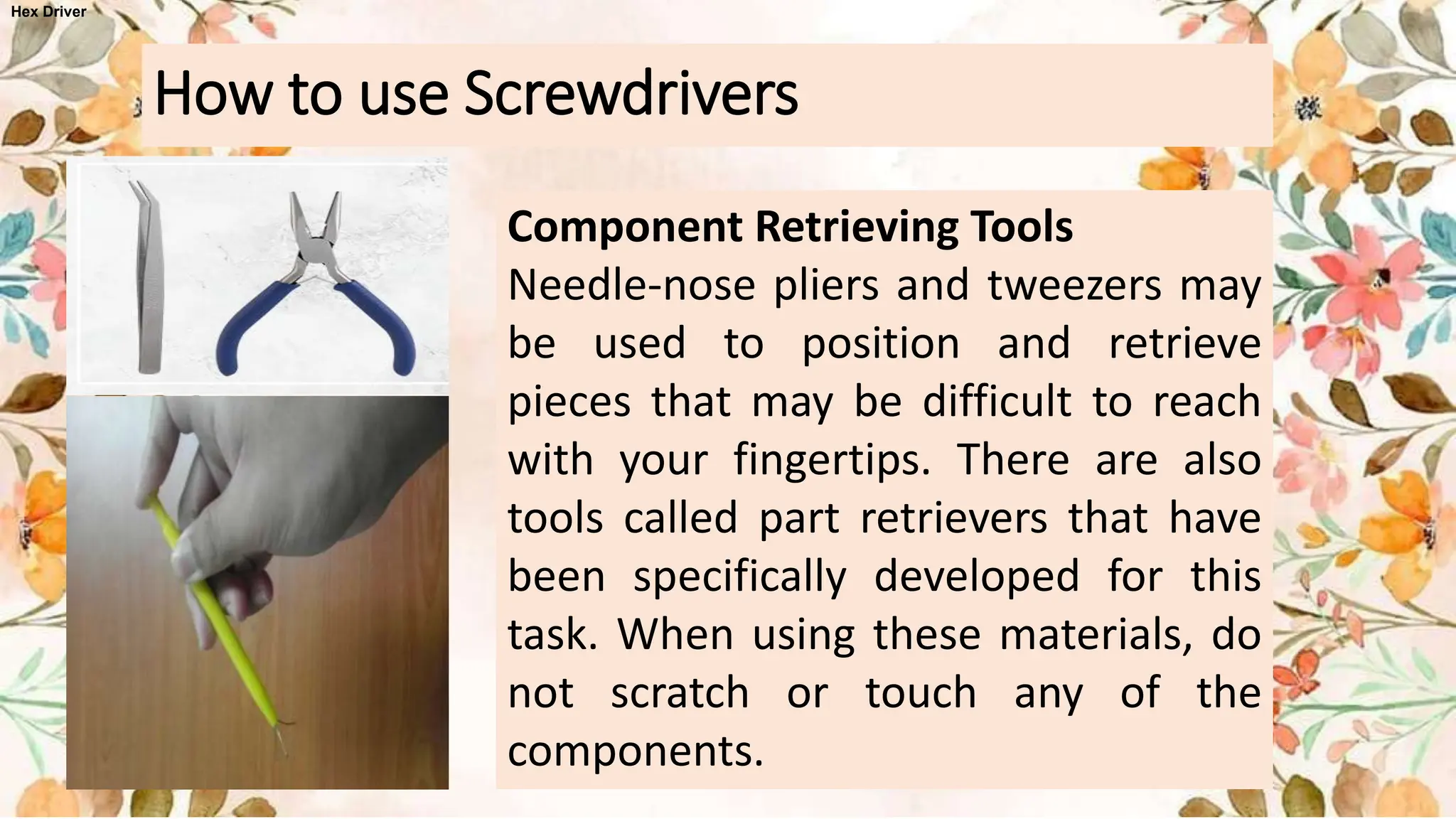
Component Retrieving Tools
Needle-nose pliers and tweezers may
be used to position and retrieve
pieces that may be difficult to reach
with your fingertips. There are also
tools called part retrievers that have
been specifically developed for this
task. When using these materials, do
not scratch or touch any of the
components.
How to use Screwdrivers
Hex Driver
CAUTION
Pencils cannot be used inside the computer to
adjust the settings of the switches or to delete
the jumpers. The pencil lead can serve as a
conductor and can damage the components of
the computer.
Hex Driver
Computer technicians need the right tools to work safely and to
prevent damage to computer equipment. A technician uses a
number of tools to diagnose and repair computer problems:
Various specialized equipment, such as Torx bits, antistatic bags
and gloves, and integrated circuit pullers, can be used for repair
and maintenance of computers. Often avoid magnetized tools,
such as magnetic head screwdrivers, or tool that use magnet
extensions to recover small metal items that are out of control.
Using magnetic tools can cause data loss on hard drives and
floppy disks.
FACT OR BLUFF
1. Hand tools are versatile and can be used for various tasks
in day-to-day activities.
2. A computer tool kit is essential for performing repair work
on a PC to ensure the use of proper hand tools and
equipment.
3. Hand tools can be manually operated using force or
electrically powered using electrical current.
4. Flathead screwdrivers are primarily used for tightening or
loosening cross-head screws.
5. Torx screwdrivers are used to tighten or loosen screws with
a star-like depression on the top, commonly found in
laptops.
FACT OR BLUFF
6. Hex drivers are primarily used for tightening nuts in
the same way that pliers tighten screws.
7. Needle-nose pliers are used to hold small parts
securely.
8. Wire cutters are used to strip and cut wires.
9. Tweezers are useful for manipulating small parts.
10.Part retrievers are specialized tools used to
retrieve parts from locations too small for hands to
reach.
FACT OR BLUFF
11.The two most common hazards associated with hand tools
are misuse and improper maintenance.
12.Eye protection is a minimum requirement for Personal
Protective Equipment (PPE) when using hand tools.
13.Pliers can be extended for additional power without the
risk of cracks or breaks.
14.Screwdrivers should never be used as pry bars, chisels,
punches, stirrers, or scrapers.
15.Utility knives with dull blades are safer to use as they
require more force and are less likely to slip.

CSS Handling of Tools.pptx

  • 1.
  • 2.
    LESSON OBJECTIVES: • identifydifferent types of hand tools used in computer assembly and repair tasks, as well as understand their functions and significance. • demonstrate proper handling and usage of hand tools by actively participating in hands-on practice sessions under supervision. • appreciate the importance of hand tools in technology and livelihood education, recognizing their role in ensuring efficiency, safety, and quality in computer-related tasks, and reflecting on how these skills can be applied in real-life situations.
  • 3.
    Identifying and SelectingDifferent Types of Hand Tools •Hand tools are useful for day-to-day activities. There are various types of tools that can be used to perform different types of task. Most devices are flexible and some have specific functions.
  • 4.
    Preparing Hand Tools •Before you do some repair work on your PC — in fact, before you even think about taking off the cover of your computer, we suggest that you provide yourself with a computer tool kit. The use of proper hand tools and equipment is very important in computer applications. A successful trouble-shooter must have knowledge of tools and equipment.
  • 5.
    Preparing Hand Tools •Ahand tool is a device for performing work on a material or a physical system using only hands. •The hands tools can be manually used employing force, or electrically powered, using electrical current.
  • 6.
    Hand Tools Flat headscrewdriver -used to loosen or tighten slotted screws.
  • 7.
    Hand Tools Phillips headscrewdriver - used to loosen or tighten cross-head screws
  • 8.
    Hand Tools Torx screwdriverused to loosen or tighten screws that have a star-like depression on top, a feature that is mainly found on laptop.
  • 9.
    Hand Tools Hex driversometimes called a nut driver, is used to tighten nuts in the same way that a screwdriver tightens screws.
  • 10.
    Hand Tools Needle NoisePlier – used to hold small parts
  • 11.
    Hand Tools Wire cutter– use to strip and cut wires.
  • 12.
    Hand Tools Tweezers –used to manipulate small parts.
  • 13.
    Hand Tools Part retriever– used to retrieve small parts that are too small for your hands to fit.
  • 14.
    Faulty or UnsafeHand Tools Hand tools include a wide variety of non- powered devices, such as wrenches, pliers, hammers and screwdrivers. Such devices may seem harmless, but they cause a lot of injuries. The following are hand tools related to safety procedures.
  • 15.
    General hazards: • Thetwo most common hazards associated with the use of hand tools include misuse and improper maintenance. • Misuse occurs when a hand tool is being used for something other than its intended purpose. An example of misuse is when we use a screwdriver as a chisel, which could cause the tip to break and strike someone. • Improper maintenance causes hand tools to deteriorate in an unsafe condition. A good example is when include broken wooden handles that cause the head of the tool to fly off or mushroomed heads that can break upon impact.
  • 16.
    General hazards: • Placehazardous devices in a safe environment. For example, use non-sparkling devices in the presence of flammable vapors and dust. Insulated equipment with appropriate ratings must be used for electrical work.
  • 17.
    Personal Protective Equipment: •The type of Personal Protective Equipment required for the use of tools depends on the nature of the task. At a minimum, eye protection should always be worn. • The use of hand gloves protection can also be necessary to provide protection against wounds, abrasion, and repetitive impacts.
  • 18.
    Do’s and Don’tsin Using Hand Tools Pliers: • Do not increase the handle length of the pliers in order to gain more power. Use the larger pair of pliers or bolt cutters. • Do not replace the pliers with the wrench when you turn the bolts and nuts. Pliers cannot properly grip and slip these items. • Never use pliers as a hammer on your handle. Such abuses are likely to cause cracks or breaks.
  • 19.
    Do’s and Don’tsin Using Hand Tools Pliers: • Cut the hardened wire only with pliers designed for this purpose. • Always make a right angle cut. Never rock from side to side or bend the wire back and forth against the cutting edge.
  • 20.
    Do’s and Don’tsin Using Hand Tools Screwdrivers: • Never use a screwdriver as a pry bar, a chisel, a punch stirrer or a scraper. Pry bar chisel scraper
  • 21.
    Do’s and Don’tsin Using Hand Tools Screwdrivers: • Always use a screwdriver tip that best fits the screw slot properly. • Throw the screwdrivers away with damaged or rusty handles.
  • 22.
    Do’s and Don’tsin Using Hand Tools Screwdrivers: • Never use pliers on the screwdriver for additional leverage. Only use specially designed wrench or screwdrivers to accept them.
  • 23.
    Do’s and Don’tsin Using Hand Tools Utility Knives/ Blades: • Always use a sharp blade. Dull blades require more force, so they are more likely to slip. Replace the blade when the blade starts to "tear" instead of cutting. • Never leave the knife unattended with the blade exposed. Consider using a self-retracted knife with a spring-loaded black knife. (The blade will retract when the pressure is removed. • Keep your free hand away from the cutting line. • Do not bend or apply side loads to blades by using them to open cans or pay loose objects. Blades are brittle and can break easily.
  • 24.
    Proper Use ofTools Proper use of tools helps prevent accidents and harm to the equipment and people. There is a right tool for every job. As a future computer technician, you must have the proper knowledge of the correct usage of each tool and the proper tools used for the current tasks. Skilful use of tools and software’s makes the job easier and less difficult. It will ensure that tasks are carried out correctly and safely.
  • 25.
    Hardware Tools A computertechnician must also have a toolkit. The toolkit should contain all the tools needed to complete hardware repairs. When you gain experience, you understand which resources are available for various types of work and a technician needs to be able to properly use each tool in the toolkit.
  • 26.
    Hand Tools The majorityof tools used in the computer assembly process are small hand tools. They can be used individually or as part of a computer repair toolkit. Toolkits are widely available in size, quality, and price.
  • 27.
    Screws • Match eachscrew to the proper screwdriver. • Place the tip of the screwdriver on the screw head. • Turn the screwdriver clockwise to tighten the screw and release the screw in the counter clockwise direction. • Screws can be stripped if you over-tighten them with a screwdriver. • A stripped screw, as shown in Figure 1, may be stuck in a screw hole or may not be tightened tightly. Discard stripped screws. Figure 1: Stripped screw
  • 28.
    Screws Flat-Head Screwdriver • Usea flat-head screwdriver while working with a slotted screw. • Don't use a flat-head screwdriver to remove a Phillips-head screw. • Never use a screwdriver as a pry bar. If the component cannot be removed, check to see if there is a clip or lock that secures the component in place.
  • 29.
    Screws CAUTION If excessive forceis required to remove or add a part, something may be wrong. Take a second look to make sure you haven't lost a screw or a lock clip that keeps the part in place.
  • 30.
    Screws Phillips-Head Screwdriver Usea Phillips-head screwdriver with crosshead screws. Do not use this type of screwdriver to puncture anything. This will damage the head of the screwdriver.
  • 31.
    How to useScrewdrivers Start with creating a pilot hole When you screw into wood, it's a good idea to make a pilot hole first. This means that the screw goes straight. Screws appear to fit the grain of the wood, resulting in skew screws. An extra advantage is that the pilot holes keep the wood from splitting when you push the screw in.
  • 32.
    How to useScrewdrivers Start the screw Place the screw on the tip of the screwdriver and hold the fingers of one hand tightly. Apply a little gentle pressure on the screwdriver while turning clockwise until the screw starts to move into the wood.
  • 33.
    How to useScrewdrivers Keep driving When the thread of the screws comes into contact with the wood, you can release your fingers that held it in place. Keep hold of the tip of the screwdriver as a guide. Keep pressing and turning clockwise, until the screw is firmly in place.
  • 34.
    How to useScrewdrivers Hex Driver • A hex screwdriver is a type of screwdriver that has a hexagonal tip for driving certain nuts, bolts and screws. Hex screwdrivers, like all types of screwdrivers, are available in a wide variety of regular and metric sizes.
  • 35.
    How to useScrewdrivers Hex Driver • These screwdrivers can make it much easier to loosen and tighten hex nuts, bolts and screws. Tool steel is a particular grade of steel intended for the manufacturing of manual tools such as pliers, wrenches and hex screwdrivers. Hex nuts, bolts and screws can be made from a wide variety of metals, such as aluminum, brass, copper and any grade of steel.
  • 36.
    How to useScrewdrivers Hex Driver • However, most types of screwdrivers are almost entirely made of steel materials. Tool steel is a very hard, robust grade of steel that holds well to daily wear and is very solid at high temperatures.
  • 37.
    How to useScrewdrivers Hex Driver Use the hex driver shown in Figure 2 to loosen and tighten the bolts with a hexagonal (six-sided) head. Hex bolts should not be over- tightened because the threads of the bolts can be stripped. Don't use a hex driver that's too large for the bolt you 're using. Figure 2: Hex driver
  • 38.
    How to useScrewdrivers Hex Driver CAUTION Some of the tools are magnetized. When operating with electronic devices, be sure that the tools you use have not been magnetized. Magnetic fields may be harmful to data stored in magnetic media. Check the tool by touching the tool with a screw. If the screw is attracted to the tool, do not use the tool. Figure 2: Hex driver
  • 39.
    How to useScrewdrivers Hex Driver Component Retrieving Tools Needle-nose pliers and tweezers may be used to position and retrieve pieces that may be difficult to reach with your fingertips. There are also tools called part retrievers that have been specifically developed for this task. When using these materials, do not scratch or touch any of the components.
  • 40.
    How to useScrewdrivers Hex Driver CAUTION Pencils cannot be used inside the computer to adjust the settings of the switches or to delete the jumpers. The pencil lead can serve as a conductor and can damage the components of the computer.
  • 41.
    Hex Driver Computer techniciansneed the right tools to work safely and to prevent damage to computer equipment. A technician uses a number of tools to diagnose and repair computer problems: Various specialized equipment, such as Torx bits, antistatic bags and gloves, and integrated circuit pullers, can be used for repair and maintenance of computers. Often avoid magnetized tools, such as magnetic head screwdrivers, or tool that use magnet extensions to recover small metal items that are out of control. Using magnetic tools can cause data loss on hard drives and floppy disks.
  • 42.
    FACT OR BLUFF 1.Hand tools are versatile and can be used for various tasks in day-to-day activities. 2. A computer tool kit is essential for performing repair work on a PC to ensure the use of proper hand tools and equipment. 3. Hand tools can be manually operated using force or electrically powered using electrical current. 4. Flathead screwdrivers are primarily used for tightening or loosening cross-head screws. 5. Torx screwdrivers are used to tighten or loosen screws with a star-like depression on the top, commonly found in laptops.
  • 43.
    FACT OR BLUFF 6.Hex drivers are primarily used for tightening nuts in the same way that pliers tighten screws. 7. Needle-nose pliers are used to hold small parts securely. 8. Wire cutters are used to strip and cut wires. 9. Tweezers are useful for manipulating small parts. 10.Part retrievers are specialized tools used to retrieve parts from locations too small for hands to reach.
  • 44.
    FACT OR BLUFF 11.Thetwo most common hazards associated with hand tools are misuse and improper maintenance. 12.Eye protection is a minimum requirement for Personal Protective Equipment (PPE) when using hand tools. 13.Pliers can be extended for additional power without the risk of cracks or breaks. 14.Screwdrivers should never be used as pry bars, chisels, punches, stirrers, or scrapers. 15.Utility knives with dull blades are safer to use as they require more force and are less likely to slip.

Editor's Notes

  • #18 Eye Protection: Eye protection, such as safety goggles or glasses, is essential because many tasks involving hand tools can produce flying debris, sparks, or dust particles that could potentially injure the eyes. For example, when using tools like grinders, drills, or hammers, there is a risk of particles being ejected into the air, posing a significant hazard to the eyes. Therefore, wearing eye protection is crucial to prevent eye injuries and maintain vision health. Hand Gloves: Hand gloves are necessary for tasks that involve handling sharp objects, rough surfaces, or repetitive impacts. For instance, when using hand tools like pliers, wire cutters, or hammers, there is a risk of cuts, abrasions, or blisters due to friction or impact. Hand gloves provide a protective barrier against these hazards, reducing the risk of injuries and promoting comfort during prolonged use. Additionally, gloves can offer insulation against electrical shocks when working with live wires or components, further enhancing safety.
  • #19 Handle Length: Increasing the handle length of pliers to gain more power is not recommended. Pliers are designed with specific handle lengths to provide optimal leverage for gripping and cutting. Modifying the handle length can affect the tool's balance and may lead to instability or loss of control during use. Instead, for tasks requiring more power, it is advisable to use a larger pair of pliers or specialized bolt cutters designed for the job. Bolts and Nuts: Pliers are not suitable replacements for wrenches when turning bolts and nuts. Wrenches are designed with jaws that provide a better grip on bolts and nuts, minimizing the risk of slipping and damage to the fasteners. Attempting to use pliers in such situations can result in inadequate grip, leading to rounded or damaged bolt heads and nuts. To ensure proper fastening or loosening of bolts and nuts, always use the appropriate wrench size for the job. Avoiding Abuse: Using pliers as a hammer by striking them against a surface can cause structural damage to the tool. Pliers are not designed to withstand the impact forces generated when used in this manner, and such abuse can lead to cracks or breaks in the handles or jaws of the pliers. Additionally, striking the handle of pliers with a hammer can cause misalignment or deformation, compromising their functionality. To avoid potential damage and ensure the longevity of pliers, always use them for their intended purpose and refrain from using them as improvised hammers. In summary, following these guidelines ensures the safe and effective use of pliers, minimizing the risk of accidents and damage to both the tool and the workpiece. By using pliers correctly and respecting their limitations, technicians can maintain tool integrity and achieve optimal results in various tasks requiring gripping, cutting, or bending.
  • #20 Use Properly Designed Pliers: Cutting hardened wire requires specialized pliers designed for this purpose. Regular or standard pliers may not have the necessary strength or durability to cut through hardened wire effectively. Using the appropriate tool ensures efficient cutting and minimizes the risk of damage to the pliers or injury to the user. Make Right Angle Cuts: When cutting hardened wire with pliers, it is essential to make right angle cuts perpendicular to the wire's axis. Making cuts at an angle or diagonally can result in uneven or jagged edges, compromising the integrity of the wire and potentially causing it to splinter or break. Right angle cuts ensure clean, precise cuts and maintain the structural integrity of the wire for optimal performance. Avoid Rocking or Bending the Wire: Rocking the wire from side to side or bending it back and forth against the cutting edge of the pliers can weaken the wire and lead to premature failure or breakage. These actions put unnecessary stress on both the wire and the cutting edge of the pliers, increasing the risk of damage to both. By avoiding rocking or bending motions and making straight, decisive cuts, technicians can preserve the wire's strength and ensure smooth, consistent cutting with minimal effort.
  • #21 Avoid Using as a Pry Bar: Using a screwdriver as a pry bar involves applying force to the tool in a way that it was not designed for. This can lead to bending or breaking of the screwdriver shaft, damaging the handle, or causing injury to the user. Pry bars are specifically designed for prying tasks and are better suited to handle the forces involved without risking damage. Avoid Using as a Chisel: Using a screwdriver as a chisel involves striking the tip of the screwdriver with a hammer or mallet to cut or shape materials. This can cause the tip of the screwdriver to deform, chip, or break, rendering it ineffective for its intended purpose. Chisels are designed with hardened blades and reinforced handles to withstand the forces involved in cutting and shaping tasks safely. Avoid Using as a Punch or Stirrer: Using a screwdriver as a punch involves driving the tip of the screwdriver into a material to create or enlarge holes. This can damage the screwdriver tip, causing it to become misaligned or deformed. Similarly, using a screwdriver as a stirrer involves agitating or mixing substances, which can cause contamination or damage to the screwdriver. Punches and stirrers are designed with specific features to handle these tasks effectively without risking damage to the tool. Avoid Using as a Scraper: Using a screwdriver as a scraper involves scraping or removing material from a surface using the blade or edge of the screwdriver tip. This can dull or damage the tip of the screwdriver, making it less effective for driving or removing screws. Scrapers are designed with hardened blades and ergonomic handles to safely and efficiently remove material from surfaces without damaging the tool.
  • #22 Another term for "security T" could be "tamper-resistant Torx." Torx is a type of screw head characterized by a six-point star shape, and the tamper-resistant variant features a pin in the center of the screw head to prevent standard Torx drivers from being inserted. This design enhances security by making it more difficult for unauthorized individuals to tamper with or remove the screw. Pozidriv" is a type of screw drive system, similar to Phillips but with additional features designed to reduce cam-out and improve torque transmission. The Pozidriv system has an "X"-shaped pattern on the screw head with additional small ribs radiating out from each arm of the cross. This design allows for better engagement between the screwdriver and the screw, reducing the risk of slippage and damage to the screw head. If you're looking for another term for "Pozidriv," it's sometimes abbreviated as "PZ" or referred to as "PZ screw" or "PZ drive."
  • #23 Risk of Damage: Pliers may slip or exert uneven pressure on the screwdriver, causing it to bend, break, or strip. This can damage the screwdriver, making it less effective or even unusable for future tasks. Safety Concerns: Attempting to force a screw with pliers on a screwdriver can result in the screwdriver slipping out of the screw head unexpectedly, leading to potential injuries from the sudden release of force. Decreased Precision: Pliers lack the precision and control provided by properly designed wrenches or screwdrivers. Using the wrong tool can make it difficult to accurately position the tool and apply the necessary torque, increasing the likelihood of mistakes or accidents. To mitigate these risks, it's important to use tools specifically designed for the task at hand. Specially designed wrenches or screwdrivers are engineered to provide the necessary leverage and grip to tighten or loosen screws safely and effectively. By using the correct tool for the job, individuals can work more efficiently, reduce the risk of accidents, and prolong the lifespan of their tools.
  • #43 Fact: Hand tools are versatile and can be used for various tasks in day-to-day activities. Fact: A computer tool kit is essential for performing repair work on a PC to ensure the use of proper hand tools and equipment. Fact: Hand tools can be manually operated using force or electrically powered using electrical current. Bluff: Flathead screwdrivers are primarily used for tightening or loosening cross-head screws. Fact: Torx screwdrivers are used to tighten or loosen screws with a star-like depression on the top, commonly found in laptops. Bluff: Hex drivers are primarily used for tightening nuts in the same way that pliers tighten screws. Fact: Needle-nose pliers are used to hold small parts securely. Fact: Wire cutters are used to strip and cut wires. Fact: Tweezers are useful for manipulating small parts. Fact: Part retrievers are specialized tools used to retrieve parts from locations too small for hands to reach. Fact: The two most common hazards associated with hand tools are misuse and improper maintenance. Fact: Eye protection is a minimum requirement for Personal Protective Equipment (PPE) when using hand tools. Bluff: Pliers can be extended for additional power without the risk of cracks or breaks. Fact: Screwdrivers should never be used as pry bars, chisels, punches, stirrers, or scrapers. Bluff: Utility knives with dull blades are safer to use as they require more force and are less likely to slip.      
  • #44 Fact: Hand tools are versatile and can be used for various tasks in day-to-day activities. Fact: A computer tool kit is essential for performing repair work on a PC to ensure the use of proper hand tools and equipment. Fact: Hand tools can be manually operated using force or electrically powered using electrical current. Bluff: Flathead screwdrivers are primarily used for tightening or loosening cross-head screws. Fact: Torx screwdrivers are used to tighten or loosen screws with a star-like depression on the top, commonly found in laptops. Bluff: Hex drivers are primarily used for tightening nuts in the same way that pliers tighten screws. Fact: Needle-nose pliers are used to hold small parts securely. Fact: Wire cutters are used to strip and cut wires. Fact: Tweezers are useful for manipulating small parts. Fact: Part retrievers are specialized tools used to retrieve parts from locations too small for hands to reach. Fact: The two most common hazards associated with hand tools are misuse and improper maintenance. Fact: Eye protection is a minimum requirement for Personal Protective Equipment (PPE) when using hand tools. Bluff: Pliers can be extended for additional power without the risk of cracks or breaks. Fact: Screwdrivers should never be used as pry bars, chisels, punches, stirrers, or scrapers. Bluff: Utility knives with dull blades are safer to use as they require more force and are less likely to slip.      
  • #45 Fact: Hand tools are versatile and can be used for various tasks in day-to-day activities. Fact: A computer tool kit is essential for performing repair work on a PC to ensure the use of proper hand tools and equipment. Fact: Hand tools can be manually operated using force or electrically powered using electrical current. Bluff: Flathead screwdrivers are primarily used for tightening or loosening cross-head screws. Fact: Torx screwdrivers are used to tighten or loosen screws with a star-like depression on the top, commonly found in laptops. Bluff: Hex drivers are primarily used for tightening nuts in the same way that pliers tighten screws. Fact: Needle-nose pliers are used to hold small parts securely. Fact: Wire cutters are used to strip and cut wires. Fact: Tweezers are useful for manipulating small parts. Fact: Part retrievers are specialized tools used to retrieve parts from locations too small for hands to reach. Fact: The two most common hazards associated with hand tools are misuse and improper maintenance. Fact: Eye protection is a minimum requirement for Personal Protective Equipment (PPE) when using hand tools. Bluff: Pliers can be extended for additional power without the risk of cracks or breaks. Fact: Screwdrivers should never be used as pry bars, chisels, punches, stirrers, or scrapers. Bluff: Utility knives with dull blades are safer to use as they require more force and are less likely to slip.