CSD4040 Oct 2014 
Finding research evidence 
http:// unihub.mdx.ac.uk / study / library
In this workshop we will look at... 
• How to find information 
• Developing an effective search strategy 
• Resources available and how to use them 
• Evaluating information for quality and relevance 
• Managing references
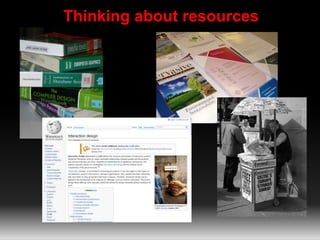
Thinking about resources
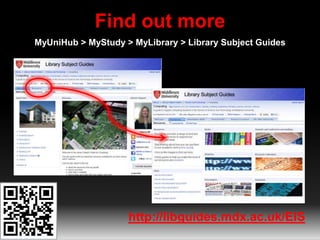
Find out more 
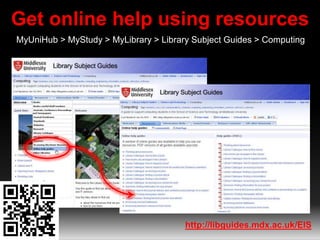
MyUniHub > MyStudy > MyLibrary > Library Subject Guides 
http://libguides.mdx.ac.uk/EIS
Thinking about keywords 
http://www.flickr.com/photos/rossjamesparker/89414788/
The real thing 
Algorithmic Biology, Formal Methods and Quantum 
Information Processing or Artificial Intelligence. 
•Keywords 
•Alternative keywords 
•More specific keywords 
•Related subjects
So far so good 
So far we’ve looked at: 
• The range of resources available 
• Choosing the right resource 
• Coming up with useful keywords 
Next: 
• Searching and evaluating information
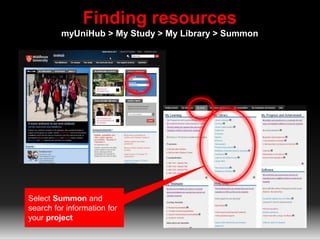
Finding resources 
myUniHub > My Study > My Library > Summon 
Select Summon and 
search for information for 
your project
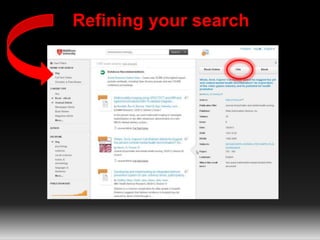
Refining your search
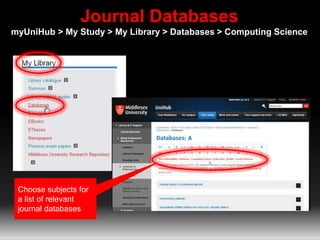
Journal Databases 
myUniHub > My Study > My Library > Databases > Computing Science 
Choose subjects for 
a list of relevant 
journal databases
Summon and journal databases provide: 
• Access to quality information 
• Information not available elsewhere 
• Up-to-date 
• Focussed/specific 
• Full-text access 
• Access on/off campus 
• Personalize 
• Citation and journal impact info
Citation searching 
• Which articles have cited an earlier article 
• Find articles on similar/related subject 
• How many times an article has been cited 
• Best journals in your field
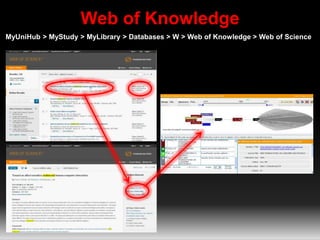
Web of Knowledge 
MyUniHub > MyStudy > MyLibrary > Databases > W > Web of Knowledge > Web of Science
Get online help using resources 
MyUniHub > MyStudy > MyLibrary > Library Subject Guides > Computing 
http://libguides.mdx.ac.uk/EIS
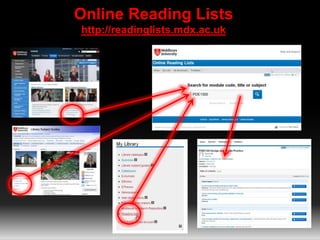
Online Reading Lists 
http://readinglists.mdx.ac.uk 
PDE1300
Keeping up-to-date with your subject 
• Zetoc Alert 
• TicTOC 
• Google Alerts 
More information on Library Subject Guide: 
http://bit.ly/CSkeepingcurrent
It’s not in the Library! 
• Inter Library Loans http://bit.ly/InterLibraryLoans 
• Sconul Access http://www.access.sconul.ac.uk/sconul-access 
• Other libraries http://bit.ly/visitingotherlibraries
But is it any good?
Evaluating information 
Imagine you are writing an essay on ‘Network Security’. 
Have a look at the 4 items that you have been given and 
consider the following: 
• Which items are the most relevant to your essay? 
• Which items would be no use? 
• Which item has the most academic authority? 
• Which items might have bias? 
• Which item is the most current?
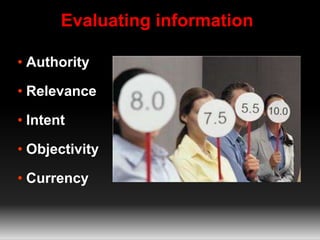
Evaluating information 
• Authority 
• Relevance 
• Intent 
• Objectivity 
• Currency
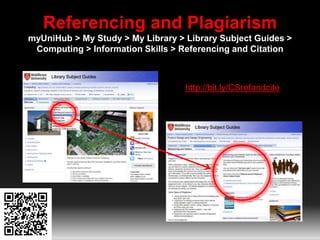
Referencing and Plagiarism 
myUniHub > My Study > My Library > Library Subject Guides > 
Computing > Information Skills > Referencing and Citation 
http://bit.ly/CSrefandcite
Managing your references 
• Use bibliographic management software 
• RefWorks and Flow 
• http://bit.ly/BibManSoftwareMDX
Keeping in touch 
• Blog http://satlibrarian.blogspot.com 
• Twitter http://twitter.com/SATlibrarian 
• Library Facebook Middlesex University Library 
• Library Twitter http://twitter.com/MDXLibrary
Need further help? 
Your Librarian is: 
Vanessa Hill v.hill@mdx.ac.uk 
http://unihub.mdx.ac.uk/support/unihelp/

CSD4040 Oct 2014

  • 1.
    CSD4040 Oct 2014 Finding research evidence http:// unihub.mdx.ac.uk / study / library
  • 2.
    In this workshopwe will look at... • How to find information • Developing an effective search strategy • Resources available and how to use them • Evaluating information for quality and relevance • Managing references
  • 3.
  • 5.
    Find out more MyUniHub > MyStudy > MyLibrary > Library Subject Guides http://libguides.mdx.ac.uk/EIS
  • 6.
    Thinking about keywords http://www.flickr.com/photos/rossjamesparker/89414788/
  • 7.
    The real thing Algorithmic Biology, Formal Methods and Quantum Information Processing or Artificial Intelligence. •Keywords •Alternative keywords •More specific keywords •Related subjects
  • 8.
    So far sogood So far we’ve looked at: • The range of resources available • Choosing the right resource • Coming up with useful keywords Next: • Searching and evaluating information
  • 9.
    Finding resources myUniHub> My Study > My Library > Summon Select Summon and search for information for your project
  • 10.
  • 11.
    Journal Databases myUniHub> My Study > My Library > Databases > Computing Science Choose subjects for a list of relevant journal databases
  • 12.
    Summon and journaldatabases provide: • Access to quality information • Information not available elsewhere • Up-to-date • Focussed/specific • Full-text access • Access on/off campus • Personalize • Citation and journal impact info
  • 13.
    Citation searching •Which articles have cited an earlier article • Find articles on similar/related subject • How many times an article has been cited • Best journals in your field
  • 14.
    Web of Knowledge MyUniHub > MyStudy > MyLibrary > Databases > W > Web of Knowledge > Web of Science
  • 15.
    Get online helpusing resources MyUniHub > MyStudy > MyLibrary > Library Subject Guides > Computing http://libguides.mdx.ac.uk/EIS
  • 16.
    Online Reading Lists http://readinglists.mdx.ac.uk PDE1300
  • 17.
    Keeping up-to-date withyour subject • Zetoc Alert • TicTOC • Google Alerts More information on Library Subject Guide: http://bit.ly/CSkeepingcurrent
  • 18.
    It’s not inthe Library! • Inter Library Loans http://bit.ly/InterLibraryLoans • Sconul Access http://www.access.sconul.ac.uk/sconul-access • Other libraries http://bit.ly/visitingotherlibraries
  • 19.
    But is itany good?
  • 21.
    Evaluating information Imagineyou are writing an essay on ‘Network Security’. Have a look at the 4 items that you have been given and consider the following: • Which items are the most relevant to your essay? • Which items would be no use? • Which item has the most academic authority? • Which items might have bias? • Which item is the most current?
  • 22.
    Evaluating information •Authority • Relevance • Intent • Objectivity • Currency
  • 23.
    Referencing and Plagiarism myUniHub > My Study > My Library > Library Subject Guides > Computing > Information Skills > Referencing and Citation http://bit.ly/CSrefandcite
  • 24.
    Managing your references • Use bibliographic management software • RefWorks and Flow • http://bit.ly/BibManSoftwareMDX
  • 25.
    Keeping in touch • Blog http://satlibrarian.blogspot.com • Twitter http://twitter.com/SATlibrarian • Library Facebook Middlesex University Library • Library Twitter http://twitter.com/MDXLibrary
  • 26.
    Need further help? Your Librarian is: Vanessa Hill v.hill@mdx.ac.uk http://unihub.mdx.ac.uk/support/unihelp/

Editor's Notes

  • #19 Inter Library Loan service: request copies of books and journals not held by MDX. £3 charge. Register as DL first. More info on our website. SCONUL Access http://www.access.sconul.ac.uk/ The SCONUL Access Scheme provides reciprocal access and borrowing rights for staff and students to approximately 170 member institutions in the UK. Apply online. Other libraries (specialist, catalogues etc): British Library http://www.bl.uk/ COPAC http://copac.ac.uk/ COPAC is a union catalogue that gives access to the merged online catalogues of members of the Consortium of University Research Libraries (CURL). Twenty  major university libraries currently contribute to COPAC. Search25 http://www.search25.ac.uk/: helps you discover library resources across London and the South East. You can also see where the libraries are and find out how to visit them. SUNCAT http://www.suncat.ac.uk/ SUNCAT, a union catalogue of serials (periodicals) for the UK, is a tool for locating serials held in UK libraries.
  • #20 How do you decide if the information is any good? Especially important with the Internet. What do you think about this quote?