CS1064
Spring
2017
In
this
project,
you
will
be
modifying
the
Caesar
Cipher
program
you
completed
earlier
in
the
semester.
We
will
use
multiple
shift
amounts
in
an
attempt
to
make
our
"encryption"
harder
to
crack
and
also
make
our
program
more
general
by
reading
the
message
from
a
file.
Caesar
Cipher
Encryption
Review
The
Caesar
Cipher
is
simple
way
to
“encrypt”
alphabetic
letters
(aside:
don’t
try
encrypt
anything
important
with
the
Caesar
Cipher).
All
remaining
punctuation
symbols,
numeric
digits,
or
other
characters
(spaceing)
remain
unchanged.
Encrypting
a
message
using
the
Caesar
Cipher
involves
replacing
each
letter
in
a
message
with
the
letter
k
places
further
down
the
alphabet,
wrapping
around
at
the
end
of
the
alphabet
when
necessary.
With
k
=
0,
each
letter
is
replaced
by
itself.
With
k
=
20,
each
letter
is
shifted
20
places
down
the
alphabet.
To
decode
or
decrypt
the
text
you
simply
shift
the
encrypted
letter
in
the
opposite
direction
by
k
places
and
wrap
around
as
necessary.
The
letters
in
the
Caesar
Cipher
alphabet
start
at
0
and
continue
through
25,
with
the
letter
"A"
being
0
and
"Z"
being
25.
If
the
user
were
to
choose
k
=
3,
the
letter
"A"
(0)
would
be
replaced
by
the
letter
"D"
(3),
while
the
letter
"B"
(1)
would
be
replaced
by
the
letter
"E"
(4).
If
a
letter
appears
towards
the
end
of
the
alphabet,
the
alphabet
simply
wraps
around
and
starts
again.
So
the
letter
"Z"
(25)
would
be
replaced
by
the
letter
"C"
(25
+
3
=
28),
which
is
2
after
wrapping
around.
The
"wrap
around"
math
is
accomplished
simply
using
the
"modulo"
operator
in
Python
(%)
which
returns
the
remainder
after
integer
division.
If
x
is
the
position
of
some
letter
we
are
trying
to
encrypt,
it
should
be
replaced
by
the
letter
at
the
position
denoted
by
(x
+
k)
%
26,
which
will
be
a
number
between
0
and
25.
For
the
above
example,
25
+
3
=
28,
and
28
%
26
=
2,
or
“C”.
To
decrypt
you
simply
subtract
k
instead
of
adding:
(x
-­‐
k)
%
26.
To
reverse
the
previous
example
we
take
the
result
"C"
=
2,
with
a
shift
of
3,
so
(2-­‐3)
%
26
=
25
giving
us
back
the
letter
"Z".
Shifting
the
Letters
in
Python
Recall
(from
Chapter
4)
that
our
alphabet
in
Python
is
encoded
using
UTF-­‐8
(see
the
table
in
the
slides
or
book),
from
Python’s
perspective
“A”
is
not
0.
Instead,
an
upper
case
"A"
is
represented
by
the
number
65,
"B"
by
66,
and
so
on,
with
capital
"Z"
represented
by
90.
While
a
lower
case
"a"
is
represented
by
the
number
97,
"b"
by
98,
and
so
on,
with
"z"
represented
by
122.
Your
program
will
have
to
account
for
this
when
shifting
the
letters
using
the
formula
above.
Note:
your
program
should
not
change
the
case
of
the
original
text
or
message.
To
obtain
the
UTF-­‐8
values,
you
will
need
to
use
the
built-­‐in
ord(char)
function,
which
accepts
a
string
containing
a
single
letter
and
returns
the
integer
value
of
the
letter.
You
will
also
need
to
use
the
built-­‐in
chr(int)
function
which
accepts
an
integer
and
returns
the
corresponding
Unicode/ASCII
letter.
The
methods
isupper()
and
islower()
may
also
be
useful.
Further,
any
remaining
punctuation
symbols,
numeric
digits,
or
other
characters
(spaces)
should
be
unmodified
and
remain
unchanged
in
the
message.
Chapter
4
contains
examples
of
how
to
identify
and
skip
these
characters
while
encoding,
as
a
hint
you
will
need
to
import string.
CS1064
Spring
2017
Implementation
and
Differences
from
Homework
5
Your
program
should
begin
by
prompting
the
user
for
an
input
file
(which
contains
the
message),
5
shift
amounts
(all
integers),
and
whether
they
would
like
to
encrypt
or
decrypt,
then
our
implementation
will
add
some
variation
to
the
basic
algorithm
to
make
it
a
little
harder
to
decode.
When
encrypting:
(1)
We
will
read
the
text
data
from
the
file
line-­‐by-­‐line,
and
all
of
the
transformations
described
below
be
should
applied
line-­‐by-­‐line.
Before
doing
the
transformations
below
you
should
use
strip()
to
remove
the
whitespace
at
the
ends
of
a
line.
(2)
Like
before,
you'll
replace
each
"e"
character
in
the
original
message
with
the
letters
"zw".
If
the
file
contains
"Hello World!",
the
resulting
message
will
be
"Hzwllo World!".
(3)
Also
like
before,
after
replacing
the
"e"
characters,
you'll
add
the
word
"hokie"
to
the
beginning,
middle
(the
middle
is
length//2),
and
the
end
of
the
message.
Continuing
with
example
above
the
message
that's
actually
encrypted
using
the
Caesar
Cipher
is
"hokieHzwllohokie World!hokie".
This
should
be
done
for
each
line
in
the
file.
Once
you
have
the
altered
message
then
we
will
perform
a
slightly
modified
Caesar
Cipher
encoding
as
described
below
and
print
the
result.
Like
above
this
transformation
is
applied
line-­‐
by-­‐line
and
shouldn't
"cross"
lines.
Rather
than
have
a
single
shift,
instead
we
will
have
5
shift
amounts
entered
by
the
user.
The
shifts
are
applied
character
by
character.
So
if
the
user
enters
shift
amounts:
3 4 5 6 7
and
the
first
line
of
the
file
contains
"Hello
World!",
your
program
will
first
transform
it
into
"hokieHzwllohokie World!hokie"
then:
"h"
would
be
shifted
by
3
characters.
"o"
would
be
shifted
by
4
characters.
"k"
would
be
shifted
by
5
characters.
"i"
would
be
shifted
by
6
characters.
"e"
would
be
shift
by
7
characters.
We
then
start
back
at
the
first
shift
amount:
"H"
would
be
shifted
by
3
characters.
"z"
would
be
shifted
by
4
characters.
"w"
would
be
shifted
by
5
characters.
"l"
would
be
shifted
by
6
characters.
"l"
would
be
shift
by
7
characters.
The
space,
exclamation
point,
and
anything
else
that's
not
a
letter
isn't
shifted,
but
it
does
"take
up"
a
shift
amount.
So
if
the
space
character
would
have
been
shifted
by
3
characters,
the
next
character
would
be
shifted
by
4.
This
continues
until
the
end
of
the
line
is
reached.
The
whole
process
starts
over
with
shift
amount
3
on
the
next
line
in
the
file.
CS1064
Spring
2017
When
decrypting,
perform
each
step
in
reverse
order.
Decrypt
the
message
using
the
Caesar
Cipher
above,
then
remove
the
"hokie"
strings,
then
change
any
occurrence
of
"zw"
to
"e".
You
may
assume
the
all
occurrences
of
"zw"
in
the
result
are
really
"e"
characters,
and
further
you
may
assume
the
"hokie"
strings
are
in
the
encrypted
message
at
the
appropriate
place,
however
there
may
be
other
occurrences
of
"hokie"
in
the
original
message.
Finally,
your
program
must
be
able
to
encrypt/decrypt
an
arbitrary
number
of
messages.
When
you’ve
completed
the
encrypting/decrypting
a
message
the
user
should
be
asked
if
they
want
to
enter
another
message.
Your
program
should
continue
until
the
user
types
“N”.
While
it's
not
a
requirement
for
this
project,
I'd
strongly
recommend
writing
function(s)
to
help
break
down
this
project.
For
example,
you
might
write
a
function
that
shifts
a
single
letter
and
use
in
your
main
program.
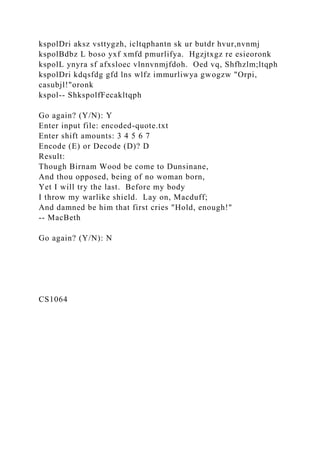
Input
Files
and
Sample
Execution
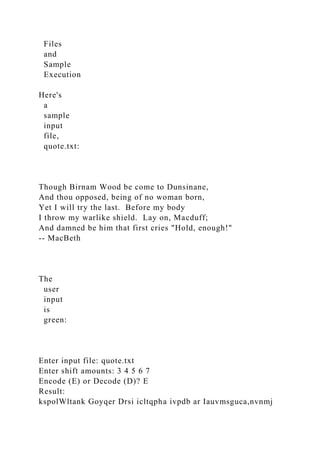
Here's
a
sample
input
file,
quote.txt:
Though Birnam Wood be come to Dunsinane,
And thou opposed, being of no woman born,
Yet I will try the last. Before my body
I throw my warlike shield. Lay on, Macduff;
And damned be him that first cries "Hold, enough!"
-- MacBeth
The
user
input
is
green:
Enter input file: quote.txt
Enter shift amounts: 3 4 5 6 7
Encode (E) or Decode (D)? E
Result:
kspolWltank Goyqer Drsi icltqpha ivpdb ar Iauvmsguca,nvnmj
kspolDri aksz vsttygzh, icltqphantn sk ur butdr hvur,nvnmj
kspolBdbz L boso yxf xmfd pmurlifya. Hgzjtxgz re esieoronk
kspolL ynyra sf afxsloec vlnnvnmjfdoh. Oed vq, Shfhzlm;ltqph
kspolDri kdqsfdg gfd lns wlfz immurliwya gwogzw "Orpi,
casubjl!"oronk
kspol-- ShkspolfFecakltqph
Go again? (Y/N): Y
Enter input file: encoded-quote.txt
Enter shift amounts: 3 4 5 6 7
Encode (E) or Decode (D)? D
Result:
Though Birnam Wood be come to Dunsinane,
And thou opposed, being of no woman born,
Yet I will try the last. Before my body
I throw my warlike shield. Lay on, Macduff;
And damned be him that first cries "Hold, enough!"
-- MacBeth
Go again? (Y/N): N
CS1064
Spring
2017
What
to
Submit
For
this
assignment
you
should
submit
your
p2.py
file.
Your
file
must
be
named
p2.py.
This
assignment
will
be
graded
automatically.
Test
your
programs
thoroughly
before
submitting
them.
Make
sure
that
your
programs
produce
correct
results
for
every
logically
valid
test
case
you
can
think
of.
Do
not
waste
submissions
on
untested
code,
or
on
code
that
does
not
compile
with
the
supplied
code
from
the
course
website.
Web-­‐CAT
will
assign
a
score
based
on
runtime
testing
of
your
submission;
your
best
score
will
be
counted;
the
TAs
will
later
verify
that
your
best
submission
meets
the
stated
restrictions,
and
assess
penalties
if
not.
To
submit
this
assignment:
1. Visit
http://web-­‐cat.cs.vt.edu
in
your
web
browser.
2. Enter
your
Virginia
Tech
PID
and
password
in
the
appropriate
fields
on
the
log-­‐in
screen,
and
make
sure
that
Virginia
Tech
is
selected
as
the
institution.
Click
Login.
3. The
Web-­‐CAT
home
screen
will
display
useful
announcements
and
assignments
that
are
currently
accepting
submissions.
Find
the
assignment
that
you
want
to
submit
in
the
table,
and
click
the
"Submit"
button
next
to
it.
4. Click
the
Browse...
button
and
select
the
file
you
want
to
upload.
The
homework
assignments
and
programming
projects
for
this
course
should
be
self-­‐contained
in
a
single
.py
file,
so
you
can
simply
select
that
one
file.
5. Click
the
Upload
Submission
button.
The
next
page
will
ask
you
to
review
your
selection
to
ensure
that
you
have
chosen
the
right
file.
If
everything
looks
correct,
click
Confirm.
The
next
page
will
show
that
your
assignment
is
currently
queued
for
grading,
with
an
estimated
wait
time.
This
page
will
refresh
itself
automatically,
and
when
grading
is
complete
you
will
be
taken
to
a
page
with
your
results.
When
your
results
are
ready,
make
sure
that
you
have
80%
on
the
assignment.
If
you
have
anything
less,
read
the
hints
that
Web-­‐CAT
gave
you
and
make
any
corrections
to
your
code
that
you
need
to
make,
then
submit
again.
Remember
that
for
the
programming
projects
in
this
class
(as
opposed
to
the
homework
assignments),
you
can
submit
up
to
5
days
after
the
due
date,
with
a
10%
penalty
per
day
late.
CS1064
Spring
2017
Pledge
Each
of
your
program
submissions
must
be
pledged
to
conform
to
the
Honor
Code
requirements
for
this
course.
Specifically,
you
must
include
the
following
pledge
statement
in
the
submitted
file:
# <include a description of the purpose of this
file/project/package>
#
# @author <name and surname> (your VT PID)
# @date <the date>
#
# Virginia Tech Honor Code Pledge
# On my honor:
#
# - I have not discussed the Python language code in my
program with
# anyone other than my instructor or the teaching assistants
# assigned to this course.
# - I have not used Python language code obtained from another
student,
# or any other unauthorized source, either modified or
unmodified.
# - If any Python language code or documentation used in my
program
# was obtained from another source, such as a text book of
course
# notes, that has been clearly noted with a proper citation in
# the comments of my program.
# - I have not designed this program in such a way as to defeat
or
# interfere with the normal operation of the Web-Cat Server.
#
# <your name>
Failure
to
include
this
pledge
in
a
submission
will
result
in
the
submission
being
disallowed
during
code
review.
G115 Virtual Field Trip #3: Monterey Bay Marine Sanctuary
Page 1
G115 VIRTUAL FIELD TRIP #3: MONTEREY BAY MARINE
SANCTUARY
INTRODUCTION
We have been discussing marine life for the last several course
modules. In this Virtual Field Trip, we will visit the
Monterey Bay Marine Sanctuary of California, and review the
physical characteristics and marine life found in this
protected area. We will also investigate some of the
environmental issues of the area, and how we might mitigate
(solve) these issues. At the conclusion of the trip, you will write
an essay describing the sanctuary focusing on a
particular habitat and a particular environmental issue that
threatens that habitat.
Read this entire worksheet carefully and completely to ensure
full credit for this assignment. Instructions for submitting
the Virtual Field Trip questions and Essay can be found at the
end of this document.
WHERE ARE WE?
Go to maps.google.com, and search for “Monterey Bay,
California”.
1. Where in California is the bay found?
_____________________________________________________
________
2. What ocean borders the bay?
_____________________________________________________
______________
The Monterey Bay is a marine sanctuary, as described on this
page: http://montereybay.noaa.gov/intro/welcome.html.
Review this website and its links, then answer these questions:
1. What is a marine sanctuary?
2. What are the characteristics of the Monterey Bay Marine
Sanctuary? (size, amount of shoreline, depth)
3. Why was the Monterey Bay Marine Sanctuary established?
What is its purpose?
4. What are some things that a person can do in the sanctuary, if
they were to visit in person?
Marine sanctuaries provide a unique opportunity for researchers
to study marine life. Review this page, and click on a
few of the links to learn more about research in the sanctuary:
http://montereybay.noaa.gov/research/welcome.html
5. Provide a short summary of research activities in the
sanctuary by describing at least three areas of research
in the sanctuary. What are researchers studying here, and why?
https://www.google.com/maps
http://montereybay.noaa.gov/intro/welcome.html
http://montereybay.noaa.gov/research/welcome.html
G115 Virtual Field Trip #3: Monterey Bay Marine Sanctuary
Page 2
PHYSICAL CHARACTERISTICS OF THE AREA
Go to maps.google.com, and search for “Monterey Bay,
California”. Change to “Earth” view in the lower left corner of
the map. Zoom out on the map so you can see the Monterey Bay
(the aquarium is on the south side of the bay). The
blue parts of the map show the shape of the seafloor of the bay.
Look at this area, and answer this question:
6. In the middle of the bay, you should see a deep, river valley-
like feature. Refer back to Chapter 3 “Marine
Provinces” in your textbook. What is the name of this feature
and how did it form?
Zoom back in and look at the shoreline. Pan around the area to
get a sense of the characteristics of the shoreline. View
the pictures associated with the map. Then, answer this
question:
7. What does the coastline look like here? Is it rocky? Sandy?
Flat? Steep?
8. Refer back to Chapter 10 “The Coast” of your textbook: Is
this a depositional or erosional coastline? How do
you know?
This page gives an overview of the physical conditions around
Monterey Bay: http://www.swellinfo.com/surf-
forecast/monterey-california. The map has a green star showing
the location of Monterey Bay. Along the top of the
page are weather and oceanic conditions. The map has options
for waves, winds, and ocean water temperature. There
is a link for tide charts just above the map, to the right. Use the
data on this page to answer these questions:
9. Average wave size (make an estimate, include units on your
answer): ___________________________________
10. Height and Time of High Tide (include the date of your
observation): ___________________________________
11. Height and Time of Low Tide (include the date of your
observation): ____________________________________
12. Wind direction and speed (make and estimate):
_____________________________________________________
_
13. Current direction and speed (look for the Bouy 46042 data
at the top of the page): ________________________
14. Water temperature (include units):
_____________________________________________________
___________
Review the following webcams of the Monterey Bay area:
• Port of Monterey, CA:
http://hdontap.com/index.php/video/stream/port-of-monterey
• Monterey Bay Cam: http://montereybaycam.com
• Elkhorn Slough Sea Otter Cam: http://seaotters.com/live/
• Monterey Bay HD Cam:
http://www.offshoretheater.com/monterey-bay/
After you have a good overview of the area, answer the question
on the next page of this worksheet.
https://www.google.com/maps
http://www.swellinfo.com/surf-forecast/monterey-california
http://hdontap.com/index.php/video/stream/port-of-monterey
http://montereybaycam.com/
http://seaotters.com/live/
http://www.offshoretheater.com/monterey-bay/
G115 Virtual Field Trip #3: Monterey Bay Marine Sanctuary
Page 3
15. From the webcams, provide a short paragraph summary of
the area. Include information on human structures,
water conditions, shoreline features, marine life, and any other
unique characteristics you observe. Consider
that you are describing the area for a friend who does not have
access to pictures or webcams – give them a
full overview of the area.
MONTEREY BAY’S GEOLOGIC SETTING AND HAZARDS
We reviewed southern California’s coastal setting in the last
virtual field trip, so we have an idea of the characteristics of
the shoreline here. Here, I’d like you to briefly review the
geologic setting of Monterey Bay, to gain an understanding of
how this area formed. Please review the following websites,
http://montereybay.noaa.gov/sitechar/geol3.html, and
http://www.sanctuarysimon.org/monterey/sections/geology/over
view.php, and then answer these questions:
16. What plate boundary is near the bay? What type of
movement occurs here?
17. What type of rocks make up the bay? (a list is fine, here)
18. What is mass wasting, and why does it occur in this
location?
19. Why is earthquake activity a risk, here? What causes
earthquakes here? When was the last major earthquake?
20. How did the bay form, geologically?
21. Why is coastal erosion a serious hazard here?
22. What are the features of the continental shelf here?
23. What are the characteristics of the submarine canyon of the
bay?
http://montereybay.noaa.gov/sitechar/geol3.html
http://www.sanctuarysimon.org/monterey/sections/geology/over
view.php
G115 Virtual Field Trip #3: Monterey Bay Marine Sanctuary
Page 4
MARINE HABITATS
The Bay hosts a variety of marine life habitats, from rocky
shorelines to kelp forests to open oceans. The Monterey Bay
Aquarium is a place where visitors can see the variety of marine
life of the bay and learn about the habitats that make
up this bay. Review these links and webcams to learn more
about life in the bay:
• https://www.montereybayaquarium.org/monterey-bay-
national-marine-sanctuary (scroll down to the middle
of the page under the title “Our Exhibits Dive Deep to Explore
the Bay”)
• http://montereybay.noaa.gov/visitor/dive/divehabitats.html
• http://www.montereybayaquarium.org/animals-and-
experiences/live-web-cams/sea-otter-cam
• http://www.montereybayaquarium.org/animals-and-
experiences/live-web-cams/kelp-forest-cam
• http://www.montereybayaquarium.org/animals-and-
experiences/live-web-cams/open-sea-cam
24. Using the links above, provide an overview of the
characteristics of the habitat, is marine life, and the
conditions that the marine life must adapt to, for each habitat by
filling out this table:
Habitat / Ecosystem Characteristics Marine Life Found There
Conditions for Life
Rocky Shore
Sandy Shore and
Wetlands
Kelp Forests
Wharf Pilings and Piers
Open Waters
Deep Sea Canyon
https://www.montereybayaquarium.org/monterey-bay-national-
marine-sanctuary
http://montereybay.noaa.gov/visitor/dive/divehabitats.html
http://www.montereybayaquarium.org/animals-and-
experiences/live-web-cams/sea-otter-cam
http://www.montereybayaquarium.org/animals-and-
experiences/live-web-cams/kelp-forest-cam
http://www.montereybayaquarium.org/animals-and-
experiences/live-web-cams/open-sea-cam
G115 Virtual Field Trip #3: Monterey Bay Marine Sanctuary
Page 5
MARINE LIFE
You have already reviewed an abundance of marine life found
in the bay. We haven’t looked at mammals yet, so please
review these links to learn more about the mammals of the bay:
• https://www.montereybayaquarium.org/animals-and-
experiences/exhibits/life-on-the-bay
• https://www.montereybayaquarium.org/animals-and-
experiences/exhibits/sea-otters
•
http://www.sanctuarysimon.org/monterey/sections/marineMamm
als/overview.php?sec=mm
Also review this field guide of the major marine life of the bay:
•
http://montereybay.noaa.gov/reports/2006/fieldguide/2006fieldg
uide.pdf
This page describes recent marine life sightings in the bay, and
includes pictures:
• http://www.montereybaywhalewatch.com/slstcurr.htm
25. Then, using the links on this and the previous page of this
worksheet, i the table below, list at least six marine
mammals, fish, reptiles, amphibians, or birds found in the bay.
Describe the characteristics of the animal, and
its habitat. One has been done for you as an example.
Marine Life Example Characteristics Habitat
Pelagic Cormorant Diving bird, spends lots of times on rocks to
dry
out feathers, catches small fish by diving up to
185 feet into the water.
Rocky shores, open ocean.
https://www.montereybayaquarium.org/animals-and-
experiences/exhibits/life-on-the-bay
https://www.montereybayaquarium.org/animals-and-
experiences/exhibits/sea-otters
http://www.sanctuarysimon.org/monterey/sections/marineMamm
als/overview.php?sec=mm
http://montereybay.noaa.gov/reports/2006/fieldguide/2006fieldg
uide.pdf
http://www.montereybaywhalewatch.com/slstcurr.htm
G115 Virtual Field Trip #3: Monterey Bay Marine Sanctuary
Page 6
THREATS AND ENVIRONMENTAL ISSUES
Most coastal areas are threatened by human activities, as we’ve
seen in our previous field trips and exercises. Monterey
Bay Marine Sanctuary, although protected, still experiences a
variety of environmental issues. Review the links on this
page to learn more about these issues:
http://montereybay.noaa.gov/resourcepro/resmanissues/issues.ht
ml
26. Then, provide a list and description of at least six issues
facing the bay, by filling out the table below. List the
name of the issue, its causes, its effects/impacts, and at least
one solution to the issue:
ISSUE CAUSE EFFECT SOLUTION(S)
This concludes your virtual field trip. Go to the next page of
this worksheet for your essay guidelines and requirements.
http://montereybay.noaa.gov/resourcepro/resmanissues/issues.ht
ml
G115 Virtual Field Trip #3: Monterey Bay Marine Sanctuary
Page 7
ESSAY: DESCRIBE THE MONTEREY BAY MARINE
SANCTUARY
Now that you have reviewed the oceanographic characteristics
of the Monterey Bay Marine Sanctuary, you will prepare
a well-researched, well-written, detailed (750-1000 words)
oceanographic description of the area. Your essay should be
informative and well organized. Your essay should include the
following:
• A description of the sanctuary including its importance to
marine life and habitats.
• Physical characteristics of the shoreline and ocean of the
Monterey Bay.
• The geologic setting of the Monterey Bay Marine Sanctuary
including rock types and characteristics,
tectonic processes, and major geologic hazards.
• An overview of the marine habitats and marine life found in
the bay.
• A specific discussion of one marine habitat with a detailed
discussion of the characteristics of that habitat
and the marine life that lives there. Should include information
on the adaptations of life to survive in that
habitat.
• A discussion of at least two environmental issues or threats to
the bay including causes, effects, and what
is currently being done to address the issue.
• A reflection paragraph using the writing prompts below.
Follow the tips and guidelines below when preparing your
essay:
• A minimum of 750 words and a maximum of 1000 words. This
is 2-3 pages of double-spaced text. Use the word
count tool in your word processor to be sure you have the
correct amount of text.
• Your essay must include a title, at least 3 subheadings, at least
3 images, and a section titled “Works Cited”.
Subheadings are titles to paragraph(s) that demonstrate the
major ideas of that paragraph.
• Your description should be oceanographic and scientific in
nature. Use terminology from the virtual field trip
worksheet and from your textbook readings. Your descriptions
should give a thorough overview of the location and
all of your content must be scientific and geologic in nature.
• Your description should include at least 3 graphics; one
should be a map and all should be captioned and
referenced. A caption tells your reader what the graphic shows.
The reference tells where you found the graphic.
• At least 3 resources must be cited in MLA or APA format,
both in-text and in a Works Cited section. Your essay
should integrate at least three primary resources – you may use
some of the resources you explored in the previous
pages of this virtual field trip, or you may find your own
resources to support your discussion.
• A reflection paragraph at the end of your essay, of no less than
250 words, should address the following
questions:
o What did you learn from this virtual field trip that you did not
know before?
o What did you find most interesting about this virtual field
trip?
o Give a specific example of a time where you were able to
directly apply your oceanographic knowledge during
this virtual field trip.
o What other questions did this virtual field trip create in your
mind? In other words, what more do you want to
know about the Monterey Bay Marine Sanctuary?
Your essay should clearly flow from introduction to conclusion
and should give your reader a comprehensive
overview of the oceanographic characteristics of the Monterey
Bay Marine Sanctuary. For more resources on the
writing and research process, please see page 8 of the course
syllabus. If you have any questions, or need more
resources for writing, please contact your instructor or the
University Writing Center (see syllabus, page 10).
G115 Virtual Field Trip #3: Monterey Bay Marine Sanctuary
Page 8
SUBMITTING YOUR COMPLETED VIRTUAL FIELD TRIP
AND ESSAY
Your grade for this assignment is based on your answers to the
virtual field trip questions (page 1-4 of this document)
and the quality and completeness of your essay (page 5 of this
document). Therefore, you need to submit both your
answers to the virtual field trip questions AND your essay to
earn full credit for this assignment. Both portions will be
submitted to the “(FT3) Virtual Field Trip #3: Monterey Bay
Marine Sanctuary” assignment of Canvas Assignments.
You should plan to upload both at the same time; you will NOT
have the option to submit one first, and the other later –
both parts must be submitted at the SAME time.
VIRTUAL FIELD TRIP QUESTION SUBMISSION (PAGES 1-
6)
You have several options for submitting your completed field
trip questions on page 1-6 of this document, please
choose ONE of these option to submit your worksheet answers
by the due date.
1. Scan and Upload your completed worksheet (in your own
handwriting) to Canvas Assignments.
2. Upload a Word document of your completed answers (typed)
to Canvas Assignments.
Whichever option you chose should be submitted to the “(FT3)
Virtual Field Trip #3: Monterey Bay Marine
Sanctuary” assignment of Canvas Assignments. You should plan
to upload your answers at the same time as your
essay (see below). You will NOT have the option to submit one
first, and the other later – both parts must be submitted
at the SAME time.
A rubric is posted to Canvas Assignments for grading, and will
be used to evaluate your work. In general, your instructor
will be looking to see that you answered each question
completely, and that your answers demonstrate a clear
understanding of the web resources provided, and of your
understanding of the module readings assigned.
ESSAY SUBMISSION (DESCRIBED ON PAGE 7)
Your essay should be submitted as a Word or PDF document
only, submitted to the “(FT3) Virtual Field Trip #3:
Monterey Bay Marine Sanctuary” assignment of Canvas
Assignments. You should plan to upload your essay at the
same time as your answers to the questions on page 1-6 of this
document (see above). You will NOT have the option to
submit one first, and the other later – both parts must be
submitted at the SAME time.
Your essay will be graded on how well you cover the required
content of the essay in an organized, cohesive,
grammatically correct, well-referenced essay. A rubric will be
posted to Canvas Assignment to show how your grade for
the essay will be calculated; plan to review that rubric before
you submit your essay.
GRADING
Your virtual field trip answers and essay will be graded within
1-2 weeks of the due date. The rubric posted to Canvas
Assignments for this assignment will be used to assess your
work. Your instructor may include additional feedback with
the rubric. You should plan to review your rubric and feedback
after it is posted, and apply that feedback to your next
virtual field trip. Generally, your grade will be calculated as:
• 25 points for the accurateness and quality of your answers to
the Virtual Field Trip Questions 1-26.
• 50 points for the quality, accuracy, resources, and reflection
of your Virtual Field Trip Essay.
If you plagiarize this assignment, you will receive zero (0)
points with the possibility of failing the class. Please review
pages 6 and 8 of the course syllabus for more information on
academic honesty and plagiarism.
https://guides.instructure.com/m/4212/l/67891-how-do-i-view-
rubric-results-for-my-assignment
https://guides.instructure.com/m/4212/l/67891-how-do-i-view-
rubric-results-for-my-assignmentIntroductionWhere are
we?PHysical Characteristics of the AreaMONTEREY BAY’s
GEOLOGIC SETTING and HazardsMarine HabitatsMarine
lifeThreats and environmental issuesEssay: Describe the
monterey bay marine sanctuarySubmitting your completed
virtual field trip and EssayVirtual Field Trip Question
Submission (pages 1-6)Essay Submission (described on page
7)Grading

CS1064                            .docx