Creating the Application
Creating a Rails application
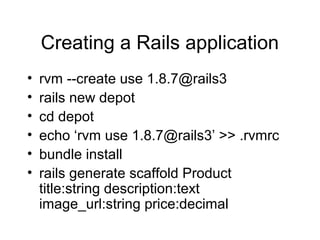
• rvm --create use 1.8.7@rails3
• rails new depot
• cd depot
• echo ‘rvm use 1.8.7@rails3’ >> .rvmrc
• bundle install
• rails generate scaffold Product
title:string description:text
image_url:string price:decimal
Rails Migration
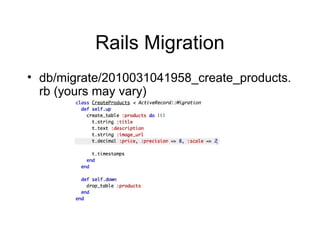
• db/migrate/2010031041958_create_products.
rb (yours may vary)
Run Your DB Migrations
• rake db:migrate
– Creates the products table
– Includes the fields we listed
• rake db:rollback
– Reverts last migration
– Drops the products table
Let’s try it
• rails server
• http://localhost:3000/products
– Create a new Product
– Verify product was created
– Reload /products to see list of products
– Try deleting a product
Change view files
• We want to change the number of lines
in the description field to 6
• app/views/products/_form.html.erb
– Change
<%= f.text_area :description %>
to
<%= f.text_area :description, :rows => 6 %>
Run tests
• rake test
– You should see 0 failures, 0 errors
– We’ll cover this more later
Add seed data to our DB
• We don’t want to have to create test
data manually all the time
• Rails offers db/seeds.rb which will
“seed” your database with test data
• curl -o db/seeds.rb
http://media.pragprog.com/titles/rails4/c
ode/depot_b/db/seeds.rb
Grab book images and layout
• http://media.pragprog.com/titles/rails4/code/d
epot_b/public/images/
– Download each image and put it in public/images/
• curl -o public/stylesheets/depot.css
http://media.pragprog.com/titles/rails4/code/d
epot_b/public/stylesheets/depot.css
• rm public/stylesheets/scaffold.css
Seed our database
• rake db:seed
– Runs content in db/seeds.rb
• Reload /products to see our new “seed”
books
Add stylesheet
• System wide layout file
• app/views/layouts/application.html.erb
• <%= stylesheet_link_tag :all %>
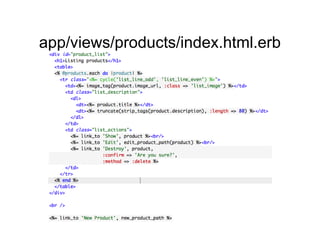
app/views/products/index.html.erb
Push Depot to Heroku
• Add Heroku to Gemfile
• “bundle install”
• heroku create
• git push heroku master
• heroku rake db:migrate
• heroku rake db:seed
• heroku open (add /products to URL)

Creating the application

  • 1.
  • 2.
    Creating a Railsapplication • rvm --create use 1.8.7@rails3 • rails new depot • cd depot • echo ‘rvm use 1.8.7@rails3’ >> .rvmrc • bundle install • rails generate scaffold Product title:string description:text image_url:string price:decimal
  • 3.
  • 4.
    Run Your DBMigrations • rake db:migrate – Creates the products table – Includes the fields we listed • rake db:rollback – Reverts last migration – Drops the products table
  • 5.
    Let’s try it •rails server • http://localhost:3000/products – Create a new Product – Verify product was created – Reload /products to see list of products – Try deleting a product
  • 6.
    Change view files •We want to change the number of lines in the description field to 6 • app/views/products/_form.html.erb – Change <%= f.text_area :description %> to <%= f.text_area :description, :rows => 6 %>
  • 7.
    Run tests • raketest – You should see 0 failures, 0 errors – We’ll cover this more later
  • 8.
    Add seed datato our DB • We don’t want to have to create test data manually all the time • Rails offers db/seeds.rb which will “seed” your database with test data • curl -o db/seeds.rb http://media.pragprog.com/titles/rails4/c ode/depot_b/db/seeds.rb
  • 9.
    Grab book imagesand layout • http://media.pragprog.com/titles/rails4/code/d epot_b/public/images/ – Download each image and put it in public/images/ • curl -o public/stylesheets/depot.css http://media.pragprog.com/titles/rails4/code/d epot_b/public/stylesheets/depot.css • rm public/stylesheets/scaffold.css
  • 10.
    Seed our database •rake db:seed – Runs content in db/seeds.rb • Reload /products to see our new “seed” books
  • 11.
    Add stylesheet • Systemwide layout file • app/views/layouts/application.html.erb • <%= stylesheet_link_tag :all %>
  • 12.
  • 13.
    Push Depot toHeroku • Add Heroku to Gemfile • “bundle install” • heroku create • git push heroku master • heroku rake db:migrate • heroku rake db:seed • heroku open (add /products to URL)