This document provides an introduction and overview of Ruby on Rails, including who uses it, example applications built with it, its MVC framework structure, and a step-by-step guide to building a basic "Hello World" Ruby on Rails application.
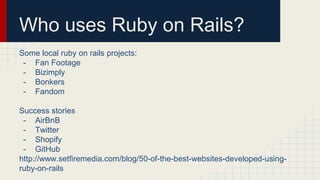
Who uses Rubyon Rails?
Some local ruby on rails projects:
- Fan Footage
- Bizimply
- Bonkers
- Fandom
Success stories
- AirBnB
- Twitter
- Shopify
- GitHub
http://www.setfiremedia.com/blog/50-of-the-best-websites-developed-using-
ruby-on-rails
3.
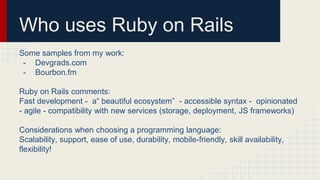
Who uses Rubyon Rails
Some samples from my work:
- Devgrads.com
- Bourbon.fm
Ruby on Rails comments:
Fast development - a“ beautiful ecosystem” - accessible syntax - opinionated
- agile - compatibility with new services (storage, deployment, JS frameworks)
Considerations when choosing a programming language:
Scalability, support, ease of use, durability, mobile-friendly, skill availability,
flexibility!
4.
What is Rubyon Rails
Rails is a web application development framework, written in the Ruby
programming language. It has been designed to make programming web
applications easier by making assumptions about what every developer needs
to get started
What is a framework? To quote wikipedia:
A web application framework is a software framework that is designed to support the development of
dynamic websites, web applications and web services. The framework aims to alleviate the overhead
associated with common activities performed in Web development.
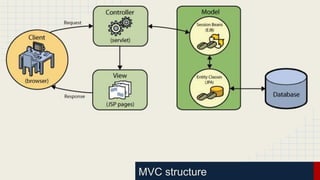
Rails is an MVC Framework - Model, View, Controller - meaning it adheres to
an MVC structure in dividing up which part of the system does what.
5.
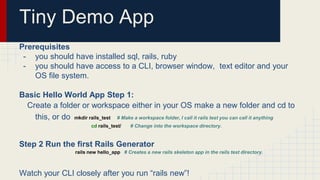
Tiny Demo App
Prerequisites
-you should have installed sql, rails, ruby
- you should have access to a CLI, browser window, text editor and your
OS file system.
Basic Hello World App Step 1:
Create a folder or workspace either in your OS make a new folder and cd to
this, or do mkdir rails_test # Make a workspace folder, I call it rails test you can call it anything
cd rails_test/ # Change into the workspace directory.
Step 2 Run the first Rails Generator
rails new hello_app # Creates a new rails skeleton app in the rails test directory.
Watch your CLI closely after you run “rails new”!
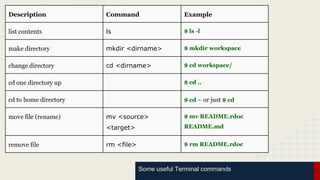
Description Command Example
listcontents ls $ ls -l
make directory mkdir <dirname> $ mkdir workspace
change directory cd <dirname> $ cd workspace/
cd one directory up $ cd ..
cd to home directory $ cd ~ or just $ cd
move file (rename) mv <source>
<target>
$ mv README.rdoc
README.md
remove file rm <file> $ rm README.rdoc
Some useful Terminal commands
8.
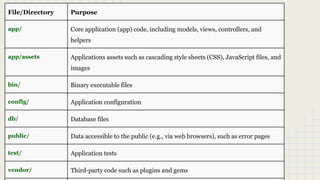
File/Directory Purpose
app/ Coreapplication (app) code, including models, views, controllers, and
helpers
app/assets Applications assets such as cascading style sheets (CSS), JavaScript files, and
images
bin/ Binary executable files
config/ Application configuration
db/ Database files
public/ Data accessible to the public (e.g., via web browsers), such as error pages
test/ Application tests
vendor/ Third-party code such as plugins and gems
9.
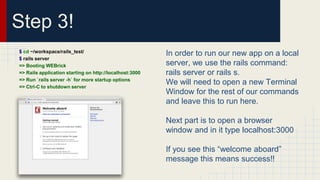
$ cd ~/workspace/rails_test/
$rails server
=> Booting WEBrick
=> Rails application starting on http://localhost:3000
=> Run `rails server -h` for more startup options
=> Ctrl-C to shutdown server
In order to run our new app on a local
server, we use the rails command:
rails server or rails s.
We will need to open a new Terminal
Window for the rest of our commands
and leave this to run here.
Next part is to open a browser
window and in it type localhost:3000
If you see this “welcome aboard”
message this means success!!
Step 3!
10.
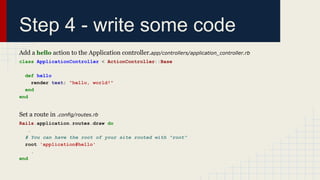
Step 4 -write some code
Add a hello action to the Application controller.app/controllers/application_controller.rb
class ApplicationController < ActionController::Base
def hello
render text: "hello, world!"
end
end
Set a route in .config/routes.rb
Rails.application.routes.draw do
.
# You can have the root of your site routed with "root"
root 'application#hello'
.
end
11.
Next steps
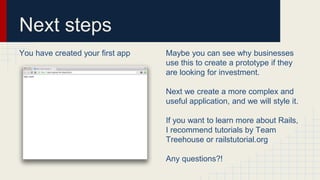
You havecreated your first app Maybe you can see why businesses
use this to create a prototype if they
are looking for investment.
Next we create a more complex and
useful application, and we will style it.
If you want to learn more about Rails,
I recommend tutorials by Team
Treehouse or railstutorial.org
Any questions?!
Editor's Notes
#3 point out that RoR is also used by those new to technology, or front end developers wishing to improve back end skills, or sometimes used by companies with a founder who is tech savvy and wants to learn themselves. Rails Girls etc.
#5 give some examples in other languages Cake PHP, Django Python, Angular/Ionic and explain how these frameworks package existing code so we can move faster on certain parts of a build
What is Model View Controller?
#6 rails new is a commonly used generator command.
give them the MVC print out
#11
Add some data and save it and talk about what’s happening in each layer
walk through a couple of files…
NB the Views which they will understand html & css.
A form, and how the controller actions work and the data persists thanks to model and what the routes do etc. Params