Using Technologies on Fireworks
  A step by step guide showing how I used the Technologies to
                     create my Title Cards.
Step One:
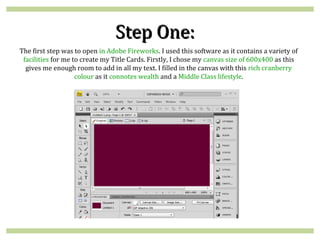
The first step was to open in Adobe Fireworks. I used this software as it contains a variety of
 facilities for me to create my Title Cards. Firstly, I chose my canvas size of 600x400 as this
  gives me enough room to add in all my text. I filled in the canvas with this rich cranberry
                    colour as it connotes wealth and a Middle Class lifestyle.
Step Two:
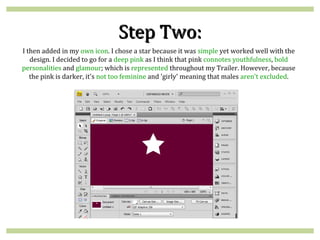
I then added in my own icon. I chose a star because it was simple yet worked well with the
   design. I decided to go for a deep pink as I think that pink connotes youthfulness, bold
personalities and glamour; which is represented throughout my Trailer. However, because
   the pink is darker, it's not too feminine and 'girly' meaning that males aren't excluded.
Step Three:
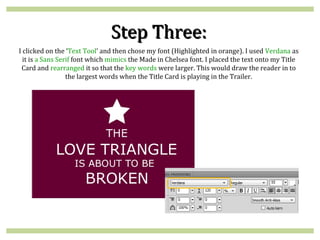
I clicked on the ‘Text Tool’ and then chose my font (Highlighted in orange). I used Verdana as
  it is a Sans Serif font which mimics the Made in Chelsea font. I placed the text onto my Title
 Card and rearranged it so that the key words were larger. This would draw the reader in to
                  the largest words when the Title Card is playing in the Trailer.
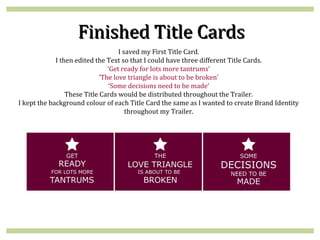
Finished Title Cards
                                    I saved my First Title Card.
             I then edited the Text so that I could have three different Title Cards.
                                ‘Get ready for lots more tantrums’
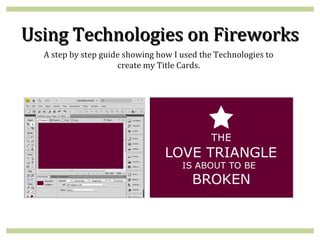
                             ‘The love triangle is about to be broken’
                                ‘Some decisions need to be made’
                 These Title Cards would be distributed throughout the Trailer.
I kept the background colour of each Title Card the same as I wanted to create Brand Identity
                                       throughout my Trailer.

Creating my Title Cards

  • 1.
    Using Technologies onFireworks A step by step guide showing how I used the Technologies to create my Title Cards.
  • 2.
    Step One: The firststep was to open in Adobe Fireworks. I used this software as it contains a variety of facilities for me to create my Title Cards. Firstly, I chose my canvas size of 600x400 as this gives me enough room to add in all my text. I filled in the canvas with this rich cranberry colour as it connotes wealth and a Middle Class lifestyle.
  • 3.
    Step Two: I thenadded in my own icon. I chose a star because it was simple yet worked well with the design. I decided to go for a deep pink as I think that pink connotes youthfulness, bold personalities and glamour; which is represented throughout my Trailer. However, because the pink is darker, it's not too feminine and 'girly' meaning that males aren't excluded.
  • 4.
    Step Three: I clickedon the ‘Text Tool’ and then chose my font (Highlighted in orange). I used Verdana as it is a Sans Serif font which mimics the Made in Chelsea font. I placed the text onto my Title Card and rearranged it so that the key words were larger. This would draw the reader in to the largest words when the Title Card is playing in the Trailer.
  • 5.
    Finished Title Cards I saved my First Title Card. I then edited the Text so that I could have three different Title Cards. ‘Get ready for lots more tantrums’ ‘The love triangle is about to be broken’ ‘Some decisions need to be made’ These Title Cards would be distributed throughout the Trailer. I kept the background colour of each Title Card the same as I wanted to create Brand Identity throughout my Trailer.