Creating Interactive
Learning Experiences
for Distant Preschool
Teacher-Trainees:
Using Emerging
Mobile Screen Casting
Tools
13-Aug-21 1
Yudaya Nakyeyune, Gatrude Nambi,
Ruth Nampenja, Percy Babirye,
Florence Nalusiba, Vincent
Muwonge, David Kabugo
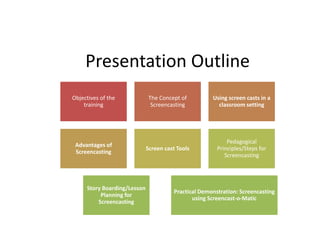
Presentation Outline
Objectives of the
training
The Concept of
Screencasting
Using screen casts in a
classroom setting
Advantages of
Screencasting
Screen cast Tools
Pedagogical
Principles/Steps for
Screencasting
Story Boarding/Lesson
Planning for
Screencasting
Practical Demonstration: Screencasting
using Screencast-o-Matic
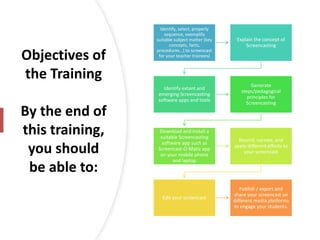
Objectives of
the Training
By the end of
this training,
you should
be able to:
Identify, select, properly
sequence, exemplify
suitable subject matter (key
concepts, facts,
procedures…) to screencast
for your teacher trainees)
Explain the concept of
Screencasting
Identify extant and
emerging Screencasting
software apps and tools
Generate
steps/pedagogical
principles for
Screencasting
Download and install a
suitable Screencasting
software app such as
Screencast-O-Matic app
on your mobile phone
and laptop
Record, narrate, and
apply different effects to
your screencast
Edit your screencast
Publish / export and
share your screencast on
different media platforms
to engage your students.
What is
Screencasting?
• Refers to the
presenter’s act of
recording and
narrating the
contents of his/her
computer/mobile
phone screen.
4
Screencast
• A digital recording of a presenter’s
phone or computer screen often
containing audio narrations.
• Most screencasts often embody sound
effects and background music.
13-Aug-21 5
Using
screencasts
in a
classroom
setting
13-Aug-21 6
Illustrate, record procedures,
and answer FAQs
Give Audio-Visual Feedback to
Students
Promote Self-Paced Learning.
(SPL)
Flip the Classroom
Make a video to help your
substitute teacher
Advantages
of screen
casting
13-Aug-21 7
It improves students’ attention & retention
because it tends to be practical
Students’ can learn at their own pace i.e.,
review it anytime they want
Provides an opportunity for students to
share feedback on their learning through
doing presentations
Screencasting
Tools
13-Aug-21 8
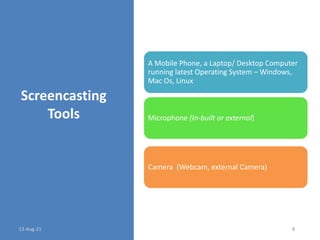
A Mobile Phone, a Laptop/ Desktop Computer
running latest Operating System – Windows,
Mac Os, Linux
Microphone (In-built or external)
Camera (Webcam, external Camera)
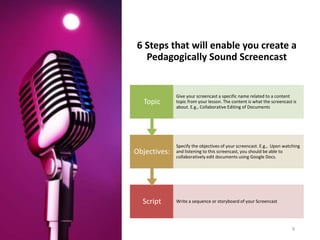
6 Steps that will enable you create a
Pedagogically Sound Screencast
13-Aug-21 9
Script Write a sequence or storyboard of your Screencast
Objectives:
Specify the objectives of your screencast. E.g., Upon watching
and listening to this screencast, you should be able to
collaboratively edit documents using Google Docs.
Topic
Give your screencast a specific name related to a content
topic from your lesson. The content is what the screencast is
about. E.g., Collaborative Editing of Documents
13-Aug-21 10
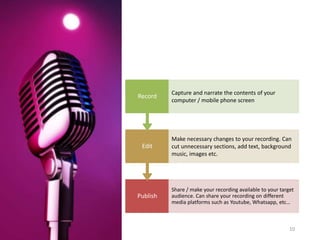
Publish
Share / make your recording available to your target
audience. Can share your recording on different
media platforms such as Youtube, Whatsapp, etc…
Edit
Make necessary changes to your recording. Can
cut unnecessary sections, add text, background
music, images etc.
Record
Capture and narrate the contents of your
computer / mobile phone screen
Demonstration:
The Case of Using
Screencast-o-Matic
13-Aug-21 11

Creating interactive learning experiences for distant preschool teacher trainees- using emerging mobile screen casting tools

  • 1.
    Creating Interactive Learning Experiences forDistant Preschool Teacher-Trainees: Using Emerging Mobile Screen Casting Tools 13-Aug-21 1 Yudaya Nakyeyune, Gatrude Nambi, Ruth Nampenja, Percy Babirye, Florence Nalusiba, Vincent Muwonge, David Kabugo
  • 2.
    Presentation Outline Objectives ofthe training The Concept of Screencasting Using screen casts in a classroom setting Advantages of Screencasting Screen cast Tools Pedagogical Principles/Steps for Screencasting Story Boarding/Lesson Planning for Screencasting Practical Demonstration: Screencasting using Screencast-o-Matic
  • 3.
    Objectives of the Training Bythe end of this training, you should be able to: Identify, select, properly sequence, exemplify suitable subject matter (key concepts, facts, procedures…) to screencast for your teacher trainees) Explain the concept of Screencasting Identify extant and emerging Screencasting software apps and tools Generate steps/pedagogical principles for Screencasting Download and install a suitable Screencasting software app such as Screencast-O-Matic app on your mobile phone and laptop Record, narrate, and apply different effects to your screencast Edit your screencast Publish / export and share your screencast on different media platforms to engage your students.
  • 4.
    What is Screencasting? • Refersto the presenter’s act of recording and narrating the contents of his/her computer/mobile phone screen. 4
  • 5.
    Screencast • A digitalrecording of a presenter’s phone or computer screen often containing audio narrations. • Most screencasts often embody sound effects and background music. 13-Aug-21 5
  • 6.
    Using screencasts in a classroom setting 13-Aug-21 6 Illustrate,record procedures, and answer FAQs Give Audio-Visual Feedback to Students Promote Self-Paced Learning. (SPL) Flip the Classroom Make a video to help your substitute teacher
  • 7.
    Advantages of screen casting 13-Aug-21 7 Itimproves students’ attention & retention because it tends to be practical Students’ can learn at their own pace i.e., review it anytime they want Provides an opportunity for students to share feedback on their learning through doing presentations
  • 8.
    Screencasting Tools 13-Aug-21 8 A MobilePhone, a Laptop/ Desktop Computer running latest Operating System – Windows, Mac Os, Linux Microphone (In-built or external) Camera (Webcam, external Camera)
  • 9.
    6 Steps thatwill enable you create a Pedagogically Sound Screencast 13-Aug-21 9 Script Write a sequence or storyboard of your Screencast Objectives: Specify the objectives of your screencast. E.g., Upon watching and listening to this screencast, you should be able to collaboratively edit documents using Google Docs. Topic Give your screencast a specific name related to a content topic from your lesson. The content is what the screencast is about. E.g., Collaborative Editing of Documents
  • 10.
    13-Aug-21 10 Publish Share /make your recording available to your target audience. Can share your recording on different media platforms such as Youtube, Whatsapp, etc… Edit Make necessary changes to your recording. Can cut unnecessary sections, add text, background music, images etc. Record Capture and narrate the contents of your computer / mobile phone screen
  • 11.
    Demonstration: The Case ofUsing Screencast-o-Matic 13-Aug-21 11