


Creating File Paths USING HTML
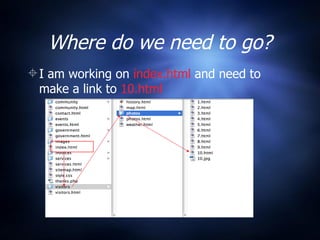
Where do we need to go? I am working on  index.html  and need to make a link to  10.html
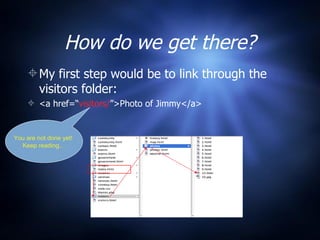
How do we get there? My first step would be to link through the visitors folder: <a href=“ visitors/ ”>Photo of Jimmy</a> You are not done yet!  Keep reading…
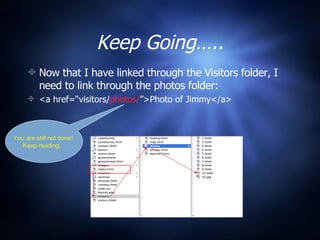
Keep Going….. Now that I have linked through the Visitors folder, I need to link through the photos folder: <a href=“visitors/ photos/ ”>Photo of Jimmy</a> You are still not done!  Keep reading…
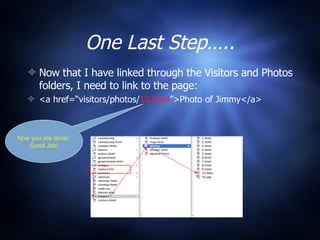
One Last Step….. Now that I have linked through the Visitors and Photos folders, I need to link to the page: <a href=“visitors/photos/ 10.html ”>Photo of Jimmy</a> Now you are done!  Good Job!
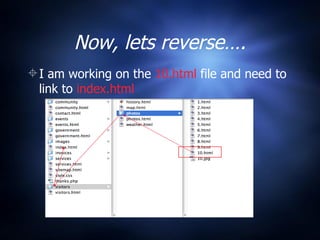
Now, lets reverse…. I am working on the  10.html  file and need to link to  index.html
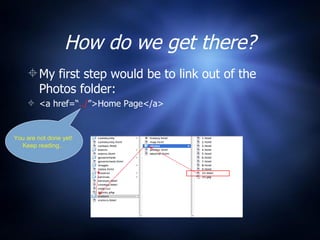
How do we get there? My first step would be to link out of the Photos folder: <a href=“ ../ ”>Home Page</a> You are not done yet!  Keep reading…
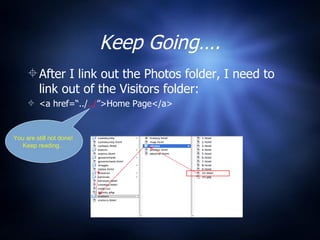
Keep Going…. After I link out the Photos folder, I need to link out of the Visitors folder: <a href=“../ ../ ”>Home Page</a> You are still not done!  Keep reading…
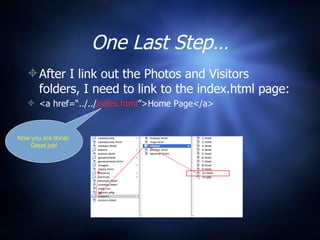
One Last Step… After I link out the Photos and Visitors folders, I need to link to the index.html page: <a href=“../ ../ index.html ”>Home Page</a> Now you are done!  Great job!
In Conclusion Your link follows your files into the folders that contain them. If you are linking back, every ../ that you use means that you are linking out of ONE folder.  Don’t forget your <a href=>, the “quotes around the link”, and your end tag </a>.

Creating File Paths in HTML

  • 1.
  • 2.
    Where do weneed to go? I am working on index.html and need to make a link to 10.html
  • 3.
    How do weget there? My first step would be to link through the visitors folder: <a href=“ visitors/ ”>Photo of Jimmy</a> You are not done yet! Keep reading…
  • 4.
    Keep Going….. Nowthat I have linked through the Visitors folder, I need to link through the photos folder: <a href=“visitors/ photos/ ”>Photo of Jimmy</a> You are still not done! Keep reading…
  • 5.
    One Last Step…..Now that I have linked through the Visitors and Photos folders, I need to link to the page: <a href=“visitors/photos/ 10.html ”>Photo of Jimmy</a> Now you are done! Good Job!
  • 6.
    Now, lets reverse….I am working on the 10.html file and need to link to index.html
  • 7.
    How do weget there? My first step would be to link out of the Photos folder: <a href=“ ../ ”>Home Page</a> You are not done yet! Keep reading…
  • 8.
    Keep Going…. AfterI link out the Photos folder, I need to link out of the Visitors folder: <a href=“../ ../ ”>Home Page</a> You are still not done! Keep reading…
  • 9.
    One Last Step…After I link out the Photos and Visitors folders, I need to link to the index.html page: <a href=“../ ../ index.html ”>Home Page</a> Now you are done! Great job!
  • 10.
    In Conclusion Yourlink follows your files into the folders that contain them. If you are linking back, every ../ that you use means that you are linking out of ONE folder. Don’t forget your <a href=>, the “quotes around the link”, and your end tag </a>.