Digital Wavefront - Your Technology Partner for multi-channel marketing
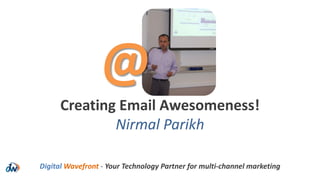
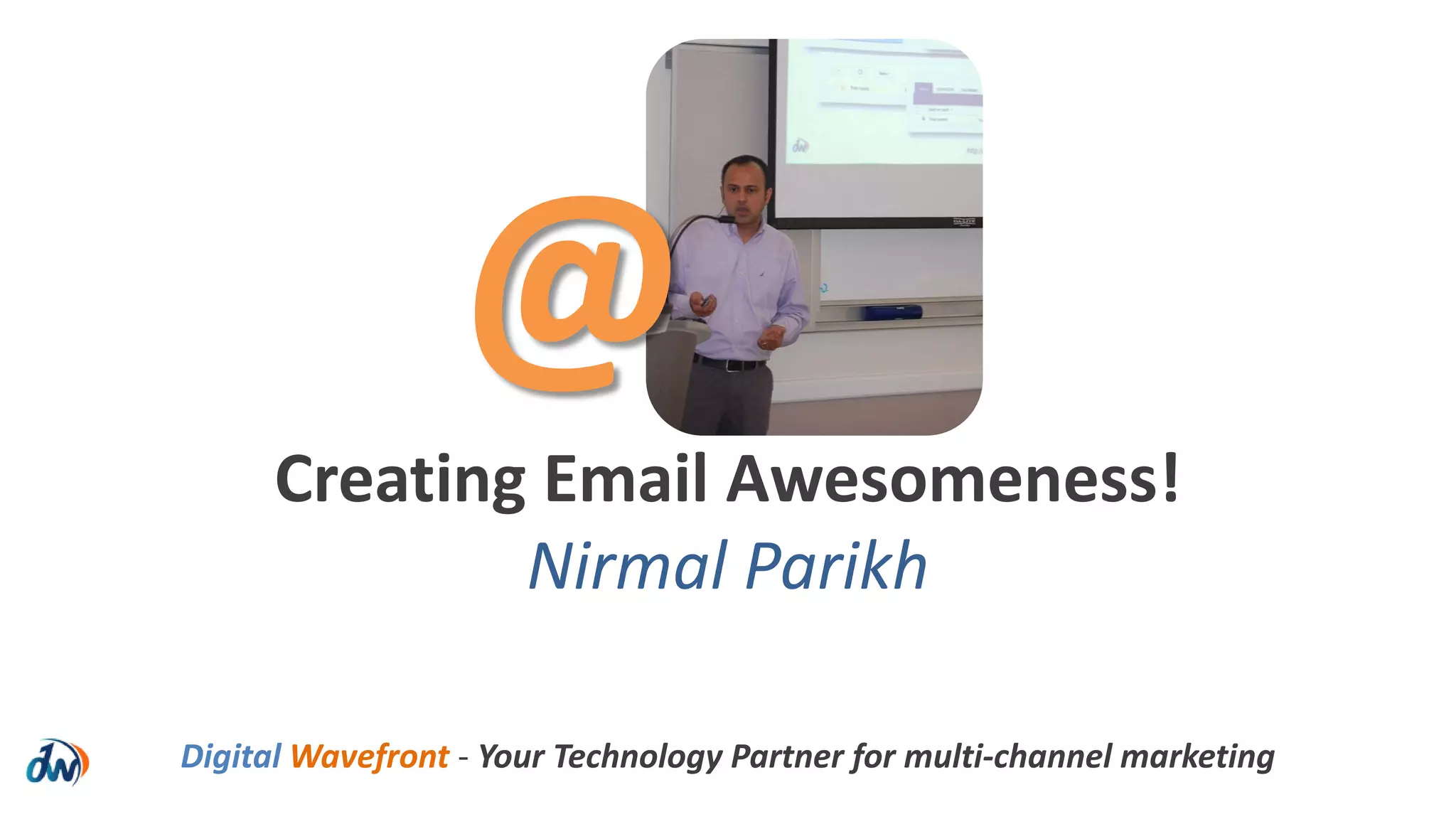
Creating Email Awesomeness!
Nirmal Parikh
@
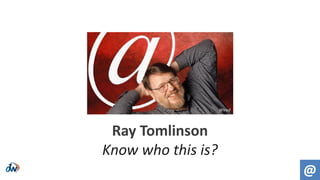
Ray Tomlinson
Know who this is?
@
Wired
Wikipedia
1971
@
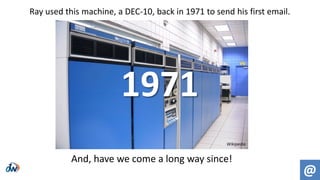
Ray used this machine, a DEC-10, back in 1971 to send his first email.
And, have we come a long way since!
 3.2 billion email accounts
 838 billion marketing messages (2013)
 3 out of 4 marketers use email marketing for retention
 2 out of 3 consumers have made a purchase as a result of an email
 $1 = $44.25 in email ROI
 400+ marketing messages per month
Source: ExactTarget, Forrester, DMA, ReturnPath
Fast Forward to 2013-14!
@
 Email marketing can be very effective
 It can/does influence purchase decisions and behavior
 Email is context-agnostic (no matter where, what, when)
 Email has control over us. Yes, it’s true!
 We have very little patience & an even smaller attention span
 We make decisions based on FROM names and subject lines
So, What Does All This Mean?
@
@
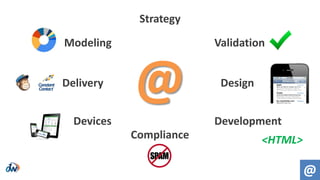
Modeling
Delivery
Devices
Compliance
Development
Design
Validation
Strategy
@
<HTML>
@
1: Strategy
There are 3 parts to an email strategy…
@
film.vic.gov.au
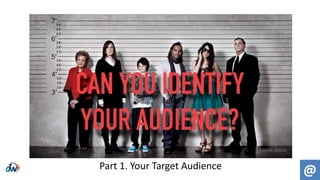
Part 1. Your Target Audience
@
valuablecontent.co.uk
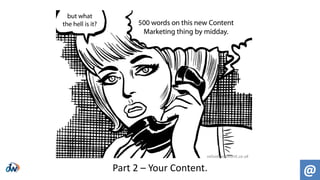
Part 2 – Your Content.
@
ewaydirect.com
Part 3: Your Offer.
2: Validation
@
Validation > Syntax Checking
jon’_@gmail.com <valid
[nirmal]@yahoo.com <valid
jenny”o”smith@aol.com <not valid
@
This is the most basic form of validation that
checks email for syntax errors.
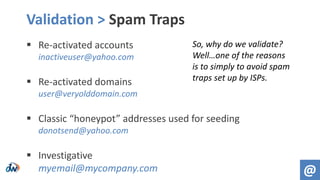
Validation > Spam Traps
 Re-activated accounts
inactiveuser@yahoo.com
 Re-activated domains
user@veryolddomain.com
 Classic “honeypot” addresses used for seeding
donotsend@yahoo.com
 Investigative
myemail@mycompany.com @
So, why do we validate?
Well…one of the reasons
is to simply to avoid spam
traps set up by ISPs.
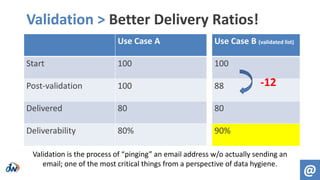
Validation > Better Delivery Ratios!
Use Case A
Start 100
Post-validation 100
Delivered 80
Deliverability 80%
Use Case B (validated list)
100
88
80
90%
@
-12
Validation is the process of “pinging” an email address w/o actually sending an
email; one of the most critical things from a perspective of data hygiene.
3: Design
@
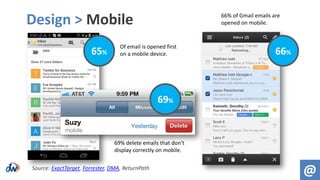
Design > Mobile
@
65%
69%
66%
Source: ExactTarget, Forrester, DMA, ReturnPath
Of email is opened first
on a mobile device.
69% delete emails that don’t
display correctly on mobile.
66% of Gmail emails are
opened on mobile.
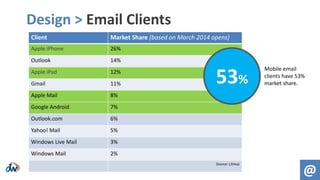
Design > Email Clients
@
Client Market Share (based on March 2014 opens)
Apple iPhone 26%
Outlook 14%
Apple iPad 12%
Gmail 11%
Apple Mail 8%
Google Android 7%
Outlook.com 6%
Yahoo! Mail 5%
Windows Live Mail 3%
Windows Mail 2%
Source: Litmus
53%
Mobile email
clients have 53%
market share.
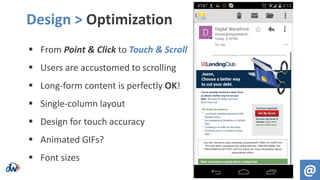
 From Point & Click to Touch & Scroll
 Users are accustomed to scrolling
 Long-form content is perfectly OK!
 Single-column layout
 Design for touch accuracy
 Animated GIFs?
 Font sizes
Design > Optimization
@
@
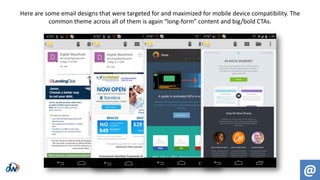
Here are some email designs that were targeted for and maximized for mobile device compatibility. The
common theme across all of them is again “long-form” content and big/bold CTAs.
4: Development
@
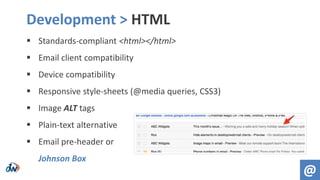
 Standards-compliant <html></html>
 Email client compatibility
 Device compatibility
 Responsive style-sheets (@media queries, CSS3)
 Image ALT tags
 Plain-text alternative
 Email pre-header or
Johnson Box
Development > HTML
@
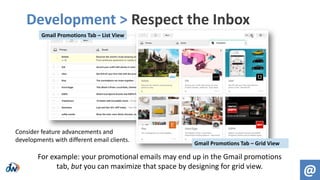
Development > Respect the Inbox
@
Consider feature advancements and
developments with different email clients.
Gmail Promotions Tab – List View
Gmail Promotions Tab – Grid View
For example: your promotional emails may end up in the Gmail promotions
tab, but you can maximize that space by designing for grid view.
5: Compliance
@
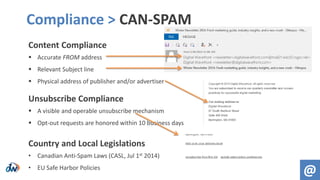
Content Compliance
 Accurate FROM address
 Relevant Subject line
 Physical address of publisher and/or advertiser
Unsubscribe Compliance
 A visible and operable unsubscribe mechanism
 Opt-out requests are honored within 10 business days
Country and Local Legislations
• Canadian Anti-Spam Laws (CASL, Jul 1st 2014)
• EU Safe Harbor Policies
Compliance > CAN-SPAM
@
6: Devices
@
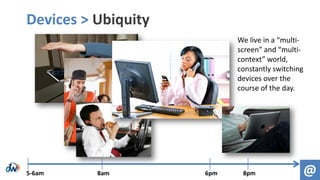
Devices > Ubiquity
@5-6am 8am 6pm 8pm
We live in a “multi-
screen” and “multi-
context” world,
constantly switching
devices over the
course of the day.
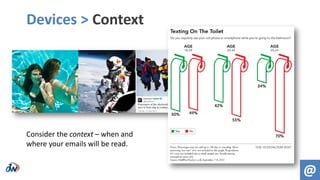
Devices > Context
@
Consider the context – when and
where your emails will be read.
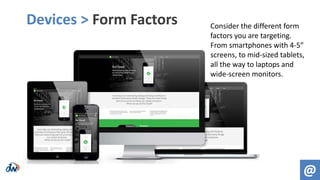
Devices > Form Factors
@
Consider the different form
factors you are targeting.
From smartphones with 4-5”
screens, to mid-sized tablets,
all the way to laptops and
wide-screen monitors.
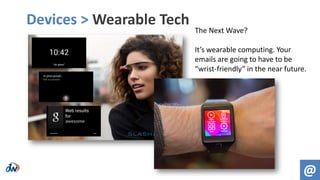
Devices > Wearable Tech
@
The Next Wave?
It’s wearable computing. Your
emails are going to have to be
“wrist-friendly” in the near future.
7: Delivery
@
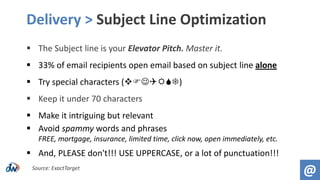
 The Subject line is your Elevator Pitch. Master it.
 33% of email recipients open email based on subject line alone
 Try special characters ()
 Keep it under 70 characters
 Make it intriguing but relevant
 Avoid spammy words and phrases
FREE, mortgage, insurance, limited time, click now, open immediately, etc.
 And, PLEASE don't!!! USE UPPERCASE, or a lot of punctuation!!!
Delivery > Subject Line Optimization
@Source: ExactTarget
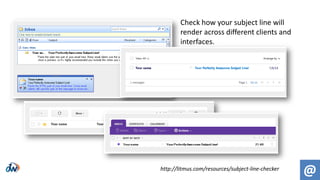
@http://litmus.com/resources/subject-line-checker
Check how your subject line will
render across different clients and
interfaces.
Delivery > Tactical Considerations
 Aligning emails with in-home delivery of direct mail
 Response rates 10% - 30% higher*
 Acquisition costs 25% - 35% lower*
 Time-zone localization
 9am EST, 9am CST, 9am PST
 Time-lapsed delivery
 9am vs 2pm
 Weekday vs. Weekend vs. Holiday delivery @
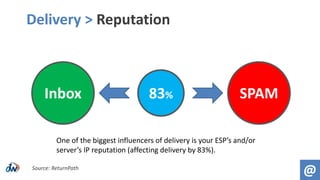
Delivery > Reputation
@Source: ReturnPath
Inbox SPAM83%
One of the biggest influencers of delivery is your ESP’s and/or
server’s IP reputation (affecting delivery by 83%).
Sender Score
https://senderscore.org
Use this as a resource to check your sender score.
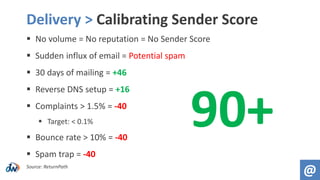
Delivery > Calibrating Sender Score
 No volume = No reputation = No Sender Score
 Sudden influx of email = Potential spam
 30 days of mailing = +46
 Reverse DNS setup = +16
 Complaints > 1.5% = -40
 Target: < 0.1%
 Bounce rate > 10% = -40
 Spam trap = -40
Source: ReturnPath
@
90+
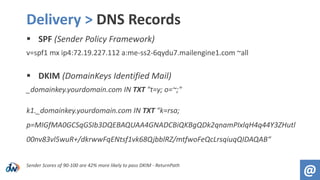
Delivery > DNS Records
 SPF (Sender Policy Framework)
v=spf1 mx ip4:72.19.227.112 a:me-ss2-6qydu7.mailengine1.com ~all
 DKIM (DomainKeys Identified Mail)
_domainkey.yourdomain.com IN TXT "t=y; o=~;"
k1._domainkey.yourdomain.com IN TXT "k=rsa;
p=MIGfMA0GCSqGSIb3DQEBAQUAA4GNADCBiQKBgQDk2qnamPIxlqH4q44Y3ZHutl
00nv83vl5wuR+/dkrwwFqENtsf1vk68QjbblRZ/mtfwoFeQcLrsqiuqQIDAQAB“
Sender Scores of 90-100 are 42% more likely to pass DKIM - ReturnPath
@
Delivery > Choice of ESPs
@
8: Predictive Modeling
@
Predictive Modeling > Why?
@
 Send fewer, more targeted emails
 Model after positive behavior and “look-alikes”
 Improve delivery
 Gain a better reputation & SenderScore
@
Modeling
Delivery
Devices
Compliance
Development
Design
Validation
Strategy
@
<HTML>
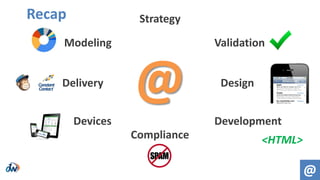
Recap
And That’s How You
Create Email Awesomeness!
@Digital Wavefront - Your Technology Partner for multi-channel marketing
@
Nirmal Parikh
www.digitalwavefront.com
@BOSMarketer
nirmalp@digitalwavefront.com
@Digital Wavefront - Your Technology Partner for multi-channel marketing

NEDMA14: Creating Email Awesomeness! - Nirmal Parikh

  • 1.
    Digital Wavefront -Your Technology Partner for multi-channel marketing Creating Email Awesomeness! Nirmal Parikh @
  • 2.
    Ray Tomlinson Know whothis is? @ Wired
  • 3.
    Wikipedia 1971 @ Ray used thismachine, a DEC-10, back in 1971 to send his first email. And, have we come a long way since!
  • 4.
     3.2 billionemail accounts  838 billion marketing messages (2013)  3 out of 4 marketers use email marketing for retention  2 out of 3 consumers have made a purchase as a result of an email  $1 = $44.25 in email ROI  400+ marketing messages per month Source: ExactTarget, Forrester, DMA, ReturnPath Fast Forward to 2013-14! @
  • 5.
     Email marketingcan be very effective  It can/does influence purchase decisions and behavior  Email is context-agnostic (no matter where, what, when)  Email has control over us. Yes, it’s true!  We have very little patience & an even smaller attention span  We make decisions based on FROM names and subject lines So, What Does All This Mean? @
  • 6.
  • 7.
    @ 1: Strategy There are3 parts to an email strategy…
  • 8.
  • 9.
  • 10.
  • 11.
  • 12.
    Validation > SyntaxChecking jon’_@gmail.com <valid [nirmal]@yahoo.com <valid jenny”o”smith@aol.com <not valid @ This is the most basic form of validation that checks email for syntax errors.
  • 13.
    Validation > SpamTraps  Re-activated accounts inactiveuser@yahoo.com  Re-activated domains user@veryolddomain.com  Classic “honeypot” addresses used for seeding donotsend@yahoo.com  Investigative myemail@mycompany.com @ So, why do we validate? Well…one of the reasons is to simply to avoid spam traps set up by ISPs.
  • 14.
    Validation > BetterDelivery Ratios! Use Case A Start 100 Post-validation 100 Delivered 80 Deliverability 80% Use Case B (validated list) 100 88 80 90% @ -12 Validation is the process of “pinging” an email address w/o actually sending an email; one of the most critical things from a perspective of data hygiene.
  • 15.
  • 16.
    Design > Mobile @ 65% 69% 66% Source:ExactTarget, Forrester, DMA, ReturnPath Of email is opened first on a mobile device. 69% delete emails that don’t display correctly on mobile. 66% of Gmail emails are opened on mobile.
  • 17.
    Design > EmailClients @ Client Market Share (based on March 2014 opens) Apple iPhone 26% Outlook 14% Apple iPad 12% Gmail 11% Apple Mail 8% Google Android 7% Outlook.com 6% Yahoo! Mail 5% Windows Live Mail 3% Windows Mail 2% Source: Litmus 53% Mobile email clients have 53% market share.
  • 18.
     From Point& Click to Touch & Scroll  Users are accustomed to scrolling  Long-form content is perfectly OK!  Single-column layout  Design for touch accuracy  Animated GIFs?  Font sizes Design > Optimization @
  • 19.
    @ Here are someemail designs that were targeted for and maximized for mobile device compatibility. The common theme across all of them is again “long-form” content and big/bold CTAs.
  • 20.
  • 21.
     Standards-compliant <html></html> Email client compatibility  Device compatibility  Responsive style-sheets (@media queries, CSS3)  Image ALT tags  Plain-text alternative  Email pre-header or Johnson Box Development > HTML @
  • 22.
    Development > Respectthe Inbox @ Consider feature advancements and developments with different email clients. Gmail Promotions Tab – List View Gmail Promotions Tab – Grid View For example: your promotional emails may end up in the Gmail promotions tab, but you can maximize that space by designing for grid view.
  • 23.
  • 24.
    Content Compliance  AccurateFROM address  Relevant Subject line  Physical address of publisher and/or advertiser Unsubscribe Compliance  A visible and operable unsubscribe mechanism  Opt-out requests are honored within 10 business days Country and Local Legislations • Canadian Anti-Spam Laws (CASL, Jul 1st 2014) • EU Safe Harbor Policies Compliance > CAN-SPAM @
  • 25.
  • 26.
    Devices > Ubiquity @5-6am8am 6pm 8pm We live in a “multi- screen” and “multi- context” world, constantly switching devices over the course of the day.
  • 27.
    Devices > Context @ Considerthe context – when and where your emails will be read.
  • 28.
    Devices > FormFactors @ Consider the different form factors you are targeting. From smartphones with 4-5” screens, to mid-sized tablets, all the way to laptops and wide-screen monitors.
  • 29.
    Devices > WearableTech @ The Next Wave? It’s wearable computing. Your emails are going to have to be “wrist-friendly” in the near future.
  • 30.
  • 31.
     The Subjectline is your Elevator Pitch. Master it.  33% of email recipients open email based on subject line alone  Try special characters ()  Keep it under 70 characters  Make it intriguing but relevant  Avoid spammy words and phrases FREE, mortgage, insurance, limited time, click now, open immediately, etc.  And, PLEASE don't!!! USE UPPERCASE, or a lot of punctuation!!! Delivery > Subject Line Optimization @Source: ExactTarget
  • 32.
    @http://litmus.com/resources/subject-line-checker Check how yoursubject line will render across different clients and interfaces.
  • 33.
    Delivery > TacticalConsiderations  Aligning emails with in-home delivery of direct mail  Response rates 10% - 30% higher*  Acquisition costs 25% - 35% lower*  Time-zone localization  9am EST, 9am CST, 9am PST  Time-lapsed delivery  9am vs 2pm  Weekday vs. Weekend vs. Holiday delivery @
  • 34.
    Delivery > Reputation @Source:ReturnPath Inbox SPAM83% One of the biggest influencers of delivery is your ESP’s and/or server’s IP reputation (affecting delivery by 83%).
  • 35.
    Sender Score https://senderscore.org Use thisas a resource to check your sender score.
  • 36.
    Delivery > CalibratingSender Score  No volume = No reputation = No Sender Score  Sudden influx of email = Potential spam  30 days of mailing = +46  Reverse DNS setup = +16  Complaints > 1.5% = -40  Target: < 0.1%  Bounce rate > 10% = -40  Spam trap = -40 Source: ReturnPath @ 90+
  • 37.
    Delivery > DNSRecords  SPF (Sender Policy Framework) v=spf1 mx ip4:72.19.227.112 a:me-ss2-6qydu7.mailengine1.com ~all  DKIM (DomainKeys Identified Mail) _domainkey.yourdomain.com IN TXT "t=y; o=~;" k1._domainkey.yourdomain.com IN TXT "k=rsa; p=MIGfMA0GCSqGSIb3DQEBAQUAA4GNADCBiQKBgQDk2qnamPIxlqH4q44Y3ZHutl 00nv83vl5wuR+/dkrwwFqENtsf1vk68QjbblRZ/mtfwoFeQcLrsqiuqQIDAQAB“ Sender Scores of 90-100 are 42% more likely to pass DKIM - ReturnPath @
  • 38.
  • 39.
  • 40.
    Predictive Modeling >Why? @  Send fewer, more targeted emails  Model after positive behavior and “look-alikes”  Improve delivery  Gain a better reputation & SenderScore
  • 41.
  • 42.
    And That’s HowYou Create Email Awesomeness! @Digital Wavefront - Your Technology Partner for multi-channel marketing @
  • 43.