By: Cory Williamson
For: Fiverr.com
Creating a Social Media Plan
Overview
Social Media Channels
6 Steps to Creating a Social Media Plan
Budgeting for Social Media
Getting Started
Questions
What is Social Media
Social media is media designed to be disseminated
through social interaction, created using highly
accessible and scalable publishing techniques.
- wikipedia.org
What is Social Media?
An ongoing conversation that’s happening RIGHT
NOW
A promotional channel for content distribution
A long-term return on investment
A steady stream of information for:
 Research
 Feedback
 Building Relationships with customers, clients, contacts
Current Statistics
Over 50% of people in the US have at least 1 social
media account
Social media makes up over 17% of all online usage
 Overtaken email as #1 activity on the web
93% of Americans believe companies should have a
social media presence
 85% believe those companies should be interacting with
customers
Social Media Facts- Facebook
1.5 Billion active users worldwide
 819 Million on mobile devices
 Mobile users are twice as active as non-mobile users
53% female, 46% male
300 Million Photo uploads per day
Thursdays and Fridays, engagement is 18% higher
Average time spent on Facebook is 20 minutes
4.75 Billion pieces of content shared daily
Largest segment is 25-34 years old
Social Media Facts- Twitter
1 Billion registered users
500 million tweets sent daily
100 Million active users daily
170 minute spent per user on Twitter Monthly
Peak days to tweet are Tuesday & Wednesday
Millennials and Teens are most active segment
Social Media Facts- YouTube
1 Billion unique visits each month
Over 6 billion hours of video are watched each
month on YouTube
 Almost an hour for every person on Earth, and 50% more than
last year
100 hours of video are uploaded to YouTube every
minute
70% of YouTube traffic comes from outside the US
According to Nielsen, YouTube reaches more US
adults ages 18-34 than any cable network
Social Media Facts- Pinterest
70 Million users as of 2013
47% of US online consumers have made a purchase
based on recommendation from Pinterest
Pinterest generates 4x more revenue per click than
Twitter and 27% more than Facebook
Pinterest buyers spend more money on items than
any of the other top 5 social media sites
Conversion rates for Pinterest traffic are 50% higher
than conversions from other traffic
80% of total pinterest pins are repins
Social Media Facts– Google+
Over 350M Users
Google plus has great SEO benefits
 Google plus links are all “dofollow”, meaning they pass
valuable link juice
 Posts are crawled and indexed immediately
 Bots crawl 2,500 words on a + page, vs 275 on Facebook
Google Plus for business offers more integrated
analytics on your business page
How is Social Media Used?
Customer Service
Product/Service Feedback
Networking and Job Searching
Lead Generation/Sales
Promotions
News
Internal communication
Creating a Social Media Plan
Steps:
1.Preplanning
2.Listen to the Conversation
3.Create Your Target Profiles
4.Set Specific Goals
5.Join the Conversation
6.Measure ROI
Step 1 - Preplanning
Questions to ask internally:
Where do our customers get their information
What influences our customers?
How does information flow in our industry?
What promotional channels are we currently using?
 Are they working?
What is my sales funnel? How are leads qualified?
Asking questions indicates how social media can be
used to complement your business goals.
Step 2 – Listen to the Conversation
Secure your brand on social platforms
 Usernames are often unique
 Use consistent usernames across all platforms
Set up monitoring channels
 Google Alerts
 Social Mention
 Technorati
 Twitter Search/Twitter Lists
 Radian6
Monitor: individual influencers, competitors,
blogs/comments, and industry news sources
Step 3 – Create Your Target Profile
Focusing on key target segments lowers marketing
costs
Example:
 Target Audience is 25-35
 $350 Billion in spending power
 Spend 20 hours online weekly
 96% of them join social networks
This information can be gathered through market
research, surveys, or previous studies
What is the perfect prospect?
Step 3 – Create Your Target Profile
Find key attributes from monitoring channels
Chart presence on social media
Determine Market Segmentation
 Demographic
 Geographic
 Psychographic
 Behavioralistic
Continue gathering customer data at each step of
your plan
Step 4 – Set Specific Social Goals
Generate Leads
Increase brand awareness
Increase traffic/Opt-ins
Develop relationships with current customers
Boost SEO/SEM results
Reduce CRM costs
Increase Revenue
Step 5 – Join the Conversation
3 Phases of Social Equity
 Awareness
 Qualify fans and followers as leads
 Engagement
 Increase long-term communication
 Exclusive promotions will help turn advocates into customers
 Social Commerce
 Determine small data set to introduce products to
 Gather product reviews
Step 5 – Join the Conversation
Establish an Editorial Calendar
 Choose specific days for posting content
 Be consistent – you’re a news source
 Helps stay on track and organize content
 Choosing specific topics each day helps find content ideas
Share calendar with everyone involved
Use video to build quality content
 Doesn’t have to be professional
 Include descriptions and tags for search engine optimization
 Post video with content on your blog/website
Step 5 – Join the Conversation
Be Transparent and Authentic
 Don’t be evasive
 Offer your name, title, experience
 Admit your interests in the topic
 Define your credibility (Use LinkedIn to build your credible
profile)
 Contribute quality input on topics of interest
Strive to answer questions about your authenticity
Don’t focus on selling, focus on engagement
Earn a reputation, build trust, then sell to qualified
leads
Step 5 – Join the Conversation
Be the expert in your industry
 Write about what you know
 Offer insights to those who ask for it
 Share links to resources you think add to the conversation
Use topics you monitor to start conversation
 Articles/blog posts
 Community Forum Threads
 Conversation from social media groups
When customers trust your content, they’ll trust
what you’re selling
Step 5 – Join the Conversation
Have rules of engagement
 Know what to do with negative responses
 Determine who in your organization is involved in responding
 Admit to mistakes and thank those who bring it to attention
 Respond Kindly
Share these rules with your team
Turn brand “detractors” into “advocates”
 People remember bad experiences, but will buy again if it’s
corrected
Step 6 – Measure Your Returns
What is a Return?
 Non-financial
 Visitors, word of mouth, page views, fans, followers, referrals
 Financial
 Sales, Transactions, Coupons
 ROI
Not all returns have to be $$ to bring value
Step 6 – Measure Your Returns
Qualitative
 Are we part of our industry’s conversation?
 How do our customers perceive us versus our competitors?
 Did we build key relationships?
 Are we moving from monologue to dialogue?
Quantitative
 Website Analytics
 Social Mentions
 SEO Rankings
 Linkbacks
 Subscribers
Step 6 – Measure Your Returns
Establish before/after baseline
 What did our online environment look like before social
media?
 What online channels were we using?
 What does it look like now?
Determine hard numbers here
 5.5% conversion rate before
 8.5% conversion rate now
This baseline should track at least 6 months
Step 6 – Measure Your Returns
Develop Activity Timeline along same baseline
Diagram exact dates in which key SM activities
occurred
 8/11 blog started
 8/13 Facebook page started
 9/15 FB ad campaign begins
 9/17 FB ad ended
Note Milestones on diagram
 500/1000/10,000 fans
 100 clicks back to blog link
Step 6 – Measure Your Returns
Look at Key Performance Indicators (KPI)
 Transactions
 New Customers
 Sales
 Revenue
 Average Order Size
 E-mail list size
Use Google Analytics to determine exact numbers
What are the transaction precursors?
 Brand mentions
 Loyalty metrics
 Store traffic
 Free sample offers
Step 6 – Measure Your Returns
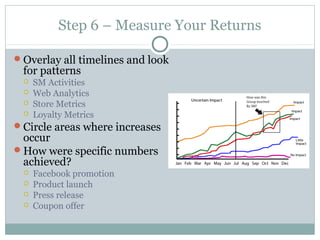
Overlay all timelines and look
for patterns
 SM Activities
 Web Analytics
 Store Metrics
 Loyalty Metrics
Circle areas where increases
occur
How were specific numbers
achieved?
 Facebook promotion
 Product launch
 Press release
 Coupon offer
Budgeting for Social Media
Allocation vs. Addition
 Do you raise new funds or borrow from existing budgets?
How to determine Allocation or Addition
 What are your goals?
 How much is your existing marketing budget?
 Which current tactics work? Which are most expensive?
 What internal resources are available?
Budgeting for Social Media
What to budget for:
 Time
 Design and Branding
 Analytics Tools
 Social Monitoring
 Automation Applications
 Social Media Advertising
 Outsources/Consulting
How to Get Started
Start with platforms you can actively maintain
What outsourcing is needed?
 Design, development, content management, market research
Plan your content flow
 Will you push content through all channels?
Find tools to automate processes
 Tweetdeck (now by Twitter)
 Hootsuite
 Sprout Social
 Mailchimp
 Sendible
Additional Resources
Blogs
 Socialmediaexplorer.com
 Socialmediatoday.com
 BrianSolis.com
 Mashable.com
Tools
 Tweetdeck
 Sendible
 Hootsuite
 Shoutlet
 Buffer
 Trackur
Questions?
Contact me at:
 Twitter.com/corywilliamson
 Linkedin.com/in/corywilliamson
 About.me/corywilliamson

Creating a social_media_plan

  • 1.
    By: Cory Williamson For:Fiverr.com Creating a Social Media Plan
  • 2.
    Overview Social Media Channels 6Steps to Creating a Social Media Plan Budgeting for Social Media Getting Started Questions
  • 3.
    What is SocialMedia Social media is media designed to be disseminated through social interaction, created using highly accessible and scalable publishing techniques. - wikipedia.org
  • 4.
    What is SocialMedia? An ongoing conversation that’s happening RIGHT NOW A promotional channel for content distribution A long-term return on investment A steady stream of information for:  Research  Feedback  Building Relationships with customers, clients, contacts
  • 5.
    Current Statistics Over 50%of people in the US have at least 1 social media account Social media makes up over 17% of all online usage  Overtaken email as #1 activity on the web 93% of Americans believe companies should have a social media presence  85% believe those companies should be interacting with customers
  • 6.
    Social Media Facts-Facebook 1.5 Billion active users worldwide  819 Million on mobile devices  Mobile users are twice as active as non-mobile users 53% female, 46% male 300 Million Photo uploads per day Thursdays and Fridays, engagement is 18% higher Average time spent on Facebook is 20 minutes 4.75 Billion pieces of content shared daily Largest segment is 25-34 years old
  • 7.
    Social Media Facts-Twitter 1 Billion registered users 500 million tweets sent daily 100 Million active users daily 170 minute spent per user on Twitter Monthly Peak days to tweet are Tuesday & Wednesday Millennials and Teens are most active segment
  • 8.
    Social Media Facts-YouTube 1 Billion unique visits each month Over 6 billion hours of video are watched each month on YouTube  Almost an hour for every person on Earth, and 50% more than last year 100 hours of video are uploaded to YouTube every minute 70% of YouTube traffic comes from outside the US According to Nielsen, YouTube reaches more US adults ages 18-34 than any cable network
  • 9.
    Social Media Facts-Pinterest 70 Million users as of 2013 47% of US online consumers have made a purchase based on recommendation from Pinterest Pinterest generates 4x more revenue per click than Twitter and 27% more than Facebook Pinterest buyers spend more money on items than any of the other top 5 social media sites Conversion rates for Pinterest traffic are 50% higher than conversions from other traffic 80% of total pinterest pins are repins
  • 10.
    Social Media Facts–Google+ Over 350M Users Google plus has great SEO benefits  Google plus links are all “dofollow”, meaning they pass valuable link juice  Posts are crawled and indexed immediately  Bots crawl 2,500 words on a + page, vs 275 on Facebook Google Plus for business offers more integrated analytics on your business page
  • 11.
    How is SocialMedia Used? Customer Service Product/Service Feedback Networking and Job Searching Lead Generation/Sales Promotions News Internal communication
  • 12.
    Creating a SocialMedia Plan Steps: 1.Preplanning 2.Listen to the Conversation 3.Create Your Target Profiles 4.Set Specific Goals 5.Join the Conversation 6.Measure ROI
  • 13.
    Step 1 -Preplanning Questions to ask internally: Where do our customers get their information What influences our customers? How does information flow in our industry? What promotional channels are we currently using?  Are they working? What is my sales funnel? How are leads qualified? Asking questions indicates how social media can be used to complement your business goals.
  • 14.
    Step 2 –Listen to the Conversation Secure your brand on social platforms  Usernames are often unique  Use consistent usernames across all platforms Set up monitoring channels  Google Alerts  Social Mention  Technorati  Twitter Search/Twitter Lists  Radian6 Monitor: individual influencers, competitors, blogs/comments, and industry news sources
  • 15.
    Step 3 –Create Your Target Profile Focusing on key target segments lowers marketing costs Example:  Target Audience is 25-35  $350 Billion in spending power  Spend 20 hours online weekly  96% of them join social networks This information can be gathered through market research, surveys, or previous studies What is the perfect prospect?
  • 16.
    Step 3 –Create Your Target Profile Find key attributes from monitoring channels Chart presence on social media Determine Market Segmentation  Demographic  Geographic  Psychographic  Behavioralistic Continue gathering customer data at each step of your plan
  • 17.
    Step 4 –Set Specific Social Goals Generate Leads Increase brand awareness Increase traffic/Opt-ins Develop relationships with current customers Boost SEO/SEM results Reduce CRM costs Increase Revenue
  • 18.
    Step 5 –Join the Conversation 3 Phases of Social Equity  Awareness  Qualify fans and followers as leads  Engagement  Increase long-term communication  Exclusive promotions will help turn advocates into customers  Social Commerce  Determine small data set to introduce products to  Gather product reviews
  • 19.
    Step 5 –Join the Conversation Establish an Editorial Calendar  Choose specific days for posting content  Be consistent – you’re a news source  Helps stay on track and organize content  Choosing specific topics each day helps find content ideas Share calendar with everyone involved Use video to build quality content  Doesn’t have to be professional  Include descriptions and tags for search engine optimization  Post video with content on your blog/website
  • 20.
    Step 5 –Join the Conversation Be Transparent and Authentic  Don’t be evasive  Offer your name, title, experience  Admit your interests in the topic  Define your credibility (Use LinkedIn to build your credible profile)  Contribute quality input on topics of interest Strive to answer questions about your authenticity Don’t focus on selling, focus on engagement Earn a reputation, build trust, then sell to qualified leads
  • 21.
    Step 5 –Join the Conversation Be the expert in your industry  Write about what you know  Offer insights to those who ask for it  Share links to resources you think add to the conversation Use topics you monitor to start conversation  Articles/blog posts  Community Forum Threads  Conversation from social media groups When customers trust your content, they’ll trust what you’re selling
  • 22.
    Step 5 –Join the Conversation Have rules of engagement  Know what to do with negative responses  Determine who in your organization is involved in responding  Admit to mistakes and thank those who bring it to attention  Respond Kindly Share these rules with your team Turn brand “detractors” into “advocates”  People remember bad experiences, but will buy again if it’s corrected
  • 23.
    Step 6 –Measure Your Returns What is a Return?  Non-financial  Visitors, word of mouth, page views, fans, followers, referrals  Financial  Sales, Transactions, Coupons  ROI Not all returns have to be $$ to bring value
  • 24.
    Step 6 –Measure Your Returns Qualitative  Are we part of our industry’s conversation?  How do our customers perceive us versus our competitors?  Did we build key relationships?  Are we moving from monologue to dialogue? Quantitative  Website Analytics  Social Mentions  SEO Rankings  Linkbacks  Subscribers
  • 25.
    Step 6 –Measure Your Returns Establish before/after baseline  What did our online environment look like before social media?  What online channels were we using?  What does it look like now? Determine hard numbers here  5.5% conversion rate before  8.5% conversion rate now This baseline should track at least 6 months
  • 26.
    Step 6 –Measure Your Returns Develop Activity Timeline along same baseline Diagram exact dates in which key SM activities occurred  8/11 blog started  8/13 Facebook page started  9/15 FB ad campaign begins  9/17 FB ad ended Note Milestones on diagram  500/1000/10,000 fans  100 clicks back to blog link
  • 27.
    Step 6 –Measure Your Returns Look at Key Performance Indicators (KPI)  Transactions  New Customers  Sales  Revenue  Average Order Size  E-mail list size Use Google Analytics to determine exact numbers What are the transaction precursors?  Brand mentions  Loyalty metrics  Store traffic  Free sample offers
  • 28.
    Step 6 –Measure Your Returns Overlay all timelines and look for patterns  SM Activities  Web Analytics  Store Metrics  Loyalty Metrics Circle areas where increases occur How were specific numbers achieved?  Facebook promotion  Product launch  Press release  Coupon offer
  • 29.
    Budgeting for SocialMedia Allocation vs. Addition  Do you raise new funds or borrow from existing budgets? How to determine Allocation or Addition  What are your goals?  How much is your existing marketing budget?  Which current tactics work? Which are most expensive?  What internal resources are available?
  • 30.
    Budgeting for SocialMedia What to budget for:  Time  Design and Branding  Analytics Tools  Social Monitoring  Automation Applications  Social Media Advertising  Outsources/Consulting
  • 31.
    How to GetStarted Start with platforms you can actively maintain What outsourcing is needed?  Design, development, content management, market research Plan your content flow  Will you push content through all channels? Find tools to automate processes  Tweetdeck (now by Twitter)  Hootsuite  Sprout Social  Mailchimp  Sendible
  • 32.
    Additional Resources Blogs  Socialmediaexplorer.com Socialmediatoday.com  BrianSolis.com  Mashable.com Tools  Tweetdeck  Sendible  Hootsuite  Shoutlet  Buffer  Trackur
  • 33.
    Questions? Contact me at: Twitter.com/corywilliamson  Linkedin.com/in/corywilliamson  About.me/corywilliamson