CREATE
DISKGROUP
SQLPLUS COMMAND
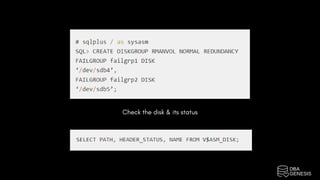
In this article we will be creating new ASM diskgroup using SQLPLUS command
while connected to ASM instance.
You must have an unused partition / disk on the server that can be used to
create ASM diskgroup.
In this activity, we are going to use /dev/sdb4 and /dev/sdb5 to create a new
normal redundancy disk group which needs at least two failure groups.
first check at OS level if you see those two partitions. Use below command to
check
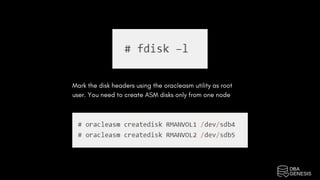
Mark the disk headers using the oracleasm utility as root
user. You need to create ASM disks only from one node
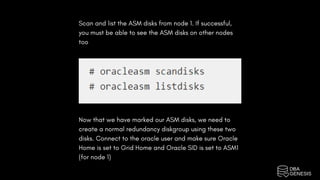
Scan and list the ASM disks from node 1. If successful,
you must be able to see the ASM disks on other nodes
too
Now that we have marked our ASM disks, we need to
create a normal redundancy diskgroup using these two
disks. Connect to the oracle user and make sure Oracle
Home is set to Grid Home and Oracle SID is set to ASM1
(for node 1)
Check the disk & its status
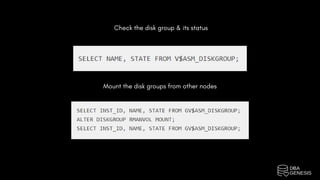
Check the disk group & its status
Mount the disk groups from other nodes
Courses | Projects | Bootcamps

Create Diskgroup Sqlplus Command

  • 1.
  • 2.
    In this articlewe will be creating new ASM diskgroup using SQLPLUS command while connected to ASM instance. You must have an unused partition / disk on the server that can be used to create ASM diskgroup. In this activity, we are going to use /dev/sdb4 and /dev/sdb5 to create a new normal redundancy disk group which needs at least two failure groups. first check at OS level if you see those two partitions. Use below command to check
  • 3.
    Mark the diskheaders using the oracleasm utility as root user. You need to create ASM disks only from one node
  • 4.
    Scan and listthe ASM disks from node 1. If successful, you must be able to see the ASM disks on other nodes too Now that we have marked our ASM disks, we need to create a normal redundancy diskgroup using these two disks. Connect to the oracle user and make sure Oracle Home is set to Grid Home and Oracle SID is set to ASM1 (for node 1)
  • 5.
    Check the disk& its status
  • 6.
    Check the diskgroup & its status Mount the disk groups from other nodes
  • 7.
    Courses | Projects| Bootcamps