CONFIGURE JASMINE AND KARMA
NODE.JS
WHY KARMA?
 A simple tool that allows you to execute JavaScript code in multiple real browsers
 Karma is to make your test-driven development easy, fast, and fun
 Test code in multiple browsers (desktop, mobile, tablets, etc.)
 Execute your tests locally during development
 Execute your tests on a continuous integration server
 Execute your tests on every save
 Uses Istanbul to automagically generate coverage reports
WHY TESTING FRAMEWORK NEEDED?
 Karma is not a testing framework, nor an assertion library
 Karma just launches an HTTP server, and generates the test runner HTML file
 Available Javascript Testing framework plugin
 Jasmine
 Mocha
 Qunit
PRE-REQUISITE - INSTALL NODE.JS AND NPM
 Open - https://nodejs.org/en/download/ and select appropriate operating system (Windows for demo)
 It starts downloading the exe file, open it once it finishes downloading
 Complete the installation wizard and verify the installation
CREATE NEW NODE PROJECT
 Command –
 npm init
 It creates new node project
along with package.json file
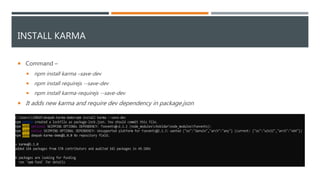
INSTALL KARMA
 Command –
 npm install karma –save-dev
 npm install requirejs --save-dev
 npm install karma-requirejs --save-dev
 It adds new karma and require dev dependency in package.json
INSTALL JASMINE AND KARMA CHROME LAUNCHER
 Command –
 npm install jasmine-core karma karma-chrome-launcher --save-dev
 npm install karma-jasmine karma-jasmine-html-reporter karma-spec-reporter --save-dev
 It adds new dependencies in package.json
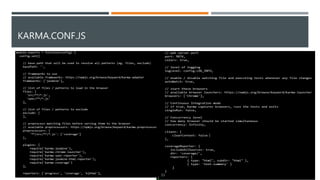
CONFIGURE KARMA
 Command –
 npm install -g karma-cli
 karma init karma.conf.js
 It will install karma cli globally, new
dependencies in package.json
 Run Karma simply by “karma” from
anywhere and it will always run the local
version
 The configuration file can be generated
using karma init
DEPENDENCIES IN PACKAGE.JSON
KARMA.CONF.JS
RUN KARMA
 Command –
 karma start karma.conf.js
 Run Karma simply by “karma” from
anywhere and it will always run the local
version
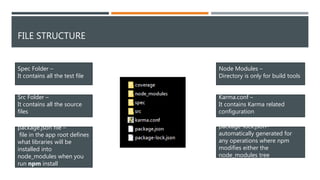
FILE STRUCTURE
Spec Folder –
It contains all the test file
Src Folder –
It contains all the source
files
package.json file –
file in the app root defines
what libraries will be
installed into
node_modules when you
run npm install
Node Modules –
Directory is only for build tools
Karma.conf –
It contains Karma related
configuration
package-lock.json–
automatically generated for
any operations where npm
modifies either the
node_modules tree
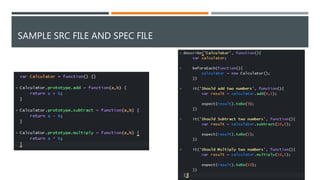
SAMPLE SRC FILE AND SPEC FILE
KARMA RESULTS
CODE COVERAGE RESULTS
THANK YOU

Configure jasmine and karma for code coverage

  • 1.
    CONFIGURE JASMINE ANDKARMA NODE.JS
  • 2.
    WHY KARMA?  Asimple tool that allows you to execute JavaScript code in multiple real browsers  Karma is to make your test-driven development easy, fast, and fun  Test code in multiple browsers (desktop, mobile, tablets, etc.)  Execute your tests locally during development  Execute your tests on a continuous integration server  Execute your tests on every save  Uses Istanbul to automagically generate coverage reports
  • 3.
    WHY TESTING FRAMEWORKNEEDED?  Karma is not a testing framework, nor an assertion library  Karma just launches an HTTP server, and generates the test runner HTML file  Available Javascript Testing framework plugin  Jasmine  Mocha  Qunit
  • 4.
    PRE-REQUISITE - INSTALLNODE.JS AND NPM  Open - https://nodejs.org/en/download/ and select appropriate operating system (Windows for demo)  It starts downloading the exe file, open it once it finishes downloading  Complete the installation wizard and verify the installation
  • 5.
    CREATE NEW NODEPROJECT  Command –  npm init  It creates new node project along with package.json file
  • 6.
    INSTALL KARMA  Command–  npm install karma –save-dev  npm install requirejs --save-dev  npm install karma-requirejs --save-dev  It adds new karma and require dev dependency in package.json
  • 7.
    INSTALL JASMINE ANDKARMA CHROME LAUNCHER  Command –  npm install jasmine-core karma karma-chrome-launcher --save-dev  npm install karma-jasmine karma-jasmine-html-reporter karma-spec-reporter --save-dev  It adds new dependencies in package.json
  • 8.
    CONFIGURE KARMA  Command–  npm install -g karma-cli  karma init karma.conf.js  It will install karma cli globally, new dependencies in package.json  Run Karma simply by “karma” from anywhere and it will always run the local version  The configuration file can be generated using karma init
  • 9.
  • 10.
  • 11.
    RUN KARMA  Command–  karma start karma.conf.js  Run Karma simply by “karma” from anywhere and it will always run the local version
  • 12.
    FILE STRUCTURE Spec Folder– It contains all the test file Src Folder – It contains all the source files package.json file – file in the app root defines what libraries will be installed into node_modules when you run npm install Node Modules – Directory is only for build tools Karma.conf – It contains Karma related configuration package-lock.json– automatically generated for any operations where npm modifies either the node_modules tree
  • 13.
    SAMPLE SRC FILEAND SPEC FILE
  • 14.
  • 15.
  • 16.