




Raheescv
raheescv1992@gmail.com
www.facebook.com/raheescv
twitter.com/raheescv
in.linkedin.com/in/raheescv
09633155669
CPU & ITS EXECUTION OFINSTRUCTION
Disclaimer: This presentation is prepared by trainees of
baabtra as a part of mentoring program. This is not official
document of baabtra –Mentoring Partner
Baabtra-Mentoring Partner is the mentoring division of baabte System Technologies Pvt . Ltd
CPU
• central processing unit or processor
• This is the brain of the computer, it does all the processing
• The main purpose of a CPU is to execute instructions
• The CPU executes the binary representation of the instructions,
-i.e., machine code.
• programs are stored in memory (RAM)
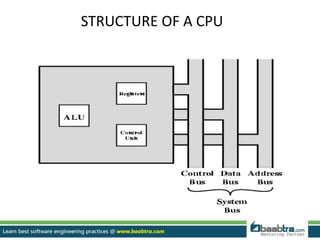
STRUCTURE OF A CPU
ALU
• The ALU consists of circuits to perform arithmetic (+, -, ×, /)
and logical operations (<, ≤ >, ≥, and, or)
-Adder
-Multiplier
-Shifter
-Comparitor
-Etc…
• Operations in the ALU set status flags
like carry, overflow, positive, zero, negative, etc
• The output (result) of the computation (obtained by the ALU)
is often stored in a general purpose register
Control Unit
• The control unit is in charge of managing the fetch-execute
cycle
• It sends out control signals to all other devices
• A control signal indicates that the device should activate or
perform it’s function
• The control unit must communicate with both the
arithmetic/logic unit and memory.
System Bus
• System Bus connects the CPU to memory and I/O devices
• It is a collection of wires that carries electrical current
• There are 3 parts to a bus
1. THE DATA BUS :-
-sometimes called the memory bus
-for both data and program instructions
-handles the transfer of all data and instructions between functional
areas of the computer.
2. THE CONTROL BUS :-
-control signals from the Control Unit to devices, and feedback lines for
acknowledging that the devices are ready or for interrupting the CPU
3. ADDRESS BUS :-
-the address of the memory location or I/O device that is to perform the
given data movement operation
Registers
• Two kind of registers are there
1. User registers
2. Control registers
User registers
• These store data and addresses (pointers to data)
• These are manipulated by your program instructions
Example: Add R1, R2, R3
R1  R2 + R3
• Computers will have between
-1 and hundreds of registers
-Possibly divided into data and address registers
• Registers are usually the size of the computer’s word size
-32 or 64 bits today, previously it had been 8 or 16 bits
• Some machines use special-purpose registers
-each register has an implied usage
User registers (cntnd).
• Others have general-purpose registers
-A general purpose register is a memory cell.
-Each general purpose register has a unique name
-It is used to store intermediate result of complex computation
-use them any way you want to
Control registers
• Registers that store information used by the control unit to
perform the fetch-execute cycle
1. Program Counter (PC)
-the memory location of the next instruction
2. Instruction Register(IR)
-the current instruction being executed
-The CPU will perform the operation indicated by the instruction
code contained in the instruction register.
3. Status flags
- information about the results of the last instruction executed
eg:- “was there an overflow”,
“ was the result positive”,
“ zero or negative” ….. ? Etc)
4. Stack Pointer
– location in memory of the top of the run-time stack (used for
procedure calls and returns)
Control and status registers (cntnd)
5. Memory address registers (MAR):
-Contains the address of a location in memory.
-This register is used to access data and instructions from memory during the
execution of an instruction.
6. Memory buffer register (MBR):
- Contains a word of data to be written to memory or the word most recently
read.
-It is the register that contains the data to be stored in the computer storage or
data after a fetch from the computer storage.
-It acts like a buffer and holds anything that is copied from the memory ready for
the processor to use it,
Types of instruction
• All existing computers (CPU) execute the following 3 types
of instructions:
• Arithmetic and logic operations :-
• (+ , - , / , * , AND, OR ,NOT)
• The result of an arithmetic and logic operation is often stored
in a general purpose register
• Memory transfer operations
• Transfer the content from some specific memory location to a
specific register (memory cell) in the CPU.
• and vice versa (transfer the content from some specific register
(memory cell) in the CPU to some specific memory location).
Types of instruction Cntnd.
• Branch operations :-
•A branch instruction will cause the CPU to branch (jump) to the specified
location in memory
• After the jump has occurred, the CPU will continue to execute the
instructions in sequence, until another branch/jump instruction is
encountered
• There are 2 kinds of branch operations:
1.A unconditional branch instruction will always cause the CPU to jump
to the target location
2.A conditional branch instruction will only cause the CPU to jump to the
target location when the specified condition is met
Instruction execution cycle
• The following is a summary of the 4 steps used to execute a
single instruction
• Fetch the instruction
• Decode the instruction
• Execute the instruction
• Store the instruction
Fetch the instruction
1. Load the address of next instruction in the PC into the MAR.
– So that the control unit can fetch the instruction from the right part
of the memory.
2. Copy the instruction/data that is in the memory address
given by the MAR into the MDR.
– MDR is used whenever anything is to go from the CPU to main
memory, or vice versa.
3. Increment the PC by 1.
– So that it contains the address of the next instruction, assuming that
the instructions are in consecutive locations.
4. Load the instruction/data that is now in the MDR into the IR.
– Thus the next instruction is copied from memory -> MDR -> IR.
DECODE
1. Contents of IR split into operation code and
address if present e.g. store, add or jump
instructions.
2. Decode the instruction that is in the IR
EXECUTE
• If the instruction is a jump instruction then
– Load the address part of the instruction in the IR into the PC.
• If the instruction is an input / load (directly) instruction then
take data input and place in accumulator.
• If the instruction is a load (from memory) instruction.
– Copy address part of the instruction (to load from) in the IR into MAR.
– Copy data from memory address held in MAR to MDR.
– Copy data in MDR into accumulator
Execute contd
• If the instruction is a store instruction then:
– Copy address part of the instruction (to store in) in the IR into MAR.
– Copy data in accumulator to MDR.
– Copy data in MDR into memory address held in MAR.
• If the instruction is an add instruction then:
– Copy address part of the instruction (of number to add) in the IR
into MAR.
– Copy number from memory address held in MAR into MDR.
– Add number in MDR to number in accumulator (accumulator will
now hold the result).
Execute contd
• If the instruction is an output (from memory) instruction
then:
– Copy address part of the instruction (of data to output) in IR into
MAR.
– Output contents of MDR.
Store the output
• Result of calculations in cpu stored in main
memory or sent to output devices.
• program Counter could be updated to a new
address
THANK YOU 
Want to learn more about programming or Looking to become a good programmer?
Are you wasting time on searching so many contents online?
Do you want to learn things quickly?
Tired of spending huge amount of money to become a Software professional?
Do an online course
@ baabtra.com
We put industry standards to practice. Our structured, activity based courses are so designed
to make a quick, good software professional out of anybody who holds a passion for coding.
Follow us @ twitter.com/baabtra
Like us @ facebook.com/baabtra
Subscribe to us @ youtube.com/baabtra
Become a follower @ slideshare.net/BaabtraMentoringPartner
Connect to us @ in.linkedin.com/in/baabtra
Give a feedback @ massbaab.com/baabtra
Thanks in advance
www.baabtra.com | www.massbaab.com |www.baabte.com
Emarald Mall (Big Bazar Building)
Mavoor Road, Kozhikode,
Kerala, India.
Ph: + 91 – 495 40 25 550
NC Complex, Near Bus Stand
Mukkam, Kozhikode,
Kerala, India.
Ph: + 91 – 495 40 25 550
Cafit Square,
Hilite Business Park,
Near Pantheerankavu,
Kozhikode
Start up Village
Eranakulam,
Kerala, India.
Email: info@baabtra.com
Contact Us

Cpu & its execution of instruction

  • 2.
  • 3.
    Disclaimer: This presentationis prepared by trainees of baabtra as a part of mentoring program. This is not official document of baabtra –Mentoring Partner Baabtra-Mentoring Partner is the mentoring division of baabte System Technologies Pvt . Ltd
  • 4.
    CPU • central processingunit or processor • This is the brain of the computer, it does all the processing • The main purpose of a CPU is to execute instructions • The CPU executes the binary representation of the instructions, -i.e., machine code. • programs are stored in memory (RAM)
  • 5.
  • 6.
    ALU • The ALUconsists of circuits to perform arithmetic (+, -, ×, /) and logical operations (<, ≤ >, ≥, and, or) -Adder -Multiplier -Shifter -Comparitor -Etc… • Operations in the ALU set status flags like carry, overflow, positive, zero, negative, etc • The output (result) of the computation (obtained by the ALU) is often stored in a general purpose register
  • 7.
    Control Unit • Thecontrol unit is in charge of managing the fetch-execute cycle • It sends out control signals to all other devices • A control signal indicates that the device should activate or perform it’s function • The control unit must communicate with both the arithmetic/logic unit and memory.
  • 8.
    System Bus • SystemBus connects the CPU to memory and I/O devices • It is a collection of wires that carries electrical current • There are 3 parts to a bus 1. THE DATA BUS :- -sometimes called the memory bus -for both data and program instructions -handles the transfer of all data and instructions between functional areas of the computer. 2. THE CONTROL BUS :- -control signals from the Control Unit to devices, and feedback lines for acknowledging that the devices are ready or for interrupting the CPU 3. ADDRESS BUS :- -the address of the memory location or I/O device that is to perform the given data movement operation
  • 9.
    Registers • Two kindof registers are there 1. User registers 2. Control registers
  • 10.
    User registers • Thesestore data and addresses (pointers to data) • These are manipulated by your program instructions Example: Add R1, R2, R3 R1  R2 + R3 • Computers will have between -1 and hundreds of registers -Possibly divided into data and address registers • Registers are usually the size of the computer’s word size -32 or 64 bits today, previously it had been 8 or 16 bits • Some machines use special-purpose registers -each register has an implied usage
  • 11.
    User registers (cntnd). •Others have general-purpose registers -A general purpose register is a memory cell. -Each general purpose register has a unique name -It is used to store intermediate result of complex computation -use them any way you want to
  • 12.
    Control registers • Registersthat store information used by the control unit to perform the fetch-execute cycle 1. Program Counter (PC) -the memory location of the next instruction 2. Instruction Register(IR) -the current instruction being executed -The CPU will perform the operation indicated by the instruction code contained in the instruction register. 3. Status flags - information about the results of the last instruction executed eg:- “was there an overflow”, “ was the result positive”, “ zero or negative” ….. ? Etc) 4. Stack Pointer – location in memory of the top of the run-time stack (used for procedure calls and returns)
  • 13.
    Control and statusregisters (cntnd) 5. Memory address registers (MAR): -Contains the address of a location in memory. -This register is used to access data and instructions from memory during the execution of an instruction. 6. Memory buffer register (MBR): - Contains a word of data to be written to memory or the word most recently read. -It is the register that contains the data to be stored in the computer storage or data after a fetch from the computer storage. -It acts like a buffer and holds anything that is copied from the memory ready for the processor to use it,
  • 14.
    Types of instruction •All existing computers (CPU) execute the following 3 types of instructions: • Arithmetic and logic operations :- • (+ , - , / , * , AND, OR ,NOT) • The result of an arithmetic and logic operation is often stored in a general purpose register • Memory transfer operations • Transfer the content from some specific memory location to a specific register (memory cell) in the CPU. • and vice versa (transfer the content from some specific register (memory cell) in the CPU to some specific memory location).
  • 15.
    Types of instructionCntnd. • Branch operations :- •A branch instruction will cause the CPU to branch (jump) to the specified location in memory • After the jump has occurred, the CPU will continue to execute the instructions in sequence, until another branch/jump instruction is encountered • There are 2 kinds of branch operations: 1.A unconditional branch instruction will always cause the CPU to jump to the target location 2.A conditional branch instruction will only cause the CPU to jump to the target location when the specified condition is met
  • 16.
    Instruction execution cycle •The following is a summary of the 4 steps used to execute a single instruction • Fetch the instruction • Decode the instruction • Execute the instruction • Store the instruction
  • 17.
    Fetch the instruction 1.Load the address of next instruction in the PC into the MAR. – So that the control unit can fetch the instruction from the right part of the memory. 2. Copy the instruction/data that is in the memory address given by the MAR into the MDR. – MDR is used whenever anything is to go from the CPU to main memory, or vice versa. 3. Increment the PC by 1. – So that it contains the address of the next instruction, assuming that the instructions are in consecutive locations. 4. Load the instruction/data that is now in the MDR into the IR. – Thus the next instruction is copied from memory -> MDR -> IR.
  • 18.
    DECODE 1. Contents ofIR split into operation code and address if present e.g. store, add or jump instructions. 2. Decode the instruction that is in the IR
  • 19.
    EXECUTE • If theinstruction is a jump instruction then – Load the address part of the instruction in the IR into the PC. • If the instruction is an input / load (directly) instruction then take data input and place in accumulator. • If the instruction is a load (from memory) instruction. – Copy address part of the instruction (to load from) in the IR into MAR. – Copy data from memory address held in MAR to MDR. – Copy data in MDR into accumulator
  • 20.
    Execute contd • Ifthe instruction is a store instruction then: – Copy address part of the instruction (to store in) in the IR into MAR. – Copy data in accumulator to MDR. – Copy data in MDR into memory address held in MAR. • If the instruction is an add instruction then: – Copy address part of the instruction (of number to add) in the IR into MAR. – Copy number from memory address held in MAR into MDR. – Add number in MDR to number in accumulator (accumulator will now hold the result).
  • 21.
    Execute contd • Ifthe instruction is an output (from memory) instruction then: – Copy address part of the instruction (of data to output) in IR into MAR. – Output contents of MDR.
  • 22.
    Store the output •Result of calculations in cpu stored in main memory or sent to output devices. • program Counter could be updated to a new address
  • 23.
  • 24.
    Want to learnmore about programming or Looking to become a good programmer? Are you wasting time on searching so many contents online? Do you want to learn things quickly? Tired of spending huge amount of money to become a Software professional? Do an online course @ baabtra.com We put industry standards to practice. Our structured, activity based courses are so designed to make a quick, good software professional out of anybody who holds a passion for coding.
  • 25.
    Follow us @twitter.com/baabtra Like us @ facebook.com/baabtra Subscribe to us @ youtube.com/baabtra Become a follower @ slideshare.net/BaabtraMentoringPartner Connect to us @ in.linkedin.com/in/baabtra Give a feedback @ massbaab.com/baabtra Thanks in advance www.baabtra.com | www.massbaab.com |www.baabte.com
  • 26.
    Emarald Mall (BigBazar Building) Mavoor Road, Kozhikode, Kerala, India. Ph: + 91 – 495 40 25 550 NC Complex, Near Bus Stand Mukkam, Kozhikode, Kerala, India. Ph: + 91 – 495 40 25 550 Cafit Square, Hilite Business Park, Near Pantheerankavu, Kozhikode Start up Village Eranakulam, Kerala, India. Email: info@baabtra.com Contact Us