CPIx BIM Assessment Form V1.0 24 February 2011
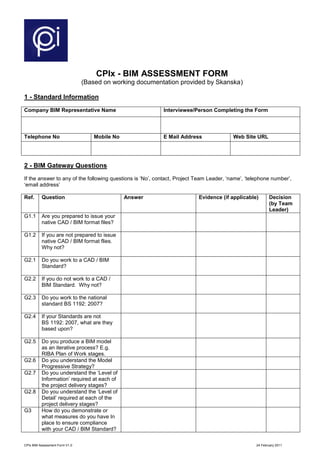
CPIx - BIM ASSESSMENT FORM
(Based on working documentation provided by Skanska)
1 - Standard Information
Company BIM Representative Name Interviewee/Person Completing the Form
Telephone No Mobile No E Mail Address Web Site URL
2 - BIM Gateway Questions
If the answer to any of the following questions is ‘No’, contact, Project Team Leader, ‘name’, ‘telephone number’,
‘email address’
Ref. Question Answer Evidence (if applicable) Decision
(by Team
Leader)
G1.1 Are you prepared to issue your
native CAD / BIM format files?
G1.2 If you are not prepared to issue
native CAD / BIM format flies.
Why not?
G2.1 Do you work to a CAD / BIM
Standard?
G2.2 If you do not work to a CAD /
BIM Standard. Why not?
G2.3 Do you work to the national
standard BS 1192: 2007?
G2.4 If your Standards are not
BS 1192: 2007, what are they
based upon?
G2.5 Do you produce a BIM model
as an iterative process? E.g.
RIBA Plan of Work stages.
G2.6 Do you understand the Model
Progressive Strategy?
G2.7 Do you understand the ‘Level of
Information’ required at each of
the project delivery stages?
G2.8 Do you understand the ‘Level of
Detail’ required at each of the
project delivery stages?
G3 How do you demonstrate or
what measures do you have In
place to ensure compliance
with your CAD / BIM Standard?
CPIx BIM Assessment Form V1.0 24 February 2011
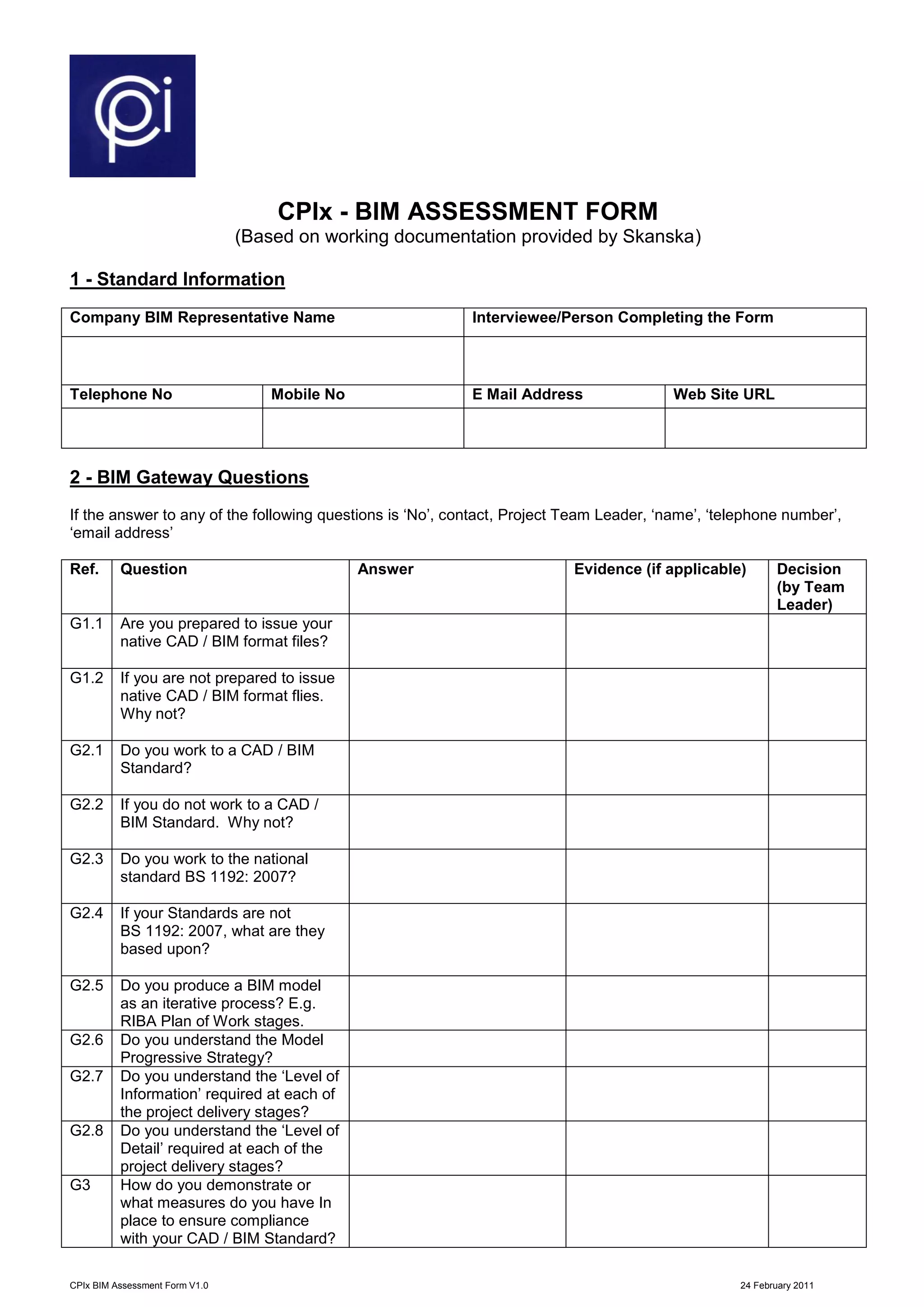
Ref. Question Answer Evidence (if applicable) Decision
(by Team
Leader)
G4.1 Are you prepared to comply
with the Project Standards?
G4.2 If you aren’t prepared to comply
with the Project Standards,
please explain why?
G5.1 Are all your CAD / BIM Tools
covered by a yearly
maintenance agreement?
G5.1 Do you train your staff In the
use of your CAD / BIM tools?
G5.2 If you train staff, who provides
the training and how often?
G6 Can you provide CAD / BIM
related qualifications and CPD
Certification for proposed team
members?
G7 How do you carry out spatial
co-ordination using CAD / BIM?
G8 In a single paragraph please
explain your experiences with
linked, attached and embedded
attribute data within 3D
models?
CPIx BIM Assessment Form V1.0 24 February 2011
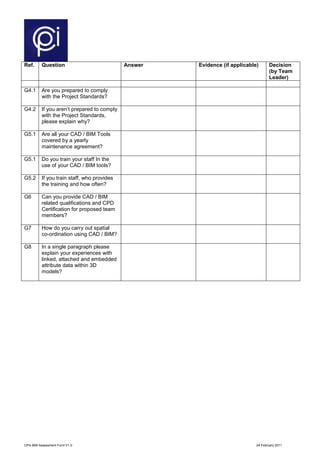
3 - 12 Areas of BIM
The projects have identified 12 Areas or functions that projects will benefit from BIM Tools, Applications and Data Management. Please complete the following table to
show your understanding of each of the areas and which areas you could support us with; please include supporting evidence.
Application /
Area
Examples Benefits Expected Understanding Supporting Evidence
• Architectural
• Structural Design and Fabrication
• MEP Design and Manufacture.
• Civil
• Landscaping
• Accurate and visual design, no shortcuts
(completed design in all details). ‘As Constructed’
re-measured and verified with adequate detail to
enable Asset Type and Asset Unique Numbering
and Location to be applied.
• Project Common Design Elements and Product
Components in use, libraries and catalogues
• Information on materials and components
available from model to meet O&M/FM &
Investor’s needs
• History
• Database links
• Optioneering
• Accurate life cycle cost estimation
• Reduced risk in life cycle fund management
• Life Cycle Assessment to evaluate
environmental aspects where required
• Optimised handover
• Asset register
• Linked H&SF
• Linked O&MM
• Linked CAFM
• Computer aided facilities management to ensure
effective maintenance of assets
• Ensures maintenance and asset performance
history maintained
• Enables FM contractor to effectively manage and
optimize maintenance services
• Schedules
• Material lists
• Component lists
• BoQ
• Re-informed Cost Plans
• Rapid and accurate take off of materials
quantities (but needs care)
• Easier to evaluate design changes and impact on
costs (5D design)
• Supports rapid optioneering
• Easier to connect quantities to costing,
scheduling and procurement
Quantity take-
Off, costing
Facilities Mgt.
Design /
Construction
Intelligent
3D-Modelling
LCC and LCA
analysis
CPIx BIM Assessment Form V1.0 24 February 2011
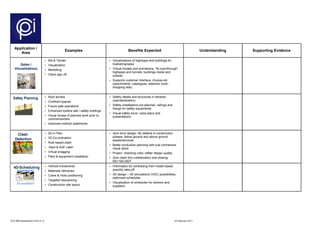
Application /
Area
Examples Benefits Expected Understanding Supporting Evidence
• Bid & Tender
• Visualization
• Marketing
• Client sign off
• Visualizations of highways and buildings for
marketing/sales
• Virtual models and animations, “fly over/through”
highways and tunnels, buildings inside and
outside
• Supports customer interface, choices etc
(assortments, catalogues, selection tools -
shopping lists)
• Roof access
• Confined spaces
• Future safe operations
• Enhanced toolbox talk / safety briefings
• Visual review of planned work prior to
commencement
• Improved method statements
• Safety details and structures in libraries
(standardization)
• Safety installations pre-planned, railings and
fixings for safety equipments
• Visual safety tours / area plans and
presentations
• 2D in Plan
• 3D Co-ordination
• Rule based clash
• ‘Hard & Soft’ clash
• Virtual snagging
• Plant & equipment installation
• Zero error design: No defects in construction
phases, below ground and above ground
assets/services
• Better production planning with sub contractors,
visual plans
• Project checking rules: better design quality
• Zero clash thro collaboration and sharing
BS1192:2007
• Vehicle movements
• Materials deliveries
• Crane & Hoist positioning
• Targeted sequencing
• Construction site layout
• Information for scheduling from model based
quantity take-off
• 4D design – 4D simulations (VDC) possibilities,
optimized schedules
• Visualization of schedules for workers and
suppliers
4D-Scheduling
Clash
Detection
Safety Planning
Sales /
Visualizations
CPIx BIM Assessment Form V1.0 24 February 2011
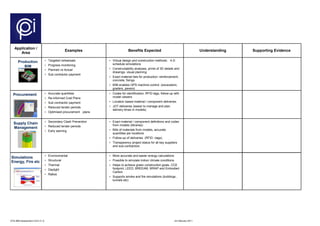
Application /
Area
Examples Benefits Expected Understanding Supporting Evidence
• Targeted rehearsals
• Progress monitoring
• Planned vs Actual
• Sub contractor payment
• Virtual design and construction methods: 4-D
schedule simulations
• Constructability analyses, prints of 3D details and
drawings, visual planning
• Exact material lists for production: reinforcement,
concrete, fixings
• BIM enables GPS machine control (excavators,
graders, pavers)
• Accurate quantities
• Re-informed Cost Plans
• Sub contractor payment
• Reduced tender periods
• Optimised procurement plans
• Codes for identification, RFID tags, follow-up with
model viewers
• Location based material / component deliveries
• JOT deliveries (easier to manage and plan,
delivery times in models)
• Secondary Clash Prevention
• Reduced tender periods
• Early warning
• Exact material / component definitions and codes
from models (libraries)
• Bills of materials from models, accurate
quantities per locations
• Follow-up of deliveries (RFID –tags)
• Transparency project status for all key suppliers
and sub-contractors
• Environmental
• Structural
• Thermal
• Daylight
• Ratios
• More accurate and easier energy calculations
• Possible to simulate indoor climate conditions
• Helps to achieve green construction goals, CO2
footprint, LEED, BREEAM, WRAP and Embodied
Carbon
• Supports smoke and fire simulations (buildings ,
tunnels etc)
Production
BIM
Supply Chain
Management
Simulations
Energy, Fire etc
Procurement
CPIx BIM Assessment Form V1.0 24 February 2011
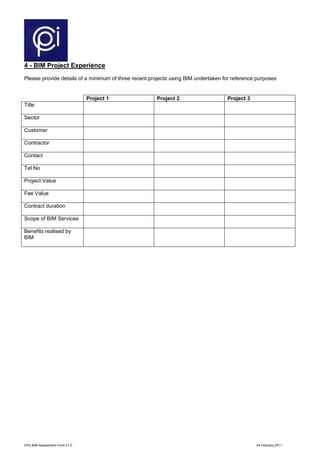
4 - BIM Project Experience
Please provide details of a minimum of three recent projects using BIM undertaken for reference purposes
Project 1 Project 2 Project 3
Title
Sector
Customer
Contractor
Contact
Tel No
Project Value
Fee Value
Contract duration
Scope of BIM Services
Benefits realised by
BIM
CPIx BIM Assessment Form V1.0 24 February 2011
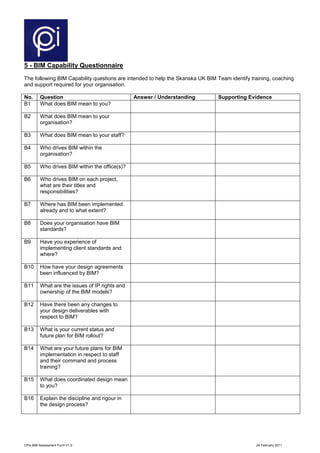
5 - BIM Capability Questionnaire
The following BIM Capability questions are intended to help the Skanska UK BIM Team identify training, coaching
and support required for your organisation.
No. Question Answer / Understanding Supporting Evidence
B1 What does BIM mean to you?
B2 What does BIM mean to your
organisation?
B3 What does BIM mean to your staff?
B4 Who drives BIM within the
organisation?
B5 Who drives BIM within the office(s)?
B6 Who drives BIM on each project,
what are their titles and
responsibilities?
B7 Where has BIM been implemented
already and to what extent?
B8 Does your organisation have BIM
standards?
B9 Have you experience of
implementing client standards and
where?
B10 How have your design agreements
been influenced by BIM?
B11 What are the issues of IP rights and
ownership of the BIM models?
B12 Have there been any changes to
your design deliverables with
respect to BIM?
B13 What is your current status and
future plan for BIM rollout?
B14 What are your future plans for BIM
implementation in respect to staff
and their command and process
training?
B15 What does coordinated design mean
to you?
B16 Explain the discipline and rigour in
the design process?
CPIx BIM Assessment Form V1.0 24 February 2011
No. Question Answer / Understanding Supporting Evidence
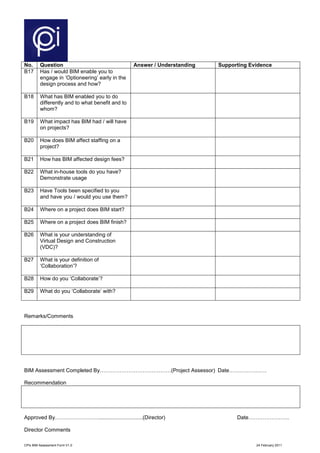
B17 Has / would BIM enable you to
engage in ‘Optioneering’ early in the
design process and how?
B18 What has BIM enabled you to do
differently and to what benefit and to
whom?
B19 What impact has BIM had / will have
on projects?
B20 How does BIM affect staffing on a
project?
B21 How has BIM affected design fees?
B22 What in-house tools do you have?
Demonstrate usage
B23 Have Tools been specified to you
and have you / would you use them?
B24 Where on a project does BIM start?
B25 Where on a project does BIM finish?
B26 What is your understanding of
Virtual Design and Construction
(VDC)?
B27 What is your definition of
‘Collaboration’?
B28 How do you ‘Collaborate’?
B29 What do you ‘Collaborate’ with?
Remarks/Comments
BIM Assessment Completed By………………………….………(Project Assessor) Date…………………
Recommendation
Approved By……………………..............................(Director) Date…………………..
Director Comments
CPIx BIM Assessment Form V1.0 24 February 2011

Cpix -bim_assessment_form_ver_1.0

  • 1.
    CPIx BIM AssessmentForm V1.0 24 February 2011 CPIx - BIM ASSESSMENT FORM (Based on working documentation provided by Skanska) 1 - Standard Information Company BIM Representative Name Interviewee/Person Completing the Form Telephone No Mobile No E Mail Address Web Site URL 2 - BIM Gateway Questions If the answer to any of the following questions is ‘No’, contact, Project Team Leader, ‘name’, ‘telephone number’, ‘email address’ Ref. Question Answer Evidence (if applicable) Decision (by Team Leader) G1.1 Are you prepared to issue your native CAD / BIM format files? G1.2 If you are not prepared to issue native CAD / BIM format flies. Why not? G2.1 Do you work to a CAD / BIM Standard? G2.2 If you do not work to a CAD / BIM Standard. Why not? G2.3 Do you work to the national standard BS 1192: 2007? G2.4 If your Standards are not BS 1192: 2007, what are they based upon? G2.5 Do you produce a BIM model as an iterative process? E.g. RIBA Plan of Work stages. G2.6 Do you understand the Model Progressive Strategy? G2.7 Do you understand the ‘Level of Information’ required at each of the project delivery stages? G2.8 Do you understand the ‘Level of Detail’ required at each of the project delivery stages? G3 How do you demonstrate or what measures do you have In place to ensure compliance with your CAD / BIM Standard?
  • 2.
    CPIx BIM AssessmentForm V1.0 24 February 2011 Ref. Question Answer Evidence (if applicable) Decision (by Team Leader) G4.1 Are you prepared to comply with the Project Standards? G4.2 If you aren’t prepared to comply with the Project Standards, please explain why? G5.1 Are all your CAD / BIM Tools covered by a yearly maintenance agreement? G5.1 Do you train your staff In the use of your CAD / BIM tools? G5.2 If you train staff, who provides the training and how often? G6 Can you provide CAD / BIM related qualifications and CPD Certification for proposed team members? G7 How do you carry out spatial co-ordination using CAD / BIM? G8 In a single paragraph please explain your experiences with linked, attached and embedded attribute data within 3D models?
  • 3.
    CPIx BIM AssessmentForm V1.0 24 February 2011 3 - 12 Areas of BIM The projects have identified 12 Areas or functions that projects will benefit from BIM Tools, Applications and Data Management. Please complete the following table to show your understanding of each of the areas and which areas you could support us with; please include supporting evidence. Application / Area Examples Benefits Expected Understanding Supporting Evidence • Architectural • Structural Design and Fabrication • MEP Design and Manufacture. • Civil • Landscaping • Accurate and visual design, no shortcuts (completed design in all details). ‘As Constructed’ re-measured and verified with adequate detail to enable Asset Type and Asset Unique Numbering and Location to be applied. • Project Common Design Elements and Product Components in use, libraries and catalogues • Information on materials and components available from model to meet O&M/FM & Investor’s needs • History • Database links • Optioneering • Accurate life cycle cost estimation • Reduced risk in life cycle fund management • Life Cycle Assessment to evaluate environmental aspects where required • Optimised handover • Asset register • Linked H&SF • Linked O&MM • Linked CAFM • Computer aided facilities management to ensure effective maintenance of assets • Ensures maintenance and asset performance history maintained • Enables FM contractor to effectively manage and optimize maintenance services • Schedules • Material lists • Component lists • BoQ • Re-informed Cost Plans • Rapid and accurate take off of materials quantities (but needs care) • Easier to evaluate design changes and impact on costs (5D design) • Supports rapid optioneering • Easier to connect quantities to costing, scheduling and procurement Quantity take- Off, costing Facilities Mgt. Design / Construction Intelligent 3D-Modelling LCC and LCA analysis
  • 4.
    CPIx BIM AssessmentForm V1.0 24 February 2011 Application / Area Examples Benefits Expected Understanding Supporting Evidence • Bid & Tender • Visualization • Marketing • Client sign off • Visualizations of highways and buildings for marketing/sales • Virtual models and animations, “fly over/through” highways and tunnels, buildings inside and outside • Supports customer interface, choices etc (assortments, catalogues, selection tools - shopping lists) • Roof access • Confined spaces • Future safe operations • Enhanced toolbox talk / safety briefings • Visual review of planned work prior to commencement • Improved method statements • Safety details and structures in libraries (standardization) • Safety installations pre-planned, railings and fixings for safety equipments • Visual safety tours / area plans and presentations • 2D in Plan • 3D Co-ordination • Rule based clash • ‘Hard & Soft’ clash • Virtual snagging • Plant & equipment installation • Zero error design: No defects in construction phases, below ground and above ground assets/services • Better production planning with sub contractors, visual plans • Project checking rules: better design quality • Zero clash thro collaboration and sharing BS1192:2007 • Vehicle movements • Materials deliveries • Crane & Hoist positioning • Targeted sequencing • Construction site layout • Information for scheduling from model based quantity take-off • 4D design – 4D simulations (VDC) possibilities, optimized schedules • Visualization of schedules for workers and suppliers 4D-Scheduling Clash Detection Safety Planning Sales / Visualizations
  • 5.
    CPIx BIM AssessmentForm V1.0 24 February 2011 Application / Area Examples Benefits Expected Understanding Supporting Evidence • Targeted rehearsals • Progress monitoring • Planned vs Actual • Sub contractor payment • Virtual design and construction methods: 4-D schedule simulations • Constructability analyses, prints of 3D details and drawings, visual planning • Exact material lists for production: reinforcement, concrete, fixings • BIM enables GPS machine control (excavators, graders, pavers) • Accurate quantities • Re-informed Cost Plans • Sub contractor payment • Reduced tender periods • Optimised procurement plans • Codes for identification, RFID tags, follow-up with model viewers • Location based material / component deliveries • JOT deliveries (easier to manage and plan, delivery times in models) • Secondary Clash Prevention • Reduced tender periods • Early warning • Exact material / component definitions and codes from models (libraries) • Bills of materials from models, accurate quantities per locations • Follow-up of deliveries (RFID –tags) • Transparency project status for all key suppliers and sub-contractors • Environmental • Structural • Thermal • Daylight • Ratios • More accurate and easier energy calculations • Possible to simulate indoor climate conditions • Helps to achieve green construction goals, CO2 footprint, LEED, BREEAM, WRAP and Embodied Carbon • Supports smoke and fire simulations (buildings , tunnels etc) Production BIM Supply Chain Management Simulations Energy, Fire etc Procurement
  • 6.
    CPIx BIM AssessmentForm V1.0 24 February 2011 4 - BIM Project Experience Please provide details of a minimum of three recent projects using BIM undertaken for reference purposes Project 1 Project 2 Project 3 Title Sector Customer Contractor Contact Tel No Project Value Fee Value Contract duration Scope of BIM Services Benefits realised by BIM
  • 7.
    CPIx BIM AssessmentForm V1.0 24 February 2011 5 - BIM Capability Questionnaire The following BIM Capability questions are intended to help the Skanska UK BIM Team identify training, coaching and support required for your organisation. No. Question Answer / Understanding Supporting Evidence B1 What does BIM mean to you? B2 What does BIM mean to your organisation? B3 What does BIM mean to your staff? B4 Who drives BIM within the organisation? B5 Who drives BIM within the office(s)? B6 Who drives BIM on each project, what are their titles and responsibilities? B7 Where has BIM been implemented already and to what extent? B8 Does your organisation have BIM standards? B9 Have you experience of implementing client standards and where? B10 How have your design agreements been influenced by BIM? B11 What are the issues of IP rights and ownership of the BIM models? B12 Have there been any changes to your design deliverables with respect to BIM? B13 What is your current status and future plan for BIM rollout? B14 What are your future plans for BIM implementation in respect to staff and their command and process training? B15 What does coordinated design mean to you? B16 Explain the discipline and rigour in the design process?
  • 8.
    CPIx BIM AssessmentForm V1.0 24 February 2011 No. Question Answer / Understanding Supporting Evidence B17 Has / would BIM enable you to engage in ‘Optioneering’ early in the design process and how? B18 What has BIM enabled you to do differently and to what benefit and to whom? B19 What impact has BIM had / will have on projects? B20 How does BIM affect staffing on a project? B21 How has BIM affected design fees? B22 What in-house tools do you have? Demonstrate usage B23 Have Tools been specified to you and have you / would you use them? B24 Where on a project does BIM start? B25 Where on a project does BIM finish? B26 What is your understanding of Virtual Design and Construction (VDC)? B27 What is your definition of ‘Collaboration’? B28 How do you ‘Collaborate’? B29 What do you ‘Collaborate’ with? Remarks/Comments BIM Assessment Completed By………………………….………(Project Assessor) Date………………… Recommendation Approved By……………………..............................(Director) Date………………….. Director Comments
  • 9.
    CPIx BIM AssessmentForm V1.0 24 February 2011