Webinar starts at 9 AM EST U.S. Dial-In: 877.682.3758 Access Code:  8551031077 International Toll-Free Dial-In: Access Code:  8551031077       UK London 02031070273 UK Other 08082348431  Ireland Dublin 012475202 Ireland Other 1800685010 Australia Sydney 282239790 Australia Other 1800635431 Hong Kong Hong Kong 030114574 Hong Kong Other 800903850 New Zealand 0800654460 Singapore 66221009 Singapore 8001011807      
I N S P I R E  T H I N K I N G  O N L I N E . ™ Campus Pack 4  –  Upgrade Webinar Presenter: Dr. Nancy Rubin Twitter: @nancyrubin [email_address]
Agenda Please mute your phone - *6.  Overview What’s the Same? What’s New? Take a Tour Questions and Answers – in chat or at the end (#6 to um-mute the phone)
CAMPUS PACK 4 Offers the Web 2.0 tools you already know, but, with increased functionality at NO ADDITIONAL COST! Released into production in January 2009.
Enhancements to core functionality New features Better support and service Better security, scalability, and performance Integration with any LMS; use all existing content with any LMS CAMPUS PACK 4
Enhancements Assessment Features Better assess individual contributions to social assignments through improved activity transparency. Flexible Sharing Granular sharing both within and outside the institution for sites, Personal Learning Space (PLS) and Community Areas (CA). Site Copy Seamlessly move content to and from course, PLS, and CA.
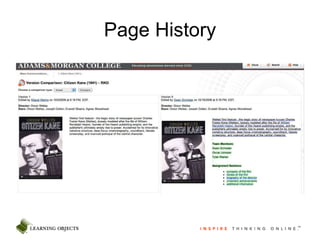
Page History
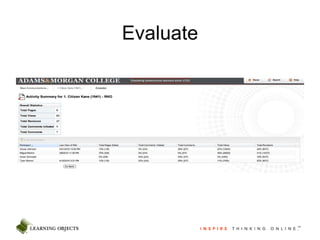
Evaluate
What’s the same? Web 2.0 tools are still available as content items in an LMS. Add wikis, blogs, journals and podcasts to your eLearning environment.  Web 2.0 content is displayed within the frameset of the LMS. Granular sharing, history tracking, assessment tools, RSS capability. Administrator control of system-wide settings and upload quotas.
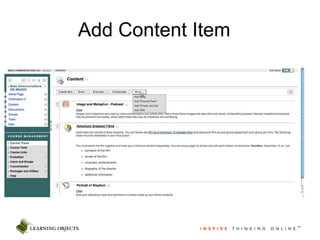
Add Content Item
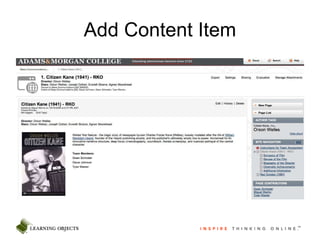
Add Content Item
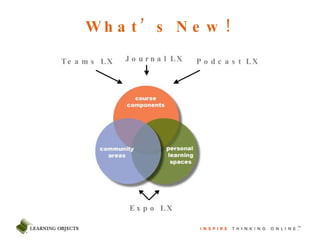
What’s New! Teams LX Journal LX Podcast LX Expo LX
Course Components Enhancements to tools you already know. Tag Clouds for labeling and searching content. Activity feeds – recent site activity at a glance. Version history – side by side comparisons of different version.
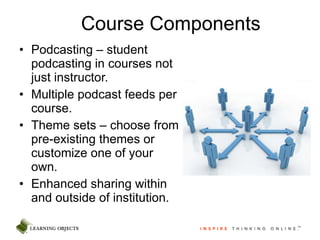
Course Components Podcasting – student podcasting in courses not just instructor. Multiple podcast feeds per course. Theme sets – choose from pre-existing themes or customize one of your own. Enhanced sharing within and outside of institution.
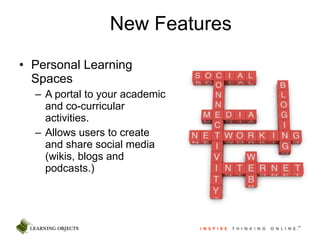
New Features Personal Learning Spaces A portal to your academic and co-curricular activities. Allows users to create and share social media (wikis, blogs and podcasts.)
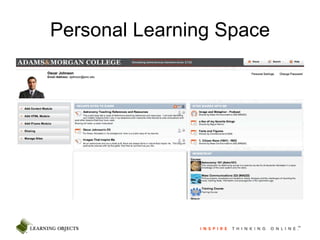
Personal Learning Space
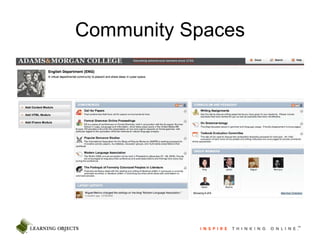
New Features Community Areas Enable departments, organizations and ad hoc groups a place to build online communities. Clubs, teams, and other groups have a forum to coordinate activities. Administrative and academic departments can easily share information with a broad audience. Collaborate easily and securely with participants outside the institution .
Community Spaces
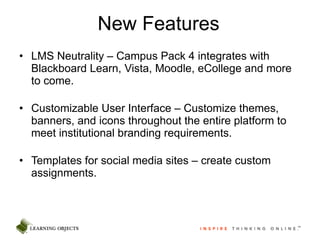
New Features LMS Neutrality – Campus Pack 4 integrates with Blackboard Learn, Vista, Moodle, eCollege and more to come. Customizable User Interface – Customize themes, banners, and icons throughout the entire platform to meet institutional branding requirements.  Templates for social media sites – create custom assignments.
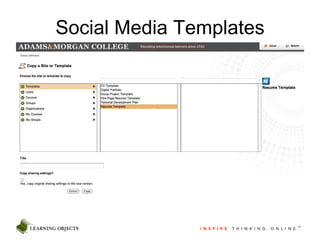
Social Media Templates
New Features External user accounts – create accounts for users not in your LMS or invite people to participate in a site via email invitation. Widgets – add components to any site such as a tag cloud, rating and voting, activity feed, threaded comments, and more. Language Packs – install custom language packs to change any word within the platform.
Spending less time managing the software infrastructure means more time to spend managing your users’ experience. Learning Objects ensures your software is optimally configured; receive updates without hassles, and we can provide you with the highest quality support and system security. Deployment and hosting – regional data centers (U.S., Canada, U.K. and soon Asia/Australia.) Why Upgrade?
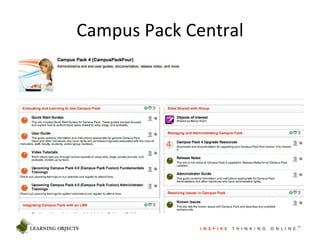
Campus Pack Central
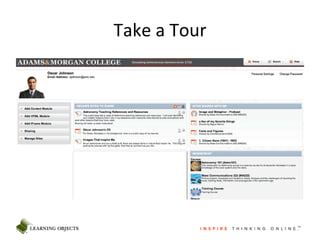
Take a Tour

Cp4 v5

  • 1.
    Webinar starts at9 AM EST U.S. Dial-In: 877.682.3758 Access Code:  8551031077 International Toll-Free Dial-In: Access Code:  8551031077       UK London 02031070273 UK Other 08082348431 Ireland Dublin 012475202 Ireland Other 1800685010 Australia Sydney 282239790 Australia Other 1800635431 Hong Kong Hong Kong 030114574 Hong Kong Other 800903850 New Zealand 0800654460 Singapore 66221009 Singapore 8001011807      
  • 2.
    I N SP I R E T H I N K I N G O N L I N E . ™ Campus Pack 4 – Upgrade Webinar Presenter: Dr. Nancy Rubin Twitter: @nancyrubin [email_address]
  • 3.
    Agenda Please muteyour phone - *6. Overview What’s the Same? What’s New? Take a Tour Questions and Answers – in chat or at the end (#6 to um-mute the phone)
  • 4.
    CAMPUS PACK 4Offers the Web 2.0 tools you already know, but, with increased functionality at NO ADDITIONAL COST! Released into production in January 2009.
  • 5.
    Enhancements to corefunctionality New features Better support and service Better security, scalability, and performance Integration with any LMS; use all existing content with any LMS CAMPUS PACK 4
  • 6.
    Enhancements Assessment FeaturesBetter assess individual contributions to social assignments through improved activity transparency. Flexible Sharing Granular sharing both within and outside the institution for sites, Personal Learning Space (PLS) and Community Areas (CA). Site Copy Seamlessly move content to and from course, PLS, and CA.
  • 7.
  • 8.
  • 9.
    What’s the same?Web 2.0 tools are still available as content items in an LMS. Add wikis, blogs, journals and podcasts to your eLearning environment. Web 2.0 content is displayed within the frameset of the LMS. Granular sharing, history tracking, assessment tools, RSS capability. Administrator control of system-wide settings and upload quotas.
  • 10.
  • 11.
  • 12.
    What’s New! TeamsLX Journal LX Podcast LX Expo LX
  • 13.
    Course Components Enhancementsto tools you already know. Tag Clouds for labeling and searching content. Activity feeds – recent site activity at a glance. Version history – side by side comparisons of different version.
  • 14.
    Course Components Podcasting– student podcasting in courses not just instructor. Multiple podcast feeds per course. Theme sets – choose from pre-existing themes or customize one of your own. Enhanced sharing within and outside of institution.
  • 15.
    New Features PersonalLearning Spaces A portal to your academic and co-curricular activities. Allows users to create and share social media (wikis, blogs and podcasts.)
  • 16.
  • 17.
    New Features CommunityAreas Enable departments, organizations and ad hoc groups a place to build online communities. Clubs, teams, and other groups have a forum to coordinate activities. Administrative and academic departments can easily share information with a broad audience. Collaborate easily and securely with participants outside the institution .
  • 18.
  • 19.
    New Features LMSNeutrality – Campus Pack 4 integrates with Blackboard Learn, Vista, Moodle, eCollege and more to come. Customizable User Interface – Customize themes, banners, and icons throughout the entire platform to meet institutional branding requirements. Templates for social media sites – create custom assignments.
  • 20.
  • 21.
    New Features Externaluser accounts – create accounts for users not in your LMS or invite people to participate in a site via email invitation. Widgets – add components to any site such as a tag cloud, rating and voting, activity feed, threaded comments, and more. Language Packs – install custom language packs to change any word within the platform.
  • 22.
    Spending less timemanaging the software infrastructure means more time to spend managing your users’ experience. Learning Objects ensures your software is optimally configured; receive updates without hassles, and we can provide you with the highest quality support and system security. Deployment and hosting – regional data centers (U.S., Canada, U.K. and soon Asia/Australia.) Why Upgrade?
  • 23.
  • 24.

Editor's Notes

  • #3 Introduce – I am Nancy Rubin and I will be leading the webinar today. This webinar is our upgrade webinar for people upgrading from Campus Pack 3 to Campus Pack 4. We do have a few other webinars that we run weekly – Campus Pack 4 Fundamentals and Campus Pack 4 for System Administrators. I am going to mute the phones for the presentation because we do have quite a few people signed up but I do have colleagues manning the chat who will answer any questions you have. If you have a question, enter it below or you can also email info@learningobjects.com after and your account manager will follow up with you to answer your questions.
  • #4 A quick overview of the webinar: I am going to run through a PPT to explain what we think is important for you to know about Campus Pack 4. After that I am going to take you on a tour of Campus Pack 4. Remember you can ask questions throughout the presentation by typing them below.
  • #5 Campus Pack 4 has been in production since January of 2009 and if offers you all the tools that you know – wikis blogs podcasts and journals – with more functionality as part of your existing license.
  • #6 At Learning Objects we take the feedback we get from our clients and use that as input into our development plans. Some of the things you can expect in Campus Pack 4 include: Enhancements to the core functionality of the tools, themselves, things like improvements in ease of use. We conducted focus groups, surveys, and gathered feedback on how we could improve the usability of the Campus Pack Tools. In response to that feedback, we streamlined certain tasks to make it easier to use the tools which we hope make it easier to use Campus Pack’s blogs, wikis podcasts and journals. You will notice performance improvements in the system itself. What Campus Pack has always done – provide Web 2.0 tools to your user community – we now do better than before. At the system level, things like Better scalability and support and Opportunities for integration with different LMSs as well as Student Information Systems, Portals, as well as LDAP authentication
  • #7 In Campus Pack 4, you are going to find: Better assessment tools to provide instructors insight into individual and group contributions to social assignments - through improved activity transparency. Granular sharing capabilities both within and outside the institution for sties, PLSs, and CAs. We’ll take a look at some of the ways that content can be created and shared internally (within the institution) and externally (with SMEs, Guest Lecturers, Mentors, Field Work Supervisors or Coordinators Copy features that allow for users to seamlessly move content from a course to a PLS and from a PLS into a course. This is what social learning is really about – giving individuals tools to create, consume, and organize their own information. An instructor can create a blog in their PLS and share it out with ALL of the courses they are teaching. A student can copy a completed assignment (a journal, group project, etc.) from their course when it ends to build a presentation portfolio or to continue working on it (perhaps in another class).
  • #8 Here you are looking at an example of a page history comparison. The comparison comparison can be visual, text only or HTML. Instructors can do a Side by Side Comparison of different versions of a wiki which allow an instructor to quickly see changes made to any version of an assignment (and they can also then scroll through the entire version set to see the progression of the assignment from start to finish.) This type of insight is not available with other web 2.0 tools or some of the tools offered by the LMS vendors.
  • #9 Here is an screenshot of our evaluation screen. We will see in the product tour the depth of information that is available to assess (or to better understand) the dynamics of team projects. In this group wiki project, the instructor can see the total of pages created, the number of times the wiki was viewed, how many revisions were made, and how many comments were either initiated or posted as responses. Additionally, by clicking on an individual student’s name, an instructor can drill down further and see contributions made by each student.
  • #10 As I have already said, Campus Pack 4 still has the same feature parity that has made it such a great solution. You still have Web 2.0 tools – blogs, wikis, podcasts and journals – seamlessly integrated as content items in your LMS - however, the ability to integrate at other levels now exists as well. CP still has granular sharing capabilities, history tracking, assessment tools and RSS. You’ll see the same WYSIWYG editor that instructors and students have become familiar with. CP still allows administrator control over system-wide sharing boundaries and file upload quotas.
  • #11 Here is a screenshot of how you add a CP tool to a course site in Bb.
  • #12 What that content item would would look like reflected through the Bb frameset (or the frameset of any LMS – eCollege, Vista, Moodle, Angel, more)
  • #13 In Campus Pack 3 you had 4 tools – teams (wikis), journals (journals and blogs) and podcasts that you could use in courses and Expo LX that could be used outside of a course. In Campus Pack 4 the course components are integrated into a single, social Learning platform, which provides new opportunities for use across campus – academic – administrative – co-curricular. I will talk more about the PLS and CAs more when I take you on a tour.
  • #14 New feature sets include tagging – a Web 2.0 capability – allowing content labeling and then searching by keywords Activity feeds – are a way for people to quickly see what has happened in a site since they last visited And we saw the version history which is a way to do side by side comparisons of students work.
  • #15 Students can now add podcasts to course in CP4 whereas in CP3 they could not. There can also be multiple feeds per course (I know for me is useful as a way to organize content) instead of just one feed per course. Theme sets are a way for individuals to customize the sites that they develop. Campus Pack 4 allows guest to be invited by email to participate in a site which has many uses in courses, PLS and CAs.
  • #16 PLSs can be a portal to a user’s courses, groups and organizations on campus. Every user can create content in their PLS (wikis, blogs, podcasts, and journals) and share them out with people inside the institution and collaborate with people outside, too. Social learning is about empowering individuals with Web 2.0 tools and the PLS is that tool. Users can copy a site from a course to their PLS – when your course ends your work can be maintained (instructor would need to give students rights to copy sites.)
  • #17 The PLS is an individual space to host wikis, blogs, podcasts and social media sites. It can be automatically populated with relevant content (admins can set default sites.) In Campus Pack 4 there is the ability to Customize the UI at domain, space and site levels. In the Membership Module of the PLS, a user can see every course or organization of which they are a member. Both PLS and CA allow for more flexible sharing options – outside of domain, customize viewing and editing permissions for any individual.
  • #18 Community Areas are also a great way to provide collaborative tools to academic departments, administrative departments, organizations, and informal groups on campus. Academic departments can share information about conferences, calls for papers, collaborate on research and also use tools like wikis for meeting support – meeting agendas, notes, and follow up discussion. (templates)
  • #19 Here is a group space for the English Dept where they can share curriculum and pedagogy information such as writing assignments and textbook evaluation wikis and also things like upcoming conferences and call for papers that people might be interested in.
  • #20 Before we start the product tour, I just wanted to highlight some of the new features of Campus Pack 4. LMS Neutrality – CP4 can integrate with many different LMSs and also with many different systems on campus including the LMS, the SIS, the Portal, LDAP for direct login capabilities. Templates are an area that we are focusing a lot of our resources (especially my department) to build out useful social media assignments and useful ideas for the tools based on our own experience. I have worked with the tools myself as an instructor, trained others on how to use CP as a trainer, designed courses as an ID, and mentored many IDs in course design and development as a curriculum specialist. I truly believe that templates will be play a significant role in increasing adoption because they provide easy to modify examples and can stimulate new ideas for innovation (on our end and yours)
  • #21 Example (we will look more closely at) of how you can seed the system with templates (as we are doing at LO) – In your test systems we are providing you templates that we have already developed for group projects, resumes, CVs, and meeting agendas.
  • #22 You also have the Ability to create (individually or in bulk) user accounts – think conferences, visiting professors, alumni, etc. To Wet your appetite a little – coming in the summer release and will be available in the test environments we are providing upgraders – improved tagging capabilities, the ability to have voting and ranking on posts for favorites or FAQs, and threaded commenting – peer review and feedback – not only do you have the ability to create all this rich content but you can discuss it as well.
  • #23 Upgrading to CP4 means that you will spend less time managing your software infrastructure which means you can spend more time on the application, itself. CP4 is now delivered as Software as a service and we are able to monitor our systems to provide you with the best service possible. We make sure that your software is optimally configured, that updates are hassle free, and that ensure that you are receiving the highest level of support and system security. CP4 is hosted around the world in data centers in the us, canada, the uk and shortly in asia and australia.
  • #24 We have a number of resources that we have built and made available in our community site including Quick Start Guides, User Guides, Video Tutorials, LMS Specific Guides for admins, etc. – This is an area that I am working on building out – new kinds of user guides and more quick start ideas. We have a lot of ideas for building out our user community and a lot of initiatives that we will be rolling out in relation to that this year.
  • #25 Now – let’s take a look under the hood 