eLead Management Process Flow: Courtesy Chevrolet Dealer Web Site and 3rd Party lead
                                    Providers


        Customer Receives a                        Customer visits HouseOfCourtesy.com or a
        Confirmation Screen                     Courtesy Chevrolet web site, Configures/Selects a
      from Courtesy Chevrolet                     new or pre-owned vehicle, Requests a Quote.
                                                                    Step #1
            web site that
      acknowledges receipt of
          the request, and
     promises a prompt dealer                    Courtesy Chevrolet receives the lead in BuzzTrak lead
     response within 24 Hours                                 management application
              – Step #2                                                Step #3
                                                           (8% of leads are “de-duped” out)


  Customer receives eSurvey within
   24 hours after submitting a lead.                                    Customer receives automated
     Questions extract customer                                         email message from Courtesy
    perception of experience with                                       Chevrolet acknowledging lead
   Courtesy’s response to the lead                  24                  and reassuring customer that ISS
      they submitted. - Step #8                    Hours
                                                                        will respond within 2 business
                                                                        hours. - Step #5


                                                                 QUOTE REQUEST LEAD RESPONSE
                                                            Market Research, and Best Practices
                                                            Benchmarking shows that the most effective
                                                            response attributes from dealers includes the
                                                            following process objectives and elements
        Additional Marketing Research                       which are listed below in order of execution:
    Courtesy Chevrolet conducts additional
     research on customer reaction to ISS                   Send Price Quotes Matrix by Email to
    response characteristics. This research                 Customer on 4 vehicles (3 new + 1 used)
  focuses on Courtesy Chevrolet buyers who                  Make Direct Phone Contact with Customer
    have submitted Internet leads which are                 after sending Email – Establish rapport & set
 then “matched” against Sold customer data                  TD appointment
   within UCS to determine which customers                  Contact Customer more than once by BOTH
 have purchased within a 90 day period from                 Email and Telephone within First 24 Hours
      lead origination. Courtesy Chevrolet                  of receiving Lead
 eBusiness can then better understand which                 No appointment after 72 Hours gets Turned
 ISS response attributes generate the lowest                back to Internet Manager for rerouting to
      & highest sales closing ratios by ISS                 another Internet Sales Specialist
Email Contact Process (first) Think of the
                     Step #7                                 Telephone Contact Process (second)
                                                             Your Email template #e002 sets the stage for
                                                                                 Step #6
email response to new Internet leads as a highly
                                                              your follow-up phone call… Which MUST be
targeted advertisement sent to one person…
                                                            made immediately after sending the email with
Select Stock Numbers & Quote prices on 4
                                                           quotes on 4 vehicles. ISS calls to verify that the
Courtesy Chevrolet Vehicles. 1. Vehicle in stock
              Courtesy Chevrolet                                                    Courtesy Chevrolet
                                                              customer has received their price quotes via
that is closest to what they Contact in their Quote
           Dealership Email specified                       email, or inform them about the Telephone
                                                                                   Dealership email and seek
Request 2. SameProcess
                     Make/Model with less equipment.                                  Contact Process
                                                               alternative email address… ISS persuades
 3. Same Make/Model with more equipment. 4.
                                                           customer to arrange a test drive appointment for
Certified Pre-Owned or Carry-over that can be
                 (see next page)                                                      (see next page)
                                                              same or next day. ISS must be prepared to
offered at an attractive price-point. All should be
                                                           answer questions about the vehicles quoted and
Available for customer sale and delivery and likely
                                                             to discuss the various incentive programs and
to attract customer interest…
                                                               special rates available on those vehicles…
Use Email Template Lead Management Process Flow: eOptimized Tactical Blueprint
          Internet #e002                               Use Phone Script #p002
Email Template #e002                                 Phone Script #p002


  (Detailed Internet Lead Management Process for First 75 Days is shown below)


Email Contact Process                            Phone Contact Process
Customer                Customer DOES
                                                         Direct Phone              NO Direct
   Does NOT                 Respond by
                                                         Contact Made               Phone
  Respond by                    Email                                               Contact
     Email


    2nd Day - No
                                  Seek                       Seek Appt.              2 Hours
  Response Email
                               Agreement                      for OEM-             Voicemail:
        #e004
                                to Speak                     Brand Test           Phone Script
                                by Phone                       Drive –           #p-am004 + Left
                                  #e021                        Phone                msg email
    4th Day - No                                            Script #p002              #e024
  Response Email
        #e005
                             Seek Test Drive                                        24 hours
                             Appt. by Email                   Log Appt.            Voicemail:
                                 #e026                         into LMS           Phone Script
    6th Day - No                                                OR No            #p-am005 + Left
  Response Email                                              Appt. After           msg email
        #e006                                                    Phone               #e024
                             3rd Party Appt.                     email
                            Confirmation by                     #e004.5
                                  Phone
  10th Day - No                   #p004                                              3rd Day
 Response Email                                                                    Voicemail:
      #e007                                            Send Appointment           Phone Script
                                                       Confirmation Email        #p-am006 + Left
                             Mark Customer              Template w/Map,             msg email
                             Appointment on          Directions, Parking Info        #e024
                           Showroom Welcome          & Where Receptionist is
   15th Day - No                 Board                        #e003
  Response Email
       #e008
                                                                                     5th Day
                                Pre-visit Preparation:                             Voicemail:
                                Select Vehicles                                   Phone Script
                                Fuel & Clean                                     #p-am007 + Left
   30th Day - No                Park up Front                                       msg email
  Response Email                Prepare Deal Doc’s                                   #e024
       #e009                    Print KBB on Trade
                                Print all Emails
                                Prepare Visit Agenda/Folder
……
                                                                                     10th Day
…. 45th Day - No                                                                   Voicemail:
….. Response       Customer Arrives at     APPT. SHOW -       Customer NO SHOW    Phone Script
 #e010 Targeted
…..                   Dealership –          NO SALE-           – Appt. No Show   #p-am008 + Left
    Broadcast      Reception Process       Followup email          Process          msg email
…..
                         #F001                 #e003.5              #e0020            #e024
……………………………………………………………………………………………………………………
75th Day – No
               60th Day – No Response Email                           response or
                #e011 Account Deactivation                            contact by Phone,
                                                                      Email or
                 Notice (Due to Inactivity)                           Showroom Visit =
                                                                      Change Status to
                                                                      “Inactive Leads –
    Customer Responds (usually over 20%) with request to keep         No Response”
“Account” active… Repeat 4-car quote Email response using #e002       then periodically
 Initial Personalized response email with replacement vehicles due    send newsletters
to changes in inventory since original lead… Follow-up with phone     and
  same day as response came back from the Account Deactivation
 Notice. Schedule appointment to visit dealership for a test drive…   product/program
                                                                      updates as part of
   Go back to beginning of Email process using #e002 Template,        Broadcast Email
followed by Telephone Follow-up using a variation of #p002 Phone      Program, if email
    Script. Follow prescribed Lead Management process unless          is valid
     customer asks not to be contacted any more, or buys a car
      somewhere else. In that case, put customer into “Bought
                Elsewhere” marketing process cycle.

Courtesy Chevrolet Internet Lead Management Process Map with Indexed Templates

  • 1.
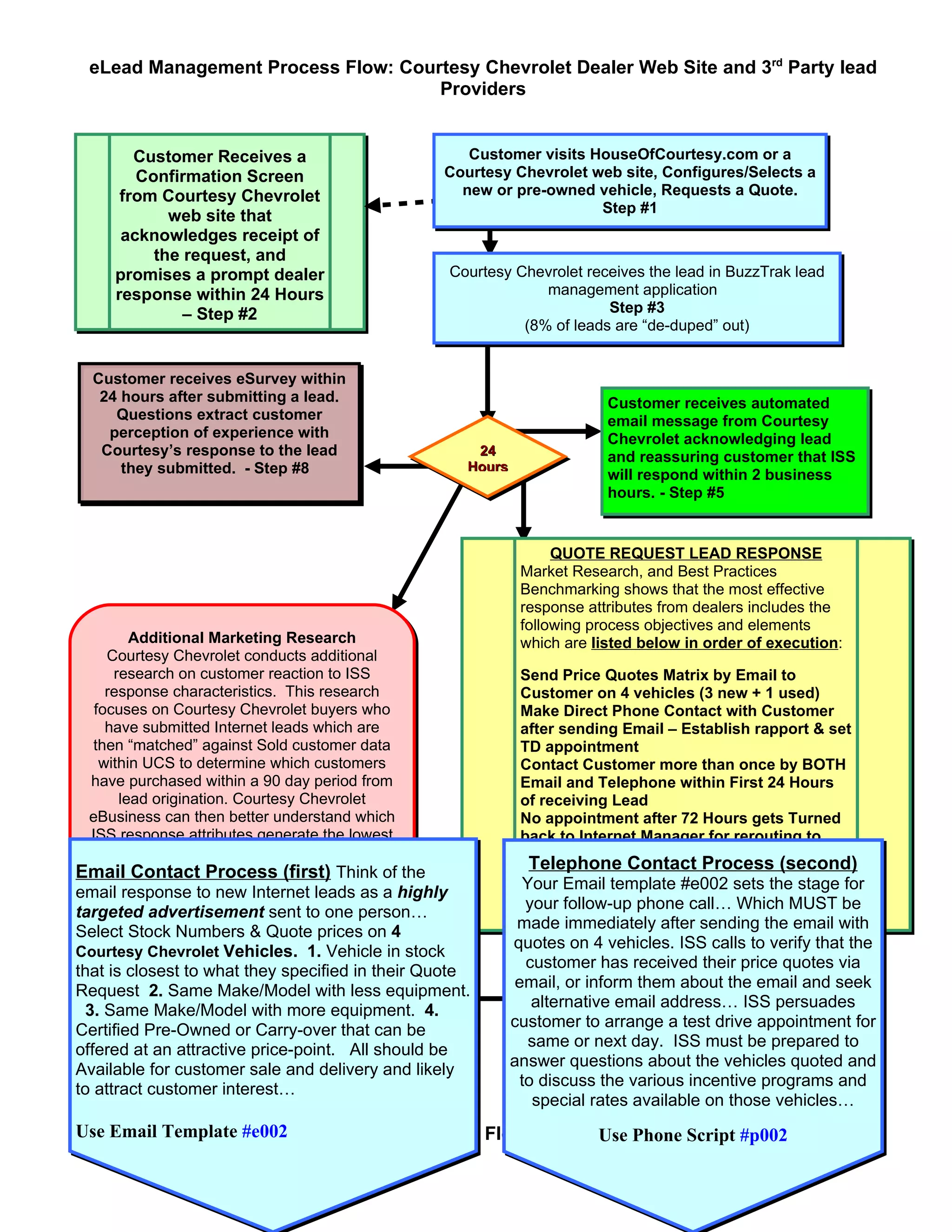
    eLead Management ProcessFlow: Courtesy Chevrolet Dealer Web Site and 3rd Party lead Providers Customer Receives a Customer visits HouseOfCourtesy.com or a Confirmation Screen Courtesy Chevrolet web site, Configures/Selects a from Courtesy Chevrolet new or pre-owned vehicle, Requests a Quote. Step #1 web site that acknowledges receipt of the request, and promises a prompt dealer Courtesy Chevrolet receives the lead in BuzzTrak lead response within 24 Hours management application – Step #2 Step #3 (8% of leads are “de-duped” out) Customer receives eSurvey within 24 hours after submitting a lead. Customer receives automated Questions extract customer email message from Courtesy perception of experience with Chevrolet acknowledging lead Courtesy’s response to the lead 24 and reassuring customer that ISS they submitted. - Step #8 Hours will respond within 2 business hours. - Step #5 QUOTE REQUEST LEAD RESPONSE Market Research, and Best Practices Benchmarking shows that the most effective response attributes from dealers includes the following process objectives and elements Additional Marketing Research which are listed below in order of execution: Courtesy Chevrolet conducts additional research on customer reaction to ISS Send Price Quotes Matrix by Email to response characteristics. This research Customer on 4 vehicles (3 new + 1 used) focuses on Courtesy Chevrolet buyers who Make Direct Phone Contact with Customer have submitted Internet leads which are after sending Email – Establish rapport & set then “matched” against Sold customer data TD appointment within UCS to determine which customers Contact Customer more than once by BOTH have purchased within a 90 day period from Email and Telephone within First 24 Hours lead origination. Courtesy Chevrolet of receiving Lead eBusiness can then better understand which No appointment after 72 Hours gets Turned ISS response attributes generate the lowest back to Internet Manager for rerouting to & highest sales closing ratios by ISS another Internet Sales Specialist Email Contact Process (first) Think of the Step #7 Telephone Contact Process (second) Your Email template #e002 sets the stage for Step #6 email response to new Internet leads as a highly your follow-up phone call… Which MUST be targeted advertisement sent to one person… made immediately after sending the email with Select Stock Numbers & Quote prices on 4 quotes on 4 vehicles. ISS calls to verify that the Courtesy Chevrolet Vehicles. 1. Vehicle in stock Courtesy Chevrolet Courtesy Chevrolet customer has received their price quotes via that is closest to what they Contact in their Quote Dealership Email specified email, or inform them about the Telephone Dealership email and seek Request 2. SameProcess Make/Model with less equipment. Contact Process alternative email address… ISS persuades 3. Same Make/Model with more equipment. 4. customer to arrange a test drive appointment for Certified Pre-Owned or Carry-over that can be (see next page) (see next page) same or next day. ISS must be prepared to offered at an attractive price-point. All should be answer questions about the vehicles quoted and Available for customer sale and delivery and likely to discuss the various incentive programs and to attract customer interest… special rates available on those vehicles… Use Email Template Lead Management Process Flow: eOptimized Tactical Blueprint Internet #e002 Use Phone Script #p002
  • 2.
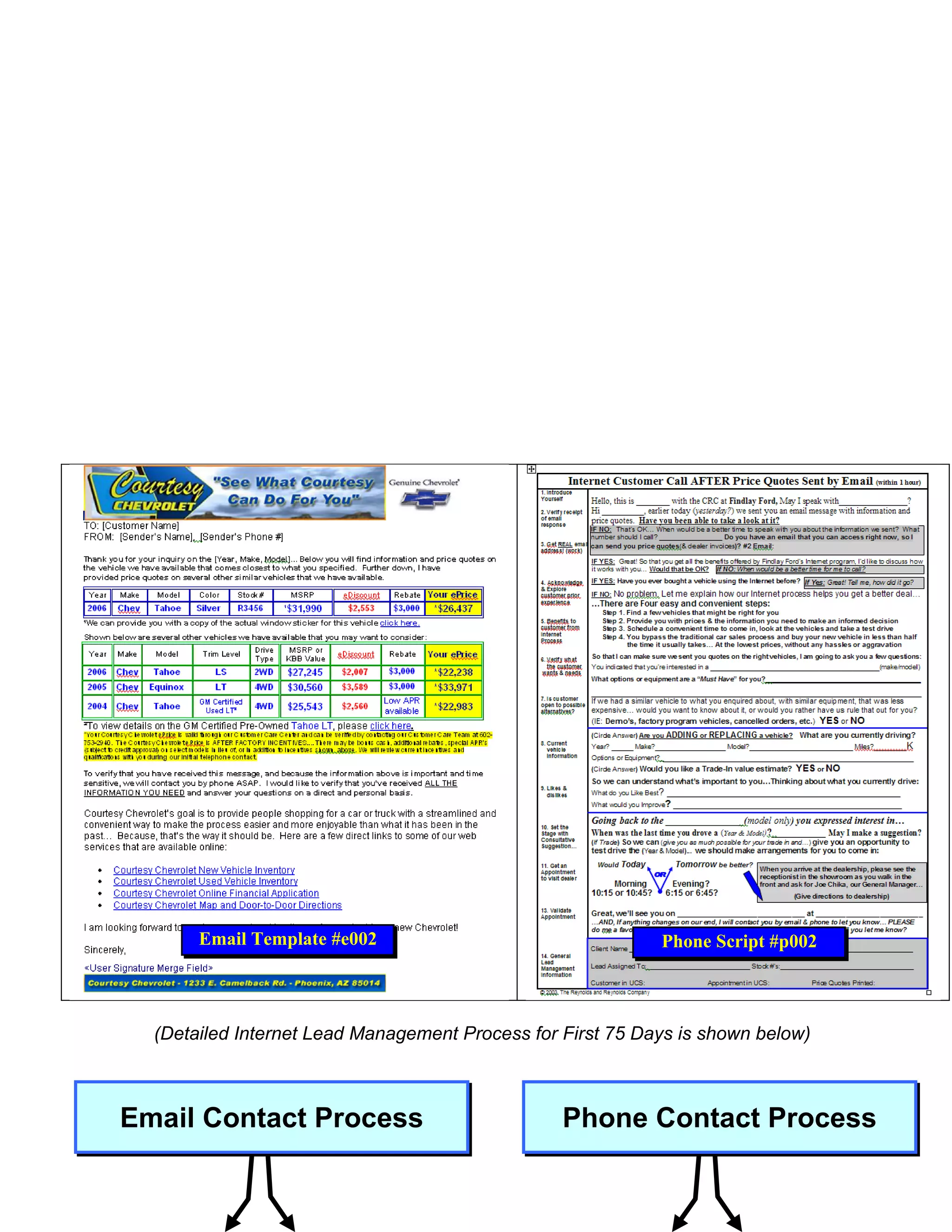
    Email Template #e002 Phone Script #p002 (Detailed Internet Lead Management Process for First 75 Days is shown below) Email Contact Process Phone Contact Process
  • 3.
    Customer Customer DOES Direct Phone NO Direct Does NOT Respond by Contact Made Phone Respond by Email Contact Email 2nd Day - No Seek Seek Appt. 2 Hours Response Email Agreement for OEM- Voicemail: #e004 to Speak Brand Test Phone Script by Phone Drive – #p-am004 + Left #e021 Phone msg email 4th Day - No Script #p002 #e024 Response Email #e005 Seek Test Drive 24 hours Appt. by Email Log Appt. Voicemail: #e026 into LMS Phone Script 6th Day - No OR No #p-am005 + Left Response Email Appt. After msg email #e006 Phone #e024 3rd Party Appt. email Confirmation by #e004.5 Phone 10th Day - No #p004 3rd Day Response Email Voicemail: #e007 Send Appointment Phone Script Confirmation Email #p-am006 + Left Mark Customer Template w/Map, msg email Appointment on Directions, Parking Info #e024 Showroom Welcome & Where Receptionist is 15th Day - No Board #e003 Response Email #e008 5th Day Pre-visit Preparation: Voicemail: Select Vehicles Phone Script Fuel & Clean #p-am007 + Left 30th Day - No Park up Front msg email Response Email Prepare Deal Doc’s #e024 #e009 Print KBB on Trade Print all Emails Prepare Visit Agenda/Folder …… 10th Day …. 45th Day - No Voicemail: ….. Response Customer Arrives at APPT. SHOW - Customer NO SHOW Phone Script #e010 Targeted ….. Dealership – NO SALE- – Appt. No Show #p-am008 + Left Broadcast Reception Process Followup email Process msg email ….. #F001 #e003.5 #e0020 #e024 ……………………………………………………………………………………………………………………
  • 4.
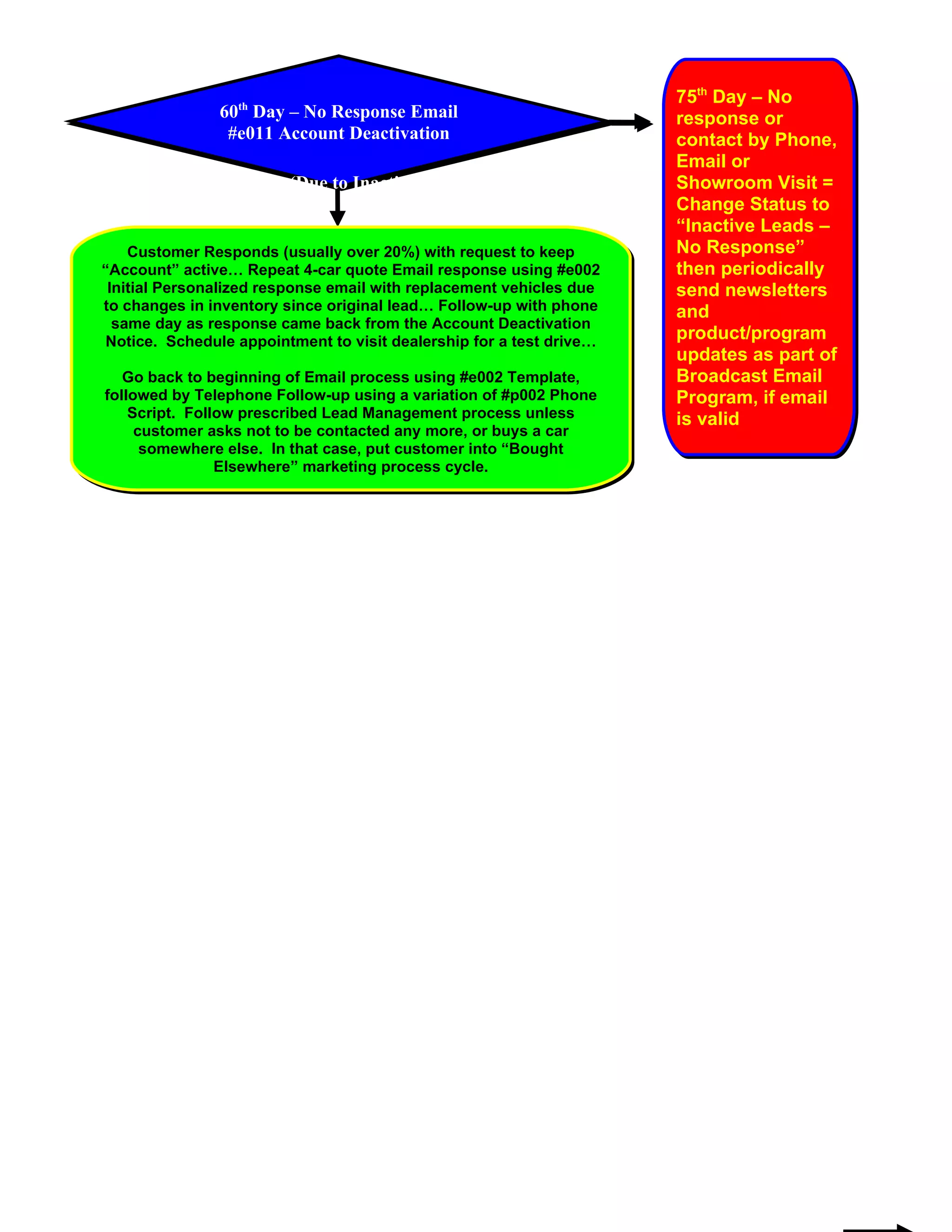
    75th Day –No 60th Day – No Response Email response or #e011 Account Deactivation contact by Phone, Email or Notice (Due to Inactivity) Showroom Visit = Change Status to “Inactive Leads – Customer Responds (usually over 20%) with request to keep No Response” “Account” active… Repeat 4-car quote Email response using #e002 then periodically Initial Personalized response email with replacement vehicles due send newsletters to changes in inventory since original lead… Follow-up with phone and same day as response came back from the Account Deactivation Notice. Schedule appointment to visit dealership for a test drive… product/program updates as part of Go back to beginning of Email process using #e002 Template, Broadcast Email followed by Telephone Follow-up using a variation of #p002 Phone Program, if email Script. Follow prescribed Lead Management process unless is valid customer asks not to be contacted any more, or buys a car somewhere else. In that case, put customer into “Bought Elsewhere” marketing process cycle.