CLOUD DISCOVERY
      AN INTRODUCTION TO CLOUD COMPUTING


Chapter 10: When to stay in-house


        By: Alain Charpentier
Table of content
•   What is the Cloud
•   The business driver for the Cloud
•   The technical driver for the Cloud
•   When to stay in-house
Cloud : a definition
• Dave Nielsen, one of the founders of the CloudCamp series
  of conferences, has this definition OSSM (pronounced
  “awesome”). This simple concept stands for the following;

   – On-demand: the infrastructure or hardware is already setup and
     ready to be deployed
   – Self-service: the customer chooses what they want, when they want
     it
   – Scalable: customers can choose how much they want and ramp up if
     necessary
   – Measureable: there’s metering/reporting so you know you are
     getting what you pay for
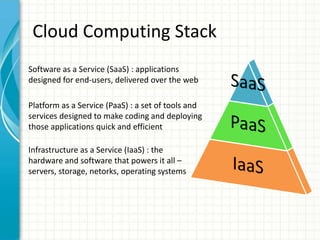
Cloud Computing Stack
Software as a Service (SaaS) : applications
designed for end-users, delivered over the web

Platform as a Service (PaaS) : a set of tools and
services designed to make coding and deploying
those applications quick and efficient

Infrastructure as a Service (IaaS) : the
hardware and software that powers it all –
servers, storage, netorks, operating systems
Public, Private, Virtual
Private, Hybrid, Cloud Bursting


   Public Cloud
                                 Virtual
                              Private Cloud


   Hybrid
   Cloud


                              Cloud Bursting
   Private Cloud


   Customers
Cloud delivery model
•   Public Cloud
     – Public Cloud is considered infrastructure that consists of shared resources, deployed on a
       self-service basis over the Internet. The benefit of Public Cloud are : the highest levels of
       efficiency as Public Cloud pools a huge number of users and almost limitless scaling
       capabilities.
•   Private Cloud
     – Private Cloud is infrastructure that emulates Cloud Computing but does so on a private
       network. The hardware is dedicated to the organisation own use and there is no sharing of
       infrastructure between users.
•   Virtual Private Cloud
     – Virtual Private Clouds are created when Public Cloud vendors fence a part of their own
       Cloud infrastructure to provide specifically for a single customer.
•   Hybrid Cloud
     – Hybrid cloud is a composition of two or more clouds (private or public) that remain unique
       entities but are bound together, offering the benefits of multiple deployment models
•   Cloud Bursting
     – Using Cloud bursting, an organization will continue to use their own infrastructure for their
       regular needs, while any peak events will be automatically passed through to the Public
       Cloud provider
Business drivers for the Cloud (1/2)
•   Location of User base
     – On-premise infrastructure works fine when all employees work out of one central
       location, as soon as mobile access and multiple locations are thrown into the
       mix, Cloud becomes the most central location to store data. Cloud also provide better
       economics than providing individual servers and network components to multiple
       branch offices.
•   Budgetary Constraints
     – Traditional IT expenditure has been very capital intensive. Hardware had to be bought
       outright and software licenses were generally an expenditure that appeared on the
       balance sheet.
     – Cloud Computing changes this and allows IT to be acquired via operating expenditure
       (OpEx) rather than by needing large capital expenditure (CapEx). The ability to
       acquire IT resource on a monthly basis without soaking up large capital outlays is very
       attractive for cash-constrained organizations.
•   Development and Testing
     – By moving development to the Cloud, organizations can significantly mitigate the risk
       of new projects and, by extension, are able to execute on more development
       opportunities.
     – Add to this the fact that developing on traditional infrastructure is hampered by
       having to wait for IT to provision resource(s) and we have a compelling reason to
       move test/dev to the Cloud.
Business drivers for the Cloud (2/2)
•   Avoiding Vendor Lock-In
     –   Vendor lock-in is a situation where an organization is unable to move vendors because their
         data, processes and infrastructure is inextricably linked with one particular vendor. This link is
         often related to proprietary formats or approaches towards technology. Utilizing a Cloud resource
         built on open standards, users gain certainty that their data can be moved between vendors at
         will, helping avoid lock-in.
•   Need for Highly Specialized IT Talent, On a Budget
     –   Cloud Computing is attractive as it allows them to enjoy a highly skilled IT workforce which
         essentially comes packaged with the services they are renting in the Cloud. While basic level IT
         service can be provided by any reasonably technology savvy business person, higher level service
         requires specialist and expensive skills that might be out of the range of small and mid-sized
         organizations.
•   Round the Cloud Support
     –   IT support may find it difficult to acquire that internally. With Cloud Computing, organizations can
         leverage the fact that vendors pool resources across multiple customers and hence can justify
         providing true 24*7 support.
•   Infrastructure Expansion
     –   Data centers are exceedingly complex and expensive projects to build and maintain. The level of
         sophistication of a modern data center is far in excess of what most standalone organizations
         could afford to build. From physical security to multiple redundant power supplies, modern data
         centers leave no stone unturned.
Technical drivers for the Cloud (1/2)
 •    Variable load
       –   Organizations need to decide to either invest in sufficient capacity to handle peak loads and to
           have redundant capacity much of the time. Or, they may obtain resources for median loads and
           risk service degradation under peak loads.
       –   By using Cloud Computing organizations are able to scale their infrastructure to closely match
           demand curves.


                                                                           Under capacity,
                                                                           unhappy customer
                                  Over capacity,
Capacity                          sleeping capital

                   CapEx


                                                                                  Cloud Capacity
                                                                                  Classic Capacity
                                                                                  Demand

                                                     Time
Technical drivers for the Cloud (2/2)
• Automation
   – With Cloud Computing organizations can automate the management of
     disparate Cloud resources and in doing so reduce the need for manual
     intervention and hence potentially increase the reliability of the
     infrastructure compared to traditional models.
• Resiliency and Redundancy
   – With Cloud Computing organizations can utilize a Cloud management
     service to provide high levels of resiliency so that, in the event of an
     outage, workloads can automatically fail over to alternative Cloud
     vendors.
• Security
   – Security in the Cloud is a partnership between vendors and customers.
     That said, Cloud Computing can offer organizations a higher level of
     security than they would be able to obtain with on-premise
     infrastructure. With increasingly high levels of nefarious security
     breaches on infrastructure and applications, a well hardened, world
     class infrastructure in the Cloud is attractive to organizations struggling
     with managing the risks on their own.
When to stay in-house (1/2)
• Financial Factors
    – Organization that have significant amounts of existing infrastructure that
      remains largely undepreciated
    – For this reason, organizations in this situation may wish to utilize their existing
      hardware, but with an overlay of software to turn it into a Private Cloud.
• Business Location
    – For customers who have only local offices, with largely basic needs that are
      static, there may be no compelling reason to move to the Cloud.
    – While Cloud undeniably brings some benefits to organizations, for many these
      benefits will not be sufficient to justify a shift.
• Where Compliance Needs Dictate the Location of Data
    – Certain organizations will fall under regulations which dictate where their data
      can, and cannot, be stored. Organizations for example under some PCI and
      HIPAA compliance regulations may be unable to store data in the Public Cloud.
    – Again for these organizations a Private Cloud setting may be the best solution.
When to stay in-house (2/2)
• Network Issues
   – Some organizations will have applications which are difficult to
     operate at internet speeds. While these applications may work fine
     in a LAN setting, often trying to use them across the internet proves
     difficult. While internet speeds are certainly improving all the
     time, there are some applications where file size issues are likely to
     make in-house the only practicable delivery method for the
     foreseeable future.
• Little Need for External Integration
   – Applications that utilize data purely from within the organization
     and have no requirement to connect with external data sources may
     be perfectly served from on-premise data. While not needing
     external data connection doesn’t change the other drivers for Cloud
     adoption, organizations should still include this as part of their
     decision making process.
QUESTIONS ?

Coud discovery chap 10

  • 1.
    CLOUD DISCOVERY AN INTRODUCTION TO CLOUD COMPUTING Chapter 10: When to stay in-house By: Alain Charpentier
  • 2.
    Table of content • What is the Cloud • The business driver for the Cloud • The technical driver for the Cloud • When to stay in-house
  • 3.
    Cloud : adefinition • Dave Nielsen, one of the founders of the CloudCamp series of conferences, has this definition OSSM (pronounced “awesome”). This simple concept stands for the following; – On-demand: the infrastructure or hardware is already setup and ready to be deployed – Self-service: the customer chooses what they want, when they want it – Scalable: customers can choose how much they want and ramp up if necessary – Measureable: there’s metering/reporting so you know you are getting what you pay for
  • 4.
    Cloud Computing Stack Softwareas a Service (SaaS) : applications designed for end-users, delivered over the web Platform as a Service (PaaS) : a set of tools and services designed to make coding and deploying those applications quick and efficient Infrastructure as a Service (IaaS) : the hardware and software that powers it all – servers, storage, netorks, operating systems
  • 5.
    Public, Private, Virtual Private,Hybrid, Cloud Bursting Public Cloud Virtual Private Cloud Hybrid Cloud Cloud Bursting Private Cloud Customers
  • 6.
    Cloud delivery model • Public Cloud – Public Cloud is considered infrastructure that consists of shared resources, deployed on a self-service basis over the Internet. The benefit of Public Cloud are : the highest levels of efficiency as Public Cloud pools a huge number of users and almost limitless scaling capabilities. • Private Cloud – Private Cloud is infrastructure that emulates Cloud Computing but does so on a private network. The hardware is dedicated to the organisation own use and there is no sharing of infrastructure between users. • Virtual Private Cloud – Virtual Private Clouds are created when Public Cloud vendors fence a part of their own Cloud infrastructure to provide specifically for a single customer. • Hybrid Cloud – Hybrid cloud is a composition of two or more clouds (private or public) that remain unique entities but are bound together, offering the benefits of multiple deployment models • Cloud Bursting – Using Cloud bursting, an organization will continue to use their own infrastructure for their regular needs, while any peak events will be automatically passed through to the Public Cloud provider
  • 7.
    Business drivers forthe Cloud (1/2) • Location of User base – On-premise infrastructure works fine when all employees work out of one central location, as soon as mobile access and multiple locations are thrown into the mix, Cloud becomes the most central location to store data. Cloud also provide better economics than providing individual servers and network components to multiple branch offices. • Budgetary Constraints – Traditional IT expenditure has been very capital intensive. Hardware had to be bought outright and software licenses were generally an expenditure that appeared on the balance sheet. – Cloud Computing changes this and allows IT to be acquired via operating expenditure (OpEx) rather than by needing large capital expenditure (CapEx). The ability to acquire IT resource on a monthly basis without soaking up large capital outlays is very attractive for cash-constrained organizations. • Development and Testing – By moving development to the Cloud, organizations can significantly mitigate the risk of new projects and, by extension, are able to execute on more development opportunities. – Add to this the fact that developing on traditional infrastructure is hampered by having to wait for IT to provision resource(s) and we have a compelling reason to move test/dev to the Cloud.
  • 8.
    Business drivers forthe Cloud (2/2) • Avoiding Vendor Lock-In – Vendor lock-in is a situation where an organization is unable to move vendors because their data, processes and infrastructure is inextricably linked with one particular vendor. This link is often related to proprietary formats or approaches towards technology. Utilizing a Cloud resource built on open standards, users gain certainty that their data can be moved between vendors at will, helping avoid lock-in. • Need for Highly Specialized IT Talent, On a Budget – Cloud Computing is attractive as it allows them to enjoy a highly skilled IT workforce which essentially comes packaged with the services they are renting in the Cloud. While basic level IT service can be provided by any reasonably technology savvy business person, higher level service requires specialist and expensive skills that might be out of the range of small and mid-sized organizations. • Round the Cloud Support – IT support may find it difficult to acquire that internally. With Cloud Computing, organizations can leverage the fact that vendors pool resources across multiple customers and hence can justify providing true 24*7 support. • Infrastructure Expansion – Data centers are exceedingly complex and expensive projects to build and maintain. The level of sophistication of a modern data center is far in excess of what most standalone organizations could afford to build. From physical security to multiple redundant power supplies, modern data centers leave no stone unturned.
  • 9.
    Technical drivers forthe Cloud (1/2) • Variable load – Organizations need to decide to either invest in sufficient capacity to handle peak loads and to have redundant capacity much of the time. Or, they may obtain resources for median loads and risk service degradation under peak loads. – By using Cloud Computing organizations are able to scale their infrastructure to closely match demand curves. Under capacity, unhappy customer Over capacity, Capacity sleeping capital CapEx Cloud Capacity Classic Capacity Demand Time
  • 10.
    Technical drivers forthe Cloud (2/2) • Automation – With Cloud Computing organizations can automate the management of disparate Cloud resources and in doing so reduce the need for manual intervention and hence potentially increase the reliability of the infrastructure compared to traditional models. • Resiliency and Redundancy – With Cloud Computing organizations can utilize a Cloud management service to provide high levels of resiliency so that, in the event of an outage, workloads can automatically fail over to alternative Cloud vendors. • Security – Security in the Cloud is a partnership between vendors and customers. That said, Cloud Computing can offer organizations a higher level of security than they would be able to obtain with on-premise infrastructure. With increasingly high levels of nefarious security breaches on infrastructure and applications, a well hardened, world class infrastructure in the Cloud is attractive to organizations struggling with managing the risks on their own.
  • 11.
    When to stayin-house (1/2) • Financial Factors – Organization that have significant amounts of existing infrastructure that remains largely undepreciated – For this reason, organizations in this situation may wish to utilize their existing hardware, but with an overlay of software to turn it into a Private Cloud. • Business Location – For customers who have only local offices, with largely basic needs that are static, there may be no compelling reason to move to the Cloud. – While Cloud undeniably brings some benefits to organizations, for many these benefits will not be sufficient to justify a shift. • Where Compliance Needs Dictate the Location of Data – Certain organizations will fall under regulations which dictate where their data can, and cannot, be stored. Organizations for example under some PCI and HIPAA compliance regulations may be unable to store data in the Public Cloud. – Again for these organizations a Private Cloud setting may be the best solution.
  • 12.
    When to stayin-house (2/2) • Network Issues – Some organizations will have applications which are difficult to operate at internet speeds. While these applications may work fine in a LAN setting, often trying to use them across the internet proves difficult. While internet speeds are certainly improving all the time, there are some applications where file size issues are likely to make in-house the only practicable delivery method for the foreseeable future. • Little Need for External Integration – Applications that utilize data purely from within the organization and have no requirement to connect with external data sources may be perfectly served from on-premise data. While not needing external data connection doesn’t change the other drivers for Cloud adoption, organizations should still include this as part of their decision making process.
  • 13.