MICROSOFT OFFICE KEYBOARD SHORTCUTS (PC)
Action Keyboard Shortcut
Bold CTRL+B
Italicize CTRL+I
Underline CTRL+U
All caps CTRL+SHIFT+A
Underline words but not spaces CTRL+SHIFT+W
Double-underline CTRL+SHIFT+D
Small capitals CTRL+SHIFT+K
Subscript CTRL+EQUAL SIGN
Superscript CTRL+SHIFT+PLUS SIGN
Decrease font size CTRL+SHIFT+<
Increase font size CTRL+SHIFT+>
Remove formatting CTRL+SPACEBAR
Copy CTRL+C
Cut CTRL+X
Paste CTRL+V
Undo CTRL+Z
Redo CTRL+Y
New CTRL+N
Open CTRL+O
Close CTRL+W
Split the document window ALT+CTRL+S
Remove the document window split ALT+SHIFT+C
Save CTRL+S
Find CTRL+F
Replace CTRL+H
Go to a specific location CTRL+G
Print CTRL+P
Switch in or out of print preview ALT+CTRL+I
Move by one page PAGE UP or PAGE DOWN
Move to the first page CTRL+HOME
Move to the last page CTRL+END
Insert a comment ALT+CTRL+M
Hyperlink CTRL+K
Copyright symbol ALT+CTRL+C
Registered trademark symbol ALT+CTRL+R
Trademark symbol ALT+CTRL+T
Copy formatting from text CTRL+SHIFT+C
Apply copied formatting to text CTRL+SHIFT+V
Change the font CTRL+SHIFT+F
Increase the font size CTRL+SHIFT+>
Decrease the font size CTRL+SHIFT+<
Increase the font size by 1 point CTRL+]
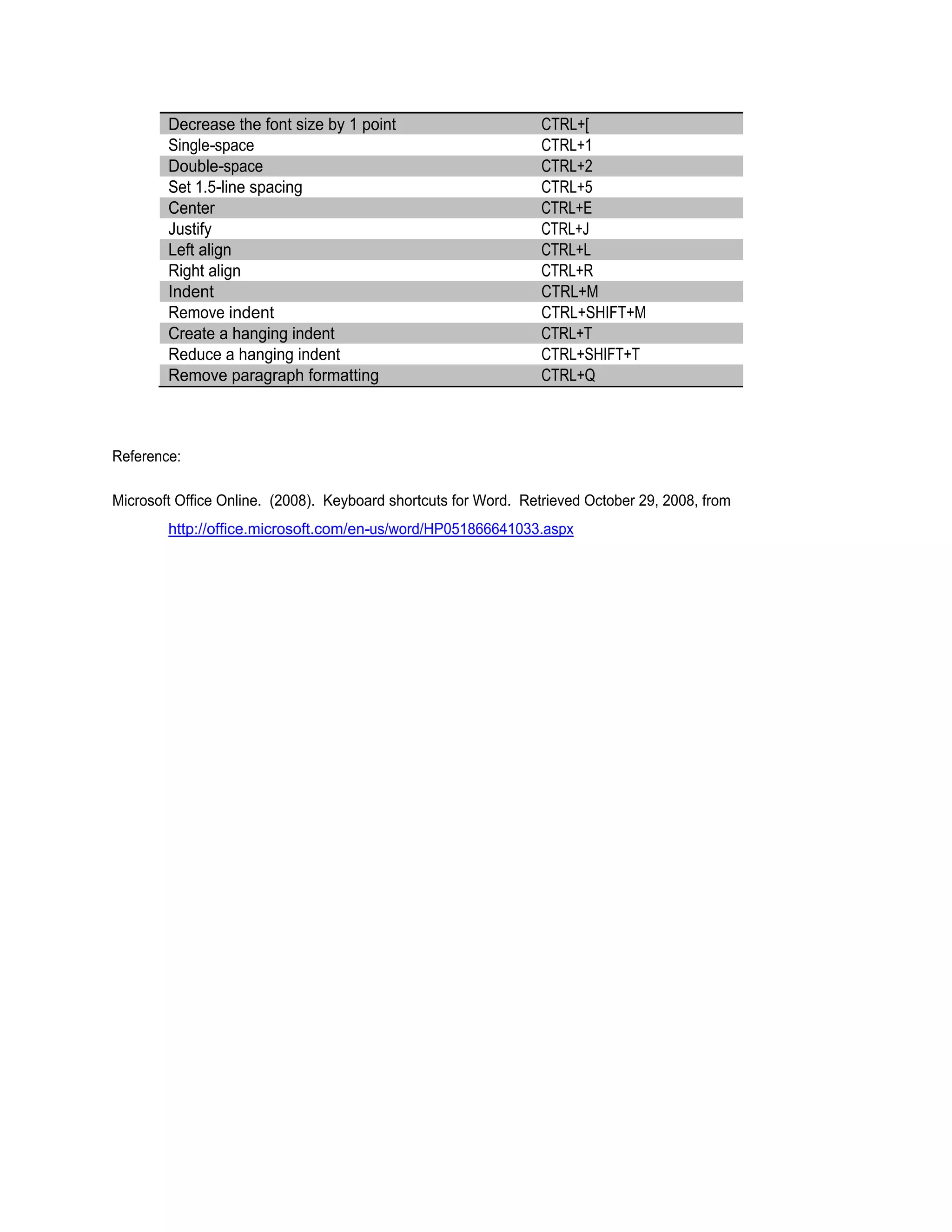
Decrease the font size by 1 point CTRL+[
Single-space CTRL+1
Double-space CTRL+2
Set 1.5-line spacing CTRL+5
Center CTRL+E
Justify CTRL+J
Left align CTRL+L
Right align CTRL+R
Indent CTRL+M
Remove indent CTRL+SHIFT+M
Create a hanging indent CTRL+T
Reduce a hanging indent CTRL+SHIFT+T
Remove paragraph formatting CTRL+Q
Reference:
Microsoft Office Online. (2008). Keyboard shortcuts for Word. Retrieved October 29, 2008, from
http://office.microsoft.com/en-us/word/HP051866641033.aspx
This document was created with Win2PDF available at http://www.win2pdf.com.
The unregistered version of Win2PDF is for evaluation or non-commercial use only.

Copy of ms word shct

  • 1.
    MICROSOFT OFFICE KEYBOARDSHORTCUTS (PC) Action Keyboard Shortcut Bold CTRL+B Italicize CTRL+I Underline CTRL+U All caps CTRL+SHIFT+A Underline words but not spaces CTRL+SHIFT+W Double-underline CTRL+SHIFT+D Small capitals CTRL+SHIFT+K Subscript CTRL+EQUAL SIGN Superscript CTRL+SHIFT+PLUS SIGN Decrease font size CTRL+SHIFT+< Increase font size CTRL+SHIFT+> Remove formatting CTRL+SPACEBAR Copy CTRL+C Cut CTRL+X Paste CTRL+V Undo CTRL+Z Redo CTRL+Y New CTRL+N Open CTRL+O Close CTRL+W Split the document window ALT+CTRL+S Remove the document window split ALT+SHIFT+C Save CTRL+S Find CTRL+F Replace CTRL+H Go to a specific location CTRL+G Print CTRL+P Switch in or out of print preview ALT+CTRL+I Move by one page PAGE UP or PAGE DOWN Move to the first page CTRL+HOME Move to the last page CTRL+END Insert a comment ALT+CTRL+M Hyperlink CTRL+K Copyright symbol ALT+CTRL+C Registered trademark symbol ALT+CTRL+R Trademark symbol ALT+CTRL+T Copy formatting from text CTRL+SHIFT+C Apply copied formatting to text CTRL+SHIFT+V Change the font CTRL+SHIFT+F Increase the font size CTRL+SHIFT+> Decrease the font size CTRL+SHIFT+< Increase the font size by 1 point CTRL+]
  • 2.
    Decrease the fontsize by 1 point CTRL+[ Single-space CTRL+1 Double-space CTRL+2 Set 1.5-line spacing CTRL+5 Center CTRL+E Justify CTRL+J Left align CTRL+L Right align CTRL+R Indent CTRL+M Remove indent CTRL+SHIFT+M Create a hanging indent CTRL+T Reduce a hanging indent CTRL+SHIFT+T Remove paragraph formatting CTRL+Q Reference: Microsoft Office Online. (2008). Keyboard shortcuts for Word. Retrieved October 29, 2008, from http://office.microsoft.com/en-us/word/HP051866641033.aspx
  • 3.
    This document wascreated with Win2PDF available at http://www.win2pdf.com. The unregistered version of Win2PDF is for evaluation or non-commercial use only.