Downloaded 25 times
![Microsoft Word 2010
Shortcut Keys
ALT+CTRL+1 Apply Heading 1 to the selected text
ALT+CTRL+2 Apply Heading 2 to the selected text
ALT+CTRL+S Splits the Document
ALT+F7 Moves to the Next Misspelling
ALT+F8 Inserts Macros
ALT+R Displays the Review tab
ALT+SHIFT+BACKSPACE Redo
ALT+SHIFT+F7 Dictionary
ALT+SHIFT+K Mail Merge Check
ALT+SHIFT+R Header Footer Link
ALT+SHIFT+T Time Field
ALT+T+A Autocurrect
CTRL + V Paste copied text
CTRL + B Bold Text
CTRL + C Copy text selection
CTRL + I Italic Text
CTRL + L Align selected text to the left
CTRL + U Underline Text
CTRL + X Cut the selected text
CTRL + Z Undo
CTRL+] Grow Font one point
CTRL+E Align selected text to the centre
CTRL+END Navigate to end of the Document
CTRL+H Find and Replace word or sentence
CTRL+J Justifies Paragraph
CTRL+K Add hyperlink to the selected text
CTRL+M Indentation of the selected text
CTRL+P Print the document
CTRL+PAGE DOWN Browse Next
CTRL+SHIFT+, Reduce Font size for selected text
CTRL+SHIFT+. Increase Fontsise for selected text
CTRL+SHIFT+A converts the selected text to capital
letters or vice versa
CTRL+SHIFT+C Copy Format
CTRL+SHIFT+D Double Underline
CTRL+SHIFT+ENTER Column Break](https://image.slidesharecdn.com/02microsoftword2010shortcuts-141018083040-conversion-gate01/85/02-microsoftword2010shortcuts-1-320.jpg)
![Microsoft Word 2010
Shortcut Keys
ALT+CTRL+1 Apply Heading 1 to the selected text
ALT+CTRL+2 Apply Heading 2 to the selected text
ALT+CTRL+S Splits the Document
ALT+F7 Moves to the Next Misspelling
ALT+F8 Inserts Macros
ALT+R Displays the Review tab
ALT+SHIFT+BACKSPACE Redo
ALT+SHIFT+F7 Dictionary
ALT+SHIFT+K Mail Merge Check
ALT+SHIFT+R Header Footer Link
ALT+SHIFT+T Time Field
ALT+T+A Autocurrect
CTRL + V Paste copied text
CTRL + B Bold Text
CTRL + C Copy text selection
CTRL + I Italic Text
CTRL + L Align selected text to the left
CTRL + U Underline Text
CTRL + X Cut the selected text
CTRL + Z Undo
CTRL+] Grow Font one point
CTRL+E Align selected text to the centre
CTRL+END Navigate to end of the Document
CTRL+H Find and Replace word or sentence
CTRL+J Justifies Paragraph
CTRL+K Add hyperlink to the selected text
CTRL+M Indentation of the selected text
CTRL+P Print the document
CTRL+PAGE DOWN Browse Next
CTRL+SHIFT+, Reduce Font size for selected text
CTRL+SHIFT+. Increase Fontsise for selected text
CTRL+SHIFT+A converts the selected text to capital
letters or vice versa
CTRL+SHIFT+C Copy Format
CTRL+SHIFT+D Double Underline
CTRL+SHIFT+ENTER Column Break](https://image.slidesharecdn.com/02microsoftword2010shortcuts-141018083040-conversion-gate01/75/02-microsoftword2010shortcuts-1-2048.jpg)
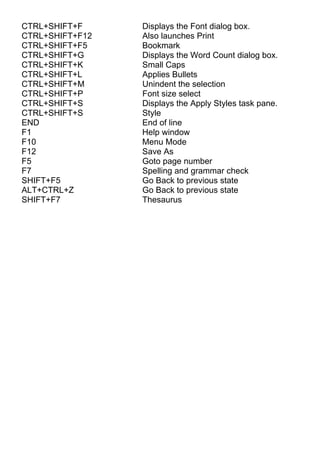

This document lists various shortcut keys for Microsoft Word 2010. Some of the shortcut keys allow the user to apply formatting like headings, bold, italics and underline. Other shortcuts allow the user to navigate the document, check spelling, insert macros or hyperlinks, split the document, print, and use features like find and replace, font size selection, and style application. In total, over 40 shortcut keys are included.


![Computer shortcuts (qt)[1]](https://cdn.slidesharecdn.com/ss_thumbnails/computershortcutsqt1-160814113952-thumbnail.jpg?width=640&height=640&fit=bounds)


![Computer Shortcuts[1]](https://cdn.slidesharecdn.com/ss_thumbnails/computershortcuts1-090823132914-phpapp01-thumbnail.jpg?width=640&height=640&fit=bounds)


![ANIMAL_CELL_,_TISSUE_AND_ORGAN_CULTURE[1].pptx](https://cdn.slidesharecdn.com/ss_thumbnails/animalcelltissueandorganculture1-260204172026-4462b440-thumbnail.jpg?width=640&height=640&fit=bounds)


