Microsoft Office
Tips & Tricks
Includes helpful shortcuts for Word,
Excel, Power Point and Outlook
Suited for Office 2010
Introduction
As an administrative professional I use Microsoft
shortcuts quite often. This presentation will
help you get a feel for many of the shortcuts
that are out there and offer you some tips or
tricks learned while working with various
programs in the Microsoft Office Suite.
7/10/2014
Cynthia M. Tedder, Administrative
Professional
2
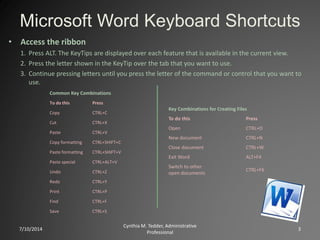
Microsoft Word Keyboard Shortcuts
7/10/2014
Cynthia M. Tedder, Administrative
Professional
3
• Access the ribbon
1. Press ALT. The KeyTips are displayed over each feature that is available in the current view.
2. Press the letter shown in the KeyTip over the tab that you want to use.
3. Continue pressing letters until you press the letter of the command or control that you want to
use.
Common Key Combinations
To do this Press
Copy CTRL+C
Cut CTRL+X
Paste CTRL+V
Copy formatting CTRL+SHIFT+C
Paste formatting CTRL+SHIFT+V
Paste special CTRL+ALT+V
Undo CTRL+Z
Redo CTRL+Y
Print CTRL+P
Find CTRL+F
Save CTRL+S
Key Combinations for Creating Files
To do this Press
Open CTRL+O
New document CTRL+N
Close document CTRL+W
Exit Word ALT+F4
Switch to other
open documents
CTRL+F6
7/10/2014
Cynthia M. Tedder, Administrative
Professional
4
Key combinations for moving around a document
To move Press
One character to the left LEFT ARROW
One character to the right RIGHT ARROW
One word to the left CTRL+LEFT ARROW
One word to the right CTRL+RIGHT ARROW
One paragraph up CTRL+UP ARROW
One paragraph down CTRL+DOWN ARROW
One cell to the left (in a table) SHIFT+TAB
One cell to the right (in a table) TAB
Up one line UP ARROW
Down one line DOWN ARROW
To the end of a line END
To the beginning of a line HOME
To the top of the window ALT+CTRL+PAGE UP
To the end of the window ALT+CTRL+PAGE DOWN
Up one screen (scrolling) PAGE UP
Down one screen (scrolling) PAGE DOWN
To the end of a document CTRL+END
To the beginning of a document CTRL+HOME
To a previous revision SHIFT+F5
After opening a document, to the
location you were working in when
the document was last closed
SHIFT+F5
Common key combinations for working with text
To do this Press
Open the Font dialog box to
change the font.
CTRL+SHIFT+F
Increase the font size. CTRL+SHIFT+>
Decrease the font size. CTRL+SHIFT+<
Increase the font size by 1
point.
CTRL+]
Decrease the font size by 1
point.
CTRL+[
Change the case of letters. SHIFT+F3
Apply bold formatting. CTRL+B
Apply an underline. CTRL+U
Apply italic formatting. CTRL+I
Remove manual character
formatting.
CTRL+SPACEBAR
Open the Styles task pane. ALT+CTRL+SHIFT+S
Apply the Normal style. CTRL+SHIFT+N
Apply the Heading 1 style. ALT+CTRL+1
Apply the Heading 2 style. ALT+CTRL+2
Apply the Heading 3 style. ALT+CTRL+3
Microsoft Excel Keyboard
Shortcuts
7/10/2014
Cynthia M. Tedder, Administrative
Professional
5
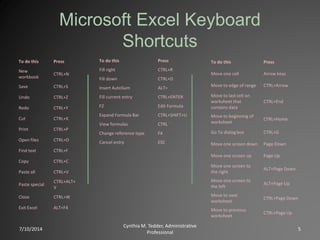
To do this Press
New
workbook
CTRL+N
Save CTRL+S
Undo CTRL+Z
Redo CTRL+Y
Cut CTRL+X
Print CTRL+P
Open files CTRL+O
Find text CTRL+F
Copy CTRL+C
Paste all CTRL+V
Paste special
CTRL+ALT+
V
Close CTRL+W
Exit Excel ALT+F4
To do this Press
Fill right CTRL+R
Fill down CTRL+D
Insert AutoSum ALT=
Fill current entry CTRL+ENTER
F2 Edit Formula
Expand Formula Bar CTRL+SHIFT+U
View formulas CTRL `
Change reference type F4
Cancel entry ESC
To do this Press
Move one cell Arrow keys
Move to edge of range CTRL+Arrow
Move to last cell on
worksheet that
contains data
CTRL+End
Move to beginning of
worksheet
CTRL+Home
Go To dialog box CTRL+G
Move one screen down Page Down
Move one screen up Page Up
Move one screen to
the right
ALT+Page Down
Move one screen to
the left
ALT+Page Up
Move to next
worksheet
CTRL+Page Down
Move to previous
worksheet
CTRL+Page Up
7/10/2014
Cynthia M. Tedder, Administrative
Professional
6
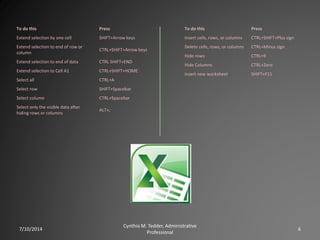
To do this Press
Extend selection by one cell SHIFT+Arrow keys
Extend selection to end of row or
column
CTRL+SHIFT+Arrow keys
Extend selection to end of data CTRL SHIFT+END
Extend selection to Cell A1 CTRL+SHIFT+HOME
Select all CTRL+A
Select row SHIFT+Spacebar
Select column CTRL+Spacebar
Select only the visible data after
hiding rows or columns
ALT+;
To do this Press
Insert cells, rows, or columns CTRL+SHIFT+Plus sign
Delete cells, rows, or columns CTRL+Minus sign
Hide rows CTRL+9
Hide Columns CTRL+Zero
Insert new worksheet SHIFT+F11
Microsoft Power Point Keyboard
Shortcuts
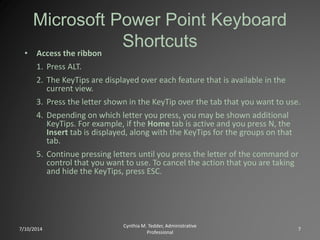
• Access the ribbon
1. Press ALT.
2. The KeyTips are displayed over each feature that is available in the
current view.
3. Press the letter shown in the KeyTip over the tab that you want to use.
4. Depending on which letter you press, you may be shown additional
KeyTips. For example, if the Home tab is active and you press N, the
Insert tab is displayed, along with the KeyTips for the groups on that
tab.
5. Continue pressing letters until you press the letter of the command or
control that you want to use. To cancel the action that you are taking
and hide the KeyTips, press ESC.
7/10/2014
Cynthia M. Tedder, Administrative
Professional
7
7/10/2014
Cynthia M. Tedder, Administrative
Professional
8
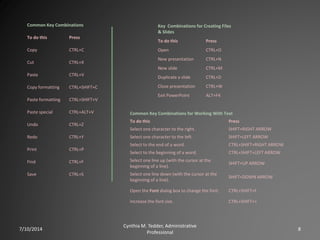
Common Key Combinations
To do this Press
Copy CTRL+C
Cut CTRL+X
Paste CTRL+V
Copy formatting CTRL+SHIFT+C
Paste formatting CTRL+SHIFT+V
Paste special CTRL+ALT+V
Undo CTRL+Z
Redo CTRL+Y
Print CTRL+P
Find CTRL+F
Save CTRL+S
Key Combinations for Creating Files
& Slides
To do this Press
Open CTRL+O
New presentation CTRL+N
New slide CTRL+M
Duplicate a slide CTRL+D
Close presentation CTRL+W
Exit PowerPoint ALT+F4
Common Key Combinations for Working With Text
To do this Press
Select one character to the right. SHIFT+RIGHT ARROW
Select one character to the left. SHIFT+LEFT ARROW
Select to the end of a word. CTRL+SHIFT+RIGHT ARROW
Select to the beginning of a word. CTRL+SHIFT+LEFT ARROW
Select one line up (with the cursor at the
beginning of a line).
SHIFT+UP ARROW
Select one line down (with the cursor at the
beginning of a line).
SHIFT+DOWN ARROW
Open the Font dialog box to change the font. CTRL+SHIFT+F
Increase the font size. CTRL+SHIFT+>
7/10/2014
Cynthia M. Tedder, Administrative
Professional
9
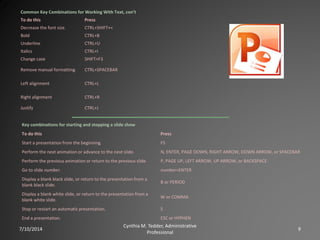
Common Key Combinations for Working With Text, con’t
To do this Press
Decrease the font size. CTRL+SHIFT+<
Bold CTRL+B
Underline CTRL+U
Italics CTRL+I
Change case SHIFT+F3
Remove manual formatting CTRL+SPACEBAR
Left alignment CTRL+L
Right alignment CTRL+R
Justify CTRL+J
Key combinations for starting and stopping a slide show
To do this Press
Start a presentation from the beginning. F5
Perform the next animation or advance to the next slide. N, ENTER, PAGE DOWN, RIGHT ARROW, DOWN ARROW, or SPACEBAR
Perform the previous animation or return to the previous slide. P, PAGE UP, LEFT ARROW, UP ARROW, or BACKSPACE
Go to slide number. number+ENTER
Display a blank black slide, or return to the presentation from a
blank black slide.
B or PERIOD
Display a blank white slide, or return to the presentation from a
blank white slide.
W or COMMA
Stop or restart an automatic presentation. S
End a presentation. ESC or HYPHEN
Microsoft Outlook Keyboard
Shortcuts
7/10/2014
Cynthia M. Tedder, Administrative
Professional
10
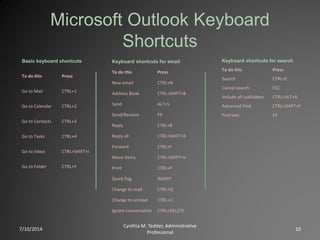
Basic keyboard shortcuts
To do this Press
Go to Mail CTRL+1
Go to Calendar CTRL+2
Go to Contacts CTRL+3
Go to Tasks CTRL+4
Go to Inbox CTRL+SHIFT+I
Go to Folder CTRL+Y
Keyboard shortcuts for email
To do this Press
New email CTRL+N
Address Book CTRL+SHIFT+B
Send ALT+S
Send/Receive F9
Reply CTRL+R
Reply all CTRL+SHIFT+R
Forward CTRL+F
Move items CTRL+SHIFT+V
Print CTRL+P
Quick flag INSERT
Change to read CTRL+Q
Change to unread CTRL+U
Ignore conversation CTRL+DELETE
Keyboard shortcuts for search
To do this Press
Search CTRL+E
Cancel search ESC
Include all subfolders CTRL+ALT+A
Advanced Find CTRL+SHIFT+F
Find text F4
7/10/2014
Cynthia M. Tedder, Administrative
Professional
11
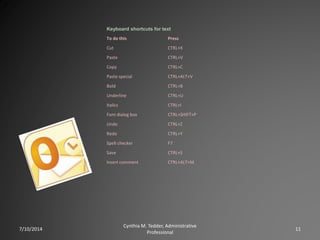
Keyboard shortcuts for text
To do this Press
Cut CTRL+X
Paste CTRL+V
Copy CTRL+C
Paste special CTRL+ALT+V
Bold CTRL+B
Underline CTRL+U
Italics CTRL+I
Font dialog box CTRL+SHIFT+P
Undo CTRL+Z
Redo CTRL+Y
Spell checker F7
Save CTRL+S
Insert comment CTRL+ALT+M

Microsoft Office Tips & Tricks

  • 1.
    Microsoft Office Tips &Tricks Includes helpful shortcuts for Word, Excel, Power Point and Outlook Suited for Office 2010
  • 2.
    Introduction As an administrativeprofessional I use Microsoft shortcuts quite often. This presentation will help you get a feel for many of the shortcuts that are out there and offer you some tips or tricks learned while working with various programs in the Microsoft Office Suite. 7/10/2014 Cynthia M. Tedder, Administrative Professional 2
  • 3.
    Microsoft Word KeyboardShortcuts 7/10/2014 Cynthia M. Tedder, Administrative Professional 3 • Access the ribbon 1. Press ALT. The KeyTips are displayed over each feature that is available in the current view. 2. Press the letter shown in the KeyTip over the tab that you want to use. 3. Continue pressing letters until you press the letter of the command or control that you want to use. Common Key Combinations To do this Press Copy CTRL+C Cut CTRL+X Paste CTRL+V Copy formatting CTRL+SHIFT+C Paste formatting CTRL+SHIFT+V Paste special CTRL+ALT+V Undo CTRL+Z Redo CTRL+Y Print CTRL+P Find CTRL+F Save CTRL+S Key Combinations for Creating Files To do this Press Open CTRL+O New document CTRL+N Close document CTRL+W Exit Word ALT+F4 Switch to other open documents CTRL+F6
  • 4.
    7/10/2014 Cynthia M. Tedder,Administrative Professional 4 Key combinations for moving around a document To move Press One character to the left LEFT ARROW One character to the right RIGHT ARROW One word to the left CTRL+LEFT ARROW One word to the right CTRL+RIGHT ARROW One paragraph up CTRL+UP ARROW One paragraph down CTRL+DOWN ARROW One cell to the left (in a table) SHIFT+TAB One cell to the right (in a table) TAB Up one line UP ARROW Down one line DOWN ARROW To the end of a line END To the beginning of a line HOME To the top of the window ALT+CTRL+PAGE UP To the end of the window ALT+CTRL+PAGE DOWN Up one screen (scrolling) PAGE UP Down one screen (scrolling) PAGE DOWN To the end of a document CTRL+END To the beginning of a document CTRL+HOME To a previous revision SHIFT+F5 After opening a document, to the location you were working in when the document was last closed SHIFT+F5 Common key combinations for working with text To do this Press Open the Font dialog box to change the font. CTRL+SHIFT+F Increase the font size. CTRL+SHIFT+> Decrease the font size. CTRL+SHIFT+< Increase the font size by 1 point. CTRL+] Decrease the font size by 1 point. CTRL+[ Change the case of letters. SHIFT+F3 Apply bold formatting. CTRL+B Apply an underline. CTRL+U Apply italic formatting. CTRL+I Remove manual character formatting. CTRL+SPACEBAR Open the Styles task pane. ALT+CTRL+SHIFT+S Apply the Normal style. CTRL+SHIFT+N Apply the Heading 1 style. ALT+CTRL+1 Apply the Heading 2 style. ALT+CTRL+2 Apply the Heading 3 style. ALT+CTRL+3
  • 5.
    Microsoft Excel Keyboard Shortcuts 7/10/2014 CynthiaM. Tedder, Administrative Professional 5 To do this Press New workbook CTRL+N Save CTRL+S Undo CTRL+Z Redo CTRL+Y Cut CTRL+X Print CTRL+P Open files CTRL+O Find text CTRL+F Copy CTRL+C Paste all CTRL+V Paste special CTRL+ALT+ V Close CTRL+W Exit Excel ALT+F4 To do this Press Fill right CTRL+R Fill down CTRL+D Insert AutoSum ALT= Fill current entry CTRL+ENTER F2 Edit Formula Expand Formula Bar CTRL+SHIFT+U View formulas CTRL ` Change reference type F4 Cancel entry ESC To do this Press Move one cell Arrow keys Move to edge of range CTRL+Arrow Move to last cell on worksheet that contains data CTRL+End Move to beginning of worksheet CTRL+Home Go To dialog box CTRL+G Move one screen down Page Down Move one screen up Page Up Move one screen to the right ALT+Page Down Move one screen to the left ALT+Page Up Move to next worksheet CTRL+Page Down Move to previous worksheet CTRL+Page Up
  • 6.
    7/10/2014 Cynthia M. Tedder,Administrative Professional 6 To do this Press Extend selection by one cell SHIFT+Arrow keys Extend selection to end of row or column CTRL+SHIFT+Arrow keys Extend selection to end of data CTRL SHIFT+END Extend selection to Cell A1 CTRL+SHIFT+HOME Select all CTRL+A Select row SHIFT+Spacebar Select column CTRL+Spacebar Select only the visible data after hiding rows or columns ALT+; To do this Press Insert cells, rows, or columns CTRL+SHIFT+Plus sign Delete cells, rows, or columns CTRL+Minus sign Hide rows CTRL+9 Hide Columns CTRL+Zero Insert new worksheet SHIFT+F11
  • 7.
    Microsoft Power PointKeyboard Shortcuts • Access the ribbon 1. Press ALT. 2. The KeyTips are displayed over each feature that is available in the current view. 3. Press the letter shown in the KeyTip over the tab that you want to use. 4. Depending on which letter you press, you may be shown additional KeyTips. For example, if the Home tab is active and you press N, the Insert tab is displayed, along with the KeyTips for the groups on that tab. 5. Continue pressing letters until you press the letter of the command or control that you want to use. To cancel the action that you are taking and hide the KeyTips, press ESC. 7/10/2014 Cynthia M. Tedder, Administrative Professional 7
  • 8.
    7/10/2014 Cynthia M. Tedder,Administrative Professional 8 Common Key Combinations To do this Press Copy CTRL+C Cut CTRL+X Paste CTRL+V Copy formatting CTRL+SHIFT+C Paste formatting CTRL+SHIFT+V Paste special CTRL+ALT+V Undo CTRL+Z Redo CTRL+Y Print CTRL+P Find CTRL+F Save CTRL+S Key Combinations for Creating Files & Slides To do this Press Open CTRL+O New presentation CTRL+N New slide CTRL+M Duplicate a slide CTRL+D Close presentation CTRL+W Exit PowerPoint ALT+F4 Common Key Combinations for Working With Text To do this Press Select one character to the right. SHIFT+RIGHT ARROW Select one character to the left. SHIFT+LEFT ARROW Select to the end of a word. CTRL+SHIFT+RIGHT ARROW Select to the beginning of a word. CTRL+SHIFT+LEFT ARROW Select one line up (with the cursor at the beginning of a line). SHIFT+UP ARROW Select one line down (with the cursor at the beginning of a line). SHIFT+DOWN ARROW Open the Font dialog box to change the font. CTRL+SHIFT+F Increase the font size. CTRL+SHIFT+>
  • 9.
    7/10/2014 Cynthia M. Tedder,Administrative Professional 9 Common Key Combinations for Working With Text, con’t To do this Press Decrease the font size. CTRL+SHIFT+< Bold CTRL+B Underline CTRL+U Italics CTRL+I Change case SHIFT+F3 Remove manual formatting CTRL+SPACEBAR Left alignment CTRL+L Right alignment CTRL+R Justify CTRL+J Key combinations for starting and stopping a slide show To do this Press Start a presentation from the beginning. F5 Perform the next animation or advance to the next slide. N, ENTER, PAGE DOWN, RIGHT ARROW, DOWN ARROW, or SPACEBAR Perform the previous animation or return to the previous slide. P, PAGE UP, LEFT ARROW, UP ARROW, or BACKSPACE Go to slide number. number+ENTER Display a blank black slide, or return to the presentation from a blank black slide. B or PERIOD Display a blank white slide, or return to the presentation from a blank white slide. W or COMMA Stop or restart an automatic presentation. S End a presentation. ESC or HYPHEN
  • 10.
    Microsoft Outlook Keyboard Shortcuts 7/10/2014 CynthiaM. Tedder, Administrative Professional 10 Basic keyboard shortcuts To do this Press Go to Mail CTRL+1 Go to Calendar CTRL+2 Go to Contacts CTRL+3 Go to Tasks CTRL+4 Go to Inbox CTRL+SHIFT+I Go to Folder CTRL+Y Keyboard shortcuts for email To do this Press New email CTRL+N Address Book CTRL+SHIFT+B Send ALT+S Send/Receive F9 Reply CTRL+R Reply all CTRL+SHIFT+R Forward CTRL+F Move items CTRL+SHIFT+V Print CTRL+P Quick flag INSERT Change to read CTRL+Q Change to unread CTRL+U Ignore conversation CTRL+DELETE Keyboard shortcuts for search To do this Press Search CTRL+E Cancel search ESC Include all subfolders CTRL+ALT+A Advanced Find CTRL+SHIFT+F Find text F4
  • 11.
    7/10/2014 Cynthia M. Tedder,Administrative Professional 11 Keyboard shortcuts for text To do this Press Cut CTRL+X Paste CTRL+V Copy CTRL+C Paste special CTRL+ALT+V Bold CTRL+B Underline CTRL+U Italics CTRL+I Font dialog box CTRL+SHIFT+P Undo CTRL+Z Redo CTRL+Y Spell checker F7 Save CTRL+S Insert comment CTRL+ALT+M