CONTROLLINING
DRAWING UNITS
Prepared By: Engr. Fahad Rehman Abro, Lab. Supervisor, Department of Civil
• Up to this point we have been referring our
distances as units.
• Now these units may be inches, millimeters or feet.
• Lets see how we can assign a unit to our drawing.
Draw a line 1 unit long.
• Open both 01 drawings in chapter 04 of the
exercise files folder.
DEFINING UNITS OF MEASURE
Prepared By: Engr. Fahad Rehman Abro, Lab. Supervisor, Department of Civil
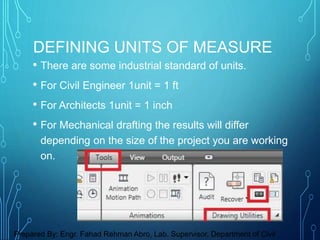
• There are some industrial standard of units.
• For Civil Engineer 1unit = 1 ft
• For Architects 1unit = 1 inch
• For Mechanical drafting the results will differ
depending on the size of the project you are working
on.
DEFINING UNITS OF MEASURE
Prepared By: Engr. Fahad Rehman Abro, Lab. Supervisor, Department of Civil
DEFINING UNITS OF MEASURE
Prepared By: Engr. Fahad Rehman Abro, Lab. Supervisor, Department of Civil
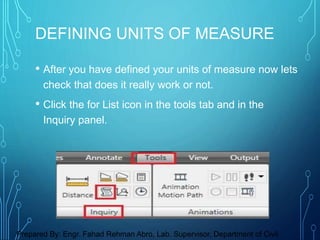
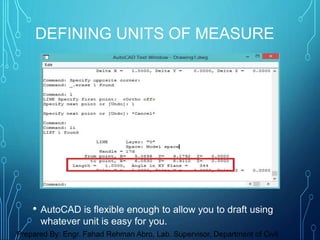
• After you have defined your units of measure now lets
check that does it really work or not.
• Click the for List icon in the tools tab and in the
Inquiry panel.
DEFINING UNITS OF MEASURE
Prepared By: Engr. Fahad Rehman Abro, Lab. Supervisor, Department of Civil
• AutoCAD is flexible enough to allow you to draft using
whatever unit is easy for you.
DEFINING UNITS OF MEASURE
Prepared By: Engr. Fahad Rehman Abro, Lab. Supervisor, Department of Civil
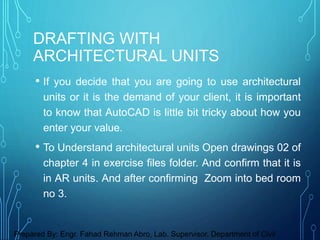
• If you decide that you are going to use architectural
units or it is the demand of your client, it is important
to know that AutoCAD is little bit tricky about how you
enter your value.
• To Understand architectural units Open drawings 02 of
chapter 4 in exercise files folder. And confirm that it is
in AR units. And after confirming Zoom into bed room
no 3.
DRAFTING WITH
ARCHITECTURAL UNITS
Prepared By: Engr. Fahad Rehman Abro, Lab. Supervisor, Department of Civil
• As you can see entering architectural measurements
involves a little extra work on our part.
• But it will be quite simple for you guys as long as you
keep practicing it and understand that how AutoCAD
wants us to enter the values.
DRAFTING WITH
ARCHITECTURAL UNITS
Prepared By: Engr. Fahad Rehman Abro, Lab. Supervisor, Department of Civil
• AutoCAD by default is set to imperial drafting
environment.
• If you Want to Work with metric units always, you
can set your AutoCAD default to metric units.
• Now Open AutoCAD blank drawing.
WORKING WITH METRIC UNITS
Prepared By: Engr. Fahad Rehman Abro, Lab. Supervisor, Department of Civil
• Open units and you will se units are set to inches
change it to millimeters ( Metric Units).
• This only does take care of your drafting but doesn't
consider the line type and size of paper.
• Click the plot icon in the quick access toolbar and
check whether your paper size is in inches or mm.
WORKING WITH METRIC UNITS
Prepared By: Engr. Fahad Rehman Abro, Lab. Supervisor, Department of Civil
• The best method to work in a metric
environment is to select acadiso template file
from your template folder of the AutoCAD.
• Acadiso file is completely set to metric unit
environment.
• You can set your AutoCAD to a default metric
environment.
WORKING WITH METRIC UNITS
Prepared By: Engr. Fahad Rehman Abro, Lab. Supervisor, Department of Civil
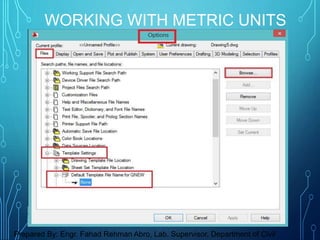
• You can do this in option> Files > Template
settings > Default Template File Name for
Qnew.
• After setting you can remove your file to set
back your AutoCAD to imperial units.
WORKING WITH METRIC UNITS
Prepared By: Engr. Fahad Rehman Abro, Lab. Supervisor, Department of Civil
WORKING WITH METRIC UNITS
Prepared By: Engr. Fahad Rehman Abro, Lab. Supervisor, Department of Civil

CONTROLLINING DRAWING UNITS in AutoCad

  • 1.
    CONTROLLINING DRAWING UNITS Prepared By:Engr. Fahad Rehman Abro, Lab. Supervisor, Department of Civil
  • 2.
    • Up tothis point we have been referring our distances as units. • Now these units may be inches, millimeters or feet. • Lets see how we can assign a unit to our drawing. Draw a line 1 unit long. • Open both 01 drawings in chapter 04 of the exercise files folder. DEFINING UNITS OF MEASURE Prepared By: Engr. Fahad Rehman Abro, Lab. Supervisor, Department of Civil
  • 3.
    • There aresome industrial standard of units. • For Civil Engineer 1unit = 1 ft • For Architects 1unit = 1 inch • For Mechanical drafting the results will differ depending on the size of the project you are working on. DEFINING UNITS OF MEASURE Prepared By: Engr. Fahad Rehman Abro, Lab. Supervisor, Department of Civil
  • 4.
    DEFINING UNITS OFMEASURE Prepared By: Engr. Fahad Rehman Abro, Lab. Supervisor, Department of Civil
  • 5.
    • After youhave defined your units of measure now lets check that does it really work or not. • Click the for List icon in the tools tab and in the Inquiry panel. DEFINING UNITS OF MEASURE Prepared By: Engr. Fahad Rehman Abro, Lab. Supervisor, Department of Civil
  • 6.
    • AutoCAD isflexible enough to allow you to draft using whatever unit is easy for you. DEFINING UNITS OF MEASURE Prepared By: Engr. Fahad Rehman Abro, Lab. Supervisor, Department of Civil
  • 7.
    • If youdecide that you are going to use architectural units or it is the demand of your client, it is important to know that AutoCAD is little bit tricky about how you enter your value. • To Understand architectural units Open drawings 02 of chapter 4 in exercise files folder. And confirm that it is in AR units. And after confirming Zoom into bed room no 3. DRAFTING WITH ARCHITECTURAL UNITS Prepared By: Engr. Fahad Rehman Abro, Lab. Supervisor, Department of Civil
  • 8.
    • As youcan see entering architectural measurements involves a little extra work on our part. • But it will be quite simple for you guys as long as you keep practicing it and understand that how AutoCAD wants us to enter the values. DRAFTING WITH ARCHITECTURAL UNITS Prepared By: Engr. Fahad Rehman Abro, Lab. Supervisor, Department of Civil
  • 9.
    • AutoCAD bydefault is set to imperial drafting environment. • If you Want to Work with metric units always, you can set your AutoCAD default to metric units. • Now Open AutoCAD blank drawing. WORKING WITH METRIC UNITS Prepared By: Engr. Fahad Rehman Abro, Lab. Supervisor, Department of Civil
  • 10.
    • Open unitsand you will se units are set to inches change it to millimeters ( Metric Units). • This only does take care of your drafting but doesn't consider the line type and size of paper. • Click the plot icon in the quick access toolbar and check whether your paper size is in inches or mm. WORKING WITH METRIC UNITS Prepared By: Engr. Fahad Rehman Abro, Lab. Supervisor, Department of Civil
  • 11.
    • The bestmethod to work in a metric environment is to select acadiso template file from your template folder of the AutoCAD. • Acadiso file is completely set to metric unit environment. • You can set your AutoCAD to a default metric environment. WORKING WITH METRIC UNITS Prepared By: Engr. Fahad Rehman Abro, Lab. Supervisor, Department of Civil
  • 12.
    • You cando this in option> Files > Template settings > Default Template File Name for Qnew. • After setting you can remove your file to set back your AutoCAD to imperial units. WORKING WITH METRIC UNITS Prepared By: Engr. Fahad Rehman Abro, Lab. Supervisor, Department of Civil
  • 13.
    WORKING WITH METRICUNITS Prepared By: Engr. Fahad Rehman Abro, Lab. Supervisor, Department of Civil