Containerization
using Docker
Presented by Wing Chan
Photo by frank mckenna on Unsplash
Agenda
• What's containerization?
• What's Docker?
• What's inside Docker?
• Why use Docker containers?
• Live Demo
Photo by Glenn Carstens-Peters on Unsplash
What's containerization?
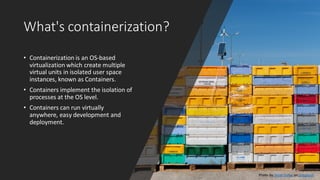
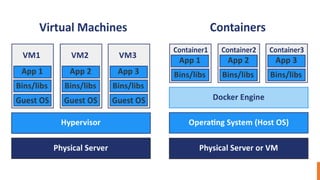
• Containerization is an OS-based
virtualization which create multiple
virtual units in isolated user space
instances, known as Containers.
• Containers implement the isolation of
processes at the OS level.
• Containers can run virtually
anywhere, easy development and
deployment.
Photo by Jacek Dylag on Unsplash
What's Docker?
• Docker is the world's leading software container
platform. It was launchedin 2013 by a company
called Docker, Inc.
• It is written in Go language.
• Docker uses the resource isolationfeatures of
Linux kernel to allowsmultiplecontainers
running on a single Linux instance.
• Docker provides all necessary tools for create,
deploy and run your applicationsby using
containers.
What's inside Docker?
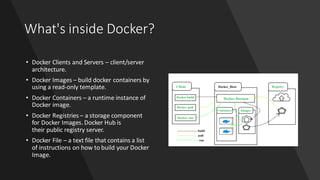
• Docker Clients and Servers – client/server
architecture.
• Docker Images – build docker containers by
using a read-only template.
• Docker Containers – a runtime instance of
Docker image.
• Docker Registries – a storage component
for Docker Images. Docker Hub is
their public registry server.
• Docker File – a text file that contains a list
of instructions on how to build your Docker
Image.
Why use Docker containers?
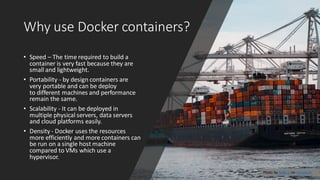
• Speed – The time required to build a
container is very fast because they are
small and lightweight.
• Portability - by design containers are
very portable and can be deploy
to different machines and performance
remain the same.
• Scalability - It can be deployed in
multiple physical servers, data servers
and cloud platforms easily.
• Density - Docker uses the resources
more efficiently and more containers can
be run on a single host machine
compared to VMs which use a
hypervisor.
Photo by Andy Li on Unsplash
Live Demo
• https://github.com/wingchanatib
sa/LearningSessions/tree/master/
Containerization%20using%20Doc
ker
Photo by chuttersnap on Unsplash

Containerization using docker

  • 1.
    Containerization using Docker Presented byWing Chan Photo by frank mckenna on Unsplash
  • 2.
    Agenda • What's containerization? •What's Docker? • What's inside Docker? • Why use Docker containers? • Live Demo Photo by Glenn Carstens-Peters on Unsplash
  • 3.
    What's containerization? • Containerizationis an OS-based virtualization which create multiple virtual units in isolated user space instances, known as Containers. • Containers implement the isolation of processes at the OS level. • Containers can run virtually anywhere, easy development and deployment. Photo by Jacek Dylag on Unsplash
  • 4.
    What's Docker? • Dockeris the world's leading software container platform. It was launchedin 2013 by a company called Docker, Inc. • It is written in Go language. • Docker uses the resource isolationfeatures of Linux kernel to allowsmultiplecontainers running on a single Linux instance. • Docker provides all necessary tools for create, deploy and run your applicationsby using containers.
  • 6.
    What's inside Docker? •Docker Clients and Servers – client/server architecture. • Docker Images – build docker containers by using a read-only template. • Docker Containers – a runtime instance of Docker image. • Docker Registries – a storage component for Docker Images. Docker Hub is their public registry server. • Docker File – a text file that contains a list of instructions on how to build your Docker Image.
  • 7.
    Why use Dockercontainers? • Speed – The time required to build a container is very fast because they are small and lightweight. • Portability - by design containers are very portable and can be deploy to different machines and performance remain the same. • Scalability - It can be deployed in multiple physical servers, data servers and cloud platforms easily. • Density - Docker uses the resources more efficiently and more containers can be run on a single host machine compared to VMs which use a hypervisor. Photo by Andy Li on Unsplash
  • 8.