04/13/2025 1
Computer Networks
By
K.SANDEEP KUMAR
(M.Sc. M.Tech)
NETWORKING
WINDOWS 2008 Server
NETWORKING
TOPICS :
 WHAT IS NETWORK?
 DIFFERENT BETWEEN NETWORK &
NETWORKING
 BENEFITS OF NETWORKING
 TYPES OF NETWORKS
 NETWORK MODELS
 NETWORK TOPOLOGIES
 COMMUNICATION MEDIA
 NETWORKING DEVICES
 OSI MODEL
 PROTOCOLS
WHAT IS NETWORK?
 A Network is collection of computers connected
together.
(or)
 A Network consists of two or more computers that are
linked in order to share resources such as printers, CD-
ROMs, files & folders.
NETWORK vs NETWORKING
Network:-
Is a collection of computers connected together.
Networking:-
Is a process of communication between the
interconnected computers.
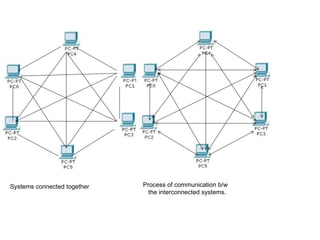
Systems connected together Process of communication b/w
the interconnected systems.
BENEFITS OF NETWORKING
 Speed: Sharing and transferring files within Networks can be done through
process rate of @ 1Gbps which saves our time.
 Security: We can secure confidential, sensitive files and programs in our
network with password protected. By restricting access to Unauthorized users.
 Resource Sharing: Resources such as printers, modems, Drives can be
shared.
 Flexible Access: We can access the files from computers throughout our
organization / firm.
 Electronic mails: E-mail on a network can enable the users to communicate
and sending information formally.
TYPES OF NETWORKS
The Networks are differentiated as,
1.LAN(Local Area Network)
2.MAN(Metropolitan Area Network)
3.WAN(Wide Area Network)
4.CAN(Campus Area Network)
LAN:-
A network is said to be Local Area Network if it all
the systems are connected within the same geographical
area, expanding not more than a mile apart to other
computers.
SYSTEMS CONNECTED WITHIN THE ORGANIZATION
MAN:-
A network is said to be Metropolitan Area Network if the
systems are connected between the cities i.e connecting two or
more branches between the cities. OFC’s are used to link their
sites.
Router Fire ware Router Fire ware
CAN:-
A network is said to be Campus/Corporate Area Network, if it is
made up of interconnection of LAN’s within the limited geographical
area.CAN covers larger area than a LAN.
Systems connected b/w the LAN’s within a campus.
Building-1
Building-2
Building-3
LAN3
LAN2
LAN1
WAN:-
The network which covers or connects larger
geographical area such as countries London, UK, India etc
is said to be called as Wide Area Network.
Web
server
DC,
DNS
WAN
Router
Router
Switch
Switch
NETWORK MODELS
There are two types of network models:
1) Work-Group Model
2) Domain Model
Work-Group Model:-
Is also called as Peer-Peer network. It is a collection of computers connected together to
share the resources without any centralized administration where each user administers
their own computer.
-There is no dedicated server.
-There is no hierarchy among the computers.
-No administrator required.
-Is less expensive.
Domain Model:-
In this model there is dedicated server which is optimized to accept
the service requests from the network clients and sending the data as per
the client request. So, it is also called as Server-Based/Client-Server
Network.
-It provides centralized administration.
-It manages the security credentials.
-It can supports more number of clients which are in different
locations.
Server
The server is a central system in a network that serves the specific
requests from all the network clients.
Client
A Client is a computer which uses the resources of the server in
which the client sends the request to the server and the server
responds to the client’s request on security basis.
NETWORK TOPOLOGIES
Topology:
The way of cabling is called a topology. So, network
topology refers to the physical arrangement of a network where all
the devices are interconnected to communicate on the network.
The different types of topologies are:
 BUS TOPOLOGY
 RING TOPOLOGY
 STAR TOPOLOGY
 MESH TOPOLOGY
 HYBRID TOPOLOGY
Bus Topology:
The way of cabling held in this topology is single
cable where multiple computers and network devices are
connected in a single line. It is shown as,
Terminator Terminator
Ring Topology:-
In this topology, all the systems are connected to one another
forming a large circle in a closed loop.
-If any one station is down, the entire ring will get disturbed.
-In this network , it uses a special type of device called Media
Access Control which receives data through one port and
transmits data through another port.
Star Topology:-
In this topology each system is connected to a centralized network
device i.e. Hub, Switch. This is the most common network setup where the
central device joins all the different nodes together and controls the
communication b/w the systems on network.
-Easy to implement and expands our network.
-Security can be implemented in the switch used.
File
server
Network Printer
Centralized Device Hub/Switch
Clients
Clients
Mesh Topology:-
In this topology each of the systems and network devices are
interconnected with one another in a network for the data transmission.
-If one of the connection breaks, still the network will operate .
-A high-speed exchange of information is possible b/w the source
and destination.
-This type of topology is mainly used in Defense.
-It has a complex physical layout.
Hybrid Topology:-
The Hybrid topology is a combination of multiple
topologies into one large topology.
-One of the combination is Star Bus topology.
-Another combination can be Star Ring topology.
STAR BUS TOPOLOGY
STAR RING TOPAOLOGY
COMMUNICATION MEDIA
 The communication media is nothing but what type of cables we are
using to make communication possible in the network architecture.
 And the cable is the medium through which information usually
moves from one network device to another device.
 The type of cable can be chosen for a network is related to the
network’s topology, protocol and area covered to build the network.
 Depending on the cabling system we have different types of cabling
standards.
 In order to transfer data from one system to another through network
medium we have different communication media cables.
 And we also have the media connectors which is a physical
 device, helps for data transfer through the communication
 media cable.
CABLING STANDARDS
 10BaseT
 10BaseFL
 100BaseT
 100BaseTX
 100BaseFX
 100BaseT4
 1000BaseT
 1000BaseCX
 1000BaseSX
 1000BaseLX
 10GBaseSR
 10GBaseLR
 10GBaseER
The different types of cabling standards are:
TYPES OF MEDIA CABLES
The different types of media cable are:
 Twisted Pair
 Co-axial
 Fiber optical
Twisted Pair:-
This is one of the type of transmission media consists of color coded
pairs of two shielded or unshielded insulated copper wires in a spiral
pattern.
-The spiral pattern included minimizes crosstalk in the network.
-It is lighter, thinner and more flexible.
-It is inexpensive.
-There are two varieties of twisted pair cabling. They are:
1)Unshielded Twisted Pair(UTP).
2)Shielded Twisted Pair(STP).
UNSHIELDED TWISTED PAIR:-
-UTP cabling consists of two unshielded wires twisted around each
other that contain no shielding.
-The standard connector used is RJ-45 connector.
-It is commonly used in telephone wires and also in computer
networking.
UTP CATEGORIES:
• Category 1  only voice communication(telephone calls), transmits 1Mbps.
• Category 2  Modern Networks, Local calls, transmits 4Mbps.
• Category 3  used for 10Mbps Ethernet, 4Mbps Token Ring networks.
• Category 4  used for 16Mps Token Ring, 10Mbps Ethernet networks.
• Category 5  transmit data @ 100Mbps for LAN networks.
• Category 5e  carry additional voice and video conversations.
• Category 6  transmits data @ 1Gbps for Gigabit Ethernet.
SHIELDED TWISTED PAIR:-
In STP the twisted pairs are in a shield with electrically grounded
woven copper mesh separating them from cable’s outer sheet.
-This shielding is to provide resistance to external electromagnetic
interference(EMI).
-It prevents crosstalk.
CO-AXIAL CABLE:-
This is a primary type of cabling used mostly by the cable
television industry and also used for computer networks.
-It is expensive and also carry additional data like voice, video with
the
help of BNC which is a connector used for data transfer in co-axial
cabling.
Where BNC Bayonet Neill Conector
Fiber Optic cable:-
This is the standard cable used for connecting networks
between buildings as it is good for high-speed, high capacity data
transmission.
This Fiber optic cable has been classified into two types:
1)Single-mode.
2)Multi-mode.
TYPES OF MEDIA CONNECTORS
The different types of media connectors are:
RJ-11
RJ-45
SC connector
LC connector
BNC
As of our network, the twisted pair cables requires a special tool
called as crimper and RJ-45 connector. And this crimping has two types
of cabling, they are:
1.Straight-through Cable.
2.Cross-over cable.
1.Straight-through cabling:- Used to connect unlike devices.
-PC to Switch or Hub
-Router to switch or hub
2.Cross-over cabling:-Used to connect like devices.
-Switch to Switch
-PC to PC
-Hub to Hub
STRAIGHT-THROUGH CABLING COLOR
CODING:-
Orange white Orange white
Orange Orange
Green white Green white
Blue Blue
Blue white Blue white
Green Green
Brown white Brown white
Brown Brown
CROSS-OVER CABLING COLOR CODING:-
Orange white Green white
Orange Green
Green white Orange white
Blue Blue
Blue white Blue white
Green Orange
Brown white Brown white
Brown Brown
NETWORKING DEVICES
 Networking devices are also called as Communication
devices.
 Communication Devices are useful to provide
communication among the systems which are connected in
the network.
 Communication devices are helpful to expand our network.
Communication Devices are of two types. They are:
1)Intelligent Devices.
2)Non-Intelligent Devices.
COMMUNICATION DEVICES
Non-Intelligent Intelligent
1)HUBS 1)SWITCHES
2)REPEATERS 2)ROUTERS
3)BRIDGES
Non-Intelligent Devices
HUBS:-
Hub is a centralized device used for communication b/w the
computers interconnected.
The main disadvantage of a Hub is, when we want to
transfer some data from one system to another system & if our
N/W has 30 systems the data packet instead of being sent only
to the destination system, it is being send to all the systems in
the network i.e Hub allows broadcasting.
REPEATERS:-
Repeaters are used for boosting up the signals. If
two computers are at a 2 km distance and we need to
make the communication possible, as we having the
cable of 1½ km. In such case we will connect the
remaining ½ km cable with the help of repeaters.
INTELLIGENT DEVICES
SWITCHES:-
It is an advanced version and the main role of
switch is unicasting. The data packets are transmitted
directly to the target computer.
Switch maintains a table called MIT(Mac
Information Table)which acts like a index. This table
contains port. no, IP Address and MAC Address.
ROUTERS:-
Router is a device which connects two different networks. In
other cases connecting of Class A network with Class C network.
A router forwards packets across multiple networks through the
most optimal path. It performs the role of a post-man.
Router front panel Router-Back panel
BRIDGES:-
Bridge is a physical units with two ports.
- Bridges reduce the amount of traffic on a LAN by dividing it into two
segments.
- Bridges operate at the data link layer (Layer 2) of the OSI model.
- Bridges inspect incoming traffic and decide whether to forward or discard it.
OSI MODEL
 The Open System Interconnection Model was
developed by ISO which defines the networking
framework for implementing protocols.
 The OSI Model is an architecture which divides the
network communication into seven layers.
SEVEN LAYERS OF OSI MODEL
 Application Layer
 Presentation Layer
 Session Layer
 Transport Layer
 Network Layer
 Data Link Layer
 Physical Layer
Application
Presentation
Session
Transport
Network
Data Link
Physical
 HTTP, SMTP, FTP, TELNET.
 Data Conversion, Data compression, Data Encryption
 NFT, SQL, RPC, ASP
 TCP,UDP
 IP, BGP, OSPF
 MAC, L2TP, PPP
 Sends and receives the bits acts as a physical medium.
PROTOCOLS
 Protocol:- It is defined as the standard set of rules.
- It is a combination of logical and physical address.
- There are two types of protocols. They are:
1)Open protocol - Open to all TCP/IP.
2)Vendor Specific protocol - Vendor will specify the
protocol, dependent on the platform.
- The IP address is called as the Logical address.
- The MAC address is called as the Physical address.
IP Address:-
IP address is also called as 32-bit address which
contains 4 octets. A single octet contains 8-bits. It can be
written as,
w.x.y.z
MAC Address:-
MAC Address is the address burnt in the NIC card by
the manufacturer. It contains 48-bits in the form of
hexadecimal, which determines the physical location of a
system. It can be written as,
MM-MM-MM-SS-SS-SS
 Commands to Know your system IP Address and
MAC Address
 ipconfig
 ipconfig/all
 getmac
 getmac - s “system name”

computer network computer networkcomputer network.pptx

  • 1.
  • 2.
  • 3.
    NETWORKING TOPICS :  WHATIS NETWORK?  DIFFERENT BETWEEN NETWORK & NETWORKING  BENEFITS OF NETWORKING  TYPES OF NETWORKS  NETWORK MODELS  NETWORK TOPOLOGIES  COMMUNICATION MEDIA  NETWORKING DEVICES  OSI MODEL  PROTOCOLS
  • 4.
    WHAT IS NETWORK? A Network is collection of computers connected together. (or)  A Network consists of two or more computers that are linked in order to share resources such as printers, CD- ROMs, files & folders.
  • 5.
    NETWORK vs NETWORKING Network:- Isa collection of computers connected together. Networking:- Is a process of communication between the interconnected computers.
  • 6.
    Systems connected togetherProcess of communication b/w the interconnected systems.
  • 7.
    BENEFITS OF NETWORKING Speed: Sharing and transferring files within Networks can be done through process rate of @ 1Gbps which saves our time.  Security: We can secure confidential, sensitive files and programs in our network with password protected. By restricting access to Unauthorized users.  Resource Sharing: Resources such as printers, modems, Drives can be shared.  Flexible Access: We can access the files from computers throughout our organization / firm.  Electronic mails: E-mail on a network can enable the users to communicate and sending information formally.
  • 8.
    TYPES OF NETWORKS TheNetworks are differentiated as, 1.LAN(Local Area Network) 2.MAN(Metropolitan Area Network) 3.WAN(Wide Area Network) 4.CAN(Campus Area Network)
  • 9.
    LAN:- A network issaid to be Local Area Network if it all the systems are connected within the same geographical area, expanding not more than a mile apart to other computers. SYSTEMS CONNECTED WITHIN THE ORGANIZATION
  • 10.
    MAN:- A network issaid to be Metropolitan Area Network if the systems are connected between the cities i.e connecting two or more branches between the cities. OFC’s are used to link their sites. Router Fire ware Router Fire ware
  • 11.
    CAN:- A network issaid to be Campus/Corporate Area Network, if it is made up of interconnection of LAN’s within the limited geographical area.CAN covers larger area than a LAN. Systems connected b/w the LAN’s within a campus. Building-1 Building-2 Building-3 LAN3 LAN2 LAN1
  • 12.
    WAN:- The network whichcovers or connects larger geographical area such as countries London, UK, India etc is said to be called as Wide Area Network. Web server DC, DNS WAN Router Router Switch Switch
  • 13.
    NETWORK MODELS There aretwo types of network models: 1) Work-Group Model 2) Domain Model Work-Group Model:- Is also called as Peer-Peer network. It is a collection of computers connected together to share the resources without any centralized administration where each user administers their own computer. -There is no dedicated server. -There is no hierarchy among the computers. -No administrator required. -Is less expensive.
  • 14.
    Domain Model:- In thismodel there is dedicated server which is optimized to accept the service requests from the network clients and sending the data as per the client request. So, it is also called as Server-Based/Client-Server Network. -It provides centralized administration. -It manages the security credentials. -It can supports more number of clients which are in different locations. Server The server is a central system in a network that serves the specific requests from all the network clients. Client A Client is a computer which uses the resources of the server in which the client sends the request to the server and the server responds to the client’s request on security basis.
  • 15.
    NETWORK TOPOLOGIES Topology: The wayof cabling is called a topology. So, network topology refers to the physical arrangement of a network where all the devices are interconnected to communicate on the network. The different types of topologies are:  BUS TOPOLOGY  RING TOPOLOGY  STAR TOPOLOGY  MESH TOPOLOGY  HYBRID TOPOLOGY
  • 16.
    Bus Topology: The wayof cabling held in this topology is single cable where multiple computers and network devices are connected in a single line. It is shown as, Terminator Terminator
  • 17.
    Ring Topology:- In thistopology, all the systems are connected to one another forming a large circle in a closed loop. -If any one station is down, the entire ring will get disturbed. -In this network , it uses a special type of device called Media Access Control which receives data through one port and transmits data through another port.
  • 18.
    Star Topology:- In thistopology each system is connected to a centralized network device i.e. Hub, Switch. This is the most common network setup where the central device joins all the different nodes together and controls the communication b/w the systems on network. -Easy to implement and expands our network. -Security can be implemented in the switch used. File server Network Printer Centralized Device Hub/Switch Clients Clients
  • 19.
    Mesh Topology:- In thistopology each of the systems and network devices are interconnected with one another in a network for the data transmission. -If one of the connection breaks, still the network will operate . -A high-speed exchange of information is possible b/w the source and destination. -This type of topology is mainly used in Defense. -It has a complex physical layout.
  • 20.
    Hybrid Topology:- The Hybridtopology is a combination of multiple topologies into one large topology. -One of the combination is Star Bus topology. -Another combination can be Star Ring topology. STAR BUS TOPOLOGY STAR RING TOPAOLOGY
  • 21.
    COMMUNICATION MEDIA  Thecommunication media is nothing but what type of cables we are using to make communication possible in the network architecture.  And the cable is the medium through which information usually moves from one network device to another device.  The type of cable can be chosen for a network is related to the network’s topology, protocol and area covered to build the network.  Depending on the cabling system we have different types of cabling standards.  In order to transfer data from one system to another through network medium we have different communication media cables.  And we also have the media connectors which is a physical  device, helps for data transfer through the communication  media cable.
  • 22.
    CABLING STANDARDS  10BaseT 10BaseFL  100BaseT  100BaseTX  100BaseFX  100BaseT4  1000BaseT  1000BaseCX  1000BaseSX  1000BaseLX  10GBaseSR  10GBaseLR  10GBaseER The different types of cabling standards are:
  • 23.
    TYPES OF MEDIACABLES The different types of media cable are:  Twisted Pair  Co-axial  Fiber optical Twisted Pair:- This is one of the type of transmission media consists of color coded pairs of two shielded or unshielded insulated copper wires in a spiral pattern. -The spiral pattern included minimizes crosstalk in the network. -It is lighter, thinner and more flexible. -It is inexpensive.
  • 24.
    -There are twovarieties of twisted pair cabling. They are: 1)Unshielded Twisted Pair(UTP). 2)Shielded Twisted Pair(STP). UNSHIELDED TWISTED PAIR:- -UTP cabling consists of two unshielded wires twisted around each other that contain no shielding. -The standard connector used is RJ-45 connector. -It is commonly used in telephone wires and also in computer networking.
  • 25.
    UTP CATEGORIES: • Category1  only voice communication(telephone calls), transmits 1Mbps. • Category 2  Modern Networks, Local calls, transmits 4Mbps. • Category 3  used for 10Mbps Ethernet, 4Mbps Token Ring networks. • Category 4  used for 16Mps Token Ring, 10Mbps Ethernet networks. • Category 5  transmit data @ 100Mbps for LAN networks. • Category 5e  carry additional voice and video conversations. • Category 6  transmits data @ 1Gbps for Gigabit Ethernet.
  • 26.
    SHIELDED TWISTED PAIR:- InSTP the twisted pairs are in a shield with electrically grounded woven copper mesh separating them from cable’s outer sheet. -This shielding is to provide resistance to external electromagnetic interference(EMI). -It prevents crosstalk.
  • 27.
    CO-AXIAL CABLE:- This isa primary type of cabling used mostly by the cable television industry and also used for computer networks. -It is expensive and also carry additional data like voice, video with the help of BNC which is a connector used for data transfer in co-axial cabling. Where BNC Bayonet Neill Conector
  • 28.
    Fiber Optic cable:- Thisis the standard cable used for connecting networks between buildings as it is good for high-speed, high capacity data transmission. This Fiber optic cable has been classified into two types: 1)Single-mode. 2)Multi-mode.
  • 29.
    TYPES OF MEDIACONNECTORS The different types of media connectors are: RJ-11 RJ-45 SC connector LC connector BNC
  • 30.
    As of ournetwork, the twisted pair cables requires a special tool called as crimper and RJ-45 connector. And this crimping has two types of cabling, they are: 1.Straight-through Cable. 2.Cross-over cable. 1.Straight-through cabling:- Used to connect unlike devices. -PC to Switch or Hub -Router to switch or hub 2.Cross-over cabling:-Used to connect like devices. -Switch to Switch -PC to PC -Hub to Hub
  • 31.
    STRAIGHT-THROUGH CABLING COLOR CODING:- Orangewhite Orange white Orange Orange Green white Green white Blue Blue Blue white Blue white Green Green Brown white Brown white Brown Brown
  • 32.
    CROSS-OVER CABLING COLORCODING:- Orange white Green white Orange Green Green white Orange white Blue Blue Blue white Blue white Green Orange Brown white Brown white Brown Brown
  • 33.
    NETWORKING DEVICES  Networkingdevices are also called as Communication devices.  Communication Devices are useful to provide communication among the systems which are connected in the network.  Communication devices are helpful to expand our network. Communication Devices are of two types. They are: 1)Intelligent Devices. 2)Non-Intelligent Devices.
  • 34.
    COMMUNICATION DEVICES Non-Intelligent Intelligent 1)HUBS1)SWITCHES 2)REPEATERS 2)ROUTERS 3)BRIDGES
  • 35.
    Non-Intelligent Devices HUBS:- Hub isa centralized device used for communication b/w the computers interconnected. The main disadvantage of a Hub is, when we want to transfer some data from one system to another system & if our N/W has 30 systems the data packet instead of being sent only to the destination system, it is being send to all the systems in the network i.e Hub allows broadcasting.
  • 36.
    REPEATERS:- Repeaters are usedfor boosting up the signals. If two computers are at a 2 km distance and we need to make the communication possible, as we having the cable of 1½ km. In such case we will connect the remaining ½ km cable with the help of repeaters.
  • 37.
    INTELLIGENT DEVICES SWITCHES:- It isan advanced version and the main role of switch is unicasting. The data packets are transmitted directly to the target computer. Switch maintains a table called MIT(Mac Information Table)which acts like a index. This table contains port. no, IP Address and MAC Address.
  • 38.
    ROUTERS:- Router is adevice which connects two different networks. In other cases connecting of Class A network with Class C network. A router forwards packets across multiple networks through the most optimal path. It performs the role of a post-man. Router front panel Router-Back panel
  • 39.
    BRIDGES:- Bridge is aphysical units with two ports. - Bridges reduce the amount of traffic on a LAN by dividing it into two segments. - Bridges operate at the data link layer (Layer 2) of the OSI model. - Bridges inspect incoming traffic and decide whether to forward or discard it.
  • 40.
    OSI MODEL  TheOpen System Interconnection Model was developed by ISO which defines the networking framework for implementing protocols.  The OSI Model is an architecture which divides the network communication into seven layers.
  • 41.
    SEVEN LAYERS OFOSI MODEL  Application Layer  Presentation Layer  Session Layer  Transport Layer  Network Layer  Data Link Layer  Physical Layer
  • 42.
    Application Presentation Session Transport Network Data Link Physical  HTTP,SMTP, FTP, TELNET.  Data Conversion, Data compression, Data Encryption  NFT, SQL, RPC, ASP  TCP,UDP  IP, BGP, OSPF  MAC, L2TP, PPP  Sends and receives the bits acts as a physical medium.
  • 43.
    PROTOCOLS  Protocol:- Itis defined as the standard set of rules. - It is a combination of logical and physical address. - There are two types of protocols. They are: 1)Open protocol - Open to all TCP/IP. 2)Vendor Specific protocol - Vendor will specify the protocol, dependent on the platform. - The IP address is called as the Logical address. - The MAC address is called as the Physical address.
  • 44.
    IP Address:- IP addressis also called as 32-bit address which contains 4 octets. A single octet contains 8-bits. It can be written as, w.x.y.z MAC Address:- MAC Address is the address burnt in the NIC card by the manufacturer. It contains 48-bits in the form of hexadecimal, which determines the physical location of a system. It can be written as, MM-MM-MM-SS-SS-SS
  • 45.
     Commands toKnow your system IP Address and MAC Address  ipconfig  ipconfig/all  getmac  getmac - s “system name”