


overview of website.
Software Requirement.
Hardware Requirement.
Limitations
Diagrammatic Elaboration.
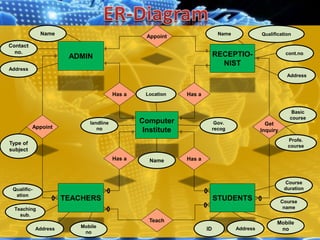
 ERD
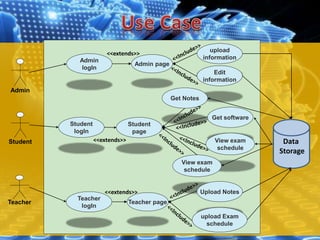
 Use Case
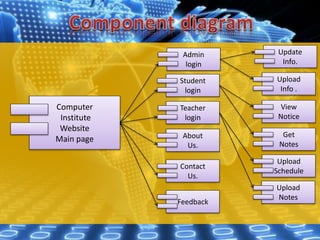
 Component Diagram
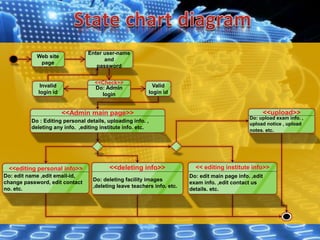
 State Chart Diagram
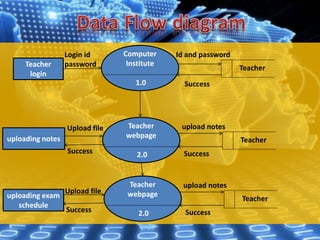
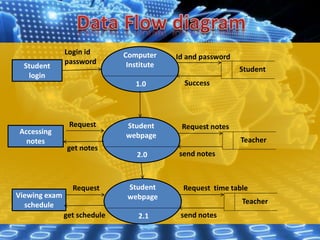
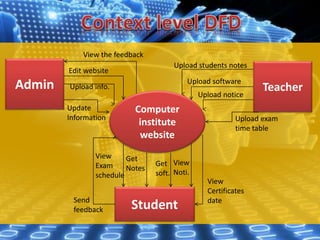
 DFD
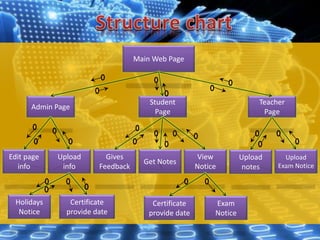
 Structure Chart Diagram
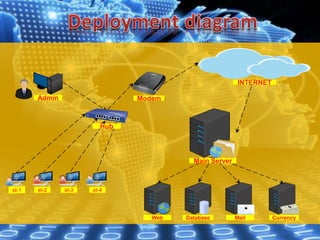
 Deployment Diagram
• Student will get the information even by staying at
home.
• Teachers can upload notes any time anywhere .
• Student can view their certificate notice.
• Student can access all information in their mobiles.
• Student will be get their exam schedule through
the website.
• Admin can view students feedback through the
website.
• Admin can advertise their institute in many
communications sites.
OS (Operating System) : Win vista/XP/7/8/8.1/10, LINUX,
UNIX, APPLE etc.
Browser : Chrome, Firefox, Safari (not supported on
windows),Internet Explorer etc.
Adobe : Adobe Flash Player 11 or higher.
Adobe Reader 10.0 or higher.
Security : Anti-virus software.
Platform : Java, HTML, CSS, PHP, .NET etc.
web developing software : Adobe Dreamweaver CS6,
Notepad ++.
Data Storing : database SQL server 2000.
Processor and RAM :
Windows
 1.2MHz Intel Pentium 4 or faster processor for Windows XP/7/ 8 /8.1/10
(1.4 GHz recommended )
 256 MB of RAM (1GB recommended) for Windows XP/7/ 8 /8.1/10
Mac OS
 1.83GHz Intel Core Duo or faster processor
 512MB of RAM (1GB recommended)
 Mac OS X 10.7.4, 10.8, 10.9
Internet Connection.
Broadband : (256 kbps or higher) recommended.
Hard Disk : 40 GB min (100 recommended )
Peripherals : keyboard, mouse, speaker etc.
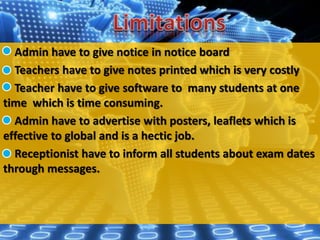
Admin have to give notice in notice board
Teachers have to give notes printed which is very costly
Teacher have to give software to many students at one
time which is time consuming.
Admin have to advertise with posters, leaflets which is
effective to global and is a hectic job.
Receptionist have to inform all students about exam dates
through messages.
Appoint
Has a
Has a
Has a
Get
Inquiry
Appoint
Teach
Has a
Computer
Institute
STUDENTSTEACHERS
RECEPTIO-
NIST
ADMIN
Teaching
sub.
Qualific-
ation
Address Mobile
no
Gov.
recog
Name
Location
landline
no
Address
Contact
no.
Name
Type of
subject
QualificationName
cont.no.
Address
Profe.
course
Basic
course
AddressID
Mobile
no
Course
name
Course
duration
Admin
Student
Teacher
Admin
logIn
Student
page
Admin page
upload
information
Edit
information
Teacher page
Get Notes
Get software
View exam
schedule
Teacher
logIn
Student
logIn
View exam
schedule
Upload Notes
upload Exam
schedule
Data
Storage
<<extends>>
<<extends>>
<<extends>>
Computer
Institute
Website
Main page
Admin
login
Student
login
Teacher
login
About
Us.
Contact
Us.
Feedback
Update
Info.
Upload
Info .
View
Notice
Get
Notes
Upload
Schedule
Upload
Notes
Enter user-name
and
password
Do: Admin
login
<<Check>>
Invalid
login id
Web site
page
Valid
login id
Do : Editing personal details, uploading info. ,
deleting any info. ,editing institute info. etc.
<<Admin main page>>
Do: edit name ,edit email-id,
change password, edit contact
no. etc.
<<editing personal info>>
Do: deleting facility images
,deleting leave teachers info. etc.
<<deleting info>>
Do: upload exam info. ,
upload notice , upload
notes. etc.
<<upload>>
Do: edit main page info. ,edit
exam info. ,edit contact us
details. etc.
<< editing institute info>>
Computer
Institute
1.0
Teacher
login
Teacher
Login id
password
Id and password
Success
Teacher
webpage
2.0
uploading notes Teacher
uploading exam
schedule
upload notes
SuccessSuccess
Upload file
Upload file
Teacher
webpage
2.0
Teacher
upload notes
SuccessSuccess
Computer
Institute
1.0
Student
login
Student
Student
webpage
2.0
Accessing
notes Teacher
Viewing exam
schedule
Request notes
send notes
Login id
password
Id and password
Success
Student
webpage
2.1
Teacher
Request time table
send notes
get notes
get schedule
Request
Request
Admin
Computer
institute
website
Student
Teacher
View the feedback
Edit website
Upload info.
Update
Information
Upload students notes
Upload software
Upload notice
Upload exam
time table
Send
feedback
View
Exam
schedule
Get
Notes
Get
soft.
View
Noti.
View
Certificates
date
Main Web Page
Admin Page
Student
Page
Teacher
Page
Edit page
info
Upload
info
Get Notes
Gives
Feedback
Upload
Exam Notice
View
Notice
Upload
notes
Holidays
Notice
Certificate
provide date
Exam
Notice
Certificate
provide date
Admin
INTERNET
Hub
Modem
st-1
Main Server
Web Database Mail Currency
st-2 st-3 st-4
Computer institute Website(TYIT project)

Computer institute Website(TYIT project)

  • 3.
    overview of website. SoftwareRequirement. Hardware Requirement. Limitations Diagrammatic Elaboration.  ERD  Use Case  Component Diagram  State Chart Diagram  DFD  Structure Chart Diagram  Deployment Diagram
  • 4.
    • Student willget the information even by staying at home. • Teachers can upload notes any time anywhere . • Student can view their certificate notice. • Student can access all information in their mobiles. • Student will be get their exam schedule through the website. • Admin can view students feedback through the website. • Admin can advertise their institute in many communications sites.
  • 5.
    OS (Operating System): Win vista/XP/7/8/8.1/10, LINUX, UNIX, APPLE etc. Browser : Chrome, Firefox, Safari (not supported on windows),Internet Explorer etc. Adobe : Adobe Flash Player 11 or higher. Adobe Reader 10.0 or higher. Security : Anti-virus software. Platform : Java, HTML, CSS, PHP, .NET etc. web developing software : Adobe Dreamweaver CS6, Notepad ++. Data Storing : database SQL server 2000.
  • 6.
    Processor and RAM: Windows  1.2MHz Intel Pentium 4 or faster processor for Windows XP/7/ 8 /8.1/10 (1.4 GHz recommended )  256 MB of RAM (1GB recommended) for Windows XP/7/ 8 /8.1/10 Mac OS  1.83GHz Intel Core Duo or faster processor  512MB of RAM (1GB recommended)  Mac OS X 10.7.4, 10.8, 10.9 Internet Connection. Broadband : (256 kbps or higher) recommended. Hard Disk : 40 GB min (100 recommended ) Peripherals : keyboard, mouse, speaker etc.
  • 7.
    Admin have togive notice in notice board Teachers have to give notes printed which is very costly Teacher have to give software to many students at one time which is time consuming. Admin have to advertise with posters, leaflets which is effective to global and is a hectic job. Receptionist have to inform all students about exam dates through messages.
  • 8.
    Appoint Has a Has a Hasa Get Inquiry Appoint Teach Has a Computer Institute STUDENTSTEACHERS RECEPTIO- NIST ADMIN Teaching sub. Qualific- ation Address Mobile no Gov. recog Name Location landline no Address Contact no. Name Type of subject QualificationName cont.no. Address Profe. course Basic course AddressID Mobile no Course name Course duration
  • 9.
    Admin Student Teacher Admin logIn Student page Admin page upload information Edit information Teacher page GetNotes Get software View exam schedule Teacher logIn Student logIn View exam schedule Upload Notes upload Exam schedule Data Storage <<extends>> <<extends>> <<extends>>
  • 10.
  • 11.
    Enter user-name and password Do: Admin login <<Check>> Invalid loginid Web site page Valid login id Do : Editing personal details, uploading info. , deleting any info. ,editing institute info. etc. <<Admin main page>> Do: edit name ,edit email-id, change password, edit contact no. etc. <<editing personal info>> Do: deleting facility images ,deleting leave teachers info. etc. <<deleting info>> Do: upload exam info. , upload notice , upload notes. etc. <<upload>> Do: edit main page info. ,edit exam info. ,edit contact us details. etc. << editing institute info>>
  • 12.
    Computer Institute 1.0 Teacher login Teacher Login id password Id andpassword Success Teacher webpage 2.0 uploading notes Teacher uploading exam schedule upload notes SuccessSuccess Upload file Upload file Teacher webpage 2.0 Teacher upload notes SuccessSuccess
  • 13.
    Computer Institute 1.0 Student login Student Student webpage 2.0 Accessing notes Teacher Viewing exam schedule Requestnotes send notes Login id password Id and password Success Student webpage 2.1 Teacher Request time table send notes get notes get schedule Request Request
  • 14.
    Admin Computer institute website Student Teacher View the feedback Editwebsite Upload info. Update Information Upload students notes Upload software Upload notice Upload exam time table Send feedback View Exam schedule Get Notes Get soft. View Noti. View Certificates date
  • 15.
    Main Web Page AdminPage Student Page Teacher Page Edit page info Upload info Get Notes Gives Feedback Upload Exam Notice View Notice Upload notes Holidays Notice Certificate provide date Exam Notice Certificate provide date
  • 16.