Digital Planet:
Tomorrow’s Technology and You
Chapter 3
Hardware Basics
Peripherals
Copyright © 2012 Pearson Education, Inc. publishing as Prentice Hall
Input Devices
Keyboard: Most familiar input device
Mouse: Designed to move pointer around screen
Wireless mice: Use Bluetooth or other wireless
frequencies
Game controllers, graphics tablets, touch screens:
Used for inputting
2
Copyright © 2012 Pearson Education, Inc. publishing as Prentice Hall
Screen Output
Display: Also called a monitor
Display size measured length of diagonal line across
screen
Images composed of tiny dots called pixels.
Resolution: Measured in dots per inch (dpi)
Aspect ratio: Relationship between width and height
Monitors use liquid crystal digital (LCD) technology.
3
Copyright © 2012 Pearson Education, Inc. publishing as Prentice Hall
Storage Devices: Input Meets Output
Some peripherals perform both input and output
functions:
• Storage devices: Include tape and disk drives
• Referred to as secondary storage
• Record information so it can be read later
4
Copyright © 2012 Pearson Education, Inc. publishing as Prentice Hall
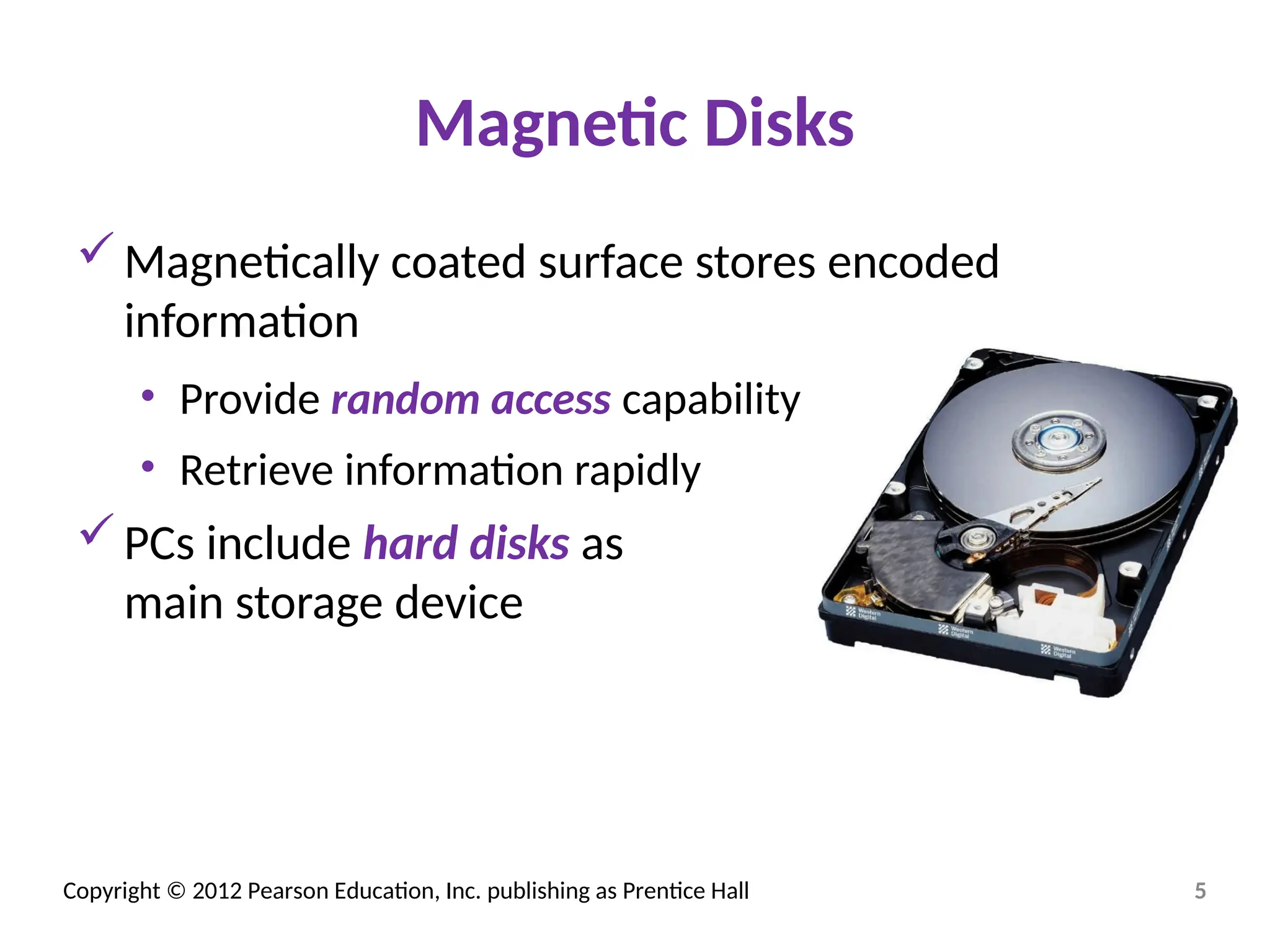
Magnetic Disks
Magnetically coated surface stores encoded
information
• Provide random access capability
• Retrieve information rapidly
PCs include hard disks as
main storage device
5
Copyright © 2012 Pearson Education, Inc. publishing as Prentice Hall
Optical Discs
Optical disc drives: Use laser beams to read and
write data
Transparent plastic disc surface protects from
physical damage
Access speeds are slower than for magnetic disks
Often used to make backup copies
6
Copyright © 2012 Pearson Education, Inc. publishing as Prentice Hall
Optical Discs (cont.)
CD-ROM (compact disc—read-only memory) discs
Holds 700 MB of information
CD-RW drive: Read data from CD-ROMs; record data onto
CD-R and CD-RW discs
• CD-R (compact disc-recordable)—write-once, read-many
• CD-RW (compact disc rewritable) erasable
Rewritable DVD drives: Commonplace in PCs today
Hold between 4.7 and 17 GB of information
• Can read and write to CD and DVD media
• Gradually being replaced by Blu-ray drives
7
Copyright © 2012 Pearson Education, Inc. publishing as Prentice Hall
Internal and External Drives
Hard disk drives and optical disk drives can be
external or internal.
• Internal drives: Reside inside casing of computer
• External drives: Can be connected through USB or
FireWire ports
• Relatively easy to transport between locations
• Can be shared between computers
8

computer hardware basics and peripherals

  • 1.
    Digital Planet: Tomorrow’s Technologyand You Chapter 3 Hardware Basics Peripherals Copyright © 2012 Pearson Education, Inc. publishing as Prentice Hall
  • 2.
    Copyright © 2012Pearson Education, Inc. publishing as Prentice Hall Input Devices Keyboard: Most familiar input device Mouse: Designed to move pointer around screen Wireless mice: Use Bluetooth or other wireless frequencies Game controllers, graphics tablets, touch screens: Used for inputting 2
  • 3.
    Copyright © 2012Pearson Education, Inc. publishing as Prentice Hall Screen Output Display: Also called a monitor Display size measured length of diagonal line across screen Images composed of tiny dots called pixels. Resolution: Measured in dots per inch (dpi) Aspect ratio: Relationship between width and height Monitors use liquid crystal digital (LCD) technology. 3
  • 4.
    Copyright © 2012Pearson Education, Inc. publishing as Prentice Hall Storage Devices: Input Meets Output Some peripherals perform both input and output functions: • Storage devices: Include tape and disk drives • Referred to as secondary storage • Record information so it can be read later 4
  • 5.
    Copyright © 2012Pearson Education, Inc. publishing as Prentice Hall Magnetic Disks Magnetically coated surface stores encoded information • Provide random access capability • Retrieve information rapidly PCs include hard disks as main storage device 5
  • 6.
    Copyright © 2012Pearson Education, Inc. publishing as Prentice Hall Optical Discs Optical disc drives: Use laser beams to read and write data Transparent plastic disc surface protects from physical damage Access speeds are slower than for magnetic disks Often used to make backup copies 6
  • 7.
    Copyright © 2012Pearson Education, Inc. publishing as Prentice Hall Optical Discs (cont.) CD-ROM (compact disc—read-only memory) discs Holds 700 MB of information CD-RW drive: Read data from CD-ROMs; record data onto CD-R and CD-RW discs • CD-R (compact disc-recordable)—write-once, read-many • CD-RW (compact disc rewritable) erasable Rewritable DVD drives: Commonplace in PCs today Hold between 4.7 and 17 GB of information • Can read and write to CD and DVD media • Gradually being replaced by Blu-ray drives 7
  • 8.
    Copyright © 2012Pearson Education, Inc. publishing as Prentice Hall Internal and External Drives Hard disk drives and optical disk drives can be external or internal. • Internal drives: Reside inside casing of computer • External drives: Can be connected through USB or FireWire ports • Relatively easy to transport between locations • Can be shared between computers 8