WelcomeTo Our Presentation
Topic : 3d Display Method
Group Member
▪ Shahrun SiddiqueTaki ----------- 161-15-7195
▪ Syeda Khadizatul Maria----------- 161-15-7333
▪ Joyanta Basak ---------------------- 162-15-7740
▪ Abu Ishak Mahy -------------------- 162-15-7893
3d Display Method:
▪ 3D graphics deals with generating and displaying three dimensional
objects in a two-dimensional space
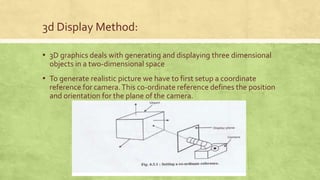
▪ To generate realistic picture we have to first setup a coordinate
reference for camera.This co-ordinate reference defines the position
and orientation for the plane of the camera.
3d Display Method:
▪ Parallel Projection
▪ Perspective Projection
▪ Depth Cueing
▪ Visible Line Identification
▪ Visible Surface Identification
▪ Surface Rendering
Parallel Projection
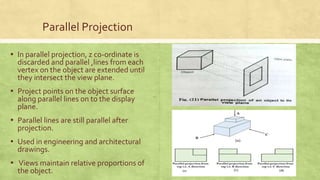
▪ In parallel projection, z co-ordinate is
discarded and parallel ,lines from each
vertex on the object are extended until
they intersect the view plane.
▪ Project points on the object surface
along parallel lines on to the display
plane.
▪ Parallel lines are still parallel after
projection.
▪ Used in engineering and architectural
drawings.
▪ Views maintain relative proportions of
the object.
Perspective Projection
• Project points to the display plane along
converging paths.
• This is the way that our eyes and a
camera lens form images and so the
displays are more realistic.
• Parallel lines appear to converge to a
distant point in the background.
• Distant objects appear smaller than
objects closer to the viewing position.
Depth Cueing
• To easily identify the front and back of
display objects.
• Depth information can be included
using various methods.
• A simple method to vary the intensity of
objects according to their distance from
the viewing position.
• Eg: lines closest to the viewing position
are displayed with the higher intensities
and lines farther away are displayed
with lower intensities.
Visible Line Identification
• Visible Lines are highlighted.
• Non visible lines are shown by dashed
lines.
• Nonvisible lines are not shown.
• Eg: lines closest to the viewing position
are displayed with the higher intensities
and lines farther away are displayed
with lower intensities.
Visible Surface Identification
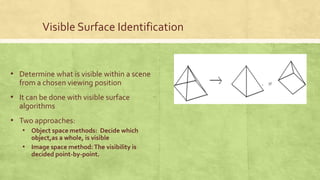
• Determine what is visible within a scene
from a chosen viewing position
• It can be done with visible surface
algorithms
• Two approaches:
• Object space methods: Decide which
object,as a whole, is visible
• Image space method:The visibility is
decided point-by-point.
Surface rendering
• • Set the surface intensity of objects
according to
• Lighting conditions in the scene
• Assigned surface characteristics
• Lighting specifications include the
intensity and positions of light sources
and the general background illumination
required for a scene.
• Surface properties include degree of
transparency and how rough or smooth
of the surfaces
Computer Graphics

Computer Graphics

  • 1.
  • 2.
    Group Member ▪ ShahrunSiddiqueTaki ----------- 161-15-7195 ▪ Syeda Khadizatul Maria----------- 161-15-7333 ▪ Joyanta Basak ---------------------- 162-15-7740 ▪ Abu Ishak Mahy -------------------- 162-15-7893
  • 3.
    3d Display Method: ▪3D graphics deals with generating and displaying three dimensional objects in a two-dimensional space ▪ To generate realistic picture we have to first setup a coordinate reference for camera.This co-ordinate reference defines the position and orientation for the plane of the camera.
  • 4.
    3d Display Method: ▪Parallel Projection ▪ Perspective Projection ▪ Depth Cueing ▪ Visible Line Identification ▪ Visible Surface Identification ▪ Surface Rendering
  • 5.
    Parallel Projection ▪ Inparallel projection, z co-ordinate is discarded and parallel ,lines from each vertex on the object are extended until they intersect the view plane. ▪ Project points on the object surface along parallel lines on to the display plane. ▪ Parallel lines are still parallel after projection. ▪ Used in engineering and architectural drawings. ▪ Views maintain relative proportions of the object.
  • 6.
    Perspective Projection • Projectpoints to the display plane along converging paths. • This is the way that our eyes and a camera lens form images and so the displays are more realistic. • Parallel lines appear to converge to a distant point in the background. • Distant objects appear smaller than objects closer to the viewing position.
  • 7.
    Depth Cueing • Toeasily identify the front and back of display objects. • Depth information can be included using various methods. • A simple method to vary the intensity of objects according to their distance from the viewing position. • Eg: lines closest to the viewing position are displayed with the higher intensities and lines farther away are displayed with lower intensities.
  • 8.
    Visible Line Identification •Visible Lines are highlighted. • Non visible lines are shown by dashed lines. • Nonvisible lines are not shown. • Eg: lines closest to the viewing position are displayed with the higher intensities and lines farther away are displayed with lower intensities.
  • 9.
    Visible Surface Identification •Determine what is visible within a scene from a chosen viewing position • It can be done with visible surface algorithms • Two approaches: • Object space methods: Decide which object,as a whole, is visible • Image space method:The visibility is decided point-by-point.
  • 10.
    Surface rendering • •Set the surface intensity of objects according to • Lighting conditions in the scene • Assigned surface characteristics • Lighting specifications include the intensity and positions of light sources and the general background illumination required for a scene. • Surface properties include degree of transparency and how rough or smooth of the surfaces