Computer Art Applications
Lesson 3
Review
1
Directions: Arrange the jumbled words to form the correct words
described on the following sentences. Write your answers on your answer
sheet.
1
1. CPI EOGACLL – allows you to make collages
incorporating photos, stickers, text, and
frames.
1
2. HOOPT RGID – a downloadable application
for android phones that allows you to make
collages out of images from your photo
gallery.
1
3. POOTH THOOB – an application for taking
photos and videos using an iPad or iPad
mini.
1
4. PCI KONMYE – a free online photo editing
tool that provides filters, frames, text, and
effects to manipulate your images.
1
5. RYEAL AINTP – is an application that has lots
of brushes, pens, painting tools, shape tools,
different layering options such as merge,
duplicate, move, and delete. It comes with a
wide variety of brushes and other tools as the
app can handle HD resolutions without any
glitches whatsoever.
COMPUTER PROGRAMS OR APPLICATIONS
1
We are now in the computer era. Everything could be possibly done with the
aid of our devices. You have already learned about the different digital
programs/applications in the previous lessons. For you to learn more about
the different computer applications/programs, you must have to experience
doing it. These could not only be done for school purposes; it could also be
used in earning a living. Get ready because we will now have step by step
procedures in using the different applications. Compose yourself; start
conceptualizing a topic that you could use in making your artworks which
could be exhibited before the quarter ends. Make sure that the medium that
you are going to use is suitable to your topic so that your audience could
understand the message that you want to convey in your artwork.
Examples of Computer Programs/Applications
1
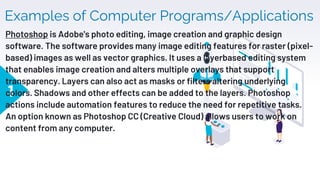
Photoshop is Adobe's photo editing, image creation and graphic design
software. The software provides many image editing features for raster (pixel-
based) images as well as vector graphics. It uses a layerbased editing system
that enables image creation and alters multiple overlays that support
transparency. Layers can also act as masks or filters altering underlying
colors. Shadows and other effects can be added to the layers. Photoshop
actions include automation features to reduce the need for repetitive tasks.
An option known as Photoshop CC (Creative Cloud) allows users to work on
content from any computer.
1
1
1
13
▸ Stencyl is a video game development tool that allows users to
create 2D video games for computers, mobile devices, and the
web. The software is available for free, with select publishing
options available for purchase. Stencyl is an authoring tool. It
includes several modules used to accomplish the necessary tasks
to create games with the software.
14
▸ The Behavior Editor is used to create and edit code and game
logic in modular pieces known as behaviors and events.
▸ The Tileset Editor is used to import and edit tilesets, including
their collision shapes, appearance, and animations.
▸ The Actor Editor is used to create and edit game entities (Actors)
and their settings, including behaviors, physics, and animations.
▸ The Scene Designer is used to create and edit levels and game
states (Scenes) by using actors, tilesets, and behaviors.
15
Twine is a free and open-source tool created by Chris Klimas for
making interactive fiction in the form of web pages. It is available on
Mac OS X, Windows, and Linux. Twine emphasizes the visual structure
of hypertext and does not require knowledge of a programming
language as many other game development tools do. It is regarded as
a tool which can be used by anyone interested in interactive fiction
and experimental games.
16
Game Maker is a computer program for the Windows operating
system. It was first made by Mark Overmars, but it is now made by
the company YoYo Games. Game Maker lets people make
computer games without knowing a computer programming
language.
17
Snapseed a photo application that enables you to enhance,
transform, and share your photos. It is a photo-editing application for
iOS and Android produced by Nik Software, now owned by Google. It
enables users to enhance photos and apply digital filters and save
users' editing history and redirect to any of the actions before. It can
also create and save filter combinations by using the default filters
and editing features. The list of special effects and filters includes
Drama, Grunge, Vintage, Center-focus, Frames, and a Tilt-shift
(which resizes photos). Users can import RAW images as well for
better quality edits.
Other Graphic Software Programs There are other graphic software
programs that you can use as image and video manipulating tools. These
are:
▸ 1. Digital painting is referred to
as a technique using a graphic
software program to create an
artwork that is totally virtual.
The canvas, brushes, paints,
and other tools are all virtual,
existing only within the
computer. The finished work is
also stored in virtual format to
be shared through cyber
space.
▸ 2. Ctrl+Paint is an example of an
online resource for teaching
yourself digital painting for free
via simple videos and mini
tutorials.
18
Other Graphic Software Programs There are other graphic software
programs that you can use as image and video manipulating tools. These
are:
▸ 3. Video Technology /
Imaging Videos – This is the
creation of computerized
images that are edited or
generated using photo
editing applications and
digital capturing devices
such as cellphones, HD
camera and video recorder.
▸ 4. Social media purposes - Another
tremendously powerful and innovative
field that digital technology has
revolutionized is that of creating and
presenting videos. The digital technology
captures and edits such videos contained
right in your tablets and android phones.
The raw video clips can be enhanced and
modified with a myriad of effects
depending on the video application you
have installed in your device.
19
20
Activity 1: Creating Your Own Artwork Using Photoshop
Directions: Work on the given task by following the instructions below to come up
with a work of art.
1. Choose a photo/s from your device with any of the themes provided below.
- Source of happiness
-Tagumpay
- Everyday life
2. Using the photoshop application, experiment your photo by exploring the different
photoshop tools (Pen tool, Clone stamp tool Shape tools, crop tool move tool etc.)
3. Print your artwork in a short coupon bond for compilation.
4. You can share it with your friends through your social media account.
Have fun!
In producing technology-
based arts, sharing and
reaching computer/digital
art internet connections
are vital in downloading
applications and programs
to be used in the
manipulations of photos,
images, and videos.
21
Examples of Technology-based/Digital
Artworks:
Digital Image Creation Produced
through an Image Manipulation
Program
22
23
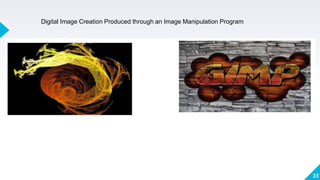
Digital Image Creation Produced through an Image Manipulation Program
24
THANKS!
Any questions?
You can find me at:
▸ @username
▸ user@mail.me

Computer Art Applications.pptx

  • 1.
  • 2.
    Review 1 Directions: Arrange thejumbled words to form the correct words described on the following sentences. Write your answers on your answer sheet.
  • 3.
    1 1. CPI EOGACLL– allows you to make collages incorporating photos, stickers, text, and frames.
  • 4.
    1 2. HOOPT RGID– a downloadable application for android phones that allows you to make collages out of images from your photo gallery.
  • 5.
    1 3. POOTH THOOB– an application for taking photos and videos using an iPad or iPad mini.
  • 6.
    1 4. PCI KONMYE– a free online photo editing tool that provides filters, frames, text, and effects to manipulate your images.
  • 7.
    1 5. RYEAL AINTP– is an application that has lots of brushes, pens, painting tools, shape tools, different layering options such as merge, duplicate, move, and delete. It comes with a wide variety of brushes and other tools as the app can handle HD resolutions without any glitches whatsoever.
  • 8.
    COMPUTER PROGRAMS ORAPPLICATIONS 1 We are now in the computer era. Everything could be possibly done with the aid of our devices. You have already learned about the different digital programs/applications in the previous lessons. For you to learn more about the different computer applications/programs, you must have to experience doing it. These could not only be done for school purposes; it could also be used in earning a living. Get ready because we will now have step by step procedures in using the different applications. Compose yourself; start conceptualizing a topic that you could use in making your artworks which could be exhibited before the quarter ends. Make sure that the medium that you are going to use is suitable to your topic so that your audience could understand the message that you want to convey in your artwork.
  • 9.
    Examples of ComputerPrograms/Applications 1 Photoshop is Adobe's photo editing, image creation and graphic design software. The software provides many image editing features for raster (pixel- based) images as well as vector graphics. It uses a layerbased editing system that enables image creation and alters multiple overlays that support transparency. Layers can also act as masks or filters altering underlying colors. Shadows and other effects can be added to the layers. Photoshop actions include automation features to reduce the need for repetitive tasks. An option known as Photoshop CC (Creative Cloud) allows users to work on content from any computer.
  • 10.
  • 11.
  • 12.
  • 13.
    13 ▸ Stencyl isa video game development tool that allows users to create 2D video games for computers, mobile devices, and the web. The software is available for free, with select publishing options available for purchase. Stencyl is an authoring tool. It includes several modules used to accomplish the necessary tasks to create games with the software.
  • 14.
    14 ▸ The BehaviorEditor is used to create and edit code and game logic in modular pieces known as behaviors and events. ▸ The Tileset Editor is used to import and edit tilesets, including their collision shapes, appearance, and animations. ▸ The Actor Editor is used to create and edit game entities (Actors) and their settings, including behaviors, physics, and animations. ▸ The Scene Designer is used to create and edit levels and game states (Scenes) by using actors, tilesets, and behaviors.
  • 15.
    15 Twine is afree and open-source tool created by Chris Klimas for making interactive fiction in the form of web pages. It is available on Mac OS X, Windows, and Linux. Twine emphasizes the visual structure of hypertext and does not require knowledge of a programming language as many other game development tools do. It is regarded as a tool which can be used by anyone interested in interactive fiction and experimental games.
  • 16.
    16 Game Maker isa computer program for the Windows operating system. It was first made by Mark Overmars, but it is now made by the company YoYo Games. Game Maker lets people make computer games without knowing a computer programming language.
  • 17.
    17 Snapseed a photoapplication that enables you to enhance, transform, and share your photos. It is a photo-editing application for iOS and Android produced by Nik Software, now owned by Google. It enables users to enhance photos and apply digital filters and save users' editing history and redirect to any of the actions before. It can also create and save filter combinations by using the default filters and editing features. The list of special effects and filters includes Drama, Grunge, Vintage, Center-focus, Frames, and a Tilt-shift (which resizes photos). Users can import RAW images as well for better quality edits.
  • 18.
    Other Graphic SoftwarePrograms There are other graphic software programs that you can use as image and video manipulating tools. These are: ▸ 1. Digital painting is referred to as a technique using a graphic software program to create an artwork that is totally virtual. The canvas, brushes, paints, and other tools are all virtual, existing only within the computer. The finished work is also stored in virtual format to be shared through cyber space. ▸ 2. Ctrl+Paint is an example of an online resource for teaching yourself digital painting for free via simple videos and mini tutorials. 18
  • 19.
    Other Graphic SoftwarePrograms There are other graphic software programs that you can use as image and video manipulating tools. These are: ▸ 3. Video Technology / Imaging Videos – This is the creation of computerized images that are edited or generated using photo editing applications and digital capturing devices such as cellphones, HD camera and video recorder. ▸ 4. Social media purposes - Another tremendously powerful and innovative field that digital technology has revolutionized is that of creating and presenting videos. The digital technology captures and edits such videos contained right in your tablets and android phones. The raw video clips can be enhanced and modified with a myriad of effects depending on the video application you have installed in your device. 19
  • 20.
    20 Activity 1: CreatingYour Own Artwork Using Photoshop Directions: Work on the given task by following the instructions below to come up with a work of art. 1. Choose a photo/s from your device with any of the themes provided below. - Source of happiness -Tagumpay - Everyday life 2. Using the photoshop application, experiment your photo by exploring the different photoshop tools (Pen tool, Clone stamp tool Shape tools, crop tool move tool etc.) 3. Print your artwork in a short coupon bond for compilation. 4. You can share it with your friends through your social media account. Have fun!
  • 21.
    In producing technology- basedarts, sharing and reaching computer/digital art internet connections are vital in downloading applications and programs to be used in the manipulations of photos, images, and videos. 21
  • 22.
    Examples of Technology-based/Digital Artworks: DigitalImage Creation Produced through an Image Manipulation Program 22
  • 23.
    23 Digital Image CreationProduced through an Image Manipulation Program
  • 24.
    24 THANKS! Any questions? You canfind me at: ▸ @username ▸ user@mail.me