Marking Pattern
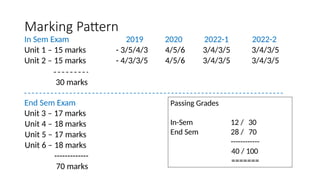
In SemExam 2019 2020 2022-1 2022-2
Unit 1 – 15 marks - 3/5/4/3 4/5/6 3/4/3/5 3/4/3/5
Unit 2 – 15 marks - 4/3/3/5 4/5/6 3/4/3/5 3/4/3/5
30 marks
End Sem Exam
Unit 3 – 17 marks
Unit 4 – 18 marks
Unit 5 – 17 marks
Unit 6 – 18 marks
-------------
70 marks
Passing Grades
In-Sem
End Sem
12 / 30
28 / 70
------------
40 / 100
=======
4.
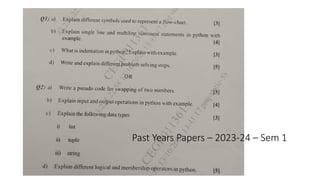
Past Years Papers- 2019
Q1 a] What are identifiers ? List the rules to name an identifier
b] Explain different data types supported by Python
c. What is a problem? List down the steps in solving a
problem
d. Write an Algorithm to find the sum of ‘n’ natural
numbers
OR
[3]
[5]
[4]
[3]
Q2 a] Explain the use of Indentation in Python ?
b. What is an operator? Enlist various types of operators
c.What is modularization? Explain top-down design
approach d] Write an algorithm to swap two numbers
[3]
[5]
[4]
[3]
5.
Past Years Papers- 2020
Q1 a) What is a problem ? Explain six problem solving steps
b. List down types of operators in Python. Explain relational operators
c. Explain flow-chart and algorithm with example
[4]
[5]
[6]
OR
Q2 a] Explain the following terms with examples
i) Comment ii) Reserved Words b]
Write a program to swap two numbers
c] Explain any six features of Python
programming
[4]
[5]
[6]
6.
Past Years Papers– 2022-23 – Sem 1
Q1 a) Explain different logical operators in python
b) Explain different flowchart symbols.
c) Explain input() function with example.
d) What are the different problem solving aspects ? Explain each in brief ?
OR
Q2 a) Explain history of python programming language
e) Explain the following terms (i) variables, (ii) identifiers
f) Explain different arithmetic operators in python
g) Explain different data types in python
[3]
[4]
[3]
[5]
[3]
[4]
[3]
[5]
7.
Past Years Papers– 2022-23 – Sem 2
Q1 a) List different program design tools? Explain an algorithm with example.
b) What are the characteristics of an algorithm
[3]
[4]
c) Explain the brief history of python programming language and list different software
[3]
[5]
developed in Python
d) Explain any five features of python programming language
OR
Q2 a) Write a pseudo code for factorial of a number
b) What are the different collection literals in Python ?
c) What do you mean by a flow-chart? Explain different flow-chart symbols
d) Explain any five categories of operators in Python with examples.
[3]
[4]
[3]
[5]
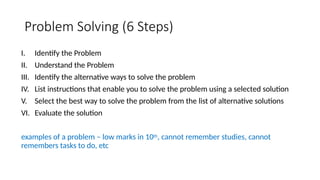
What is aProblem ?
Problem is defined as a situation or issue or a condition which needs
to be solved to achieve a goal
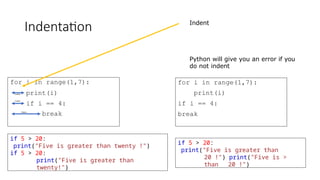
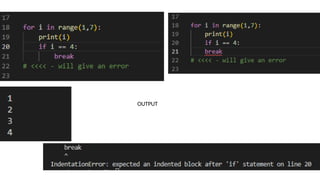
10.
Problem Solving (6Steps)
I. Identify the Problem
II. Understand the Problem
III. Identify the alternative ways to solve the problem
IV. List instructions that enable you to solve the problem using a selected solution
V. Select the best way to solve the problem from the list of alternative solutions
VI. Evaluate the solution
examples of a problem – low marks in 10th, cannot remember studies, cannot
remembers tasks to do, etc
11.
Types of Problems
•Algorithmic
• Heuristic
• Algorithmic – These are problems that can be solved with a series of
actions
• Making tea
• Stitching a dress
• Making Vada/Pav
12.
Types of Problems
•Heuristic – These are solutions that cannot be reached by a series of steps
• Ways to get good grades
• Ways to make more money
• Travel to place A to place B
Some experience and knowledge with trial and error is needed in this approach.
13.
Problem solving usingComputers
• Computers are built to deal with Algorithmic solutions
• Humans are better at developing Heuristic solutions
• The field of computers that solve Heuristic problems is called Artificial
Intelligence (AI). Here the computer keeps building its own knowledge bank and
solves problems
14.
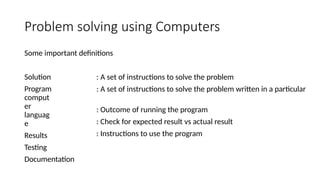
Problem solving usingComputers
Some important definitions
Solution
Program
comput
er
languag
e
Results
Testing
Documentation
: A set of instructions to solve the problem
: A set of instructions to solve the problem written in a particular
: Outcome of running the program
: Check for expected result vs actual result
: Instructions to use the program
15.
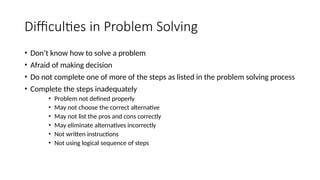
Difficulties in ProblemSolving
• Don’t know how to solve a problem
• Afraid of making decision
• Do not complete one of more of the steps as listed in the problem solving process
• Complete the steps inadequately
• Problem not defined properly
• May not choose the correct alternative
• May not list the pros and cons correctly
• May eliminate alternatives incorrectly
• Not written instructions
• Not using logical sequence of steps
16.
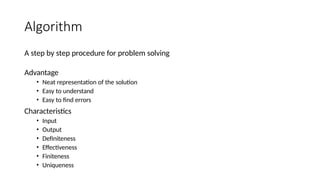
Algorithm
A step bystep procedure for problem solving
Advantage
• Neat representation of the solution
• Easy to understand
• Easy to find errors
Characteristics
• Input
• Output
• Definiteness
• Effectiveness
• Finiteness
• Uniqueness
17.
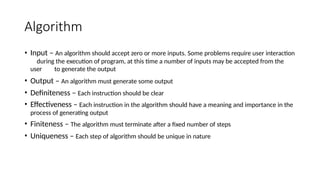
Algorithm
• Input –An algorithm should accept zero or more inputs. Some problems require user interaction
during the execution of program, at this time a number of inputs may be accepted from the
user to generate the output
• Output – An algorithm must generate some output
• Definiteness – Each instruction should be clear
• Effectiveness – Each instruction in the algorithm should have a meaning and importance in the
process of generating output
• Finiteness – The algorithm must terminate after a fixed number of steps
• Uniqueness – Each step of algorithm should be unique in nature
18.
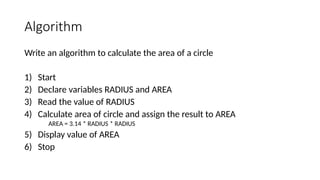
Algorithm
Write an algorithmto calculate the area of a circle
1) Start
2) Declare variables RADIUS and AREA
3) Read the value of RADIUS
4) Calculate area of circle and assign the result to AREA
AREA = 3.14 * RADIUS * RADIUS
5) Display value of AREA
6) Stop
19.
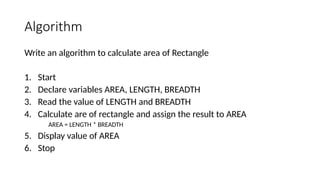
Algorithm
Write an algorithmto calculate area of Rectangle
1. Start
2. Declare variables AREA, LENGTH, BREADTH
3. Read the value of LENGTH and BREADTH
4. Calculate are of rectangle and assign the result to AREA
AREA = LENGTH * BREADTH
5. Display value of AREA
6. Stop
20.
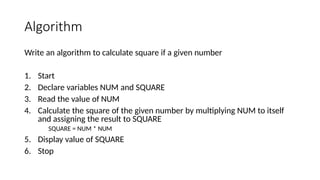
Algorithm
Write an algorithmto calculate square if a given number
1. Start
2. Declare variables NUM and SQUARE
3. Read the value of NUM
4. Calculate the square of the given number by multiplying NUM to itself
and assigning the result to SQUARE
SQUARE = NUM * NUM
5. Display value of SQUARE
6. Stop
21.
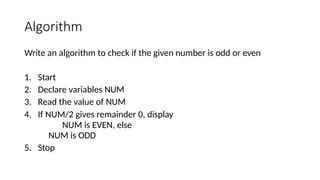
Algorithm
Write an algorithmto check if the given number is odd or even
1. Start
2. Declare variables NUM
3. Read the value of NUM
4. If NUM/2 gives remainder 0, display
NUM is EVEN, else
NUM is ODD
5. Stop
22.
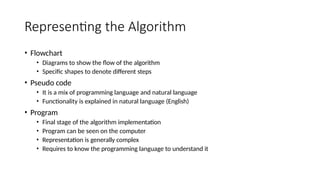
Representing the Algorithm
•Flowchart
• Diagrams to show the flow of the algorithm
• Specific shapes to denote different steps
• Pseudo code
• It is a mix of programming language and natural language
• Functionality is explained in natural language (English)
• Program
• Final stage of the algorithm implementation
• Program can be seen on the computer
• Representation is generally complex
• Requires to know the programming language to understand it
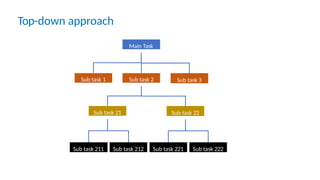
Top-Down Design Approach
•A top-down design approach starts by dividing the complex algorithm
into one or more functions.
• These functions can further be decomposed into one or more sub-
functions, and the process of decompositions is iterated until the
desired level of module complexity is achieved.
25.
Top-down approach
Main Task
Subtask 2
Sub task 1 Sub task 3
Sub task 21 Sub task 22
Sub task 211 Sub task 212 Sub task 221 Sub task 222
26.
Bottom-up Design Approach
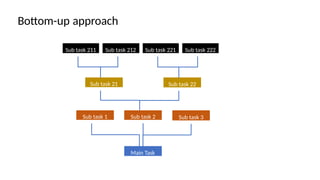
•A bottom-up approach is exactly opposite to the top-down approach
• In this approach, initially most basic and primitive components are
designed and then proceeded to the next higher level
• Communication among the steps is mandatory
• Object oriented programming languages such as Java, Python and C++
follow the bottom-up approach
27.
Bottom-up approach
Sub task211 Sub task 212 Sub task 221 Sub task 222
Sub task 21 Sub task 22
Sub task 2
Sub task 1 Sub task 3
Main Task
28.
Modularization
For a complexproblem, the algorithm is often divided into smaller units
called modules. The process of dividing an algorithm into modules is
called Modularization.
29.
Flowchart
• Flowchart isa graphical/pictorial representation of an algorithm
• It is easier to understand
• Processing and finding errors occurred during problem solving
becomes quicker and accurate
• Advantage
• It is a suitable method of communication between user/programmer
• Easier to understand
• Easy to trace the faults
• Used for documentation
30.
Flowchart
• Disadvantage
• Itis not suitable for communication between human and computers
• If modification has to be done, then the flowchart has to be redrawn
31.
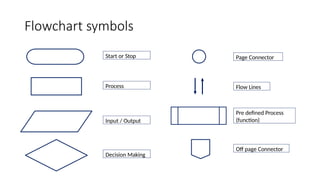
Flowchart symbols
Start orStop
Process
Input / Output
Decision Making
Flow Lines
Page Connector
Pre defined Process
(function)
Off page Connector
32.
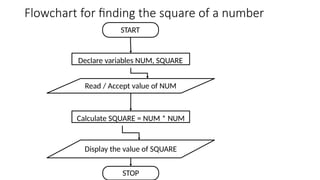
Flowchart for findingthe square of a number
START
Declare variables NUM, SQUARE
Calculate SQUARE = NUM * NUM
Display the value of SQUARE
STOP
Read / Accept value of NUM
33.
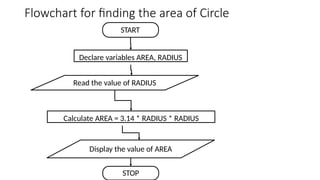
Flowchart for findingthe area of Circle
START
Declare variables AREA, RADIUS
Calculate AREA = 3.14 * RADIUS * RADIUS
Display the value of AREA
STOP
Read the value of RADIUS
34.
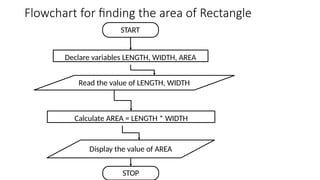
Flowchart for findingthe area of Rectangle
START
Declare variables LENGTH, WIDTH, AREA
Calculate AREA = LENGTH * WIDTH
Display the value of AREA
STOP
Read the value of LENGTH, WIDTH
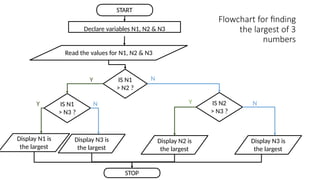
35.
Flowchart for finding
thelargest of 3
numbers
START
STOP
Declare variables N1, N2 & N3
Read the values for N1, N2 & N3
IS N1
> N2 ?
IS N2
> N3 ?
IS N1
> N3 ?
N
Y
Display N1 is
the largest
Display N3 is
the largest
Y Y
N N
Display N3 is
the largest
Display N2 is
the largest
36.
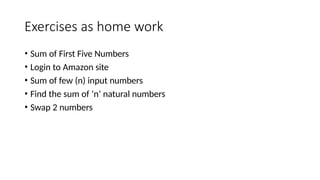
Exercises as homework
• Sum of First Five Numbers
• Login to Amazon site
• Sum of few (n) input numbers
• Find the sum of ‘n’ natural numbers
• Swap 2 numbers
37.
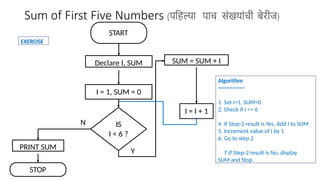
Sum of FirstFive Numbers (पहिल्या पाच संखयांची बेरीज)
START
I = 1, SUM = 0
IS
I < 6 ?
SUM = SUM + I
I = I + 1
STOP
N
Y
PRINT SUM
Declare I, SUM
Algorithm
=========
1. Set I=1, SUM=0
2. Check if I <= 6
4. If Step-2 result is Yes, Add I to SUM
5. Increment value of I by 1
6. Go to step 2
7.If Step-2 result is No, display
SUM and Stop
EXERCISE
38.
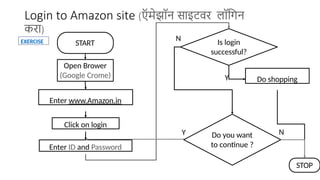
Login to Amazonsite (ऍमेझॉन साइटवर लॉगिन
करा)
START
Open Brower
(Google Crome)
Is login
successful?
Do shopping
STOP
N
Y
Enter www.Amazon.in
Click on login
Enter ID and Password
Do you want
to continue ?
Y N
EXERCISE
39.
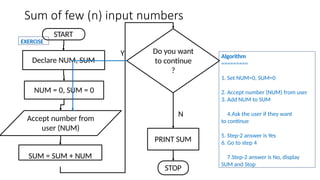
Sum of few(n) input numbers
START
NUM = 0, SUM = 0
Do you want
to continue
?
STOP
N
Y
PRINT SUM
SUM = SUM + NUM
Accept number from
user (NUM)
Declare NUM, SUM
Algorithm
=========
1. Set NUM=0, SUM=0
2. Accept number (NUM) from user
3. Add NUM to SUM
4.Ask the user if they want
to continue
5. Step-2 answer is Yes
6. Go to step 4
7.Step-2 answer is No, display
SUM and Stop
EXERCISE
40.
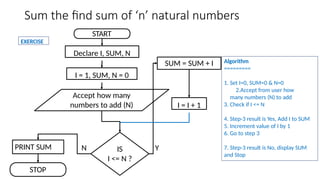
Sum the findsum of ‘n’ natural numbers
START
I = 1, SUM, N = 0
IS
I <= N ?
SUM = SUM + I
I = I + 1
STOP
N Y
PRINT SUM
Declare I, SUM, N
Accept how many
numbers to add (N)
Algorithm
=========
1. Set I=0, SUM=0 & N=0
2.Accept from user how
many numbers (N) to add
3. Check if I <= N
4. Step-3 result is Yes, Add I to SUM
5. Increment value of I by 1
6. Go to step 3
7. Step-3 result is No, display SUM
and Stop
EXERCISE
41.
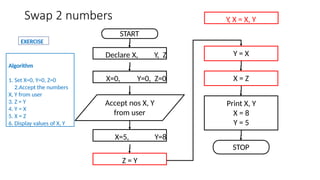
Swap 2 numbers
START
DeclareX, Y, Z
STOP
X=0, Y=0, Z=0
Accept nos X, Y
from user
X=5, Y=8
Z = Y
Y = X
X = Z
Print X, Y
X = 8
Y = 5
Algorithm
1. Set X=0, Y=0, Z=0
2.Accept the numbers
X, Y from user
3. Z = Y
4. Y = X
5. X = Z
6. Display values of X, Y
EXERCISE
Y, X = X, Y
42.
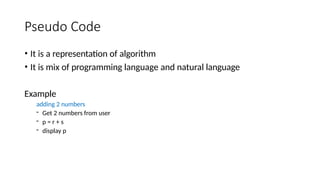
Pseudo Code
• Itis a representation of algorithm
• It is mix of programming language and natural language
Example
adding 2 numbers
- Get 2 numbers from user
- p = r + s
- display p
43.
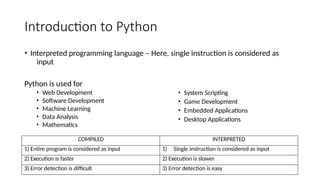
Introduction to Python
•General purpose language – We can use this language to build wide variety of
applications
• High level programming language – Interpreter is used to convert high level language
to low level language [Java, Python, C++]
• Open Source and community driven – Free to download and can be changed
• Dynamically typed language – It is run-time execution
STATIC DYNAMIC
1) Java, C++ 1) Python
2) Less flexible 2) More flexible
3) Errors are detected earlier 3) Errors are detected at execution
4) Once the variable is declared, its type cannot
be changed
4) We can change the type of the variable
anytime if we want
44.
Introduction to Python
•Interpreted programming language – Here, single instruction is considered as
input
COMPILED INTERPRETED
1) Entire program is considered as input 1) Single instruction is considered as input
2) Execution is faster 2) Execution is slower
3) Error detection is difficult 3) Error detection is easy
Python is used for
• Web Development
• Software Development
• Machine Learning
• Data Analysis
• Mathematics
• System Scripting
• Game Development
• Embedded Applications
• Desktop Applications
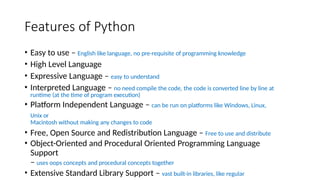
45.
Features of Python
•Easy to use – English like language, no pre-requisite of programming knowledge
• High Level Language
• Expressive Language – easy to understand
• Interpreted Language – no need compile the code, the code is converted line by line at
runtime (at the time of program execution)
• Platform Independent Language – can be run on platforms like Windows, Linux,
Unix or
Macintosh without making any changes to code
• Free, Open Source and Redistribution Language – Free to use and distribute
• Object-Oriented and Procedural Oriented Programming Language
Support
– uses oops concepts and procedural concepts together
• Extensive Standard Library Support – vast built-in libraries, like regular
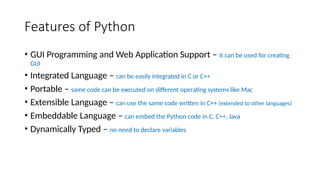
46.
Features of Python
•GUI Programming and Web Application Support – It can be used for creating
GUI
• Integrated Language – can be easily integrated in C or C++
• Portable – same code can be executed on different operating systems like Mac
• Extensible Language – can use the same code written in C++ (extended to other languages)
• Embeddable Language – can embed the Python code in C, C++, Java
• Dynamically Typed – no need to declare variables
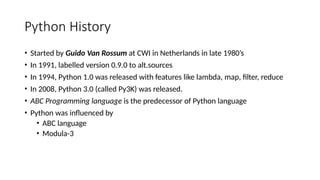
47.
Python History
• Startedby Guido Van Rossum at CWI in Netherlands in late 1980’s
• In 1991, labelled version 0.9.0 to alt.sources
• In 1994, Python 1.0 was released with features like lambda, map, filter, reduce
• In 2008, Python 3.0 (called Py3K) was released.
• ABC Programming language is the predecessor of Python language
• Python was influenced by
• ABC language
• Modula-3
48.
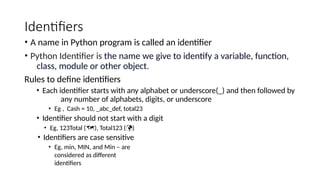
Identifiers
• A namein Python program is called an identifier
• Python Identifier is the name we give to identify a variable, function,
class, module or other object.
Rules to define identifiers
• Each identifier starts with any alphabet or underscore(_) and then followed by
any number of alphabets, digits, or underscore
• Eg , Cash = 10, _abc_def, total23
• Identifier should not start with a digit
• Eg, 123Total (), Total123 ()
• Identifiers are case sensitive
• Eg, min, MIN, and Min – are
considered as different
identifiers
49.
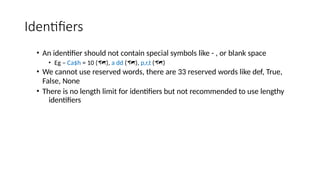
Identifiers
• An identifiershould not contain special symbols like - , or blank space
• Eg – Ca$h = 10 (), a dd (), p,r,t ()
• We cannot use reserved words, there are 33 reserved words like def, True,
False, None
• There is no length limit for identifiers but not recommended to use lengthy
identifiers
50.
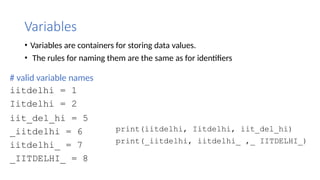
Variables
• Variables arecontainers for storing data values.
• The rules for naming them are the same as for identifiers
# valid variable names
iitdelhi = 1
Iitdelhi = 2
iit_del_hi = 5
_iitdelhi = 6
iitdelhi_ = 7
_IITDELHI_ = 8
print(iitdelhi, Iitdelhi, iit_del_hi)
print(_iitdelhi, iitdelhi_ ,_ IITDELHI_)
51.
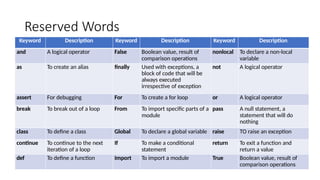
Reserved Words
Keyword DescriptionKeyword Description Keyword Description
and A logical operator False Boolean value, result of
comparison operations
nonlocal To declare a non-local
variable
as To create an alias finally Used with exceptions, a
block of code that will be
always executed
irrespective of exception
not A logical operator
assert For debugging For To create a for loop or A logical operator
break To break out of a loop From To import specific parts of a
module
pass A null statement, a
statement that will do
nothing
class To define a class Global To declare a global variable raise TO raise an exception
continue To continue to the next
iteration of a loop
If To make a conditional
statement
return To exit a function and
return a value
def To define a function Import To import a module True Boolean value, result of
comparison operations
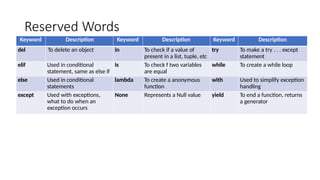
52.
Reserved Words
Keyword DescriptionKeyword Description Keyword Description
del To delete an object in To check if a value of
present in a list, tuple, etc
try To make a try . . . except
statement
elif Used in conditional
statement, same as else if
Is To check f two variables
are equal
while To create a while loop
else Used in conditional
statements
lambda To create a anonymous
function
with Used to simplify exception
handling
except Used with exceptions,
what to do when an
exception occurs
None Represents a Null value yield To end a function, returns
a generator
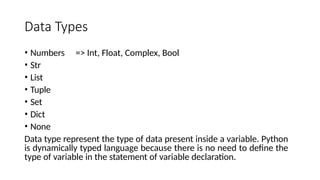
53.
Data Types
• Numbers=> Int, Float, Complex, Bool
• Str
• List
• Tuple
• Set
• Dict
• None
Data type represent the type of data present inside a variable. Python
is dynamically typed language because there is no need to define the
type of variable in the statement of variable declaration.
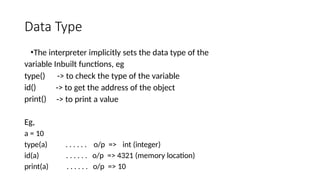
54.
Data Type
•The interpreterimplicitly sets the data type of the
variable Inbuilt functions, eg
type()
id()
print()
-> to check the type of the variable
-> to get the address of the object
-> to print a value
Eg,
a = 10
type(a) . . . . . . o/p => int (integer)
id(a) . . . . . . o/p => 4321 (memory location)
print(a) . . . . . . o/p => 10
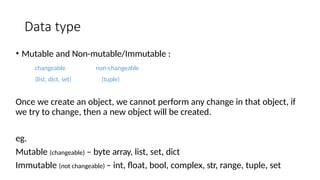
55.
Data type
• Mutableand Non-mutable/Immutable :
changeable
(list, dict, set)
non-changeable
(tuple)
Once we create an object, we cannot perform any change in that object, if
we try to change, then a new object will be created.
eg.
Mutable (changeable) – byte array, list, set, dict
Immutable (not changeable) – int, float, bool, complex, str, range, tuple, set
56.
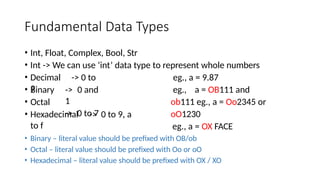
Fundamental Data Types
•Int, Float, Complex, Bool, Str
• Int -> We can use ‘int’ data type to represent whole numbers
• Decimal -> 0 to
9
eg., a = 9.87
eg., a = OB111 and
ob111 eg., a = Oo2345 or
oO1230
eg., a = OX FACE
• Binary
• Octal
-> 0 and
1
-> 0 to 7
• Hexadecimal -> 0 to 9, a
to f
• Binary – literal value should be prefixed with OB/ob
• Octal – literal value should be prefixed with Oo or oO
• Hexadecimal – literal value should be prefixed with OX / XO
57.
Literals in Python
Thereare different types of literals supported by Python. These are
• String
• Numeric
• Boolean
• Special literals
• Literal Collection
58.
Literals in Python
String
•A string literal are characters that are surrounded by quotes
• These quotes can be single, double or triple quotes
• Two types of strings
• Single line strings – Strings that are terminated within one line
• Multi line strings – Strings that are spread across multiple lines. There are several ways
to create a multiline literal string
• Adding backslash() to the end of each string
• Using triple quotes
• Multiline string using brackets
• Multiline string using join()
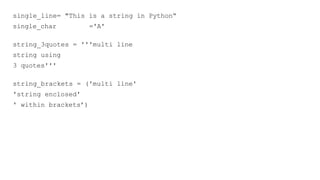
59.
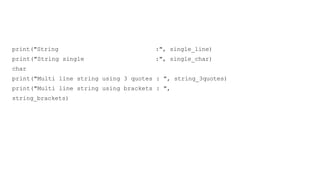
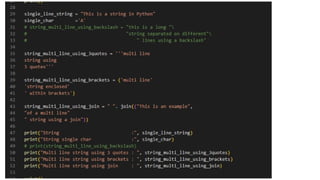
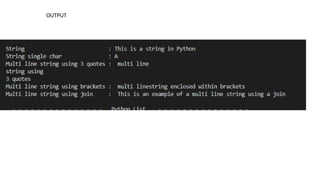
single_line= "This isa string in Python“
single_char ='A'
string_3quotes = '''multi line
string using
3 quotes'''
string_brackets = ('multi line'
'string enclosed'
' within brackets’)
Literals in Python
Numeric
•Int (signed integers) - positive and negative numbers with no decimals –
example -200, -250, 54332, 98495
• Float (floating point) – Real numbers with fractional (decimal) part – example
-45.32, -0.555478422, 5233334.2, 95555.44231
• Complex (complex) – In the form of real part and imaginary part of complex
numbers – example 2+3.14j
Literals in Python
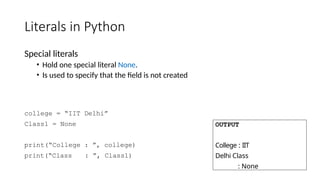
Specialliterals
• Hold one special literal None.
• Is used to specify that the field is not created
college = “IIT Delhi”
Class1 = None
print(“College : ”, college)
print(“Class : ”, Class1)
OUTPUT
College : IIT
Delhi Class
: None
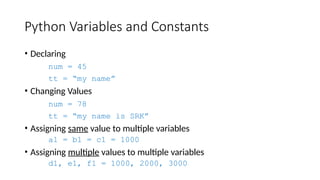
Python Variables andConstants
• Declaring
num = 45
tt = “my name”
• Changing Values
num = 78
tt = “my name is SRK”
• Assigning same value to multiple variables
a1 = b1 = c1 = 1000
• Assigning multiple values to multiple variables
d1, e1, f1 = 1000, 2000, 3000
68.
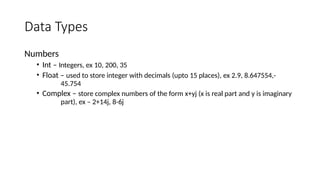
Data Types
Numbers
• Int– Integers, ex 10, 200, 35
• Float – used to store integer with decimals (upto 15 places), ex 2.9, 8.647554,-
45.754
• Complex – store complex numbers of the form x+yj (x is real part and y is imaginary
part), ex – 2+14j, 8-6j
69.
Data Types
List
• Orderedsequence of items
• Items are stored in square brackets [], and are separated by a comma (,)
• Lists are mutable, means items can be changed
• We can use the slide operator [:] to access the items in the list
70.
Data Types
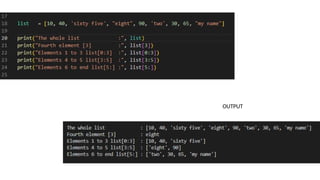
list =[10, 40, 'sixty five', "eight", 90, 'two', 30, 65, "my name"]
print(list)
print(list[3])
print(list[0:3])
print(list[3:5])
print(list[5:])
Element 10 40 sixty five eight 90 Two 30 65 my name
Index No 0 1 2 3 4 5 6 7 8
Starts from 3 and ends at 4
Starts from 0 and ends at 2
Only index 3
Starts from 5 till end
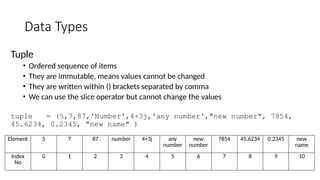
Data Types
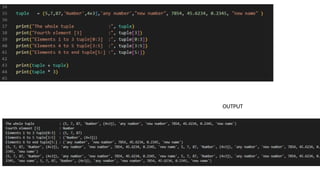
Tuple
• Orderedsequence of items
• They are immutable, means values cannot be changed
• They are written within () brackets separated by comma
• We can use the slice operator but cannot change the values
tuple = (5,7,87,'Number',4+3j,'any number',"new number", 7854,
45.6234, 0.2345, "new name" )
Element 5 7 87 number 4+3j any
number
new
number
7854 45.6234 0.2345 new
name
Index
No
0 1 2 3 4 5 6 7 8 9 10
Data Types
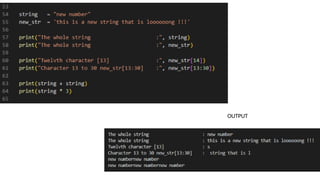
Strings
• Usesingle, double or triple quote to define a string
• ‘+’ operator joins 2 strings
• ‘*’ operator multiplies 2 strings
• Slicing operator [] can be used with a string
76.
Data Types
string
new_str
= "newnumber"
= 'this is a new string that is loooooong !!!'
print(string)
print(new_str)
print(new_str[
14])
print(new_str[
13:30])
print(string + string)
print(string * 3)
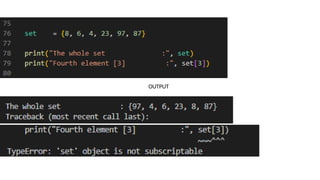
Data Types
Set
• Unorderedcollection of unique items
• Defined inside braces{} separated by a comma
• Slicing operator does not work
set = {8, 6, 4, 23, 97, 87}
print("The whole set
print("Fourth element [3]
:", set)
:", set[3])
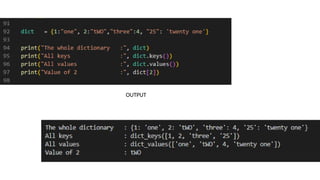
Data Types
• Dictionary
•Unordered collection of key-value pairs
• Defined with braces{}, with each item in a pair in the form key:value
• Key and value can be of any type
dict = {1:"one", 2:"tWO","three":4, "25": 'twenty one'}
print("The whole dictionary :", dict)
print("All keys :", dict.keys())
print("All values :", dict.values())
print("Value of 2 :", dict[2])
Data Types
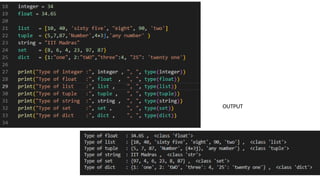
• type()function
• Conversion between data types
• Python Type conversion and Type Casting
• Implicit Type Conversion
• Explicit Type Conversion
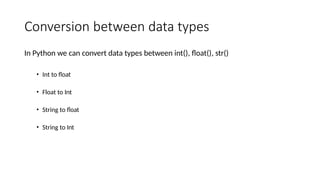
Conversion between datatypes
In Python we can convert data types between int(), float(), str()
• Int to float
• Float to Int
• String to float
• String to Int
87.
Python Type conversionand Type Casting
Implicit Type Conversion – Python automatically converts data from
one data type to another data type.
88.
Program Design Tools
•Pseudo code
• Algorithm
• Flowchart
• Structure Charts (Top down Method & Bottom Up Method)
89.
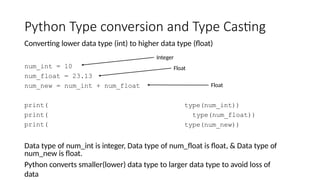
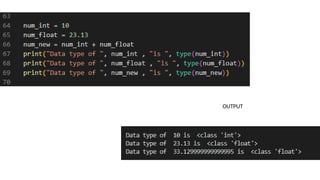
Python Type conversionand Type Casting
Converting lower data type (int) to higher data type (float)
num_int = 10
num_float = 23.13
num_new = num_int + num_float
print(
print(
print(
type(num_int))
type(num_float))
type(num_new))
Data type of num_int is integer, Data type of num_float is float, & Data type of
num_new is float.
Python converts smaller(lower) data type to larger data type to avoid loss of
data
Integer
Float
Float
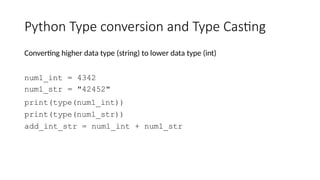
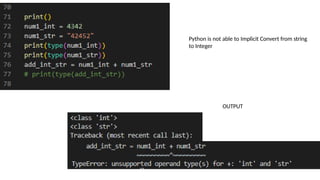
Python Type conversionand Type Casting
Converting higher data type (string) to lower data type (int)
num1_int = 4342
num1_str = "42452"
print(type(num1_int))
print(type(num1_str))
add_int_str = num1_int + num1_str
Python Type conversionand Type Casting
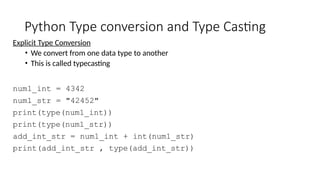
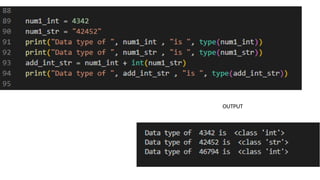
Explicit Type Conversion
• We convert from one data type to another
• This is called typecasting
num1_int = 4342
num1_str = "42452"
print(type(num1_int))
print(type(num1_str))
add_int_str = num1_int + int(num1_str)
print(add_int_str , type(add_int_str))
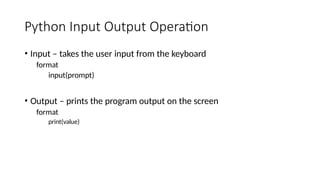
Python Input OutputOperation
• Input – takes the user input from the keyboard
format
input(prompt)
• Output – prints the program output on the screen
format
print(value)
96.
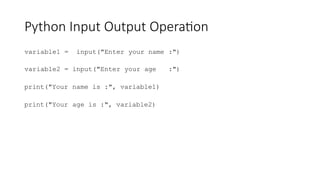
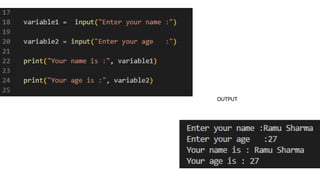
Python Input OutputOperation
variable1 = input("Enter your name :")
variable2 = input("Enter your age :")
print("Your name is :", variable1)
print("Your age is :", variable2)
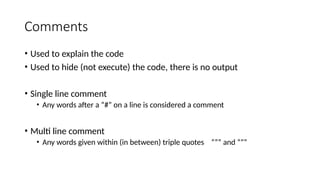
Comments
• Used toexplain the code
• Used to hide (not execute) the code, there is no output
• Single line comment
• Any words after a “#” on a line is considered a comment
• Multi line comment
• Any words given within (in between) triple quotes “”” and “””
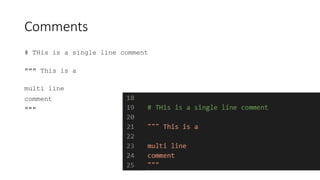
99.
Comments
# THis isa single line comment
""" This is a
multi line
comment
"""
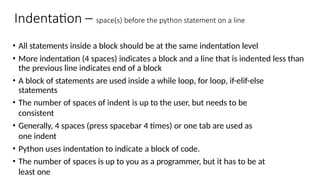
100.
Indentation – space(s)before the python statement on a line
• All statements inside a block should be at the same indentation level
• More indentation (4 spaces) indicates a block and a line that is indented less than
the previous line indicates end of a block
• A block of statements are used inside a while loop, for loop, if-elif-else
statements
• The number of spaces of indent is up to the user, but needs to be
consistent
• Generally, 4 spaces (press spacebar 4 times) or one tab are used as
one indent
• Python uses indentation to indicate a block of code.
• The number of spaces is up to you as a programmer, but it has to be at
least one
101.
for i inrange(1,7):
print(i)
if i == 4:
break
Indentation Indent
Python will give you an error if you
do not indent
for i in range(1,7):
print(i)
if i == 4:
break
if 5 > 20:
print("Five is greater than twenty !")
if 5 > 20:
print("Five is greater than
twenty!")
if 5 > 20:
print("Five is greater than
20 !") print("Five is >
than 20 !")
Indent
Indent
Indent
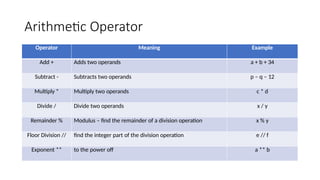
Arithmetic Operator
Operator MeaningExample
Add + Adds two operands a + b + 34
Subtract - Subtracts two operands p – q – 12
Multiply * Multiply two operands c * d
Divide / Divide two operands x / y
Remainder % Modulus – find the remainder of a division operation x % y
Floor Division // find the integer part of the division operation e // f
Exponent ** to the power off a ** b
105.
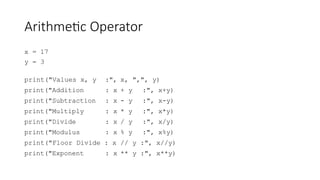
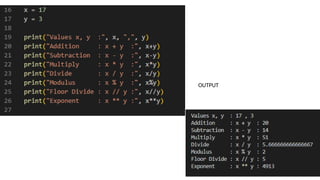
Arithmetic Operator
x =17
y = 3
print("Values x, y :", x, ",", y)
print("Addition : x + y :", x+y)
print("Subtraction : x - y :", x-y)
print("Multiply : x * y :", x*y)
print("Divide : x / y :", x/y)
print("Modulus : x % y :", x%y)
print("Floor Divide : x // y :", x//y)
print("Exponent : x ** y :", x**y)
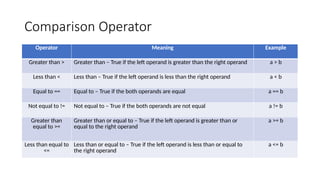
Comparison Operator
Operator MeaningExample
Greater than > Greater than – True if the left operand is greater than the right operand a > b
Less than < Less than – True if the left operand is less than the right operand a < b
Equal to == Equal to – True if the both operands are equal a == b
Not equal to != Not equal to – True if the both operands are not equal a != b
Greater than
equal to >=
Greater than or equal to – True if the left operand is greater than or
equal to the right operand
a >= b
Less than equal to
<=
Less than or equal to – True if the left operand is less than or equal to
the right operand
a <= b
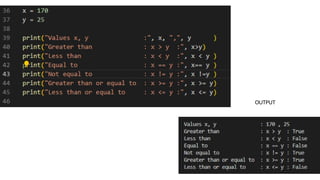
108.
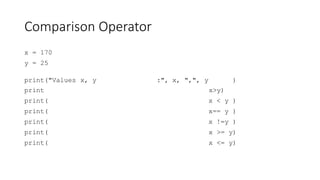
Comparison Operator
x =170
y = 25
print("Values x, y :", x, ",", y )
print x>y)
print( x < y )
print( x== y )
print( x !=y )
print( x >= y)
print( x <= y)
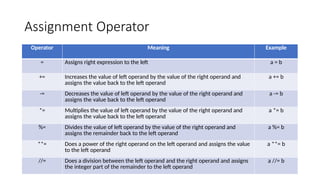
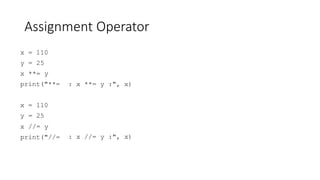
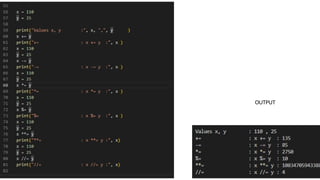
Assignment Operator
Operator MeaningExample
= Assigns right expression to the left a = b
+= Increases the value of left operand by the value of the right operand and
assigns the value back to the left operand
a += b
-= Decreases the value of left operand by the value of the right operand and
assigns the value back to the left operand
a -= b
*= Multiplies the value of left operand by the value of the right operand and
assigns the value back to the left operand
a *= b
%= Divides the value of left operand by the value of the right operand and
assigns the remainder back to the left operand
a %= b
**= Does a power of the right operand on the left operand and assigns the value
to the left operand
a **= b
//= Does a division between the left operand and the right operand and assigns
the integer part of the remainder to the left operand
a //= b
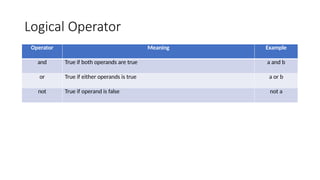
Logical Operator
Operator MeaningExample
and True if both operands are true a and b
or True if either operands is true a or b
not True if operand is false not a
116.
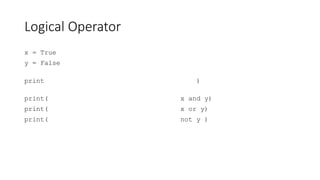
Logical Operator
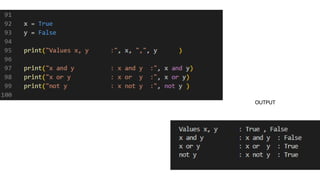
x =True
y = False
print )
print(
print(
print(
x and y)
x or y)
not y )
Bitwise Operator
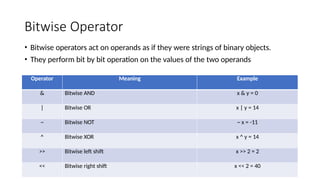
Operator MeaningExample
& Bitwise AND x & y = 0
| Bitwise OR x | y = 14
~ Bitwise NOT ~ x = -11
^ Bitwise XOR x ^ y = 14
>> Bitwise left shift x >> 2 = 2
<< Bitwise right shift x << 2 = 40
• Bitwise operators act on operands as if they were strings of binary objects.
• They perform bit by bit operation on the values of the two operands
119.
Bitwise Operator
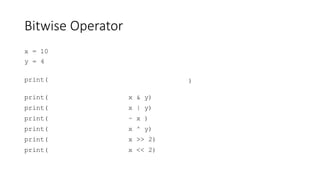
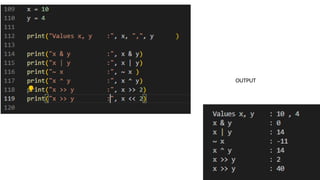
x =10
y = 4
print(
print( x & y)
print( x | y)
print( ~ x )
print( x ^ y)
print( x >> 2)
print( x << 2)
)
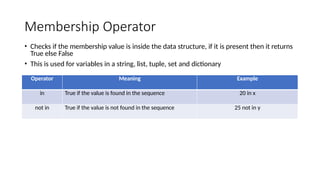
Membership Operator
Operator MeaningExample
in True if the value is found in the sequence 20 in x
not in True if the value is not found in the sequence 25 not in y
• Checks if the membership value is inside the data structure, if it is present then it returns
True else False
• This is used for variables in a string, list, tuple, set and dictionary
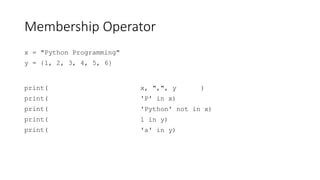
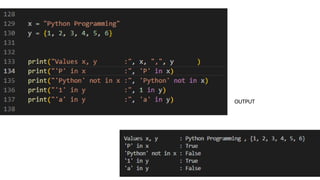
122.
Membership Operator
x ="Python Programming"
y = {1, 2, 3, 4, 5, 6}
print(
print(
print(
print(
print(
x, ",", y )
'P' in x)
'Python' not in x)
1 in y)
'a' in y)
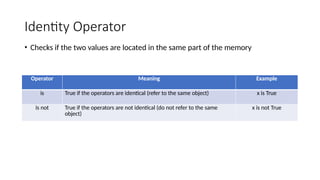
Identity Operator
Operator MeaningExample
is True if the operators are identical (refer to the same object) x is True
is not True if the operators are not identical (do not refer to the same
object)
x is not True
• Checks if the two values are located in the same part of the memory
125.
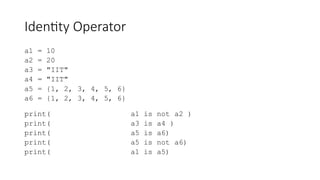
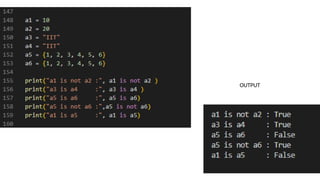
Identity Operator
a1 =10
a2 = 20
a3 = "IIT"
a4 = "IIT"
a5 = {1, 2, 3, 4, 5, 6}
a6 = {1, 2, 3, 4, 5, 6}
print( a1 is not a2 )
print( a3 is a4 )
print( a5 is a6)
print( a5 is not a6)
print( a1 is a5)
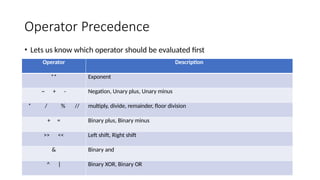
Operator Precedence
Operator Description
**Exponent
~ + - Negation, Unary plus, Unary minus
* / % // multiply, divide, remainder, floor division
+ = Binary plus, Binary minus
>> << Left shift, Right shift
& Binary and
^ | Binary XOR, Binary OR
• Lets us know which operator should be evaluated first
128.
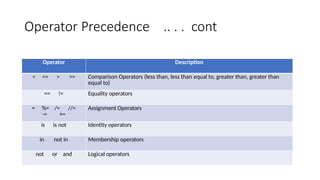
Operator Precedence ... . cont
Operator Description
< <= > >= Comparison Operators (less than, less than equal to, greater than, greater than
equal to)
== != Equality operators
= %= /= //=
-= +=
Assignment Operators
is is not Identity operators
in not in Membership operators
not or and Logical operators
129.
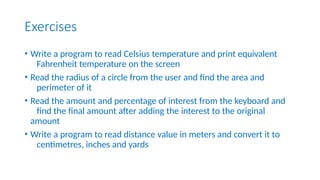
Exercises
• Write aprogram to read Celsius temperature and print equivalent
Fahrenheit temperature on the screen
• Read the radius of a circle from the user and find the area and
perimeter of it
• Read the amount and percentage of interest from the keyboard and
find the final amount after adding the interest to the original
amount
• Write a program to read distance value in meters and convert it to
centimetres, inches and yards
130.
End of Unit1
Your time is limited, make the most of it

![Past Years Papers - 2019
Q1 a] What are identifiers ? List the rules to name an identifier
b] Explain different data types supported by Python
c. What is a problem? List down the steps in solving a
problem
d. Write an Algorithm to find the sum of ‘n’ natural
numbers
OR
[3]
[5]
[4]
[3]
Q2 a] Explain the use of Indentation in Python ?
b. What is an operator? Enlist various types of operators
c.What is modularization? Explain top-down design
approach d] Write an algorithm to swap two numbers
[3]
[5]
[4]
[3]](https://image.slidesharecdn.com/pps-unit-111-251104055058-40224618/85/PPS-Unit-1-1-1-ppt-PYTHOJN-SYSTEMGDGD-4-320.jpg)
![Past Years Papers - 2020
Q1 a) What is a problem ? Explain six problem solving steps
b. List down types of operators in Python. Explain relational operators
c. Explain flow-chart and algorithm with example
[4]
[5]
[6]
OR
Q2 a] Explain the following terms with examples
i) Comment ii) Reserved Words b]
Write a program to swap two numbers
c] Explain any six features of Python
programming
[4]
[5]
[6]](https://image.slidesharecdn.com/pps-unit-111-251104055058-40224618/85/PPS-Unit-1-1-1-ppt-PYTHOJN-SYSTEMGDGD-5-320.jpg)
![Past Years Papers – 2022-23 – Sem 1
Q1 a) Explain different logical operators in python
b) Explain different flowchart symbols.
c) Explain input() function with example.
d) What are the different problem solving aspects ? Explain each in brief ?
OR
Q2 a) Explain history of python programming language
e) Explain the following terms (i) variables, (ii) identifiers
f) Explain different arithmetic operators in python
g) Explain different data types in python
[3]
[4]
[3]
[5]
[3]
[4]
[3]
[5]](https://image.slidesharecdn.com/pps-unit-111-251104055058-40224618/85/PPS-Unit-1-1-1-ppt-PYTHOJN-SYSTEMGDGD-6-320.jpg)
![Past Years Papers – 2022-23 – Sem 2
Q1 a) List different program design tools? Explain an algorithm with example.
b) What are the characteristics of an algorithm
[3]
[4]
c) Explain the brief history of python programming language and list different software
[3]
[5]
developed in Python
d) Explain any five features of python programming language
OR
Q2 a) Write a pseudo code for factorial of a number
b) What are the different collection literals in Python ?
c) What do you mean by a flow-chart? Explain different flow-chart symbols
d) Explain any five categories of operators in Python with examples.
[3]
[4]
[3]
[5]](https://image.slidesharecdn.com/pps-unit-111-251104055058-40224618/85/PPS-Unit-1-1-1-ppt-PYTHOJN-SYSTEMGDGD-7-320.jpg)
![Introduction to Python
• General purpose language – We can use this language to build wide variety of
applications
• High level programming language – Interpreter is used to convert high level language
to low level language [Java, Python, C++]
• Open Source and community driven – Free to download and can be changed
• Dynamically typed language – It is run-time execution
STATIC DYNAMIC
1) Java, C++ 1) Python
2) Less flexible 2) More flexible
3) Errors are detected earlier 3) Errors are detected at execution
4) Once the variable is declared, its type cannot
be changed
4) We can change the type of the variable
anytime if we want](https://image.slidesharecdn.com/pps-unit-111-251104055058-40224618/85/PPS-Unit-1-1-1-ppt-PYTHOJN-SYSTEMGDGD-43-320.jpg)
![Literals in Python
Literal Collection
• Four literal collection – List literal, Tuple literal, Dictionary literal, Set literal
fruit_list = [‘apple’, “mango”, ‘banana’, “grapes”]
name_tuple = (“Ramu”, “Shamu”, “Rahul”, “Sonia”)
alpha_dictionary = {1:“one”, 2:”two”, 3:”three”,4:”four”}
vowels_set = {‘a’, ‘e’, ‘i’, ‘o’, ‘u’}](https://image.slidesharecdn.com/pps-unit-111-251104055058-40224618/85/PPS-Unit-1-1-1-ppt-PYTHOJN-SYSTEMGDGD-66-320.jpg)
![Data Types
List
• Ordered sequence of items
• Items are stored in square brackets [], and are separated by a comma (,)
• Lists are mutable, means items can be changed
• We can use the slide operator [:] to access the items in the list](https://image.slidesharecdn.com/pps-unit-111-251104055058-40224618/85/PPS-Unit-1-1-1-ppt-PYTHOJN-SYSTEMGDGD-69-320.jpg)
![Data Types
list = [10, 40, 'sixty five', "eight", 90, 'two', 30, 65, "my name"]
print(list)
print(list[3])
print(list[0:3])
print(list[3:5])
print(list[5:])
Element 10 40 sixty five eight 90 Two 30 65 my name
Index No 0 1 2 3 4 5 6 7 8
Starts from 3 and ends at 4
Starts from 0 and ends at 2
Only index 3
Starts from 5 till end](https://image.slidesharecdn.com/pps-unit-111-251104055058-40224618/85/PPS-Unit-1-1-1-ppt-PYTHOJN-SYSTEMGDGD-70-320.jpg)
![Data Types
print(tuple)
print(tuple[3])
print(tuple[0:3])
print(tuple[3:5])
print(tuple[5:])
print(tuple + tuple)
print(tuple * 3)](https://image.slidesharecdn.com/pps-unit-111-251104055058-40224618/85/PPS-Unit-1-1-1-ppt-PYTHOJN-SYSTEMGDGD-73-320.jpg)
![Data Types
Strings
• Use single, double or triple quote to define a string
• ‘+’ operator joins 2 strings
• ‘*’ operator multiplies 2 strings
• Slicing operator [] can be used with a string](https://image.slidesharecdn.com/pps-unit-111-251104055058-40224618/85/PPS-Unit-1-1-1-ppt-PYTHOJN-SYSTEMGDGD-75-320.jpg)
![Data Types
string
new_str
= "new number"
= 'this is a new string that is loooooong !!!'
print(string)
print(new_str)
print(new_str[
14])
print(new_str[
13:30])
print(string + string)
print(string * 3)](https://image.slidesharecdn.com/pps-unit-111-251104055058-40224618/85/PPS-Unit-1-1-1-ppt-PYTHOJN-SYSTEMGDGD-76-320.jpg)
![Data Types
Set
• Unordered collection of unique items
• Defined inside braces{} separated by a comma
• Slicing operator does not work
set = {8, 6, 4, 23, 97, 87}
print("The whole set
print("Fourth element [3]
:", set)
:", set[3])](https://image.slidesharecdn.com/pps-unit-111-251104055058-40224618/85/PPS-Unit-1-1-1-ppt-PYTHOJN-SYSTEMGDGD-78-320.jpg)
![Data Types
• Dictionary
• Unordered collection of key-value pairs
• Defined with braces{}, with each item in a pair in the form key:value
• Key and value can be of any type
dict = {1:"one", 2:"tWO","three":4, "25": 'twenty one'}
print("The whole dictionary :", dict)
print("All keys :", dict.keys())
print("All values :", dict.values())
print("Value of 2 :", dict[2])](https://image.slidesharecdn.com/pps-unit-111-251104055058-40224618/85/PPS-Unit-1-1-1-ppt-PYTHOJN-SYSTEMGDGD-80-320.jpg)
![integer = 34
float = 34.65
list = [10, 40, 'sixty five', "eight", 90, 'two']
tuple = (5,7,87,'Number',4+3j,'any number' )
string = "IIT Madras"
set = {8, 6, 4, 23, 97, 87}
dict = {1:"one", 2:"tWO","three":4, "25": 'twenty one'}
print(integer , ", ", type(integer))
print(float
print(list ,
print(tuple
,
, ",
",
",
",
",
",
type(float))
type(list))
type(tuple))
print(string
print(set ,
print(dict ,
, ",
",
",
",
",
",
type(string))
type(set))
type(dict))](https://image.slidesharecdn.com/pps-unit-111-251104055058-40224618/85/PPS-Unit-1-1-1-ppt-PYTHOJN-SYSTEMGDGD-84-320.jpg)