THERMOFORMING ANALYSIS
IN LS-DYNA
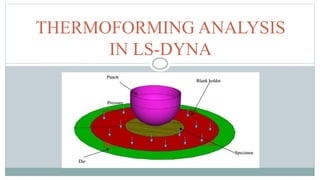
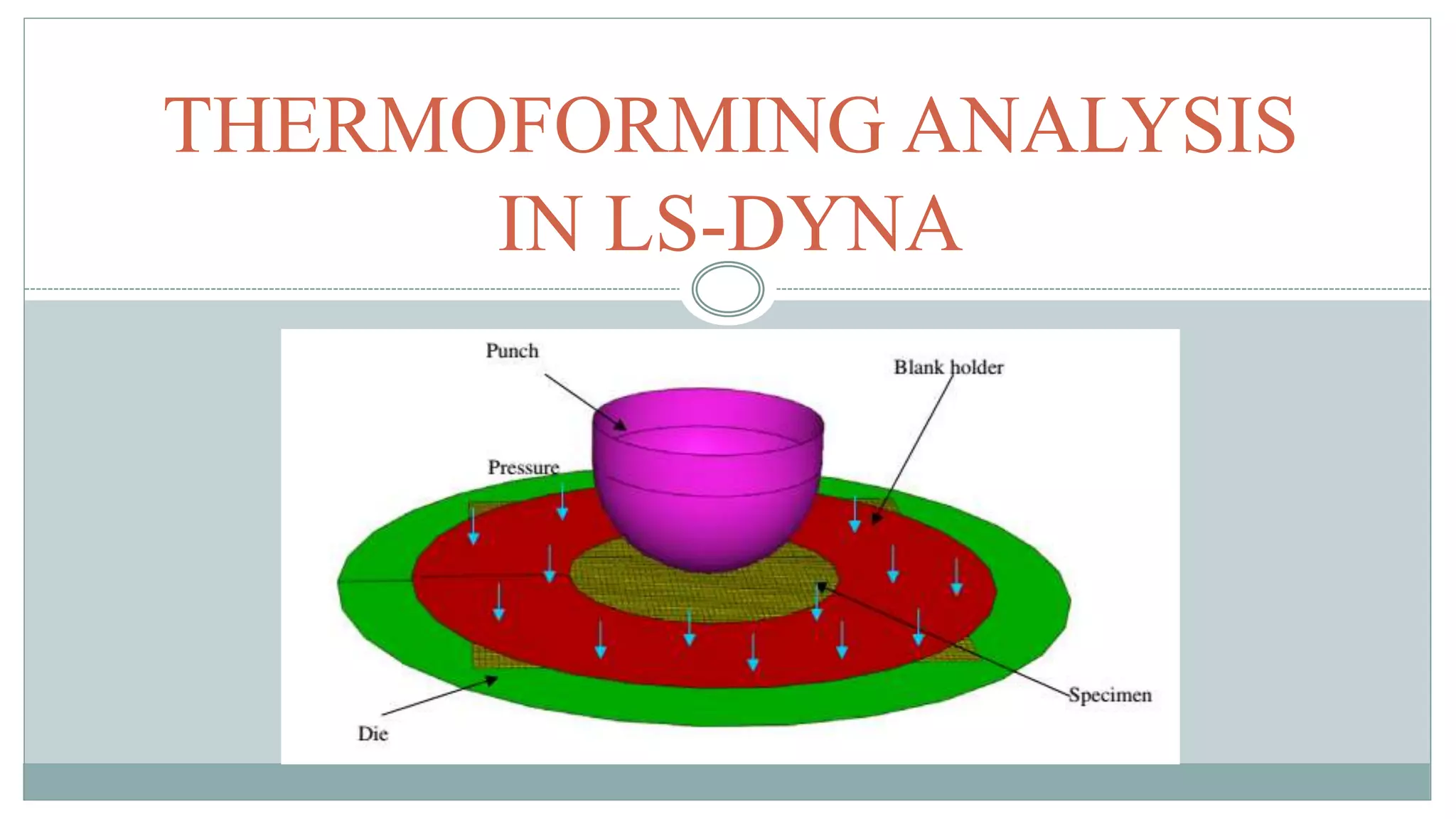
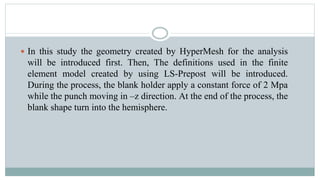
 In this study the geometry created by HyperMesh for the analysis
will be introduced first. Then, The definitions used in the finite
element model created by using LS-Prepost will be introduced.
During the process, the blank holder apply a constant force of 2 Mpa
while the punch moving in –z direction. At the end of the process, the
blank shape turn into the hemisphere.
Geometry
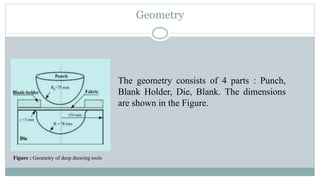
Figure : Geometry of deep drawing tools
The geometry consists of 4 parts : Punch,
Blank Holder, Die, Blank. The dimensions
are shown in the Figure.
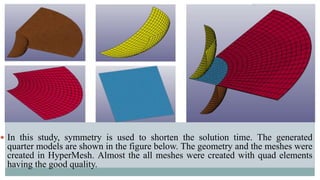
 In this study, symmetry is used to shorten the solution time. The generated
quarter models are shown in the figure below. The geometry and the meshes were
created in HyperMesh. Almost the all meshes were created with quad elements
having the good quality.
Element Selection
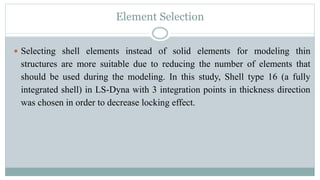
 Selecting shell elements instead of solid elements for modeling thin
structures are more suitable due to reducing the number of elements that
should be used during the modeling. In this study, Shell type 16 (a fully
integrated shell) in LS-Dyna with 3 integration points in thickness direction
was chosen in order to decrease locking effect.
Unit System
 LS-Dyna does not allow to define any unit. So the values used in the
analysis should be entered according to a suitable unit system. In this
study Table 1 (c) compatible unit system was used [4].
Keywords Defined for LS-DYNAAnalysis
 The creation of the finite element model in Ls-Dyna is done by a set of
keywords. These definitions includes simulation time, simulation
speed, contact state and friction force, material model and type,
moment of inertia, wall thicknesses, degrees of freedom, loading
conditions and various simulation control parameters. These keywords
can be entered in the system manually or by using the LS-Prepost
interface [5].
Defining of the Materials
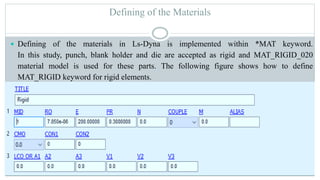
 Defining of the materials in Ls-Dyna is implemented within *MAT keyword.
In this study, punch, blank holder and die are accepted as rigid and MAT_RIGID_020
material model is used for these parts. The following figure shows how to define
MAT_RIGID keyword for rigid elements.
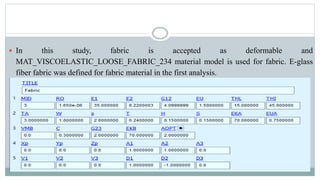
 In this study, fabric is accepted as deformable and
MAT_VISCOELASTIC_LOOSE_FABRIC_234 material model is used for fabric. E-glass
fiber fabric was defined for fabric material in the first analysis.
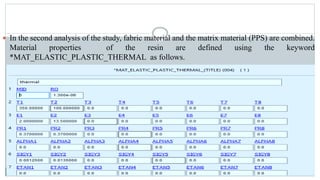
 In the second analysis of the study, fabric material and the matrix material (PPS) are combined.
Material properties of the resin are defined using the keyword
*MAT_ELASTIC_PLASTIC_THERMAL as follows.
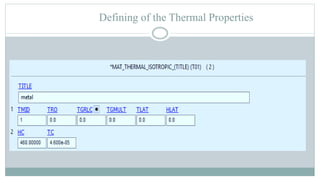
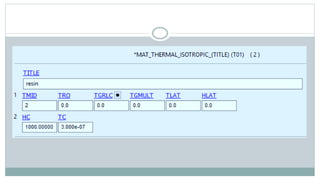
Defining of the Thermal Properties
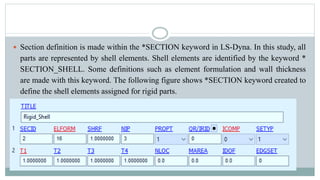
 Section definition is made within the *SECTION keyword in LS-Dyna. In this study, all
parts are represented by shell elements. Shell elements are identified by the keyword *
SECTION_SHELL. Some definitions such as element formulation and wall thickness
are made with this keyword. The following figure shows *SECTION keyword created to
define the shell elements assigned for rigid parts.
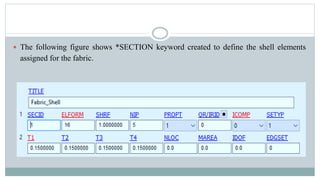
 The following figure shows *SECTION keyword created to define the shell elements
assigned for the fabric.
Defining of the Part
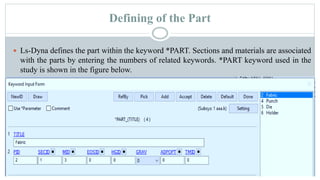
 Ls-Dyna defines the part within the keyword *PART. Sections and materials are associated
with the parts by entering the numbers of related keywords. *PART keyword used in the
study is shown in the figure below.
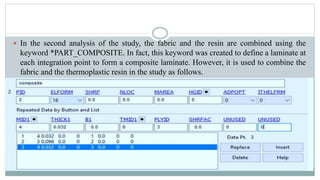
 In the second analysis of the study, the fabric and the resin are combined using the
keyword *PART_COMPOSITE. In fact, this keyword was created to define a laminate at
each integration point to form a composite laminate. However, it is used to combine the
fabric and the thermoplastic resin in the study as follows.
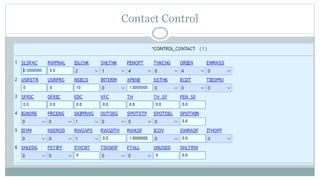
Contact Definitions
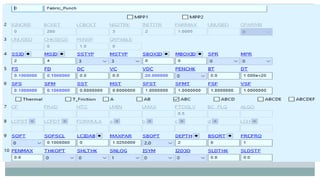
 Ls-Dyna offers several contact algorithms for the users. The determination of the
suitable contact algorithm is of great importance in the analysis. Ls-Dyna defines the
contacts in the keyword *CONTACT.
 *CONTACT_FORMING_ONE_WAY_SURFACE_TO_SURFACE keyword is used to
define contact interactions between the parts in this study because the commonly used
contact type for stamping analysis is the FORMING contact. The parameters used in this
keyword is shown the figure below.
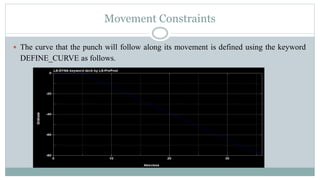
Movement Constraints
 The curve that the punch will follow along its movement is defined using the keyword
DEFINE_CURVE as follows.
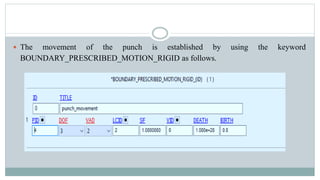
 The movement of the punch is established by using the keyword
BOUNDARY_PRESCRIBED_MOTION_RIGID as follows.
Load Definition
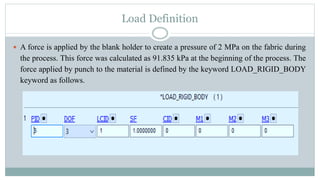
 A force is applied by the blank holder to create a pressure of 2 MPa on the fabric during
the process. This force was calculated as 91.835 kPa at the beginning of the process. The
force applied by punch to the material is defined by the keyword LOAD_RIGID_BODY
keyword as follows.
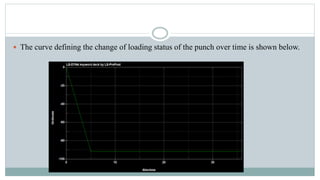
 The curve defining the change of loading status of the punch over time is shown below.
Time Definition
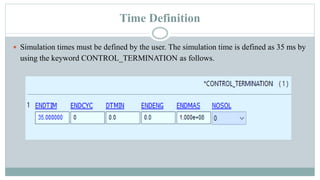
 Simulation times must be defined by the user. The simulation time is defined as 35 ms by
using the keyword CONTROL_TERMINATION as follows.
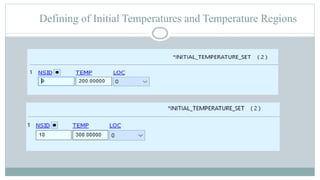
Defining of Initial Temperatures and Temperature Regions
Hourglass Control
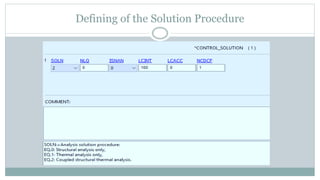
Defining of the Solution Procedure
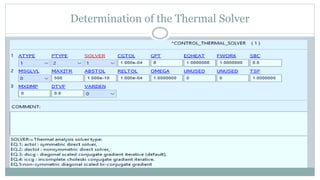
Determination of the Thermal Solver
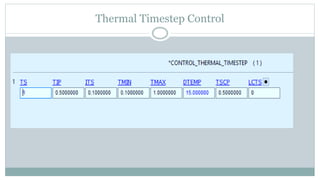
Thermal Timestep Control
Contact Control
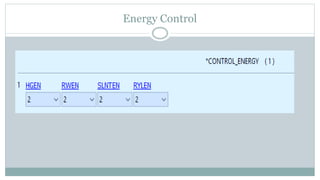
Energy Control
Results
 The simulation is applied for two initial fiber orientations of E-glass fiber fabric, 0˚/90˚
and -45˚/+45˚. The final shape of the draped fabric is compared with the Tabiei’s result.
 Comparison of draped shapes for 0˚/90˚ orientation a) Tabiei’s result [3] b) Simulation result
Comparison of draped shapes for -45˚/+45˚ orientation a) Tabiei’s result [3] b) Simulation result
 Distortion angles were determined along the diagonal axis starting from the center point
for 0˚/90˚ orientation, along the horizontal axis starting from the center point for -
45˚/+45˚ orientation.
Comparison of the angular distortions for 0˚/90˚ orientation a) Tabiei’s result [3] b) Simulation result
Comparison of the angular distortions for -45˚/+45˚ orientation a) Tabiei’s result [3] b) Simulation result
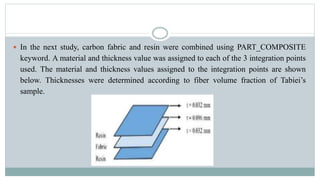
 In the next study, carbon fabric and resin were combined using PART_COMPOSITE
keyword. A material and thickness value was assigned to each of the 3 integration points
used. The material and thickness values ​​assigned to the integration points are shown
below. Thicknesses were determined according to fiber volume fraction of Tabiei’s
sample.
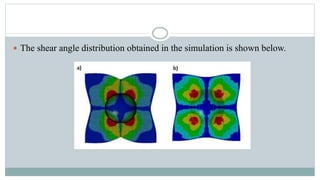
 The shear angle distribution obtained in the simulation is shown below.
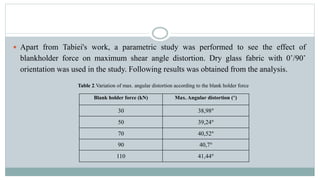
 Apart from Tabiei's work, a parametric study was performed to see the effect of
blankholder force on maximum shear angle distortion. Dry glass fabric with 0˚/90˚
orientation was used in the study. Following results was obtained from the analysis.
Blank holder force (kN) Max. Angular distortion (°)
30 38,98°
50 39,24°
70 40,52°
90 40,7°
110 41,44°
Table 2. Variation of max. angular distortion according to the blank holder force
It has been tried to duplicate Tabiei’s study using Ls-Dyna FEA package. Although
the results are close to that of Tabiei, some deviations are observed. Yarn thickness,
transverse shear modulus and coefficient of friction between the fibers are not given
for glass fiber fabric in Tabiei's article. In addition, yarn thickness and coefficient of
friction between the fibers are not given for carbon fabric. These parameters
couldn’t be found because there are many conflicting values in the literature. So, the
estimated values ​​were used for these parameters. This is thought to be one of the
most important reasons for the discrepancy in the results. Micro-mechanical and
meso-mechanical models like MAT_234 represents the fabric behaviour
successfully however too many parameters are needed to obtain for the simulation.
It is necessary to carry out too many tests to be able to determine the input values in
the model and these tests can be quite expensive and time consuming.
CONCLUSION
 For the next thesis progress following studies will be held :
 Coupled thermo-mechanical analysis for hemispherical forming of fabric reinforced
thermoplastic prepreg will be carried out by using MAT_249. The results will be
compared with the results obtained using MAT_234.
 Thermoforming process simulation of a laminate will be carried out.
 Effects of laminate sequencing and interlaminar friction on thermoforming will be
studied.
 Experimental studies related to thermoforming process will be carried out.
FUTURE WORK
REFERENCES
 [1] Ivanov I., Method development for finite element impact simulations of composite materials, University of
Cincinnati, 2002.

 [2] Ivanov I., Tabiei A., Loosely woven fabric model with viscoelastic crimped fibres for ballistic impact simulations,
International Journal for Numerical Methods in Engineering, 61, 1565-1583, 2004.

 [3] Tabiei A., Murugesan R., Thermal structural forming simulation of carbon and glass fiber reinforced plastics
composites, International Journal of Composite Materials, 5(6), 182-194, 2015.

 [4] Sözen L., Boru bükme operasyonu sonucunda meydana gelen geri yaylanma miktarının öngörülmesi, TOBB ETÜ,
2011.
 [5] Livermore Software Technology Corporations (LSTC), LS-DYNA Keyword User’s Manual - Volume I, 2018.
 [6] Livermore Software Technology Corporations (LSTC), LS-DYNA Keyword User’s Manual - Volume II, 2018.

Composite Forming in Ls Dyna.pptx

  • 1.
  • 2.
     In thisstudy the geometry created by HyperMesh for the analysis will be introduced first. Then, The definitions used in the finite element model created by using LS-Prepost will be introduced. During the process, the blank holder apply a constant force of 2 Mpa while the punch moving in –z direction. At the end of the process, the blank shape turn into the hemisphere.
  • 3.
    Geometry Figure : Geometryof deep drawing tools The geometry consists of 4 parts : Punch, Blank Holder, Die, Blank. The dimensions are shown in the Figure.
  • 4.
     In thisstudy, symmetry is used to shorten the solution time. The generated quarter models are shown in the figure below. The geometry and the meshes were created in HyperMesh. Almost the all meshes were created with quad elements having the good quality.
  • 5.
    Element Selection  Selectingshell elements instead of solid elements for modeling thin structures are more suitable due to reducing the number of elements that should be used during the modeling. In this study, Shell type 16 (a fully integrated shell) in LS-Dyna with 3 integration points in thickness direction was chosen in order to decrease locking effect.
  • 6.
    Unit System  LS-Dynadoes not allow to define any unit. So the values used in the analysis should be entered according to a suitable unit system. In this study Table 1 (c) compatible unit system was used [4].
  • 7.
    Keywords Defined forLS-DYNAAnalysis  The creation of the finite element model in Ls-Dyna is done by a set of keywords. These definitions includes simulation time, simulation speed, contact state and friction force, material model and type, moment of inertia, wall thicknesses, degrees of freedom, loading conditions and various simulation control parameters. These keywords can be entered in the system manually or by using the LS-Prepost interface [5].
  • 8.
    Defining of theMaterials  Defining of the materials in Ls-Dyna is implemented within *MAT keyword. In this study, punch, blank holder and die are accepted as rigid and MAT_RIGID_020 material model is used for these parts. The following figure shows how to define MAT_RIGID keyword for rigid elements.
  • 9.
     In thisstudy, fabric is accepted as deformable and MAT_VISCOELASTIC_LOOSE_FABRIC_234 material model is used for fabric. E-glass fiber fabric was defined for fabric material in the first analysis.
  • 10.
     In thesecond analysis of the study, fabric material and the matrix material (PPS) are combined. Material properties of the resin are defined using the keyword *MAT_ELASTIC_PLASTIC_THERMAL as follows.
  • 11.
    Defining of theThermal Properties
  • 13.
     Section definitionis made within the *SECTION keyword in LS-Dyna. In this study, all parts are represented by shell elements. Shell elements are identified by the keyword * SECTION_SHELL. Some definitions such as element formulation and wall thickness are made with this keyword. The following figure shows *SECTION keyword created to define the shell elements assigned for rigid parts.
  • 14.
     The followingfigure shows *SECTION keyword created to define the shell elements assigned for the fabric.
  • 15.
    Defining of thePart  Ls-Dyna defines the part within the keyword *PART. Sections and materials are associated with the parts by entering the numbers of related keywords. *PART keyword used in the study is shown in the figure below.
  • 16.
     In thesecond analysis of the study, the fabric and the resin are combined using the keyword *PART_COMPOSITE. In fact, this keyword was created to define a laminate at each integration point to form a composite laminate. However, it is used to combine the fabric and the thermoplastic resin in the study as follows.
  • 17.
    Contact Definitions  Ls-Dynaoffers several contact algorithms for the users. The determination of the suitable contact algorithm is of great importance in the analysis. Ls-Dyna defines the contacts in the keyword *CONTACT.  *CONTACT_FORMING_ONE_WAY_SURFACE_TO_SURFACE keyword is used to define contact interactions between the parts in this study because the commonly used contact type for stamping analysis is the FORMING contact. The parameters used in this keyword is shown the figure below.
  • 19.
    Movement Constraints  Thecurve that the punch will follow along its movement is defined using the keyword DEFINE_CURVE as follows.
  • 20.
     The movementof the punch is established by using the keyword BOUNDARY_PRESCRIBED_MOTION_RIGID as follows.
  • 21.
    Load Definition  Aforce is applied by the blank holder to create a pressure of 2 MPa on the fabric during the process. This force was calculated as 91.835 kPa at the beginning of the process. The force applied by punch to the material is defined by the keyword LOAD_RIGID_BODY keyword as follows.
  • 22.
     The curvedefining the change of loading status of the punch over time is shown below.
  • 23.
    Time Definition  Simulationtimes must be defined by the user. The simulation time is defined as 35 ms by using the keyword CONTROL_TERMINATION as follows.
  • 24.
    Defining of InitialTemperatures and Temperature Regions
  • 25.
  • 26.
    Defining of theSolution Procedure
  • 27.
    Determination of theThermal Solver
  • 28.
  • 29.
  • 30.
  • 31.
    Results  The simulationis applied for two initial fiber orientations of E-glass fiber fabric, 0˚/90˚ and -45˚/+45˚. The final shape of the draped fabric is compared with the Tabiei’s result.  Comparison of draped shapes for 0˚/90˚ orientation a) Tabiei’s result [3] b) Simulation result
  • 32.
    Comparison of drapedshapes for -45˚/+45˚ orientation a) Tabiei’s result [3] b) Simulation result
  • 33.
     Distortion angleswere determined along the diagonal axis starting from the center point for 0˚/90˚ orientation, along the horizontal axis starting from the center point for - 45˚/+45˚ orientation. Comparison of the angular distortions for 0˚/90˚ orientation a) Tabiei’s result [3] b) Simulation result
  • 34.
    Comparison of theangular distortions for -45˚/+45˚ orientation a) Tabiei’s result [3] b) Simulation result
  • 35.
     In thenext study, carbon fabric and resin were combined using PART_COMPOSITE keyword. A material and thickness value was assigned to each of the 3 integration points used. The material and thickness values ​​assigned to the integration points are shown below. Thicknesses were determined according to fiber volume fraction of Tabiei’s sample.
  • 36.
     The shearangle distribution obtained in the simulation is shown below.
  • 37.
     Apart fromTabiei's work, a parametric study was performed to see the effect of blankholder force on maximum shear angle distortion. Dry glass fabric with 0˚/90˚ orientation was used in the study. Following results was obtained from the analysis. Blank holder force (kN) Max. Angular distortion (°) 30 38,98° 50 39,24° 70 40,52° 90 40,7° 110 41,44° Table 2. Variation of max. angular distortion according to the blank holder force
  • 38.
    It has beentried to duplicate Tabiei’s study using Ls-Dyna FEA package. Although the results are close to that of Tabiei, some deviations are observed. Yarn thickness, transverse shear modulus and coefficient of friction between the fibers are not given for glass fiber fabric in Tabiei's article. In addition, yarn thickness and coefficient of friction between the fibers are not given for carbon fabric. These parameters couldn’t be found because there are many conflicting values in the literature. So, the estimated values ​​were used for these parameters. This is thought to be one of the most important reasons for the discrepancy in the results. Micro-mechanical and meso-mechanical models like MAT_234 represents the fabric behaviour successfully however too many parameters are needed to obtain for the simulation. It is necessary to carry out too many tests to be able to determine the input values in the model and these tests can be quite expensive and time consuming. CONCLUSION
  • 39.
     For thenext thesis progress following studies will be held :  Coupled thermo-mechanical analysis for hemispherical forming of fabric reinforced thermoplastic prepreg will be carried out by using MAT_249. The results will be compared with the results obtained using MAT_234.  Thermoforming process simulation of a laminate will be carried out.  Effects of laminate sequencing and interlaminar friction on thermoforming will be studied.  Experimental studies related to thermoforming process will be carried out. FUTURE WORK
  • 40.
    REFERENCES  [1] IvanovI., Method development for finite element impact simulations of composite materials, University of Cincinnati, 2002.   [2] Ivanov I., Tabiei A., Loosely woven fabric model with viscoelastic crimped fibres for ballistic impact simulations, International Journal for Numerical Methods in Engineering, 61, 1565-1583, 2004.   [3] Tabiei A., Murugesan R., Thermal structural forming simulation of carbon and glass fiber reinforced plastics composites, International Journal of Composite Materials, 5(6), 182-194, 2015.   [4] Sözen L., Boru bükme operasyonu sonucunda meydana gelen geri yaylanma miktarının öngörülmesi, TOBB ETÜ, 2011.  [5] Livermore Software Technology Corporations (LSTC), LS-DYNA Keyword User’s Manual - Volume I, 2018.  [6] Livermore Software Technology Corporations (LSTC), LS-DYNA Keyword User’s Manual - Volume II, 2018.

Editor's Notes

  • #10 MID: Number of defined material model RO: Density E1: Young’s modulus in the yarn axial-direction E2: Young’s modulus in the yarn transverse-direction G12: Shear modulus of the yarns EU: Ultimate strain at failure THL: Yarn locking angle THI: Initial braid angle TA: Transition angle to locking W: Fiber width s: Span between the fibers T: Real fiber thickness H: Effective fiber thickness S: Fiber cross-sectional area EKA: Elastic constant of element "a" EUA: Ultimate strain of element "a" VMB: Damping coefficient of element "b" C: Coefficient of friction between the fibers G23: Transverse shear modulus EKB: Elastic constant of element "b" AOPT: Material axes option
  • #11 ALPHA1:=Corresponding coefficient of thermal expansion at temperature T1 ETAN1:=Corresponding plastic hardening modulus at temperature T1
  • #14 SHRF:=Shear factor which scales the transverse shear stress (default =1.0)
  • #19 SSID: Slave segment set ID, node set ID, part set ID, part ID, or shell element set ID MSID: Master segment set ID, node set ID, part set ID, part ID, or shell element set ID SSTYP: ID type of SSID MSTYP: ID type of MSID FS: Static coefficient of friction FD: Dynamic coefficient of friction DC: Exponential decay coefficient VC: Coefficient for viscous friction. This is necessary to limit the friction force to a maximum VDC: Viscous damping coefficient in percent of critical or the coefficient of restitution expressed as percentage. In order to avoid undesirable oscillation in contact, e.g., for sheet forming simulation, a contact damping perpendicular to the contacting surfaces is applied. PENCHK: Small penetration in contact search option. If the slave node penetrates more than the segment thickness times the factor XPENE, the penetration is ignored and the slave node is set free. BT: Birth time (contact surface becomes active at this time) DT: Death time (contact surface is deactivated at this time) SFS: Scale factor on default slave penalty stiffness when SOFT = 0 or SOFT = 2 SFM: Scale factor on default master penalty stiffness when SOFT = 0 or SOFT = 2 SST: Optional contact thickness for slave surface (overrides default contact thickness). This option applies to contact with shell and beam elements. MST: Optional contact thickness for master surface (overrides default contact thickness). This option applies only to contact with shell elements. SFST: Scale factor applied to contact thickness of slave surface