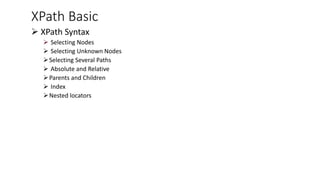
XPath Basic
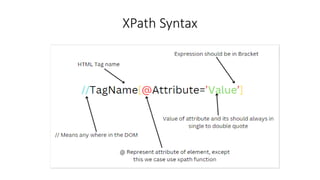
➢ XPathSyntax
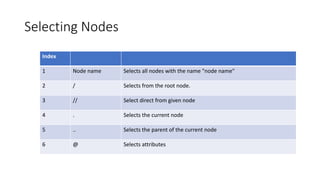
➢ Selecting Nodes
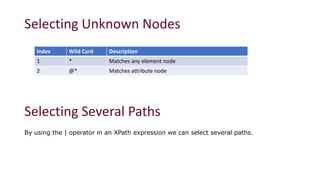
➢ Selecting Unknown Nodes
➢Selecting Several Paths
➢ Absolute and Relative
➢Parents and Children
➢ Index
➢Nested locators
Absolute and relativeXPath
Absolute XPath
▪ The path from root element to targeted element without missing any elements in between.
▪ Absolute XPath starts form by using ‘/’ (single forward slash) and ‘[index]’ (square bracket with index).
▪ /html/body/div[2]/div/div[1]/form/input[2]
Relative XPath
▪ This XPath is specific to the target element. It uses expression to locate web element(s) in HTML
documents.
▪ It uses “//” (double forward slash) and “/” along with other symbols, functions, and axes names.
▪ //*[@id="file-submit"]
5.
Selecting Nodes
Index
1 Nodename Selects all nodes with the name "node name"
2 / Selects from the root node.
3 // Select direct from given node
4 . Selects the current node
5 .. Selects the parent of the current node
6 @ Selects attributes
6.
Selecting Unknown Nodes
SelectingSeveral Paths
By using the | operator in an XPath expression we can select several paths.
Index Wild Card Description
1 * Matches any element node
2 @* Matches attribute node
7.
Parents and Children
//Tag[@condition]/..# Parent
//Tag[@condition]/Tag[condition] # Child
//Tag[@condition]/Tag[condition] # Search with in child)
Index
Nested locators
//Tag[@condition][index] // nth child of its parent
(//Tag[@condition])[index] // nth locator of this locator
//Tag[tag[@condition]] // nested locator
//Tag[.//tag[@condition]] // nested locator
normalize-space()
If an elementhas spaces in its text or in the value of any attribute, then to create an XPath for such an element
we have to use the normalize-space function. It removes all the trailing and leading spaces from the string. It
also removes every new tab or line existing within the string.
//th[normalize-space(text()) ='Date']
![Absolute and relative XPath
Absolute XPath
▪ The path from root element to targeted element without missing any elements in between.
▪ Absolute XPath starts form by using ‘/’ (single forward slash) and ‘[index]’ (square bracket with index).
▪ /html/body/div[2]/div/div[1]/form/input[2]
Relative XPath
▪ This XPath is specific to the target element. It uses expression to locate web element(s) in HTML
documents.
▪ It uses “//” (double forward slash) and “/” along with other symbols, functions, and axes names.
▪ //*[@id="file-submit"]](https://image.slidesharecdn.com/completexpathguideforbeginners-250914184556-942cf95f/85/Complete-XPath-guide-for-beginners-testing-pdf-4-320.jpg)
![Parents and Children
//Tag[@condition]/.. # Parent
//Tag[@condition]/Tag[condition] # Child
//Tag[@condition]/Tag[condition] # Search with in child)
Index
Nested locators
//Tag[@condition][index] // nth child of its parent
(//Tag[@condition])[index] // nth locator of this locator
//Tag[tag[@condition]] // nested locator
//Tag[.//tag[@condition]] // nested locator](https://image.slidesharecdn.com/completexpathguideforbeginners-250914184556-942cf95f/85/Complete-XPath-guide-for-beginners-testing-pdf-7-320.jpg)
![contains()
//span[contains(text(),'Add')]
//input[contains(@placeholder, "Email address")]](https://image.slidesharecdn.com/completexpathguideforbeginners-250914184556-942cf95f/85/Complete-XPath-guide-for-beginners-testing-pdf-9-320.jpg)
![starts-with()
//span[starts-with(text(),'Add')]
//input[starts-with(@placeholder, "Email address")]](https://image.slidesharecdn.com/completexpathguideforbeginners-250914184556-942cf95f/85/Complete-XPath-guide-for-beginners-testing-pdf-10-320.jpg)
![position()
//tr[position()= 3]](https://image.slidesharecdn.com/completexpathguideforbeginners-250914184556-942cf95f/85/Complete-XPath-guide-for-beginners-testing-pdf-11-320.jpg)
![last()
//tbody/tr[last()]
count() //tbody/tr/td[count(//thead/tr/th[contains(text(), 'Date')+1])]](https://image.slidesharecdn.com/completexpathguideforbeginners-250914184556-942cf95f/85/Complete-XPath-guide-for-beginners-testing-pdf-12-320.jpg)
![normalize-space()
If an element has spaces in its text or in the value of any attribute, then to create an XPath for such an element
we have to use the normalize-space function. It removes all the trailing and leading spaces from the string. It
also removes every new tab or line existing within the string.
//th[normalize-space(text()) ='Date']](https://image.slidesharecdn.com/completexpathguideforbeginners-250914184556-942cf95f/85/Complete-XPath-guide-for-beginners-testing-pdf-13-320.jpg)
![translate()
//th[translate(text(), 'ABCDEFGHIJKLMNOPQRSTUVWXYZ', 'abcdefghijklmnopqrstuvwxyz') =' date ']
//th[normalize-space(translate(text(), 'ABCDEFGHIJKLMNOPQRSTUVWXYZ', 'abcdefghijklmnopqrstuvwxyz')) ='date']](https://image.slidesharecdn.com/completexpathguideforbeginners-250914184556-942cf95f/85/Complete-XPath-guide-for-beginners-testing-pdf-14-320.jpg)
![round() //td[round(text())='9']
floor() //td[floor(text())='8']](https://image.slidesharecdn.com/completexpathguideforbeginners-250914184556-942cf95f/85/Complete-XPath-guide-for-beginners-testing-pdf-15-320.jpg)
![not()
//input[@type="radio" and not(@value='2’)]](https://image.slidesharecdn.com/completexpathguideforbeginners-250914184556-942cf95f/85/Complete-XPath-guide-for-beginners-testing-pdf-16-320.jpg)
![string-length()
//span[string-length(text()) = 10]
//span[string-length(text()) > 30]
//span[string-length(text()) < 4]](https://image.slidesharecdn.com/completexpathguideforbeginners-250914184556-942cf95f/85/Complete-XPath-guide-for-beginners-testing-pdf-17-320.jpg)
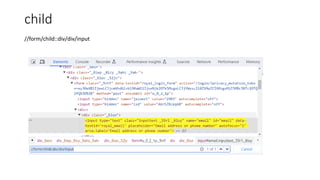
![parent //span[text()="Starbucks coffee"]/parent::td/parent::tr/td[5]/span](https://image.slidesharecdn.com/completexpathguideforbeginners-250914184556-942cf95f/85/Complete-XPath-guide-for-beginners-testing-pdf-19-320.jpg)
![ancestor
//span[text()="MailChimp Services"]/ancestor::table
//span[text()="MailChimp Services"]/ancestor::tr
used to find the ancestor of a specific member at the specified
layer
used to find the ancestor of a specific member at the specified layer](https://image.slidesharecdn.com/completexpathguideforbeginners-250914184556-942cf95f/85/Complete-XPath-guide-for-beginners-testing-pdf-21-320.jpg)
![ancestor-or-self
//span[text()="MailChimp Services"]/ancestor-or-self::span
//span[text()="MailChimp Services"]/ancestor-or-self::td](https://image.slidesharecdn.com/completexpathguideforbeginners-250914184556-942cf95f/85/Complete-XPath-guide-for-beginners-testing-pdf-22-320.jpg)
![descendent
//div[@class="table-responsive"]/descendant::tr
//div[@class="table-responsive"]/descendant::td
This function will return the descendant element of the particular element.](https://image.slidesharecdn.com/completexpathguideforbeginners-250914184556-942cf95f/85/Complete-XPath-guide-for-beginners-testing-pdf-23-320.jpg)
![descendent-or-self
//div[@class="table-responsive"]/descendant-or-self::div
//div[@class="table-responsive"]/descendant-or-self::td](https://image.slidesharecdn.com/completexpathguideforbeginners-250914184556-942cf95f/85/Complete-XPath-guide-for-beginners-testing-pdf-24-320.jpg)
![following
//tbody/tr[2]/following::td
//tbody/tr[2]/following::tr
This function will return the immediate element of the particular component](https://image.slidesharecdn.com/completexpathguideforbeginners-250914184556-942cf95f/85/Complete-XPath-guide-for-beginners-testing-pdf-25-320.jpg)
![following-sibling
//tbody/tr[2]/following-sibling::tr](https://image.slidesharecdn.com/completexpathguideforbeginners-250914184556-942cf95f/85/Complete-XPath-guide-for-beginners-testing-pdf-26-320.jpg)
![Preceding
//tbody/tr[2]/preceding::tr
//tbody/tr[2]/preceding::td
This function will return the preceding element of the particular element](https://image.slidesharecdn.com/completexpathguideforbeginners-250914184556-942cf95f/85/Complete-XPath-guide-for-beginners-testing-pdf-27-320.jpg)
![preceding-sibling
//tbody/tr[2]/preceding-sibling::tr
//tbody/tr[2]/preceding-sibling::td](https://image.slidesharecdn.com/completexpathguideforbeginners-250914184556-942cf95f/85/Complete-XPath-guide-for-beginners-testing-pdf-28-320.jpg)