Grazie a
Sponsor
Follow me on
Twitter or the
Kitten gets it:
@MatteoValoriani
Agenda
• Heuristic Based Gesture Detection
• Exemplar Matching Based Gesture Detection
• Common Problems
• Takeaways
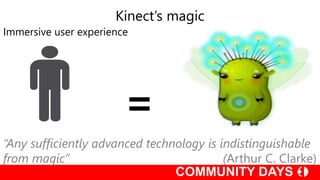
=
Immersive user experience
Kinect’s magic
“Any sufficiently advanced technology is indistinguishable
from magic” (Arthur C. Clarke)
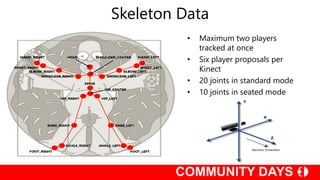
Skeleton Data
• Maximum two players
tracked at once
• Six player proposals per
Kinect
• 20 joints in standard mode
• 10 joints in seated mode
Heuristic Based Gesture
Detection
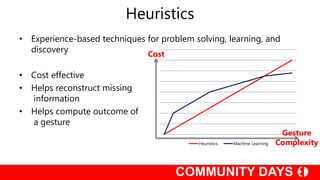
Heuristics
• Experience-based techniques for problem solving, learning, and
discovery
• Cost effective
• Helps reconstruct missing
information
• Helps compute outcome of
a gesture
Heuristics Machine Learning
Cost
Gesture
Complexity
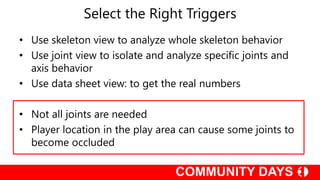
Select the Right Triggers
• Use skeleton view to analyze whole skeleton behavior
• Use joint view to isolate and analyze specific joints and
axis behavior
• Use data sheet view: to get the real numbers
• Not all joints are needed
• Player location in the play area can cause some joints to
become occluded
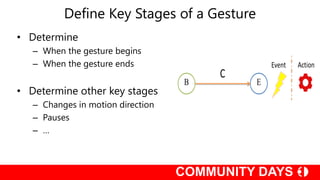
Define Key Stages of a Gesture
• Determine
– When the gesture begins
– When the gesture ends
• Determine other key stages
– Changes in motion direction
– Pauses
– …
Be careful!!
• Some players have more energy (or enthusiasm) than
others
• Some players will “optimize” their gestures
• Most players will not perform the gesture precisely as
intended
DEMO
Heuristic Based Gesture Detection: HandOnHead
DEMO
Heuristic Based Gesture Detection: FAAST
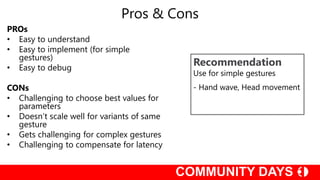
PROs
• Easy to understand
• Easy to implement (for simple
gestures)
• Easy to debug
CONs
• Challenging to choose best values for
parameters
• Doesn’t scale well for variants of same
gesture
• Gets challenging for complex gestures
• Challenging to compensate for latency
Pros & Cons
Recommendation
Use for simple gestures
- Hand wave, Head movement
Exemplar Matching Based
Gesture Detection
Gesture Definition
• Define gesture as pre-recorded animations
– Motion capture animations
– Record different people doing same gesture
– Each person doing same gesture multiple times
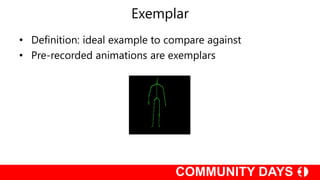
Exemplar
• Definition: ideal example to compare against
• Pre-recorded animations are exemplars
Exemplar Matching
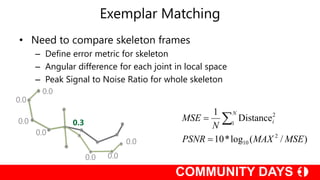
• Need to compare skeleton frames
– Define error metric for skeleton
– Angular difference for each joint in local space
– Peak Signal to Noise Ratio for whole skeleton
)/(log*10
Distance
1
2
10
1
2
MSEMAXPSNR
N
MSE
N
i

 0.3
Exemplar Matching
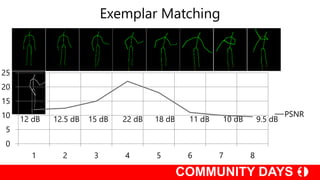
• Search for best matching frames
– Best matching frame has strongest signal
– Different classifiers can be used
• K-Nearest
• Dynamic Time Warping (DTW)
• Hidden Markov Models (HMM)
Exemplar Matching
0
5
10
15
20
25
1 2 3 4 5 6 7 8
PSNR
DEMO
DTW Based Gesture Detection: Swipe
Pros & Cons
Recommendation
Use for complex context-sensitive
dynamic gestures
- Dancing, fitness exercises
PROs
• Very complex gestures can be detected
• DTW allows for different speeds
• Can scale for variants of same gesture
• Easy to visualize exemplar matching
CONs
• Requires lots of resources to be robust
• Optimize by reducing exemplar
matches
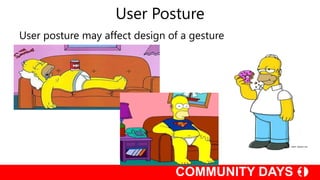
User Posture
User posture may affect design of a gesture
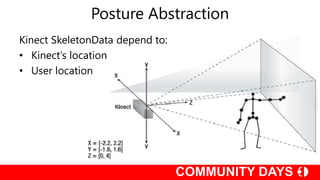
Posture Abstraction
Kinect SkeletonData depend to:
• Kinect’s location
• User location
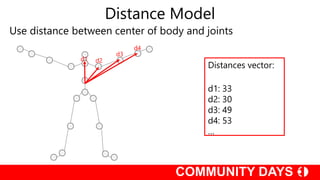
Distance Model
Use distance between center of body and joints
d1 d2
d3
d4
Distances vector:
d1: 33
d2: 30
d3: 49
d4: 53
…
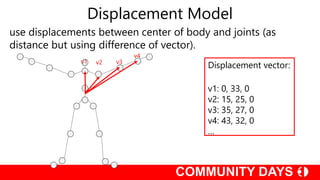
Displacement Model
use displacements between center of body and joints (as
distance but using difference of vector).
v1 v2 v3
v4
Displacement vector:
v1: 0, 33, 0
v2: 15, 25, 0
v3: 35, 27, 0
v4: 43, 32, 0
…
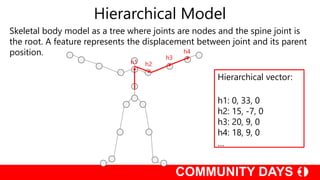
Hierarchical Model
Skeletal body model as a tree where joints are nodes and the spine joint is
the root. A feature represents the displacement between joint and its parent
position.
h1 h2
h3
h4
Hierarchical vector:
h1: 0, 33, 0
h2: 15, -7, 0
h3: 20, 9, 0
h4: 18, 9, 0
…
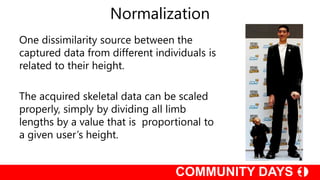
Normalization
One dissimilarity source between the
captured data from different individuals is
related to their height.
The acquired skeletal data can be scaled
properly, simply by dividing all limb
lengths by a value that is proportional to
a given user’s height.
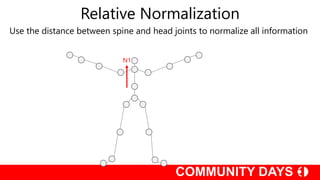
Relative Normalization
Use the distance between spine and head joints to normalize all information
N1
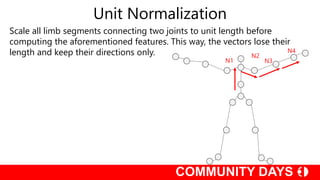
Unit Normalization
Scale all limb segments connecting two joints to unit length before
computing the aforementioned features. This way, the vectors lose their
length and keep their directions only.
N1
N2
N3
N4
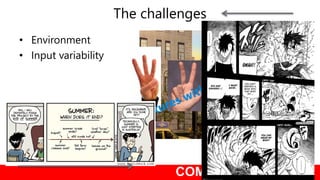
• Environment
• Input variability
The challenges
Takeaways
A system, not just a detector
Invest equally in other components
A good design gesture can resolve a lot of problems
Collect real user data
Q&A
Tutto il nateriale di questa sessione su
http://www.communitydays.it/
#CDays13
@MatteoValoriani
Grazie a
Sponsor
So Long
and
Thanks
for all
the Fish
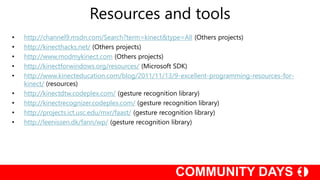
• http://channel9.msdn.com/Search?term=kinect&type=All (Others projects)
• http://kinecthacks.net/ (Others projects)
• http://www.modmykinect.com (Others projects)
• http://kinectforwindows.org/resources/ (Microsoft SDK)
• http://www.kinecteducation.com/blog/2011/11/13/9-excellent-programming-resources-for-
kinect/ (resources)
• http://kinectdtw.codeplex.com/ (gesture recognition library)
• http://kinectrecognizer.codeplex.com/ (gesture recognition library)
• http://projects.ict.usc.edu/mxr/faast/ (gesture recognition library)
• http://leenissen.dk/fann/wp/ (gesture recognition library)
Resources and tools

Communityday2013

  • 2.
  • 3.
    Follow me on Twitteror the Kitten gets it: @MatteoValoriani
  • 4.
    Agenda • Heuristic BasedGesture Detection • Exemplar Matching Based Gesture Detection • Common Problems • Takeaways
  • 5.
    = Immersive user experience Kinect’smagic “Any sufficiently advanced technology is indistinguishable from magic” (Arthur C. Clarke)
  • 6.
    Skeleton Data • Maximumtwo players tracked at once • Six player proposals per Kinect • 20 joints in standard mode • 10 joints in seated mode
  • 7.
  • 8.
    Heuristics • Experience-based techniquesfor problem solving, learning, and discovery • Cost effective • Helps reconstruct missing information • Helps compute outcome of a gesture Heuristics Machine Learning Cost Gesture Complexity
  • 9.
    Select the RightTriggers • Use skeleton view to analyze whole skeleton behavior • Use joint view to isolate and analyze specific joints and axis behavior • Use data sheet view: to get the real numbers • Not all joints are needed • Player location in the play area can cause some joints to become occluded
  • 10.
    Define Key Stagesof a Gesture • Determine – When the gesture begins – When the gesture ends • Determine other key stages – Changes in motion direction – Pauses – …
  • 11.
    Be careful!! • Someplayers have more energy (or enthusiasm) than others • Some players will “optimize” their gestures • Most players will not perform the gesture precisely as intended
  • 12.
    DEMO Heuristic Based GestureDetection: HandOnHead
  • 13.
  • 14.
    PROs • Easy tounderstand • Easy to implement (for simple gestures) • Easy to debug CONs • Challenging to choose best values for parameters • Doesn’t scale well for variants of same gesture • Gets challenging for complex gestures • Challenging to compensate for latency Pros & Cons Recommendation Use for simple gestures - Hand wave, Head movement
  • 15.
  • 16.
    Gesture Definition • Definegesture as pre-recorded animations – Motion capture animations – Record different people doing same gesture – Each person doing same gesture multiple times
  • 17.
    Exemplar • Definition: idealexample to compare against • Pre-recorded animations are exemplars
  • 18.
    Exemplar Matching • Needto compare skeleton frames – Define error metric for skeleton – Angular difference for each joint in local space – Peak Signal to Noise Ratio for whole skeleton )/(log*10 Distance 1 2 10 1 2 MSEMAXPSNR N MSE N i   0.3
  • 19.
    Exemplar Matching • Searchfor best matching frames – Best matching frame has strongest signal – Different classifiers can be used • K-Nearest • Dynamic Time Warping (DTW) • Hidden Markov Models (HMM)
  • 20.
  • 21.
    DEMO DTW Based GestureDetection: Swipe
  • 22.
    Pros & Cons Recommendation Usefor complex context-sensitive dynamic gestures - Dancing, fitness exercises PROs • Very complex gestures can be detected • DTW allows for different speeds • Can scale for variants of same gesture • Easy to visualize exemplar matching CONs • Requires lots of resources to be robust • Optimize by reducing exemplar matches
  • 23.
    User Posture User posturemay affect design of a gesture
  • 24.
    Posture Abstraction Kinect SkeletonDatadepend to: • Kinect’s location • User location
  • 25.
    Distance Model Use distancebetween center of body and joints d1 d2 d3 d4 Distances vector: d1: 33 d2: 30 d3: 49 d4: 53 …
  • 26.
    Displacement Model use displacementsbetween center of body and joints (as distance but using difference of vector). v1 v2 v3 v4 Displacement vector: v1: 0, 33, 0 v2: 15, 25, 0 v3: 35, 27, 0 v4: 43, 32, 0 …
  • 27.
    Hierarchical Model Skeletal bodymodel as a tree where joints are nodes and the spine joint is the root. A feature represents the displacement between joint and its parent position. h1 h2 h3 h4 Hierarchical vector: h1: 0, 33, 0 h2: 15, -7, 0 h3: 20, 9, 0 h4: 18, 9, 0 …
  • 28.
    Normalization One dissimilarity sourcebetween the captured data from different individuals is related to their height. The acquired skeletal data can be scaled properly, simply by dividing all limb lengths by a value that is proportional to a given user’s height.
  • 29.
    Relative Normalization Use thedistance between spine and head joints to normalize all information N1
  • 30.
    Unit Normalization Scale alllimb segments connecting two joints to unit length before computing the aforementioned features. This way, the vectors lose their length and keep their directions only. N1 N2 N3 N4
  • 31.
    • Environment • Inputvariability The challenges
  • 32.
    Takeaways A system, notjust a detector Invest equally in other components A good design gesture can resolve a lot of problems Collect real user data
  • 33.
    Q&A Tutto il naterialedi questa sessione su http://www.communitydays.it/ #CDays13 @MatteoValoriani
  • 34.
  • 35.
  • 36.
    • http://channel9.msdn.com/Search?term=kinect&type=All (Othersprojects) • http://kinecthacks.net/ (Others projects) • http://www.modmykinect.com (Others projects) • http://kinectforwindows.org/resources/ (Microsoft SDK) • http://www.kinecteducation.com/blog/2011/11/13/9-excellent-programming-resources-for- kinect/ (resources) • http://kinectdtw.codeplex.com/ (gesture recognition library) • http://kinectrecognizer.codeplex.com/ (gesture recognition library) • http://projects.ict.usc.edu/mxr/faast/ (gesture recognition library) • http://leenissen.dk/fann/wp/ (gesture recognition library) Resources and tools