EMBARCADERO EMBARCADERO TTEECCHHNNOOLLOOGGIIEESS 
Common SQL Server 
Mistakes and How to Avoid 
Them 
Tim Radney 
SQL Server MVP
EMBARCADERO TECHNOLOGIES 
Tim Radney 
Linchpin People - Partner 
www.linchpinpeople.com 2 
@tradney 
timradney.com 
linked.com/in/tradney 
facebook.com/radneysql 
google.com/+TimRadney 
Specialties / Focus Areas / Passions: 
• Performance Tuning & 
Troubleshooting 
• Capacity Management 
• Infrastructure 
• Virtualization 
• SQL Consolidation 
• High Availability 
• Disaster Recovery 
• Health Monitoring 
• Architecture 
• License Efficiency 
• Chicken & Tilapia 
Farmer 
Microsoft MVP 
Chapter Leader “Columbus 
GA SQL Users Group” 
Pass Regional Mentor 
“South East USA”
EMBARCADERO TECHNOLOGIES 
Backups 
Do you have recent backups 
• Is the current backup strategy adequate for the SLA of the system 
• How often is it being backed up, can you do a point in time recovery 
• Do you have the right recovery model 
• Is there a plan in place to validate the backups 
• When is the last time a test recovery was performed 
• Script to check for frequency of backups 
• http://timradney.com/backups 
3
EMBARCADERO TECHNOLOGIES 
Consistency Checks 
Do you have corruption in your newly acquired 
databases 
• Is there a scheduled task/job to run DBCC CHECKDB 
• It is debatable how often this should be ran. Some say daily and others say weekly, as with everything 
SQL Server related “IT DEPENDS”, in this case, how much data loss can you handle 
DBCC CHECKDB 
DBCC CHECKALLOC 
DBCC CHECKFILEGROUP 
4
EMBARCADERO TECHNOLOGIES 
Log Cleanup 
Pruning Records 
• MSDB stores all backup and restore history 
• sp_delete_backuphistory 
USE msdb; 
GO 
EXEC sp_delete_backuphistory '01/01/2014' 
• Error Log Cleanup 
• EXEC sp_cycle_errorlog 
• Increase default value from 6 to some number up to 99 
5 
http://www.littlehouseinthebigweeds.com/wp-content/uploads/2008/02/pruning.jpeg
EMBARCADERO TECHNOLOGIES 
Statistics 
Are your statistics up to date 
•Are your statistics up to date 
• sp_updatestats 
• Is there a job to manually update stats 
• Ola Hallengren – excellent process for updating statistics 
• Is “Auto Update Statistics” turned on 
• Auto Update Statistics typically update after 20% of the rows change 
•Impact of Statistics to the Query Optimizer 
• The Query Optimizer uses statistics to build the execution plan. Without current statistics you are pretty 
much guaranteed to NOT have the “good enough” execution plan 
6
EMBARCADERO TECHNOLOGIES 
Index Maintenance 
• What causes fragmentation 
• Data modifications (Insert, Delete, Updates) 
• Why should you care about fragmented indexes 
• Whitepaper from Microsoft stated fragmentation can slow down systems from 13% to 460% based on the size of the environment 
and fragmentation level 
• How do you fix this 
• You can rebuild, reorganize, or drop and recreate your indexes. 
• Can schedule rebuilds using a maintenance plan (ok for small db’s). 
• You can use a custom script and run it in a SQL Job 
• You can use third party tools 
• Check out ola.hallengren.com 
• Duplicate Indexes 
• Indexes that are exact duplicates are bad and should be removed 
• Lots of scripts and apps to detect duplicate indexes out there 
7
EMBARCADERO TECHNOLOGIES 
Memory Settings 
Set Limits 
• Max and Min Values 2008R2 and below 
• Max Default is 2147483647 or 2 PB 
• Min value is set to 0 
• Potential for SQL to starve the OS and OS to starve SQL 
• Max memory applies to the buffer pool 
• SQL 2012 
• Memory Manager redesign 
• Max memory applies to all memory manager allocations 
• Can consider letting SQL Server dynamically manage memory 
8
EMBARCADERO TECHNOLOGIES 
Max DOP & Cost Threshold 
Defaults need tweaking 
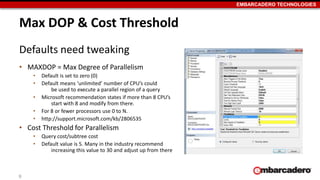
• MAXDOP = Max Degree of Parallelism 
• Default is set to zero (0) 
• Default means ‘unlimited’ number of CPU’s could 
be used to execute a parallel region of a query 
• Microsoft recommendation states if more than 8 CPU’s 
start with 8 and modify from there. 
• For 8 or fewer processors use 0 to N. 
• http://support.microsoft.com/kb/2806535 
• Cost Threshold for Parallelism 
• Query cost/subtree cost 
• Default value is 5. Many in the industry recommend 
increasing this value to 30 and adjust up from there 
9
EMBARCADERO TECHNOLOGIES 
TempDB 
Unique Database 
• Special Characteristics 
• Recreated at startup 
• Serves entire instance 
• Modeled after the model database* 
• Cannot be backed up 
• Considerations 
• When 8 cores or less, one per core. Greater than 8 cores start with 8 and increase by 4 based on 
contention. (http://support.microsoft.com/kb/2154845) 
• Place data files on separate disk with fast IO 
10
EMBARCADERO TECHNOLOGIES 
SQL Server Alerts 
Proactive Monitoring 
• Requires Database Mail 
• Configure a mail operator to send alerts to 
• Include a distribution group that would work the issues 
• Agent Alerts 
• Severity 16 – 25 errors and errors 823 - 825 
• Agents can be created through GUI or Script 
11
EMBARCADERO TECHNOLOGIES 
Power Savings 
Power Savings = Loss of power 
• Power Savings has negative impact for SQL Server 
• Can under clock your CPU 
• Not conducive to SQL CPU behavior 
• Set power setting to “High Performance” rather than “Balanced Power” 
• Disable power savings in BIOS 
• Free tool CPUz is great at showing clock speed in use 
• Other power settings can be bad to such as putting a NIC to sleep 
12
EMBARCADERO TECHNOLOGIES 
13

Common SQL Server Mistakes and How to Avoid Them with Tim Radney

  • 1.
    EMBARCADERO EMBARCADERO TTEECCHHNNOOLLOOGGIIEESS Common SQL Server Mistakes and How to Avoid Them Tim Radney SQL Server MVP
  • 2.
    EMBARCADERO TECHNOLOGIES TimRadney Linchpin People - Partner www.linchpinpeople.com 2 @tradney timradney.com linked.com/in/tradney facebook.com/radneysql google.com/+TimRadney Specialties / Focus Areas / Passions: • Performance Tuning & Troubleshooting • Capacity Management • Infrastructure • Virtualization • SQL Consolidation • High Availability • Disaster Recovery • Health Monitoring • Architecture • License Efficiency • Chicken & Tilapia Farmer Microsoft MVP Chapter Leader “Columbus GA SQL Users Group” Pass Regional Mentor “South East USA”
  • 3.
    EMBARCADERO TECHNOLOGIES Backups Do you have recent backups • Is the current backup strategy adequate for the SLA of the system • How often is it being backed up, can you do a point in time recovery • Do you have the right recovery model • Is there a plan in place to validate the backups • When is the last time a test recovery was performed • Script to check for frequency of backups • http://timradney.com/backups 3
  • 4.
    EMBARCADERO TECHNOLOGIES ConsistencyChecks Do you have corruption in your newly acquired databases • Is there a scheduled task/job to run DBCC CHECKDB • It is debatable how often this should be ran. Some say daily and others say weekly, as with everything SQL Server related “IT DEPENDS”, in this case, how much data loss can you handle DBCC CHECKDB DBCC CHECKALLOC DBCC CHECKFILEGROUP 4
  • 5.
    EMBARCADERO TECHNOLOGIES LogCleanup Pruning Records • MSDB stores all backup and restore history • sp_delete_backuphistory USE msdb; GO EXEC sp_delete_backuphistory '01/01/2014' • Error Log Cleanup • EXEC sp_cycle_errorlog • Increase default value from 6 to some number up to 99 5 http://www.littlehouseinthebigweeds.com/wp-content/uploads/2008/02/pruning.jpeg
  • 6.
    EMBARCADERO TECHNOLOGIES Statistics Are your statistics up to date •Are your statistics up to date • sp_updatestats • Is there a job to manually update stats • Ola Hallengren – excellent process for updating statistics • Is “Auto Update Statistics” turned on • Auto Update Statistics typically update after 20% of the rows change •Impact of Statistics to the Query Optimizer • The Query Optimizer uses statistics to build the execution plan. Without current statistics you are pretty much guaranteed to NOT have the “good enough” execution plan 6
  • 7.
    EMBARCADERO TECHNOLOGIES IndexMaintenance • What causes fragmentation • Data modifications (Insert, Delete, Updates) • Why should you care about fragmented indexes • Whitepaper from Microsoft stated fragmentation can slow down systems from 13% to 460% based on the size of the environment and fragmentation level • How do you fix this • You can rebuild, reorganize, or drop and recreate your indexes. • Can schedule rebuilds using a maintenance plan (ok for small db’s). • You can use a custom script and run it in a SQL Job • You can use third party tools • Check out ola.hallengren.com • Duplicate Indexes • Indexes that are exact duplicates are bad and should be removed • Lots of scripts and apps to detect duplicate indexes out there 7
  • 8.
    EMBARCADERO TECHNOLOGIES MemorySettings Set Limits • Max and Min Values 2008R2 and below • Max Default is 2147483647 or 2 PB • Min value is set to 0 • Potential for SQL to starve the OS and OS to starve SQL • Max memory applies to the buffer pool • SQL 2012 • Memory Manager redesign • Max memory applies to all memory manager allocations • Can consider letting SQL Server dynamically manage memory 8
  • 9.
    EMBARCADERO TECHNOLOGIES MaxDOP & Cost Threshold Defaults need tweaking • MAXDOP = Max Degree of Parallelism • Default is set to zero (0) • Default means ‘unlimited’ number of CPU’s could be used to execute a parallel region of a query • Microsoft recommendation states if more than 8 CPU’s start with 8 and modify from there. • For 8 or fewer processors use 0 to N. • http://support.microsoft.com/kb/2806535 • Cost Threshold for Parallelism • Query cost/subtree cost • Default value is 5. Many in the industry recommend increasing this value to 30 and adjust up from there 9
  • 10.
    EMBARCADERO TECHNOLOGIES TempDB Unique Database • Special Characteristics • Recreated at startup • Serves entire instance • Modeled after the model database* • Cannot be backed up • Considerations • When 8 cores or less, one per core. Greater than 8 cores start with 8 and increase by 4 based on contention. (http://support.microsoft.com/kb/2154845) • Place data files on separate disk with fast IO 10
  • 11.
    EMBARCADERO TECHNOLOGIES SQLServer Alerts Proactive Monitoring • Requires Database Mail • Configure a mail operator to send alerts to • Include a distribution group that would work the issues • Agent Alerts • Severity 16 – 25 errors and errors 823 - 825 • Agents can be created through GUI or Script 11
  • 12.
    EMBARCADERO TECHNOLOGIES PowerSavings Power Savings = Loss of power • Power Savings has negative impact for SQL Server • Can under clock your CPU • Not conducive to SQL CPU behavior • Set power setting to “High Performance” rather than “Balanced Power” • Disable power savings in BIOS • Free tool CPUz is great at showing clock speed in use • Other power settings can be bad to such as putting a NIC to sleep 12
  • 13.