TOP 10 ADMIN 
MISTAKES ON SQL 
SERVER 
Kevin Kline 
• Director of Engineering Services, SQL Sentry 
• SQL Server MVP since 2003 
• Twitter, FB, LI: KEKline 
• Blog: http://KevinEKline.com, http://ForITPros.com
AGENDA 
• About SQL Sentry 
• The Top 10 Countdown: DBA Mistakes on 
Microsoft SQL Server 
o Mistakes come in surprising forms 
o Often people & process, instead of technology 
• Summary, Resources, and Q&A
FOR FRIENDS OF SQL SENTRY 
• Free Plan Explorer download: 
http://www.sqlsentry.net/plan-explorer/ 
• Free query tuning consultations: 
http://answers.sqlperformance.com. 
• Free new ebook (regularly $10) to attendees. 
Send request to sales@sqlsentry.net. 
• SQL Server educational videos, scripts, and 
slides: http://SQLSentry.TV 
• Tuning blog: http://www.sqlperformance.com/ 
• Monthly eNews tips and tricks: 
http://www.sqlsentry.net/newsletter-archive.asp
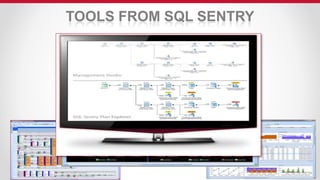
TOOLS FROM SQL SENTRY
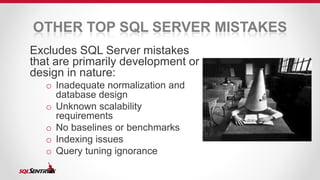
OTHER TOP SQL SERVER MISTAKES 
Excludes SQL Server mistakes 
that are primarily development or 
design in nature: 
o Inadequate normalization and 
database design 
o Unknown scalability 
requirements 
o No baselines or benchmarks 
o Indexing issues 
o Query tuning ignorance
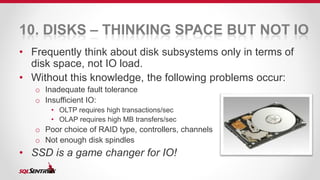
10. DISKS – THINKING SPACE BUT NOT IO 
• Frequently think about disk subsystems only in terms of 
disk space, not IO load. 
• Without this knowledge, the following problems occur: 
o Inadequate fault tolerance 
o Insufficient IO: 
• OLTP requires high transactions/sec 
• OLAP requires high MB transfers/sec 
o Poor choice of RAID type, controllers, channels 
o Not enough disk spindles 
• SSD is a game changer for IO!
9. BUSINESS IGNORANCE 
• As the IT professional, you should know how SQL Server 
works at an “internals” level. 
o What is checkpoint? Lazywriter? 
o How is TempDB used? What’s in the plan cache? 
• The DBA is the guardian of the corporate data assets. 
• As the liaison between business and IT, you should know how 
For more tech info: 
- SQLPASS.org 
- SQL University 
- SQL Crunch 
- SQLBlog.com 
and in what ways your servers are used. 
o Who cares if this app is down? How much does the downtime cost the company? 
o What are the business cycles? 
o When are the best downtimes? 
o Baseline? Benchmarks? What is normal?
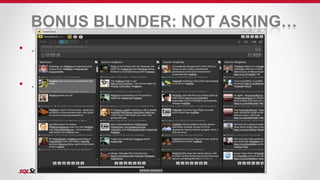
BONUS BLUNDER: NOT ASKING… 
• …for help: 
• Forums vs Support: know the value 
• #sqlhelp and Twitter 
• …for mentoring: 
• Senior bloggers love to mentor!
8. NO TROUBLESHOOTING 
METHODOLOGY 
• When the chips are down, the DBA needs a 
strong, step-by-step methodology for root-cause 
analysis. Without one, you get: 
o Missed errors and problems 
o Errors resulting data loss and catastrophic failure 
o Poor response times and breached SLAs 
o Lost credibility 
• Don’t have a methodology? Check out End-to- 
End Troubleshooting on http://SQLSentry.TV 
• SQL Server Troubleshooting Guide by J. 
Kehayias on http://www.simple-talk.com
BONUS BLUNDER: REACTIVE NOT 
PROACTIVE 
• DEMO
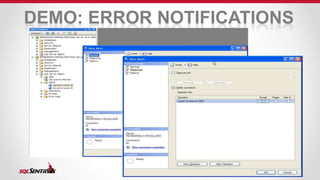
DEMO: ERROR NOTIFICATIONS
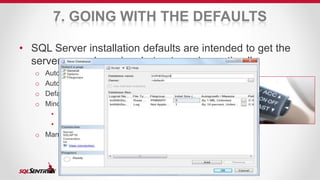
7. GOING WITH THE DEFAULTS 
• SQL Server installation defaults are intended to get the 
server up and running, but not running optimally: 
o Auto-grow and Auto-shrink on databasese 
o Auto sizing of auto-growing databases 
o Default filegroups 
o Minor issues can become major issues: 
• MAXDOP 
• FILLFACTOR 
o Many server- and database-level configuration settings
6. SECURITY AS AN AFTERTHOUGHT 
• SQL Injection is the #1 hack on the internet today. 
o Remarkably, we knew as much about preventing SQL Injection ten years 
ago as we do today. 
• Plan ahead of time to minimize issues: 
o Ensure the least privileges principle for applications running on your servers 
o How much surface area do your servers expose? 
o Who has access to your servers? 
o How do you find out the who, what, and when of a breach? 
• See my session Understanding & Preventing 
SQL Injection for more info
5. INADEQUATE AUTOMATION 
• Automation is the means by which DBAs work “smarter” 
instead of “harder”. Ironically, it takes a lot of work at the 
outset to automate. 
• Without automation, DBAs must deal with: 
o Manual processes prone to error, omission, and forgetfulness 
o Inability to scale environment to multiple servers 
o Time constraints from fire-fighter and script-pusher modes 
• Examples of working smarter instead of harder: 
o Automated error notification 
o Scheduled jobs 
o Lots of scripts, not too much GUI 
Automation made easy 
with PowerShell and/or 
WMI: 
- PowerGUI 
- Scriptomatic
4. WRONG FEATURE OR TECHNIQUE 
FOR THE JOB 
• DBA’s are the “performance engineer” for their corporation’s 
IT applications. 
• It’s imperative that the most appropriate feature be applied to 
each business requirement. Otherwise: 
o Brittle applications 
o Applications complexity 
o Excess resource consumption 
o “Ooooh! Shiny!” 
o Design reflects the current “fad” 
• Axiom: There are no IT projects. There are business projects 
solved using IT.
3. APATHY ABOUT CHANGE 
MANAGEMENT 
• Change management is important! Without it, DBAs face: 
o Changes that leave things worse than they started 
o Piecemeal rollbacks that cripple applications 
o Inconsistent support across applications and servers 
• Change control versus Change management? 
• Proper change management means: 
o Key stakeholders have a say in Go-NoGo (CM board) 
o Performed at pre-planned times and within a defined time limit 
o Change is tested and verified to have no effect or positive effect on production 
environment 
o Changes are isolated, atomic, and reversible
2. INADEQUATE PREVENTATIVE 
MAINTENANCE 
• Proper preventative maintenance (PM) helps you: 
o Catch issue before they become problems 
o Ensure optimal performance 
o Perform resource intensive operations with few, if any, users on the system 
• PM on SQL Server should include: 
o Database consistency checks (DBCC) and CHECKIDENT 
o Backups with verification & Restore checks 
o Defragmentation, Fill factor, Pad Index 
o Index Statistics 
• Don’t rely on the Database Maintenance Wizard!
BONUS BLUNDER: 
REINVENTING THE WHEEL 
• Most PM has already been written and vetted by 
others. 
• Check out: 
o www.sqlfool.com 
o www.olahallengren.com
1. BACKUPS <> RECOVERY 
DBAs often don’t test backups or recoveries as they 
should. Causes lots of problems: 
o Can you meet your SLA? RTO? RPO? 
o Not certain that backups are good: verified and available? 
o Where’s all the data, files, It’s 
DLLs, etc for recovery? 
o Got all of the databases that are needed? 
o Haven’t tested a full, ground-up restore: 
All About 
The Data, All 
The Time, Every 
• What if you have to reinstall everything? 
o One of the great things about VM recovery! 
• The importance of recovery: the Lost Job scenario 
o Can you actually restore older, archived data? 
Time
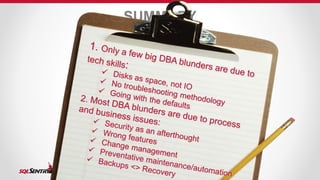
SUMMARY
RESOURCES 
• http://www.sqlcat.com - Excellent source of SQL 
Server best practices, white papers, etc. 
• Paul Randal and all the blogs at SQLSkills – 
http://www.sqlskills.com/blogs/paul/ et al 
• http://SQLPerformance.com 
• http://www.sqlpass.org
Q & A 
• Send questions to me at: kkline@sqlsentry.net 
• Twitter, Facebook, LinkedIn at KEKline 
• Slides at http://SQLSentry.TV 
• Kevin’s IT leadership and soft-skills content at 
http://ForITPros.com 
THANK YOU!

Top 10 DBA Mistakes on Microsoft SQL Server

  • 1.
    TOP 10 ADMIN MISTAKES ON SQL SERVER Kevin Kline • Director of Engineering Services, SQL Sentry • SQL Server MVP since 2003 • Twitter, FB, LI: KEKline • Blog: http://KevinEKline.com, http://ForITPros.com
  • 2.
    AGENDA • AboutSQL Sentry • The Top 10 Countdown: DBA Mistakes on Microsoft SQL Server o Mistakes come in surprising forms o Often people & process, instead of technology • Summary, Resources, and Q&A
  • 3.
    FOR FRIENDS OFSQL SENTRY • Free Plan Explorer download: http://www.sqlsentry.net/plan-explorer/ • Free query tuning consultations: http://answers.sqlperformance.com. • Free new ebook (regularly $10) to attendees. Send request to sales@sqlsentry.net. • SQL Server educational videos, scripts, and slides: http://SQLSentry.TV • Tuning blog: http://www.sqlperformance.com/ • Monthly eNews tips and tricks: http://www.sqlsentry.net/newsletter-archive.asp
  • 4.
  • 5.
    OTHER TOP SQLSERVER MISTAKES Excludes SQL Server mistakes that are primarily development or design in nature: o Inadequate normalization and database design o Unknown scalability requirements o No baselines or benchmarks o Indexing issues o Query tuning ignorance
  • 6.
    10. DISKS –THINKING SPACE BUT NOT IO • Frequently think about disk subsystems only in terms of disk space, not IO load. • Without this knowledge, the following problems occur: o Inadequate fault tolerance o Insufficient IO: • OLTP requires high transactions/sec • OLAP requires high MB transfers/sec o Poor choice of RAID type, controllers, channels o Not enough disk spindles • SSD is a game changer for IO!
  • 7.
    9. BUSINESS IGNORANCE • As the IT professional, you should know how SQL Server works at an “internals” level. o What is checkpoint? Lazywriter? o How is TempDB used? What’s in the plan cache? • The DBA is the guardian of the corporate data assets. • As the liaison between business and IT, you should know how For more tech info: - SQLPASS.org - SQL University - SQL Crunch - SQLBlog.com and in what ways your servers are used. o Who cares if this app is down? How much does the downtime cost the company? o What are the business cycles? o When are the best downtimes? o Baseline? Benchmarks? What is normal?
  • 8.
    BONUS BLUNDER: NOTASKING… • …for help: • Forums vs Support: know the value • #sqlhelp and Twitter • …for mentoring: • Senior bloggers love to mentor!
  • 9.
    8. NO TROUBLESHOOTING METHODOLOGY • When the chips are down, the DBA needs a strong, step-by-step methodology for root-cause analysis. Without one, you get: o Missed errors and problems o Errors resulting data loss and catastrophic failure o Poor response times and breached SLAs o Lost credibility • Don’t have a methodology? Check out End-to- End Troubleshooting on http://SQLSentry.TV • SQL Server Troubleshooting Guide by J. Kehayias on http://www.simple-talk.com
  • 10.
    BONUS BLUNDER: REACTIVENOT PROACTIVE • DEMO
  • 11.
  • 12.
    7. GOING WITHTHE DEFAULTS • SQL Server installation defaults are intended to get the server up and running, but not running optimally: o Auto-grow and Auto-shrink on databasese o Auto sizing of auto-growing databases o Default filegroups o Minor issues can become major issues: • MAXDOP • FILLFACTOR o Many server- and database-level configuration settings
  • 13.
    6. SECURITY ASAN AFTERTHOUGHT • SQL Injection is the #1 hack on the internet today. o Remarkably, we knew as much about preventing SQL Injection ten years ago as we do today. • Plan ahead of time to minimize issues: o Ensure the least privileges principle for applications running on your servers o How much surface area do your servers expose? o Who has access to your servers? o How do you find out the who, what, and when of a breach? • See my session Understanding & Preventing SQL Injection for more info
  • 14.
    5. INADEQUATE AUTOMATION • Automation is the means by which DBAs work “smarter” instead of “harder”. Ironically, it takes a lot of work at the outset to automate. • Without automation, DBAs must deal with: o Manual processes prone to error, omission, and forgetfulness o Inability to scale environment to multiple servers o Time constraints from fire-fighter and script-pusher modes • Examples of working smarter instead of harder: o Automated error notification o Scheduled jobs o Lots of scripts, not too much GUI Automation made easy with PowerShell and/or WMI: - PowerGUI - Scriptomatic
  • 15.
    4. WRONG FEATUREOR TECHNIQUE FOR THE JOB • DBA’s are the “performance engineer” for their corporation’s IT applications. • It’s imperative that the most appropriate feature be applied to each business requirement. Otherwise: o Brittle applications o Applications complexity o Excess resource consumption o “Ooooh! Shiny!” o Design reflects the current “fad” • Axiom: There are no IT projects. There are business projects solved using IT.
  • 16.
    3. APATHY ABOUTCHANGE MANAGEMENT • Change management is important! Without it, DBAs face: o Changes that leave things worse than they started o Piecemeal rollbacks that cripple applications o Inconsistent support across applications and servers • Change control versus Change management? • Proper change management means: o Key stakeholders have a say in Go-NoGo (CM board) o Performed at pre-planned times and within a defined time limit o Change is tested and verified to have no effect or positive effect on production environment o Changes are isolated, atomic, and reversible
  • 17.
    2. INADEQUATE PREVENTATIVE MAINTENANCE • Proper preventative maintenance (PM) helps you: o Catch issue before they become problems o Ensure optimal performance o Perform resource intensive operations with few, if any, users on the system • PM on SQL Server should include: o Database consistency checks (DBCC) and CHECKIDENT o Backups with verification & Restore checks o Defragmentation, Fill factor, Pad Index o Index Statistics • Don’t rely on the Database Maintenance Wizard!
  • 18.
    BONUS BLUNDER: REINVENTINGTHE WHEEL • Most PM has already been written and vetted by others. • Check out: o www.sqlfool.com o www.olahallengren.com
  • 19.
    1. BACKUPS <>RECOVERY DBAs often don’t test backups or recoveries as they should. Causes lots of problems: o Can you meet your SLA? RTO? RPO? o Not certain that backups are good: verified and available? o Where’s all the data, files, It’s DLLs, etc for recovery? o Got all of the databases that are needed? o Haven’t tested a full, ground-up restore: All About The Data, All The Time, Every • What if you have to reinstall everything? o One of the great things about VM recovery! • The importance of recovery: the Lost Job scenario o Can you actually restore older, archived data? Time
  • 20.
  • 21.
    RESOURCES • http://www.sqlcat.com- Excellent source of SQL Server best practices, white papers, etc. • Paul Randal and all the blogs at SQLSkills – http://www.sqlskills.com/blogs/paul/ et al • http://SQLPerformance.com • http://www.sqlpass.org
  • 22.
    Q & A • Send questions to me at: kkline@sqlsentry.net • Twitter, Facebook, LinkedIn at KEKline • Slides at http://SQLSentry.TV • Kevin’s IT leadership and soft-skills content at http://ForITPros.com THANK YOU!